2016 AUDI A3 child
[x] Cancel search: childPage 61 of 328
.... N
0 > CX)
rl I.Cl U"I
rl I.Cl ....
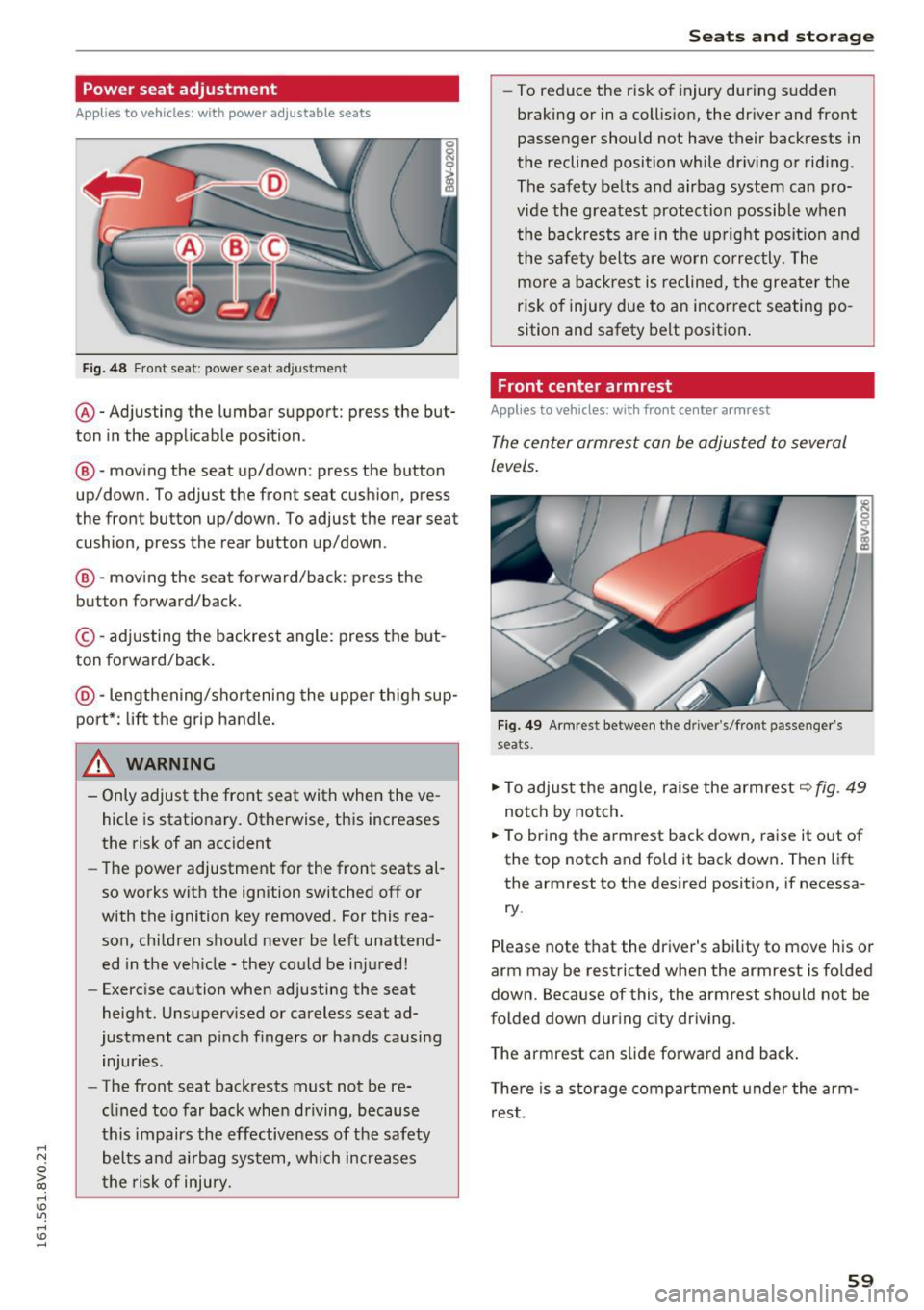
Power seat adjustment
Applies to vehicles: with power adjustable seats
Fig. 48 Front se at: po wer se at adjust men t
@ -Adjusting the lumbar support: press the but
ton in the applicable position .
@-moving the seat up/down : press the button
up/down. To adjust the front seat cushion, press
t he fron t button up/down. To adjust the rear seat
cushion, press the rear button up/down .
@-moving the seat forward/back: press the
but ton forward/back.
© -adjusting the backrest angle : press the but
ton forward/back.
@ -lengthening/shortening the upper thigh sup
port* : lift the grip handle.
A WARNING
- Only adjust the front seat with when the ve
hicle is stationary. Otherwise, this increases
the risk of an accident
- The power adjustment for the front seats al
so works with the ignition switched off or
with the ignition key removed. For this rea
son, children should never be left unattend
ed in the vehicle - they could be injured!
- Exercise caution when adjusting the seat
height. Unsupervised or careless seat ad
justment can pinch fingers or hands causing
injuries .
- The front seat backrests must not be re
clined too far back when driving, because
this impairs the effectiveness of the safety
belts and airbag system, which increases
the risk of injury.
Seats and storage
-To reduce the risk of injury during sudden
braking or in a collision, the driver and front
passenger should not have their backrests in
the reclined position while driving or riding .
The safety belts and airbag system can pro
vide the greatest protection possible when
the backrests are in the upright position and
the safety belts are worn correctly. The
more a backrest is reclined, the greater the
risk of injury due to an incorrect seating po
sition and safety belt position.
Front center armrest
Applies to vehicles: with front center a rm rest
The center armrest can be adjusted to several
l e ve ls.
Fig. 49 Armre st between th e driv er's /fro nt pa ssenger 's
s eats.
.,. To adjust the angle, raise the armrest~ fig. 49
notch by notch.
.,. To bring the armrest back down, raise it out of
the top notch and fold it back down. Then
lift
the armrest to the desired position, if necessa
ry.
Please note that the driver 's ability to move his or
arm may be restricted when the armrest is folded
down. Because of this, the armrest should not be
folded down during city driving .
The armrest can slide forward and back.
There is a storage compartment under the arm
rest .
59
Page 63 of 328

.... N
0 > CX)
.... I.Cl U"I
.... I.Cl ....
.. To move the head restraint down, press the
button ®
¢fig . 52 and slide the head restraint
downward .
Removing the head restraints
To remove the head res tra ints, the back res t must
be folded forward partially .
.. Remove the screwdriver from the vehicle tool
kit
r:::;, page 280 .
.. Release the backrest r:::;, page 65 .
.. Press the button @ r:::;, fig . 52 and slide the head
restraint up as far as it can go
c::> ,& .
.. Place the screwdriver in position@ in the
opening, press the button ® and pull the head
restraint out of the backrest at the same time
r:::;, _& .
.. Fold the backrest down until it latches securely
r:::;, ,& in Increasing the size of the luggage
compartment on page 65 .
Installing the head restraints
To install the head restraints , the backrest must
be folded forward partially .
.. Release the backrest
c::> page 65.
.. Slide the posts on the head restraint down into
the gu ides until you feel the posts click into
place . You should not be able to pull the head
restra int out of the backrest .
.,. Fold the backrest down until it latches securely
r:::;, ,&. in Increasing the size of the luggage
compartment on page 65 .
A WARNING
- Only remove the rear seat head restraints
when necessary in order to install a child
seat . Install the head restraint again imme
diately once the child seat is removed. Driv
ing with the head restra ints removed or
head restraints not in the highest position
increases the risk of serious injury .
- Read and following the WARNINGS in
r:::;, poge 170 .
-
Seats and storag e
Cigarette lighter
Applies to vehicles: with cigarette lighter
Fig. 53 Center conso le : cigarette lighte r
.,. Press the c igarette lighter in .
.,. Remove the cigarette lighter when it pops out.
The cigarette lighter should only be used as a
power source when it is absol utely necessary.
A WARNING
The cigarette lighter only works when the ig
ni tion is switched on. Inco rrect usage can lead
to serious inj uries or burns. To reduce the ris k
of injuries, never leave children unattended in
the vehicle with the vehicle key .
(D Note
- To red uce the risk of damage to the sockets,
only use plugs that fit correctly .
- T he ciga rette lighte r socket should only be
used as a powe r source fo r electr ical acces
sories for a short pe riod of time. The sock
ets* in the vehicle should be used for longe r
use of power supply .
(D Tips
The vehicle battery dra ins when accessories
are tu rned on but the engine is off.
.
61
Page 64 of 328

Seats and storage
Socket
Applies to vehicles: with socket
Electrical accessories con be connected in the 12
volt socket.
-
--:,: -_-,--,-~
' ' I
Fig . 54 Center console: front/rear 12 volt socket•
Fig. 55 Luggage compartment s ide trim panel: 12 volt
socket * (example)
... Remove the plug from the center console sock
et
¢ fig. 54, or
... Open the cover on the luggage compartment
socket*
¢ fig . 55 .
... Insert the plug for the electr ical device into the
socket.
The 12 volt socket can be used for electrical ac cessories. The power consumption at the outlet
m ust not exceed 120 watts.
A WARNING
The socket works only when the ignition is
switched on. Incorrect usage can lead to seri
ous injur ies or burns. To reduce the risk of in
jur ies, never leave children unattended in the
vehicle with the vehicle key.
(D Note
- To prevent damage to the socket, only use
the correct type of plugs.
62
- Never connect devices that generate electri
cal power such as solar pane ls or a battery
charger to the 12 vo lt socket. They can dam
age the vehicle e lectrica l system.
(D Tips
The vehicle battery drains when accessories
are turned on but the eng ine is off.
Storage
Beverage holders
Fig. 56 Center console: front cup holders
Fig. 57 Sect ion of the rear bench seat: rear cup holde rs*
Front cup holders
... Place beverages in the holder ¢fig. 56. There is
space for two beverages. A larger plast ic bottle
can be placed in the door trim.
Rear* cup holders
... To open the cup holders, tap on the rim@
¢fig . 57.
... To place the beverage container in the cup
holder, push the arm @ outward .
... Then push the arm against the beverage con
tainer so that the arm lies closely against it .
... To close the cup holders, push them back into
t he slot . .,.
Page 68 of 328

Sea ts and stor age
Lowering the cargo floor
Applies to veh icles: w ith adj ustable cargo f loor
The cargo floor can lower to expand the storage
area in the luggage compartment.
F ig. 62 L uggage compartment: lowered cargo floor
The cargo floor can also be inse rted at a lower
point depending on vehicle eq uipment .
., Lift the cargo floor in order to lower it.
., Pull the cargo floor back slightly a nd insert it in
the lowe r pos it ion
@ .
To make loading and un load ing eas ier, br inging
the cargo floo r back into position @ afte r trans
port ing b ulky i tems is recommended.
Tie-downs and cargo net
The cargo net* prevents small objects from slid
ing.
F ig . 63 Luggage compartment: location of the tie -downs
66
F ig. 6 4 Luggage compartment: luggage compartment net•
spread out
., Secure the cargo to the tie-downs c::> fig. 63
-arrows- .
., To secure the cargo net, first hang the front
hooks in the tie-downs then hang the rear
hooks -arrows-
c::> fig. 64.
., Obse rve
the safety precaut ions c::> page 172,
Storing cargo correctly .
.&_ WARNING
Weak, damaged or fau lty straps used to se
cure objects to the tie-downs can fail during
heavy braking or a co llision and lead to seri
ous injur ies .
- Always use s uitable straps and secure ob
jects to the tie-downs in the luggage com
partment to prevent objects from shifting
and sliding forward.
- Never secure a child seat restraint to a tie
down.
- Because of their load capacity, the hooks
should only be used to secure objects that
weigh a maximum of 10 lbs (5 kg). Heavy
objects will not be secured sufficiently, and
this increases the risk of inju ry.
-
Page 83 of 328

,....,
N
0 > co ,....,
tion look while the vehicle is moving . Other
wise the steering lock will engage and you
will not be able to steer the vehicle .
- Please note that the brake booster and pow
er steering only work when the engine is
running . When the engine off, you must use
more force to steer or brake the vehicle. Be
cause the usual steering and braking capa
bility is not available, the risk of accidents or
injuries increases.
- Always take the vehicle key with you when
leaving the vehicle, even for a short period
of time. This applies particularly when chil
dren remain in the vehicle. Otherwise the
children could start the engine or operate
electrical equipment such as power win
dows .
- Avoid high engine speed, full throttle, and
heavy engine load as long as the engine has
not reached operating temperature yet . You
could damage th@ engine.
-The engine cannot be started by pushing or
towing .
@ For the sake of the environment
Do not let the engine run while parked to
warm up. Begin driving immediately. This re
duces unnecessary emissions.
(D Tips
- If it is difficult to turn the key to position
(D, turn the steering wheel back and forth
slightly to release the steering wheel lock .
- Some noise after starting the engine is nor
mal and is no cause for concern.
- If the battery is disconnected and recon
nected, you have to hold the ignition key in
position
(D for five seconds for the engine
to start.
- After switching the ignition off, you can only
remove the key when the selector lever is in
the "P" (Park) position. After that, the selec
tor lever is locked.
Driving
Stopping the engine with the key
App lies to vehicles : wi th ignition lock
Stopping the engine
.,. Bring the vehicle to a full stop.
.,. Turn the key to position @. The needle in the
tachometer moves into the
OFF position.
Releasing the steering lock
Requirement: the selector lever must be in P.
.,. Remove the ignition key in position @
¢ page 82, fig. 78 ¢ .&_.
.,. Turn the steering wheel until you hear the
steering wheel lock .
The locked steering helps prevent vehicle theft.
A WARNING
.--
- Never turn off the engine before the vehicle
has come to a complete stop . The full func
tion of the brake booster and the power
steering is not guaranteed. You must use
more force to turn or brake if. Because you
cannot steer and brake as you usually
would, this could lead to accidents and seri
ous injuries.
- Never remove the ignition key from the igni
tion look while the vehicle is moving. Other
wise, the steering lock could suddenly en
gage and you would not be able to steer the
vehicle.
- Please note that the brake booster and pow
er steering only work when the engine is
running. When the engine off, you must use
more force to steer or brake the vehicle. Be
cause the usual steering and braking capa
bility is not available, the risk of accidents or
injuries increases .
- Always take the vehicle key with you when
leaving the vehicle, even for a short period
of time. This applies particularly when chil
dren remain in the vehicle. Otherwise the
children could start the engine or operate
electrical equipment such as power win
dows.
- For safety reasons, always park the vehicle
with the selector lever in the P position.
81
Page 85 of 328

,....,
N
0 > co ,....,
There is an automatic start malfunction if the~
(gasoline engine) or
II (diesel engine) indicator
light turns on and the message
Engine start sys
tem malfunction! Please contact Service
ap
pears.
To start the engine, press and hold the
I S TART ENGINE STOPI button until the engine
runs.
Drive to an authorized Audi dealer or authorized
Audi Service Facility immediately to have the
malfunction corrected.
& WARNING
- To reduce the risk of poisoning, never allow
the engine to run in confined spaces.
- Always take the vehicle key with you when
leaving the vehicle, even for a short period
of time. This applies particularly when chil
dren remain in the vehicle. Otherwise the
children could start the engine or operate
electrical equipment such as power win
dows .
- Please note that the brake booster and pow
er steering only work when the engine is
running . When the engine off, you must use
more force to steer or brake the vehicle. Be
cause the usual steering and braking capa
bility is not available, the risk of accidents or
injuries increases.
(D Note
- Avoid high engine speed, full throttle, and
heavy engine load as long as the engine has
not reached operating temperature yet. You
could damage the engine.
- The engine cannot be started by pushing or
towing.
@) For the sake of the environment
Do not let the engine run while parked to
warm up. Begin driving immediately. This re
duces unnecessary emissions.
,....,
{!) Tips
-Some noise after starting the engine is nor
mal and is no cause for concern.
- If the . indicator light blinks in the instru
ment cluster before switching the ignition
off, the ignition will not switch on again.
¢page 162
-If you leave your vehicle with the ignition
switched on, the ignition will switch off af
ter a certain amount of time. Make sure that electrical equipment such as the exterior
lights are switched off .
Turning the engine off using the
button
Applies to vehicles: with convenience key
Plug-in hybrid drive*: refer to the information un
der
¢ page 100.
"' Bring the vehicle to a full stop.
"' Move the selector lever into the P position.
.. Press the
!STAR T ENGINE STOP ! button
¢ page 82, fig. 78.
The needle in the tachometer moves to OFF when
the ignition switches off.
Steering lock1
)
The steering locks when you turn the engine off
using the
I START ENGINE STOPI* button, move
the selector lever into the P position and open
the driver's door.
The locked steering helps prevent vehicle theft.
Emergency off function
If it is absolutely necessary, the engine can also
be turned off while driving at speeds lower than
6 mph (10 km/h). To switch the engine off, press
the
I START ENGINE STOPI button twice in a row
briefly or press and hold for longer than two sec -
onds. ..,.
83
Page 86 of 328

Driving
_& WARNING
- Never turn off the engine before the vehicle
has come to a complete stop. The full func
tion of the brake booster and the power
steering is not guaranteed. You must use
more force to turn or brake if. Because you
cannot steer and brake as you usually
would, this could lead to accidents and seri
ous injuries.
- Please note that the brake booster and pow
er steering only work when the engine is
running. When the engine off, you must use
more force to steer or brake the vehicle. Be
cause the usual steering and brak.ing capa
bility is not available, the risk of accidents or
injuries increases .
- Always take the vehicle key with you when
leaving the vehicle, even for a short period
of time. This applies particularly when chil
dren remain in the vehicle . Otherwise the
children could start the engine or operate
electrical equipment such as power win
dows.
- For safety reasons, always park the vehicle
with the selector lever in the P position.
Otherwise, there is the risk that the vehicle
could roll.
- After the engine has been switched off, the
radiator fan can continue to run for up to 10
minutes -even with the ignition switched
off. It can also switch on again after some
time if the coolant temperature rises as the result of heat buildup or if the engine com
partment is heated by the sun's rays and the
engine is hot.
(D Note
If the engine has been under heavy load for
an extended period of time, heat builds up in
the engine compartment after the engine is
switched off- there is a risk of damaging the
engine. For this reason, let the engine run for
at idle for approximately two minutes before
shutting it off.
84
Starting the engine if there is a
malfunction
Applies to vehicles: with convenience key
It may not be possible to start the engine under
certain circumstances, for example if the battery
in the vehicle key is drained, if interference is af
fected the key or if there is a system malfunc
tion.
Fig. 79 Steering column/remote control key: starting the
e ngin e if there is a malfunct ion
As long as the message y>>) Key not recognized.
See owner's manual
appears, you can start your
vehicle using the emergency start function.
.,. Press the brake pedal¢ ,&.
in Engine with the
button
START ENGINE S TOP Starting on
page 83.
.,. Press the ~1s=T-A~R~T~E-N~G=r-N~E~S~T~O~P~ I button.
.,. Hold the master key in the location indicated as
shown in the illustration
t>>) ¢ fig. 79. The en
gine will start.
.,. If the engine does not automatically start,
press the
I START ENGINE STOPI button again .
Drive to an authorized Audi dealer or authorized
Audi Service Facility immediately to have the
malfunction corrected .
@ Tips
You can display the message that appears
during an emergency by pressing the
I START ENGINE STOPI* button.
Messages
Turn off ignition before leaving car. Battery is
discharging .,.
Page 88 of 328

Driving
brake provides various convenience and safety
functions.
When starting from a stop
- The integral hill start assist helps you when
driving by automatically releasing the parking
brake
c:;, page 87, Starting from a stop.
- When starting on inclines, the hill start assist
prevents the vehicle from unintentionally roll
ing back. The braking force of the parking brake
is not released until the wheels build up
enough driving force.
Emergency brake function
The emergency braking function ensures that the
vehicle can be slowed down even if the
standard
brakes fail c:;, page 87, Emergency braking
function.
A WARNING
- Do not press the accelerator pedal inadver
tently when the vehicle is stationary and the engine is running and a gear is selected.
Otherwise the vehicle will start to move im
mediately and could result in a crash.
- If the power supply fails, the released park
ing brake can no longer engage. In this
case, park the vehicle on level ground and
secure it by placing the selector lever in the
P position . See an authorized Audi dealer or
authorized Audi Service Facility for assis
tance.
(D Note
If the . or .. (USA models) /. (Canada
models) indicator light in the instrument
cluster blinks, there is a malfunction in the
brake system. Refer to the detailed descrip
tion of the indicator lights
c:;, page 18.
-If the - (USA models) /. (Cana-
da models) or
Ill indicator light turns on,
there is a malfunction in the parking brake
c;, page 19.
@ Tips
-If the parking brake is set while the ignition
is switched off, the
¢~jj indicator light in the
button and in the instrument cluster dis-
86
play - (USA models) /. (Canada mod
els) will turn off after a certain amount of
time.
- If driver's door is opened while the ignition
is switched on, the parking brake sets auto
matically. This prevents unintended rolling
of the vehicle.
- Occasional noises when the parking brake is
set and released are normal and are not a
cause for concern.
- When the vehicle is parked, the parking
brake goes through a self-test cycle at regu
lar intervals. Any noises associated with this
are normal.
- If there is a power failure, the parking brake
will not set if it is released, and it will not release if it is set
c:;, I!:::,. . See an authorized
Audi dealer or authorized Audi Service Fa cility for assistance.
· Parking
.,. Press the brake pedal to stop the vehicle.
.,. Pull the switch @
c:;, page 85, fig. 80 to set the
parking brake.
.,. Place the selector lever in the P position.
.,. Turn the engine off
c:;, & -
.,. Turn the steering wheel when parking on in
clines so that the wheels will roll into the curb
if the vehicle starts moving.
A WARNING
- Always take the vehicle key with you when
leaving the vehicle, even for a short period
of time . This applies particularly when chil
dren remain in the vehicle. Otherwise chil
dren could start the engine, release the
parking brake or operate electrical equip
ment such as power windows, which in
creases the risk of an accident.
- When the vehicle is locked, no one -particu
larly not children -should remain in the ve
hicle. Locked doors make it more difficult
for emergency workers to get into the vehi
cle, which puts lives at risk.