2016 Alfa Romeo MiTo Menu
[x] Cancel search: MenuPage 114 of 280

Make sure that the backrest is correctly secured on
both sides (red bands B fig. 91 not visible) to prevent it
from moving forward in the event of sharp braking,
causing injuries to occupants.SBR SYSTEM (Seat Belt
Reminder)
It consists of an acoustic warning which, switching on thewarning
lights in the trim located on the internal rear view mirror (see fig.
92), warns passengers in the front and rear seats that the seat belt is
not fastened.
Contact Alfa Romeo Authorised Workshops to deactivate the SBR
system for a long period.
The SBR system can be reactivated at any time through the Setup Menu
only (see "Menu Items" in "Knowing your car" section).
The warning lights may be red or green and operate as follows:
❒1 = front left seat (driver status for left-hand drive versions);
❒2 = rear left seat (passenger);
❒3 = rear centre seat (passenger);
❒4 = rear right seat (passenger);
❒5 = front right seat (passenger status for left-hand drive versions).
fig. 91A0J0182fig. 92A0J0308
110
GETTING TO KNOW
YOUR CAR
SAFETY
STARTING AND
DRIVING
IN AN EMERGENCY
SERVICING AND
MAINTENANCE
TECHNICAL
SPECIFICATIONS
INDEX
Page 130 of 280

DRIVER SIDE KNEE BAG
This is located in a dedicated compartment under the steering wheel
fig. 107. It provides additional protection in the event of a frontal
impact.
Deactivating passenger side airbags: front airbag and
side bag for pelvis, chest and shoulders protection (Side
bag)
If a child must be carried on the front seat in a rear facing child
restraint system, deactivate the passenger side front airbag and side
bag for pelvis, chest and shoulder protection (Side bag).
With airbags deactivated, warning light
lights up in the trim
located above the internal rearview mirror fig. 108.
To deactivate the airbags, see the “Knowing your car”
section, “Menu items” paragraph.
SIDE AIRBAGS
(SIDE BAGS - WINDOW BAGS)
To increase protection of occupants in case of side collision, the car is
equipped with front side bags for pelvis, chest and shoulder protection
(side bags) for the driver and the passenger and airbags protecting
the head of front and rear occupants (window bags).
Non-activation of side bags in other types of collisions (head-on
collisions, rear shunts, roll-overs, etc...) is not an indication of system
malfunction.
fig. 107A0J0056fig. 108A0J0402
126
GETTING TO KNOW
YOUR CAR
SAFETY
STARTING AND
DRIVING
IN AN EMERGENCY
SERVICING AND
MAINTENANCE
TECHNICAL
SPECIFICATIONS
INDEX
Page 241 of 280

TABLE OF CONTENTS
INTRODUCTION ........................................................................... 239
ADVICE ..................................................................................... 239
TECHNICAL CHARACTERISTICS ................................................... 240
BASIC LEVEL SYSTEM.................................................................. 240
QUICK GUIDE............................................................................... 241
GENERAL FUNCTIONS ............................................................... 242
RADIO FUNCTIONS ................................................................... 243
CD FUNCTIONS ......................................................................... 243
STEERING WHEEL CONTROLS ...................................................... 244
GENERAL INFORMATION ............................................................. 245
FUNCTIONS AND ADJUSTMENTS ................................................. 247
SWITCHING ON THE RADIO ...................................................... 247
SWITCHING OFF THE RADIO ...................................................... 247
SELECTING THE RADIO FUNCTIONS ........................................... 247
SELECTING CD FUNCTION ......................................................... 247
AUDIO SOURCE MEMORY FUNCTION ....................................... 247
VOLUME ADJUSTMENT .............................................................. 247
MUTE/PAUSE FUNCTION (zeroing the volume) ........................... 247
AUDIO SETTINGS....................................................................... 248
TONE ADJUSTMENT (bass/treble) ............................................... 248
BALANCE ADJUSTMENT ............................................................. 248
FADER ADJUSTMENT .................................................................. 248
LOUDNESS FUNCTION .............................................................. 249
PRESET/USER/CLASSIC/ROCK/JAZZ FUNCTIONS ...................... 249
USER EQ SETTINGS FUNCTION ................................................. 249
MENU ....................................................................................... 249
AF SWITCHING function ............................................................ 250
TRAFFIC INFORMATION function ................................................ 250
REGIONAL MODE function ........................................................ 251
MP3 DISPLAY function ................................................................ 252SPEED VOLUME function ............................................................ 252
RADIO ON VOLUME function ..................................................... 252
PHONE FUNCTION .................................................................... 253
AUX OFFSET function ................................................................. 253
RADIO OFF function .................................................................. 253
SYSTEM RESET function ............................................................... 253
PHONE SET-UP........................................................................... 254
ANTI-THEFT PROTECTION ........................................................... 254
RADIO (TUNER) ............................................................................ 255
INTRODUCTION......................................................................... 255
FREQUENCY BAND SELECTION.................................................. 255
PRESET BUTTONS ....................................................................... 256
STORING THE LAST STATION LISTENED TO.................................. 256
AUTOMATIC TUNING................................................................. 256
MANUAL TUNING ..................................................................... 256
AUTOSTORE FUNCTION ........................................................... 256
EMERGENCY ALARM RECEPTION ............................................... 257
EON FUNCTION (Enhanced Other Network) ................................ 257
STEREOPHONIC BROADCASTERS ............................................... 257
CD PLAYER ................................................................................... 258
INTRODUCTION......................................................................... 258
SELECTING THE CD PLAYER ........................................................ 258
LOADING/EJECTING A CD ........................................................ 258
DISPLAY INFORMATION ............................................................. 259
TRACK SELECTION (forward/back) ............................................. 259
TRACK FAST FORWARD/REWIND ............................................... 259
PAUSE FUNCTION...................................................................... 259
MP3 CD PLAYER ............................................................................ 260
INTRODUCTION......................................................................... 260
MP3 MODE................................................................................ 260
237
SOUND-SYSTEM
Page 246 of 280
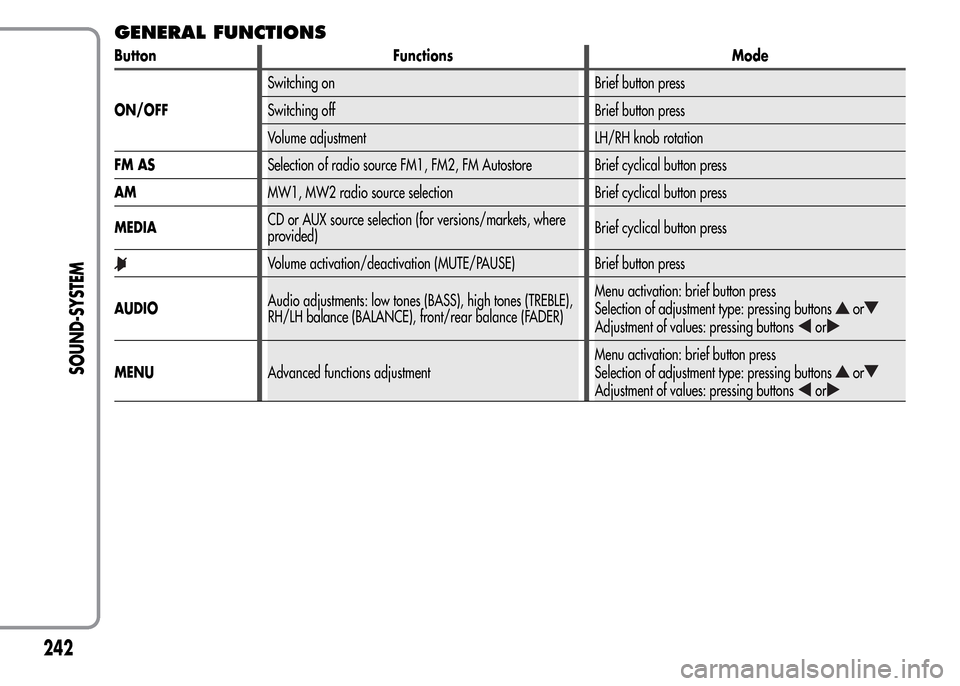
GENERAL FUNCTIONS
Button Functions Mode
ON/OFFSwitching on Brief button press
Switching off Brief button press
Volume adjustment LH/RH knob rotation
FM ASSelection of radio source FM1, FM2, FM Autostore Brief cyclical button press
AMMW1, MW2 radio source selection Brief cyclical button press
MEDIACD or AUX source selection (for versions/markets, where
provided)Brief cyclical button press
Volume activation/deactivation (MUTE/PAUSE) Brief button press
AUDIOAudio adjustments: low tones (BASS), high tones (TREBLE),
RH/LH balance (BALANCE), front/rear balance (FADER)Menu activation: brief button press
Selection of adjustment type: pressing buttons
or
Adjustment of values: pressing buttonsor
MENUAdvanced functions adjustmentMenu activation: brief button press
Selection of adjustment type: pressing buttonsor
Adjustment of values: pressing buttonsor
242
SOUND-SYSTEM
Page 252 of 280
With the Mute function activated, it will be ignored when there is
an incoming traffic alert (if the TA function is activated), or if an
emergency alarm is received. The function will be reactivated when
the alert is over.
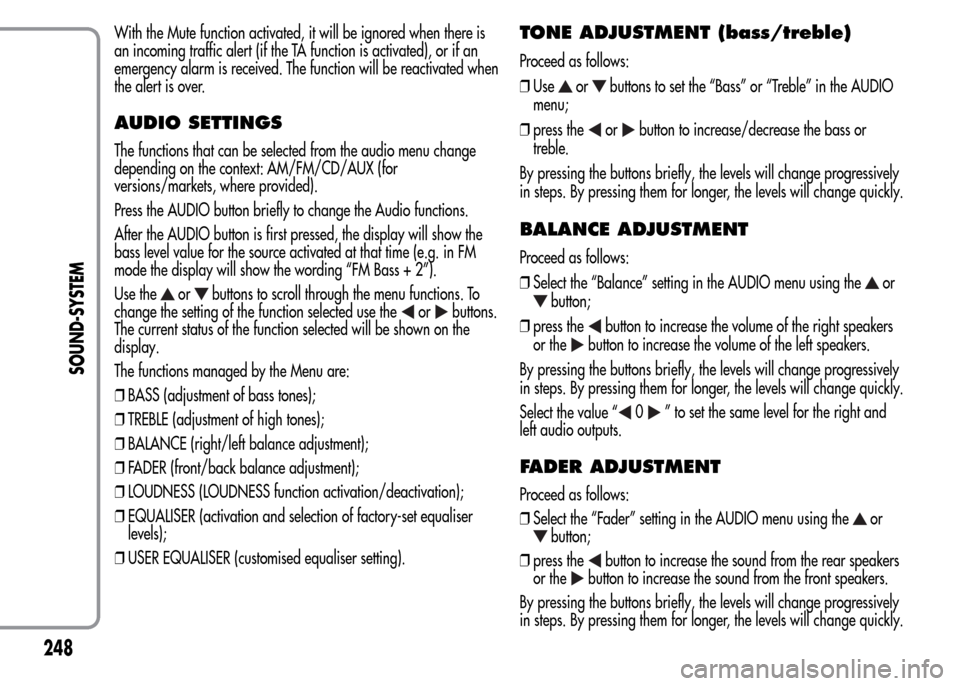
AUDIO SETTINGS
The functions that can be selected from the audio menu change
depending on the context: AM/FM/CD/AUX (for
versions/markets, where provided).
Press the AUDIO button briefly to change the Audio functions.
After the AUDIO button is first pressed, the display will show the
bass level value for the source activated at that time (e.g. in FM
mode the display will show the wording “FM Bass + 2”).
Use the
orbuttons to scroll through the menu functions. To
change the setting of the function selected use the
orbuttons.
The current status of the function selected will be shown on the
display.
The functions managed by the Menu are:
❒BASS (adjustment of bass tones);
❒TREBLE (adjustment of high tones);
❒BALANCE (right/left balance adjustment);
❒FADER (front/back balance adjustment);
❒LOUDNESS (LOUDNESS function activation/deactivation);
❒EQUALISER (activation and selection of factory-set equaliser
levels);
❒USER EQUALISER (customised equaliser setting).
TONE ADJUSTMENT (bass/treble)
Proceed as follows:
❒Use
orbuttons to set the “Bass” or “Treble” in the AUDIO
menu;
❒press the
orbutton to increase/decrease the bass or
treble.
By pressing the buttons briefly, the levels will change progressively
in steps. By pressing them for longer, the levels will change quickly.
BALANCE ADJUSTMENT
Proceed as follows:
❒Select the “Balance” setting in the AUDIO menu using the
or
button;
❒press the
button to increase the volume of the right speakers
or the
button to increase the volume of the left speakers.
By pressing the buttons briefly, the levels will change progressively
in steps. By pressing them for longer, the levels will change quickly.
Select the value “
0” to set the same level for the right and
left audio outputs.
FADER ADJUSTMENT
Proceed as follows:
❒Select the “Fader” setting in the AUDIO menu using the
or
button;
❒press the
button to increase the sound from the rear speakers
or the
button to increase the sound from the front speakers.
By pressing the buttons briefly, the levels will change progressively
in steps. By pressing them for longer, the levels will change quickly.
248
SOUND-SYSTEM
Page 253 of 280
Select the value “0” to set the same level for the front and
rear audio outputs.
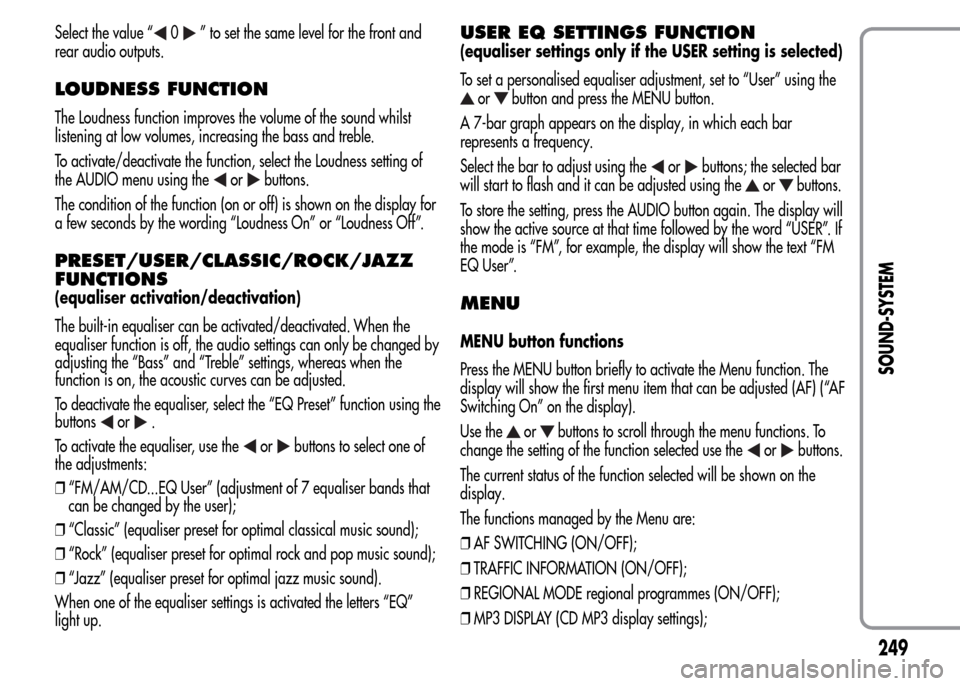
LOUDNESS FUNCTION
The Loudness function improves the volume of the sound whilst
listening at low volumes, increasing the bass and treble.
To activate/deactivate the function, select the Loudness setting of
the AUDIO menu using the
orbuttons.
The condition of the function (on or off) is shown on the display for
a few seconds by the wording “Loudness On” or “Loudness Off”.
PRESET/USER/CLASSIC/ROCK/JAZZ
FUNCTIONS
(equaliser activation/deactivation)
The built-in equaliser can be activated/deactivated. When the
equaliser function is off, the audio settings can only be changed by
adjusting the “Bass” and “Treble” settings, whereas when the
function is on, the acoustic curves can be adjusted.
To deactivate the equaliser, select the “EQ Preset” function using the
buttons
or.
To activate the equaliser, use the
orbuttons to select one of
the adjustments:
❒“FM/AM/CD...EQ User” (adjustment of 7 equaliser bands that
can be changed by the user);
❒“Classic” (equaliser preset for optimal classical music sound);
❒“Rock” (equaliser preset for optimal rock and pop music sound);
❒“Jazz” (equaliser preset for optimal jazz music sound).
When one of the equaliser settings is activated the letters “EQ”
light up.
USER EQ SETTINGS FUNCTION
(equaliser settings only if the USER setting is selected)
To set a personalised equaliser adjustment, set to “User” using the
orbutton and press the MENU button.
A 7-bar graph appears on the display, in which each bar
represents a frequency.
Select the bar to adjust using the
orbuttons; the selected bar
will start to flash and it can be adjusted using the
orbuttons.
To store the setting, press the AUDIO button again. The display will
show the active source at that time followed by the word “USER”. If
the mode is “FM”, for example, the display will show the text “FM
EQ User”.
MENU
MENU button functions
Press the MENU button briefly to activate the Menu function. The
display will show the first menu item that can be adjusted (AF) (“AF
Switching On” on the display).
Use the
orbuttons to scroll through the menu functions. To
change the setting of the function selected use the
orbuttons.
The current status of the function selected will be shown on the
display.
The functions managed by the Menu are:
❒AF SWITCHING (ON/OFF);
❒TRAFFIC INFORMATION (ON/OFF);
❒REGIONAL MODE regional programmes (ON/OFF);
❒MP3 DISPLAY (CD MP3 display settings);
249
SOUND-SYSTEM
Page 254 of 280
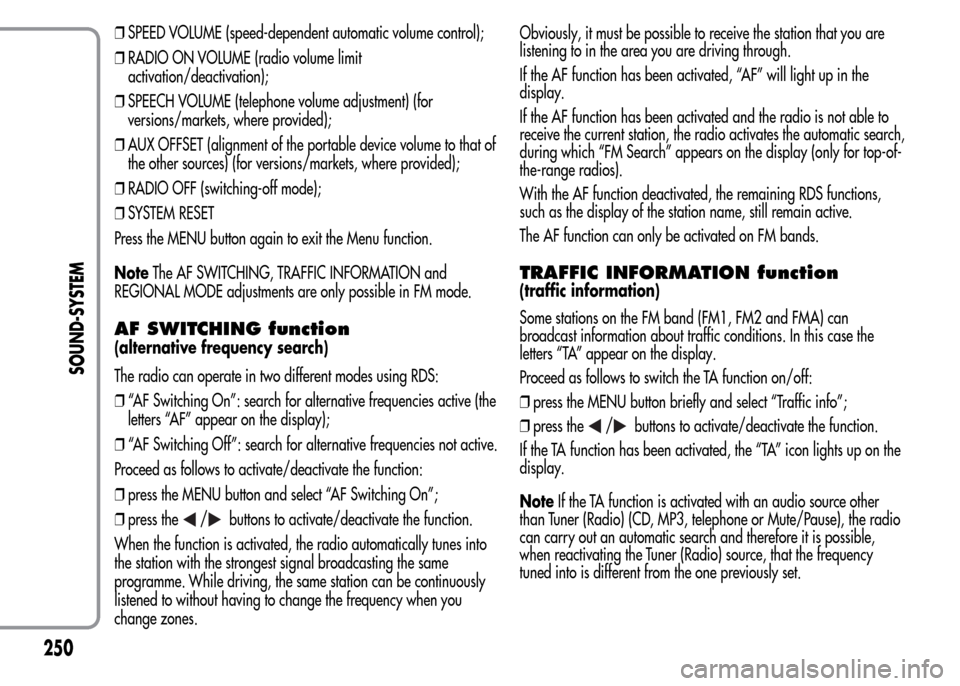
❒SPEED VOLUME (speed-dependent automatic volume control);
❒RADIO ON VOLUME (radio volume limit
activation/deactivation);
❒SPEECH VOLUME (telephone volume adjustment) (for
versions/markets, where provided);
❒AUX OFFSET (alignment of the portable device volume to that of
the other sources) (for versions/markets, where provided);
❒RADIO OFF (switching-off mode);
❒SYSTEM RESET
Press the MENU button again to exit the Menu function.
NoteThe AF SWITCHING, TRAFFIC INFORMATION and
REGIONAL MODE adjustments are only possible in FM mode.
AF SWITCHING function
(alternative frequency search)
The radio can operate in two different modes using RDS:
❒“AF Switching On”: search for alternative frequencies active (the
letters “AF” appear on the display);
❒“AF Switching Off”: search for alternative frequencies not active.
Proceed as follows to activate/deactivate the function:
❒press the MENU button and select “AF Switching On”;
❒press the
/buttons to activate/deactivate the function.
When the function is activated, the radio automatically tunes into
the station with the strongest signal broadcasting the same
programme. While driving, the same station can be continuously
listened to without having to change the frequency when you
change zones.Obviously, it must be possible to receive the station that you are
listening to in the area you are driving through.
If the AF function has been activated, “AF” will light up in the
display.
If the AF function has been activated and the radio is not able to
receive the current station, the radio activates the automatic search,
during which “FM Search” appears on the display (only for top-of-
the-range radios).
With the AF function deactivated, the remaining RDS functions,
such as the display of the station name, still remain active.
The AF function can only be activated on FM bands.
TRAFFIC INFORMATION function
(traffic information)
Some stations on the FM band (FM1, FM2 and FMA) can
broadcast information about traffic conditions. In this case the
letters “TA” appear on the display.
Proceed as follows to switch the TA function on/off:
❒press the MENU button briefly and select “Traffic info”;
❒press the
/buttons to activate/deactivate the function.
If the TA function has been activated, the “TA” icon lights up on the
display.
NoteIf the TA function is activated with an audio source other
than Tuner (Radio) (CD, MP3, telephone or Mute/Pause), the radio
can carry out an automatic search and therefore it is possible,
when reactivating the Tuner (Radio) source, that the frequency
tuned into is different from the one previously set.
250
SOUND-SYSTEM
Page 256 of 280
MP3 DISPLAY function
(MP3 CD data display)
This function makes it possible to select the information shown by
the display when listening to a CD containing MP3 tracks.
The function can only be selected if an MP3 CD is inserted: in this
case “MP3 Display” will appear on the display.
To change the function, use the
orbuttons.
The following settings are available:
❒“Title” (track title, if the ID3-TAG is available);
❒“Author” (track author, if the ID3-TAG is available);
❒“Album” (track album, if the ID3-TAG is available);
❒“Folder” name (name assigned to the folder);
❒“File” name (name assigned to the MP3 file).
SPEED VOLUME function
(speed-based volume change)
This function automatically adapts the volume level to the speed of
the car, increasing the volume when the speed increases to
maintain the ratio with the noise level inside the passenger
compartment.
To activate/deactivate the function, press the
/buttons. The
words “Speed volume” appear on the display, followed by the
current status of the function:
❒Off: function deactivated
❒Low: function activated (low sensitivity)
❒High: function activated (high sensitivity).
RADIO ON VOLUME function
(radio volume limit activation/deactivation)
This function makes it possible to activate/deactivate the volume
limits when the radio is turned on.
The display shows the function status:
❒“Radio on vol – Limit on”: when the radio is switched on the
volume level will be:
– if the volume level is equal to or higher than the maximum value,
the radio will switch on at the maximum volume;
– if the volume level is between the minimum and maximum values,
the radio will switch on at the same volume as before it was
switched off.
❒“Radio on vol – Limit off”: the radio will switch on at the volume
level it was at before switching off. The volume may be between
0 and 40.
To change the setting of the selected function, use the
/buttons.
NOTES
❒Using the Menu it is only possible to adjust the
activation/deactivation of the function and not the minimum or
maximum volume value.
❒If the “TA” or “TEL” functions or an external audio source are
activated when the radio is turned on, the radio will switch on at
the volume set for these sources. When the external audio source
is deactivated, the volume can be adjusted between the
minimum and maximum levels.
❒If the battery charge is low, it will not be possible to adjust the
volume between the minimum and maximum levels.
252
SOUND-SYSTEM