Page 419 of 553

418
uuParking Your Vehicle uParking Sensor System*
Driving
Parking Sensor System*
The corner and center sensors monitor obstacles around your vehicle. The beeper
and audio/information screen lets you know the approximate distance between your
vehicle and the obstacle.
■The sensor location and range
1 Parking Sensor System*
Even when the system is on, always confirm if there is
no obstacle near your ve hicle before parking.
The system may not work properly when:
•The sensors are covered with snow, ice, mud or
dirt.
•The vehicle is on uneven su rface, such as grass,
bumps, or a hill.
•The vehicle has been out in hot or cold weather.•The system is affected by some electronic devices
that generate ultrasonic wave.
•Driving in bad weather.
The system may not sense:
•Thin or low objects.•Sonic-absorptive materials, such as snow, cotton,
or sponge.
•Objects directly under the bumper.
Do not put any accessories on or around the sensors.Within about 24 in (60 cm) or less
Front Corner Sensors
Rear Corner Sensors
Rear Center Sensors
Within about 43 in (110 cm) or less
* Not available on all models
16 ACURA TLX-31TZ36100.book 418 ページ 2015年8月26日 水曜日 午後1時54分
Page 420 of 553
419
uuParking Your Vehicle uParking Sensor System*
Continued
Driving
■Parking sensor system on and off
With the power mode in ON, press the
parking sensor system button to turn the
system on or off. The indicator in the button
comes on and the beeper sounds when the
system is on.
The rear center and corner sensors start to
detect an obstacle when the transmission is in
(R, and the vehicle speed is less than 5 mph
(8 km/h).
The front corner sensors start to detect an
obstacle when the transmission is not in
(P,
and the vehicle speed is less than 5 mph (8
km/h).
16 ACURA TLX-31TZ36100.book 419 ページ 2015年8月26日 水曜日 午後1時54分
Page 421 of 553
420
uuParking Your Vehicle uParking Sensor System*
Driving
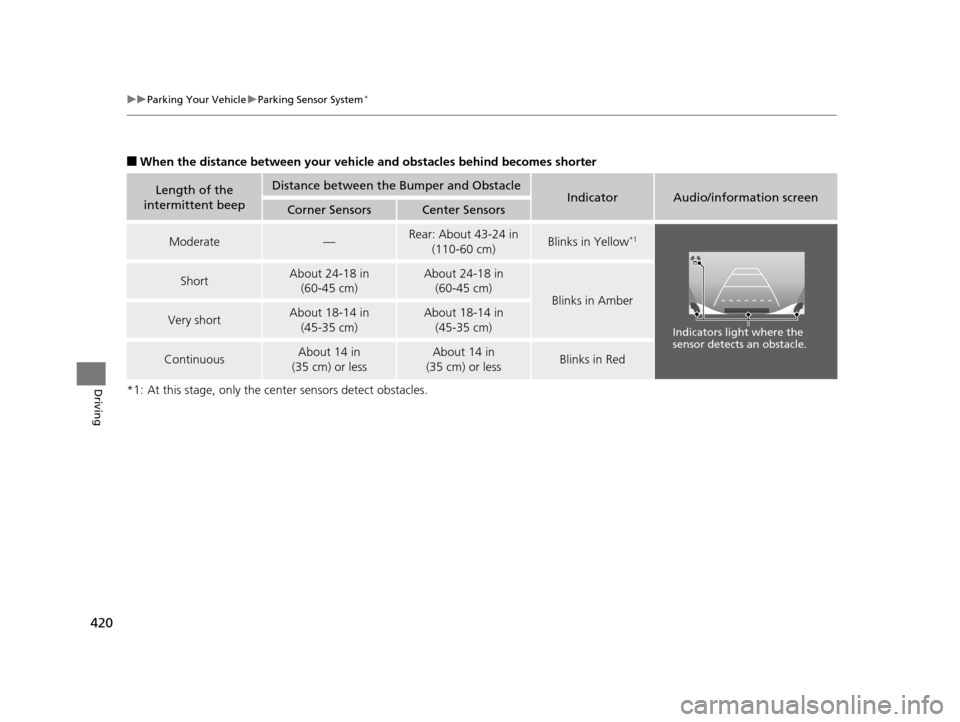
■When the distance between your vehicl e and obstacles behind becomes shorter
*1: At this stage, only the ce nter sensors detect obstacles.
Length of the
intermittent beepDistance between the Bumper and ObstacleIndicatorAudio/information screenCorner SensorsCenter Sensors
Moderate—Rear: About 43-24 in (110-60 cm) Blinks in Yellow*1
ShortAbout 24-18 in (60-45 cm) About 24-18 in (60-45 cm)
Blinks in Amber
Very shortAbout 18-14 in
(45-35 cm) About 18-14 in (45-35 cm)
ContinuousAbout 14 in
(35 cm) or lessAbout 14 in
(35 cm) or lessBlinks in Red
Indicators light where the
sensor detects an obstacle.
16 ACURA TLX-31TZ36100.book 420 ページ 2015年8月26日 水曜日 午後1時54分
Page 422 of 553
421
uuParking Your Vehicle uParking Sensor System*
Driving
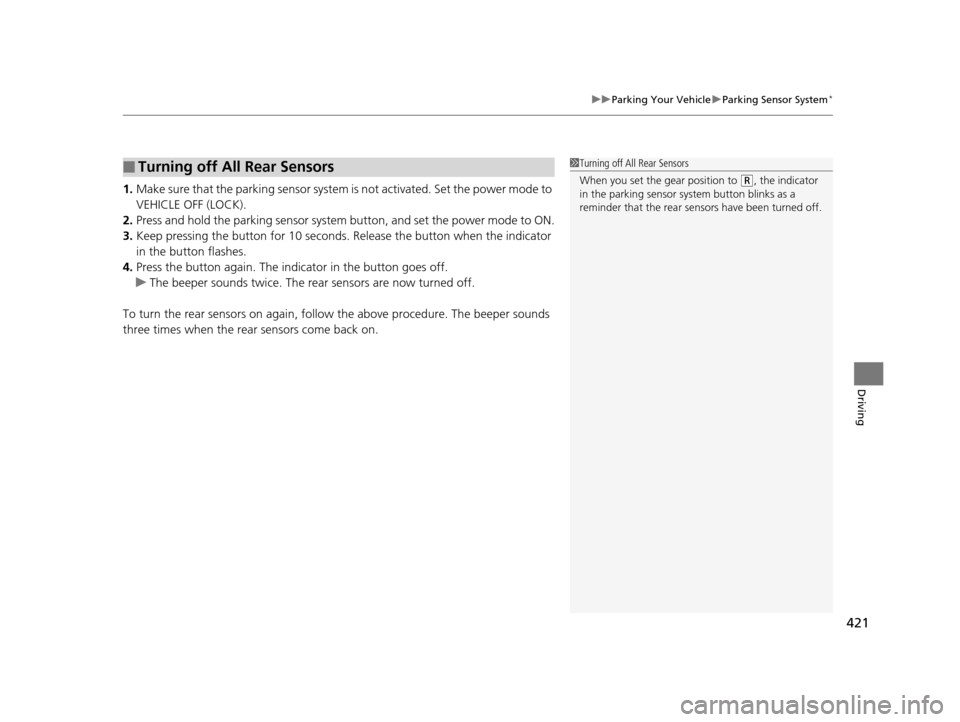
1. Make sure that the parking sensor system is not activated. Set the power mode to
VEHICLE OFF (LOCK).
2. Press and hold the parking sensor system button, and set the power mode to ON.
3. Keep pressing the button for 10 seconds. Release the button when the indicator
in the button flashes.
4. Press the button again. The indi cator in the button goes off.
u The beeper sounds twice. The r ear sensors are now turned off.
To turn the rear sensors on again, follo w the above procedure. The beeper sounds
three times when the rear sensors come back on.
■Turning off All Rear Sensors1 Turning off All Rear Sensors
When you set the gear position to
(R, the indicator
in the parking sensor system button blinks as a
reminder that the rear sens ors have been turned off.
16 ACURA TLX-31TZ36100.book 421 ページ 2015年8月26日 水曜日 午後1時54分
Page 423 of 553
422
uuParking Your Vehicle uCross Traffic Monitor*
Driving
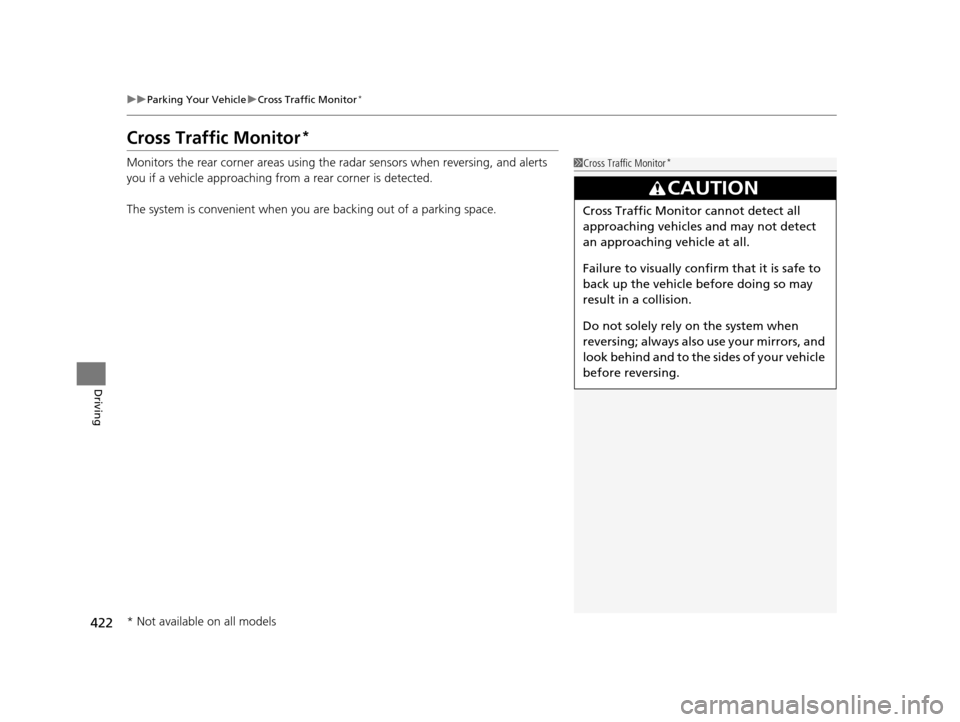
Cross Traffic Monitor*
Monitors the rear corner areas using the radar sensors when reversing, and alerts
you if a vehicle approaching fro m a rear corner is detected.
The system is convenient when you are backing out of a parking space.1 Cross Traffic Monitor*
3CAUTION
Cross Traffic Monitor cannot detect all
approaching vehicles and may not detect
an approaching vehicle at all.
Failure to visually confirm that it is safe to
back up the vehicle before doing so may
result in a collision.
Do not solely rely on the system when
reversing; always also use your mirrors, and
look behind and to the sides of your vehicle
before reversing.
* Not available on all models
16 ACURA TLX-31TZ36100.book 422 ページ 2015年8月26日 水曜日 午後1時54分
Page 424 of 553

Continued423
uuParking Your Vehicle uCross Traffic Monitor*
Driving
The system activates when:
• The power mode is in ON.
• The Cross Traffic Monitor system is turned
on.
2 Cross Traffic Monitor On and Off P. 424
2 Customized Features P. 259
•The transmission is in (R.
• Your vehicle is moving at 3 mph (5 km/h) or
lower.
When a vehicle is detected approaching from a rear corner, Cross Traffic Monitor
alerts you with a buzzer and a displayed warning.
The system will not detect a vehicle that approaches from directly behind your
vehicle, nor will it provide alerts about a detected vehicle when it moves directly
behind your vehicle.
The system does not detect or provide alerts for a vehicle that is moving away from
your vehicle, and it may not detect or ale rt for pedestrians, bicycles, or stationary
objects.
■How the System Works1 Cross Traffic Monitor*
Cross Traffic Monitor may not detect an approaching
vehicle, or may delay aler ting you under the following
conditions:
•A vehicle, which is parked adjacent to your vehicle,
is blocking the radar sensor’s scope.
•Your vehicle is moving at the speed of about 3 mph
(5 km/h) or higher.
•A vehicle is approaching at the speed other than
between about 6 and 16 mph (10 and 25 km/h).
•The system picks up external interference such as
other radar sensors from an other vehicle or strong
radio wave transmitted fr om a facility nearby.
•Either corner of the rear bumper is covered with
snow, ice, mud or dirt.
•When there is bad weather.
•Your vehicle is on an incline.•Your vehicle is tilted due to a heavy load in the rear.
•The rear bumper or the sensors have been
improperly repaired or the rear bumper has been
deformed. Have a vehicle checked by a dealer.
For proper operation, always keep the rear bumper
corner area clean.
Do not cover the rear bumper corner area with labels
or stickers of any kind.
Radar sensors:
Underneath the rear bumper
corners
* Not available on all models
16 ACURA TLX-31TZ36100.book 423 ページ 2015年8月26日 水曜日 午後1時54分
Page 425 of 553
uuParking Your Vehicle uCross Traffic Monitor*
424
Driving
An arrow icon appears on the side a vehicle is approaching on the audio/information
screen.
You can switch on and off the system using
the audio/information screen.
2Customized Features P. 259
■When the System Detects a Vehicle1When the System Detects a Vehicle
If the on the lower right changes to when the
transmission is in
(R, mud, snow or ice may have
accumulated in the vicinity of the sensor. Check the
bumper corners for any obs tructions, and thoroughly
clean the area if necessary.
If the comes on when the transmission is in
( R,
there may be a problem with the Cross Traffic
Monitor system. Do not use the system and have your
vehicle checked by a dealer.
■Cross Traffic Monitor On and Off
Rear Wide View Rear Normal View
Arrow Icon
Icon
16 ACURA TLX-31TZ36100.book 424 ページ 2015年8月26日 水曜日 午後1時54分
Page 427 of 553

426
Driving
Refueling
Fuel Information
■Fuel recommendation
Use of lower octane gasoline can cause occasional metallic knocking noise in the
engine and will result in decreased engine performance.
Use of gasoline with a pump octane less than 87 can lead to engine damage.
■Top tier detergent gasoline
Because the level of detergency and additives in gasoline vary in the market, Acura
endorses the use of “TOP TIER Deterg ent Gasoline” where available to help
maintain the performance and reliability of your vehicle. TOP TIER Detergent
Gasoline meets a new gasoline standard join tly established by leading automotive
manufacturers to meet the need s of today’s advanced engines.
Qualifying gasoline retailers will, in most ca ses, identify their gasoline as having met
“TOP TIER Detergent Gasoline” standards at the retail location. This fuel is
guaranteed to contain the proper level of detergent additives and be free of metallic
additives. The proper level of detergent additives, and absence of harmful metallic
additives in gasoline, help avoid build-up of deposits in your engine and emission
control system.
For further important fuel-rel ated information for your vehicle, or on information on
gasoline that does not contain MMT, visit Acura Owners at owners.acura.com. In
Canada, visit www.acura.ca for additional informatio n on gasoline. For more
information on top tier gasoline, visit www.toptiergas.com.
■Fuel tank capacity: 17.2 US gal (65 liters)
Unleaded premium gasoline, pump octane number 91 or higher
1Fuel Information
NOTICE
We recommend quality ga soline containing
detergent additives that help prevent fuel system and
engine deposits. In addition, in order to maintain
good performance, fuel economy, and emissions
control, we strongly reco mmend the use of gasoline
that does NOT contain harmful manganese-based
fuel additives such as MMT, if such gasoline is
available.
Use of gasoline with these additives may adversely
affect performance, a nd cause the malfunction
indicator lamp on your inst rument panel to come on.
If this happens, contact a dealer for service.
Some gasoline today is ble nded with oxygenates such
as ethanol. Your vehicle is designed to operate on
oxygenated gasoline containing up to 15% ethanol
by volume. Do not use gaso line containing methanol.
If you notice any undesira ble operating symptoms, try
another service station or sw itch to another brand of
gasoline.
16 ACURA TLX-31TZ36100.book 426 ページ 2015年8月26日 水曜日 午後1時54分