2016 Acura RLX ipod
[x] Cancel search: ipodPage 23 of 581
22
Quick Reference Guide
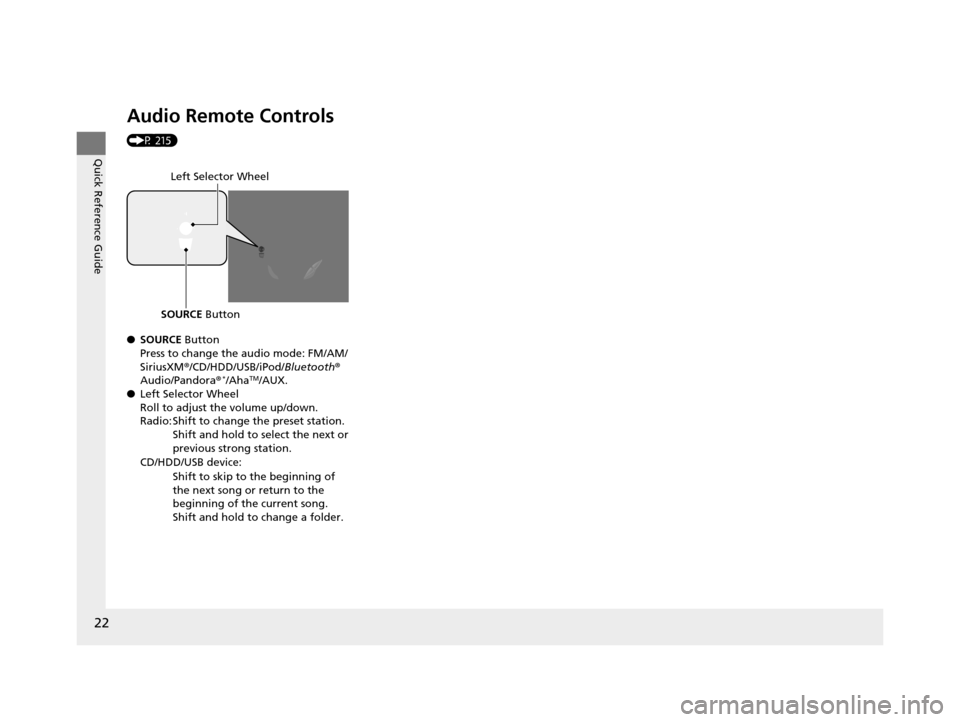
Audio Remote Controls
(P 215)
●SOURCE Button
Press to change the audio mode: FM/AM/
SiriusXM ®/CD/HDD/USB/iPod/ Bluetooth®
Audio/Pandora®
*/AhaTM/AUX.
● Left Selector Wheel
Roll to adjust the volume up/down.
Radio: Shift to change the preset station.
Shift and hold to select the next or
previous strong station.
CD/HDD/USB device: Shift to skip to the beginning of
the next song or return to the
beginning of the current song.
Shift and hold to change a folder.
Left Selector Wheel
SOURCE Button
16 ACURA RLX E-AWD-31TY36200.book 22 ページ 2015年5月22日 金曜日 午後3時5 0分
Page 212 of 581

211
Features
This chapter describes how to operate technology features.
Audio SystemAbout Your Audio System ................ 212
USB Port .......................................... 213
Auxiliary Input Jack .......................... 213
Audio System Theft Protection ......... 214
Audio Remote Controls .................... 215
Audio System Basic Operation ........ 216
On Demand Multi-Use Display
TM....... 217
Audio/Information Screen ................ 225
Adjusting the Sound ........................ 230
Display Setup ................................... 231
Voice Control Operation .................. 232
Playing AM/FM Radio ....................... 240 Playing SiriusXM
® Radio ................... 245
Playing a CD .................................... 248
Playing Hard Disk Drive (HDD) Audio .... 251Playing an iPod ................................ 261
Song By VoiceTM (SBV) ...................... 265
Playing Internet Radio ...................... 269
Playing a USB Flash Drive ................. 272
Playing Bluetooth ® Audio................. 275
Audio Error Messages CD Player ......................................... 277
Hard Disk Drive (HDD) Audio............ 278
iPod/USB Flash Drive ........................ 279
Pandora ®......................................... 280
Aha
TM Radio ..................................... 281
General Information on the Audio SystemSiriusXM ® Radio Service ................... 282
Recommended CDs ......................... 283
Compatible iPod, iPhone, and USB Flash
Drives ................................................. 285
Customized Features............................286Defaulting All th e Settings........................ 309
Deleting all HDD Data .............................. 310
HomeLink® Universal Transceiver.......311Bluetooth® HandsFreeLink®
Using HFL ........................................ 313
HFL Menus ...................................... 315
AcuraLink®............................................352
16 ACURA RLX E-AWD-31TY36200.book 211 ページ 2015年5月22日 金曜日 午後3時 50分
Page 213 of 581

212
Features
Audio System
About Your Audio System
See the Navigation System Manual for information on the navigation system.
The audio system features AM/FM radio and the SiriusXM ® Radio service. It can also
play audio CDs, WMA/MP3/AAC files, Hard Di sk Drive (HDD) audio, USB flash drives,
and iPod, iPhone and Bluetooth® devices.
You can operate the audio system from the buttons and switches on the panel, or
the icons on the On Demand Multi-Use Display
TM.
1 About Your Audio System
SiriusXM ® Radio is available on a subscription basis
only. For more information on SiriusXM ® Radio,
contact a dealer.
2 General Information on the Audio System
P. 282
SiriusXM ® Radio is available in the United States and
Canada, except Ha waii, Alaska, and Puerto Rico.
SiriusXM ® is a registered trademark of Sirius XM
Radio, Inc.
Video CDs, DVDs, and 3-inch (8-cm) mini CDs are not
supported.
iPod, iPhone and iTunes are trademarks of Apple Inc.
State or local laws may pr ohibit the operation of
handheld electronic devi ces while operating a
vehicle.
When the screen is vi ewed through polarized
sunglasses, a rainbow pa ttern may appear on the
screen due to optical characteristics of the screen. If
this is disturbing, please operate the screen without
polarized sunglasses.
Remote Controls iPod
16 ACURA RLX E-AWD-31TY36200.book 212 ページ 2015年5月22日 金曜日 午後3時
50分
Page 214 of 581

213
uuAudio System uUSB Port
Features
USB Port
Install the iPod dock connector or the USB
flash drive to the USB port.
Auxiliary Input Jack
Use the jack to connect standard audio
devices.
1. Open the AUX cover.
2. Connect a standard audio device to the
input jack using a 1/8 inch (3.5 mm) stereo
miniplug.
u The audio system auto matically switches
to the AUX mode.
1 USB Port
•Do not leave the iPod or USB flash drive in the
vehicle. Direct sunlight and high temperatures may
damage it.
•We recommend using an ex tension cable with the
USB port.
•Do not connect the iPod or USB flash drive using a
hub.
•Do not use a device such as a card reader or hard
disk drive, as the device or your files may be
damaged.
•We recommend your data backed up before using
the device in your vehicle.
•Displayed messages may vary depending on the
device model and software version.
If the audio system does not recognize the iPod, try
reconnecting it a few times or reboot the device. To
reboot, follow the manufac turer’s instructions
provided with the iPod or visit www.apple.com/ipod.
1Auxiliary Input Jack
You can return to the AUX mode by selecting
Change Source on the Audio menu screen or
Audio Source on the On Demand Multi-Use
Display
TM.
16 ACURA RLX E-AWD-31TY36200.book 213 ページ 2015年5月22日 金曜日 午後3時 50分
Page 216 of 581

215
uuAudio System uAudio Remote Controls
Features
Audio Remote Controls
Allows you to operate the audio system while driving.
SOURCE Button
Cycles through the audio modes as follows:
FM AM SiriusXM®CD HDD USB
iPod Bluetooth ®Audio Pandora ®
*AhaTM
AUX
Left Selector Wheel
Roll Up: To increase the volume.
Roll Down: To decrease the volume.
Push: To mute. Push again to unmute.
• When listening to the radio
Move to the right: To select the next preset radio station.
Move to the left: To select the previous preset radio station.
Move to the right and hold: To select the next strong station.
Move to the left and hold: To select the previous strong station.
• When listening to a CD, HDD, iPod, USB flash drive, or Bluetooth® Audio
Move to the right: To skip to the next song.
Move to the left: To go back to the beginning of the current or previous song.
Move to the right and hold: To go to the group up. (Bluetooth® Audio only)
Move to the left and hold: To go to the group down. (Bluetooth® Audio only)
• When listening to a CD, HDD or USB flash drive
Move to the right and hold: To skip to the next folder.
Move to the left and hold: To go back to the previous folder.
• When listening to Pandora ®
*
Move to the right: To skip to the next song.
Move to the right and hold: To select the next station.
Move to the left and hold: To select the previous station.
1Audio Remote Controls
Some mode appears only when an appropriate
device or medium is used.
Left Selector Wheel
SOURCE Button
* Not available on all models
16 ACURA RLX E-AWD-31TY36200.book 215 ページ 2015年5月22日 金曜日 午後3時 50分
Page 235 of 581

234
uuAudio System Basic Operation uVoice Control Operation
Features
The system accepts these commands on
most screens.
• Climate control automatic
*1
•Climate control off*1
•Air conditioner on*1
•Air conditioner off*1
•Climate control defrost on*1
•Climate control defrost off*1
•Rear defrost on*1
•Rear defrost off*1
•Climate control fresh air
• Climate control recirculate
• Climate control vent
• Climate control bi-level
• Climate control floor
• Climate control floor and defrost
• Fan speed up
• Fan speed down
• Fan speed # (#: 1 to 7)
• Temperature # degrees (#: 57 to 87°F, 15
to 29°C)
• Driver temperature # degrees (#: 57 to
87°F, 15 to 29°C)
• Passenger temperature # degrees (#: 57
to 87°F, 15 to 29°C)
• Temperature up
• Temperature down
■Climate Control Commands• Driver temperature up
• Driver temperature down
• Passenger temperature up
• Passenger temperature down
• Temperature max heat
• Temperature max cool
• Driver temperature max heat
• Driver temperature max cool
• Passenger temperature max heat
• Passenger temperature max cool
• Climate control sync on
*1
•Climate control sync off*1
*1: These commands toggle the function
on and off, so the command may not match
your intended action.
The system accepts these commands on
most screens.
■Using Song By VoiceTM
Song By VoiceTM is a feature that allows you
to select music from your Hard Disk Drive or
iPod device using your voice.
To activate this mode , you must press the
(Talk) button on the Voice Portal screen
and say: “Music search.”
■Audio Commands
■Song By VoiceTM commands
• Music search
• List album (specify album)
• List artist (specify artist)
• List composer (specify composer)
• List genre (specify genre)
• List playlist (specify playlist)
• Play album (specify album)
• Play artist (specify artist)
• Play composer (specify composer)
• Play genre (specify genre)
• Play playlist (specify playlist)
• Play song (specify song)
• What am I listening to?
• Who am I listening to?
• Who is this?
• What’s playing?
• Who’s playing?
• What album is this?
16 ACURA RLX E-AWD-31TY36200.book 234 ページ 2015年5月22日 金曜日 午後3時 50分
Page 237 of 581

236
uuAudio System Basic Operation uVoice Control Operation
Features
■iPod commands
• iPod play
• iPod play track # (#: 1 to 30)
• iPod skip forward
• iPod skip back
• iPod track shuffle
*1
•iPod album shuffle*1
•iPod track repeat*1
•iPod normal play
• What am I listening to?
• Who am I listening to?
• Who is this?
• What’s playing?
• Who’s playing?
• What album is this?
*1: These commands toggle the function
on and off, so the command may not match
your intended action.
■USB commands
• USB play
• USB play track # (#: 1 to 30)
• USB skip forward
• USB skip back
• USB track random
*1
•USB track repeat*1
•USB track scan*1
•USB folder up
• USB folder down
• USB folder random
*1
•USB folder repeat*1
•USB folder scan*1
•USB normal play
*1: These commands toggle the function
on and off, so the command may not match
your intended action.
■Bluetooth ® Audio commands
• Bluetooth Audio play
• Bluetooth Audio skip forward
• Bluetooth Audio skip back
• Bluetooth Audio group up
• Bluetooth Audio group down
• Bluetooth Audio pause
• Bluetooth Audio resume
• Bluetooth Audio track random
• Bluetooth Audio track repeat
NOTE:
Bluetooth ® Audio commands may not work
on some phones or Bluetooth ® Audio
devices.
■AUX commands
• Auxiliary play
16 ACURA RLX E-AWD-31TY36200.book 236 ページ 2015年5月22日 金曜日 午後3時 50分
Page 241 of 581

240
uuAudio System Basic Operation uPlaying AM/FM Radio
Features
Playing AM/FM Radio
Audio/Information Screen
On Demand Multi-Use Display
TM
Tune Up/Down Icons
Select or to tune the radio frequency.
MENU Button
Press to display the menu items.
(Power) Button
Press to turn the audio system
on and off.
Audio Source
Select to change a band or change
an audio source.
Tune
Select to switch to tune mode. Preset Icons
Select to store a station.
To listen to a stored channel, select
1-
6 (AM) or 1 -12 (FM).
Skip/Seek Icons
Select or to search up
and down the selected band for
a station with a strong signal.
More
Select to display the menu items.
BACK Button
Press to go back to the previous display.
VOL (Volume) Knob
(Pushed out)
Turn to adjust the volume.
Interface Dial/ENTER Button
Press and turn to select preset radio
stations.
Move up, down, right and left to
select secondary menu.
TAG
Select to tag the song if it is played on
an HD RadioTM station. The iPod/iPhone
should be connected to the audio
system to store the tagged song
information on your device.
Models with HD RadioTM feature
iPod/iPhone
Scan
Select to sample each of the
strongest stations on the selected
band for 10 seconds.
16 ACURA RLX E-AWD-31TY36200.book 240 ページ 2015年5月22日 金曜日 午後3時 50分