Page 81 of 521
80
uuIndicators u
Instrument Panel
IndicatorNameOn/BlinkingExplanationMessage
Collision
Mitigation Braking
System
TM
(CMBSTM)
Indicator*
●Comes on when the CMBSTM system
shuts itself off.●Stays on - The area around the camera is
blocked by dirt, mud, etc. Stop your vehicle
in a safe place, and wipe it off with a soft
cloth.
2 Front Sensor Camera* P. 352
●When the radar sensor gets dirty, stop your
vehicle in a safe place, and wipe off dirt
using a soft cloth.
●Have your vehicle checked by a dealer if the
message does not disappear even after you
clean the sensor cover.
2Collision Mitigation Braking SystemTM
(CMBSTM)* P. 392
●Stays on - The temperature inside the
camera is too high. Use the climate control
system to cool down the camera. The
system activates when the temperature
inside the camera cools down.
2 Front Sensor Camera* P. 352
Models with CMBSTM
* Not available on all models
16 ACURA ILX-31TX66300.book 80 ページ 2014年12月22日 月曜日 午後10時15分
Page 84 of 521

83
uuIndicators uMulti-Information Display Warning and Information Messages
Continued
Instrument Panel
*1:On the left: Models wi thout full color display
On the right: Models with full color display
Message*1ConditionExplanation
—
●Appears when the starter system has a
problem.●As a temporary measure, press and hold the
ENGINE START/STOP button for 15 seconds
while pressing the brake pedal and manually
start the engine.
Have the vehicle checked by a dealer.
●Appears if the keyless access remote battery is
too weak to start the engine or the key is not
within operating range to start the engine.
A beeper sounds six times.
2 If the Keyless Access Remote Battery is
Weak P. 483
●Appears after the driver’s door is opened when
the power mode is in ACCESSORY.●Press the ENGINE START/STOP button twice
with your foot off the brake pedal to change
the power mode to VEHICLE OFF (LOCK).
●Appears when the power mode is in
ACCESSORY.
—
U.S.
Canada
U.S.
Canada
16 ACURA ILX-31TX66300.book 83 ページ 2014年12月22日 月曜日 午後10時15分
Page 85 of 521

84
uuIndicators uMulti-Information Display Warn ing and Information Messages
Instrument Panel
*1:On the left: Models without full color display
On the right: Models with full color display
Message*1ConditionExplanation
●Appears when you close the door with the
power mode in ON without the keyless access
remote inside the vehicle.●Disappears when you bring the keyless access
remote back inside the vehicle and close the
door.
2Keyless Access Remote Reminder P. 135
●Appears when the keyless access remote
battery becomes weak.●Replace the battery as soon as possible.
2Replacing the Button Battery P. 452
●Appears after you unlock and open the driver’s
door.
2Starting the Engine P. 338
●Appears three seconds after the TO START
ENGINE message appears.
2Starting the Engine P. 338
●Appears if you push the ENGINE START/STOP
button to turn the engine off without the shift
lever in
(P.
●Move the shift lever to (P. The power mode
changes to VEHICLE OFF.
16 ACURA ILX-31TX66300.book 84 ページ 2014年12月22日 月曜日 午後10時15分
Page 86 of 521

85
uuIndicators uMulti-Information Display Warning and Information Messages
Continued
Instrument Panel
*1:On the left: Models wi thout full color display
On the right: Models with full color display
Message*1ConditionExplanation
—
●Appears when you unlock and open the
driver’s door while the engine is running by
two-way keyless access remote
*.
2 Remote Engine Start with Vehicle
Feedback* P. 340
●Appears when the transmission system
temperature is too high. The vehicle no longer
moves.●Immediately stop in a safe place in (P.●Let the engine idle until the message
disappears.
—
●Appears if any door or the trunk is not
completely closed.
●Appears if any door is opened while driving.
The beeper sounds.
●Goes off when all doors and the trunk are
closed.
●Appears when there is a problem with the
headlights.●Appears while driving - The low beam
headlights may not be on. When conditions
allow you to drive safely, have your vehicle
checked by a dealer as soon as possible.
* Not available on all models
16 ACURA ILX-31TX66300.book 85 ページ 2014年12月22日 月曜日 午後10時15分
Page 98 of 521

Continued97
uuGauges and Multi-Information Display uMulti-Information Display
Instrument Panel
Use the multi-information display to customize certain features.
■How to customize
Press the button to select Vehicle Settings and press the SEL/RESET
button.
■Customized Features1 Customized Features
To customize other features , roll the right selector
wheel.
2 List of customizable options P. 100
2 Example of customization settings P. 105
Customization is possible when you see the driver’s
ID ( Driver 1 or Driver 2) on the screen.
The driver’s ID indicates which remote transmitter
you have used to unlock the driver’s door. The
customized settings are recalled every time you
unlock the driver’s door with that remote.
Shift to
( P before you attempt to change any
customized setting.
Customizing is also av ailable from the audio/
information screen.
You cannot have Vehicle Settings displayed on the
multi-information display while the audio/
information screen shows the same menu.
2 Customized Features
* P. 245
Models with driving position memory system
Models with On Demand Multi-Use DisplayTM
Multi-information Display: Goes to Vehicle Settings.
Models without
full color displayModels with full
color display
SEL/RESET Button:
Enters the selected item
Button:
Changes the customize
menus and items
* Not available on all models
16 ACURA ILX-31TX66300.book 97 ページ 2014年12月22日 月曜日 午後10時15分
Page 99 of 521
98
uuGauges and Multi-Information Display uMulti-Information Display
Instrument Panel
■Customization flow
Press the button to select Vehicle Settings and press the SEL/RESET button.
Vehicle Settings
“Trip A” Reset Timing
Language Selection
Adjust Outside Temp. Display
Memory Position Link
Door Unlock Mode
Keyless Access Light Flash
Driver Assist System Setup
Meter Setup
Driving Position Setup*
Keyless Access Setup
“Trip B” Reset Timing
Turn by Turn Display*
Forward Collision Warning Distance*
ACC Forward Vehicle Detect Beep*
Lane Keeping Assist Suspend Beep*
Blind Spot Info*
Keyless Access Beep
ACC Display Speed Unit*
Road Departure Mitigation Setting*
SEL/RESET
SEL/RESET
SEL/RESET
SEL/RESET
SEL/RESET
SEL/RESET
Remote Start System On/Off*
* Not available on all models
16 ACURA ILX-31TX66300.book 98 ページ 2014年12月22日 月曜日 午後10時15分
Page 100 of 521
99
uuGauges and Multi-Information Display uMulti-Information Display
Continued
Instrument Panel
Exit
Door Setup
Maintenance Info.
Default All
Lighting Setup
Key And Remote Unlock Mode
Auto Door Lock
Auto Door Unlock
Keyless Lock Answer Back
Security Relock Timer
Interior Light Dimming Time
Headlight Auto Off Timer
Auto Light Sensitivity
Maintenance Reset
SEL/RESET
SEL/RESET
SEL/RESET
SEL/RESET
16 ACURA ILX-31TX66300.book 99 ページ 2014年12月22日 月曜日 午後10時15分
Page 103 of 521
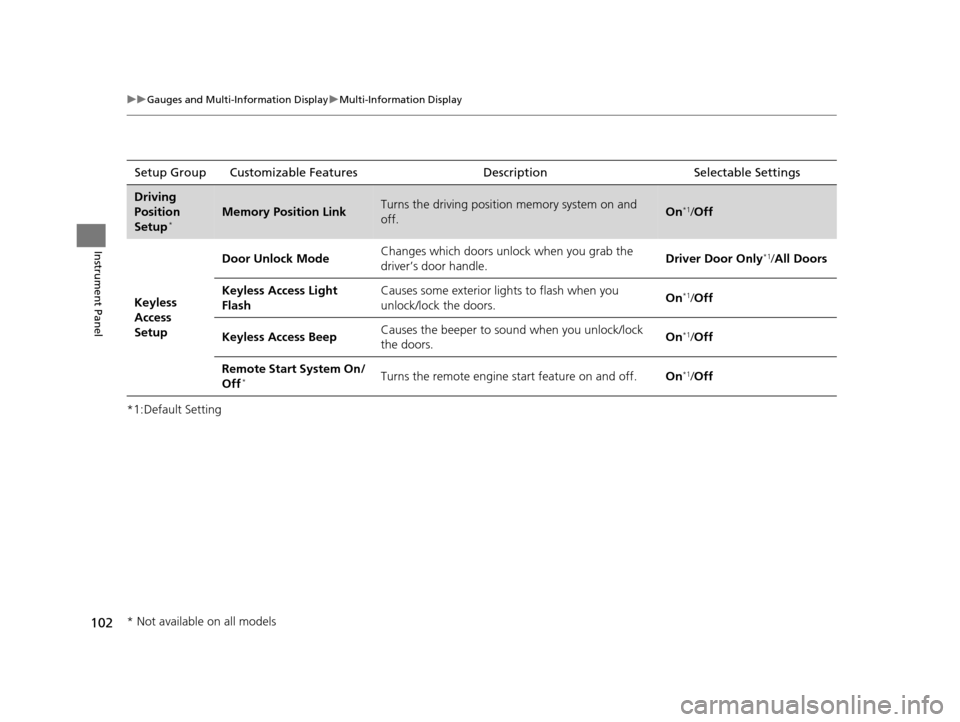
102
uuGauges and Multi-Information Display uMulti-Information Display
Instrument Panel
*1:Default SettingSetup Group Customizable Features Description Selectable Settings
Driving
Position
Setup
*Memory Position LinkTurns the driving position memory system on and
off.On*1/
Off
Keyless
Access
Setup Door Unlock Mode
Changes which doors unlock when you grab the
driver’s door handle.
Driver Door Only
*1/
All Doors
Keyless Access Light
Flash Causes some exterior lights to flash when you
unlock/lock the doors.
On
*1/
Off
Keyless Access Beep Causes the beeper to s
ound when you unlock/lock
the doors. On
*1/
Off
Remote Start System On/
Off
*Turns the remote engine start feature on and off. On*1/Off
* Not available on all models
16 ACURA ILX-31TX66300.book 102 ページ 2014年12月22日 月曜日 午後10時15分