2016.75 VAUXHALL ASTRA J ignition
[x] Cancel search: ignitionPage 179 of 291

Driving and operating177Deactivation
ESC and TC can be deactivated:● hold b pressed for a minimum of
five seconds: ESC and TC are
both deactivated. k and n
illuminate and status messages appear in the Driver Information
Centre.
● To deactivate only Traction control system press button b
briefly: TC is inactive but ESC
remains active, k illuminates. A
status message appears in the
Driver Information Centre when
TC is deactivated.
ESC is reactivated by pressing the
b button again. If the TC system was
previously disabled, both TC and
ESC are reactivated. k and n
extinguishes when TC and ESC are
reactivated.
ESC is also reactivated the next time
the ignition is switched on.
Fault
If there is a fault in the system the
control indicator b illuminates
continuously and a message appears in the Driver Information Centre. The
system is not operational.
Have the cause of the fault remedied
by a workshop.
Sport mode
Sport mode adapts the settings of
some vehicle systems to a sportier
driving style.
● The engine reacts more quickly to the accelerator pedal.
● Steering reacts more direct to provide better contact with the
road surface.
● Shift points of automatic transmission occur later.
Activation
Page 180 of 291

178Driving and operatingPress SPORT when engine is
running.
LED in the button lights up when sport
mode is active and a status message appears in the Driver Information
Centre.
Deactivation
Briefly press SPORT. Sport mode is
deactivated the next time the ignition
is switched on.Driver assistance
systems9 Warning
Driver assistance systems are
developed to support the driver
and not to replace the driver's
attention.
The driver accepts full
responsibility when driving the
vehicle.
When using driver assistance
systems, always take care
regarding the current traffic
situation.
Cruise control
The cruise control can store and
maintain speeds of approx. 20 mph to maximum vehicle speed. Deviations
from the stored speeds may occur
when driving uphill or downhill.
For safety reasons, the cruise control cannot be activated until the foot
brake has been operated once.
Activating in first gear is not possible.
Do not use the cruise control if it is not advisable to maintain a constant
speed.
Illustrations show different versions.
Page 182 of 291

180Driving and operatingAutomatic deactivation:● Vehicle speed is below approx. 20 mph.
● Vehicle speed drops more than 15 mph below the set speed.
● The brake pedal is depressed.
● The clutch pedal is depressed for
a few seconds.
● The selector lever is in N.
● Engine speed is in a very low range.
● The Traction Control system or Electronic Stability Control is
operating.
● Parking brake is applied.
● Simultaneous pressing RES/+
and brake pedal deactivates
cruise control and will delete
stored speed.
Resume stored speed
Turn thumb wheel to RES/+ at a
speed above 20 mph. The stored
speed will be obtained.Switching off
Press m, control indicator m in
instrument cluster extinguishes. The
stored speed is deleted.
Pressing L to activate the speed
limiter or switching off the ignition also switches off cruise control and
deletes the stored speed.
Speed limiter
The speed limiter prevents the
vehicle exceeding a preset maximum
speed.
The maximum speed can be set at
speeds above 15 mph up to
125 mph.
The driver can only accelerate up to
the preset speed. Deviations from the
limited speed may occur when driving downhill.
The preset speed limit is displayed in
the Driver Information Centre when
the system is active.Activation
Illustrations show different versions.
Page 183 of 291

Driving and operating181Press L. If cruise control has been
activated before, it is switched off
when speed limiter is activated and
control indicator m extinguishes.
Set speed limit
Accelerate to the desired speed and
briefly turn thumb wheel to SET/-: the
current speed is stored as maximum
speed. Speed limit is displayed in the
Driver Information Centre.
Change speed limit
With speed limiter active, hold or
briefly turn thumb wheel to RES/+ to
increase or SET/- to decrease the
desired maximum speed.
Exceeding the speed limit
When exceeding the limited speed
without driver input, the speed will
flash in the Driver Information Centre
and a chime sounds during this
period.
In the event of an emergency, it is
possible to exceed the speed limit by
depressing the accelerator pedal
firmly nearly to the final point. In this
case no chime appears.
Release the accelerator pedal and the speed limiter function is
reactivated once a speed lower than
the limit speed is obtained.
Deactivation Press y: speed limiter is deactivated
and the vehicle can be driven without
speed limit.
The limited speed will be stored and
is indicated in brackets in the Driver
Information Centre. Additionally, a
corresponding message appears.
Resume limit speed Turn thumb wheel to RES/+. The
stored speed limit will be obtained.Switching off
Press L, the speed limit indication
extinguishes in the Driver Information Centre. The stored speed is deleted.
By pressing m to activate cruise
control, speed limiter is also
deactivated and the stored speed is
deleted.
By switching off the ignition, speed
limiter is also deactivated, but the
speed limit will be stored for next
speed limiter activation.
Forward collision alert The forward collision alert can help to
avoid or reduce the harm caused by
front-end crashes.
Forward collision alert uses the front
camera system in the windscreen to
detect a vehicle directly ahead, in
your path, within a distance of approx.
60 metres.
Page 185 of 291

Driving and operating183Caution
The colour lighting of this control
indicator does not correspond to
local traffic laws on following
distance. The driver bears full
responsibility for maintaining safe
following distance according to
applicable traffic rules, weather
and road conditions etc. at all
times.
When the time to a potential collision
with a vehicle in front gets too small
and a collision is imminent, the
collision alert symbol pops-up in the
Driver Information Centre and the
driver gets notified by a flashing red
LED stripe which is projected on the
windscreen in the driver's field of
view.
Simultaneously a warning chime sounds. Depress the brake pedal and
steer the vehicle, if it is required by the
situation.
Deactivation The system can be deactivated.
Press V repeatedly until Forward
Collision Alert Off appears in the
Driver Information Centre.
If the forward collision alert was
deactivated, alert sensitivity is set to
"medium" when ignition is switched
on next time.
The settings "near", "medium" or "far" will be stored when the ignition is
switched off.
General information9 Warning
Forward collision alert is just a
warning system and does not
apply the brakes. When
approaching a vehicle ahead too
rapidly, it may not provide you
enough time to avoid a collision.
The driver accepts full
responsibility for the appropriate
following distance based on traffic, weather and visibility conditions.
The complete attention of the
driver is always required while
driving. The driver must always be
ready to take action and apply the
brakes.
System limitations
The system is designed to warn on vehicles only, but may react also to
other objects.
Page 188 of 291

186Driving and operatingIn some cases, the active emergencybraking system may provide an
automatic braking in situations that
seem to be unnecessary, for instance
in parking garages, due to traffic signs in a curve or due to vehicles in
another lane. This is normal
operation, the vehicle does not need service. Firmly apply the accelerator
pedal to override the automatic
braking.
Deactivation
Active emergency braking can be
deactivated by repeatedly pressing
the gap switch V to Off setting,
3 181. If deactivated a message is
displayed in the Driver Information
Centre.
Fault
In the event of a system service
requirement, a message is displayed
in the Driver Information Centre.
If the system does not work as it
should do, vehicle messages are
displayed in the Driver Information
Centre.
Vehicle messages 3 120.
Parking assist Rear parking assist9 Warning
It is the driver who bears full
responsibility for the parking
manoeuvre.
Always check the surrounding
area while reversing and using the rear parking assist system.
The rear parking assist makes
parking easier by measuring the
distance between the vehicle and
rear obstacles. It informs and warns
the driver by giving acoustic signals
and display indication.
The system has four ultrasonic
parking sensors in the rear bumper.
Activation
After ignition is switched on, the rear
parking assist is activated.
An illuminated LED in the parking
assist button r indicates that the
system is ready to operate.
Page 190 of 291

188Driving and operating
The system has four ultrasonic
parking sensors each in the rear and
front bumper.
Activation
The system is activated automatically
at a speed up to 7 mph.An illuminated LED in the parking
assist button r indicates that the
system is ready to operate.
If r is switched off within an ignition
cycle, the front parking assist is
deactivated. If vehicle speed has
exceeded 15 mph beforehand,
parking assist will be reactivated when speed drops below 7 mph.
When the system is deactivated, the
LED in the button extinguishes and
Park Assist Off pops-up in the Driver
Information Centre.
Indication
The system warns the driver with
acoustic signals against potentially
hazardous obstacles in front of the
vehicle in a distance range up to 80
cm and against potentially hazardous
obstacles behind the vehicle in a
distance range up to 50 cm while a
forward gear is engaged, respectively up to 1.5 m while reverse gear is
engaged.
Depending on which side of the
vehicle is closer to an obstacle, you
will hear acoustic warning signals inthe vehicle on the respective side.
The interval between the sounds
becomes shorter as the vehicle gets
closer to that obstacle. When the
distance is less than approx. 30 cm,
the sound is continuous.
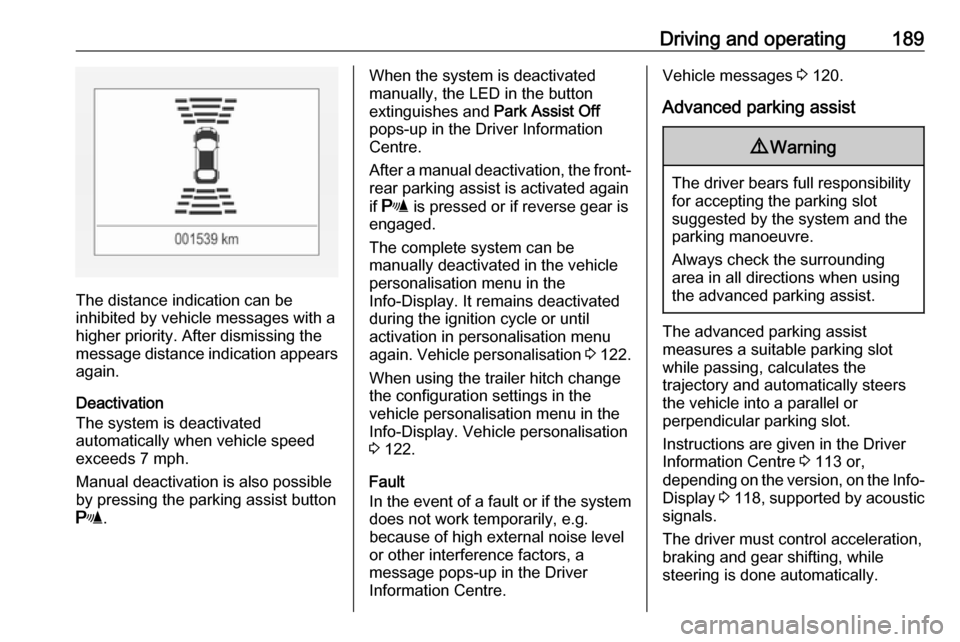
Additionally, the distance to rear and
front obstacles is displayed by
changing distance lines in the Driver
Information Centre 3 113 or,
depending on the version, on the Info-
Display 3 118.
Page 191 of 291
Driving and operating189
The distance indication can be
inhibited by vehicle messages with a higher priority. After dismissing themessage distance indication appears again.
Deactivation
The system is deactivated
automatically when vehicle speed
exceeds 7 mph.
Manual deactivation is also possible
by pressing the parking assist button
r .
When the system is deactivated
manually, the LED in the button
extinguishes and Park Assist Off
pops-up in the Driver Information
Centre.
After a manual deactivation, the front- rear parking assist is activated again
if r is pressed or if reverse gear is
engaged.
The complete system can be
manually deactivated in the vehicle
personalisation menu in the
Info-Display. It remains deactivated during the ignition cycle or until
activation in personalisation menu
again. Vehicle personalisation 3 122.
When using the trailer hitch change
the configuration settings in the
vehicle personalisation menu in the
Info-Display. Vehicle personalisation
3 122.
Fault
In the event of a fault or if the system does not work temporarily, e.g.
because of high external noise level
or other interference factors, a
message pops-up in the Driver
Information Centre.Vehicle messages 3 120.
Advanced parking assist9 Warning
The driver bears full responsibility
for accepting the parking slot
suggested by the system and the
parking manoeuvre.
Always check the surrounding
area in all directions when using
the advanced parking assist.
The advanced parking assist
measures a suitable parking slot
while passing, calculates the
trajectory and automatically steers
the vehicle into a parallel or
perpendicular parking slot.
Instructions are given in the Driver
Information Centre 3 113 or,
depending on the version, on the Info- Display 3 118 , supported by acoustic
signals.
The driver must control acceleration,
braking and gear shifting, while
steering is done automatically.