2016.75 VAUXHALL ASTRA J steering
[x] Cancel search: steeringPage 158 of 291

156Driving and operatingfunctions remain active until driver's
door is opened, provided the ignition
was on previously.Emergency shut off during driving
Press Engine Start/Stop for longer
than two seconds or press twice
briefly within five seconds 3 157.
Steering wheel lock
The steering wheel lock activates
automatically when:
● The vehicle is stationary.
● The ignition has been switched off.
● The driver's door is opened.
To release steering wheel lock, open
and close driver's door and switch on accessory mode or start the engine
directly.
9 Warning
If the vehicle battery is discharged,
the vehicle must not be towed,
tow-started or jump-started as the
steering wheel lock cannot be
disengaged.
Operation on vehicles with
electronic key system in case of
failure
If either the electronic key fails or the
battery of the electronic key is weak,
the Driver Information Centre may
display No Remote Detected or
Replace Battery in Remote Key when
you try to start the vehicle.
Place the electronic key solely
centred in the transmitter area in
longitudinal direction flat with buttons
upside as shown in the illustration.
Other objects, e.g. other keys,
transponder, tags, coins etc. must be removed from the centre console.
Depress the clutch pedal (manual
transmission) or the brake pedal
(automatic transmission or manual
transmission automated) and press
Engine Start/Stop .
To switch off the engine, press
Engine Start/Stop again. Remove the
electronic key from the centre
console.
This option is intended for
emergencies only. Replace the
electronic key battery as soon as
possible 3 21.
For unlocking or locking the doors,
see fault in radio remote control unit
or electronic key system 3 23.
Retained power off
The following electronic systems can
work until the driver's door is opened
or for ten minutes after the ignition is
switched off:
● power windows
● sunroof
● power outlets
Page 159 of 291

Driving and operating157Starting the engine
Vehicles with ignition switch
Turn key to position 1 to release the
steering wheel lock.
Manual transmission: operate clutch
and brake pedal.
Automatic transmission: operate
brake pedal and move selector lever
to P or N.
Manual transmission automated:
operate brake pedal. If brake pedal is not depressed, N in the transmission
display could flash or a message in
the Driver Information Centre could
appear.
Do not operate accelerator pedal.
Diesel engines: turn the key to
position 2 for preheating and wait until
control indicator ! extinguishes.
Turn key briefly to position 3 and
release: an automatic procedure
operates the starter with a short delay
until the engine is running, see
Automatic Starter Control.
Manual transmission: during an
Autostop, the engine can be started
by depressing the clutch pedal
3 159.
Automatic transmission or manual
transmission automated: during an
Autostop, the engine can be started
by releasing the brake pedal 3 159.Vehicles with power button
Manual transmission: operate clutch
and brake pedal.
Automatic transmission: operate
brake pedal and move selector lever
to P or N.
Manual transmission automated:
operate brake pedal. If brake pedal is not depressed, N in the transmission
display could flash or a message in
the Driver Information Centre could
appear.
Do not operate accelerator pedal.
Page 160 of 291

158Driving and operatingPress and release Engine Start/Stop:
an automatic procedure operates the
starter with a short delay until the
engine is running, see automatic
starter control.
Before restarting or to switch off the
engine when vehicle is stationary,
press Engine Start/Stop once more
briefly.
Manual transmission: during an
Autostop, the engine can be started
by depressing the clutch pedal
3 159.
Automatic transmission or manual
transmission automated: during an
Autostop, the engine can be started
by releasing the brake pedal 3 159.
Emergency shut off during driving If the engine needs to be switched offduring driving in case of emergency,
press Engine Start/Stop for longer
than two seconds or press twice
briefly within five seconds.9 Danger
Switching off the engine during
driving may cause loss of power
support for brake and steering
systems. Assistance systems and
airbag systems are disabled.
Lighting and brake lights will
extinguish. Therefore power down the engine and ignition while
driving only when required in case of emergency.
Starting the vehicle at low
temperatures
Starting the engine without additional
heaters is possible down to -25 °С for diesel engines and -30 °C for petrol
engines. Required is an engine oil
with the correct viscosity, the correct fuel, performed services and a
sufficiently charged vehicle battery.
With temperatures below -30 °C the
automatic transmission requires a
warming phase of approx.
five minutes. The selector lever must
be in position P.
Automatic starter control
This function controls the engine
starting procedure. The driver does
not need to hold the key in position 3
or to hold Engine Start/Stop pressed.
Once applied, the system will go on
starting automatically until the engine
is running. Because of the checking procedure, the engine starts running
after a short delay.
Possible reasons for a non-starting
engine:
● Clutch pedal not operated (manual transmission).
● Brake pedal not operated or selector lever not in P or N
(automatic transmission).
● Brake pedal not operated (manual transmission
automated).
● Timeout occurred.
Page 164 of 291

162Driving and operating● The charging level of the vehiclebattery is below a defined level.
● The brake vacuum is not sufficient.
● The vehicle is driven at least at walking speed.
● The climate control system requests an engine start.
● The air conditioning is manually switched on.
If the bonnet is not fully closed, a
warning message is displayed in the
Driver Information Centre.
If an electrical accessory, e.g. a
portable CD player, is connected to
the power outlet, a brief power drop during the restart might be noticeable.
Parking9 Warning
● Do not park the vehicle on an
easily ignitable surface. The
high temperature of the
exhaust system could ignite the
surface.
● Always apply the parking brake. Activate the manual
parking brake without pressing the release button. Apply as
firmly as possible on a downhill slope or uphill slope. Depress
brake pedal at the same time to
reduce operating force.
For vehicles with electric
parking brake, pull switch m for
a minimum of one second until
control indicator m illuminates
constantly and electric parking
brake is applied 3 109.
● Switch off the engine. ● If the vehicle is on a level surface or uphill slope, engage
first gear or set the selector
lever to position P before
removing the ignition key or
switching off ignition on
vehicles with power button. On
an uphill slope, turn the front
wheels away from the kerb.
If the vehicle is on a downhill
slope, engage reverse gear or
set the selector lever to positionP before removing the ignition
key or switching off ignition on
vehicles with power button.
Turn the front wheels towards
the kerb.
● Close the windows and the sunroof.
● Remove the ignition key from the ignition switch or switch off
ignition on vehicles with power
button. Turn the steering wheel until the steering wheel lock is
felt to engage.
For vehicles with automatic
transmission, the key can only
be removed when the selector
lever is in position P.
For vehicles with manual
transmission automated, the key can only be removed from
the ignition switch when the
parking brake is applied.
Page 178 of 291

176Driving and operating
Control indicator k illuminates.
A status message appears in the
Driver Information Centre when TC is
deactivated.
When TC is deactivated, ESC
remains active but with higher control threshold.
TC is reactivated by pressing b
again. A status message pops up in the Driver Information Centre when
TC is reactivated.
TC is also reactivated the next time
the ignition is switched on.
Fault
If there is a fault in the system the
control indicator b illuminates
continuously and a message appears in the Driver Information Centre. The
system is not operational.
Have the cause of the fault remedied by a workshop.
Electronic Stability Control
Electronic Stability Control (ESC)
improves driving stability when
necessary, regardless of the type of
road surface or tyre grip.
As soon as the vehicle starts to
swerve (understeer/oversteer),
engine output is reduced and the wheels are braked individually.
ESC operates in combination with the Traction Control system (TC). It
prevents the drive wheels from
spinning.
Torque distribution is a special
feature that allocates the torque to the drive wheels before the ESC
intervenes. When cornering, the
wheels on the inner curve are braked
individually. Additionally, engine
torque will be delivered to the drive wheel on the outer curve. This
reduces the tendency of
understeering and improves traction
when cornering fast.
ESC is operational after each engine
start as soon as the control indicator
b extinguishes.
When ESC operates b flashes.
9 Warning
Do not let this special safety
feature tempt you into taking risks
when driving.
Adapt speed to the road
conditions.
Control indicator b 3 110.
Page 179 of 291

Driving and operating177Deactivation
ESC and TC can be deactivated:● hold b pressed for a minimum of
five seconds: ESC and TC are
both deactivated. k and n
illuminate and status messages appear in the Driver Information
Centre.
● To deactivate only Traction control system press button b
briefly: TC is inactive but ESC
remains active, k illuminates. A
status message appears in the
Driver Information Centre when
TC is deactivated.
ESC is reactivated by pressing the
b button again. If the TC system was
previously disabled, both TC and
ESC are reactivated. k and n
extinguishes when TC and ESC are
reactivated.
ESC is also reactivated the next time
the ignition is switched on.
Fault
If there is a fault in the system the
control indicator b illuminates
continuously and a message appears in the Driver Information Centre. The
system is not operational.
Have the cause of the fault remedied
by a workshop.
Sport mode
Sport mode adapts the settings of
some vehicle systems to a sportier
driving style.
● The engine reacts more quickly to the accelerator pedal.
● Steering reacts more direct to provide better contact with the
road surface.
● Shift points of automatic transmission occur later.
Activation
Page 186 of 291

184Driving and operatingIn the following cases, forward
collision alert may not detect a vehicle ahead or sensor performance is
limited:
● on winding roads
● when weather limits visibility, such as fog, rain, or snow
● when the sensor is blocked by snow, ice, slush, mud, dirt,
windscreen damage or affected
by foreign items, e.g. stickers
Following distance indication
The following distance indication
displays the distance to a preceding
moving vehicle. The front camera in
the windscreen is used to detect the
distance of a vehicle directly ahead in
the vehicle's path. It is active at
speeds above 25 mph.
When a preceding vehicle is detected
ahead, the distance is indicated in
seconds, displayed on a page in the
Driver Information Centre.On Midlevel display, choose Info
Menu ? via MENU on the turn
signal lever and turn the adjuster wheel to choose following distance
indication page, 3 113
On Uplevel display, select Info menu
via steering wheel buttons and press o to select following distance
indication 3 113.
The minimum indicated distance is 0.5 seconds.
If there is no vehicle ahead or the
vehicle ahead is out of range, two
dashes will be displayed: -.- sec.
Active emergency braking
Active emergency braking can help toreduce the damage and injury from
crashes with vehicles and obstacles
directly ahead, when a collision can no longer be avoided either by
manual braking or by steering. Before the active emergency braking
applies, the driver is warned by the
forward collision alert 3 181.
The feature uses various inputs (e.g.
camera sensor, brake pressure,
vehicle speed) to calculate the
probability of a frontal collision.
Active emergency braking operates
above walking speed up to 53 mph. A precondition is that the system is not
deactivated by toggling the gap
switch V to Off setting, 3 181.
The system includes: ● brake preparation system
● emergency automatic braking ● forward looking brake assist
Page 191 of 291
Driving and operating189
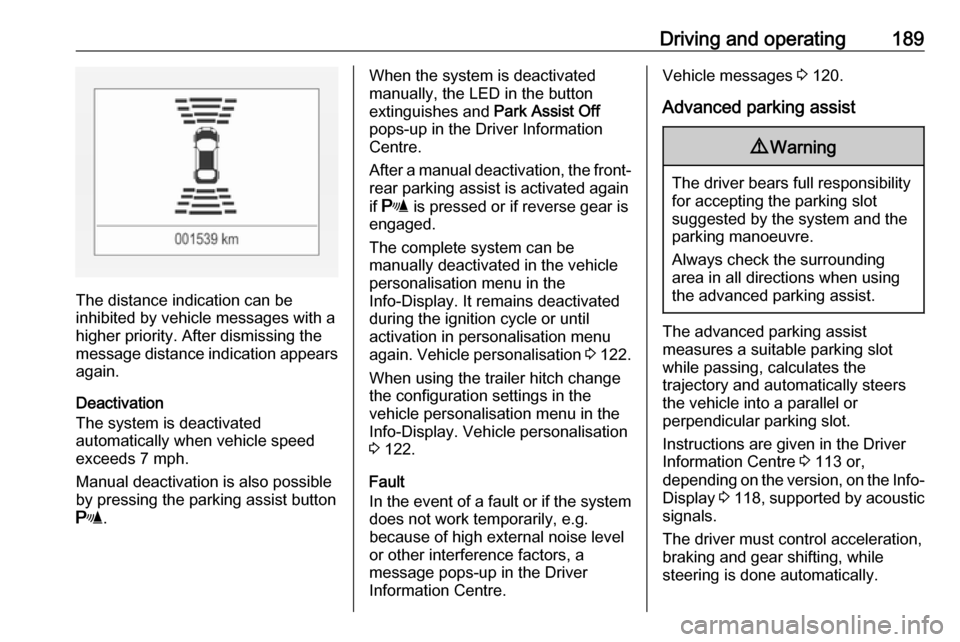
The distance indication can be
inhibited by vehicle messages with a higher priority. After dismissing themessage distance indication appears again.
Deactivation
The system is deactivated
automatically when vehicle speed
exceeds 7 mph.
Manual deactivation is also possible
by pressing the parking assist button
r .
When the system is deactivated
manually, the LED in the button
extinguishes and Park Assist Off
pops-up in the Driver Information
Centre.
After a manual deactivation, the front- rear parking assist is activated again
if r is pressed or if reverse gear is
engaged.
The complete system can be
manually deactivated in the vehicle
personalisation menu in the
Info-Display. It remains deactivated during the ignition cycle or until
activation in personalisation menu
again. Vehicle personalisation 3 122.
When using the trailer hitch change
the configuration settings in the
vehicle personalisation menu in the
Info-Display. Vehicle personalisation
3 122.
Fault
In the event of a fault or if the system does not work temporarily, e.g.
because of high external noise level
or other interference factors, a
message pops-up in the Driver
Information Centre.Vehicle messages 3 120.
Advanced parking assist9 Warning
The driver bears full responsibility
for accepting the parking slot
suggested by the system and the
parking manoeuvre.
Always check the surrounding
area in all directions when using
the advanced parking assist.
The advanced parking assist
measures a suitable parking slot
while passing, calculates the
trajectory and automatically steers
the vehicle into a parallel or
perpendicular parking slot.
Instructions are given in the Driver
Information Centre 3 113 or,
depending on the version, on the Info- Display 3 118 , supported by acoustic
signals.
The driver must control acceleration,
braking and gear shifting, while
steering is done automatically.