2016.5 VAUXHALL MOVANO_B audio
[x] Cancel search: audioPage 69 of 129

Bluetooth music69Select the desired device from the list
and confirm by pressing OK. A
display message confirms
connection.
Disconnecting an audio device
To disconnect an audio device from
the Infotainment system, press TEL
(or SETUP ) and select Bluetooth
connection . Select the desired device
from the device list then select
Disconnect the device by turning and
pressing OK. A display message
confirms disconnection.
Switching off the audio device or
deactivating the Bluetooth function on
the audio device also disconnects the device from the Infotainment system.
Unpairing an auxiliary audio device
from the Infotainment system
If the list of paired audio devices is full,
a new device can only be paired if an
existing device is unpaired.
To unpair, i.e. to delete an audio
device from the system memory,
press TEL and select Delete device .
Select the desired audio device from
the list and press OK to confirm
deletion when prompted.Operation via Infotainment system
When paired and connected
wirelessly, audio playback begins
automatically.
The audio device can then be
operated via the Infotainment system
function buttons, rotary knobs and
display menus.
The range of accessible functions
that can be operated via the
Infotainment system depends on the
type of audio player.
The operation of the audio device when connected wirelessly is similarto the operations for the CD player
3 58.
NAVI 50 IntelliLink - Playing
music via Bluetooth
Bluetooth connection
A connection must be set up between the audio device and the Infotainment
system via Bluetooth, i.e. the device
must be paired to the vehicle before
using it.
Refer to (NAVI 50 IntelliLink)
"Bluetooth connection" in the "Phone" section 3 112.● A maximum of 5 audio devices
can be paired and saved in the
device list, but only one can be
connected at a time (depending
on version, up to 8 audio devices
may be paired).
● If the device has both audio player and telephone functions,
both functions will be paired.
Pairing a mobile phone 3 110.
● Phone functions will remain active while the audio player is inuse, and audio playback will be
suspended during phone use.
Pairing an auxiliary audio device to the Infotainment system
To pair the audio device, press 7
followed by ÿSETTINGS on the
display screen.
Select Bluetooth then either Search
for Bluetooth device or External
device authorisation .
On the audio device, search for
Bluetooth equipment in the vicinity of
the device.
Select the name of the Infotainment
system (e.g. MEDIA-NAV) from the
list on the audio device, then (if
Page 70 of 129

70Bluetooth musicrequired), on the audio device
keypad, enter the pairing code shown
on the Infotainment system display
screen.
The default pairing code is 0000. To
change this pairing code before the
pairing procedure is started, select
Change passkey to update.
Notice
If the audio device does not have a
screen, enter the default pairing
code on the device, then on the
Infotainment system. Refer to the
operating instructions for this default audio device pairing code, usually
0000 . Depending on the device, the
pairing code may need to be entered
in reverse order, i.e. on the
Infotainment system first.
If pairing fails, repeat procedure if
necessary.
Notice
When a Bluetooth connection is
active, controlling the audio device
via the Infotainment system will
discharge the audio device battery more rapidly.Connecting an audio device
Audio devices are automatically
connected to the Infotainment system after the pairing procedure is
completed.
To change the audio device
connected, press 7 followed by
ÿ SETTINGS on the display screen.
Then select Bluetooth followed by
View Bluetooth device list . The device
list shows the audio devices already paired.
Select the desired audio device from
the list and confirm by pressing OK.
Disconnecting an audio device Switching off the audio device or
deactivating the Bluetooth function on the audio device disconnects the
device from the Infotainment system.
Unpairing an auxiliary audio device
from the Infotainment system
If the list of paired audio devices is full,
a new device can only be paired if an
existing device is unpaired.To unpair, i.e. to delete an audio
device from the system memory,
press 7 followed by ÿSETTINGS on
the display screen.
Select Bluetooth then View Bluetooth
device list .
Select the desired audio device from
the list, then press ë to delete the
device. If required, delete all devices
in the list by pressing Options
followed by Delete all. Confirm with
OK .
Operation via Infotainment system When paired and connected
wirelessly, audio playback begins
automatically.
The audio device can then be
operated via the Infotainment system
display options.
The range of accessible functions
that can be operated via the
Infotainment system depends on the
type of audio player.
The operation of the audio device
when connected wirelessly is similar
to the operations for playing saved
audio files via the USB socket. Refer
Page 71 of 129

Bluetooth music71to (NAVI 50 IntelliLink) "Playing music
via USB socket" in the "USB port"
section 3 64.
NAVI 80 IntelliLink - Playing
music via Bluetooth
Bluetooth connection
A connection must be set up between
the audio device and the Infotainment system via Bluetooth, i.e. the device
must be paired to the vehicle before
using it.
● There is a maximum number of audio devices that can be paired
and saved in the device list, but
only one can be connected at a
time.
● If the device has both audio player and telephone functions,
both functions will be paired. Pairing a mobile phone 3 110.
● Phone functions will remain active while the audio player is inuse, and audio playback will be
suspended during phone use.Pairing an auxiliary audio device to the Infotainment system
From the Home page, press MENU
then Multimedia , followed by
Settings on the display screen.
Select Media to access the media
settings menu, then select the
"Manage Bluetooth
devices"/"Configure Bluetooth
connection" option.
The pairing procedure is similar to
pairing a mobile phone. Refer to
(NAVI 80 IntelliLink) "Bluetooth
connection" in the "Phone" section
3 112.
Connecting an audio device
Audio devices are automatically
connected to the Infotainment system after the pairing procedure is
completed.
At any time, change the audio source
to Bluetooth mode to playback files
from a connected Bluetooth device.
From the Home page, press MENU
then Multimedia , followed by Media
on the display screen.Depending on version, press < (to
open a pop-up menu). Select
Bluetooth /Bluetooth connection to
change the audio source to
Bluetooth.
Disconnecting an audio device
Switching off the audio device or
deactivating the Bluetooth function on the audio device disconnects the
device from the Infotainment system.
Unpairing an auxiliary audio device
from the Infotainment system
To unpair, i.e. to delete a device from
the system memory:
From the Home page, press MENU
then Multimedia , followed by
Settings on the display screen.
Select Media to access the media
settings menu, then select the "Manage Bluetooth
devices"/"Configure Bluetooth
connection" option.
Press < to open a pop-up menu. The
following options are available:
● Disable Bluetooth : Select to
deactivate the Bluetooth function
on the Infotainment system.
Page 72 of 129

72Bluetooth music●Set TomTom visible : Select to
make the Infotainment system
"visible" to other Bluetooth
devices, allowing them to be paired to the system.
● Disconnect all devices : Select to
disconnect all currently
connected devices from the
Infotainment system without
deleting/unpairing them.
● Delete device(s) : Select to unpair
a device from the Infotainment
system.
The unpairing procedure is similar to
unpairing a mobile phone. Refer to
(NAVI 80 IntelliLink) "Bluetooth
connection" in the "Phone" section
3 112.
Operation via Infotainment system When paired and connected
wirelessly, audio playback may begin automatically.
The audio device can then be
operated via the Infotainment system
display options.The range of accessible functions
that can be operated via the
Infotainment system depends on the
type of audio player.
The operation of the audio device
when connected wirelessly is similar
to the operations for playing saved
audio files via the USB socket. Refer
to (NAVI 80 IntelliLink) "Playing music via USB socket" in the "USB port"
section 3 64.
Page 80 of 129
80NavigationPress anywhere on the map. Thecursor indicates the current selected
position. To scroll within the map,
drag the cursor in the required
direction.
To access the map screen with route
guidance, press 7 followed by
y NAVI on the display screen and
enter a destination. Refer to
(NAVI 50 IntelliLink) "Destination
input" 3 90.
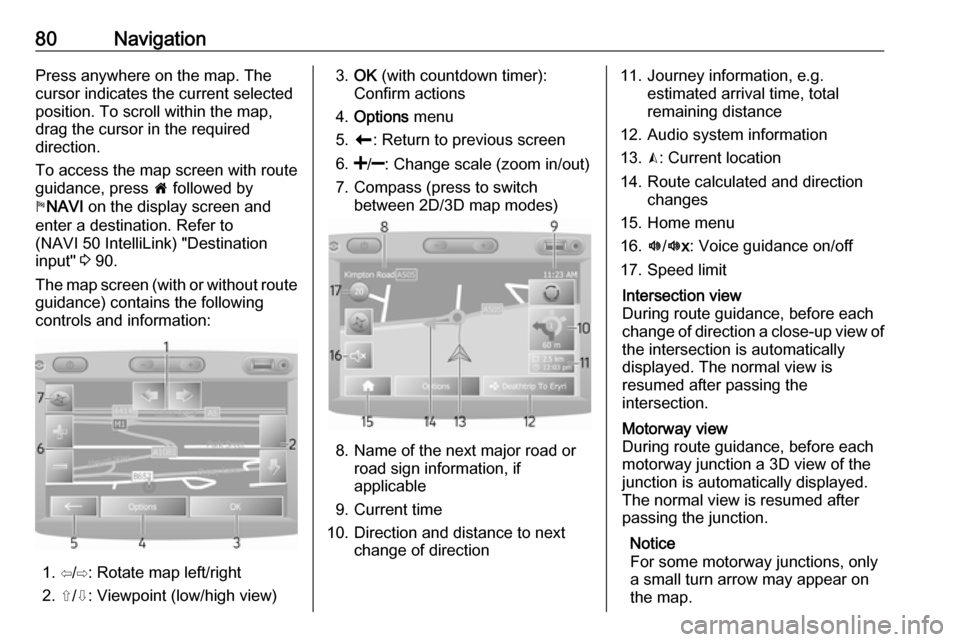
The map screen (with or without route
guidance) contains the following
controls and information:
1. ⇦/⇨: Rotate map left/right
2. ⇧/⇩: Viewpoint (low/high view)
3. OK (with countdown timer):
Confirm actions
4. Options menu
5. r : Return to previous screen
6.
7. Compass (press to switch between 2D/3D map modes)
8. Name of the next major road orroad sign information, if
applicable
9. Current time
10. Direction and distance to next change of direction
11. Journey information, e.g. estimated arrival time, total
remaining distance
12. Audio system information
13. K: Current location
14. Route calculated and direction changes
15. Home menu
16. l/l x: Voice guidance on/off
17. Speed limitIntersection view
During route guidance, before each
change of direction a close-up view of
the intersection is automatically
displayed. The normal view is
resumed after passing the
intersection.Motorway view
During route guidance, before each
motorway junction a 3D view of the
junction is automatically displayed.
The normal view is resumed after
passing the junction.
Notice
For some motorway junctions, only
a small turn arrow may appear on
the map.
Page 82 of 129
82Navigation
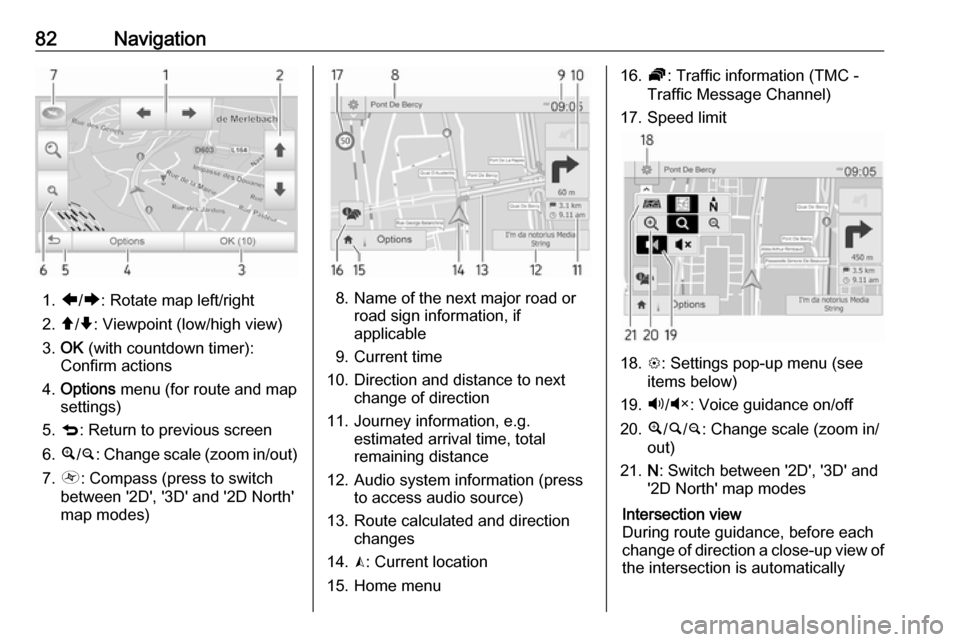
1.ä/å : Rotate map left/right
2. â/ã : Viewpoint (low/high view)
3. OK (with countdown timer):
Confirm actions
4. Options menu (for route and map
settings)
5. q : Return to previous screen
6. ¼/¾ : Change scale (zoom in/out)
7. Ô : Compass (press to switch
between '2D', '3D' and '2D North' map modes)8. Name of the next major road or road sign information, if
applicable
9. Current time
10. Direction and distance to next change of direction
11. Journey information, e.g. estimated arrival time, total
remaining distance
12. Audio system information (press to access audio source)
13. Route calculated and direction changes
14. K: Current location
15. Home menu
16. Ö: Traffic information (TMC -
Traffic Message Channel)
17. Speed limit
18. L: Settings pop-up menu (see
items below)
19. Ù/Ú : Voice guidance on/off
20. ¼/½ /¾ : Change scale (zoom in/
out)
21. N: Switch between '2D', '3D' and
'2D North' map modes
Intersection view
During route guidance, before each
change of direction a close-up view of
the intersection is automatically
Page 85 of 129

Navigation8514. Audio system information
15. K: Current location (cursor)
Route calculated and direction
changes
16. r: Return to previous screenLane images
During route guidance, before each
major road change, a 3D view of the
junction (with a turn arrow and road signs) is automatically displayed. The
normal view is resumed after passing the junction.
To switch off the lane images view,
refer to (NAVI 80 IntelliLink)
"Advanced Settings" in "Setting up
the navigation system" below.Automatic zoom
During route guidance, before each
change of direction a close-up view of
the junction is automatically
displayed. The normal view is
resumed after passing the junction.
To switch off the automatic zoom
feature, refer to (NAVI 80 IntelliLink)
"Advanced Settings" in "Setting up
the navigation system" below.Operating keyboards in the
display
NAVI 50 IntelliLink - Operating keyboards in the display
To move within and to enter
characters in both the alphabetical
and numerical keyboards, make the
appropriate selection by touching the
display screen.
● Select Options to change the
keyboard type (e.g. Qwerty,
ABC).
● Select 1^& to switch to numbers
and symbols.
● Select the drop down menu icon ó to display a list of results for the
current operation (e.g.
destination input).
● Entries can be corrected during input with the k keyboard
character.
● Press r to stop using the
keyboard and return to the
previous screen.Notice
When making an entry, certain
letters and numbers are unavailable
for selection (greyed-out) based on
the information stored in the
Navigation system.
NAVI 80 IntelliLink - Operating
keyboards in the display
To move within and to enter
characters in both the alphabetical and numerical keyboards, make the
appropriate selection by touching the
display screen.
● Entries can be corrected during input with the k keyboard
character.
● Press r to stop using the
keyboard and return to the
previous screen.
Live services
NAVI 80 IntelliLink - Live services
In addition to the free navigation
services (e.g. traffic information, fixed
speed cameras), extra features can be added by subscribing to paid LIVE services.
Page 87 of 129

Navigation87●Alert point warnings (On/Off)
● Pre-alert distance (0 m/200 m/
500 m)
Available depending on version.
Warn when speeding : The digital map
contains speed limits for certain
roads. Audio and/or visual warnings
are given when the vehicle exceeds
the speed limit.
Speed limit always visible : The speed
limit for certain roads is always visible on the screen.
Alert point warnings : When the
vehicle passes an alert point
(permanent or temporary) - i.e. when
entering a potentially hazardous area requiring extra caution - audio and
visual warnings are given.
Pre-alert distance : Select a distance
from which notifications of alert point warnings should be given.
Notice
Warnings may not be available for
some roads and regions.Route settings
Select Route settings to update the
following settings for route
calculation:
● Route planning method (Fast/
Short/ECO)
● Motorways (On/Off)
● Period charge (On/Off)
● Per-use toll (On/Off)
● Ferries (On/Off)
● Carpool/HOV (On/Off)
● Unpaved roads (On/Off)
If necessary, press Options then
Reset to defaults to set each of these
options back to the factory default
settings.
Alternatively, when the map is
displayed (no route guidance is
active), the Route settings menu can
be accessed by pressing Options.
Refer to (NAVI 50 IntelliLink) "Information on the display", "Map
screen" above for further information.Route planning method : Select Fast
to set the fastest route to the
destination entered. This method
assumes the vehicle travels at or near
the speed limit on all roads.
Select Short to set the shortest route
and minimise the total distance to
travel to the destination entered.
Select Eco to set a compromise
between the fastest and the shortest
route planning methods. The route
provided may be shorter than the
fastest method, but not significantly
slower.
Motorways : To include or exclude
motorways from the route plan.
Turn off, e.g. when towing a vehicle, or when motorway driving is not
permitted.
Notice
Follow the regulations of the country in which you are driving.
Period charge : To include or exclude
roads which require a special license
to be purchased for certain periods.
Per-use toll : To include or exclude
roads for which a toll must be paid to
use the road once only.