2015 YAMAHA XT660Z lock
[x] Cancel search: lockPage 23 of 98

INSTRUMENT AND CONTROL FUNCTIONS
3-6
3
EAUS1944
Multi-function display
WARNING
EWA12313
Be sure to stop the vehicle before
making any setting changes to the
multi-function display. Changing
settings while riding can distract the
operator and increase the risk of an
accident.
The multi-function display is equipped
with the following:
a speedometer (which shows the
riding speed)
a digital tachometer (which shows
engine r/min)
an odometer (which shows the to-
tal distance traveled)
two tripmeters (which show the
distance traveled since they were
last set to zero)
a fuel reserve tripmeter (which
shows the distance traveled since
the bottom segment of the fuel
meter started flashing)
a clock
a fuel meter
a self-diagnosis deviceTIPBe sure to turn the key to “ON” be-
fore using the “SELECT” and “RE-
SET” buttons.
For the U.K. only: To switch the
speedometer and odometer/trip-
meter displays between kilome-
ters and miles, push the
“SELECT” and “RESET” buttons
together, then while holding thebuttons, turn the key to “ON”.
When the digits start flashing,
push the “SELECT” button to
change between kilometers and
miles.
Tachometer
The tachometer allows the rider to
monitor the engine speed and keep it
within the ideal power range.
When the key is turned to “ON”, the ta-
chometer needle sweeps once across
the r/min range and then returns to
zero r/min in order to test the electrical
circuit.
1. Tachometer
2. Speedometer
3. Odometer
4. Tripmeter/fuel reserve tripmeter
5. Clock
6. Fuel meter
7. “RESET” button
8. “SELECT” button
1. Tachometer
2. Tachometer red zone
U2BDE1E0.book Page 6 Tuesday, December 16, 2014 5:38 PM
Page 24 of 98

INSTRUMENT AND CONTROL FUNCTIONS
3-7
3
NOTICE
ECA10032
Do not operate the engine in the ta-
chometer red zone.
Red zone: 7500 r/min and aboveTripmeter and tachometer modes
Pushing the “SELECT” button switch-
es the display between the tripmeter
modes “TRIP 1” and “TRIP 2” in the
following order:
TRIP 1 → TRIP 2 → TRIP 1When the fuel amount in the fuel tank
decreases to XT660Z 6.7 L (1.77 US
gal, 1.47 Imp.gal) - XT660ZA 5.8 L
(1.53 US gal, 1.28 Imp.gal), the bottom
segment of the fuel meter starts flash-
ing, and the tripmeter display automat-
ically changes to the fuel reserve
tripmeter mode “F-TRIP” and starts
counting the distance traveled from
that point. In that case, pushing the
“SELECT” button switches the display
between the various tripmeter modes
in the following order:
F-TRIP → TRIP 1 → TRIP 2 → F-TRIP
To reset a tripmeter, select it by push-
ing the “SELECT” button, and then
push the “RESET” button for at least
four seconds. If you do not reset the
fuel reserve tripmeter manually, it re-
sets itself automatically and the display
returns to the prior mode after refueling
and traveling 5 km (3 mi).Clock mode
TIPThe clock always shows the time re-
gardless of the main switch position.To set the clock:1. Push the “SELECT” button for at
least four seconds.
2. When the hour digits start flash-
ing, push the “RESET” button to
set the hours.
3. Push the “SELECT” button, and
the minute digits start flashing.
4. Push the “RESET” button to set
the minutes.
1. Odometer
2. Tripmeter/fuel reserve tripmeter
3. “SELECT” button
4. “RESET” button
1. Clock
2. “SELECT” button
3. “RESET” button
U2BDE1E0.book Page 7 Tuesday, December 16, 2014 5:38 PM
Page 25 of 98

INSTRUMENT AND CONTROL FUNCTIONS
3-8
3 5. Push the “SELECT” button and
then release it to start the clock.
Fuel meter
With the key in the “ON” position, the
fuel meter indicates the amount of fuel
in the fuel tank. When the key is turned
to “ON”, all of the display segments of
the fuel meter appear one after the oth-
er and then disappear in order to test
the electrical circuit. The display seg-
ments of the fuel meter disappear to-
wards “E” (Empty) as the fuel level
decreases. When only one segment is
left near “E” (Empty), refuel as soon as
possible.
TIPThis fuel meter is equipped with a self-
diagnosis system. If the electrical cir-
cuit is defective, all the segments start
flashing. If this occurs, have a Yamaha
dealer check the electrical circuit.Self-diagnosis devices
This model is equipped with a self-di-
agnosis device for various electrical
circuits.
If any engine electrical circuits are de-
fective, the engine trouble warning light
starts flashing. If this occurs, have a
Yamaha dealer check the vehicle.(for ABS models)
If any of the ABS electrical circuits are
defective, the ABS warning light will
come on. If this occurs, have a Yamaha
dealer check the vehicle.
This model is also equipped with a self-
diagnosis device for the immobilizer
system.
If any of the immobilizer system circuits
are defective, the immobilizer system
indicator light starts flashing. If this oc-
curs, have a Yamaha dealer check the
vehicle.
TIPIf the indicator light slowly flashes five
times, and then quickly flashes two
times repeatedly, this error could be
caused by transponder interference. If
this occurs, try the following.1. Use the code re-registering key to
start the engine.
2. If the engine starts, turn it off, and
try starting the engine with the
standard keys.
3. If one or both of the standard keys
do not start the engine, take the
vehicle, the code re-registering
1. Fuel meter
1. Anti-lock Brake System (ABS) warning
light Ž (for ABS models)
2. Immobilizer system indicator light Ž
3. Engine trouble warning light Ž
ABS
U2BDE1E0.book Page 8 Tuesday, December 16, 2014 5:38 PM
Page 29 of 98

INSTRUMENT AND CONTROL FUNCTIONS
3-12
3
EAU51802
ABS (for ABS models)The Yamaha ABS (Anti-lock Brake
System) features a dual electronic con-
trol system, which acts on the front and
rear brakes independently.
Operate the brakes with ABS as you
would conventional brakes. If the ABS
is activated, a pulsating sensation may
be felt at the brake lever or brake ped-
al. In this situation, continue to apply
the brakes and let the ABS work; do
not “pump” the brakes as this will re-
duce braking effectiveness.
WARNING
EWA16051
Always keep a sufficient distance
from the vehicle ahead to match the
riding speed even with ABS.
The ABS performs best with
long braking distances.
On certain surfaces, such as
rough or gravel roads, the brak-
ing distance may be longer with
the ABS than without.The ABS is monitored by an ECU,
which will revert the system to conven-
tional braking if a malfunction occurs.
TIPThe ABS performs a self-diagno-
sis test each time the vehicle first
starts off after the key is turned to
“ON” and the vehicle has traveled
at a speed of 10 km/h (6 mi/h) or
higher. During this test, a “click-
ing” noise can be heard from un-
der the seat, and if the brake lever
or brake pedal is even slightly ap-
plied, a vibration can be felt at the
lever and pedal, but these do not
indicate a malfunction.
This ABS has a test mode which
allows the owner to experience
the pulsation at the brake lever or
brake pedal when the ABS is op-
erating. However, special tools are
required, so please consult your
Yamaha dealer.NOTICE
ECA16121
Keep any type of magnets (including
magnetic pick-up tools, magnetic
screwdrivers, etc.) away from the
front and rear wheel hubs, otherwise
the magnetic rotors equipped in thewheel hubs may be damaged, re-
sulting in improper performance of
the ABS system.
1. Front wheel hub
1. Rear wheel hub
U2BDE1E0.book Page 12 Tuesday, December 16, 2014 5:38 PM
Page 30 of 98

INSTRUMENT AND CONTROL FUNCTIONS
3-13
3
EAU13075
Fuel tank capTo open the fuel tank cap
Open the fuel tank cap lock cover, in-
sert the key into the lock, and then turn
it 1/4 turn clockwise. The lock will be
released and the fuel tank cap can be
opened.
To close the fuel tank cap
1. Push the fuel tank cap into posi-
tion with the key inserted in the
lock.
2. Turn the key counterclockwise to
the original position, remove it,
and then close the lock cover.
TIPThe fuel tank cap cannot be closed un-
less the key is in the lock. In addition,
the key cannot be removed if the cap is
not properly closed and locked.
WARNING
EWA11092
Make sure that the fuel tank cap is
properly closed after filling fuel.
Leaking fuel is a fire hazard.
EAU13222
FuelMake sure there is sufficient gasoline in
the tank.
WARNING
EWA10882
Gasoline and gasoline vapors are
extremely flammable. To avoid fires
and explosions and to reduce the
risk of injury when refueling, follow
these instructions.1. Before refueling, turn off the en-
gine and be sure that no one is sit-
ting on the vehicle. Never refuel
while smoking, or while in the vi-
cinity of sparks, open flames, or
other sources of ignition such as
the pilot lights of water heaters
and clothes dryers.
2. Do not overfill the fuel tank. When
refueling, be sure to insert the
pump nozzle into the fuel tank filler
hole. Stop filling when the fuel
reaches the bottom of the filler
tube. Because fuel expands when
it heats up, heat from the engine or
the sun can cause fuel to spill out
of the fuel tank.
1. Lock cover
2. Open.U2BDE1E0.book Page 13 Tuesday, December 16, 2014 5:38 PM
Page 32 of 98

INSTRUMENT AND CONTROL FUNCTIONS
3-15
3
EAUB1302
Fuel tank breather/overflow
hoseBefore operating the motorcycle:
Check the fuel tank breather/over-
flow hose connection.
Check the fuel tank breather/over-
flow hose for cracks or damage,
and replace it if necessary.
Make sure that the end of the fuel
tank breather/overflow hose is not
blocked, and clean it if necessary.
Make sure that the fuel tank
breather/overflow hose is routed
through the clamp.
EAU13434
Catalytic converterThis model is equipped with a catalytic
converter in the exhaust system.
WARNING
EWA10863
The exhaust system is hot after op-
eration. To prevent a fire hazard or
burns:
Do not park the vehicle near
possible fire hazards such as
grass or other materials that
easily burn.
Park the vehicle in a place
where pedestrians or children
are not likely to touch the hot
exhaust system.
Make sure that the exhaust sys-
tem has cooled down before
doing any maintenance work.
Do not allow the engine to idle
more than a few minutes. Long
idling can cause a build-up of
heat.
NOTICE
ECA10702
Use only unleaded gasoline. The use
of leaded gasoline will cause unre-
pairable damage to the catalytic
converter.
1. Fuel tank breather/overflow hose
2. Hose clampU2BDE1E0.book Page 15 Tuesday, December 16, 2014 5:38 PM
Page 33 of 98

INSTRUMENT AND CONTROL FUNCTIONS
3-16
3
EAU13862
SeatTo remove the seat
Insert the key into the seat lock, turn it
counterclockwise, and then pull the
seat off.
To install the seat
Insert the projections on the front of the
seat into the seat holders, push the
rear of the seat down to lock it in place,
and then remove the key.
TIPMake sure that the seat is properly se-
cured before riding.
EAUM3590
Adjusting the front forkFor XT660Z:
This front fork is equipped with spring
preload adjusting bolts.
WARNING
EWA10181
Always adjust both fork legs equally,
otherwise poor handling and loss of
stability may result.Adjust the spring preload as follows.
To increase the spring preload and
thereby harden the suspension, turn
the adjusting bolt on each fork leg in di-
rection (a). To decrease the spring pre-
load and thereby soften the
suspension, turn the adjusting bolt on
each fork leg in direction (b).TIPUse the 10 hexagon wrench or the 10
open wrench included in the owner's
tool kit to turn the adjusting bolts (ac-
cording to the type of spring preload
adjusting bolt used on your motorcy-
cle).
1. Seat lock
2. Unlock.
1. Projection
2. Seat holder
U2BDE1E0.book Page 16 Tuesday, December 16, 2014 5:38 PM
Page 64 of 98
PERIODIC MAINTENANCE AND ADJUSTMENT
6-20
6
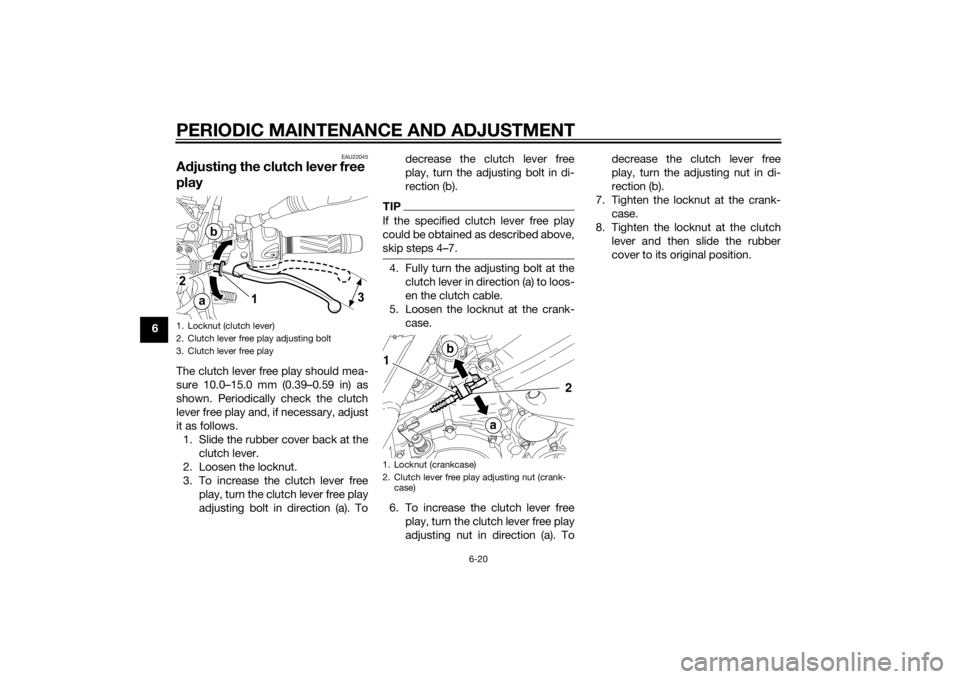
EAU22045
Adjusting the clutch lever free
playThe clutch lever free play should mea-
sure 10.0–15.0 mm (0.39–0.59 in) as
shown. Periodically check the clutch
lever free play and, if necessary, adjust
it as follows.
1. Slide the rubber cover back at the
clutch lever.
2. Loosen the locknut.
3. To increase the clutch lever free
play, turn the clutch lever free play
adjusting bolt in direction (a). Todecrease the clutch lever free
play, turn the adjusting bolt in di-
rection (b).
TIPIf the specified clutch lever free play
could be obtained as described above,
skip steps 4…7.4. Fully turn the adjusting bolt at the
clutch lever in direction (a) to loos-
en the clutch cable.
5. Loosen the locknut at the crank-
case.
6. To increase the clutch lever free
play, turn the clutch lever free play
adjusting nut in direction (a). Todecrease the clutch lever free
play, turn the adjusting nut in di-
rection (b).
7. Tighten the locknut at the crank-
case.
8. Tighten the locknut at the clutch
lever and then slide the rubber
cover to its original position.
1. Locknut (clutch lever)
2. Clutch lever free play adjusting bolt
3. Clutch lever free play
1. Locknut (crankcase)
2. Clutch lever free play adjusting nut (crank-
case)
U2BDE1E0.book Page 20 Tuesday, December 16, 2014 5:38 PM