2015 VOLVO XC70 high beam
[x] Cancel search: high beamPage 176 of 408

04 Driver support
City Safety™
04
174
Press My Car in the center console control
panel and go to
SettingsCar settings
Driver support systemsCity Safety.
Select
Off.
If the engine is switched off, City Safety™ will reactivate when the engine is restarted.
WARNING
The laser sensor emits light when the igni- tion is in mode II or higher, even if City
Safety™ has been switched off.
To switch City Safety™ on again:
• Follow the same procedure as for switch- ing City Safety™ off but select
On.
Limitations
The sensor used by City Safety™ is designed to detect cars and other larger motor vehiclesahead of your vehicle in both daylight anddarkness.
WARNING
The laser sensor has certain limitations and its function may be reduced (or it maynot function at all) in conditions such asheavy rain or snowfall, or by dense fog orthick, blowing dust or snow. Condensa-tion, dirt, ice or snow on the windshieldmay also interfere with the sensor’s func-tion.
Objects such as warning flags hanging from long objects on the roof or accessories suchas auxiliary lights or protective arches on thefront of the vehicle that are higher than thehood may also impede the sensor’s function. Braking distance to the vehicle ahead increa- ses on slippery road surfaces, which mayreduce City Safety’s capacity to avoid a colli-sion. In situations like this, the DSTC system(see page 152) will help provide the best pos-sible braking capacity and stability. City Safety™ emits a laser beam and meas- ures the way in which the light is reflected.Therefore, vehicles or objects with low-reflec-tive surfaces may not be detected. Normally,the license plate and taillight reflectors givethe rear section of a vehicle ahead sufficientreflective surfaces to be detected.
NOTE
•Keep the windshield in front of the laser sensor free of ice, snow, dirt, etc.See page 173.
• Snow or ice on the hood deeper than2 inches (5 cm) may obstruct the sen-sor. Keep the hood free of ice andsnow.
• Do not mount or in any way attachanything on the windshield that couldobstruct the laser sensor.
Troubleshooting
If Windscreen Sensors blocked appears in
the information display, this indicates that the City Safety™ laser sensor is obstructed insome way and cannot detect vehicles aheadof you, which means that the system is notfunctioning. However, this message will not be displayed in all situations in which the sensor isobstructed. For this reason, the driver mustensure that the area of the windshield in frontof the sensor is always kept clean. The following table shows some of the situa- tions that can cause the message to be dis-played and suggested actions.
Page 178 of 408

04 Driver support
City Safety™
04
176
Maximum pulse energy2.64 μJ
Maximum average output45 mW
Pulse length33 ns
Divergence (horizontal × verti- cal)28° × 12°
NOTE
The function of aftermarket laser detectors may be affected by City Safety's laser sen-sor.
WARNING
The laser sensor emits light when the igni- tion is in mode II or higher, even if City
Safety™ has been switched off.
WARNING
Eye injury may occur if any of the following points are not followed: • It is essential that all pertinent instruc- tions be followed when handling laserinstruments. Testing, repairing, remov-ing, adjusting and/or replacing anycomponents in the laser sensor mayonly be done by a trained and qualifiedVolvo service technician.
• Do not remove the laser sensor(including removal of the lenses). Alaser sensor that has been removedbelongs to laser class 3B according tostandard IEC 60825-1. Devices in laserclass 3B present a risk of injury to theeyes.
• The laser sensor’s connector must bedisconnected before the sensor isremoved from the windshield.
• The laser sensor must be mounted inplace on the windshield before con-necting the sensor’s connector.
• Do not view the laser sensor (whichemits spreading, invisible laser beams)with optical instruments from a dis-tance of less than 4 inches (100 mm).Symbols and messages in the display
When City Safety™ automatically applies the brakes, one or more of the symbols in themain instrument panel may illuminate and itsassociated message will be displayed. A text message can be erased by pressing briefly on the
OK button on the turn signal
lever.
Page 288 of 408

07 During your trip
Driving recommendations
07
286
WARNING
The cooling fan may start or continue to operate (for up to 6 minutes) after theengine has been switched off.
•Remove any auxiliary lights from in front of the grille when driving in hot weatherconditions.
• Do not exceed engine speeds of4500 rpm if driving with a trailer in hillyterrain. The oil temperature could becometoo high.
Conserving electrical currentKeep the following in mind to help minimize battery drain:
• When the engine is not running, avoid using ignition mode
II. Many electrical
systems (the audio system, the optionalnavigation system, power windows, etc)will function in ignition modes 0 and I.
These modes reduce drain on the battery.
• Please keep in mind that using systems,accessories, etc., that consume a greatdeal of current when the engine is notrunning could result in the battery beingcompletely drained. Driving or having theengine running for approximately15 minutes will help keep the batterycharged. •
The optional 12-volt socket in the cargoarea provides electrical current even withthe ignition switched off, which drains thebattery.
Before a long distance tripIt is always worthwhile to have your vehicle checked by a trained and qualified Volvoservice technician before driving long dis-tances. Your retailer will also be able to sup-ply you with bulbs, fuses, spark plugs andwiper blades for your use in the event thatproblems occur. As a minimum, the following items should be checked before any long trip:
• Check that engine runs smoothly and that fuel consumption is normal.
• Check for fuel, oil, and fluid leakage.
• Have the transmission oil level checked.
• Check condition of drive belts.
• Check state of the battery's charge.
• Examine tires carefully (the spare tire aswell), and replace those that are worn.Check tire pressures.
• The brakes, front wheel alignment, andsteering gear should be checked by atrained and qualified Volvo service techni-cian only.
• Check all lights, including high beams. •
Reflective warning triangles are legallyrequired in some states/provinces.
• Have a word with a trained and qualifiedVolvo service technician if you intend todrive in countries where it may be difficultto obtain the correct fuel.
• Consider your destination. If you will bedriving through an area where snow or iceare likely to occur, consider snow tires.
Cold weather precautionsIf you wish to check your vehicle before the approach of cold weather, the followingadvice is worth noting:
• Make sure that the engine coolant con- tains 50 percent antifreeze. Any othermixture will reduce freeze protection. Thisgives protection against freezing down to–31 °F (–35 °C). The use of "recycled"antifreeze is not approved by Volvo. Dif-ferent types of antifreeze must not bemixed.
• Volvo recommends using only genuineVolvo antifreeze in your vehicle's radiator.
• Try to keep the fuel tank well filled – thishelps prevent the formation of condensa-tion in the tank. In addition, in extremelycold weather conditions it is worthwhileto add fuel line de-icer before refueling.
• The viscosity of the engine oil is impor-tant. Oil with low viscosity (thinner oil)
Page 354 of 408

09 Maintenance and specifications
Replacing bulbs 09
352
Low beam, Halogen
G021746
1. Remove the headlight housing from thevehicle (see page 350).
2. Remove the cover over the bulbs (see page 351).
3. Unplug the connector from the bulb.
4. Remove the bulb by pressing the holder downward.
5. Press the new bulb into the socket until it snaps into place. It can only be secured in one position.
6. Put the cover back into position and rein- stall the headlight housing.
High beam, Halogen
G021747
1. Remove the headlight housing from thevehicle (see page 350).
2. Remove the cover over the bulbs (see page 351).
3. Remove the bulb by turning it counter- clockwise and pulling it straight out.
4. Remove the connector from the bulb.
5. Press the new bulb into the socket and turn it clockwise to put it in place. It can only be secured in one position.
6. Reinsert the bulb holder into the headlight housing.
7. Put the cover back into position and rein- stall the headlight housing.
Extra high beam 1
G021748
1. Remove the headlight housing from the
vehicle (see page 350).
2. Remove the cover over the bulbs (see page 351).
3. Remove the bulb by pressing the holder downward.
4. Remove the connector from the bulb.
5. Insert a new bulb in the connector until it snaps in place. It can only be inserted in one way.
6. Return the bulb holder into position in the headlight housing.
7. Put the cover back into position and rein- stall the headlight housing.
1Models with optional Active Bending Lights only.
Page 357 of 408
09 Maintenance and specifications
Replacing bulbs09
* Option/accessory, for more information, see Introduction.355
Vanity mirror lighting
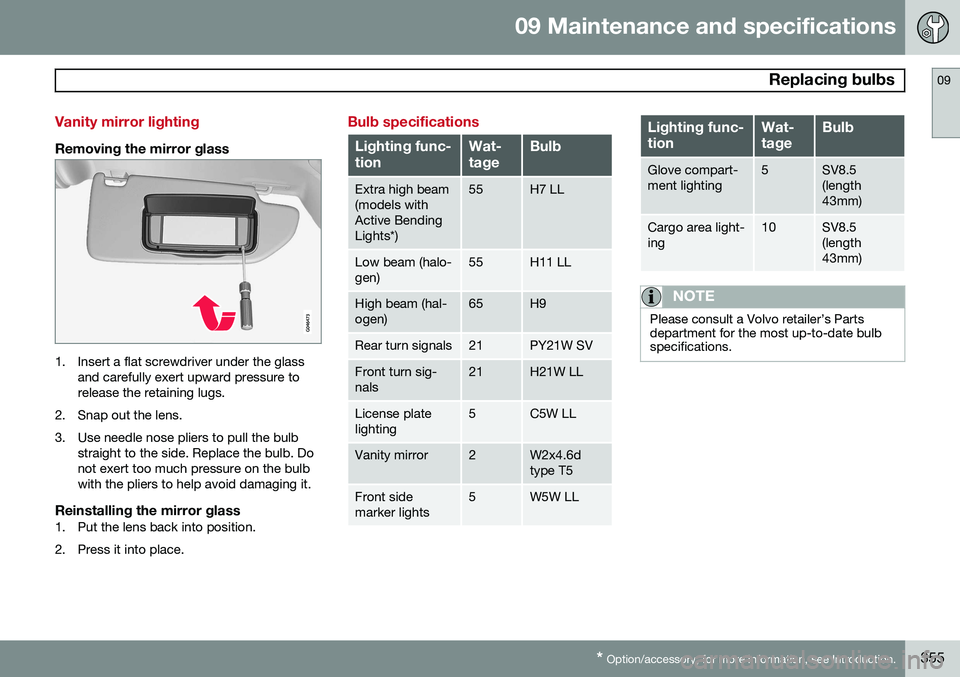
Removing the mirror glass
1. Insert a flat screwdriver under the glass
and carefully exert upward pressure to release the retaining lugs.
2. Snap out the lens.
3. Use needle nose pliers to pull the bulb straight to the side. Replace the bulb. Do not exert too much pressure on the bulbwith the pliers to help avoid damaging it.
Reinstalling the mirror glass1. Put the lens back into position.
2. Press it into place.
Bulb specifications
Lighting func- tionWat- tageBulb
Extra high beam (models withActive BendingLights*)55H7 LL
Low beam (halo- gen)55H11 LL
High beam (hal- ogen)65H9
Rear turn signals21PY21W SV
Front turn sig- nals21H21W LL
License plate lighting5C5W LL
Vanity mirror2W2x4.6d type T5
Front side marker lights5W5W LL
Lighting func- tionWat- tageBulb
Glove compart- ment lighting5SV8.5 (length43mm)
Cargo area light- ing10SV8.5 (length43mm)
NOTE
Please consult a Volvo retailer’s Parts department for the most up-to-date bulbspecifications.
Page 393 of 408

10 Specifications
Overview of information and warning symbols
10
}}
* Option/accessory, for more information, see Introduction.391
Introduction
The symbols in the vehicle's various displays are divided into three main categories:
• Warning symbols
• Indicator symbols
• Information symbols
The following tables list the most commonsymbols, their meaning and the pages in thismanual that provide more detailed informa-tion.
NOTE
Not all of the symbols shown in the follow- ing tables are available in all models or onall markets. Local variations may occur.
Warning symbol
: The red warning symbol illuminates to
indicate a problem related to safety and/or drivability. A message will also appear in themain instruments panel's display.
Information symbol
: The information symbol illuminates
and a text message is displayed to provide the driver with necessary information aboutone of the vehicle's systems.
Symbols in the main instrument panel
Warning symbols in the instrument
panel
SymbolDescriptionPg. no.
Low oil pressure84
Parking brake84
SRS airbags84
Seat belt reminder84
Generator not charging84
Fault in the brake system84
Warning symbol85
Indicator symbols in the instrument panel
SymbolDescriptionPg. no.
Fault in the Active Bend- ing Light (ABL)*system82
Malfunction indicator light82
Anti-lock brake system (ABS)83
Rear fog lights on83
Stability system (DSTC), Hill Descent Control,Trailer Stability Assist*83
Tire pressure monitoring sensor (TPMS)83
Low fuel level83
Information symbol, see text in information dis-play83
High beam indicator80
Page 394 of 408

10 Specifications
Overview of information and warning symbols
10
392* Option/accessory, for more information, see Introduction.
SymbolDescriptionPg. no.
Left turn signal indicator80
Right turn signal indica- tor80
Stability system , Sport mode152
Information symbols in the instrument panel
SymbolDescriptionPg. no.
Adaptive Cruise Control *158
Adaptive Cruise Control *158
Adaptive Cruise Control *158
Adaptive Cruise Control * (Distancealert)158
Radar sensor*165
SymbolDescriptionPg. no.
Camera sensor, laser sensor182175
Collision Warning with Full Auto-brakeand PedestrianDetection*186
Active Bending Lights (ABL)*102
Driver Alert System*188
Driver Alert System*188
Parking brake144
Rain sensor*107
Active High Beams (AHB)*100
Windshield sensor*100
SymbolDescriptionPg. no.
Driver Alert System* (Lane DepartureWarning)190
Driver Alert System* (Lane DepartureWarning)190
Driver Alert System* (Lane DepartureWarning)190
Fuel tank on pas- senger's side of thevehicle290
Information symbols in the center console display
SymbolDescriptionPg. no.
Audio files260
CD folder260
Video files260
Bluetooth-connected cell phone270
Page 398 of 408

11 Index
11
396
1, 2, 3 ...
12-volt sockets........................................ 235
A
ABS (anti-lock brake system).................. 142
Accessory installation warning.................. 13
Active chassis system............................. 232
Active high beams................................... 100Active yaw control................................... 152
Adaptive brake lights............................... 141
Adaptive cruise control.................... 158, 160 queue assist........................................ 163
Airbags disconnecting the front passenger’s
side................................................. 26, 27
front...................................................... 22
inflatable curtain................................... 32
side impact........................................... 30
Air conditioning........................................ 220
Air distribution.......................................... 216
Air distribution table................................. 224
Air vents................................................... 217 All Wheel Drive......................................... 130
Ambient temperature sensor..................... 85
Anti-freeze....................................... 286, 348Anti-lock brake system
warning light......................................... 83
Anti-lock Brake System (ABS)................. 142
Approach lighting.............................. 61, 106Audio system AUX/USB sockets............................... 264 Bluetooth ®
devices............................. 267
Bluetooth ®
hands-free system........... 269
Bluetooth streaming audio................. 267
getting started.................................... 241
HD digital radio................................... 252
introduction......................................... 240
media player....................................... 259
overview.............................................. 240
radio functions.................................... 250SiriusXM ™ satellite radio.................... 254
sound settings.................................... 245
steering wheel keypad........................ 241
voice control....................................... 278
Auto-dim rearview mirror......................... 113
Automatic locking retractor....................... 38 Automatic transmission
Eco (driving function).......................... 134
Geartronic........................................... 128
general description..................... 127, 128
oil........................................................ 389
shiftlock override................................ 130
Axle weight.............................................. 320
B
Battery maintenance....................................... 360
remote key, replacing........................... 65
replacing..................................... 360, 361
specifications...................................... 390
warning symbols................................. 359
Blind Spot Information System (BLIS)..... 200
Bluetooth cell phone connection............. 269
Booster cushion, integrated...................... 51
Booster cushions....................................... 47
Brake lights.............................................. 141Brake system ABS..................................................... 142
Brake pad inspection.......................... 141
checking fluid level............................. 348