2015 VOLVO XC60 ad blue
[x] Cancel search: ad bluePage 240 of 406

06 Infotainment
Introduction
06
238* Option/accessory, for more information, see Introduction.
General information
The infotainment system consists of radio and media player features and also makes itpossible to communicate via a cell phone.The information is displayed on a 7" screen inthe center console. Infotainment functionscan be controlled from the center console orvia the buttons on the steering wheel keypad.On models equipped with the navigation sys-tem*, voice commands can also be used toe.g., set destinations, make calls from a Bluetooth ®
-connected cell phone, etc.
If the infotainment system was on when the ignition was switched off, the most recently used source (
FM1, etc.) will restart the next
time the ignition is put in mode I or higher.
The driver's door must also be closed on vehicles with keyless drive*. The infotainment system can be operated for 15 minutes at a time while the engine isswitched off by pressing the On/Off button. While the engine is being started, the infotain- ment system will be temporarily interruptedand will resume when the engine has started.
NOTE
To help avoid excessive battery drain, remove the remote key from the ignitionslot if the infotainment system is usedwhile the engine is switched off.
Dolby Digital, Dolby Pro Logic
The system is manufactured under license from Dolby Laboratories LicensingCorporation. Dolby Digital, Dolby Pro Logic and the
symbol are trademarks of Dolby Laboratories Licensing Corporation.
Audyssey MultEQ 1
The Audyssey MultEQ system has been used to optimize sound quality to help ensure aworld-class listening experience.
1
Applies only to models with Premium Sound Multimedia.
Page 242 of 406

06 Infotainment
Introduction
06
240* Option/accessory, for more information, see Introduction.
Eject a disc.
OK/MENU – press the thumb wheel on
the steering wheel keypad or this button on the center console to confirm a menu selec-tion or accept an incoming phone call. FromRADIO or MEDIA mode's main view, press-
ing this button displays a menu for theselected source. Arrows at the right of thescreen indicate submenus.
TUNE – turn the thumb wheel on the
steering wheel keypad or this button on the center console to scroll among tracks/folders,radio stations, phone contacts or to navigateamong the alternatives shown on the screen.
EXIT – short press - go upward in the
menu system, cancel a current function, reject an incoming phone call or erase char-acters that have been entered on the screen.Press and hold - to go to the mode's main
view. From a mode’s main view, pressing andholding EXIT takes you to the infotainment
system's main view, which enables you toaccess the same modes as by pressing therespective mode keys on the center console.
# INFO – if more information is available
than is currently displayed on the screen, press # INFO to display the remaining infor-
mation.
Keypad for entering text/numbers, storing
radio stations, etc.
* FAV – this button can be used to store a
shortcut to a commonly used function in AM/FM/SIRIUS/DISC, etc. See the section " *
FAV —storing a shortcut" on page 243 for
information on using this button.
MUTE (models without the navigation sys-
tem*) – press to mute/unmute infotainment system sound.
Voice control (models with the navigation
system*) – press to activate voice commands (for Bluetooth ®
-connected cell phones and
the navigation system*).
Page 244 of 406

06 Infotainment
Introduction
06
242* Option/accessory, for more information, see Introduction.
Mode button (in this example, the MEDIA
button). The number of buttons varies, depending on your vehicle’s specifica-tions). Each mode has four basic views:
Normal view
Shortcut view
Quick scroll view
Menu view
Select a mode by pressing its button (1) ( RADIO, MEDIA, TEL , etc.). Navigate using
TUNE, OK/MENU or EXIT .
Rear control panel with headphone sockets*
Headphones with an impedance of 16 – 32 ohm and sensitivity of 102 dB orhigher are recommended for best soundreproduction.
Volume control (right/left sides)
Scroll/search forward and back
MODE – select: AM, FM1, FM2,HD
Radio2 , SAT1*, SAT2*, Disc, USB, iPod,Bluetooth, AUX and ON/OFF.
Headphones sockets (3.5 mm)
Activating/deactivatingThe control panel is activated by pressing MODE when the infotainment system is
switched on. It is switched off automaticallywhen the infotainment system is switched offor by a long press on MODE.
Scroll/search forward and backPress briefly on (2) to scroll between CDtracks/audio files or to search for the nextavailable radio station.
Limitations
NOTE
•The sound source (AM, FM1, Disc,
etc.) being played through the infotain- ment system's speakers cannot becontrolled from the rear control panel.
• In order to select and play an externaldevice using
MODE, the device must
be connected to the infotainment sys-tem.
2 U.S. models only.
Page 245 of 406

06 Infotainment
Introduction
06
}}
* Option/accessory, for more information, see Introduction.243
* FAV—storing a shortcut
The * FAV button can be used to store fre-
quently used functions, making it possible to start the stored function by simply press-ing * FAV . One favorite (for example,
Equalizer) can be programmed for each of
the following infotainment system functions: In RADIO mode
• AM
• FM1/FM2
• SIRIUS1/SIRIUS2*
In MEDIA mode
• DISC
• USB •
iPod
• Bluetooth
• AUX
Favorites can also be stored for MY CAR,
CAM * and NAV*. See page 209 for a descrip-
tion of the menu system.To program a function on the * FAV button:
1. Select a mode (e.g., RADIO, MEDIA ,
etc.).
2. Select e.g., a waveband (
FM1, etc.) or
source (Disc), etc.
3. Press and hold * FAV until the "favorite"
menu is displayed.
4. Turn TUNE to scroll through the list of
alternatives displayed and press OK/
MENU to confirm (store) your choice.
> The next time the infotainment system mode ( RADIO , MEDIA , etc.) is
selected, a short press on * FAV will
start the stored function.
Basic sound settings
Press SOUND to display the basic sound set-
ting menu (Bass, Treble, etc). Continue
pressing SOUND or OK/MENU to display the
other setting alternatives. Adjust the setting by turning TUNE and save
the new setting by pressing OK/MENU.
Continue pressing SOUND or OK/MENU to
display: •
Surround: 3
Can be set to On or Off.
When switched on, the system will auto- matically select settings for the bestsound quality, which is normally DPLII and
will appear in the display. If the
recording was made using Dolby Digital technology, playback will be provided with this setting and
will appear
in the display. If Surround is switched off, audio will be provided using 3 channelstereo.
•
Bass: Bass level.
•
Treble: Treble level.
•
Fader: Balance between the front and
rear speakers.
•
Balance: Balance between the right and
left speakers.
3 Premium Sound Multimedia only
Page 248 of 406
06 Infotainment
Introduction
06
246
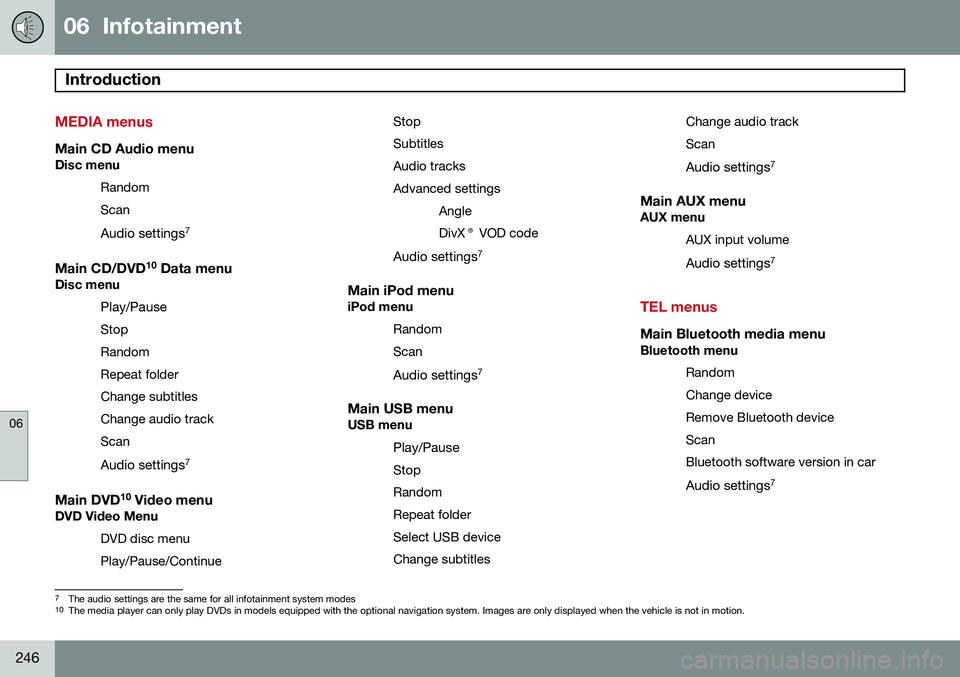
MEDIA menus
Main CD Audio menuDisc menuRandom Scan
Audio settings 7
Main CD/DVD 10
Data menuDisc menu
Play/Pause
StopRandomRepeat folderChange subtitlesChange audio trackScan
Audio settings 7
Main DVD10
Video menuDVD Video Menu
DVD disc menuPlay/Pause/Continue StopSubtitlesAudio tracksAdvanced settings
AngleDivX® VOD code
Audio settings 7
Main iPod menuiPod menu
RandomScan
Audio settings 7
Main USB menuUSB menu
Play/Pause
StopRandomRepeat folderSelect USB deviceChange subtitles Change audio trackScan
Audio settings 7
Main AUX menuAUX menu
AUX input volume
Audio settings 7
TEL menus
Main Bluetooth media menuBluetooth menu
Random Change deviceRemove Bluetooth deviceScanBluetooth software version in car
Audio settings 7
7
The audio settings are the same for all infotainment system modes10
The media player can only play DVDs in models equipped with the optional navigation system. Images are only displayed when the vehicle is not in motion.
Page 249 of 406

06 Infotainment
Introduction
06
247
Main Bluetooth® hands-free menu
Phone menu
Call listsAll calls Missed callsAnswered callsDialled callsCall duration
Phone book SearchNew contactSpeed dialsReceive vCardMemory statusClear phone book
Change phoneRemove Bluetooth devicePhone settings DiscoverableSounds and volumeDownload phone bookBluetooth software version in car Call options
Auto answer Voicemail number
Disconnect phone
Page 267 of 406
06 Infotainment
Bluetooth® media
06
}}
265
Introduction
The vehicle's media player is equipped with Bluetooth ®
and can play streaming audio files
from a Bluetooth ®
device such as a cell
phone or mp3 player. Navigation and control of the device can be done through the vehi-cle's center console control panel or thesteering wheel keypad. On certain externaldevices, it is also possible to change tracksfrom the device.
NOTE
Any Bluetooth cell phones used must sup- port Audio/Video Remote Control Profile(AVRCP) and Advanced Audio DistributionProfile (A2DP). The phone must useAVRCP version 1.3 and A2DP 1.2. If olderversions of these standards are used, cer-tain features (e.g., scan or random) maynot function. Not all cell phones are fully compatible with the vehicle's Bluetooth system. A listof compatible phones is available at youVolvo retailer or at www.volvocars.us.
Menu navigation
Choices can be made in the Bluetoothmenus from the center console control panel or the steering wheel keypad. For additionalinformation about navigating the variousmenus, see page 239. The vehicle's media player can only play audio files through the Bluetooth
®
function.
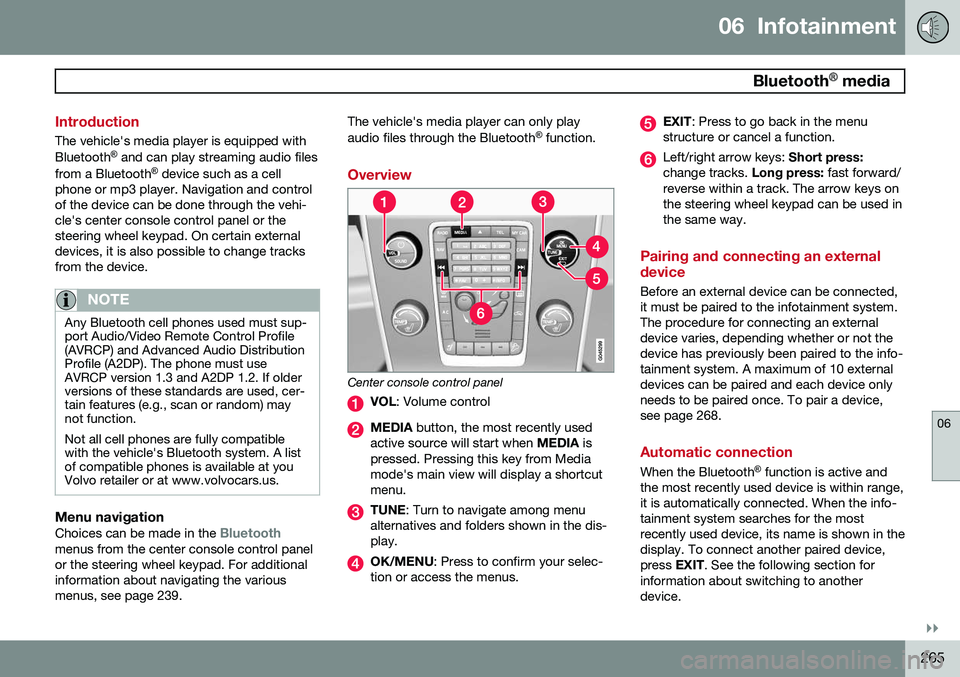
Overview
Center console control panel
VOL : Volume control
MEDIA button, the most recently used
active source will start when MEDIA is
pressed. Pressing this key from Media mode's main view will display a shortcutmenu.
TUNE : Turn to navigate among menu
alternatives and folders shown in the dis- play.
OK/MENU : Press to confirm your selec-
tion or access the menus.
EXIT : Press to go back in the menu
structure or cancel a function.
Left/right arrow keys: Short press:
change tracks. Long press: fast forward/
reverse within a track. The arrow keys on the steering wheel keypad can be used inthe same way.
Pairing and connecting an external device
Before an external device can be connected, it must be paired to the infotainment system.The procedure for connecting an externaldevice varies, depending whether or not thedevice has previously been paired to the info-tainment system. A maximum of 10 externaldevices can be paired and each device onlyneeds to be paired once. To pair a device,see page 268.
Automatic connection
When the Bluetooth ®
function is active and
the most recently used device is within range, it is automatically connected. When the info-tainment system searches for the mostrecently used device, its name is shown in thedisplay. To connect another paired device,press EXIT. See the following section for
information about switching to anotherdevice.
Page 268 of 406

06 Infotainment
Bluetooth® media
06
266
Switching to another device
It is possible to switch among paired Bluetooth ®
devices that are in the vehicle. To
do so: 1. Press MEDIA ,scroll to
Bluetooth and
press the thumb wheel on the steering wheel keypad or OK/MENU.
2. Be sure the Bluetooth ®
device is discov-
erable (refer to its user manual if neces-sary).
3. Press the thumb wheel or OK/MENU.
4. Turn the thumb wheel or TUNE to
Change device and confirm by pressing
the thumb wheel or OK/MENU.
> After several seconds, the names of any paired external devices will be dis- played.
5. Scroll to the device to be connected and press the thumb wheel or OK/MENU.
> The device will be connected.
Audio files can now be selected using the
/ buttons in the center console or on
the steering wheel keypad.
Disconnecting an external device
The external device is automatically discon- nected from the infotainment system if it ismoved out of range.
Removing a paired device
1. In Bluetooth mode, press OK/MENU.
2. Scroll to
Remove Bluetooth device and
press the thumb wheel or OK/MENU.
3. Scroll to the device to be removed by turning the thumb wheel or TUNE and
confirm by pressing the thumb wheel or OK/MENU .
> A question asking if you would like to remove the device will be displayed.
4. Press the thumb wheel or OK/MENU to
confirm or EXIT to cancel.
Random 1
This function plays the audio files on the external device in random order (shuffle). Thisfunction can be activated/deactivated under:
Bluetooth menuRandom
Press the / buttons on the center
console or steering wheel keypad to change tracks.
Scanning audio files on an external device 1
This function plays the first ten seconds of each audio file. This function can be acti- vated/deactivated under:
Bluetooth menuScan. Scanning can be canceled by pressing
EXIT.
Bluetooth® version information
This feature offers information about the Bluetooth ®
version installed in the vehicle's
infotainment system. This information can be found under
Bluetooth menuBluetooth
software version in car.
1 Function is not supported on all cell phones.