2015 VOLVO V60 center console
[x] Cancel search: center consolePage 284 of 414

06 Infotainment
Bluetooth® hands-free connection
06
282
ButtonFunction
+ 0 p w
# *
Searching for contacts
Searching for contacts using the text wheel
List of characters
Switch between character entry modes (see the following table)
Phone book (list of contacts)
To search for or edit a contact in phone mode, go to
Phone menuPhone bookSearch. 1. Turn
TUNE to the desired letter and press
OK/MENU to confirm. The number/letter
keys on the center console can also be used.
2. Continue to the next letter, etc. The results of the search will be displayed inthe phone book (3).
3. To switch from letter entry mode to the entry mode for numbers or special char-acters, or to go to the phone book, turnTUNE to one of the selections (see the
explanation in the following table) in thelist for switching character entry mode (2)and press OK/MENU .
Character entry modes
123/ABCToggle between letters and numbers by pressing OK/
MENU .
MoreSwitch to special characters by pressing OK/MENU.
This leads to the phone book (3). Turn TUNE to select a con-
tact and press OK/MENU to
display the contact's informa-tion.
Press EXIT briefly to erase a single character.
Press and hold EXIT to erase all of the char-
acters that have been entered. If a number button on the center console is pressed while the text wheel is displayed, alist of characters (1) will be displayed. Brieflypress the button once to enter its first letter,twice to enter the second letter, etc. Continueto press the button to display other charac-ters. Continue with the next character, etc. To enter a number, press and hold the but- ton.
Adding a new contact
Enter the name of a new contact
Switch between character entry modes (see the following table)
Character entry field
Page 285 of 414

06 Infotainment
Bluetooth® hands-free connection
06
}}
283
New contacts can be added in phone mode in
Phone menuPhone bookNew
contact.
1. When
Name is highlighted, press OK/
MENU to go to the character entry mode
(see the illustration).
2. Turn TUNE to the desired letter and press
OK/MENU to confirm. The number/letter
keys on the center console can also be used.
3. Continue to the next letter, etc. The name entered will be displayed in the characterentry field (2).
4. To switch from letter entry mode to the entry mode for numbers or special char-acters, or to toggle between upper andlower case letters, etc., turn TUNE to one
of the selections (see the explanation inthe following table) in the list (1) and pressOK/MENU .
When you have finished entering the name, select
OK in the list in the display (1) and
press OK/MENU . Continue by entering the
phone number in the same way. When you have entered the phone number, press OK/MENU and select a tag for the
number (
Mobile phone, Home, Work orGeneral). Press OK/MENU to confirm. When all of the contact's information has been entered, select
Save contact in the
menu to save.
123/AB
CToggle between letters and numbers by pressing OK/
MENU .
MoreSwitch to special characters by pressing OK/MENU.
OKSave and return to Add con-
tact by pressing OK/MENU.
Toggle between upper and lower case letters by pressingOK/MENU.
Press OK/MENU and the cur-
sor will move to the character entry field (2) at the top of thedisplay. The cursor can now bemoved by turning TUNE to a
position where new characterscan be entered or deleted bypressing EXIT. In order to add
characters, return to text entrymode by pressing OK/MENU.
Speed dialSpeed dial numbers can be added in phone mode in
Phone menuPhone bookSpeed dial.
To use speed dial to make a call in phone mode, press a button on the center consolekeypad followed by OK/MENU. If a contact
has not been saved on the speed dial numberused, you will be prompted to save a contacton the number selected.
Accept vCardsvCards from other cell phones can be addedto the infotainment system's phone book. Toenable this feature, put the infotainment sys- tem in discoverable mode for Bluetooth ®
. The
feature is activated in
Phone menuPhone
book
Receive vCard.
Memory statusIn phone mode, the memory status of the infotainment system's phone book and theconnected cell phone's phone book can be seen in
Phone menuPhone bookMemory status.
Clearing the phone bookIn phone mode, all entries in the infotainment system's phone book can be cleared in
Page 288 of 414
06 Infotainment
Cell phone voice control*
06
286* Option/accessory, for more information, see Introduction.
Getting started
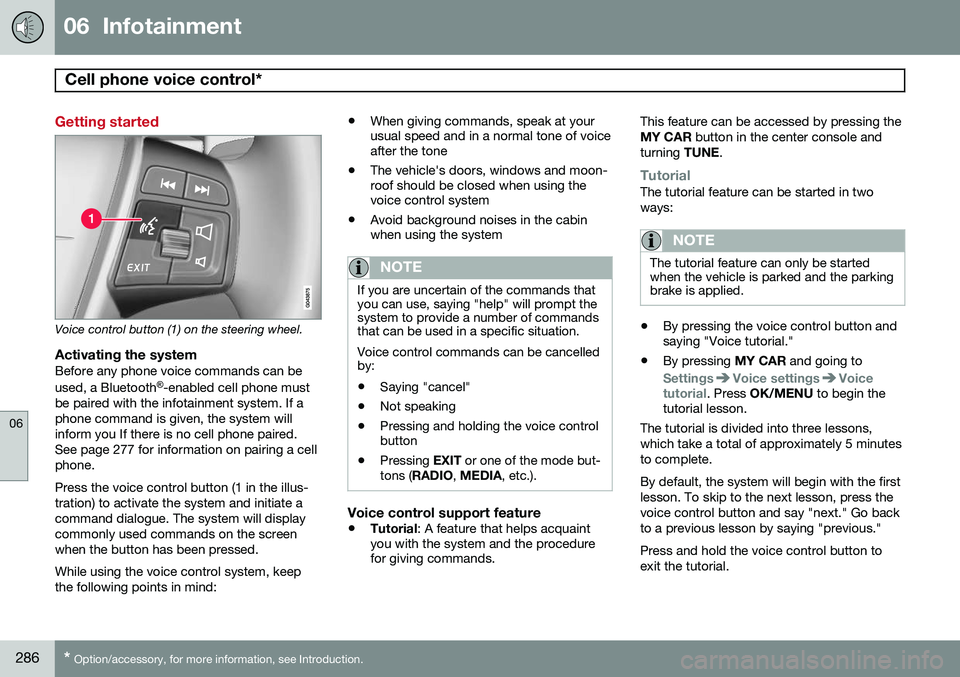
Voice control button (1) on the steering wheel.
Activating the systemBefore any phone voice commands can be used, a Bluetooth ®
-enabled cell phone must
be paired with the infotainment system. If a phone command is given, the system willinform you If there is no cell phone paired.See page 277 for information on pairing a cellphone. Press the voice control button (1 in the illus- tration) to activate the system and initiate acommand dialogue. The system will displaycommonly used commands on the screenwhen the button has been pressed. While using the voice control system, keep the following points in mind: •
When giving commands, speak at your usual speed and in a normal tone of voiceafter the tone
• The vehicle's doors, windows and moon-roof should be closed when using thevoice control system
• Avoid background noises in the cabinwhen using the system
NOTE
If you are uncertain of the commands that you can use, saying "help" will prompt thesystem to provide a number of commandsthat can be used in a specific situation. Voice control commands can be cancelled by:
• Saying "cancel"
• Not speaking
• Pressing and holding the voice control button
• Pressing
EXIT or one of the mode but-
tons ( RADIO , MEDIA , etc.).
Voice control support feature
•Tutorial
: A feature that helps acquaint
you with the system and the procedure for giving commands. This feature can be accessed by pressing the MY CAR
button in the center console and
turning TUNE.
TutorialThe tutorial feature can be started in two ways:
NOTE
The tutorial feature can only be started when the vehicle is parked and the parkingbrake is applied.
•By pressing the voice control button and saying "Voice tutorial."
• By pressing
MY CAR and going to
SettingsVoice settingsVoice
tutorial. Press OK/MENU to begin the
tutorial lesson.
The tutorial is divided into three lessons, which take a total of approximately 5 minutesto complete. By default, the system will begin with the first lesson. To skip to the next lesson, press thevoice control button and say "next." Go backto a previous lesson by saying "previous." Press and hold the voice control button to exit the tutorial.
Page 332 of 414
08 Wheels and tires
Tire Sealing System*
08
330* Option/accessory, for more information, see Introduction.
Location
IntroductionThe vehicle is equipped with a tire sealing system that enables you to temporarily seal ahole in the tread surface and re-inflate a flattire, or to adjust a tire’s inflation pressure. The system consists of an air compressor, a container for the sealing compound, wiring toconnect the system to the vehicle’s electricalsystem via one of the 12-volt sockets, and ahose used to connect the system to the tire’sinflation valve.
NOTE
The tire sealing system's compressor has been tested and approved by Volvo.
The 12-volt sockets are located in the front tunnel console, on the rear side of the centerconsole in the rear seat and in the cargoarea*, see page 244.
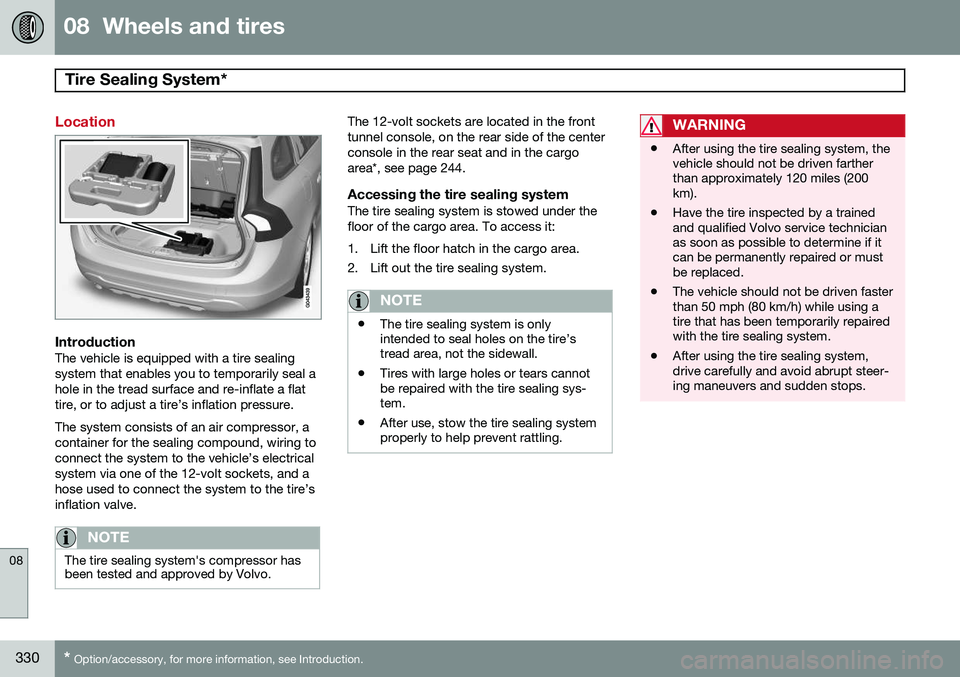
Accessing the tire sealing systemThe tire sealing system is stowed under thefloor of the cargo area. To access it:
1. Lift the floor hatch in the cargo area.
2. Lift out the tire sealing system.
NOTE
• The tire sealing system is only intended to seal holes on the tire’stread area, not the sidewall.
• Tires with large holes or tears cannotbe repaired with the tire sealing sys-tem.
• After use, stow the tire sealing systemproperly to help prevent rattling.
WARNING
• After using the tire sealing system, the vehicle should not be driven fartherthan approximately 120 miles (200km).
• Have the tire inspected by a trainedand qualified Volvo service technicianas soon as possible to determine if itcan be permanently repaired or mustbe replaced.
• The vehicle should not be driven fasterthan 50 mph (80 km/h) while using atire that has been temporarily repairedwith the tire sealing system.
• After using the tire sealing system,drive carefully and avoid abrupt steer-ing maneuvers and sudden stops.
Page 400 of 414

10 Specifications
Overview of information and warning symbols
10
398* Option/accessory, for more information, see Introduction.
SymbolDescriptionPg. no.
Left turn signal indicator82
Right turn signal indica- tor82
Stability system , Sport mode152
Information symbols in the instrument panel
SymbolDescriptionPg. no.
Adaptive Cruise Control *159
Adaptive Cruise Control *159
Adaptive Cruise Control *159
Adaptive Cruise Control * (Distancealert)159
Radar sensor*166
SymbolDescriptionPg. no.
Camera sensor, laser sensor183176
Collision Warning with Full Auto-brakeand PedestrianDetection*187
Active Bending Lights (ABL)*104
Driver Alert System*189
Driver Alert System*189
Parking brake146
Rain sensor*109
Active High Beams (AHB)*102
Windshield sensor*102
SymbolDescriptionPg. no.
Driver Alert System* (Lane DepartureWarning/LaneKeeping Aid)191
Driver Alert System* (Lane DepartureWarning/LaneKeeping Aid)191
Driver Alert System* (Lane DepartureWarning/LaneKeeping Aid)191
Fuel tank on pas- senger's side of thevehicle298
Information symbols in the center console display
SymbolDescriptionPg. no.
Audio files267
CD folder267
Video files267
Page 405 of 414

11 Index
11
403
emergency brake assistance.............. 144
fluid..................................................... 394
general information............................. 143
Bulbs cargo area lighting.............................. 360
headlights........................... 356, 357, 358
introduction......................................... 356
license plate lights.............................. 360
specifications...................................... 361
C
Camera, Park Assist................................ 202
Capacity weight....................................... 325Cargo areachanging bulbs................................... 360
steel grid............................................. 304
Cargo area cover..................................... 304
Cargo area net......................................... 305
Catalytic converter................................... 299
Cell phone, hands-free connection......... 276
Cell phone voice control.......................... 285
Central locking system, introduction......... 58
Chains...................................................... 328 Check Engine warning light....................... 84Child restraints
recalls and registration......................... 40
Child restraint systems.............................. 41 booster cushions.................................. 48
convertible seats.................................. 45
infant seats........................................... 43
ISOFIX/LATCH anchors........................ 49
top tether anchors................................ 51
Child safety................................................ 38 booster cushions.................................. 48
child restraint systems.......................... 41
convertible seats.................................. 45
infant seats........................................... 43
Child safety locks...................................... 55
City safety................................................ 173
Climate system........................................ 231 air distribution............................. 226, 233
air vents.............................................. 227
Interior Air Quality System.................. 226
introduction......................................... 225
passenger compartment filter............ 225
refrigerant........................................... 225
Clock, setting............................................. 88
Cold weather driving................................ 294
Collision warning system................. 179, 180 Compass in rearview mirror..................... 117
Conserving electrical current................... 294
Controls, center console.......................... 249
Convertible seats....................................... 45
Coolant............................................ 354, 394
Cooling system, general information....... 293
Corner traction control............................. 152
Courtesy lighting...................................... 107
Crash event data......................................... 9
Crash mode............................................... 36
Cruise control.................................. 157, 158
adaptive.............................................. 159
Curb weight............................................. 325
Current, conserving................................. 294
Cyclist detection...................................... 179
D
Daytime running lights............................. 101
Defroster.................................................. 231
Detachable key blade.......................... 64, 67Disconnecting the front passenger’s air-
bag....................................................... 27, 28