2015 VOLVO V60 light
[x] Cancel search: lightPage 67 of 414

02 Locks and alarm
Remote key and key blade
02
}}
* Option/accessory, for more information, see Introduction.65
Unlocking the driver's door with the detached key blade
Driver's door keyhole cover
If the remote key/PCC* does not function nor- mally (weak battery, etc.), the vehicle can beunlocked with the detachable key blade.
1. Remove the key blade from the remote key/PCC (see the previous section, "Removing the key blade" on page 64 forinstructions).
2. Press the key blade approx. 0.5 in. (1 cm) straight up in the hole on the underside ofthe keyhole cover.
> The cover will come off due to thepressure exerted when the key blade is pushed upward. 3. Insert the key blade as far as possible in
the driver's door lock. Turn the key bladeto unlock the driver's door. This will trig-
ger the alarm .
4. To turn off the alarm , insert the remote
key in the ignition slot. This also appliesto vehicles equipped with the optionalkeyless drive.
5. Press the cover back into place after the door has been unlocked.
Replacing batteries in the remote key/PCC
The battery/batteries in the remote key/PCC should be replaced if: •The information symbol lights up and a text appears in the information display.
and/or
• the vehicle's locks repeatedly do notreact when a button on the remotekey/PCC is pressed within approximately60 ft (20 m) from the vehicle.
Battery type CR 2430, 3 V (one battery in the remote key, two batteries in the PCC)
Page 74 of 414
02 Locks and alarm
Locks
02
72
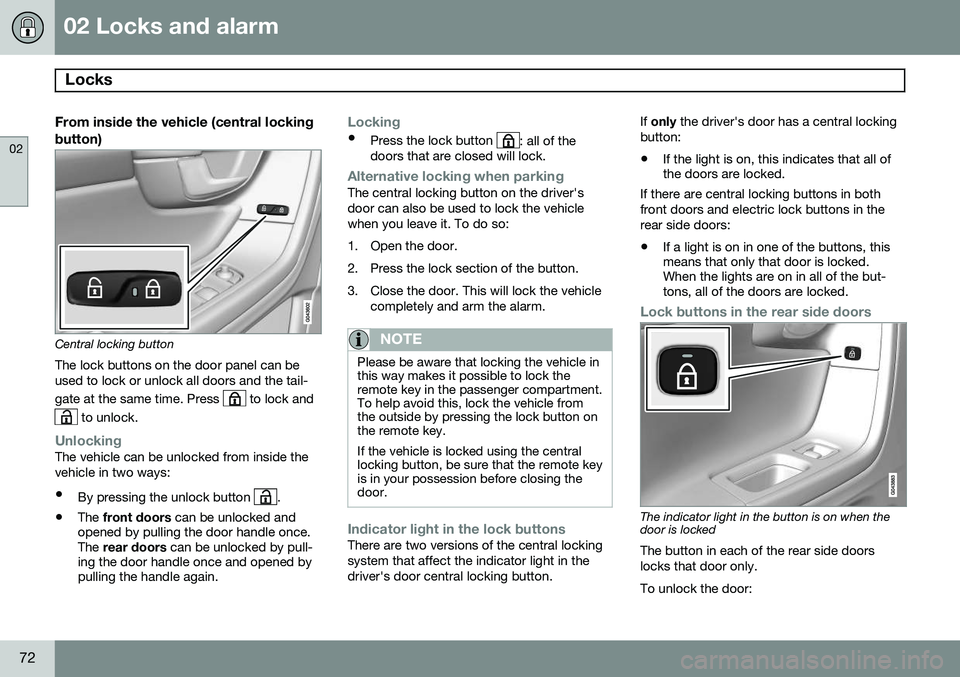
From inside the vehicle (central lockingbutton)
Central locking button
The lock buttons on the door panel can be used to lock or unlock all doors and the tail- gate at the same time. Press
to lock and
to unlock.
UnlockingThe vehicle can be unlocked from inside the vehicle in two ways:
• By pressing the unlock button
.
• The
front doors can be unlocked and
opened by pulling the door handle once. The rear doors can be unlocked by pull-
ing the door handle once and opened bypulling the handle again.
Locking
• Press the lock button : all of the
doors that are closed will lock.
Alternative locking when parkingThe central locking button on the driver's door can also be used to lock the vehiclewhen you leave it. To do so:
1. Open the door.
2. Press the lock section of the button.
3. Close the door. This will lock the vehicle
completely and arm the alarm.
NOTE
Please be aware that locking the vehicle in this way makes it possible to lock theremote key in the passenger compartment.To help avoid this, lock the vehicle fromthe outside by pressing the lock button onthe remote key. If the vehicle is locked using the central locking button, be sure that the remote keyis in your possession before closing thedoor.
Indicator light in the lock buttonsThere are two versions of the central locking system that affect the indicator light in thedriver's door central locking button. If
only the driver's door has a central locking
button:
• If the light is on, this indicates that all of the doors are locked.
If there are central locking buttons in both
front doors and electric lock buttons in the rear side doors: • If a light is on in one of the buttons, this means that only that door is locked.When the lights are on in all of the but-tons, all of the doors are locked.
Lock buttons in the rear side doors
The indicator light in the button is on when the door is locked
The button in each of the rear side doors locks that door only. To unlock the door:
Page 75 of 414

02 Locks and alarm
Locks
02
}}
73
•
The door can be unlocked by pulling the door handle once and opened by pullingthe handle again.
Automatic relockingIf the doors are unlocked, the locks will auto- matically reengage (re-lock) and the alarm willrearm after 2 minutes unless a door or thetailgate has been opened.
Automatic lockingWhen the vehicle starts to move, the doorsand tailgate can be locked automatically. Thisfeature can be turned on or off by pressing MY CAR
and going to
Car settingsLock
settings
Automatic door locking. See
page 219 for a description of the menu sys- tem.
Glove compartment
The glove compartment can only be locked and unlocked using the detachable key bladein the remote key. See page 64 for informa-tion on removing the key blade from theremote key.
Insert the key blade in the glove compart- ment lock.
Turn the key blade 90 degrees clockwise.
Remove the key blade from the lock.
Locking/unlocking the tailgate
Tailgate unlock button on the remote key
Unlocking the tailgate with the remote
key
–Press the tailgate unlock button on the remote key to unlock (but not open) thetailgate. See also page 61.
> The alarm indicator light on the dash- board will go out to indicate that the alarm is not monitoring the entire vehi-cle.
Page 76 of 414

02 Locks and alarm
Locks
02
74
NOTE
•If the doors are locked while the tail- gate is open, the tailgate will remainunlocked until the vehicle is relockedby pressing the Lock button on theremote key.
• On keyless drive vehicles, the gearselector must be in the Park (
P) posi-
tion, all doors and the tailgate must beclosed and the ignition must beswitched off before the vehicle can belocked.
Unlocking the tailgate from the driver's seat
–Press the button on the lighting panel (1) to unlock (but not open) the tailgate.
NOTE
The taillights will illuminate automatically for a short period when the tailgate hasbeen opened.
Locking the tailgate with the remote key
Press the lock button () on the remote.
See also page 61 The alarm indicator on the dashboard will begin flashing to show that the vehicle islocked and that the alarm has been armed.
Opening the tailgate manually
The tailgate is held closed by an electronic locking mechanism. To open: 1. Press lightly on the wider rubberized plate
under the handle to release the lock.
2. Lift the handle to open the tailgate.
CAUTION
• When pressing the rubberized plate, only light pressure is necessary torelease the tailgate's electronic lockingmechanism.
• When opening the tailgate, pull it upusing the handle. Too much pressureon the rubberized plate can damageits electrical connections.
Page 77 of 414

02 Locks and alarm
Alarm
02
}}
75
The alarm system
The alarm is automatically armed whenever the vehicle is locked with the remote key oroptional Personal Car Communicator. When armed, the alarm continuously moni- tors a number of points on the vehicle. Thefollowing conditions will trigger the alarm:• The hood is forced open.
• The tailgate is forced open.
• A door is forced open.
• The ignition slot is tampered with.
• An attempt is made to start the vehicle with a non-approved key (a key notcoded to the car's ignition).
• The battery is disconnected (while thealarm is armed).
• The siren is disconnected when the alarmis disarmed.
A message will appear in the information dis- play if a fault should occur in the alarm sys-tem. Contact a trained and qualified Volvoservice technician.
NOTE
Do not attempt to repair any of the compo- nents in the alarm system yourself. Thiscould affect the insurance policy on thevehicle.
The alarm indicator light
The status of the alarm system is indicated by the red indicator light on the dashboard (seeillustration):
• Indicator light off: the alarm is not armed
• The indicator light flashes at one-second intervals: the alarm is armed
• The indicator light flashes rapidly beforethe remote key is inserted in the ignitionslot and the ignition is put in mode
I: the
alarm has been triggered.
Arming the alarm
–Press the Lock button on the remote key. One long flash of the turn signals will con-firm that the alarm is armed.
Alarm confirmation settings can be changed in MY CAR , under
Car settingsLock
settings
Keyless entry. See page 219 for
a description of the menu system.
USA FCC ID: MAYDA 5823(3) This device complies with part 15 of the FCC rules. Operation is subject to the followingconditions: (1) This device may not causeharmful interference, and (2) this device mustaccept any interference received, includinginterference that may cause undesired opera-tion. Canada IC: 4405A-DA 5823(3)
This device is subject to the following condi- tions: (1) this device may not cause interfer-ence, and (2) this device must accept anyinterference, including interference that maycause undesired operation of the device.
Page 80 of 414

78* Option/accessory, for more information, see Introduction. Instruments and controls........................................................................ 80 Ignition modes........................................................................................ 90Seats....................................................................................................... 92Steering wheel........................................................................................ 99Lighting................................................................................................. 101
Wipers and washers.............................................................................. 109Windows............................................................................................... 112Mirrors................................................................................................... 114
Digial compass*.................................................................................... 117
Power moonroof* ................................................................................. 119 HomeLink
®
Wireless Control System*.................................................. 121
Starting the engine................................................................................ 124 Transmission......................................................................................... 129
Eco Guide* and Power Meter*.............................................................. 134Eco* ...................................................................................................... 136Start/Stop* ........................................................................................... 139Brakes................................................................................................... 143Parking brake........................................................................................ 146
Page 83 of 414

03 Your driving environment
Instruments and controls
03
}}
* Option/accessory, for more information, see Introduction.81
FunctionPage
Controls for menus and messages, turn signals,high/low beams, tripcomputer219, 106,101, 234
Paddles for manually shifting gears*131
Cruise control157
Horn, airbag99, 23
Main instrument panel81
Infotainment system/ Bluetooth hands-freecontrols248, 276
START/STOP ENGINE button90
Ignition slot90
Display for infotainment system functions andmenus248, 217
Door handle-
In-door control panels (power windows, mirrors,central locking button)112, 114, 71
FunctionPage
Hazard warning flashers106
Controls for the infotain- ment system and menus219, 248, 228
Climate system controls228
Gear selector129
Controls for active chas- sis (Four-C)*241
Wipers and washers109, 110
Steering wheel adjust- ment99
Hood opening control350
Parking brake146
Power seat* adjustment controls92
Lighting panel, buttons for opening fuel fillerdoor and unlocking thetailgate101, 298, 73
Instrument panel information displays
Information displays: analog instrument panel
Information displays: digital instrument panel* These displays show information on some of the vehicle's functions, such as cruise con-
Page 84 of 414

03 Your driving environment
Instruments and controls
03
82* Option/accessory, for more information, see Introduction.
trol, the trip computer and messages. The information is shown with text and symbols. More detailed information can be found in the descriptions of the functions that use theinformation displays.
Gauges and indicators: analog instrument panel
Fuel gauge: When the indicator shows one white marking 1
, a yellow indicator
light will illuminate to indicate a low fuel level. See also 234 and 296 for addi-tional information.
Eco meter: Indicates how economically the vehicle is being driven. The higher the needle moves on the scale, the moreeconomically the vehicle is being driven.
Speedometer
Tachometer: Shows engine speed in thousands of revolutions per minute (rpm)
Gear indicator: Shows the currently selected gear
Gauges and indicators: digital instrument panel*
Different themes (display alternatives) can be selected for the digital instrument panel: •
Elegance
• Eco
• Performance
To change themes, press the OK button on
the left steering wheel lever and use the thumb wheel to scroll to
Themes. Press OK
to confirm your choice.
Theme Elegance : gauges and indicators
Fuel gauge. When the indicator shows one white marking, a yellow indicator lightwill illuminate to indicate a low fuel level.See also 234 and 296 for additionalinformation.
Coolant temperature gauge
Speedometer
Tachometer (engine speed in thousands of revolutions per minute (rpm))
Gear indicator: Shows the currently selected gear
1
When the message Distance to empty fuel tank: shows "----", the marker turns red