2015 VOLVO S80 reset
[x] Cancel search: resetPage 117 of 392

03 Your driving environment
HomeLink®
Wireless Control System*
03
* Option/accessory, for more information, see Introduction.115
both the HomeLink and hand-held trans- mitter buttons.
Proceed with “Programming” step 3 to com-
plete.
Using HomeLink
To operate, simply press and hold the pro- grammed HomeLink button until the traineddevice begins to operate (this may take sev-eral seconds). Activation will now occur forthe trained device (i.e., garage door opener,gate operator, security system, entry doorlock, home/office lighting, etc.). For conven-ience, the hand-held transmitter of the devicemay also be used at any time. In the eventthat there are still programming difficulties orquestions, contact HomeLink at:www.homelink.com or by phoning the hotlineat 1–800–355–3515.
NOTE
If the ignition is switched off, HomeLink will function for 30 minutes after the driv-er's door has been opened.
Resetting HomeLink Buttons
Use the following procedure to reset (erase programming) from the three HomeLink but-tons (individual buttons cannot be reset butcan be “reprogrammed” as outlined in the fol-lowing section):
1. Press and hold the two outer HomeLink buttons until the indicator light begins to flash.
2. Release both buttons. > HomeLink is now in the training (orlearning) mode and can be pro-grammed at any time beginning with“Programming” - step 1.
Reprogramming a Single HomeLink Button
To program a device to HomeLink using a HomeLink button previously trained, followthese steps:
1. Press and hold the desired HomeLink button. DO NOT release the button.
2. The indicator light will begin to flash after 20 seconds. Without releasing the Home- Link button, proceed with “Programming”- step 1. For questions or comments, contact Home-Link at: www.homelink.com or phone 1–800–355–3515. This device complies with FCC rules part 15 and Industry Canada (IC) RSS-210. Operationis subject to the following two conditions: (1)This device may not cause harmful interfer-ence, and (2) This device must accept anyinterference that may be received includinginterference that may cause undesired opera-tion.
NOTE
The transmitter has been tested and com- plies with FCC and IC rules. Changes ormodifications not expressly approved bythe party responsible for compliance couldvoid the user’s authority to operate the device.
2
2
The term “IC:” before the certification/registration number only signifies that Industry Canada technical specifications were met.
Page 130 of 392

03 Your driving environment
Eco*
03
128* Option/accessory, for more information, see Introduction.
Introduction
Eco is a function 1
developed by Volvo to give
the driver the opportunity to actively drive more economically and to help reduce fuelconsumption.
When Eco is activated, thefollowing functions are modi-fied:
•The automatic transmission's shifting points
• The engine management system andaccelerator pedal response
• Stop/stop function (see page 131): theengine can auto-stop before the vehiclehas come to a full stop
• Eco Coast functionality is activated:engine braking is disabled
• Climate system settings: certain functions(e.g., air conditioning) will be temporarilyreduced or deactivated
NOTE
When Eco is activated, several climate system parameters are changed and thefunction of certain current-consuming sys-tems will be reduced. Pressing the
AC button will reset the cli-
mate system but at a reduced level.
Function
ECO On/Off button in the center console
ECO symbol in the instrument panel
When the engine is switched off, ECO is deactivated and must be reactivated each time the engine is started (with the exceptionof certain engines). The
ECO symbol will be displayed in the
instrument panel and the indicator light in the ECO button will be on when Eco is activated.
Eco on or offWhen ECO is deactivated, the ECO symbol will not be
displayed in the instrument panel and the indicator lightin the ECO button will be off.
The function will remaindeactivated until the buttonis pressed again.
Eco CoastEco Coast is an integral part of the Eco func- tion and essentially deactivates engine brak-ing, allowing the vehicle to roll freely.
NOTE
To function optimally, Eco Coast should primarily be used when the vehicle cancoast as far as possible.
When the driver releases the accelerator pedal, the transmission is automatically dis-
1 Option on models equipped with certain 4-cylinder engines
Page 150 of 392

04 Driver support
Cruise control
04
148
Operation
Steering wheel-mounted controls and display
Standby mode
Resume set speed
Deactivating
Activate/set speed
Selected speed (gray symbol indicates
standby mode)
Cruise control active: white symbol ( gray
symbol indicates standby mode)
Engaging the cruise control functionBefore a speed can be set, the cruise control system must be engaged (put in standbymode).
–Press the CRUISE button (1).
> The symbol
illuminates and the text
(---) mph (5) indicates that cruise con-
trol is in standby mode.
NOTE
Putting cruise control in standby mode does not set a cruising speed.
Setting a speed
Use the or buttons set the vehicle's
current speed. The set speed is shown in the display.
NOTE
Cruise control cannot be engaged at speeds below 20 mph (30 km/h).
Adjusting the set speedAfter a speed has been set, it can be increased or decreased by using the
or buttons. 1. Press
or briefly and release the
button to increase or decrease vehicle speed by approximately 5 mph (8 km/h).
> This will become the set speed when the button is released.
2. To adjust the speed in increments of 1 mph (approx. 2 km/h), press and hold down
or until the vehicle reaches
the desired speed.
NOTE
• A temporary increase in speed by pressing the accelerator pedal, for lessthan 1 minute (e.g. when passinganother car), does not affect the cur-rent cruise control setting. The vehiclewill automatically return to the previ-ously set speed when the acceleratorpedal is released.
• If one of the cruise control buttons iskept depressed for more than approx.1 minute cruise control is disengaged.The engine must then be switched offin order to reset cruise control.
Page 155 of 392
04 Driver support
Adaptive Cruise Control (ACC)*
04
}}
* Option/accessory, for more information, see Introduction.153
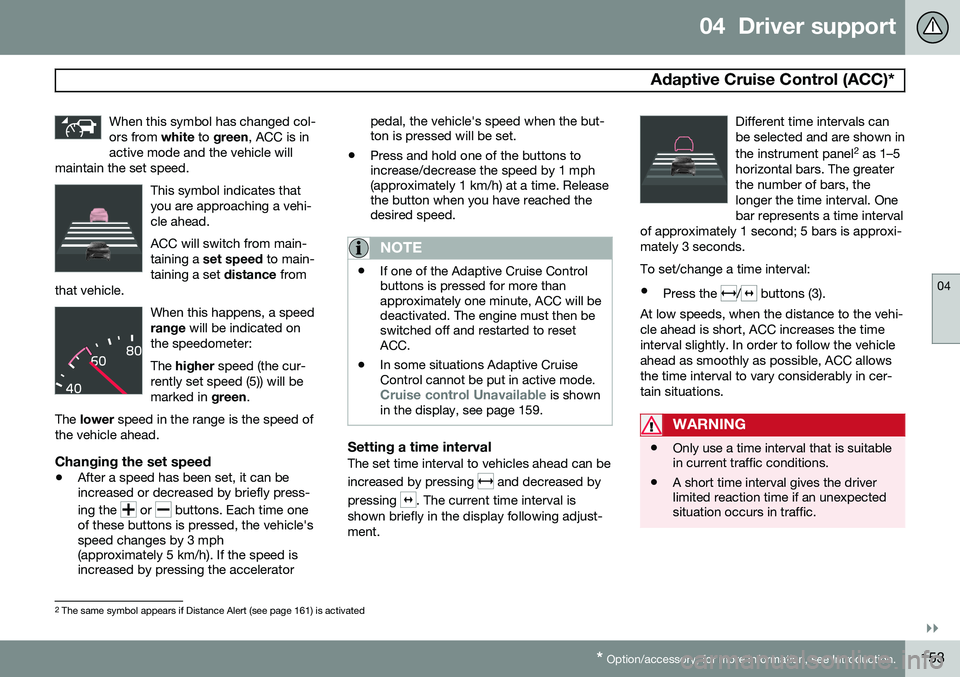
When this symbol has changed col- ors from
white to green , ACC is in
active mode and the vehicle will
maintain the set speed.
This symbol indicates that you are approaching a vehi-cle ahead. ACC will switch from main- taining a set speed to main-
taining a set distance from
that vehicle.
When this happens, a speed range will be indicated on
the speedometer: The higher speed (the cur-
rently set speed (5)) will be marked in green.
The lower speed in the range is the speed of
the vehicle ahead.
Changing the set speed
• After a speed has been set, it can be increased or decreased by briefly press- ing the
or buttons. Each time one
of these buttons is pressed, the vehicle's speed changes by 3 mph(approximately 5 km/h). If the speed isincreased by pressing the accelerator pedal, the vehicle's speed when the but-ton is pressed will be set.
• Press and hold one of the buttons toincrease/decrease the speed by 1 mph(approximately 1 km/h) at a time. Releasethe button when you have reached thedesired speed.
NOTE
•If one of the Adaptive Cruise Control buttons is pressed for more thanapproximately one minute, ACC will bedeactivated. The engine must then beswitched off and restarted to resetACC.
• In some situations Adaptive CruiseControl cannot be put in active mode.
Cruise control Unavailable is shown
in the display, see page 159.
Setting a time intervalThe set time interval to vehicles ahead can be increased by pressing
and decreased by
pressing
. The current time interval is
shown briefly in the display following adjust- ment. Different time intervals canbe selected and are shown in the instrument panel
2
as 1–5
horizontal bars. The greater the number of bars, thelonger the time interval. Onebar represents a time interval
of approximately 1 second; 5 bars is approxi-mately 3 seconds.
To set/change a time interval:
• Press the
/ buttons (3).
At low speeds, when the distance to the vehi- cle ahead is short, ACC increases the timeinterval slightly. In order to follow the vehicleahead as smoothly as possible, ACC allowsthe time interval to vary considerably in cer-tain situations.
WARNING
• Only use a time interval that is suitable in current traffic conditions.
• A short time interval gives the driverlimited reaction time if an unexpectedsituation occurs in traffic.
2
The same symbol appears if Distance Alert (see page 161) is activated
Page 197 of 392

04 Driver support
Blind Spot Information System (BLIS)*
04
* Option/accessory, for more information, see Introduction.195
Text in the displaySystem status
Blind-spot info systemOFFBLIS system off
Blind spot syst. ReducedfunctionThe BLIS cameras' func- tion has been reduceddue to weak or impaireddata transfer betweenthe BLIS system's cam-eras and the vehicle'selectrical system. Thecameras will reset them-selves when this datatransfer has returned tonormal.
Page 201 of 392

05 Comfort and driving pleasure
Menus and messages
05
}}
* Option/accessory, for more information, see Introduction.199
Main instrument panel
Analog Instrument panel and menu controls
Digital Instrument panel* and menu controls
OK : access to the list of messages and
message confirmation.
Thumb wheel: browse among menus and options in the list of functions.
RESET : reset the active function. Used in
certain cases to select/activate a func- tion, see the explanation under eachrespective function.
The menus shown on the information displaysin the instrument panel are controlled with theleft lever. The menus displayed depend onignition mode. Press OK to erase a message
and return to the menus.
Menu overview
The following menu alternatives may vary, depending on the equipment installed in thevehicle.
Analog instrument panelDigital speed Trip comp. opt.Service status
Messages (##) 1
Digital instrument panel*
Settings
Themes
Contrast mode /Color mode
Service status
Messages Trip computer reset
1 Number of messages in parentheses
Page 202 of 392
05 Comfort and driving pleasure
Menus and messages
05
200
Messages
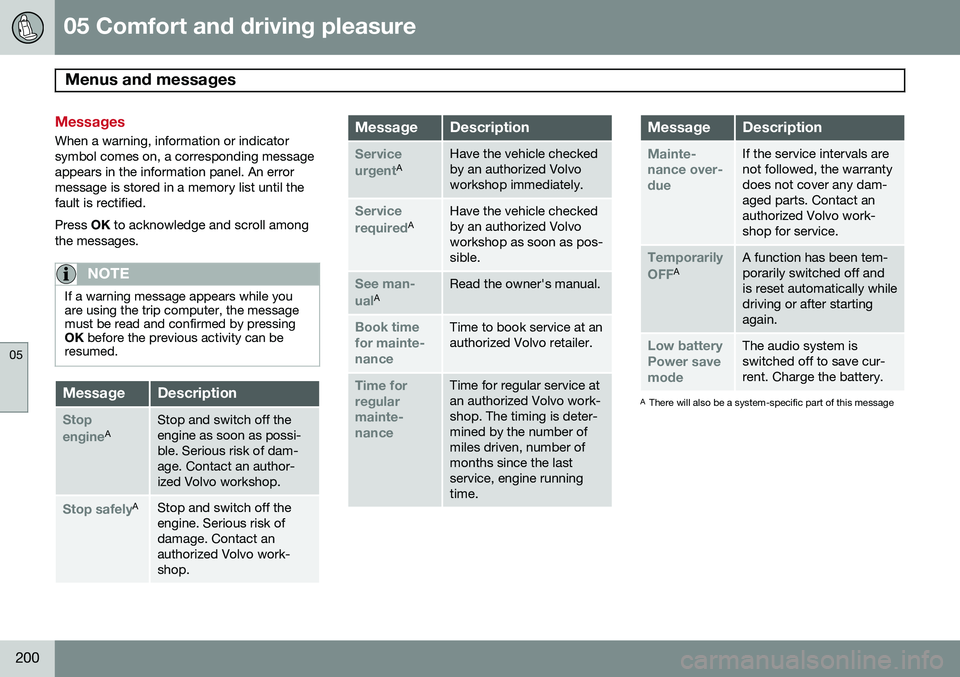
When a warning, information or indicator symbol comes on, a corresponding messageappears in the information panel. An errormessage is stored in a memory list until thefault is rectified. Press OK to acknowledge and scroll among
the messages.
NOTE
If a warning message appears while you are using the trip computer, the messagemust be read and confirmed by pressingOK before the previous activity can be
resumed.
MessageDescription
Stop engineAStop and switch off the engine as soon as possi-ble. Serious risk of dam-age. Contact an author-ized Volvo workshop.
Stop safelyAStop and switch off the engine. Serious risk ofdamage. Contact anauthorized Volvo work-shop.
MessageDescription
Service urgentAHave the vehicle checked by an authorized Volvoworkshop immediately.
Service requiredAHave the vehicle checked by an authorized Volvoworkshop as soon as pos-sible.
See man- ualARead the owner's manual.
Book time for mainte-nanceTime to book service at an authorized Volvo retailer.
Time for regularmainte-nanceTime for regular service at an authorized Volvo work-shop. The timing is deter-mined by the number ofmiles driven, number ofmonths since the lastservice, engine runningtime.
MessageDescription
Mainte- nance over-dueIf the service intervals are not followed, the warrantydoes not cover any dam-aged parts. Contact anauthorized Volvo work-shop for service.
Temporarily OFFAA function has been tem- porarily switched off andis reset automatically whiledriving or after startingagain.
Low battery Power savemodeThe audio system is switched off to save cur-rent. Charge the battery.
A There will also be a system-specific part of this message
Page 205 of 392

05 Comfort and driving pleasure
The MY CAR menus
05
}}
203
Menu settings
The following pages list the main menus/ submenus and possible selections. Themenus are set up as follows:
Menu level 1
Menu level 2Menu level 3Menu level 4
Car key memory See pages 88 and 55 for more information. Lock settings
Automatic door locking Doors unlockAll doorsDriver door, then all
Keyless entry All doorsAny doorDoors on same sideBoth front doors
Audible confirmation See page 55 and 64 for more information. Side mirror settings
Fold mirrors Tilt left mirrorTilt right mirror
See page 106 for more information. Light settings
Door lock confirmation light Unlock confirmation light
See page 55 for more information.
Approach light durationOff30 sec60 sec90 sec
See page 57 for more information.
Home safe light durationOff30 sec60 sec90 sec See page 100 for more information.
Triple indicator
See page 99 for more information.
Daytime running lights
See page 95 for more information.
Active bending lights
See page 97 for more information. Tire pressure system
Warns if tyre pressure is too low Calibrate tire pressure
See page 318 for more information. This sys- tem is optional in Canada. Steering wheel force
High MediumLow
See page 224 for more information. Reset car settings This feature returns the "Car settings" menu to the original factory settings.