2015 VOLVO S60 wheel
[x] Cancel search: wheelPage 209 of 406

04 Driver support
Blind Spot Information System (BLIS)*
04
}}
* Option/accessory, for more information, see Introduction.207
Activating/deactivating BLIS
Button for activating/deactivating BLIS BLIS can be deactivated/reactivated by pressing the button on the center console. The number or combinations of options on the vehicle may not leave a space availableon the center console for the BLIS button. Ifthis is the case, BLIS can be deactivated/reactivated in the MY CAR menu system (see
page 215)
• Select Off or On in
SettingsCar
settings
BLIS.
When BLIS is deactivated/reactivated, the indicator lights will go out/illuminate (the indi-cators will also flash once when the functionis reactivated) and a message will appear inthe instrument panel. To erase the message: •
Press the
OK button on the left steering
wheel lever
or
• Wait for approx. 5 seconds for the mes- sage to disappear
When does BLIS function
Zone 1. Blind area, Zone 2. Area for passing vehicles
The system functions when your vehicle is moving at speeds above 6 mph (10 km/h). BLIS is designed to react to:
• Other vehicles in your door mirrors' "blind area"
• Vehicles that are passing your vehicle When BLIS detects a vehicle in zone 1 or a passing vehicle in zone 2, the indicator light inthe door panel will glow steadily. If the driverthen uses the turn signal on the side on whichthe warning is given, the indicator light willflash and become brighter.
WARNING
•
BLIS does not function in sharp curves.
• BLIS does not function when yourvehicle is backing up.
Cross Traffic Alert (CTA)
On vehicles equipped with the optional Park assist system (see page 194), Cross TrafficAlert (CTA) can be deactivated/reactivated bypressing the Park assist button on the centerconsole. The BLIS indicator lights on the frontdoors will flash when CTA is reactivated bypressing the button.
Page 211 of 406

04 Driver support
Blind Spot Information System (BLIS)*
04
* Option/accessory, for more information, see Introduction.209
In angled parking spaces, CTA may be "blind" on one side
However, as you back your vehicle out of a parking space, CTA's "field of vision"expands. Examples of other limitations include:
• Dirt, ice or snow obstructing the sensors may reduce the system's function ormake it impossible to detect other vehi-cles or objects.
• Do not attach tape, decals, etc., on thesurface of the sensors (see the illustrationin the following "Maintenance" section).
• BLIS and CTA are deactivated if a trailer'swiring is connected to the vehicle's elec-trical system.
Maintenance
Location of the BLIS/CTA sensors 2
The BLIS/CTA sensors are located on the inside of the rear fenders/bumper. The surfaces in front of the sensors must be kept clean for the system to function opti-mally.
CAUTION
Repairs to the BLIS/CTA systems and/or paint work on the rear bumper should onlybe done by a trained and qualified Volvoservice technician.
Messages
If BLIS/CTA are not functioning normally, a symbol will illuminate in the instrument paneland a text message will be displayed. Followany instructions that may be provided. These messages include:
MessageSystem status
CTA OFFCTA has been switched off manually. BLIS remainsactive.
BLIS and CTA OFFTrailerattachedBLIS and CTA are tempo- rarily deactivated becausea trailer's wiring has beenconnected to the vehicle'selectrical system.
BLIS and CTA Serv-ice requiredBLIS and CTA are not functioning normally.
• If this message recurs, the systems should beinspected by a trainedand qualified Volvoservice technician.
Messages can be erased by pressing the
OK
button on the left steering wheel lever.
2 Generic illustration
Page 214 of 406

05 Comfort and driving pleasure
Volvo Sensus
05
212* Option/accessory, for more information, see Introduction.
Introduction
Center console control panel
Volvo Navigation System (VNS)* – NAV:
see the separate VNS manual for operat- ing instructions.
Infotainment ( RADIO, MEDIA , TEL ): see
page 244 .
Vehicle-related settings - MY CAR: see
page 215.
Park assist camera - CAM*: see
page 198.
Climate system: see page 221.
Volvo Sensus is the operating system in your vehicle providing a coordinated interface for anumber of functions such as the individual-ized settings that can be made in the MY
CAR menus, the climate and infotainment systems as well as other options such as thepark assist camera(s), etc. Volvo Sensus uses the screen in the center instrument panel to display information andselections are made using this panel’s con-trols and buttons. Certain features can alsobe controlled using the steering wheel key-pad. Press
MY CAR to present all of the available
settings related to driving and/or controlling the vehicle, such as City Safety, setting theclock, lock settings, etc. Press RADIO , MEDIA , TEL , NAV * and CAM*
to change a source and to activated systems or functions such as AM, FM1, CD, DVD,Bluetooth, navigation* and the park assistcamera *. See the respective sections in this manual for more detailed information about your vehi-cle's various features and functions.
Page 215 of 406
05 Comfort and driving pleasure
Menus and messages
05
}}
* Option/accessory, for more information, see Introduction.213
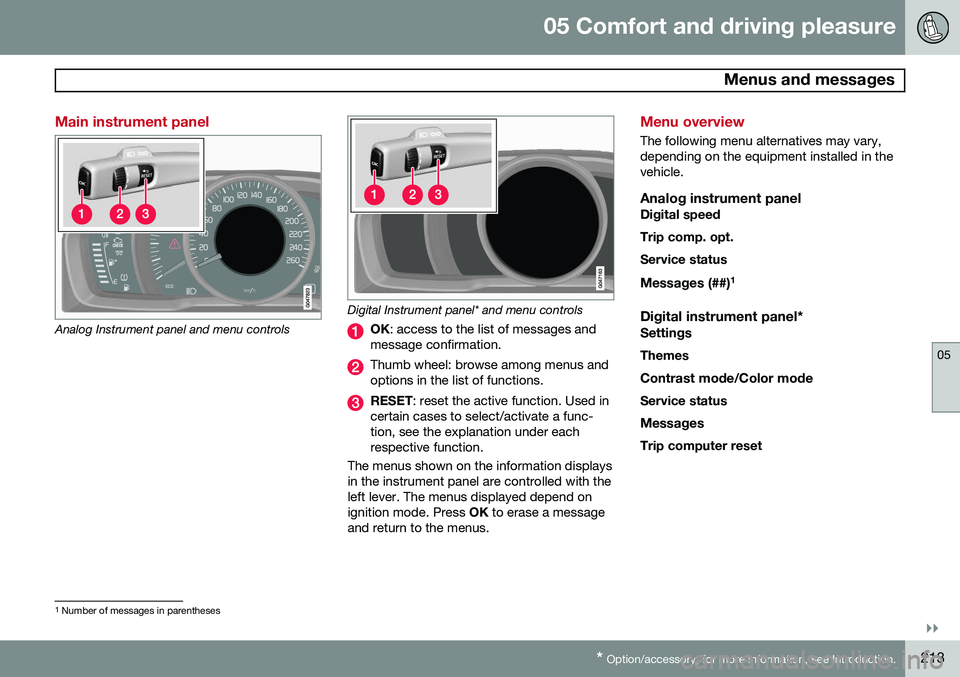
Main instrument panel
Analog Instrument panel and menu controls
Digital Instrument panel* and menu controls
OK : access to the list of messages and
message confirmation.
Thumb wheel: browse among menus and options in the list of functions.
RESET : reset the active function. Used in
certain cases to select/activate a func- tion, see the explanation under eachrespective function.
The menus shown on the information displaysin the instrument panel are controlled with theleft lever. The menus displayed depend onignition mode. Press OK to erase a message
and return to the menus.
Menu overview
The following menu alternatives may vary, depending on the equipment installed in thevehicle.
Analog instrument panelDigital speed Trip comp. opt.Service status
Messages (##) 1
Digital instrument panel*
Settings
Themes
Contrast mode /Color mode
Service status
Messages Trip computer reset
1 Number of messages in parentheses
Page 217 of 406

05 Comfort and driving pleasure
The MY CAR menus
05
}}
215
Introduction
The menu system provides access to menus for operating many of the vehi-cle's functions, such as setting the
clock, door mirrors, locks, etc.
Navigating in the menus is done using the buttons on the center console control panelor with the right-side steering wheel keypad. Some of the features mentioned in this sec- tion are optional.
Operation
Center console controls
Center console controls for menu navigation
Press MY CAR to access the My Car
menus.
Press OK/MENU to select a highlighted
selection or to store a certain function in the system's memory.
Turn to navigate up/down among menu selections.
EXIT
EXIT functionsThe results of a short press on EXIT vary,
depending on where the cursor is and where you are in the menu structure. •
Reject and incoming phone call
• The current function will be cancelled
• Characters that have been entered will be erased
• The most recent selection will be cancel-led
• Go back (upward) in the menu system
A long press will take you to the highest
menu level (the main view), giving you access to all of the vehicles/menus. See page 245for additional information.
Steering wheel keypad
The keypad varies according to the vehicle's equipment
Turn the thumb wheel to go up/down
among menu selections. Press the thumb
Page 218 of 406

05 Comfort and driving pleasure
The MY CAR menus
05
216
wheel to make a selection or store a func tion in the system's memory.
EXIT.
MY CAR menu pathsThe current menu level is displayed at the upper right of the center console display.Menu paths are displayed as follows, forexample:
SettingsCar settingsLock settings
Doors unlockDriver door, then all
The following is an example of how to set a function in the menu system:
1. Press the MY CAR button on the center
console control panel.
2. Navigate to a menu, for example
Settings using the thumb wheel (1) and
press it to open a submenu.
3. Navigate to the desired submenu such as
Car settings.
4. Navigate to
Lock settings and press the
thumb wheel to open a new submenu. 5.
Navigate to
Doors unlock and press the
thumb wheel to open a submenu with alternatives that can be selected.
6. Use the thumb wheel to move to the desired choice and press the thumbwheel to put an X in the box.
7. Finish by exiting the menu system either one step at a time with short presses onEXIT (2) or press and hold this button to
return to the main menu.
The OK/MENU (2), EXIT (4) and control (3) in
the center console can be used in the sameway.
MY CAR
When the MY CAR button has been pressed,
the following menu alternatives are displayed.
•
My S60
•DRIVe1
•
Support systems
•Settings
My S60
MY CARMy S60
The display shows all of the driver support systems installed in the vehicle, which can beactivated/deactivated here.
DRIVe 1This selectoin describes Volvo's DRIVe con-cept and displays the following headers:
•
Start/Stop
Information on the Start/ Stop feature (see page 135).
•
Eco driving guide
Provides information about driving eco- nomically.
Driver support systems
MY CARSupport systems
The screen shows the current status (set- tings) for the vehicle's driver support sys-tems.
Settings
MY CARSettings
1 Vehicles equipped with the optional Start/Stop function
Page 219 of 406

05 Comfort and driving pleasure
The MY CAR menus
05
}}
217
Menu settings
The following pages list the main menus/ submenus and possible selections. Themenus are set up as follows:
Menu level 1
Menu level 2Menu level 3Menu level 4
Car key memory See pages 92 and 57 for more information. Lock settings
Automatic door locking Doors unlockAll doorsDriver door, then all
Keyless entry All doorsAny doorDoors on same sideBoth front doors
Audible confirmation See page 57 and 66 for more information. Side mirror settings
Fold mirrors Tilt left mirrorTilt right mirror
See page 110 for more information. Light settings
Door lock confirmation light Unlock confirmation light
See page 57 for more information.
Approach light durationOff30 sec60 sec90 sec
See page 59 for more information.
Home safe light durationOff30 sec60 sec90 sec See page 105 for more information.
Triple indicator
See page 103 for more information.
Daytime running lights
See page 99 for more information.
Active bending lights
See page 101 for more information. Tire pressure system
Warns if tyre pressure is too low Calibrate tire pressure
See page 332 for more information. This sys- tem is optional in Canada. Steering wheel force
High MediumLow
See page 237 for more information. Reset car settings This feature returns the "Car settings" menu to the original factory settings.
Page 221 of 406

05 Comfort and driving pleasure
The MY CAR menus
05
}}
219
Rear park assist volume Phone ringing volume
Reset system options This feature returns the "System options" menu to the original factory settings.
MY CARSettingsVoice settingsA .
A Only on vehicles with the optional Volvo Navigation System
Voice tutorial Select this menu alternative and press OK for
spoken information about how the system works. Voice command list
Phone commandsPhone Phone call contactPhone dial number
Navigation commands NavigationNavigation repeat instructionNavigation go to address
General commands Help CancelVoice tutorial
The menu alternatives under
Phone
commands show examples of the voice
commands available when a cell phone is connected to the Bluetooth ®
hands-free sys-
tem. See page 281 for more detailed infor- mation. The menu alternatives under
Navigation
commands show examples of the voice
commands available for the optional Volvo Navigation System. Refer to the navigationsystem's manual for detailed information. Voice user setting
Default setting User 1User 2
Two user profiles can be set, which is useful if more than one person uses voice commands regularly.
Default setting resets the factory
settings. Voice training
User 1 User 2
Voice training enables the system to
become familiar with the driver's voice and pronunciation. A list of phrases is presented on the screen for the driver to read aloud.When the system has registered the driver'spronunciation, no additional phrases will bedisplayed. After completed voice training, select
User 1 or User 2 in Voice user
setting to set the system to the current user.
Voice output volume
• A volume control will be displayed. To set the volume level:
1. Adjust the volume using the thumb wheel
2. Test the setting by pressing OK
3. Store the setting and leave the menu by pressing EXIT.
Voice POI list
Edit list
The navigation system has a large number of points of interest (POIs). A maximum of 30POIs can be stored in this list. The menu alternative
Voice POI list is only
displayed if the vehicle is equipped with the optional Volvo Navigation System. Refer tothe navigation system's manual for detailedinformation.
MY CARSettingsAudio settings