Page 7 of 435
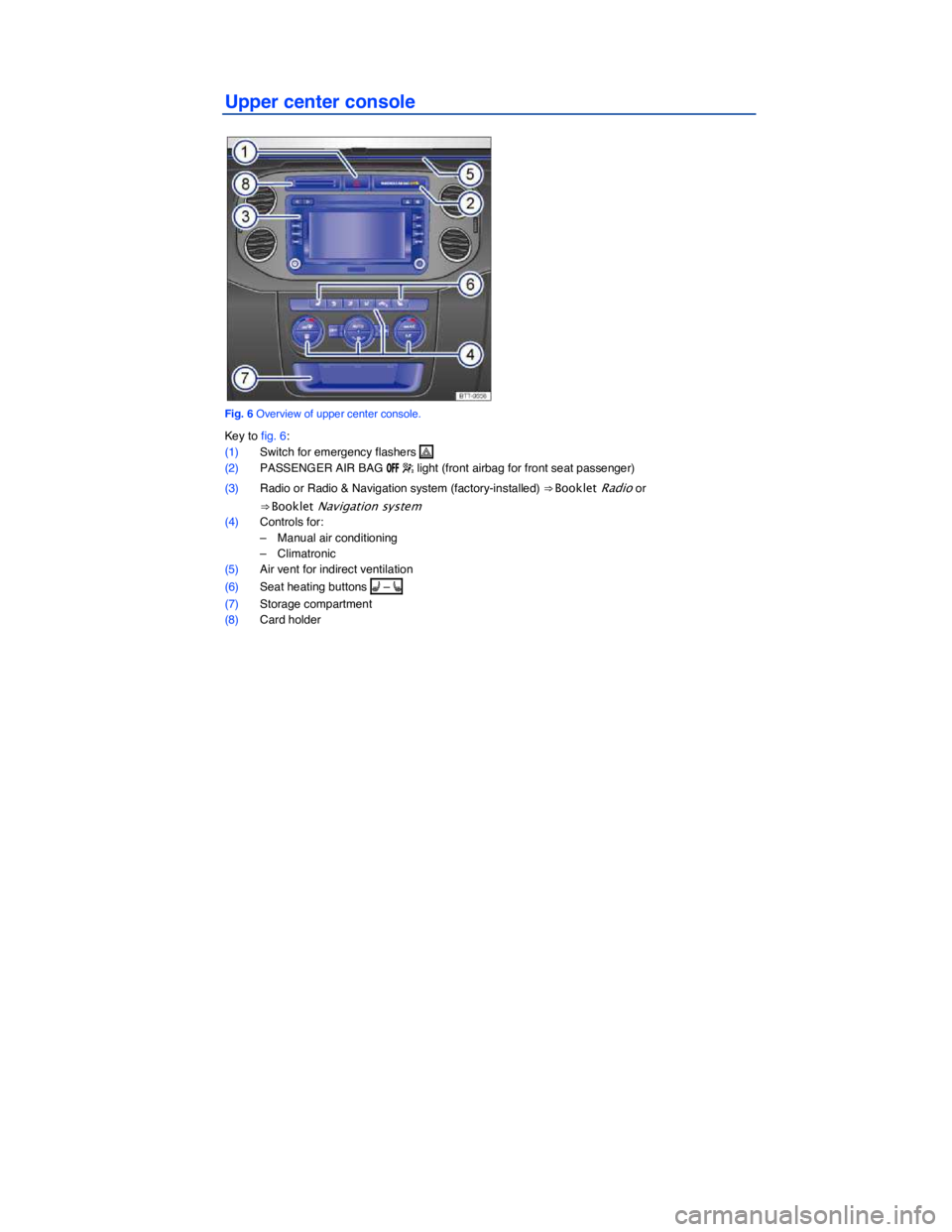
Upper center console
Fig. 6 Overview of upper center console.
Key to fig. 6:
(1) Switch for emergency flashers �
(2) PASSENGER AIR BAG /&& � light (front airbag for front seat passenger)
(3) Radio or Radio & Navigation system (factory-installed) ⇒ Booklet Radio or
⇒ Booklet Navigation system
(4) Controls for:
– Manual air conditioning
– Climatronic
(5) Air vent for indirect ventilation
(6) Seat heating buttons A – [
(7) Storage compartment
(8) Card holder
Page 13 of 435
Instrument explanations ⇒ fig. 11:
(1) Speedometer.
(2) Tachometer (shows engine revolutions per minute in thousands). The red zone at the end of the scale indicates maximum permissible engine rpm (revolutions per minute) for all gears after the break-in period. Before reaching the red zone, select the next higher gear or selector level
position Drive (D), or ease your foot off the accelerator ⇒ .
(3) Displays
(4) Reset button for the trip odometer display trip.
– Push and hold the 0.0 / SET button about one second in order to reset to zero.
– Push and hold the 0.0 / SET button for more than 10 seconds to display the vehicle's en-gine code. You must do this when the ignition is on, but the engine is not running.
(5) Fuel gauge
(6) Button for setting the instrument cluster clock, the Radio or Radio & Navigation system clock1.
– With the ignition on, push the
Page 26 of 435
– Digital speed display
– Speed warn. (speed warning)
– Back
▪ Convenience
– ATA confirm
– Central locking
Auto unlock
Unlock doors
– Window op. (Window operation)
Off
All
Driver
Back
– Mirror adjust
Individually
Both mirrors
Mirror down (vehicles with memory seats)
Back
– Factory setting
▪ Lights / Vision
– Coming home
– Leaving home
– Footwell light
– Conv. turn sig. (convenience turn signal)
– Factory setting
– Back
▪ Time
– Hours
– Minutes
– 24 hr. mode
– Daylight save
– Back
▪ Snow tires (winter tires)
– On
– + 5 mph
– - 5 mph
– Back
▪ Compass (vehicles without navigation system)
– Zone
– Calibrate
– Back
▪ Units
– Temperature
– Consump./ dist.
– Back
▪ Tire pressure
– Store
Page 30 of 435

Settings menu Function
MFI Data Enable the features you want to be available under the MFI menu in the instrument cluster display
Compass Calibrating the compass on vehicles without a factory-installed navigation system. To calibrate, follow instructions in the instrument cluster display
Convenience Convenience function settings
Lights & Vision Vehicle lighting settings
Time Set hours and minutes for the instrument cluster clock and in the Radio Navigation System clock. The digital clocks can be set to show the time in 12 or 24 hour format. Resetting clocks to daylight savings time or standard time.
Snow tires Set up visual and acoustic speed warning. Use the feature only when winter tires are installed that have a speed rating less than top vehicle speed.
Units Set units for temperature, fuel consumption and distances should be displayed (for example, whether to show distance driven in miles or kilometers).
Tire pressure Reset the tire pressure, for example after replacing tires.
Service Display service messages or reset service interval display.
Factory setting Resets the functions in the Settings menu to the default factory settings.
Convenience sub-menu
Page 37 of 435

Remote Vehicle Access:
Feature Description
Remote Door Unlock
You can send a request to unlock the vehicle doors through your Volkswagen Car-Net iPhone® or Android® app, the Volkswagen Car-Net website or by calling the Volkswagen Car-Net Response Center (text and data rates apply). If none of the vehicle doors are opened within about 30 seconds, the car will lock again.
Remote Honk and Flash
You can send a honk and flash signal to the car using the Volkswagen Car-Net website or the VW Car-Net iPhone® or Android® app (text and data rates apply). The car will honk the horn and blink the headlights and emergency flashers for up to 10 seconds.
Last Parked Location You can locate your last parked location using your Volkswagen Car-Net iPhone® or Android® app (text and data rates apply).
Destinations Only applicable for vehicles equipped with a factory-installed navigation system.
Points of Interest (POIs) or other destinations can be imported remotely into the factory-installed navigation system (if equipped) from a computer or the Volkswagen Car-Net iPhone® or Android® app (text and data rates apply). These destinations can be called up and used by the navigation system.
Destination Download Only applicable for vehicles equipped with a factory-installed navigation system.
Press the • button in the 3-button module: The vehicle will connect directly to the Volkswagen Car-Net Response Center where a Volkswagen Car-Net Customer Specialist will assist with destinations. The address of a dealer’s location can also be sent by the Customer Specialist to your factory-installed navigation system (if equipped).
Remote Status Check
Current information about the vehicle can be viewed through a computer or your Volkswagen Car-Net iPhone® or Android® app (text and data rates apply). You can find out if the doors, luggage compartment and engine hood are open or closed, whether the car lights are on or off, the level of fuel in the tank, when the vehicle needs to be serviced next and more.
Diagnostics & Maintenance:
Feature Description
Dealer Scheduling
Press the • button in the 3-button module: The vehicle will initiate a call to the Volkswagen Car-Net Response Center where a Volkswagen Car-Net Customer Specialist will connect you with an authorized Volkswagen dealer to schedule your service appointment. The address of the dealer’s location can also be sent by the Customer Specialist to your factory-installed navigation system (if equipped).
Vehicle Health Report
View a vehicle health report to proactively manage maintenance and other services and to receive up-to-date diagnostics in a monthly email report or by immediate request.
Page 43 of 435
d Are engine oil (⇒ Engine oil) and other operating fluids that meet Volkswagen quality and performance requirements available where you will be driving? For more information, please see
⇒ Booklet Warranty and Maintenance.
d Does the factory-installed navigation system work in the countries where you will be driving, and is navigation data available?
d Are special or heavy-duty tires necessary for the kind of driving expected?
NOTICE
Volkswagen is not responsible for mechanical damage that may result from substandard fuel or service or the unavailability of Genuine Volkswagen parts.
Driving through water on roads
Page 214 of 435
WARNING
The center armrest can restrict the driver's arm movement and cause crashes and serious personal injury.
x Always keep storage compartments in the center armrest closed while driving.
WARNING
Never let a passenger, especially a child, ride on the center armrest.
There may be a factory-installed (MEDIA IN), Apple iPod® adapter, AUX-in or 12 Volt socket
located in the storage compartment in the front center armrest ⇒ Booklet Radio or
⇒ Booklet Navigation system.
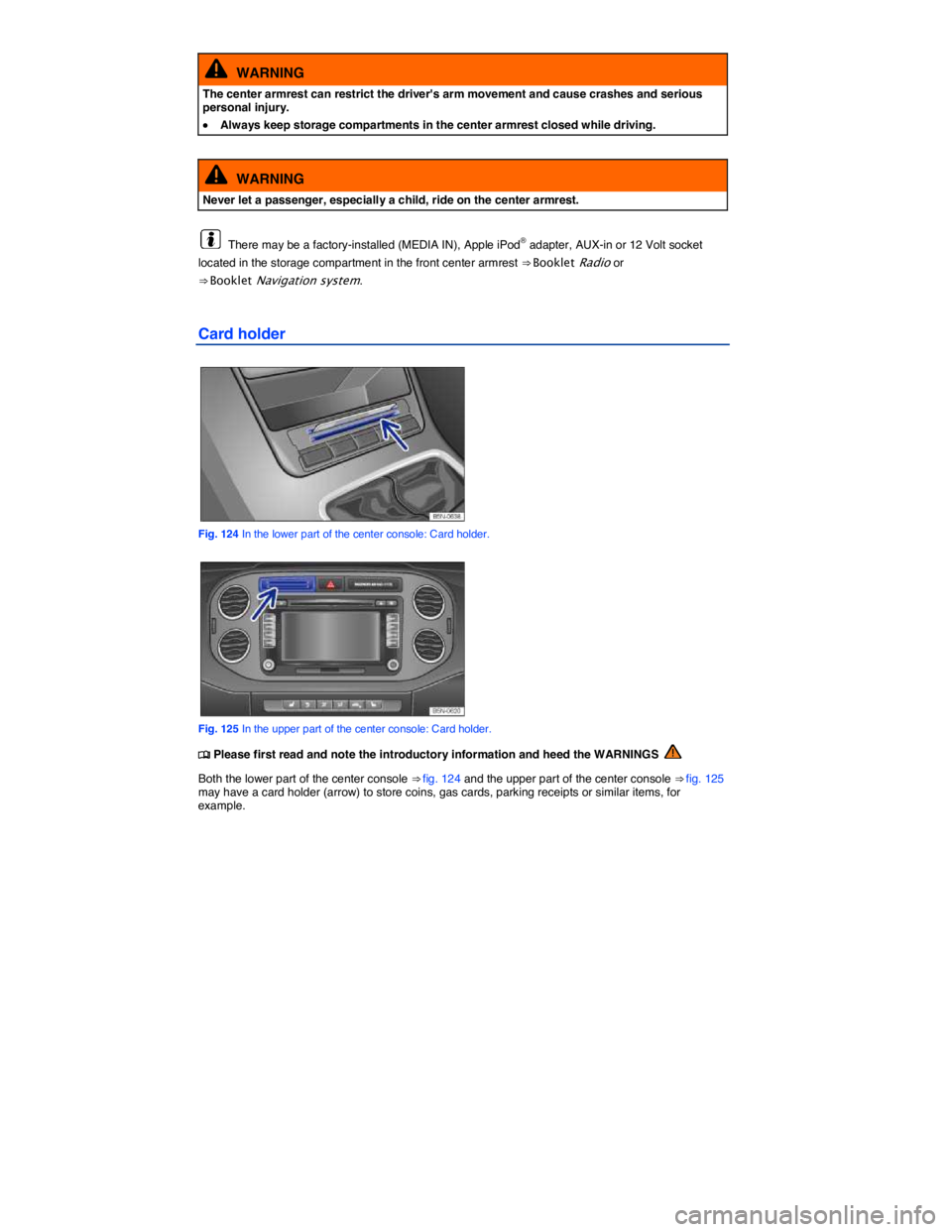
Card holder
Fig. 124 In the lower part of the center console: Card holder.
Fig. 125 In the upper part of the center console: Card holder.
Page 276 of 435

Rear View Camera system ⇒ fig. 154 and screen is automatically activated and deactivated.
Deactivate: Accelerate. OR: Drive forward briefly. OR: Press the MEDIA selection button of the navigation system
⇒ Booklet Navigation system.
Special considerations
1) Do not use Rear View Camera system in the following situations:
– When an incorrect or unclear image is displayed, such as when there is poor visibility or a lens is dirty.
– If the area behind the vehicle cannot be seen clearly or completely.
– If the rear of the vehicle is heavily loaded.
– If the rear hatch is open.
– If the driver is not familiar with the system.
– If the position or angle of the camera was changed, such as after a rear-end collision, have the system checked by an authorized Volkswagen dealer or an authorized Volkswagen Service Facility.
2.) Examples of optical deception by the camera:
The Rear View Camera system provides only two-dimensional images. Recesses and protruding objects on the ground or protruding parts on other vehicles are difficult or impossible to identify due to the lack of depth of field.
Objects or another vehicle may seem closer or farther away on the screen than they really are.
– When driving from a level surface onto an upward or downward slope.
– When driving up or down a slope onto a level surface.
– If the rear of the vehicle is heavily loaded.
– When approaching protruding objects. These objects can disappear from the field of view when backing up.
Cleaning the camera lens
Keep camera lens clean and free from snow and ice.
x Engage the parking brake.
x Switch on the ignition.
x Select the Reverse (R) gear.