2015 VOLKSWAGEN POLO cruise control
[x] Cancel search: cruise controlPage 5 of 100
Downloaded from www.Manualslib.com manuals search engine 12/29/2015Bedienungsanleitung < Service & Zubehör < Volkswagen Deutschland
2/32
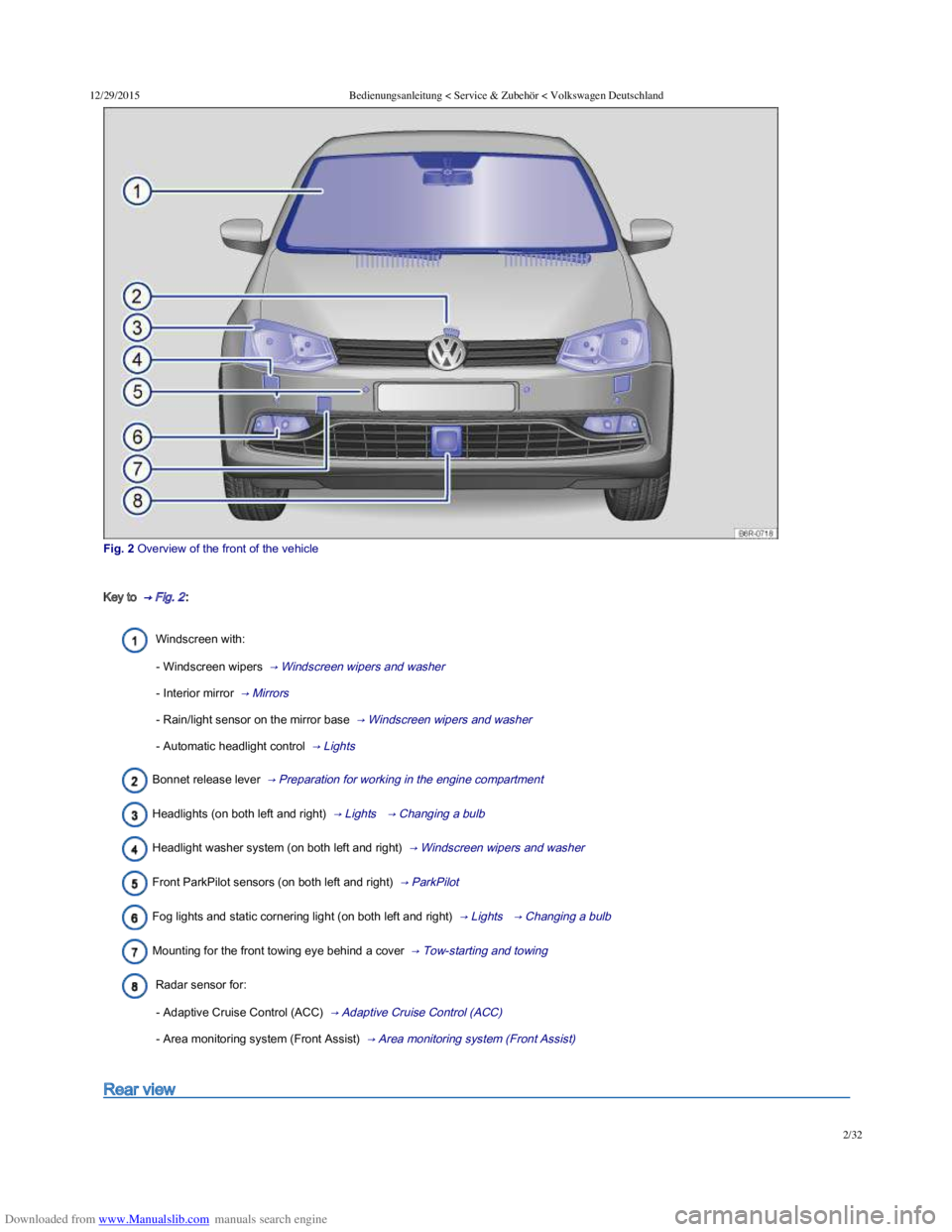
Fig. 2 Overview of the front of the vehicle
Key to → Fig. 2 :
Windscreen with:
- Windscreen wipers → Windscreen wipers and washer
- Interior mirror → Mirrors
- Rain/light sensor on the mirror base → Windscreen wipers and washer
- Automatic headlight control → Lights
Bonnet release lever → Preparation for working in the engine compartment
Headlights (on both left and right) → Lights → Changing a bulb
Headlight washer system (on both left and right) → Windscreen wipers and washer
Front ParkPilot sensors (on both left and right) → ParkPilot
Fog lights and static cornering light (on both left and right) → Lights → Changing a bulb
Mounting for the front towing eye behind a cover → Tow-starting and towing
Radar sensor for:
- Adaptive Cruise Control (ACC) → Adaptive Cruise Control (ACC)
- Area monitoring system (Front Assist) → Area monitoring system (Front Assist)
Rear view
Page 9 of 100
Downloaded from www.Manualslib.com manuals search engine 12/29/2015Bedienungsanleitung < Service & Zubehör < Volkswagen Deutschland
6/32
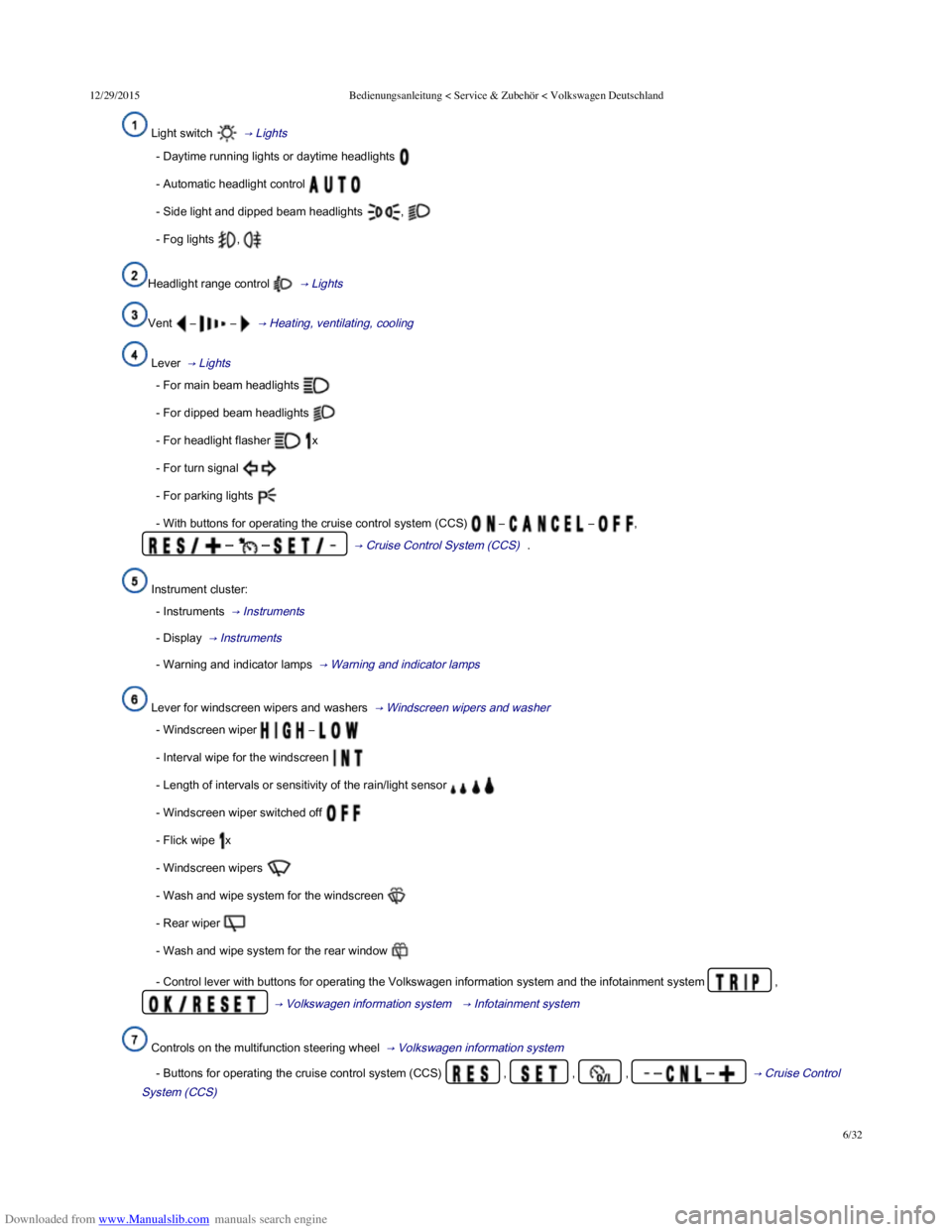
Light switch → Lights
- Daytime running lights or daytime headlights
- Automatic headlight control
- Side light and dipped beam headlights ,
- Fog lights ,
Headlight range control → Lights
Vent – – → Heating, ventilating, cooling
Lever → Lights
- For main beam headlights
- For dipped beam headlights
- For headlight flasher x
- For turn signal
- For parking lights
- With buttons for operating the cruise control system (CCS) – – ,
– – → Cruise Control System (CCS) .
Instrument cluster:
- Instruments → Instruments
- Display → Instruments
- Warning and indicator lamps → Warning and indicator lamps
Lever for windscreen wipers and washers → Windscreen wipers and washer
- Windscreen wiper –
- Interval wipe for the windscreen
- Length of intervals or sensitivity of the rain/light sensor
- Windscreen wiper switched off
- Flick wipe x
- Windscreen wipers
- Wash and wipe system for the windscreen
- Rear wiper
- Wash and wipe system for the rear window
- Control lever with buttons for operating the Volkswagen information system and the infotainment system ,
→ Volkswagen information system → Infotainment system
Controls on the multifunction steering wheel → Volkswagen information system
- Buttons for operating the cruise control system (CCS) , , , – – → Cruise Control
System (CCS)
Page 10 of 100
Downloaded from www.Manualslib.com manuals search engine 12/29/2015Bedienungsanleitung < Service & Zubehör < Volkswagen Deutschland
7/32
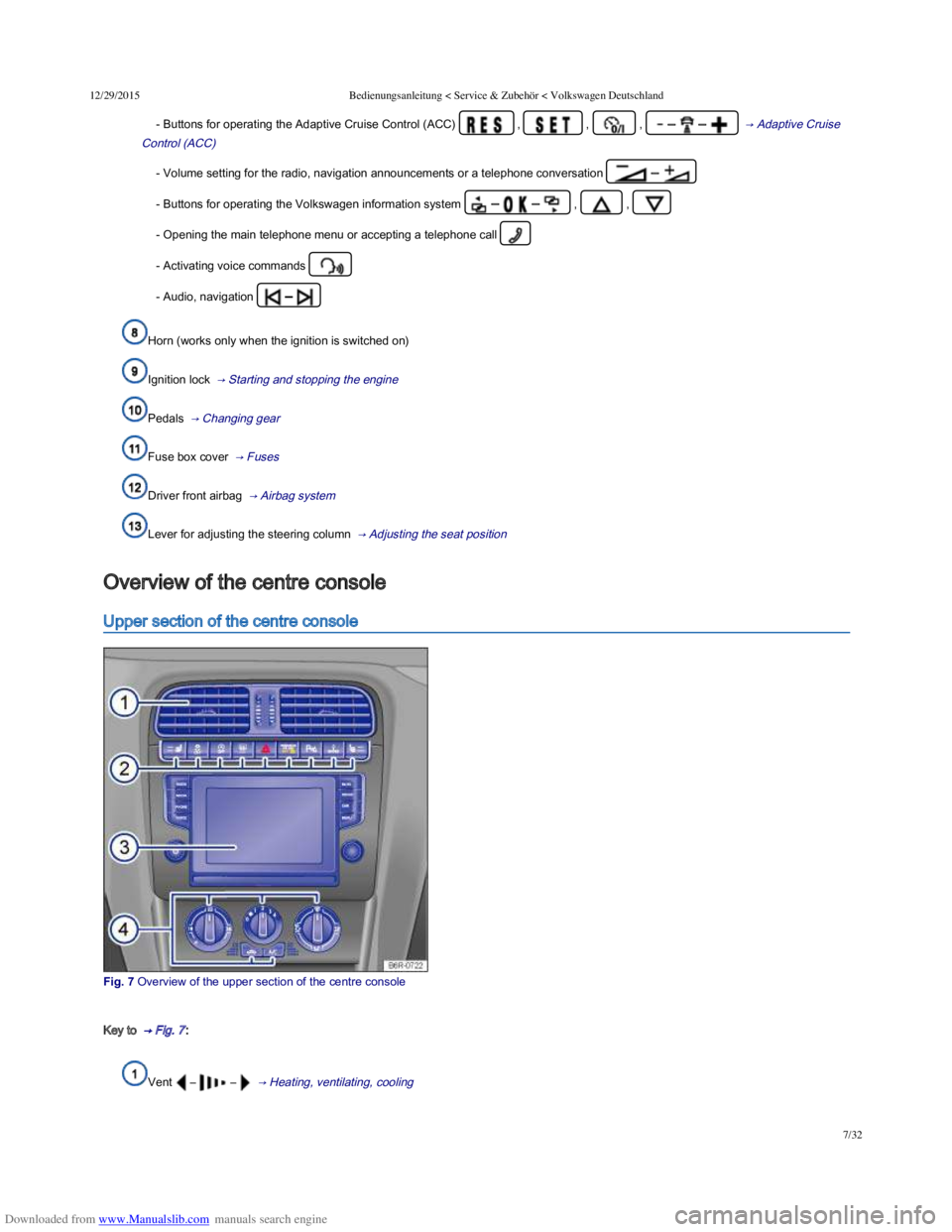
- Buttons for operating the Adaptive Cruise Control (ACC) , , , – – → Adaptive Cruise
Control (ACC)
- Volume setting for the radio, navigation announcements or a telephone conversation –
- Buttons for operating the Volkswagen information system – – , ,
- Opening the main telephone menu or accepting a telephone call
- Activating voice commands
- Audio, navigation –
Horn (works only when the ignition is switched on)
Ignition lock → Starting and stopping the engine
Pedals → Changing gear
Fuse box cover → Fuses
Driver front airbag → Airbag system
Lever for adjusting the steering column → Adjusting the seat position
Upper section of the centre console
Fig. 7 Overview of the upper section of the centre console
Key to → Fig. 7 :
Vent – – → Heating, ventilating, cooling
Overview of the centre console
Page 14 of 100
Downloaded from www.Manualslib.com manuals search engine 12/29/2015Bedienungsanleitung < Service & Zubehör < Volkswagen Deutschland
11/32
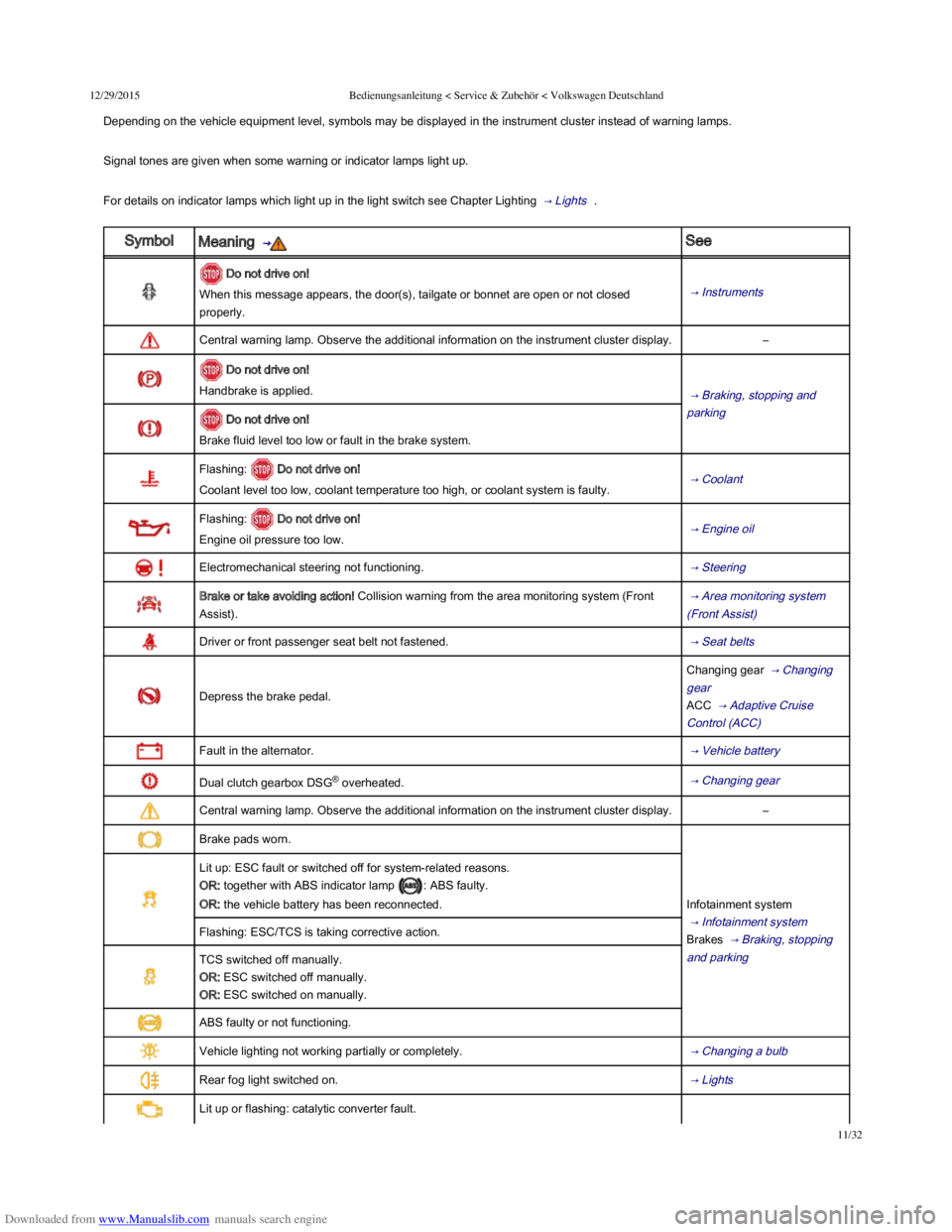
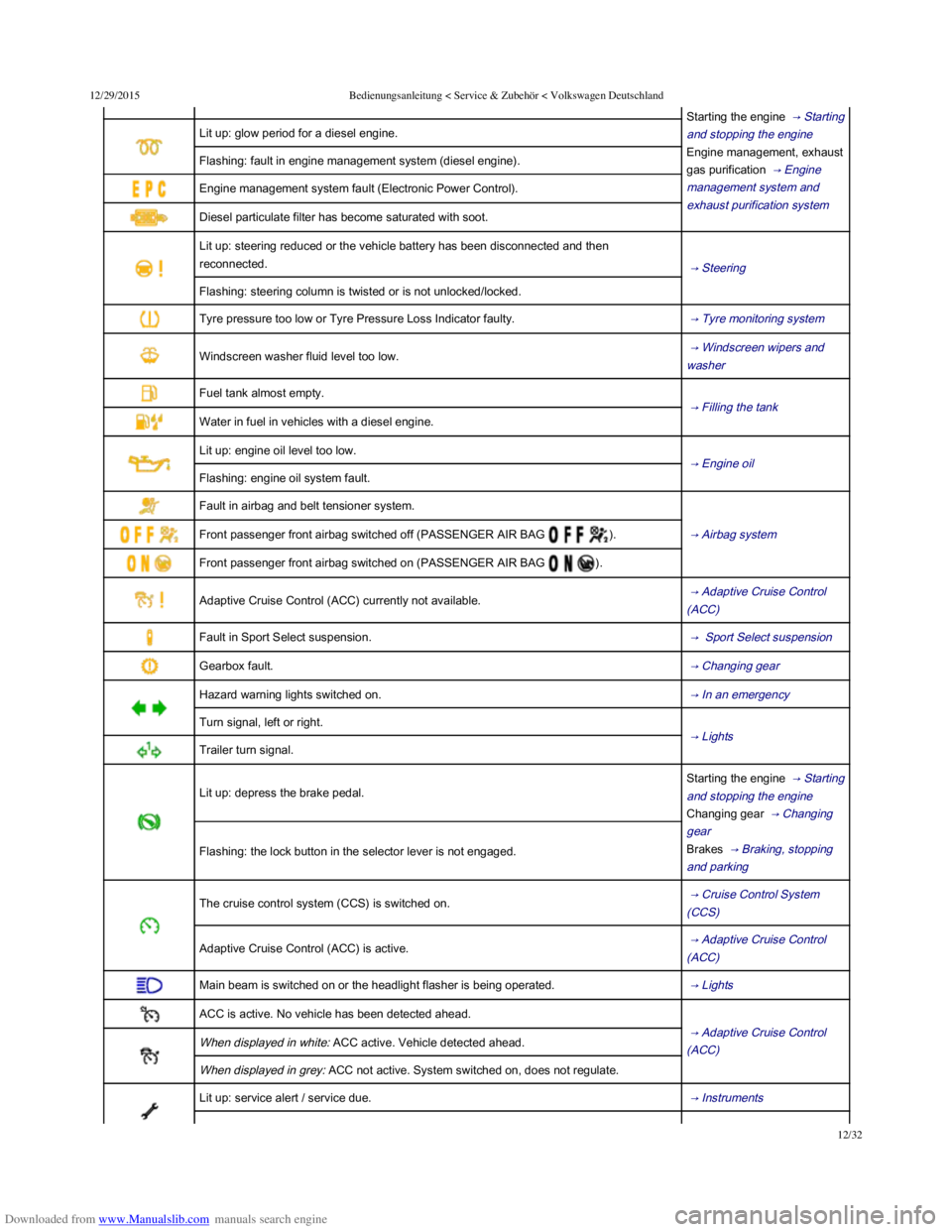
Depending on the vehicle equipment level, symbols may be displayed in the instrument cluster instead of warning lamps.
Signal tones are given when some warning or indicator lamps light up.
For details on indicator lamps which light up in the light switch see Chapter Lighting → Lights .
SymbolMeaning → See
Do not drive on!
When this message appears, the door(s), tailgate or bonnet are open or not closed
properly.
→ Instruments
Central warning lamp. Observe the additional information on the instrument cluster display.–
Do not drive on!
Handbrake is applied. → Braking, stopping and
parking Do not drive on!
Brake fluid level too low or fault in the brake system.
Flashing: Do not drive on!
Coolant level too low, coolant temperature too high, or coolant system is faulty. → Coolant
Flashing: Do not drive on!
Engine oil pressure too low. → Engine oil
Electromechanical steering not functioning. → Steering
Brake or take avoiding action! Collision warning from the area monitoring system (Front
Assist).
→ Area monitoring system
(Front Assist)
Driver or front passenger seat belt not fastened. → Seat belts
Depress the brake pedal.
Changing gear → Changing
gear
ACC → Adaptive Cruise
Control (ACC)
Fault in the alternator. → Vehicle battery
Dual clutch gearbox DSG® overheated. → Changing gear
Central warning lamp. Observe the additional information on the instrument cluster display.–
Brake pads worn.
Infotainment system
→ Infotainment system
Brakes → Braking, stopping
and parking
Lit up: ESC fault or switched off for system-related reasons.
OR: together with ABS indicator lamp : ABS faulty.
OR: the vehicle battery has been reconnected.
Flashing: ESC/TCS is taking corrective action.
TCS switched off manually.
OR: ESC switched off manually.
OR: ESC switched on manually.
ABS faulty or not functioning.
Vehicle lighting not working partially or completely. → Changing a bulb
Rear fog light switched on. → Lights
Lit up or flashing: catalytic converter fault.
Starting the engine → Starting
Page 15 of 100
Downloaded from www.Manualslib.com manuals search engine 12/29/2015Bedienungsanleitung < Service & Zubehör < Volkswagen Deutschland
12/32
Starting the engine → Starting
and stopping the engine
Engine management, exhaust
gas purification → Engine
management system and
exhaust purification system
Lit up: glow period for a diesel engine.
Flashing: fault in engine management system (diesel engine).
Engine management system fault (Electronic Power Control).
Diesel particulate filter has become saturated with soot.
Lit up: steering reduced or the vehicle battery has been disconnected and then
reconnected. → Steering
Flashing: steering column is twisted or is not unlocked/locked.
Tyre pressure too low or Tyre Pressure Loss Indicator faulty. → Tyre monitoring system
Windscreen washer fluid level too low. → Windscreen wipers and
washer
Fuel tank almost empty.
→ Filling the tank
Water in fuel in vehicles with a diesel engine.
Lit up: engine oil level too low.
→ Engine oil
Flashing: engine oil system fault.
Fault in airbag and belt tensioner system.
→ Airbag system Front passenger front airbag switched off (PASSENGER AIR BAG ).
Front passenger front airbag switched on (PASSENGER AIR BAG ).
Adaptive Cruise Control (ACC) currently not available. → Adaptive Cruise Control
(ACC)
Fault in Sport Select suspension. → Sport Select suspension
Gearbox fault. → Changing gear
Hazard warning lights switched on. → In an emergency
Turn signal, left or right.
→ Lights
Trailer turn signal.
Lit up: depress the brake pedal.
Starting the engine → Starting
and stopping the engine
Changing gear → Changing
gear
Brakes → Braking, stopping
and parking
Flashing: the lock button in the selector lever is not engaged.
The cruise control system (CCS) is switched on. → Cruise Control System
(CCS)
Adaptive Cruise Control (ACC) is active. → Adaptive Cruise Control
(ACC)
Main beam is switched on or the headlight flasher is being operated. → Lights
ACC is active. No vehicle has been detected ahead.
→ Adaptive Cruise Control
(ACC) When displayed in white: ACC active. Vehicle detected ahead.
When displayed in grey: ACC not active. System switched on, does not regulate.
Lit up: service alert / service due. → Instruments
→ Changing gear
Page 26 of 100
Downloaded from www.Manualslib.com manuals search engine 12/29/2015Bedienungsanleitung < Service & Zubehör < Volkswagen Deutschland
23/32
Long-term
Speed warning function
Digital speed
Range
Convenience consumers
Driver assist systems → Selection menu
Front Assist on/off
Adaptive Cruise Control (ACC)
Navigation ⇒ BookletNavigation system,
Audio ⇒ BookletRadio, or ⇒ BookletNavigation system,
Telephone ⇒ BookletProvision for mobile telephone, , ⇒ BookletNavigation system, / ⇒ BookletRadio/navigation system,
Vehicle status → Selection menu
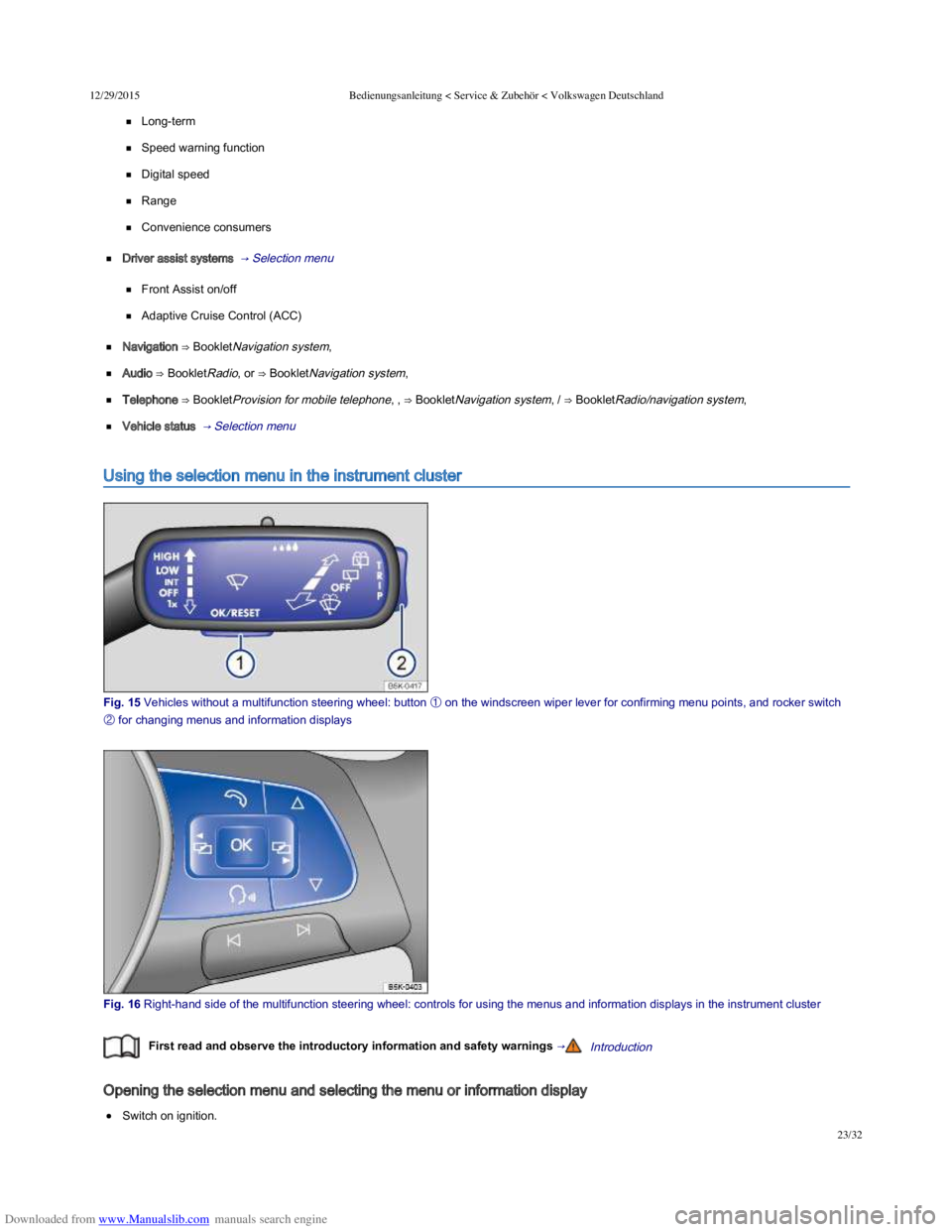
Using the selection menu in the instrument cluster
Fig. 15 Vehicles without a multifunction steering wheel: button
Page 30 of 100
Downloaded from www.Manualslib.com manuals search engine 12/29/2015Bedienungsanleitung < Service & Zubehör < Volkswagen Deutschland
27/32
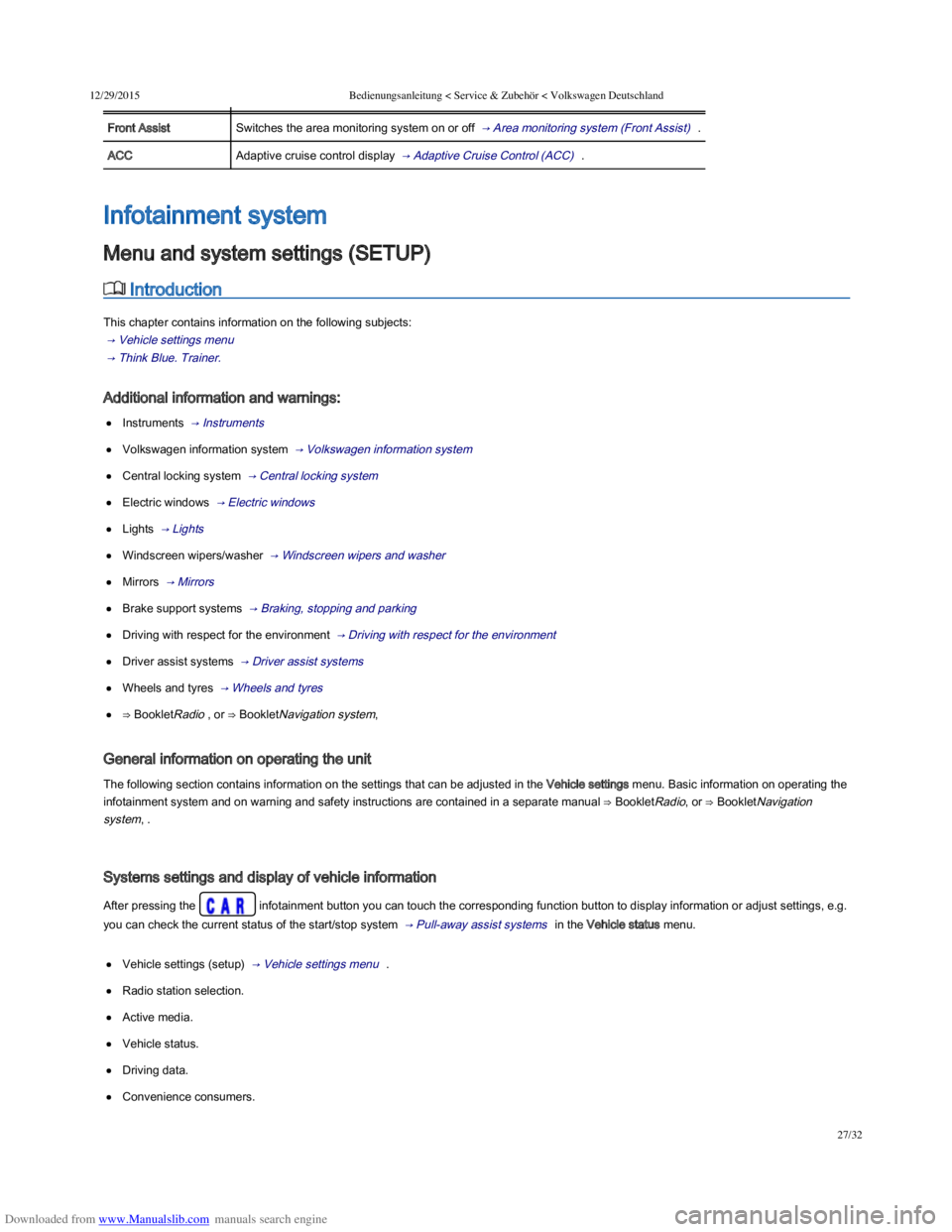
MenuFunction
Front AssistSwitches the area monitoring system on or off → Area monitoring system (Front Assist) .
ACCAdaptive cruise control display → Adaptive Cruise Control (ACC) .
Introduction
This chapter contains information on the following subjects:
→ Vehicle settings menu
→ Think Blue. Trainer.
Additional information and warnings:
Instruments → Instruments
Volkswagen information system → Volkswagen information system
Central locking system → Central locking system
Electric windows → Electric windows
Lights → Lights
Windscreen wipers/washer → Windscreen wipers and washer
Mirrors → Mirrors
Brake support systems → Braking, stopping and parking
Driving with respect for the environment → Driving with respect for the environment
Driver assist systems → Driver assist systems
Wheels and tyres → Wheels and tyres
⇒ BookletRadio , or ⇒ BookletNavigation system,
General information on operating the unit
The following section contains information on the settings that can be adjusted in the Vehicle settings menu. Basic information on operating the
infotainment system and on warning and safety instructions are contained in a separate manual ⇒ BookletRadio, or ⇒ BookletNavigation
system, .
Systems settings and display of vehicle information
After pressing the infotainment button you can touch the corresponding function button to display information or adjust settings, e.g.
you can check the current status of the start/stop system → Pull-away assist systems in the Vehicle status menu.
Vehicle settings (setup) → Vehicle settings menu .
Radio station selection.
Active media.
Vehicle status.
Driving data.
Convenience consumers.
Infotainment system
Menu and system settings (SETUP)
Page 31 of 100
Downloaded from www.Manualslib.com manuals search engine 12/29/2015Bedienungsanleitung < Service & Zubehör < Volkswagen Deutschland
28/32
After starting the engine with a discharged vehicle battery, or after the battery has been changed, system settings (time, date, personal
convenience settings and programming) may have been changed or deleted. Check and correct the settings as necessary once the vehicle
battery has been sufficiently charged.
Vehicle settings menu
First read and observe the introductory information and safety warnings →Introduction
Opening the Vehicle settings menu
Switch on ignition.
Switch on infotainment system if necessary.
Press the infotainment button.
Touch the function button to open the Vehicle settings menu.
Touch the corresponding function button to open additional menus in the Vehicle settings menu, or to adjust settings in the menu points.
If the checkbox in the function button is ticked , the respective function is switched on.
Changes made in settings menus are automatically applied immediately after entry.
Touching the function button takes you back to the previous menu.
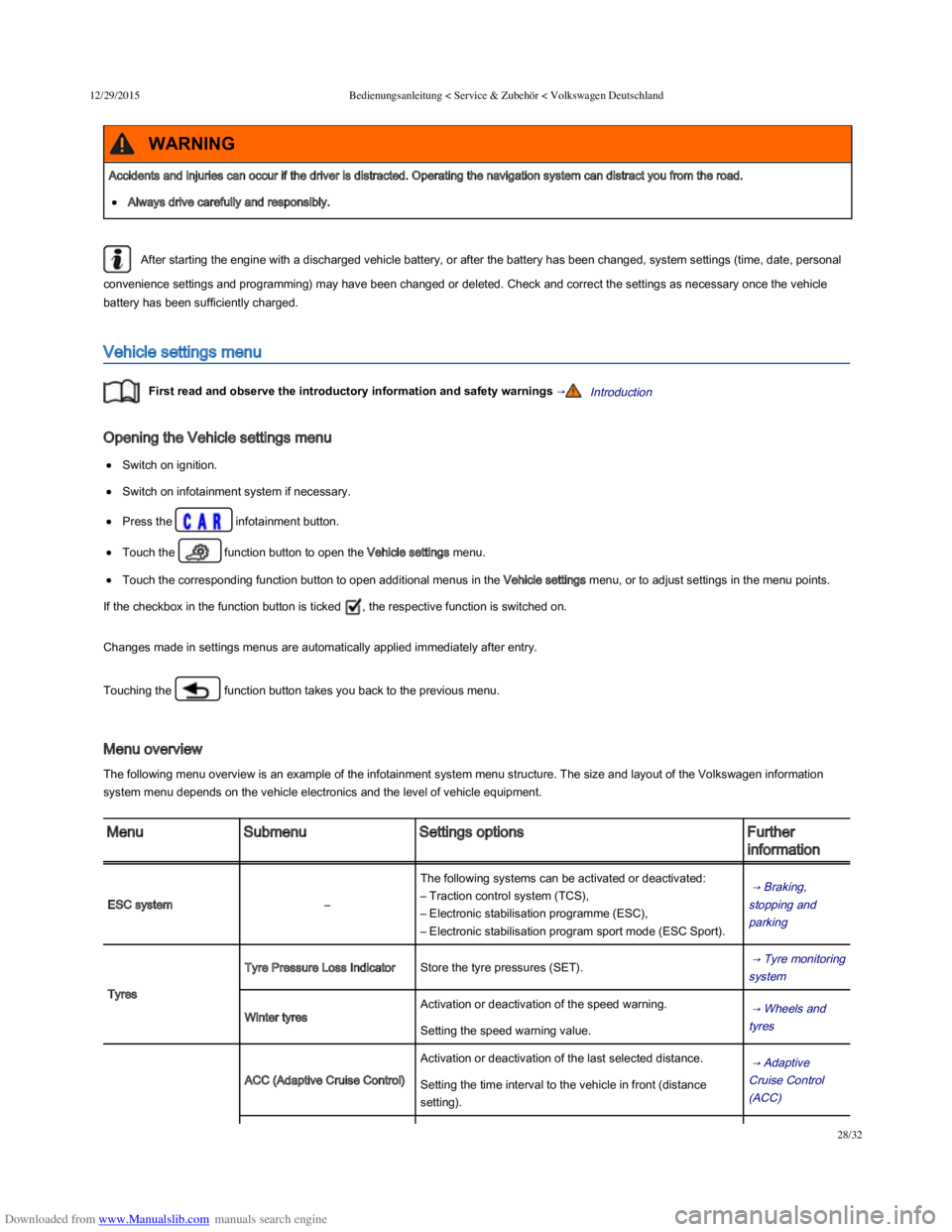
Menu overview
The following menu overview is an example of the infotainment system menu structure. The size and layout of the Volkswagen information
system menu depends on the vehicle electronics and the level of vehicle equipment.
MenuSubmenuSettings optionsFurther
information
ESC system–
The following systems can be activated or deactivated:
– Traction control system (TCS),
– Electronic stabilisation programme (ESC),
– Electronic stabilisation program sport mode (ESC Sport).
→ Braking,
stopping and
parking
Tyres
Tyre Pressure Loss IndicatorStore the tyre pressures (SET). → Tyre monitoring
system
Winter tyres
Activation or deactivation of the speed warning. → Wheels and
tyres Setting the speed warning value.
ACC (Adaptive Cruise Control)
Activation or deactivation of the last selected distance. → Adaptive
Cruise Control
(ACC)
Setting the time interval to the vehicle in front (distance
setting).
Accidents and injuries can occur if the driver is distracted. Operating the navigation system can distract you from the road.
Always drive carefully and responsibly.
WARNING