2015 VOLKSWAGEN PASSAT Door
[x] Cancel search: DoorPage 3 of 397
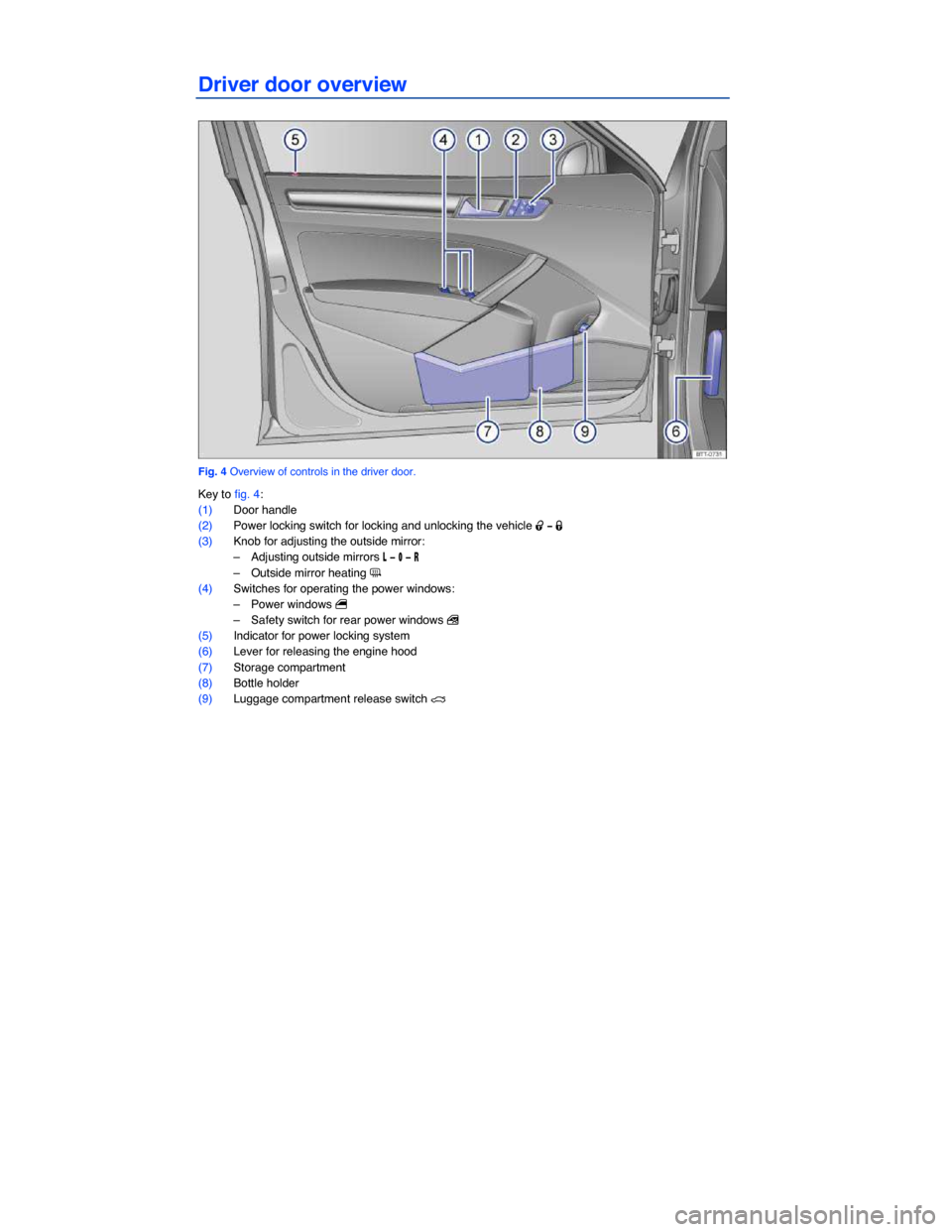
Driver door overview
Fig. 4 Overview of controls in the driver door.
Key to fig. 4:
(1) Door handle
(2) Power locking switch for locking and unlocking the vehicle 0
Page 23 of 397

▪ Speed warning --- mph
Audio ⇒ Booklet Radio or ⇒ Booklet Navigation system
Navigation ⇒ Booklet Navigation system
Phone ⇒ Booklet Volkswagen Car-Net and Mobile Phone Package
Vehicle status ⇒ Main menus: Premium version
Settings ⇒ Settings menu
▪ Language
▪ MFI data
– Travel time
– Curr. consum. (current fuel consumption)
– Av. consum. (average fuel consumption)
– Route
– Av. speed
– Digit. speed (digital speed display)
– Oil temperature
– Speed warn. (speed warning)
– Back
▪ Convenience ⇒ Convenience submenu
– ATA confirm
– Central locking
Auto unlock
Unlock doors
Back
– Window op. (window operation)
Off
All
Driver
Back
– Mirror down (vehicles with memory seats)
– Mirror adjust
Individually
Both mirrors
Factory setting
Back
▪ Lights & Vision ⇒ Lights & Vision submenu
– Coming home
– Leaving home
– Conv. turn sig. (convenience turn signal)
– Factory setting
– Back
▪ Time
– Hours
– Minutes
– 24 hr. mode
– Daylight save
Page 28 of 397

Convenience menu Function
Unlock doors
Doors are unlocked as follows depending on the option selected: – All doors: Pushing the unlock button 0 on the remote
control vehicle key (⇒ fig. 34, ⇒ fig. 37, ⇒ fig. 36 or
⇒ fig. 35) unlocks all doors and the luggage compartment. – Single door: Pushing the unlock button 0 on the remote control vehicle key unlocks only the driver door. To unlock all doors and the luggage compartment, push the unlock button 0 on the key a second time within about 5 seconds. – Vehicle side: Pushing the unlock button 0 on the remote control vehicle key unlocks the doors on the driver side of the vehicle. On vehicles with Keyless Access
⇒ page 50, touching the sensor surface of a door handle on the side where the valid vehicle key is located unlocks the doors on that side of the vehicle
Window op.
Off
Manual unlocking/locking: No windows open or close when the key is held in the unlocking or locking position Keyless Access: No windows close when the locking sen-sor on the door handle is pressed and held (convenience closing)
All
Manual unlocking/locking: All windows open or close when the key is held in the unlocking or locking position. Keyless Access: All windows close when the locking sensor on the door handle is pressed and held.
Driver
Manual unlocking: The driver window opens when the key is held in the unlocking position. Manual locking: All windows close when the key is held in the locking position. Keyless Access: All windows close when the locking sensor on the door handle is pressed and held.
Back The display switches back to the Convenience menu.
Mirror down Tilts passenger mirror down when backing up so you can see the curb. Feature only available on vehicles equipped with memory seats.
Mirror adjust
Individually Both outside mirrors are adjusted separately.
Both mirrors The front passenger outside mirror is adjusted at the same time as the driver outside mirror.
Back The display returns to the Convenience menu.
Factory setting The display switches back to the Convenience menu.
Back The display switches back to the Settings menu.
Page 34 of 397

Remote Vehicle Access:
Feature Description
Remote Door Unlock
You can send a request to unlock the vehicle doors through your Volkswagen Car-Net iPhone® or Android® app, the Volkswagen Car-Net website or by call-ing the Volkswagen Car-Net Response Center (text and data rates apply). If none of the vehicle doors are opened within about 30 seconds, the car will lock again.
Remote Honk and Flash
You can send a honk and flash signal to the car using the Volkswagen Car-Net website or the VW Car-Net iPhone® or Android® app (text and data rates apply). The car will honk the horn and blink the headlights and emergency flashers for up to 10 seconds.
Last Parked Location You can locate your last parked location using your Volkswagen Car-Net iPh-one® or Android® app (text and data rates apply).
Destinations Only applicable for vehicles equipped with a factory-installed naviga-tion system.
Points of Interest (POIs) or other destinations can be imported remotely into the factory-installed navigation system (if equipped) from a computer or the Volkswagen Car-Net iPhone® or Android® app (text and data rates apply). These destinations can be called up and used by the navigation system.
Destination Down-load Only applicable for vehicles equipped with a factory-installed naviga-tion system.
Press the • button in the 3-button module: The vehicle will connect directly to the Volkswagen Car-Net Response Center where a Volkswagen Car-Net Cus-tomer Specialist will assist with destinations. The address of a dealer’s location can also be sent by the Customer Specialist to your factory-installed navigation system (if equipped).
Remote Status Check
Current information about the vehicle can be viewed through a computer or your Volkswagen Car-Net iPhone® or Android® app (text and data rates apply). You can find out if the doors, luggage compartment and engine hood are open or closed, whether the car lights are on or off, the level of fuel in the tank, when the vehicle needs to be serviced next and more.
Diagnostics & Maintenance:
Feature Description
Dealer Scheduling
Press the • button in the 3-button module: The vehicle will initiate a call to the Volkswagen Car-Net Response Center where a Volkswagen Car-Net Customer Specialist will connect you with an authorized Volkswagen dealer to schedule your service appointment. The address of the dealer’s location can also be sent by the Customer Specialist to your factory-installed navigation system (if equipped).
Vehicle Health Report
View a vehicle health report to proactively manage maintenance and other services and to receive up-to-date diagnostics in a monthly email report or by immediate request.
Page 43 of 397

Vehicle identification label
The vehicle identification label ⇒ fig. 20 is affixed to the area of the spare wheel well underneath the luggage compartment floor panel and contains the following information:
(1) Vehicle identification number (VIN)
(2) Vehicle type, engine output, and transmission
(3) Engine and transmission identification codes, paint number, and interior type. In the example,
the engine identification code is “CBFA” ⇒ fig. 20.
(4) Optional equipment and part numbers
Safety Compliance Certification Label
A safety certificate affixed to the door jamb in the driver door confirms that at time of production all necessary safety standards and requirements of the traffic safety agency of the respective country were met. The month and year of production as well as the vehicle identification number may be listed as well.
Radiator fan and high voltage warning sticker
A warning sticker about the radiator fan and the high voltage of the electrical system is located in the engine compartment next to the engine hood release. The vehicle ignition system complies with the Canadian standard ICES-002.
Tire inflation pressure label
A tire inflation pressure label is on the driver door jamb ⇒ Tires and wheels.
Fuel grade sticker
An information sticker listing the correct fuel grade for your vehicle ⇒ Refueling.
Engine data
Page 47 of 397

Remote start feature
Press the button (3) to activate the remote start feature ⇒ Starting and stopping the engine.
Replacement vehicle keys
The vehicle identification number is required to get a replacement key or an additional remote control vehicle key.
Up to 8 vehicle keys, each of which must be properly cut, coded, programmed, and synchronized, can be used with your vehicle.
Each new vehicle key contains a microchip and must be coded with the data from the vehicle's elec-tronic immobilizer. A vehicle key will not work if it does not contain a microchip or contains a chip that is not coded, even if the key bit was cut correctly.
You can obtain additional or duplicate remote control vehicle keys from authorized Volkswagen deal-ers, authorized Volkswagen Service Facilities, and from certain independent repair facilities and lock-smiths which are qualified to make remote control vehicle keys.
Each vehicle key must be programmed by an authorized Volkswagen dealer, an authorized Volkswagen Service Facility in order for it to work with your vehicle.
To find the nearest qualified independent repair facility, locksmith, or Volkswagen dealer which can cut and code replacement vehicle keys, call the VW Customer Care Hotline at 1-800-822-8987 or visit http://www.vw.com and search for “replacement keys.”
Canadian customers can contact an authorized Volkswagen dealer or Volkswagen Service Facility or call the Volkswagen Canada Customer CARE Center at (1-800-822-8987).
NOTICE
The remote control vehicle keys contain electrical components. Protect them from damage, moisture and rough handling.
Do not press the buttons on the remote control vehicle key unless you actually want to use the function in question. Since terrain and conditions vary, pressing a button on the remote control vehicle key when it is not necessary may unlock the vehicle or set off the panic alarm, even if you think you are out of range.
Remote control vehicle key functions can be temporarily disrupted by interference from transmit-ters near the vehicle that use the same frequency range (such as radio equipment or mobile phones).
Things between the remote control vehicle key and vehicle, bad weather, as well as a weak battery can reduce the operating range.
If the remote control vehicle key buttons ⇒ Vehicle key set or the power locking buttons ⇒ Un-locking and locking the vehicle from the inside are pushed repeatedly in quick succession, the power locking system is switched off for a brief period to help keep it from being overloaded. The vehicle is then unlocked for about 30 seconds. Unless a door or the luggage compartment lid is opened in this span of time, the vehicle is automatically locked afterwards.
Page 51 of 397
WARNING
Improper use of power locks can result in serious personal injury.
x The power locking button locks all doors. Locking the doors from the inside can help prevent unintended door opening during a collision and can also prevent unwanted entry from the outside. Locked doors can, however, delay assistance to vehicle occupants and rescue from the outside in an accident or other emergency.
x Never leave children or anyone who cannot help themselves behind in the vehicle. All doors can be locked from the inside with the power lock button. This could leave people trapped in the vehicle in an emergency. Depending on the time of year, people trapped in the vehicle can be exposed to very high or very low temperatures.
x A closed vehicle can become very hot or very cold, depending on the season. Particularly in the summer, heat build-up in the passenger and luggage compartment of a parked vehicle can result in temperatures in the vehicle that are much higher than the outside temperatures. Temperatures can quickly reach levels that can cause unconsciousness and death, particu-larly to small children.
x Never allow passengers to remain in a locked vehicle. In an emergency any person still inside the vehicle might not be able to get out.
Indicator light in the driver door
Page 52 of 397

x From the inside with the power locking button ⇒ Unlocking and locking the vehicle from the inside.
Special functions of the power locking system can be activated or deactivated via the Convenience
submenu in the Settings menu on vehicles with the Premium instrument cluster ⇒ Volkswagen Information System or by an authorized Volkswagen dealer or authorized Volkswagen Service Facility.
The doors, the luggage compartment lid, and the fuel filler flap can be locked manually if the remote vehicle key is not working.
Automatic locking (Auto lock)
The vehicle locks automatically when it reaches a speed of about 10 mph (15 km/h). When the vehicle
is locked, the indicator light 1 lights up in the power locking button ⇒ fig. 39.
Automatic unlocking (Auto unlock)
All doors automatically unlock when you switch off the ignition and open a door from inside the vehicle. On vehicles with automatic transmission, the doors will also unlock when the selector lever is in Park (P) or the ignition is switched off. Auto unlock works only if the vehicle has been automatically locked with the Auto lock feature. The indicator light 1 goes out in the power locking button when the doors
unlock ⇒ fig. 39.
Locking the vehicle after airbag inflation
If the airbags are activated during a collision, the entire vehicle is unlocked. Depending on the severity of the damage, the vehicle can be locked after a collision when the airbags have deployed as follows:
Function Action
Locking the vehicle with the power locking button: – Switch the ignition off. – Press the power locking button 1.
Locking the vehicle with the remote control vehicle key: – Switch the ignition off. OR: Remove the vehicle key from the ignition. – Lock the vehicle with the remote control vehicle key.
If the vehicle key buttons ⇒ Vehicle key set or one of the power locking buttons ⇒ Unlocking and locking the vehicle from the inside are pushed repeatedly in quick succession, the power locking system is switched off for a brief period to help keep it from being overloaded. The vehicle is then unlocked for about 30 seconds. Unless a door or the luggage compartment lid is opened during this time, the vehicle is automatically locked afterwards.