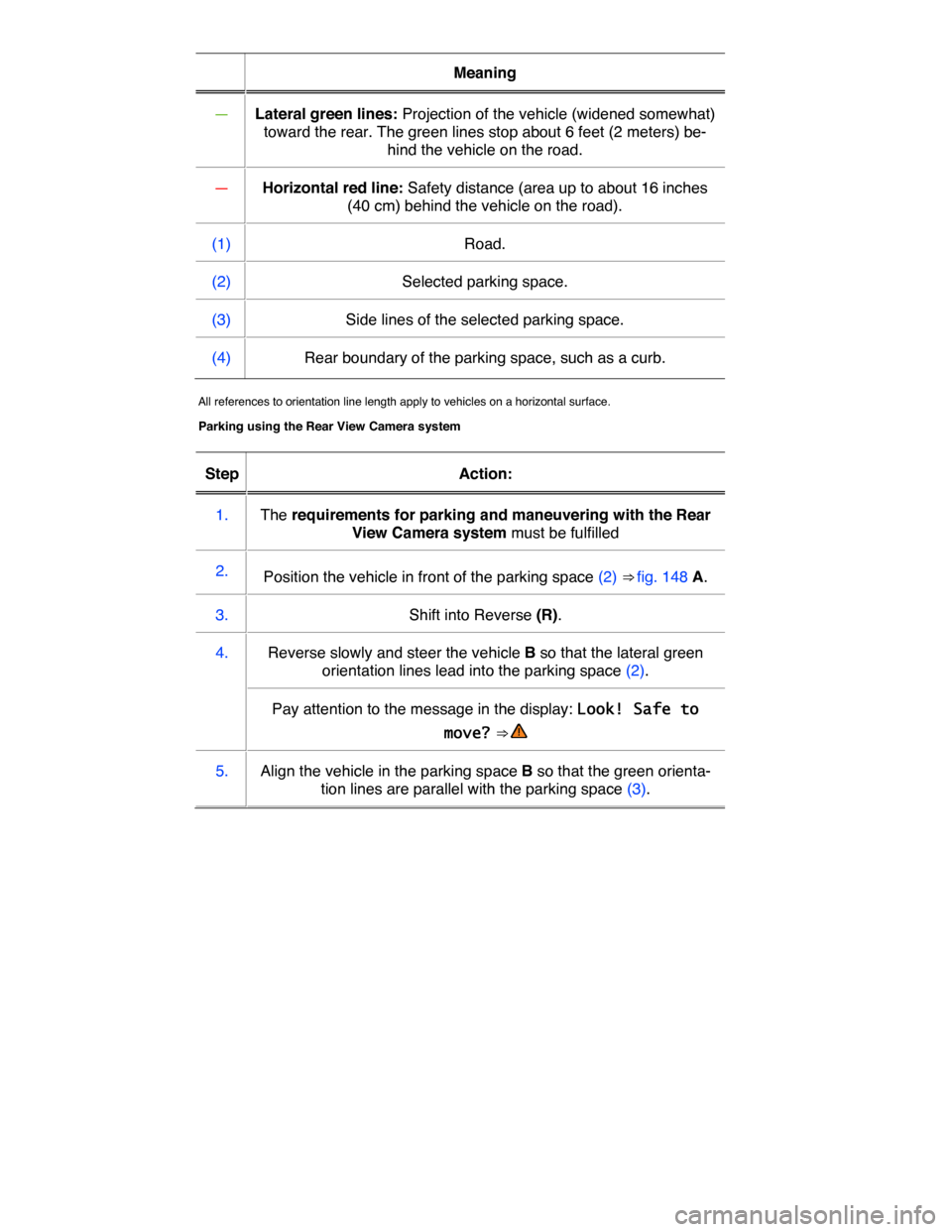
Meaning
— Lateral green lines: Projection of the vehicle (widened somewhat)
toward the rear. The green lines stop about 6 feet (2 meters) be-
hind the vehicle on the road.
— Horizontal red line: Safety distance (area up to about 16 inches
(40 cm) behind the vehicle on the road).
(1) Road.
(2) Selected parking space.
(3) Side lines of the selected parking space.
(4) Rear boundary of the parking space, such as a curb.
All references to orientation line length apply to vehicles on a horizontal surface.
Parking using the Rear View Camera system
Step Action:
1. The requirements for parking and maneuvering with the Rear
View Camera system must be fulfilled
2. Position the vehicle in front of the parking space (2) ⇒ fig. 148 A.
3. Shift into Reverse (R).
4. Reverse slowly and steer the vehicle B so that the lateral green
orientation lines lead into the parking space (2).
Pay attention to the message in the display: Look! Safe to
move? ⇒
5. Align the vehicle in the parking space B so that the green orienta-
tion lines are parallel with the parking space (3).
In order to Operation (when the ignition is switched on)
OR: Tap the mini PDC function key.
Switch to the Rear
View Camera sys-
tem display (if
equipped):
Shift into Reverse (R).
OR: Tap the Z function key.
The indicator light in the � button ⇒ fig. 150 lights up and stays on as long as the feature is active.
Automatic activation
When the PDC is activated automatically, a mini PDC display appears on the left-hand side of the
screen ⇒ fig. 152.
Automatic activation of the PDC when driving slowly towards an obstacle located in front of the vehicle only works when the speed falls below about 6–9 mph (10–15 km/h) for the first time. If the PDC was switched off using the � button, performing one of the following actions with the ignition switched on can automatically reactivate the PDC:
x If the vehicle accelerates to a speed greater than 6–9 mph (10–15 km/h) and then drops below that speed again.
x OR: If the selector lever is moved to Park (P) and then out of that position again.
x OR: If automatic activation is turned off and on again in the Infotainment system.
Automatic activation of the mini PDC display can be turned on or off in the Infotainment system ⇒ Infotainment system.
When the box in the automatic activation function key is checked =, signal chimes sound from a distance of about 20 inches (50 cm) from the obstacle.
WARNING
Never rely completely on the PDC for information about people and objects that might be in the way of the vehicle and could be struck by the vehicle causing serious personal injury.
x The PDC sensors have blind spots where they cannot detect people or objects.
x Always watch for people, especially small children and animals, because the sensors may not always be able to detect them.
If you hear a long beep of about 3 seconds when you first turn PDC on or the indicator light in the button starts blinking, this means there is a malfunction in the Park Distance Control system. Switch off the Park Distance Control system with the button and have it immediately checked by an author-ized Volkswagen dealer or an authorized Volkswagen Service Facility.