2015 VOLKSWAGEN E GOLF charge
[x] Cancel search: chargePage 264 of 394

Temperature monitoring
During the charging process the charging cable can become slightly warmer. This is normal and no cause for concern
If the control unit or the charging cable becomes too hot, the charging current will automatically be reduced If the control unit or the charging cable continues to get hot even at the lowest charging current, the protection unit will be switched off, and will remain switched off until it has cooled down sufficiently.
If no other sources of heat, such as direct sunlight, can be identified as relevant, have the outlet checked by properly qualified and trained experts.
Charging cable for charging at charging stations (if equipped)
Keep the charging cable for charging at a charging station safely in its bag in the luggage compart-ment. Follow the operating manual for the charging station. Before using the charging cable, read the procedure for charging with alternating current
WARNING
Charging the high-voltage battery improperly, using improper or damaged outlets and charg-ing cables, improper handling of the high-voltage battery or failure to follow safe charging procedures can cause short circuits, electric shock, explosions, fire, burns, injuries and death.
x Always connect the charging cable to a properly functioning 110 Volt Ground Fault Circuit (GFI) wall outlet. The outlet must be properly protected from water, moisture and other fluids.
x Always check the fuse protection of the GFI outlet before connecting the charging cable.
x Never connect the charging cable to a conventional power outlet, regardless of whether the outlet is protected or not.
x Never use the charging cable with an extension cord of any kind.
x Never let plugs or connectors come into contact with water, moisture, or any other fluids.
x Never use any charging cable if it is damaged and never use the charging cable with a damaged GFI outlet.
x Never attempt to alter or repair cables or other electrical components.
x Never let anybody stay in the vehicle while the high-voltage battery is charging.
x Never do any kind of work on the outside or inside of the vehicle while the high-voltage battery is charging.
x Always disconnect the charging cable completely from the vehicle before starting the motor.
WARNING
If you are not familiar with the outlet or the electrical installation or it has not been checked by qualified experts, never use it for charging. Even very low charging currents can cause serious damage and in particular fires if the socket or electrical installation is in bad condi-tion. If necessary, get expert assistance from a qualified electrical installation specialist.
WARNING
If a 110 Volt outlet is being used for charging, never charge 2 or more vehicles on outlets of the same fuse at the same time. Use a different fuse circuit for charging another vehicle. Al-ways comply with the maximum load for the fuse circuit used. If necessary, get expert assis-tance.
Page 265 of 394
NOTICE
The supplied charging cable for 110 Volt outlets should always be carried in the vehicle.
NOTICE
Always follow the manufacturer's information and instructions on using the charging station.
NOTICE
The supplied charging cable for 110 Volt outlets has been developed and approved for this vehicle. Do not use the charging cable to charge other vehicles. This applies in particular for vehicles that do not have DC residual current protection.
NOTICE
Always end the charging process before disconnecting the charging cable.
NOTICE
Always connect the charging cable directly to a 110 Volt outlet. Never use the charging cable together with an extension cable, a cable reel, a multiple socket outlet or an adapter such as a regional adapter or timer.
If the charging cable is connected to a 110 Volt outlet with other electrical consumers on the same electrical circuit, the fuse in the electrical circuit can be triggered. If this happens the high-voltage battery will not be charged. Switch off other consumers on the electrical circuit or choose another electrical circuit. If necessary, have the electrical installation checked by qualified experts.
Protect the control unit on the charging cable and the connector from heat, especially from sunlight, during charging.
If the vehicle is close to high-voltage cables during charging, charging may be restricted.
Charging with alternating current (AC charging)
Page 268 of 394
NOTICE
Always follow the manufacturer's information and instructions on using the charging station.
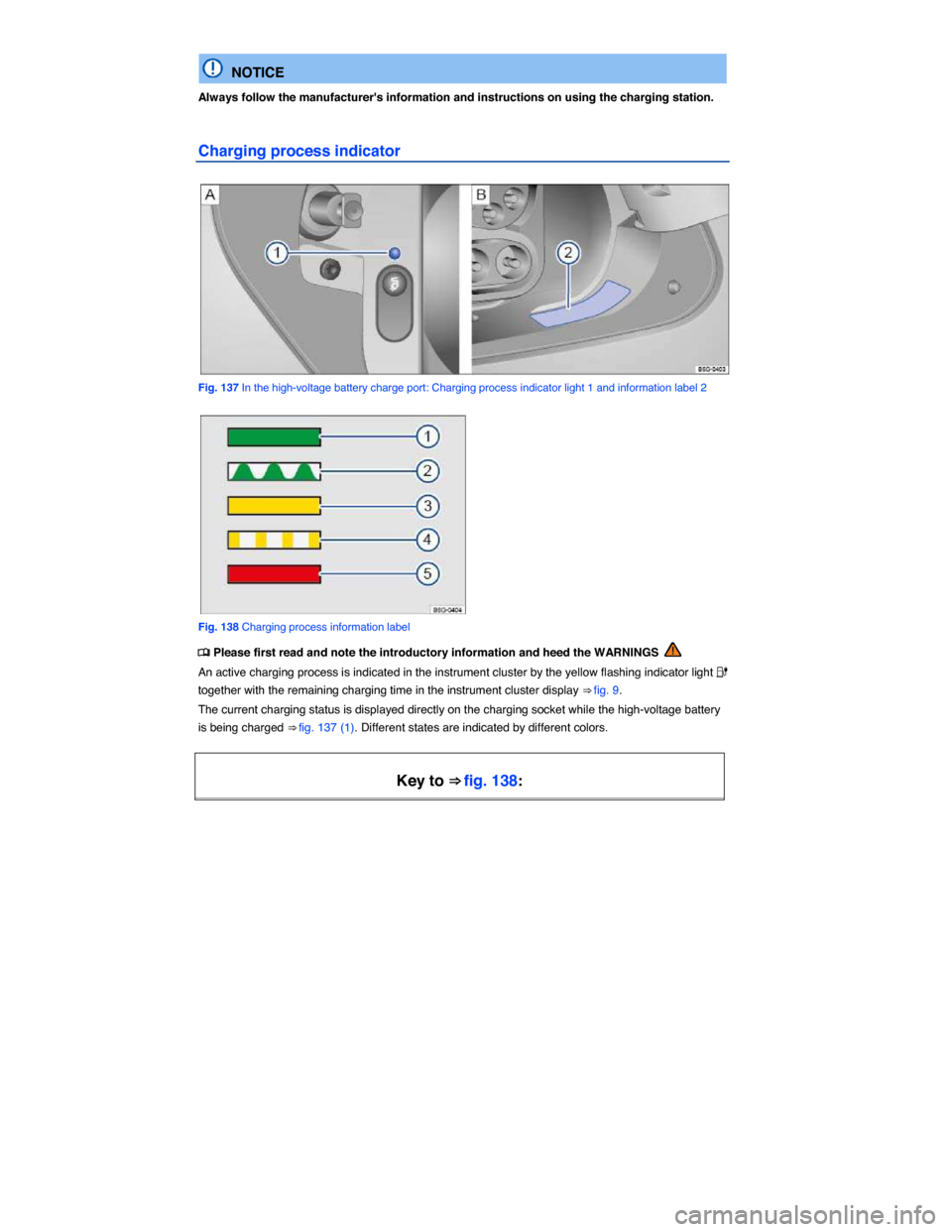
Charging process indicator
Fig. 137 In the high-voltage battery charge port: Charging process indicator light 1 and information label 2
Fig. 138 Charging process information label
Page 269 of 394

Charging pro-
cess indicator
light ⇒ fig. 137
(1)
Meaning Proper re-
sponse
(1) Lights up green
permanently.
High-voltage
battery charging
process has
been completed.
Disconnect the
charging con-
nector and close
the charging
socket flap.
(2) Flashes green
permanently.
High-voltage
battery is being
charged.
-
(3) Lights up yellow
briefly.
Charging cable
is connected and
has been detect-
ed by the vehi-
cle.
-
Lights up yellow
permanently.
The charging
cable is con-
nected but there
is no current.
Have the power
supply or the
outlet checked. If
necessary, seek
expert help.
OR: The vehicle
has automatical-
ly unlocked the
charging cable
connector.
Remove the
charging cable
connector.
(4) Flashes yellow. The selector
lever is not in
position P (Park).
Place the selec-
tor lever in posi-
tion P (Park)
Page 270 of 394

Key to ⇒ fig. 138:
Charging pro-
cess indicator
light ⇒ fig. 137
(1)
Meaning Proper re-
sponse
(5) Lights up red. Charging cable
connector could
not be locked
properly in the
charging socket
of the vehicle.
Check whether
the charging
connector is
plugged in cor-
rectly. Pull out
the charging
cable connector
and insert it into
the charging
socket again.
Get expert assis-
tance if neces-
sary.
Flashes red. Error in charging
system. The
high-voltage
battery cannot
be charged.
Get expert assis-
tance.
Page 271 of 394
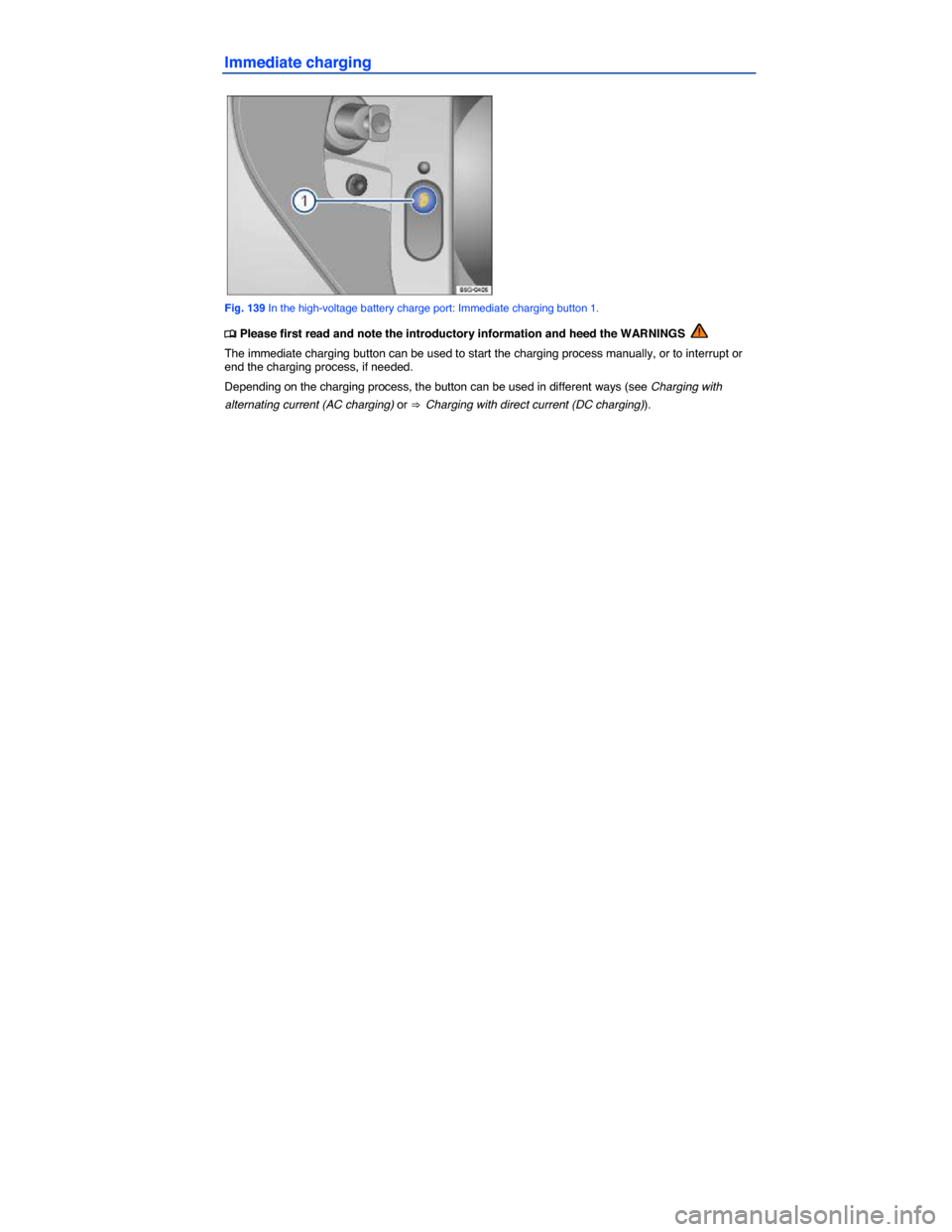
Immediate charging
Fig. 139 In the high-voltage battery charge port: Immediate charging button 1.
Page 304 of 394

WARNING
The electric motor compartment of any motor vehicle is a potentially dangerous area and can cause serious personal injury.
x Always use extreme caution when doing any work in the electric motor compartment. Always follow commonly accepted safety practices and use common sense. Never risk per-sonal injury.
x Never perform any work in the electric motor compartment unless you know exactly how to carry out the job and have the correct technical information and the correct tools.
x If you are uncertain about what to do, have the work performed by an authorized Volkswagen dealer, an authorized Volkswagen Service Facility, or another qualified work-shop. Serious personal injury may result from improperly performed work.
x We strongly recommend that you always have HID – High Intensity Discharge (Xenon) headlights and H7 bulbs replaced by a qualified technician. Serious personal injury may re-sult from improperly performed work.
x Never open or close the electric motor hood if steam or coolant is escaping. Hot steam or coolant can cause serious burns. Always wait until you no longer see or hear steam or cool-ant escaping from the electric motor.
x Always let the electric motor cool down completely before carefully opening the hood.
x Hot parts of the electric motor and the exhaust system will burn skin on contact.
x When the electric motor has cooled down and you are ready to open the hood:
– Firmly apply the parking brake and shift the transmission into Park (P) (automatic) or Neutral (manual only).
– Take the vehicle key out of the ignition.
– On vehicles with Keyless Access, make sure that the remote control vehicle key is out of range of the vehicle and that the vehicle cannot be started by depressing the starter
button ⇒ Unlocking or locking the vehicle with Keyless Access.
– Always keep children and others away from the electric motor compartment and never leave them unsupervised.
x The electric motor coolant system is under pressure when the electric motor is hot. Never unscrew the coolant expansion tank cap when the electric motor is hot. Hot coolant can spray out and cause severe burns and other serious injuries.
– Turn the cap slowly and very carefully in a counterclockwise direction while applying light downward pressure on the top of the cap.
– Always protect your face, hands, and arms from hot escaping coolant or steam by covering the cap with a large, thick rag.
x Never spill fluids on the electric motor or exhaust system when refilling. Spilling fluids onto hot parts of the electric motor or exhaust system can cause a fire.
Page 305 of 394

WARNING
High voltage systems in the electric motor compartment can cause electrical shocks or even electrocution, severe burns, other serious injuries, and even death!
x Never short-circuit the electrical system. Be especially careful when using jumper cables. The vehicle's battery could explode!
x To reduce the risk of electrical shock and personal injury while the electric motor is acti-vated:
– Never touch ignition cables. Never touch other components of the high voltage elec-tronic ignition system.
– Never touch the wiring of the HID – High Intensity Discharge (Xenon) headlights.
x Read and heed the important information and warnings on cleaning the electric motor
compartment ⇒ Cleaning the electric motor compartment.
WARNING
Moving parts in the electric motor compartment can cause serious personal injury on con-tact.
x Never reach into the area around or touch the radiator fan. Contact with the blades can cause serious personal injury. Always remember that the radiator fan is temperature-controlled and can come on suddenly even when the electric motor has been switched off for a while and the key has been removed from the ignition.
x If you have to perform a check or repair when the electric motor is activated, there are more risks from the rotating parts, such as the drive belts, alternator, radiator fan, etc., and from the high-voltage ignition system. Always use extreme care.
– Always make sure that jewelry, loose clothing and long hair do not get caught in rotat-ing electric motor parts. Before starting any work remove your jewelry, take off your neck-tie, tie back and cover your hair, and do not wear clothing that can hang down and get caught in moving electric motor parts.
– Always use extreme caution if the accelerator pedal has to be depressed to perform a check. The vehicle will start to move even if the parking brake is on.
x Never leave any objects in the electric motor compartment, for example cleaning rags and tools. Objects left behind can cause malfunctions, electric motor damage, and even fires.
WARNING
Additional materials in the electric motor compartment such as blankets can interfere with the operation of the electric motor and can cause fires, which can lead to serious injuries.
x Never cover the electric motor with blankets or other materials.
WARNING
Operating fluids and some materials in the electric motor compartment can catch fire easily, causing burns and other serious personal injuries!
x Never smoke near the electric motor compartment.
x Never work next to open flames or sparks.
x Never pour or spill operating fluids or other flammable liquids on the electric motor. These fluids can ignite on hot electric motor parts and cause injuries.
x Always have a functional, approved fire extinguisher nearby.