Page 13 of 223

In brief11
1Side air vents ...................... 118
2 Light switch ......................... 104
3 Turn and lane-change
signals ................................. 109
Headlight flash ....................105
Low beam and high beam ..105
4 Cruise control ...................... 136
Speed limiter ....................... 137
Forward collision alert .........138
5 Instruments ........................... 79
6 Horn ..................................... 73
Driver airbag ........................ 44
7 Steering wheel controls .......72
8 Windscreen wiper,
windscreen washer system ...73
Rear wiper, rear washer system ................................... 75
9 Centre air vents adjustment 118
10 Centre air vents ................... 118
11 Electronic Stability Control . 134
12 Hazard warning flashers ....10913 Control indicator for airbag
deactivation .......................... 84
14 Instrument panel storage
button .................................... 54
15 Passenger airbag
deactivation ........................... 46
16 Glovebox .............................. 55
17 Infotainment system
18 Eco button for stop-start
system ................................. 122
Fuel selector ......................... 80
19 AUX input, USB input, SD
card slot
20 Selector lever, manual
transmission ....................... 130
Automatic transmission ......127
21 Parking brake ......................132
22 Power outlet .......................... 78
23 Parking assist ..................... 140
Descent control system ......... 86
24 Climate control system ........ 113
25 Accelerator pedal ................12126Ignition switch with
steering wheel lock ............121
27 Brake pedal ......................... 131
28 Clutch pedal ........................ 120
29 Steering wheel adjustment ..72
30 Instrument panel storage ......54
31 Bonnet release lever ..........158
Page 16 of 223
14In briefWasher and wiper systems
Windscreen wiperHI=fastLO=slowINT=interval wiping or automatic
wiping with rain sensorOFF=off
For a single wipe when the
windscreen wiper is off, press the
lever down to position 1x.
Windscreen wiper 3 73, Wiper
blade replacement 3 163.
Windscreen washer systems
Pull lever.
Windscreen washer system 3 73,
Washer fluid 3 161.
Rear window wiper
Press the rocker switch to activate the
rear window wiper:
upper switch=continuous
operationlower switch=intermittent
operationmiddle position=off
Page 31 of 223

Keys, doors and windows29Windows
Windscreen
Heat-reflecting windscreen The heat-reflecting windscreen has a
coating which reflects solar radiation.
Also data signals, e.g. from toll
stations, might be reflected.
The marked areas of the windscreen
behind the interior mirror are not
covered with the coating. Devices for
electronic data recording and fee
payment must be attached in these
areas. Otherwise data recording
malfunctions may occur.
Windscreen stickers
Do not attach stickers such as toll
road stickers or similar on the
windscreen in the area of the interior
mirror. Otherwise the detection zone
of the sensor and the view area of the camera in the mirror housing could be
restricted.
Manual windows The door windows can be opened or
closed with the window winders.
Power windows9 Warning
Take care when operating the
power windows. Risk of injury,
particularly to children.
If there are children on the rear seats, switch on the child safety
system for the power windows.
Keep a close watch on the
windows when closing them.
Ensure that nothing becomes
trapped in them as they move.
Switch on ignition to operate power
windows.
Operate the switch for the respective
window by pushing to open or pulling to close.
Pushing or pulling gently to the first
detent: window moves up or down as long as the switch is operated.
Page 75 of 223
Instruments and controls73Heated steering wheel
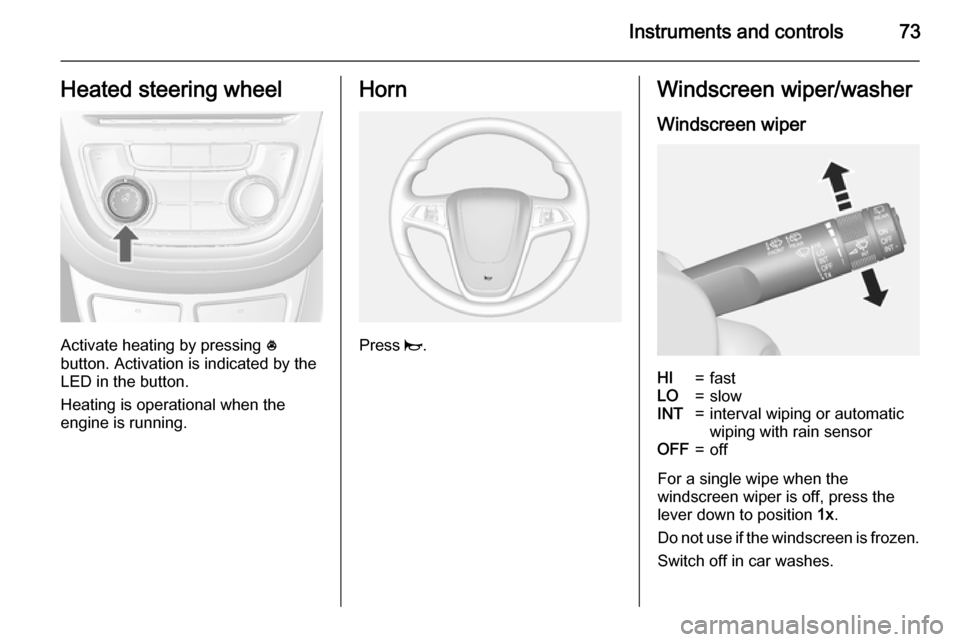
Activate heating by pressing *
button. Activation is indicated by the
LED in the button.
Heating is operational when the
engine is running.
Horn
Press j.
Windscreen wiper/washer
Windscreen wiperHI=fastLO=slowINT=interval wiping or automatic
wiping with rain sensorOFF=off
For a single wipe when the
windscreen wiper is off, press the
lever down to position 1x.
Do not use if the windscreen is frozen.
Switch off in car washes.
Page 76 of 223
74Instruments and controls
Adjustable wiper interval
Wiper lever in position INT.
Turn the adjuster wheel to adjust the
desired wipe interval:
short interval=turn adjuster
wheel upwardslong interval=turn adjuster
wheel downwardsAutomatic wiping with rain sensorINT=automatic wiping with rain
sensor
The rain sensor detects the amount of water on the windscreen and
automatically regulates the frequency
of the windscreen wiper.
Adjustable sensitivity of the rain
sensor
Turn the adjuster wheel to adjust the
sensitivity:
low sensitivity=turn adjuster
wheel downwardshigh sensitivity=turn adjuster
wheel upwards
Keep the sensor free from dust, dirt
and ice.
Page 77 of 223
Instruments and controls75
Windscreen washer
Pull lever. Washer fluid is sprayed
onto the windscreen and the wiper
wipes a few times.
Rear window wiper/washer
Press the rocker switch to activate the
rear window wiper:
upper switch=continuous
operationlower switch=intermittent
operationmiddle position=off
Push lever. Washer fluid is sprayed
onto the rear window and the wiper
wipes a few times.
Do not use if the rear window is
frozen.
Switch off in car washes.
The rear window wiper comes on
automatically when the windscreen
wiper is switched on and reverse gear
is engaged.
Activation or deactivation of this
function can be changed in the menu Settings in the Info-Display.
Vehicle personalisation 3 100.
Page 103 of 223

Instruments and controls101
Press the CONFIG button, when
ignition is on and Infotainment system is activated.
Setting menus is displayed.
To switch the setting menus, turn the
MENU knob.
To select the setting menus, press the
MENU button.
To close or back to previous, press the BACK button.
The following settings can be
selected:
■ Languages
■ Time Date
■ Radio settings
■ Bluetooth settings
■ Vehicle settings
In the corresponding submenus the
following settings can be changed:
Languages
Selection of the desired language.
Time Date
See Clock 3 76.Radio settings
See Infotainment system manual for further information.
Bluetooth settings
See Infotainment system manual for further information.
Vehicle settings ■ Climate and air quality
Auto fan speed : Modifies the fan
regulation. Changed setting will be
active after switching the ignition off
and on again.
Climate control mode : Activates or
deactivates cooling.
Auto demist : Supports windscreen
dehumidification by automatically
selecting the necessary settings
and auto air conditioning mode.
Auto rear demist : Automatic
activation of rear heated window.
■ Comfort settings
Chime volume : Changes the
volume of warning chimes.Personalization by driver : Activates
or deactivates the personalisation
function.
Rear auto wipe in reverse :
Activates or deactivates automatic
switching on of the rear window
wiper when reverse gear is
engaged.
■ Exterior ambient lighting
Exterior lighting by unlocking :
Activates or deactivates the entry lighting.
Duration upon exit of vehicle :
Activates or deactivates and
changes the duration of exit
lighting.
■ Power door locks
Auto door lock : Activates or
deactivates the automatic door
unlocking function after switching
off ignition. Activates or deactivates the automatic door locking function after driving-off.
Stop door lock if door open :
Activates or deactivates the
automatic door locking function
while a door is open.
Page 110 of 223

108Lighting
Reversing functionIf the headlights are on and reverse
gear is engaged, both corner lights
are switched on. They remain
illuminated for 20 seconds after
disengaging reverse gear or until
driving faster than 10 mph in a
forward gear.
High beam assist
This feature allows high beam as
main driving light by night and when
vehicle speed is faster than 25 mph.
It switches to low beam when: ■ the camera in the windscreen detects the lights of oncoming or
preceding vehicles
■ the vehicle speed is slower than 12 mph
■ it is foggy or snowy
■ driving in urban areasActivation
The high beam assist is activated by
pushing the indicator lever twice at a
speed above 25 mph.
The green control indicator l
illuminates continuously when the
assist is activated, the blue one 7
illuminates when high beam is on.
Control indicator l 3 88.
Deactivation
Push indicator lever once. It is also
deactivated when front or rear fog
lights are switched on.
If a headlight flash is activated when
the high beam is on, the high beam
assist will be deactivated.
If a headlight flash is activated when
the high beam is off, the high beam
assist will remain activated.
High beam assist is always active
after the ignition is switched on.
Dynamic automatic headlight
levelling
To prevent oncoming traffic from dazzle, headlight levelling is
automatically adjusted based on
inclination information measured by
front and rear axle, acceleration or
deceleration and vehicle speed.
Fault in Adaptive forward
lighting system When the system detects a failure in
the Adaptive forward lighting system,
the system moves to a preset position to avoid dazzling of oncoming traffic.
Have the cause of the failure
remedied by a workshop as soon as
possible.