Page 73 of 364

732. Instrument cluster
2
Instrument cluster
Warning lights inform the driver of malfunctions in the indicated vehi-
cle’s systems.
Warning lights
*1
(Except Canada)
Brake system warning
light ( P. 272)
*1Electric power steering
system warning light
(P. 273)
*1
(Canada)
Brake system warning
light ( P. 272)
*1, 3
Slip indicator light
(P. 273)
*1
Charging system warn-
ing light ( P. 272)
*2
(Yellow)
Cruise control indicator
light (P. 274)
*1
Low engine oil pressure
warning light ( P. 272)Open door warning light
(P. 274)
*1
(Red)
High engine coolant
temperature warning
light ( P. 272)Low fuel level warning
light (P. 274)
*1
(Except Canada)
Malfunction indicator
lamp ( P. 273)Driver’s and front pas-
senger’s seat belt
reminder light ( P. 274)
*1
(Canada)
Malfunction indicator
lamp (P. 273)
*1
(Except Canada)
Tire pressure warning
light (P. 274)
*1
SRS warning light
(P. 273)
*1
(If equipped)
Low windshield washer
fluid warning light
(P. 275)
*1
(Except Canada)
ABS warning light
(P. 273)
*1
(Except Canada)
Maintenance required
reminder light ( P. 275)
*1
(Canada)
ABS warning light
(P. 273)
Page 74 of 364

742. Instrument cluster
*1: These lights turn on when the engine switch is turned to the “ON” positionto indicate that a system check is being performed. They will turn off after
the engine is started, or after a few seconds. There may be a malfunction
in a system if a light does not come on, or if the lights do not turn off. Have
the vehicle inspected by your Toyota dealer.
*2: If equipped
*3: The light flashes to indicate that the system is operating and come on toindicate a malfunction.
The indicators inform the driver of the operating state of the vehicle’s
various systems.
Indicators
Turn signal indicator
( P. 142)*2Cruise control “SET”
indicator ( P. 158)
Headlight high beam
indicator ( P. 146)
*1, 5
Slip indicator ( P. 163)
*2Front fog light indicator
(P. 147)*1“TRAC OFF” indicator
(P. 163)
*3
(Blue)
Low engine coolant tem-
perature indicator
*1
VSC OFF indicator
(P. 164)
*1, 4Eco Driving Indicator
Light ( P. 120)*1, 6“AIR BAG ON” indicator
(P. 46)
*2
(Green)
Cruise control indicator
(P. 158)
*1, 6
“AIR BAG OFF” indicator
(P. 46)
Page 77 of 364
772. Instrument cluster
2
Instrument cluster
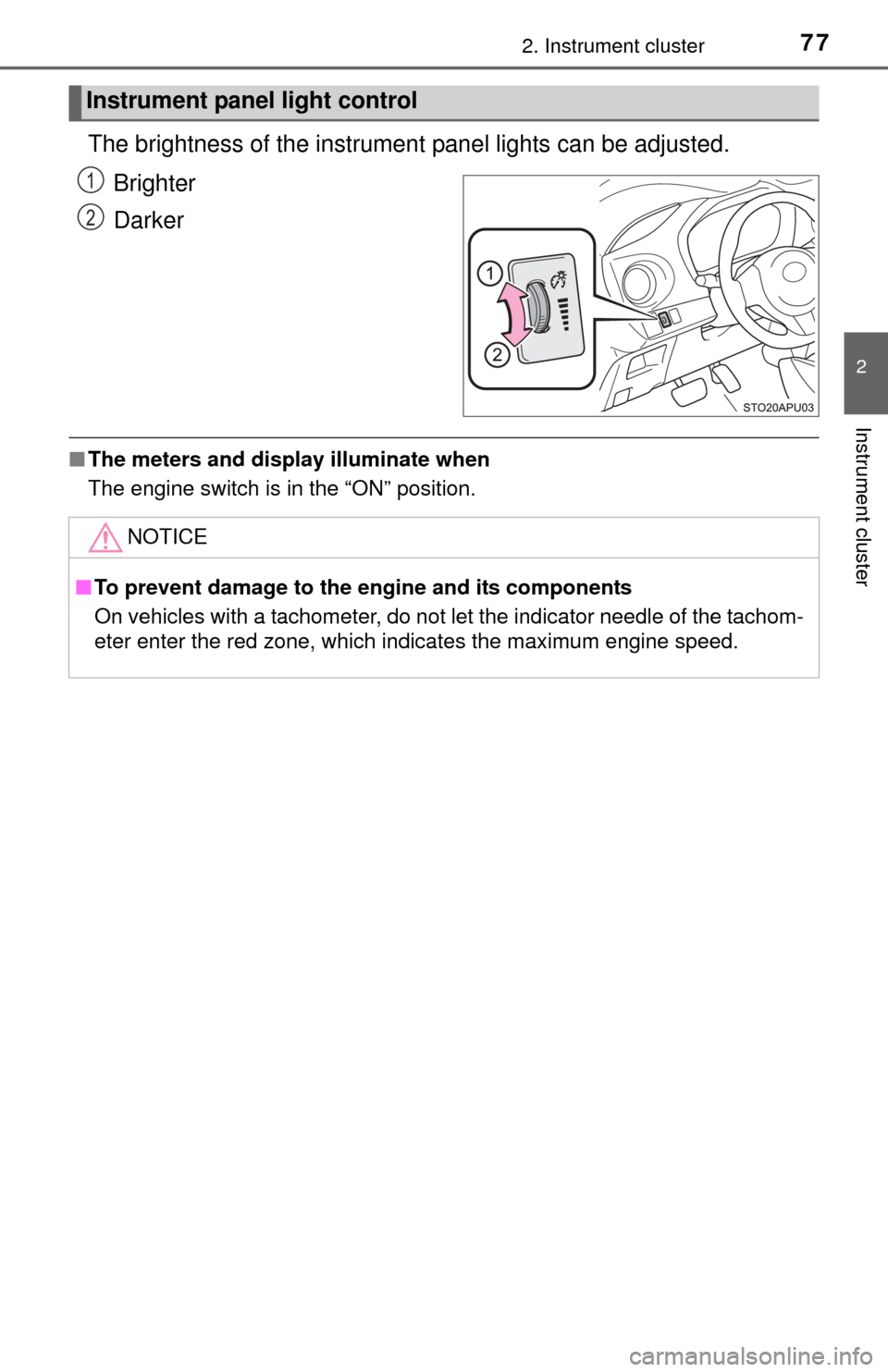
The brightness of the instrument panel lights can be adjusted.
Brighter
Darker
■ The meters and display illuminate when
The engine switch is in the “ON” position.
Instrument panel light control
1
2
NOTICE
■To prevent damage to the engine and its components
On vehicles with a tachometer, do not let the indicator needle of the tachom-
eter enter the red zone, which indicates the maximum engine speed.
Page 84 of 364
843-1. Key information
Keys
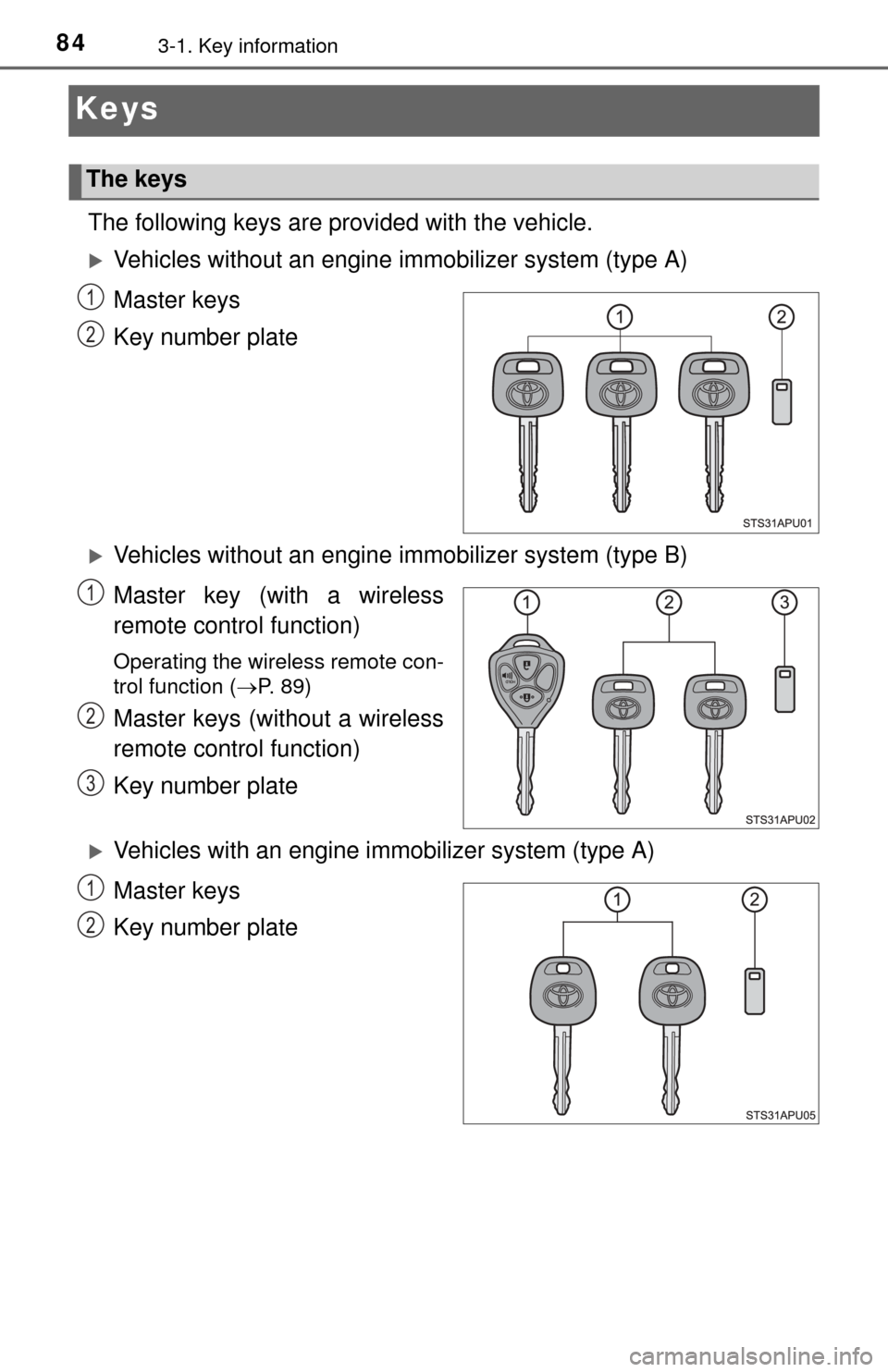
The following keys are provided with the vehicle.
Vehicles without an engine immobilizer system (type A)
Master keys
Key number plate
Vehicles without an engine immobilizer system (type B)
Master key (with a wireless
remote control function)
Operating the wireless remote con-
trol function ( P. 89)
Master keys (without a wireless
remote control function)
Key number plate
Vehicles with an engine immobilizer system (type A)
Master keys
Key number plate
The keys
1
2
1
2
3
1
2
Page 85 of 364
853-1. Key information
3
Operation of each component
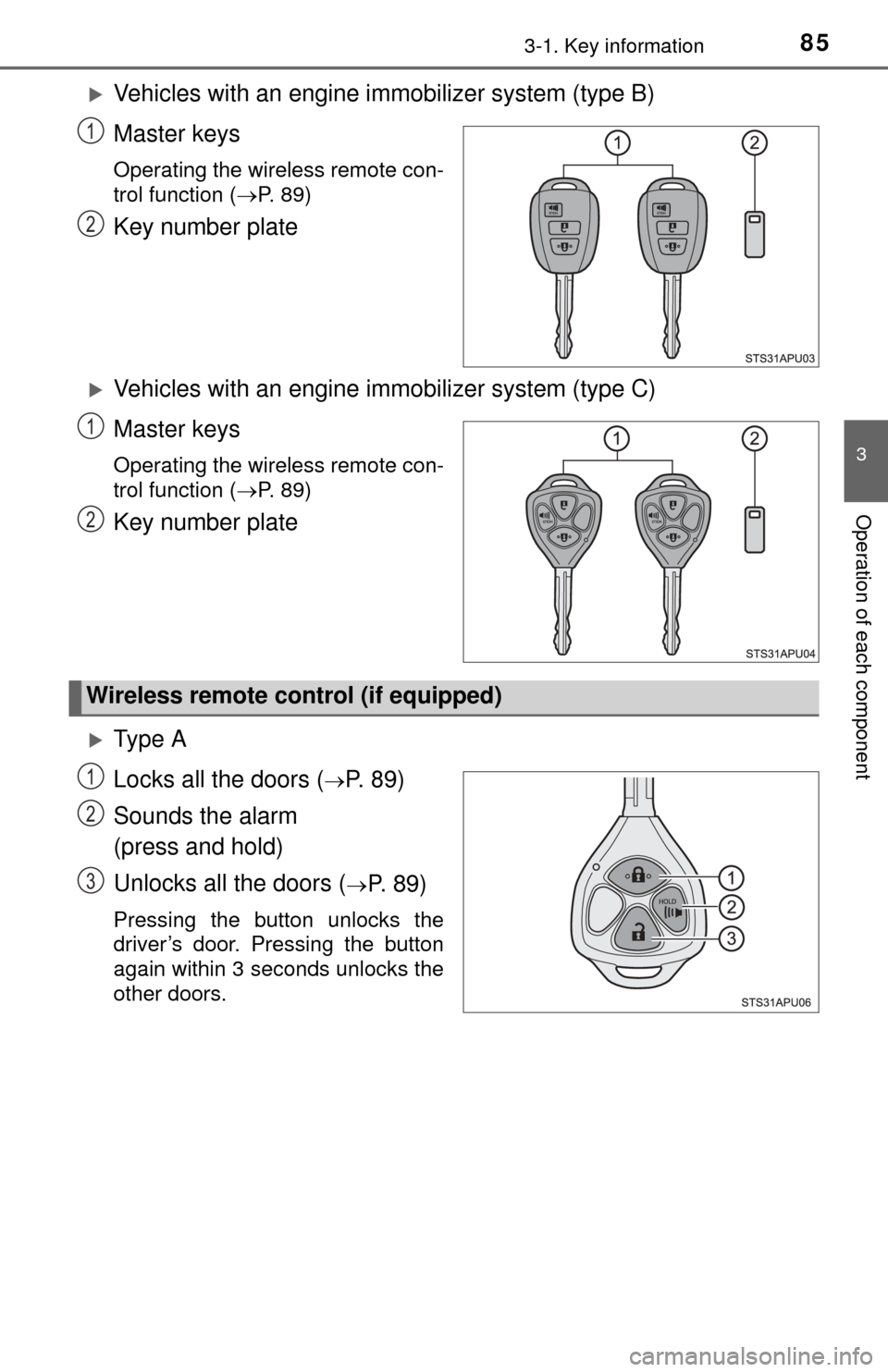
Vehicles with an engine immobilizer system (type B)
Master keys
Operating the wireless remote con-
trol function ( P. 89)
Key number plate
Vehicles with an engine immobilizer system (type C)
Master keys
Operating the wireless remote con-
trol function ( P. 89)
Key number plate
Ty p e A
Locks all the doors (
P. 8 9 )
Sounds the alarm
(press and hold)
Unlocks all the doors (
P. 89)
Pressing the button unlocks the
driver’s door. Pressing the button
again within 3 seconds unlocks the
other doors.
1
2
1
2
Wireless remote control (if equipped)
1
2
3
Page 86 of 364
863-1. Key information
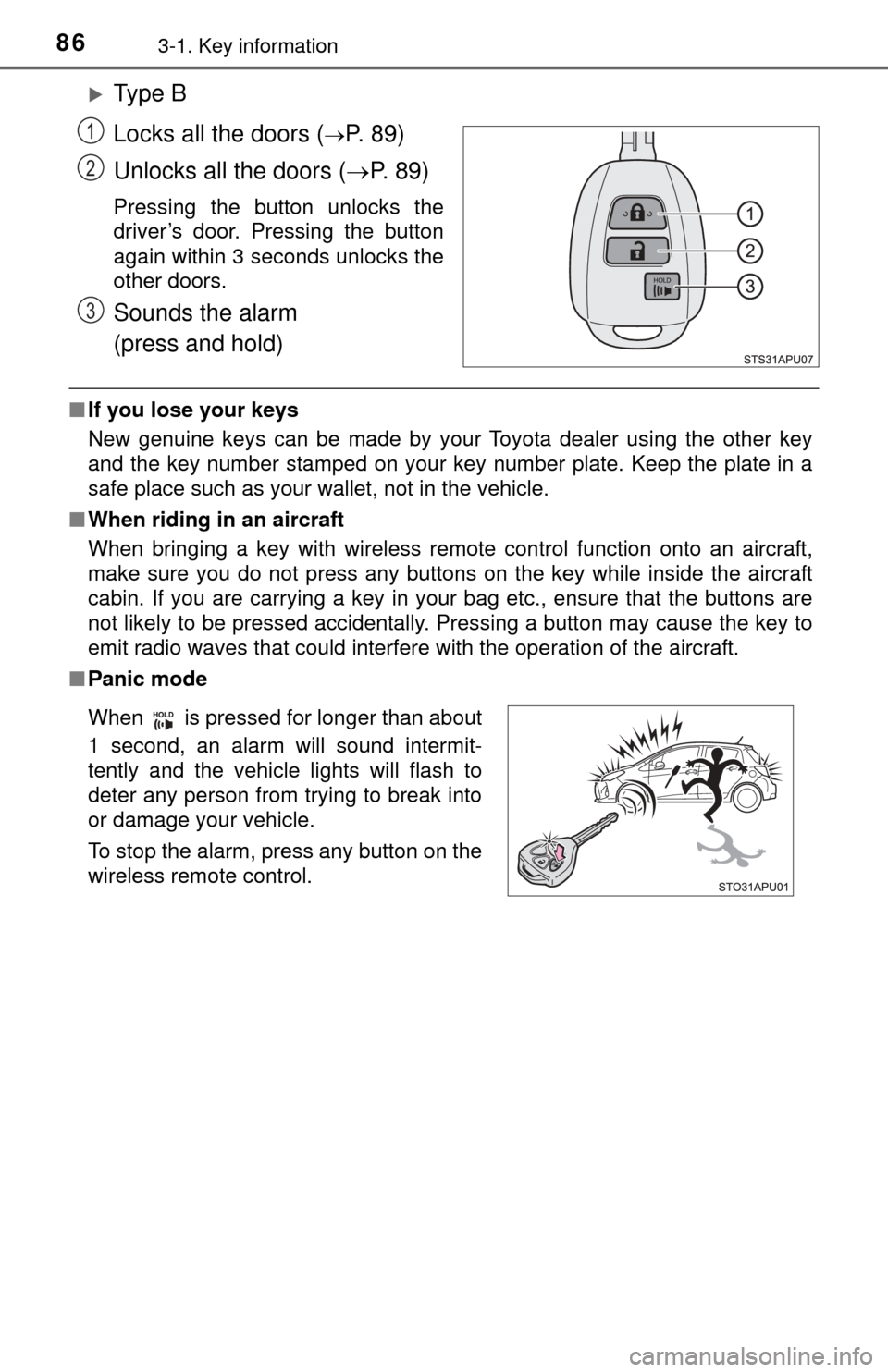
Ty p e B
Locks all the doors (
P. 8 9 )
Unlocks all the doors ( P. 8 9 )
Pressing the button unlocks the
driver’s door. Pressing the button
again within 3 seconds unlocks the
other doors.
Sounds the alarm
(press and hold)
■If you lose your keys
New genuine keys can be made by your Toyota dealer using the other key
and the key number stamped on your key number plate. Keep the plate in a
safe place such as your wallet, not in the vehicle.
■ When riding in an aircraft
When bringing a key with wireless remote control function onto an aircraft,
make sure you do not press any buttons on the key while inside the aircraft
cabin. If you are carrying a key in your bag etc., ensure that the buttons are
not likely to be pressed accidentally. Pressing a button may cause the key to
emit radio waves that could interfere with the operation of the aircraft.
■ Panic mode
1
2
3
When is pressed for longer than about
1 second, an alarm will sound intermit-
tently and the vehicle lights will flash to
deter any person from trying to break into
or damage your vehicle.
To stop the alarm, press any button on the
wireless remote control.
Page 87 of 364

873-1. Key information
3
Operation of each component
■Conditions affecting operation (wireless remote control)
The wireless remote control function may not operate normally in the follow-
ing situations:
●When the wireless key battery is depleted
● Near a TV tower, electric power plant, gas station, radio station, large dis-
play, airport or other facility that generates strong radio waves or electrical
noise
● When carrying a portable radio, cellular phone or other wireless communi-
cation devices
● When the wireless key is in contact with, or is covered by a metallic object
● When other wireless keys (that emit radio waves) are being used nearby
● If window tint with a metallic content or metallic objects are attached to the
rear window
■ Key battery depletion
If the wireless remote control function does not operate, the battery may be
depleted. Replace the battery when necessary.
■ Customization that can be conf igured at your Toyota dealer
Settings (e.g. wireless remote control system) can be changed.
(Customizable features: P. 333)
■ Certification for the wireless remote control
U.S.A.
FCC ID: HYQ23AAA
FCC ID: HYQ12BBY
NOTE:
This device complies with part 15 of the FCC Rules. Operation is subject to
the following two conditions: (1) This device may not cause harmful interfer-
ence, and (2) this device must accept any interference received, including
interference that may cause undesired operation.
FCC WARNING:
Changes or modifications not expressly approved by the party responsible for
compliance could void the user’s authority to operate the equipment.
Canada
NOTE:
This device complies with Industry Canada licence-exempt RSS standard(s).
Operation is subject to the following two conditions: (1) this device may not
cause interference, and (2) this device must accept any interference, includ-
ing interference that may cause undesired operation of the device.
Page 88 of 364
883-1. Key information
NOTICE
■To prevent key damage
Observe the following:
● Do not subject the keys to strong shocks, expose them to high tempera-
tures by placing them in direct sunlight, or get them wet.
● Do not expose the keys to electromagnetic materials or attach any mate-
rial that blocks electromagnetic waves to the key surface.
● Do not disassemble the wireless remote control key.