2015 TOYOTA YARIS HATCHBACK reset
[x] Cancel search: resetPage 247 of 540
2474-6. Using the driving support systems
4
Driving
YARIS_F_WE_52G04E
■Cruise control can be set when
Vehicles with a Multidrive
● The shift lever is in the D or range 4 or higher of M has been selected.
● Range 4 or higher has been selected by using the paddle shift.
● Vehicle speed is above approximately 40 km/h (25 mph).
Vehicles with a manual transmission
● Vehicle speed is above approximately 40 km/h (25 mph).
■ Accelerating after setting the vehicle speed
● The vehicle can be accelerated normally. After acceleration, the set speed
resumes.
● Even without canceling the cruise control, the set speed can be increased
by first accelerating the vehicle to the desired speed and then pushing the
lever down to set the new speed.
■ Automatic cruise control cancelation
Cruise control will stop maintaining the vehicle speed in any of the following
situations.
● Actual vehicle speed falls more than approximately 16 km/h (10 mph) below
the preset vehicle speed.
At this time, the memorized set speed is not retained.
● Actual vehicle speed is below approximately 40 km/h (25 mph).
● VSC is activated (if equipped).
● Speed limiter is activated (if equipped).
■ If the cruise control indicator comes in yellow
Press the “ON-OFF” button once to deactivate the system, and then press
the button again to reactivate the system.
If the cruise control speed cannot be set or if the cruise control cancels imme-
diately after being activated, there may be a malfunction in the cruise control
system. Have the vehicle inspected by any authorized Toyota dealer or
repairer, or another duly qualified and equipped professional.
Page 279 of 540
![TOYOTA YARIS HATCHBACK 2015 Owners Manual 2795-3. Using the radio
5
Audio system
YARIS_F_WE_52G04E
Search for a desired station by turning or pressing “” or “”
on .
Press and hold the button (from [1] to [6]) the station](/manual-img/14/60919/w960_60919-278.png "TOYOTA YARIS HATCHBACK 2015 Owners Manual 2795-3. Using the radio
5
Audio system
YARIS_F_WE_52G04E
Search for a desired station by turning or pressing “” or “”
on .
Press and hold the button (from [1] to [6]) the station")
2795-3. Using the radio
5
Audio system
YARIS_F_WE_52G04E
Search for a desired station by turning or pressing “” or “”
on .
Press and hold the button (from [1] to [6]) the station
is to be set to until you hear a beep.
■Updating the station list
Press .
The station list will be displayed.
Press (UPDATE) to update the list.
“Updating” is displayed while the searching is in process, and then avail-
able stations will be listed on the display.
To cancel the updating process, press .
■Selecting a station from the station list
Press .
The station list will be displayed.
Turn to select a station.
Press to tune in the station.
To return to the previous display, press .
Setting station presets
Using the station list
1
2
1
2
1
2
3
Page 282 of 540
2825-3. Using the radio
YARIS_F_WE_52G04E
■EON (Enhanced Other Network) system (for traffic announcement func-
tion)
If the RDS station (with EON data) you are listening to is not broadcasting a
traffic information program and the audio system is in the TA (traffic
announcement) mode, the radio will be switched automatically to a station
broadcasting a traffic information program in the EON AF list when traffic
information begins.
■ When the battery is disconnected
Stations presets are erased.
■ Reception sensitivity
● Maintaining perfect radio reception at all times is difficult due to the continu-
ally changing position of the antenna, differences in signal strength and sur-
rounding objects, such as trains, transmitters, etc.
● The radio antenna is mounted on the rear roof. The antenna can be
removed from the base by turning it.
■ Digital Audio Broadcast (DAB) radio
The optional radio antenna and tuner are necessary for the use of Digital
Audio Broadcast (DAB) radio.
NOTICE
■ To prevent damage, remove the antenna in the following cases
● The antenna will touch the ceiling of a garage.
● A cover will be put on the roof.
Page 296 of 540

2965-5. Using an external device
YARIS_F_WE_52G04E
■ iPod functions
● When an iPod is connected and the audio source is changed to iPod mode,
the iPod will resume play from the same point in which it was last used.
● Depending on the iPod that is connected to the system, certain functions
may not be available. If a function is unavailable due to a malfunction (as
opposed to a system specification), disconnecting the device and recon-
necting it once again may resolve the problem.
● While connected to the system, the iPod cannot be operated with its own
controls. It is necessary to use the controls of the vehicle’s audio system
instead.
● When the battery level of an iPod is very low, the iPod may not operate. If
so, charge the iPod before use.
● Supported models (P. 297)
■ iPod problems
To resolve most problems encountered when using your iPod, disconnect
your iPod from the vehicle iPod connection and reset it.
For instructions on how to reset your iPod, refer to your iPod Owner’s Man-
ual.
■ Display
P. 286
■ Error messages
If an error message is displayed, refer to the following table and take the
appropriate measures. If the problem is not rectified, take the vehicle to any
authorized Toyota dealer or repair er, or another duly qualified and equipped
professional.
MessageCause/Correction procedures
“ERROR”This indicates a problem in the iPod or its
connection.
“NO SONGS”This indicates that there is no music data in
the iPod.
“NO PLAYLIST”This indicates that some available songs are
not found in a selected playlist.
“UPDATE YOUR IPOD”
This indicates that the version of the iPod is
not compatible. Upgrade your iPod software
to the latest version.
Page 364 of 540

3647-3. Do-it-yourself maintenance
YARIS_F_WE_52G04E
■Engine oil consumption
A certain amount of engine oil will be consumed while driving. In the following
situations, oil consumption may increase, and engine oil may need to be
refilled in between oil maintenance intervals.
● When the engine is new, for example directly after purchasing the vehicle or
after replacing the engine
● If low quality oil or oil of an inappropriate viscosity is used
● When driving at high engine speeds or with a heavy load, when towing
(except for South Africa), or when driving while accelerating or decelerating
frequently
● When leaving the engine idling for a long time, or when driving frequently
through heavy traffic
■ After changing the engine oil (diesel engine only)
The engine oil maintenance data should be reset. Perform the following pro-
cedures:
Switch the display to the trip meter “A” when the engine is running.
( P. 93)
Turn the engine switch to the “LOCK” position (vehicles without a smart
entry & start system) or off (vehicles with a smart entry & start system).
Vehicles without a smart entry & start system:
While pressing the display change button ( P. 93), turn the engine
switch to the “ON” position (do not start the engine because reset mode
will be canceled). Continue to press and hold the button until the trip
meter displays “000000”.
Vehicles with a smart entry & start system:
While pressing the display change button ( P. 93), turn the engine
switch to the IGNITION ON mode (do not start the engine because other-
wise the reset mode will be canceled). Continue to press and hold the
button until the trip meter displays “000000”.
1
2
3
Page 376 of 540
3767-3. Do-it-yourself maintenance
YARIS_F_WE_52G04E
■How to initialize the tire pressure warning system (vehicles
with a tire pressure warning system)
Park the vehicle in a safe place and turn the engine switch to the
“LOCK” position (vehicles without a smart entry & start system)
or off (vehicles with a smart entry & start system).
Initialization cannot be performed while the vehicle is moving.
Adjust the tire inflation pressure to the specified cold tire inflation
pressure level. ( P. 509)
Make sure to adjust the tire pressure to the specified cold tire inflation
pressure level. The tire pressure warning system will operate based on
this pressure level.
Turn the engine switch to the “ON” position (vehicles without a
smart entry & start system) or IGNITION ON mode (vehicles with
a smart entry & start system).
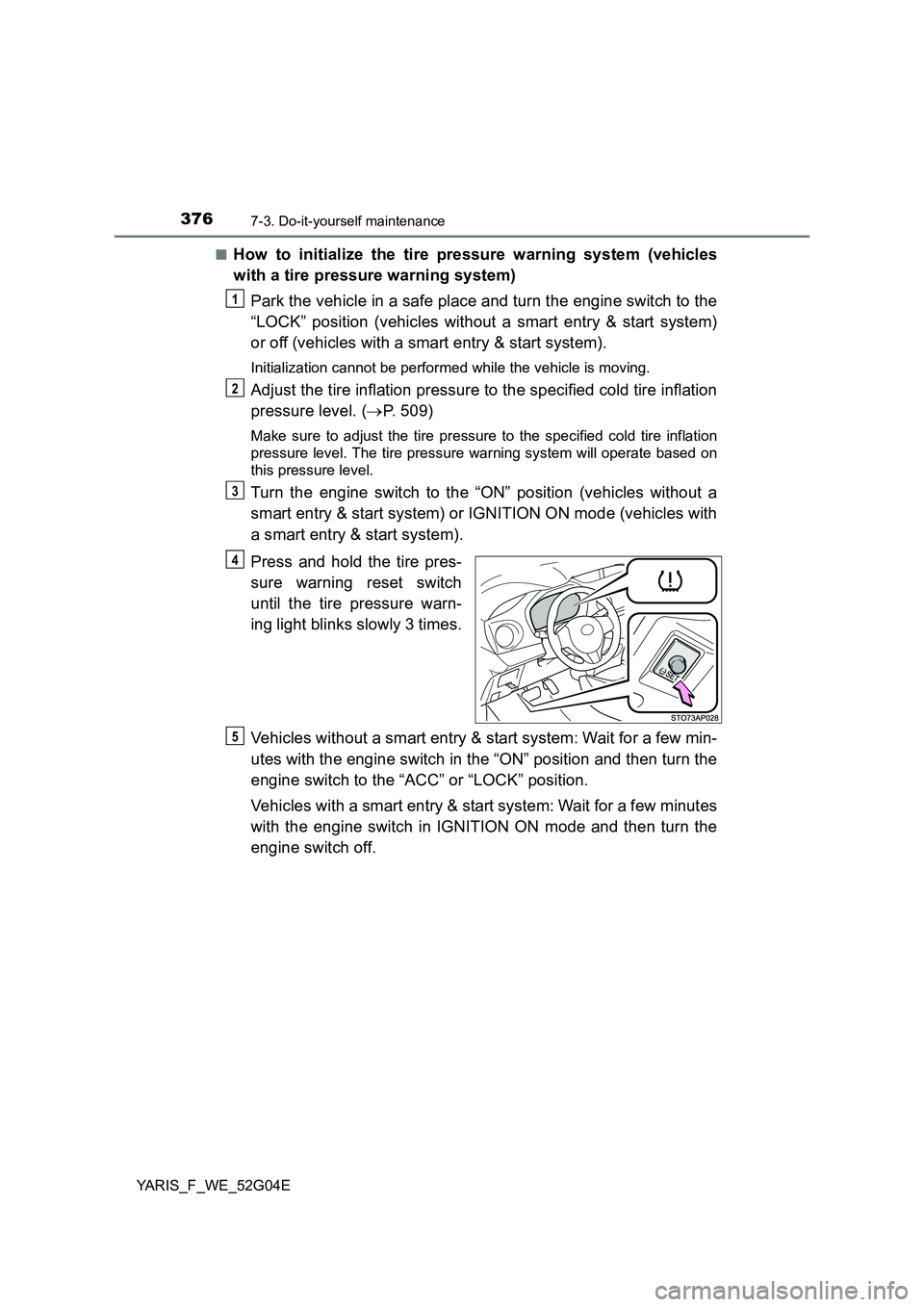
Press and hold the tire pres-
sure warning reset switch
until the tire pressure warn-
ing light blinks slowly 3 times.
Vehicles without a smart entry & start system: Wait for a few min-
utes with the engine switch in the “ON” position and then turn the
engine switch to the “ACC” or “LOCK” position.
Vehicles with a smart entry & start system: Wait for a few minutes
with the engine switch in IGNITION ON mode and then turn the
engine switch off.
1
2
3
4
5
Page 378 of 540
3787-3. Do-it-yourself maintenance
YARIS_F_WE_52G04E
■ Routine tire inflation pressure checks (vehicles with a tire pressure
warning system)
The tire pressure warning system does not replace routine tire inflation pres-
sure checks. Make sure to check tire inflation pressure as part of your routine
of daily vehicle checks.
■ Initializing the tire pressure warning system (vehicles with a tire pres-
sure warning system)
Initialize the system with the tire inflation pressure adjusted to the specified
level.
■ If the tread on snow tires wears down below 4 mm (0.16 in.)
The effectiveness of the tires as snow tires is lost.
■ When initialization of the tire pressure warning system has failed (vehi-
cles with a tire pressure warning system)
Initialization can be completed in a few minutes. However, in the following
cases, the settings have not been recorded and the system will not operate
properly. If repeated attempts to record tire inflation pressure settings are
unsuccessful, have the vehicle inspected by any authorized Toyota dealer or
repairer, or another duly qualified and equipped professional.
● When operating the tire pressure warning reset switch, the tire pressure
warning light does not blink 3 times.
● After driving for a certain period of time since the initialization has been
completed, the warning light comes on after blinking for 1 minute.
Page 385 of 540
3857-3. Do-it-yourself maintenance
7
Maintenance and care
YARIS_F_WE_52G04E
WARNING
■When inspecting or replacing tires
Observe the following precautions to prevent accidents.
Failure to do so may cause damage to parts of the drive train as well as
dangerous handling characteristics, which may lead to an accident resulting
in death or serious injury.
● Do not mix tires of different makes, models or tread patterns.
Also, do not mix tires of remarkably different treadwear.
● Do not use tire sizes other than those recommended by Toyota.
● Do not mix differently constructed tires (radial, bias-belted or bias-ply
tires).
● Do not mix summer, all season and snow tires.
● Do not use tires that have been used on another vehicle.
Do not use tires if you do not know how they were used previously.
● Vehicles with a compact spare tire: Do not tow if your vehicle has a com-
pact spare tire installed.
■ When initializing the tire pressure warning system (vehicles with a tire
pressure warning system)
Do not operate the tire pressure warning reset switch without first adjusting
the tire inflation pressure to the specified level. Otherwise, the tire pressure
warning light may not come on even if the tire inflation pressure is low, or it
may come on when the tire inflation pressure is actually normal.
NOTICE
■ Repairing or replacing tires, wheels, tire pressure warning valves,
transmitters and tire valve caps (vehicles with a tire pressure warning
system)
● When removing or fitting the wheels, tires or the tire pressure warning
valves and transmitters, contact any authorized Toyota dealer or repairer,
or another duly qualified and equipped professional as the tire pressure
warning valves and transmitters may be damaged if not handled correctly.
● Make sure to install the tire valve caps. If the tire valve caps are not
installed, water could enter the tire pressure warning valves and the tire
pressure warning valves could be bound.
● When replacing tire valve caps, do not use tire valve caps other than those
specified. The cap may become stuck.