Page 128 of 564
128 1-7. Safety information
CAUTION
SRS airbag precautions
Observe the following precautions regarding the SRS airbags.
Failure to do so may cause death or serious injury.
The driver and all passengers in the vehicle must wear their seat belts
properly.
The SRS airbags are supplemental devices to be used with the seat belts.
The SRS driver airbag deploys with considerable force, and can cause
death or serious injury especially if the driver is very close to the airbag.
Since the risk zone for the driver’s airbag is the first 50 - 75 mm (2 - 3 in.)
of inflation, placing yourself 250 mm (10 in.) from your driver airbag pro-
vides you with a clear margin of safety. This distance is measured from the
center of the steering wheel to your breastbone. If you sit less than 250
mm (10 in.) away now, you can change your driving position in several
ways:
• Move your seat to the rear as far as you can while still reaching the
pedals comfortably.
• Slightly recline the back of the seat. Although vehicle designs vary,
many drivers can achieve the 250 mm (10 in.) distance, even with the
driver seat all the way forward, simply by reclining the back of the seat
somewhat. If reclining the back of your seat makes it hard to see the
road, raise yourself by using a firm, non-slippery cushion, or raise the
seat if your vehicle has that feature.
• If your steering wheel is adjustable, tilt it downward. This points the air-
bag toward your chest instead of your head and neck.
The seat should be adjusted as recommended above, while still maintain-
ing control of the foot pedals, steering wheel, and your view of the instru-
ment panel controls.
Page 165 of 564
165 2-1. Driving procedures
2
When driving
CAUTION
Do not shift the shift lever to D (vehicles with a Multidrive) or 1 (vehicles
with a manual transmission) while the vehicle is moving backward.
Doing so can damage the transmission and may result in a loss of vehicle
control.
Moving the shift lever to N while the vehicle is moving will disengage the
engine from the transmission. Engine braking is not available when N is
selected.
During normal driving, do not turn off the engine. Turning the engine off
while driving will not cause loss of steering or braking control, but the
power assist to these systems will be lost. This will make it more difficult to
steer and brake, so you should pull over and stop the vehicle as soon as it
is safe to do so.
However, in the event of an emergency, such as if it becomes impossible
to stop the vehicle in the normal way: P. 518
Use engine braking (downshift) to maintain a safe speed when driving
down a steep hill.
Using the brakes continuously may cause the brakes to overheat and lose
effectiveness. (P. 187)
When stopped on an inclined surface, use the brake pedal and parking
brake to prevent the vehicle from rolling backward or forward and causing
an accident.
Do not adjust the positions of the steering wheel, the seat, or the inside or
outside rear view mirrors while driving.
Doing so may result in a loss of vehicle control that can cause accidents,
resulting in death or serious injury.
Always check that all passengers' arms, heads or other parts of their body
are not outside the vehicle, as this may result in death or serious injury.
When driving on slippery road surfaces
Sudden braking, acceleration and steering may cause tire slippage and
reduce your ability to control the vehicle, resulting in an accident.
Sudden changes in engine speed, such as engine braking caused by up-
shifting and down-shifting, may cause the vehicle to skid, resulting in an
accident.
Page 178 of 564
178 2-1. Driving procedures
Operation of the “ENGINE START STOP” switch
When operating the “ENGINE START STOP” switch, one short, firm press is
enough. If the switch is pressed improperly, the engine may not start or the
“ENGINE START STOP” switch mode may not change. It is not necessary to
press and hold the switch.
Electronic key battery depletion
P. 4 4
Conditions affecting operation
P. 4 1
Notes for the entry function
P. 4 2
If the engine does not start
The engine immobilizer system may not have been deactivated.
(P. 105)
Steering lock
After turning the “ENGINE START STOP” switch off and opening and closing
the doors, the steering wheel will be locked due to the steering lock function.
Operating the “ENGINE START STOP” switch again automatically cancels
the steering lock.
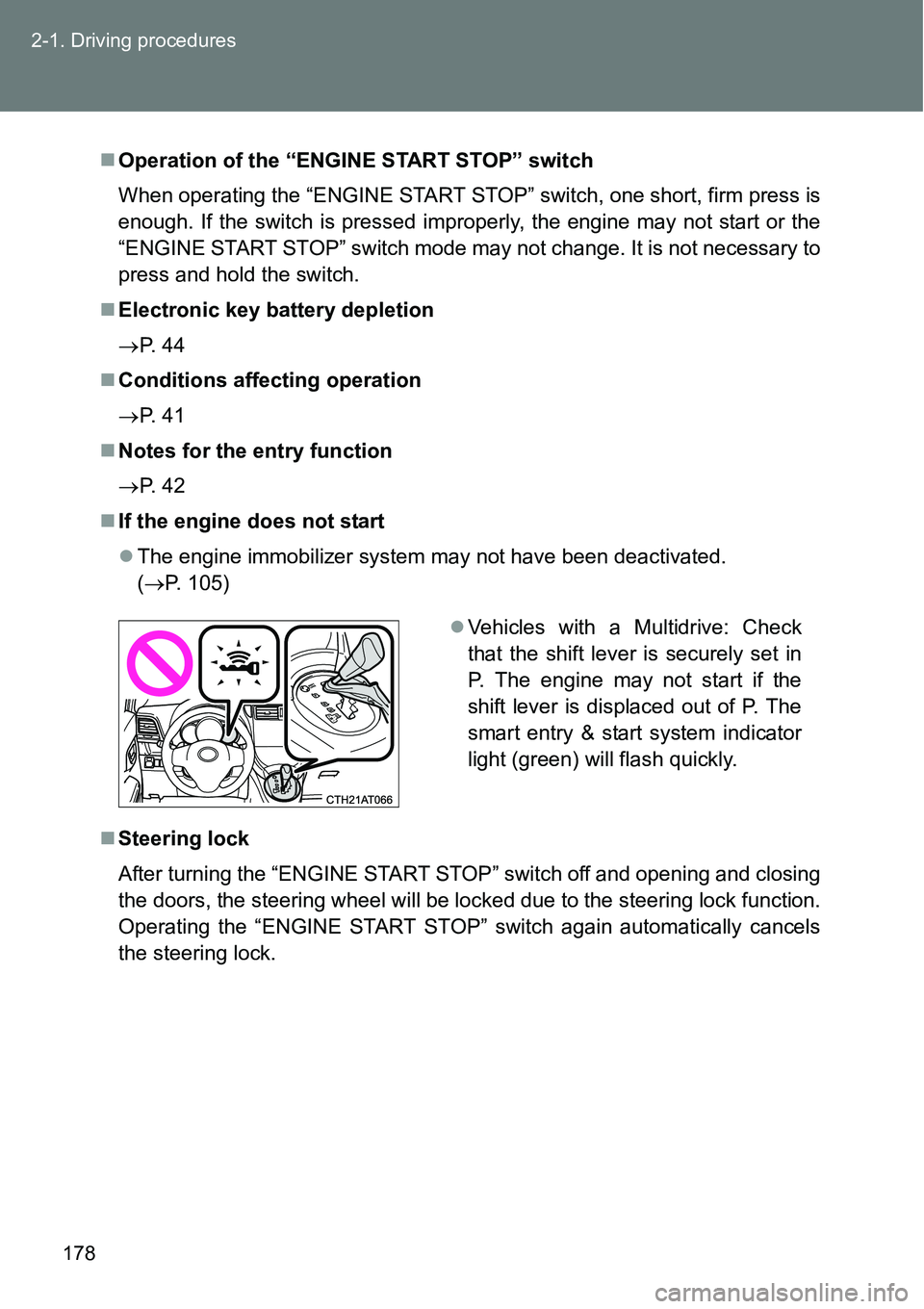
Vehicles with a Multidrive: Check
that the shift lever is securely set in
P. The engine may not start if the
shift lever is displaced out of P. The
smart entry & start system indicator
light (green) will flash quickly.
Page 261 of 564
261 2-5. Driving information
2
When driving
Increasing vehicle-to-vehicle distance
At a speed of 10 km/h (6 mph), the distance to the vehicle running
ahead of you should be equivalent to or greater than the combined
length of your vehicle and trailer. Avoid sudden braking that may
cause skidding. Otherwise, the vehicle may spin out of control.
This is especially true when driving on wet or slippery road sur-
faces.
Sudden acceleration/steering input/cornering
Executing sharp turns when towing may result in the trailer collid-
ing with your vehicle. Decelerate well in advance when approach-
ing turns and take them slowly and carefully to avoid sudden
braking.
Important points regarding turning
The wheels of the trailer will travel closer to the inside of the curve
than the wheels of the vehicle. To make allowance for this, take the
turns wider than you would normally do.
Important points regarding stability
Vehicle movement resulting from uneven road surfaces and strong
crosswinds will affect handling. The vehicle may also be rocked by
passing buses or large trucks. Frequently check behind when mov-
ing alongside such vehicles. As soon as such vehicle movement
occurs, immediately start to decelerate smoothly by slowly apply-
ing the brakes. Always steer the vehicle straight ahead while brak-
ing.
Passing other vehicles
Consider the total combined length of your vehicle and trailer and
ensure that the vehicle-to-vehicle distance is sufficient before exe-
cuting lane changes.
Page 283 of 564
283
3
Interior features
3-2. Using the audio system
Audio system types
: If equipped
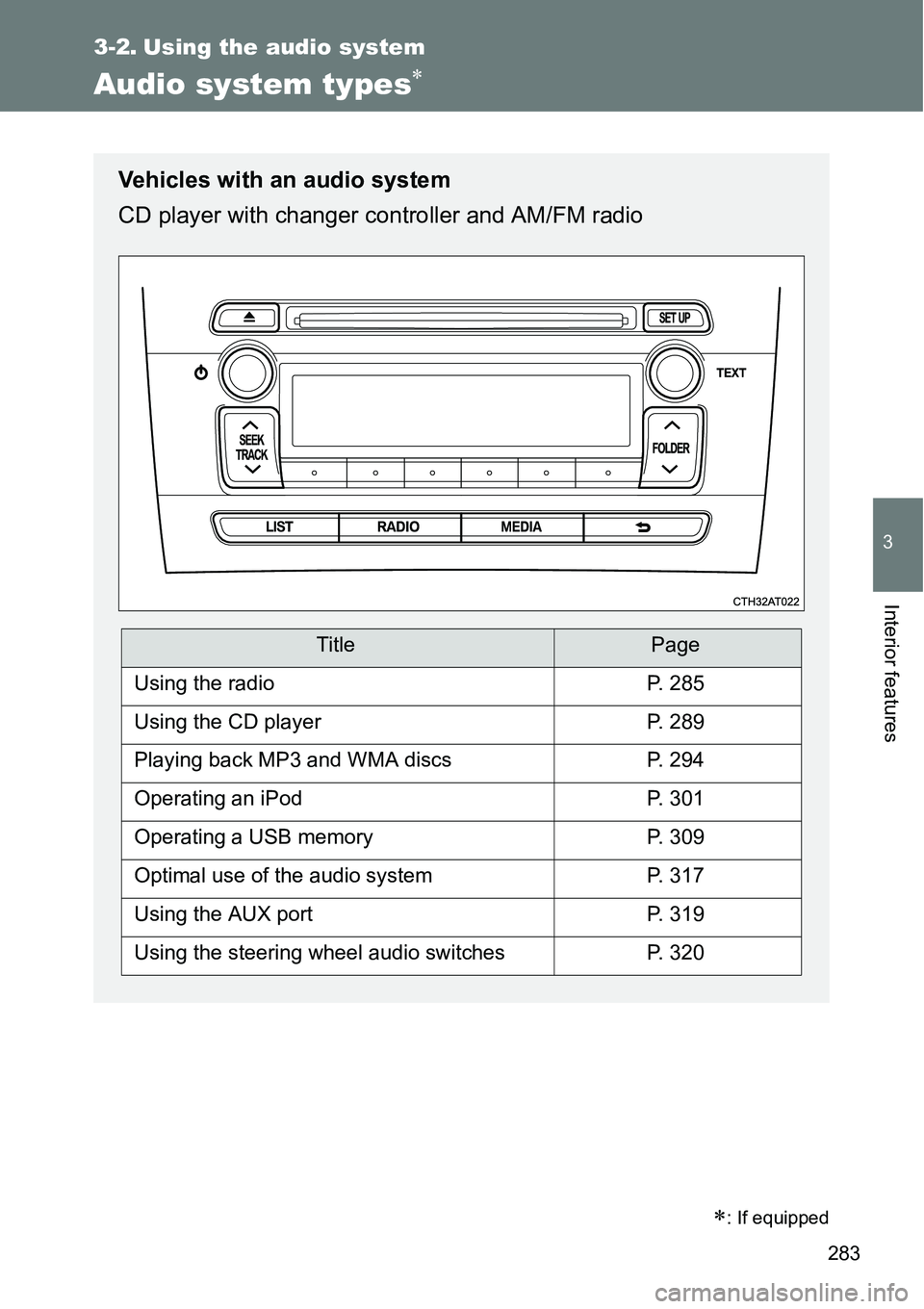
Vehicles with an audio system
CD player with changer controller and AM/FM radio
TitlePage
Using the radioP. 285
Using the CD playerP. 289
Playing back MP3 and WMA discsP. 294
Operating an iPodP. 301
Operating a USB memoryP. 309
Optimal use of the audio systemP. 317
Using the AUX portP. 319
Using the steering wheel audio switchesP. 320
Page 320 of 564
320
3-2. Using the audio system
Using the steering wheel audio switches
Turning on the power
Press when the audio system is turned off.
Changing the audio source
Press when the audio system is turned on. The audio source
changes as follows each time is pressed.
AMFMCD modeiPod or USB memory mode*
AUX*AM
*: If equipped
: If equipped
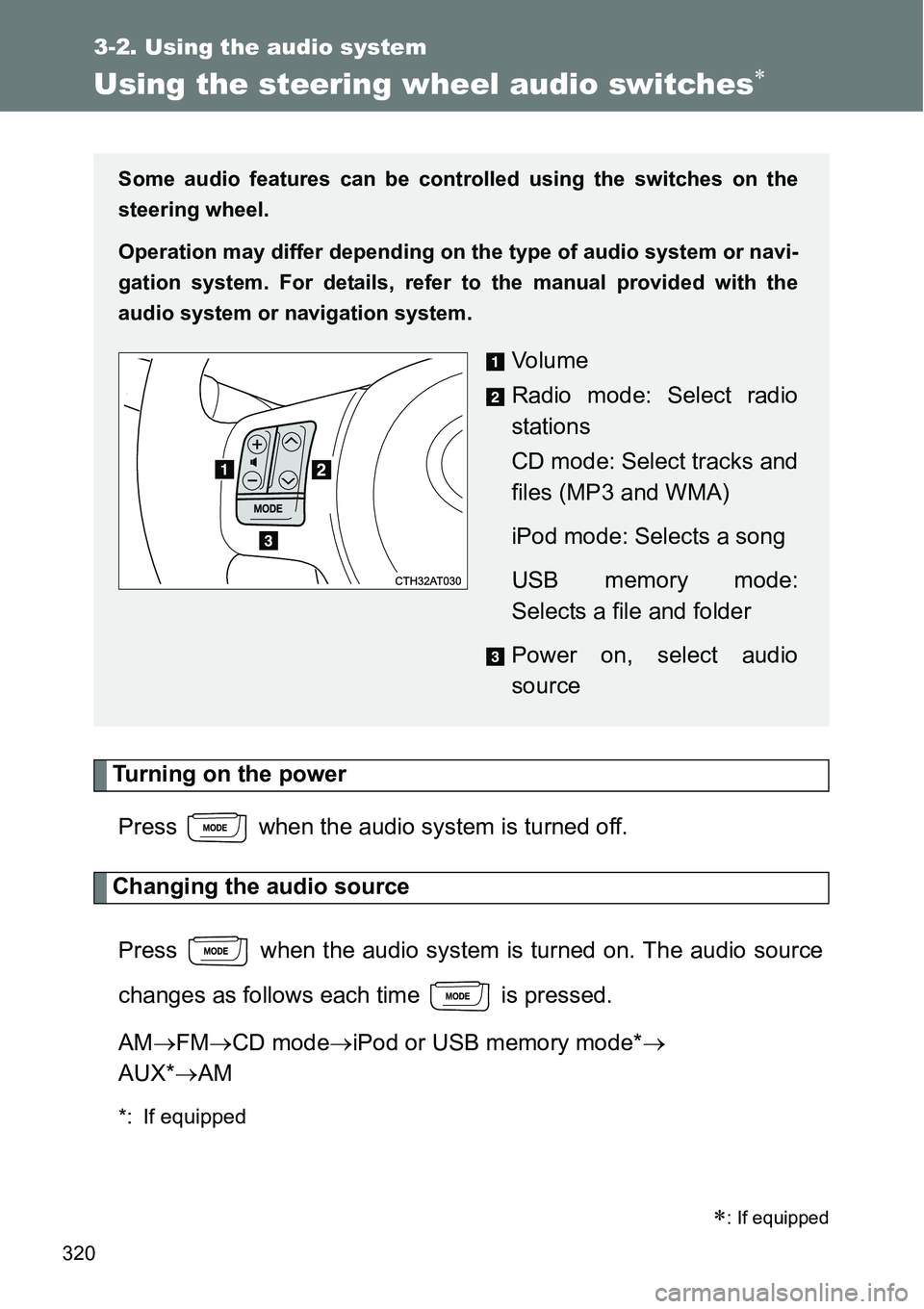
Some audio features can be controlled using the switches on the
steering wheel.
Operation may differ depending on the type of audio system or navi-
gation system. For details, refer to the manual provided with the
audio system or navigation system.
Vo l u m e
Radio mode: Select radio
stations
CD mode: Select tracks and
files (MP3 and WMA)
iPod mode: Selects a song
USB memory mode:
Selects a file and folder
Power on, select audio
source
Page 385 of 564
385 4-3. Do-it-yourself maintenance
4
Maintenance and care
Installing tire pressure warning valves and transmitters
When replacing tires or wheels, tire pressure warning valves and
transmitters must also be installed.
When new tire pressure warning valves and transmitters are
installed, new ID codes must be registered in the tire pressure warn-
ing computer and tire pressure warning system must be initialized.
Have tire pressure warning valve and transmitter ID codes registered
by any authorized Toyota dealer or repairer, or another duly qualified
and equipped professional. (P. 387)
Initializing the tire pressure warning system
The tire pressure warning system must be initialized in the fol-
lowing circumstances:
When the tire inflation pressure is changed such as when
changing travelling speed or load weight
When changing the tire size
When the tire pressure warning system is initialized, the current
tire inflation pressure is set as the benchmark pressure.
Page 443 of 564
5
443 5-1. Essential information
When trouble arises
CAUTION
Observe the following precautions.
Failure to do so may result in death or serious injury.
When towing the vehicle
While towing
When towing using a rope, avoid sudden starts, etc. which place exces-
sive stress on the towing hook and rope.
The towing hook or rope may become damaged, broken debris may hit
people and cause serious damage.
Vehicles without a smart entry & start system: Do not turn the engine
switch to the “LOCK” position.
There is a possibility that the steering wheel is locked and cannot be oper-
ated.
Vehicles with a smart entry & start system: Do not turn the “ENGINE
START STOP” switch off.
There is a possibility that the steering wheel is locked and cannot be oper-
ated.
Installing towing eyelet to the vehicle
Make sure that towing eyelet is installed securely.
If not securely installed, towing eyelet may come loose during towing.
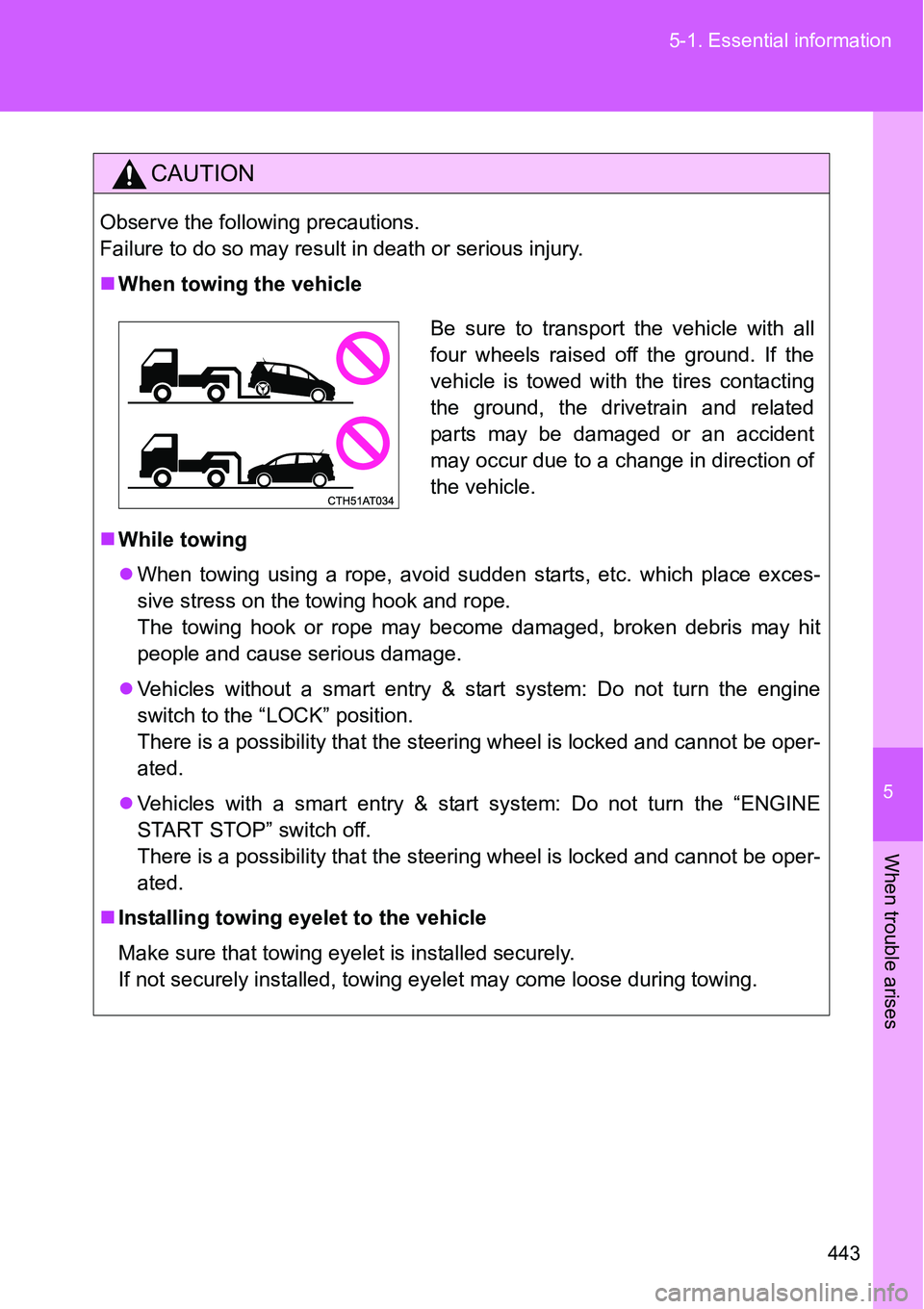
Be sure to transport the vehicle with all
four wheels raised off the ground. If the
vehicle is towed with the tires contacting
the ground, the drivetrain and related
parts may be damaged or an accident
may occur due to a change in direction of
the vehicle.