Page 4 of 564

TABLE OF CONTENTSIndex
4
3-1. Using the air conditioning
system and defogger
Manual air conditioning
system .............................. 266
Automatic air conditioning
system .............................. 272
Power heater ...................... 279
Rear window and
outside rear view
mirror defoggers ............... 281
3-2. Using the audio system
Audio system types............. 283
Using the radio.................... 285
Using the CD player............ 289
Playing back MP3 and
WMA discs........................ 294
Operating an iPod ............... 301
Operating a USB
memory............................. 309
Optimal use of the audio
system .............................. 317
Using the AUX port ............. 319
Using the steering wheel
audio switches .................. 3203-3. Using the interior lights
Interior lights list ................. 323
• Personal lights ................. 324
• Personal/interior lights ..... 324
• Interior light ...................... 325
3-4. Using the storage
features
List of storage features....... 326
• Auxiliary box..................... 327
• Glove box ......................... 327
• Bottle holders ................... 329
• Tray .................................. 330
• Cup holders...................... 331
3-5. Other interior features
Sun visors .......................... 332
Vanity mirrors ..................... 333
Clock .................................. 334
Outside temperature
display .............................. 335
Power outlets ..................... 336
Seat heaters ....................... 338
Armrests ............................. 340
Panoramic roof shade ........ 341
Assist grips ......................... 344
Floor mat ............................ 345
Luggage compartment
features ............................ 347
3Interior features
Page 10 of 564
10
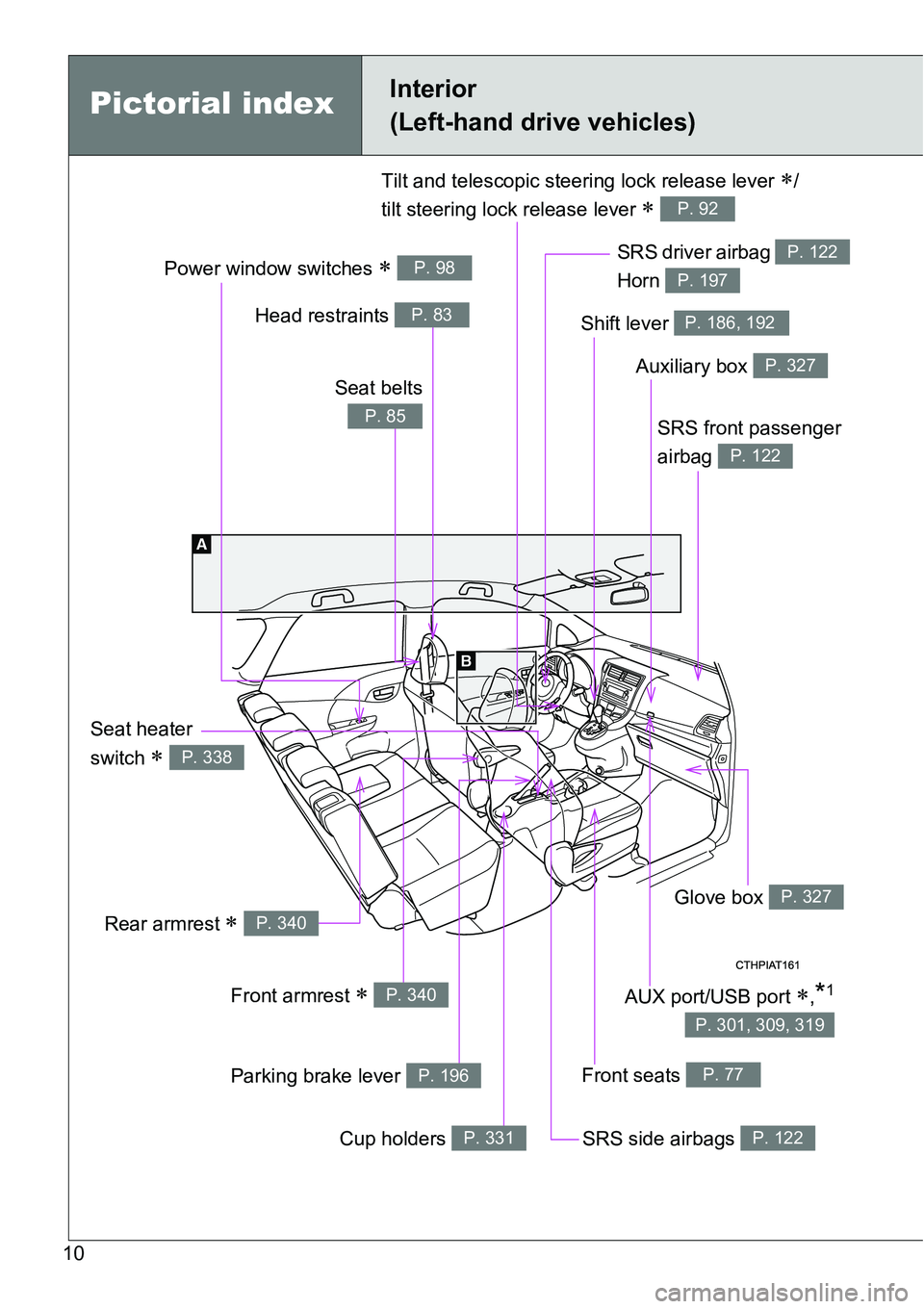
Power window switches P. 98
Pictorial indexInterior
(Left-hand drive vehicles)
SRS front passenger
airbag
P. 122
SRS driver airbag
Horn P. 122
P. 197
Front seats P. 77
SRS side airbags P. 122
Glove box P. 327
Auxiliary box P. 327
Shift lever P. 186, 192
Seat heater
switch
P. 338
Tilt and telescopic steering lock release lever /
tilt steering lock release lever
P. 92
Rear armrest P. 340
Front armrest P. 340
Parking brake lever P. 196
Cup holders P. 331
Head restraints P. 83
Seat belts
P. 85
AUX port/USB port ,*1
P. 301, 309, 319
Page 16 of 564
16
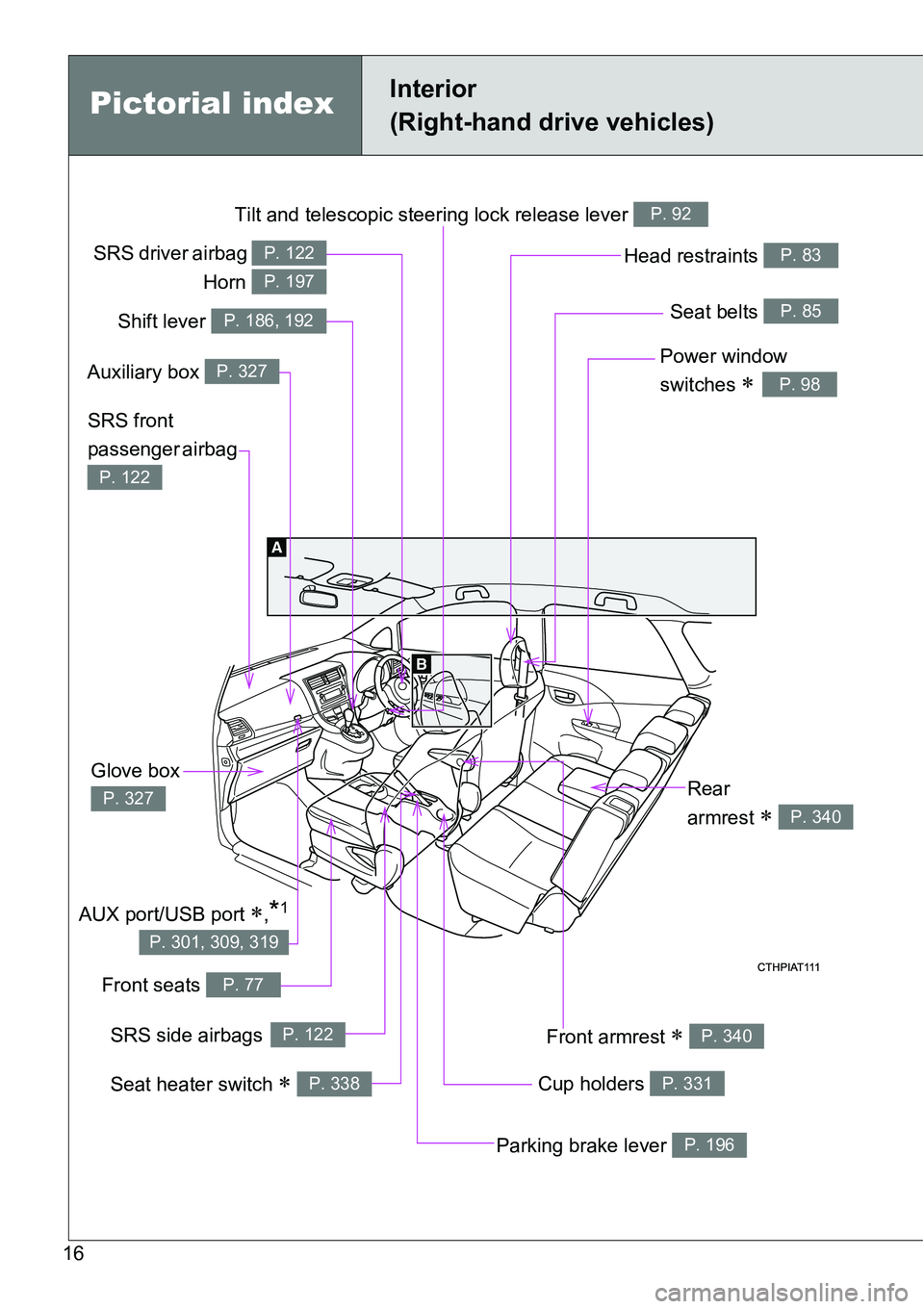
Tilt and telescopic steering lock release lever P. 92
Power window
switches
P. 98
Seat belts P. 85
SRS front
passenger airbag
P. 122
Head restraints P. 83
Cup holders P. 331
Front armrest P. 340
Front seats P. 77
Glove box
P. 327
Parking brake lever P. 196
Rear
armrest
P. 340
Pictorial indexInterior
(Right-hand drive vehicles)
SRS driver airbag
Horn P. 122
P. 197
Shift lever P. 186, 192
Auxiliary box P. 327
SRS side airbagsP. 122
Seat heater switch P. 338
AUX port/USB port ,*1
P. 301, 309, 319
Page 265 of 564

3Interior features
265
3-1. Using the air
conditioning system
and defogger
Manual air conditioning
system ............................ 266
Automatic air conditioning
system ............................ 272
Power heater .................... 279
Rear window and
outside rear view
mirror defoggers ............. 281
3-2. Using the audio system
Audio system types .......... 283
Using the radio ................. 285
Using the CD player ......... 289
Playing back MP3 and
WMA discs...................... 294
Operating an iPod............. 301
Operating a USB
memory........................... 309
Optimal use of the audio
system ............................ 317
Using the AUX port ........... 319
Using the steering wheel
audio switches ................ 320
3-3. Using the interior lights
Interior lights list................ 323
• Personal lights ................ 324
• Personal/interior
lights ............................... 324
• Interior light ..................... 3253-4. Using the storage
features
List of storage features ..... 326
• Auxiliary box ................... 327
• Glove box ....................... 327
• Bottle holders.................. 329
• Tray ................................ 330
• Cup holders .................... 331
3-5. Other interior features
Sun visors ......................... 332
Vanity mirrors.................... 333
Clock ................................. 334
Outside temperature
display ............................ 335
Power outlets .................... 336
Seat heaters ..................... 338
Armrests ........................... 340
Panoramic roof shade....... 341
Assist grips ....................... 344
Floor mat........................... 345
Luggage compartment
features........................... 347
Page 283 of 564
283
3
Interior features
3-2. Using the audio system
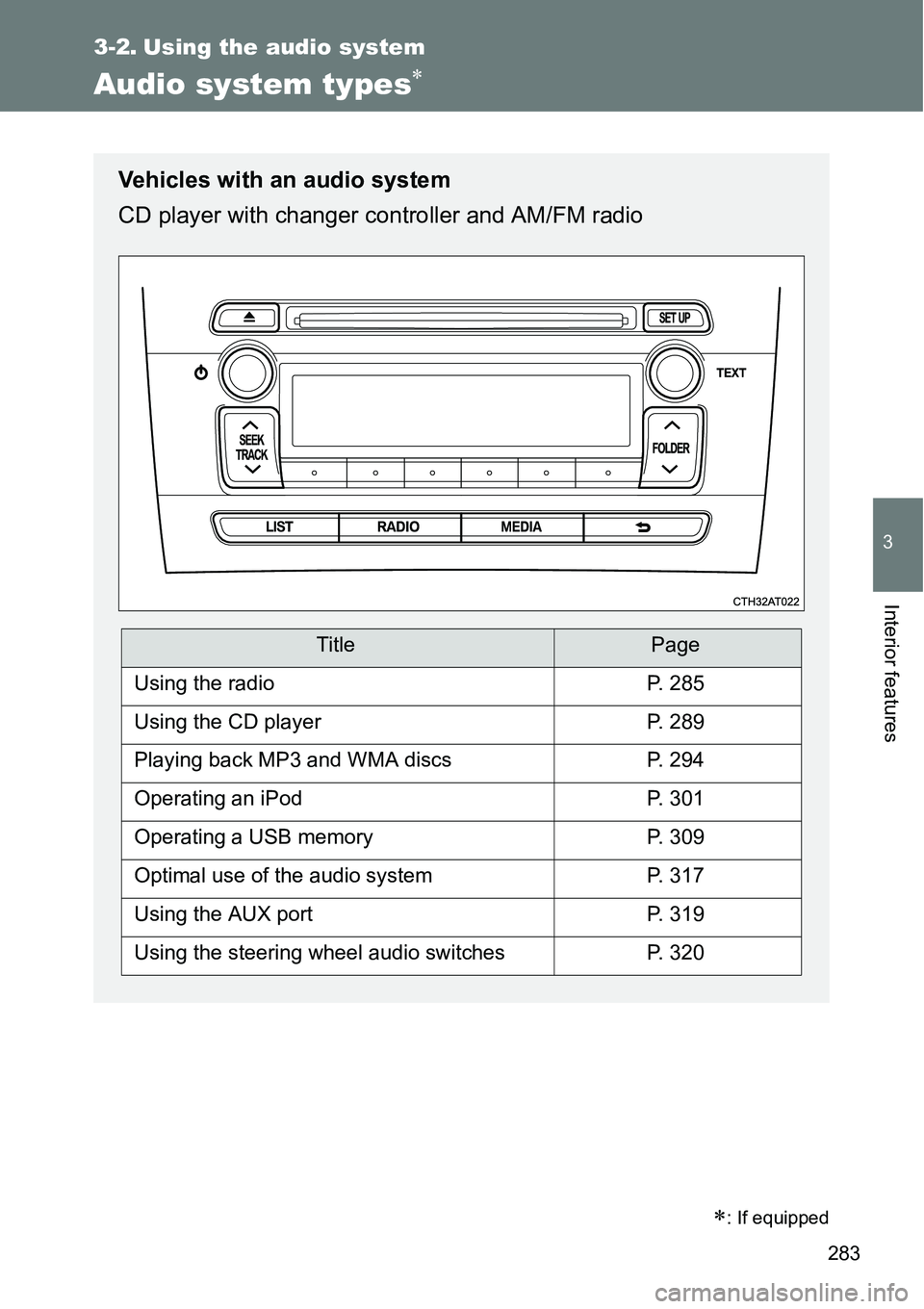
Audio system types
: If equipped
Vehicles with an audio system
CD player with changer controller and AM/FM radio
TitlePage
Using the radioP. 285
Using the CD playerP. 289
Playing back MP3 and WMA discsP. 294
Operating an iPodP. 301
Operating a USB memoryP. 309
Optimal use of the audio systemP. 317
Using the AUX portP. 319
Using the steering wheel audio switchesP. 320
Page 309 of 564
309
3-2. Using the audio system
3
Interior features
Operating a USB memor y
: If equipped
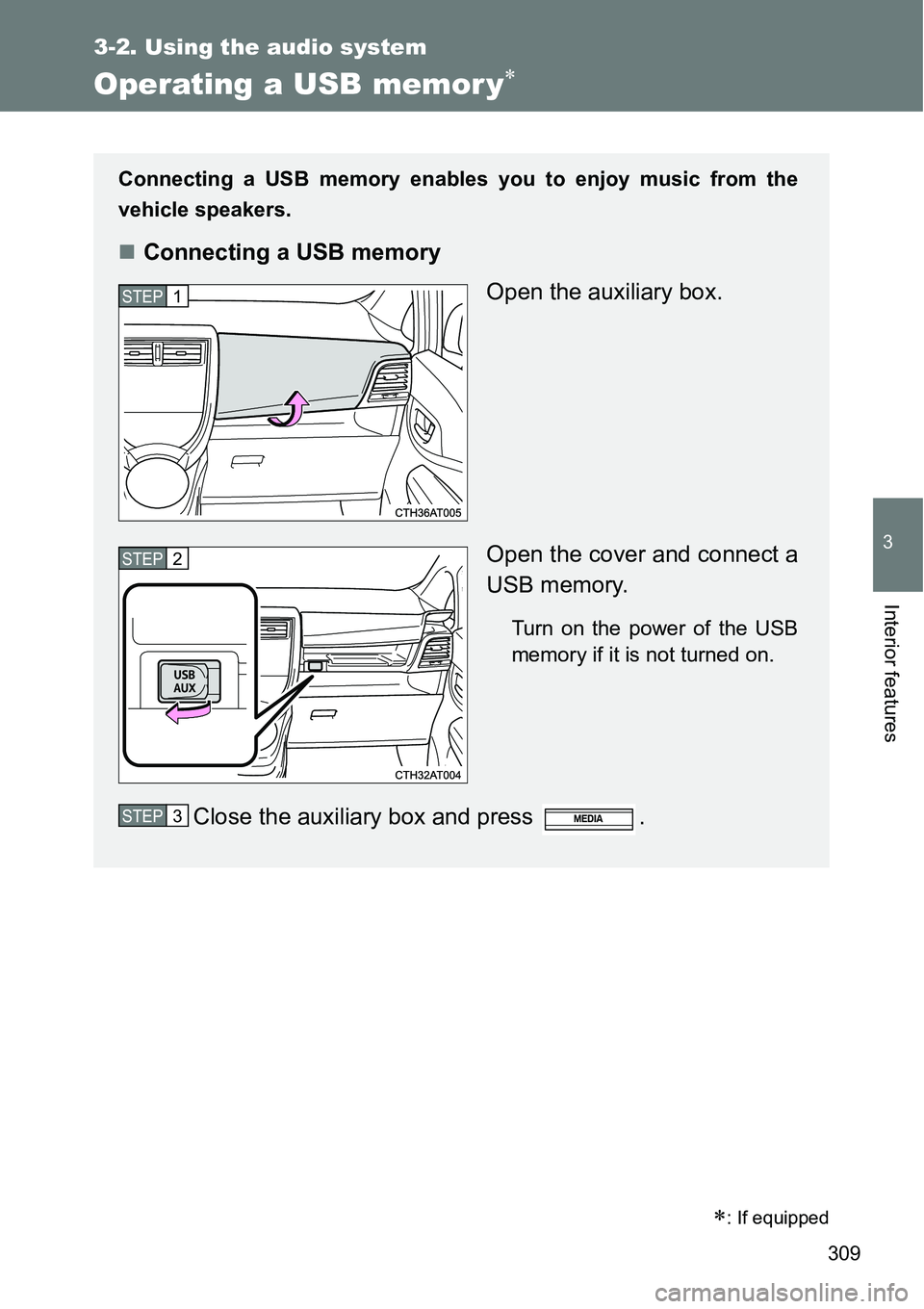
Connecting a USB memory enables you to enjoy music from the
vehicle speakers.
Connecting a USB memory
Open the auxiliary box.
Open the cover and connect a
USB memory.
Turn on the power of the USB
memory if it is not turned on.
Close the auxiliary box and press .
STEP1
STEP2
STEP3
Page 312 of 564
312 3-2. Using the audio system
Switching the display
Press .
Track title, Artist name and Album title (MP3 only) are displayed on the
display.
To return to the previous display, press or .
USB memory functions
Depending on the USB memory that is connected to the system, the
device itself may not be operable and certain functions may not be avail-
able. If the device is inoperable or a function is unavailable due to a mal-
function (as opposed to a system specification), disconnecting the device
and reconnecting it once again may resolve the problem.
If the USB memory still does not begin operation after being discon-
nected and reconnected, format the memory.
Display
P. 291
Error messages
“ERROR”: This indicates a problem in the USB memory or its connection.
“NO MUSIC”: This indicates that no MP3/WMA files are included in the USB
memory.
Page 313 of 564
313 3-2. Using the audio system
3
Interior features
USB memory
Compatible devices
USB memory that can be used for MP3 and WMA playback
Compatible device formats
The following device formats can be used:
• USB communication formats: USB2.0 FS (12 mbps)
• File formats: FAT16/32 (Windows)
• Correspondence class: Mass storage class
MP3 and WMA files written in any format other than those listed above
may not play correctly, and their file names and folder names may not be
displayed correctly.
Items related to standards and limitations are as follows:
• Maximum directory hierarchy: 8 levels
• Maximum number of folders in a device: 999 (including the root)
• Maximum number of files in a device: 9999
• Maximum number of files per folder: 255
MP3 and WMA files
MP3 (MPEG Audio LAYER 3) is a standard audio compression format.
Files can be compressed to approximately 1/10 of their original size using
MP3 compression.
WMA (Windows Media Audio) is a Microsoft audio compression format.
This format compresses audio data to a size smaller than that of the MP3
format.
There is a limit to the MP3 and WMA file standards that can be used and
to the media/formats on which the files are recorded.