Page 312 of 664
312
SIENNA_OM_01999-08001_(U)
4-6. Driving tips
Accelerate the vehicle slowly, keep a safe distance between you and
the vehicle ahead, and drive at a reduced speed suitable to road con-
ditions.
Park the vehicle and move the shift lever to P without setting the park-
ing brake. The parking brake may freeze up, preventing it from being
released. If necessary, block the wheels to prev ent inadvertent sliding
or creeping.
Use the tire chains of correct size and type.
Use SAE Class “S” type radial tire chains, with the exception of radial
cable chains or V-bar type chains.
Regulations regarding the use of tire chains vary depending on loca-
tion and type of road. Al ways check local regulations before installing
chains.
■ Tire chain installation
Observe the following precautions when installing and removing chains.
●Install and remove tire chains in a safe location.
● Install tire chains on the front tires only. Do not install tire chains on the rear
tires.
● Install tire chains on front tires as tightly as possible. Retighten chains after
driving 1/4 - 1/2 mile (0.5 - 1.0 km).
● Install tire chains following the instructions provided with the tire chains.
When driving the vehicle
When parking the vehicle
Selecting tire chains
Regulations on the use of tire chains
Page 313 of 664
SIENNA_OM_01999-08001_(U)
3134-6. Driving tips
4
Driving
WARNING
■Driving with snow tires
Observe the following precautions to reduce the risk of accidents.
Failing to do so may result in a loss of vehicle control and cause death or
serious injury.
● Use tires of the specified size.
● Maintain the recommended level of air pressure.
● Do not drive in excess of 75 mph (120 km/h), regardless of the type of
snow tires being used.
● Use snow tires on all, not just some wheels.
■ Driving with tire chains
Observe the following precautions to reduce the risk of accidents.
Failing to do so may result in the vehicle being unable to be driven safely,
and may cause death or serious injury.
● Do not drive in excess of the speed limit specified for the tire chains being
used or 30 mph (50 km/h), whichever is lower.
● Avoid driving on bumpy road surfaces or over potholes.
● Avoid sudden acceleration, abrupt steering, sudden braking and shifting
operations that cause sudden engine braking.
● Slow down sufficiently before entering a curve to ensure that vehicle con-
trol is maintained.
NOTICE
■Repairing or replacing snow tires
Request repairs or replacement of snow tires from Toyota dealers or legiti-
mate tire retailers.
This is because the removal and attachment of snow tires affects the opera-
tion of the tire pressure warning valves and transmitters.
■ Fitting tire chains
The tire pressure warning valves and transmitters may not function correctly
when tire chains are fitted.
Page 314 of 664
314
SIENNA_OM_01999-08001_(U)
5-1. Basic OperationsAudio system types ........... 316
Audio system .................... 317
Steering wheel audio switches .......................... 320
AUX Port/USB Port ........... 322
Basic audio operations...... 323
5-2. Setup Setup menu....................... 325
General settings ................ 326
Audio settings ................... 328
Display settings ................. 329
Voice settings.................... 330
5-3. Using the Multimedia system
Selecting the audio source ............................. 331
List screen operation......... 332
Optimal use of the audio system ............................ 334
5-4. Using the radio Radio operation................. 335
5Audio system
Page 315 of 664

315
SIENNA_OM_01999-08001_(U)
5Audio system
5-5. Playing an audio CD and MP3/WMA/AAC discs
CD player operation .......... 337
5-6. Using an external device Listening to an iPod .......... 343
Listening to a USB memory device ....... 347
Using the AUX port ........... 352
5-7. Connecting Bluetooth
®
Preparations to use wireless
communication ................ 353
Registering a Bluetooth
®
audio player for the
first time .......................... 356
Registering a Bluetooth
®
phone for the
first time .......................... 357
Registering a Bluetooth
®
device.............................. 358
Connecting a Bluetooth
®
device.............................. 360
Displaying a Bluetooth
®
device details .................. 362
Detailed Bluetooth
®
system settings ............... 363 5-8. Bluetooth
® Audio
Listening to Bluetooth®
Audio............................... 364
5-9. Bluetooth
® phone
Using a Bluetooth®
Phone ............................. 366
Making a call ..................... 368
Receiving a call ................. 371
Speaking on the phone ..... 372
Bluetooth
® phone
message function ............ 375
Using the steering wheel switches ................ 379
Bluetooth
® phone
settings ........................... 380
Contact/Call History Settings ........................... 381
What to do if... (Troubleshooting) ............ 390
5-10. Bluetooth
®
Bluetooth®......................... 394
5-11. Using the voice command system
Voice command system .... 400
Page 320 of 664
320
SIENNA_OM_01999-08001_(U)
5-1. Basic Operations
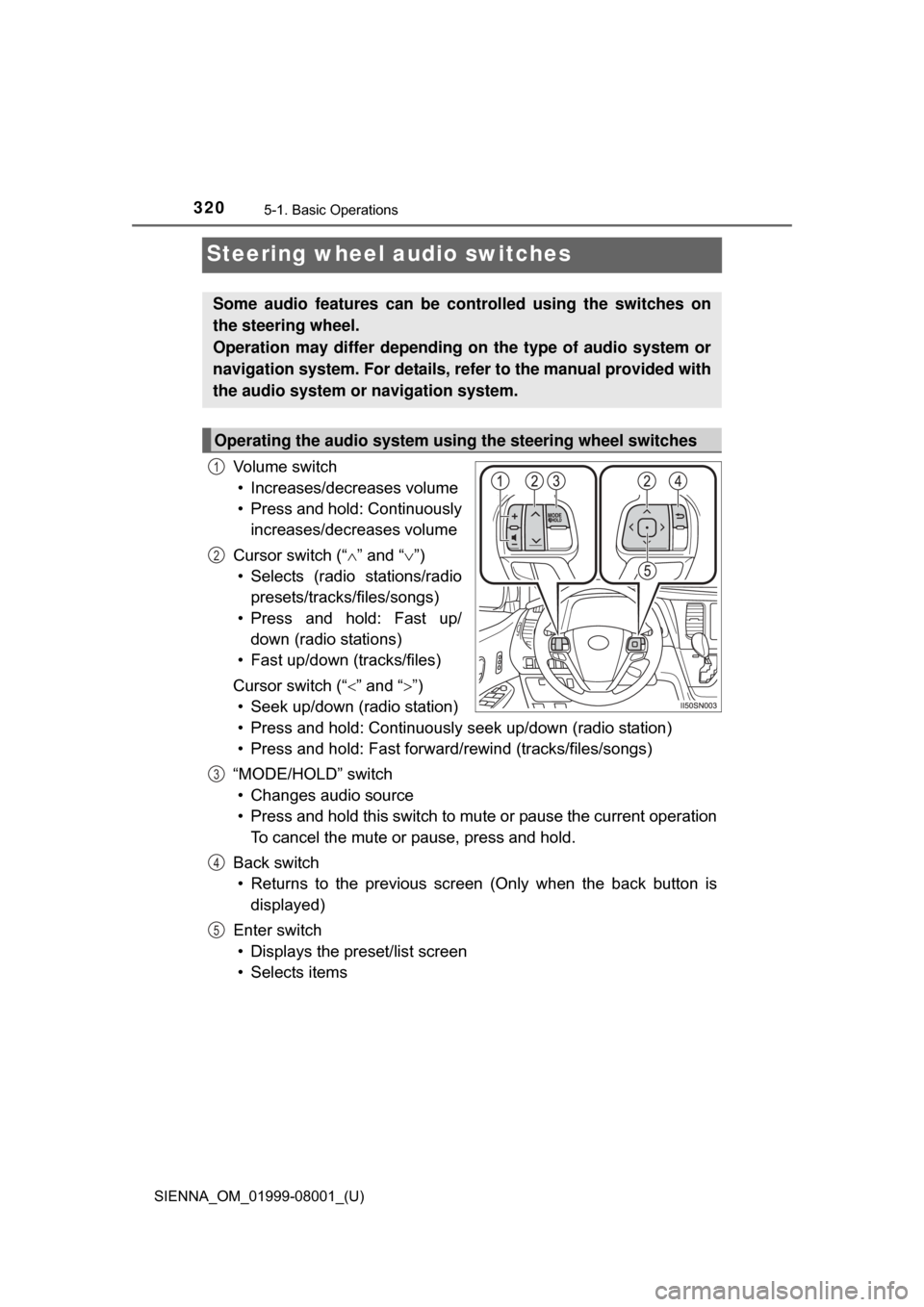
Steering wheel audio switches
Vo l u m e s w i t c h• Increases/decreases volume
• Press and hold: Continuously increases/decreases volume
Cursor switch (“ ” and “ ”)
• Selects (radio stations/radio presets/tracks/files/songs)
• Press and hold: Fast up/ down (radio stations)
• Fast up/down (tracks/files)
Cursor switch (“ ” and “”)
• Seek up/down (radio station)
• Press and hold: Continuously seek up/down (radio station)
• Press and hold: Fast forwar d/rewind (tracks/files/songs)
“MODE/HOLD” switch • Changes audio source
• Press and hold this switch to mute or pause the current operation To cancel the mute or pause, press and hold.
Back switch • Returns to the previous scr een (Only when the back button is
displayed)
Enter switch • Displays the preset/list screen
• Selects items
Some audio features can be c ontrolled using the switches on
the steering wheel.
Operation may differ depending on the type of audio system or
navigation system. For details, refer to the manual provided with
the audio system or navigation system.
Operating the audio system using the steering wheel switches
1
2
3
4
5
Page 321 of 664
SIENNA_OM_01999-08001_(U)
3215-1. Basic Operations
5
Audio system
WARNING
■To reduce the risk of an accident
Exercise care when operating the audio switches on the steering wheel.
Page 331 of 664
331
SIENNA_OM_01999-08001_(U)
5-3. Using the Multimedia system
5
Audio system
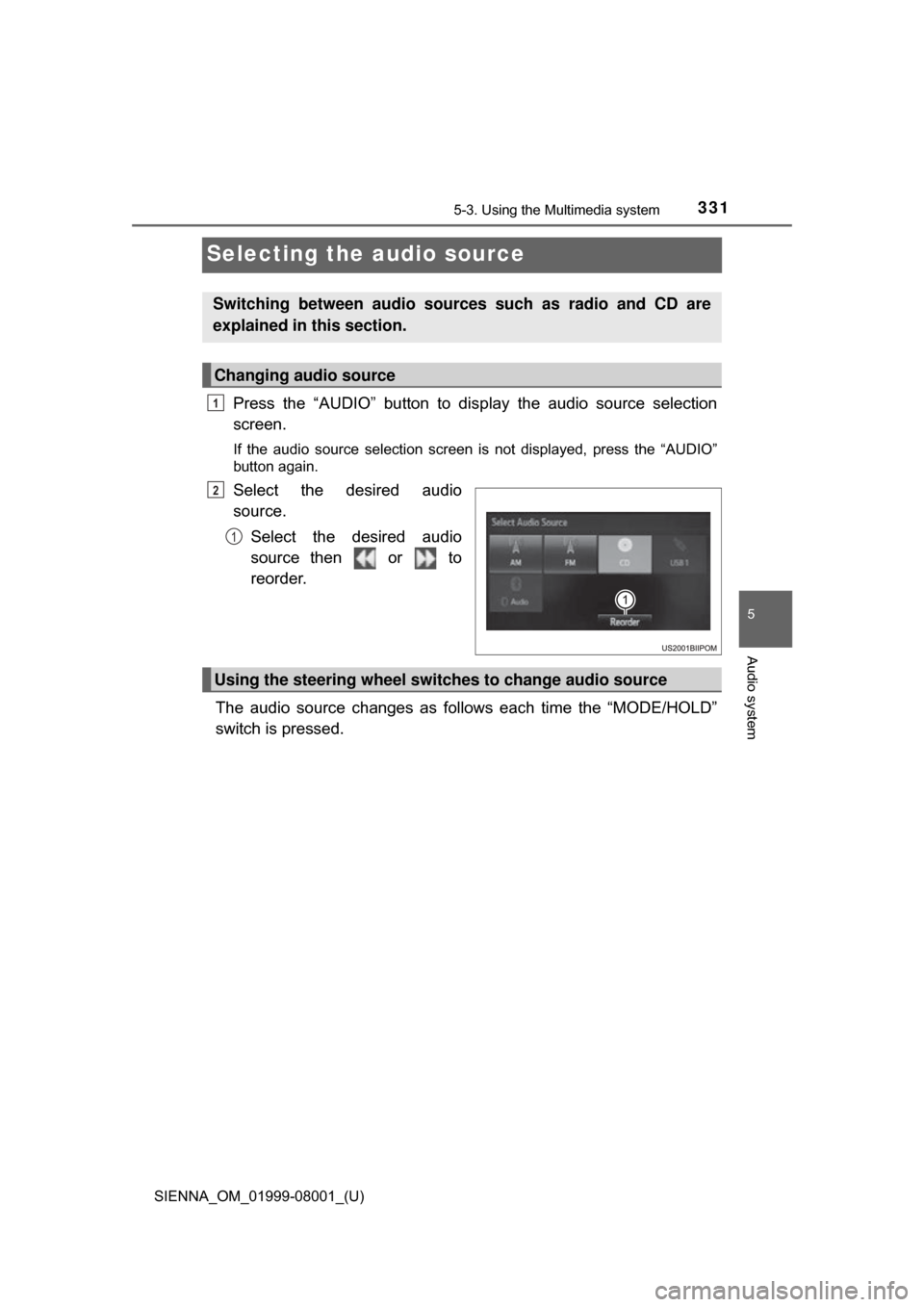
Selecting the audio source
Press the “AUDIO” button to disp lay the audio source selection
screen.
If the audio source selection screen is not displayed, press the “AUDIO”
button again.
Select the desired audio
source.
Select the desired audio
source then or to
reorder.
The audio source changes as follows each time the “MODE/HOLD”
switch is pressed.
Switching between audio sources such as radio and CD are
explained in this section.
Changing audio source
1
2
1
Using the steering wheel switches to change audio source
Page 366 of 664
366
SIENNA_OM_01999-08001_(U)
5-9. Bluetooth® phone
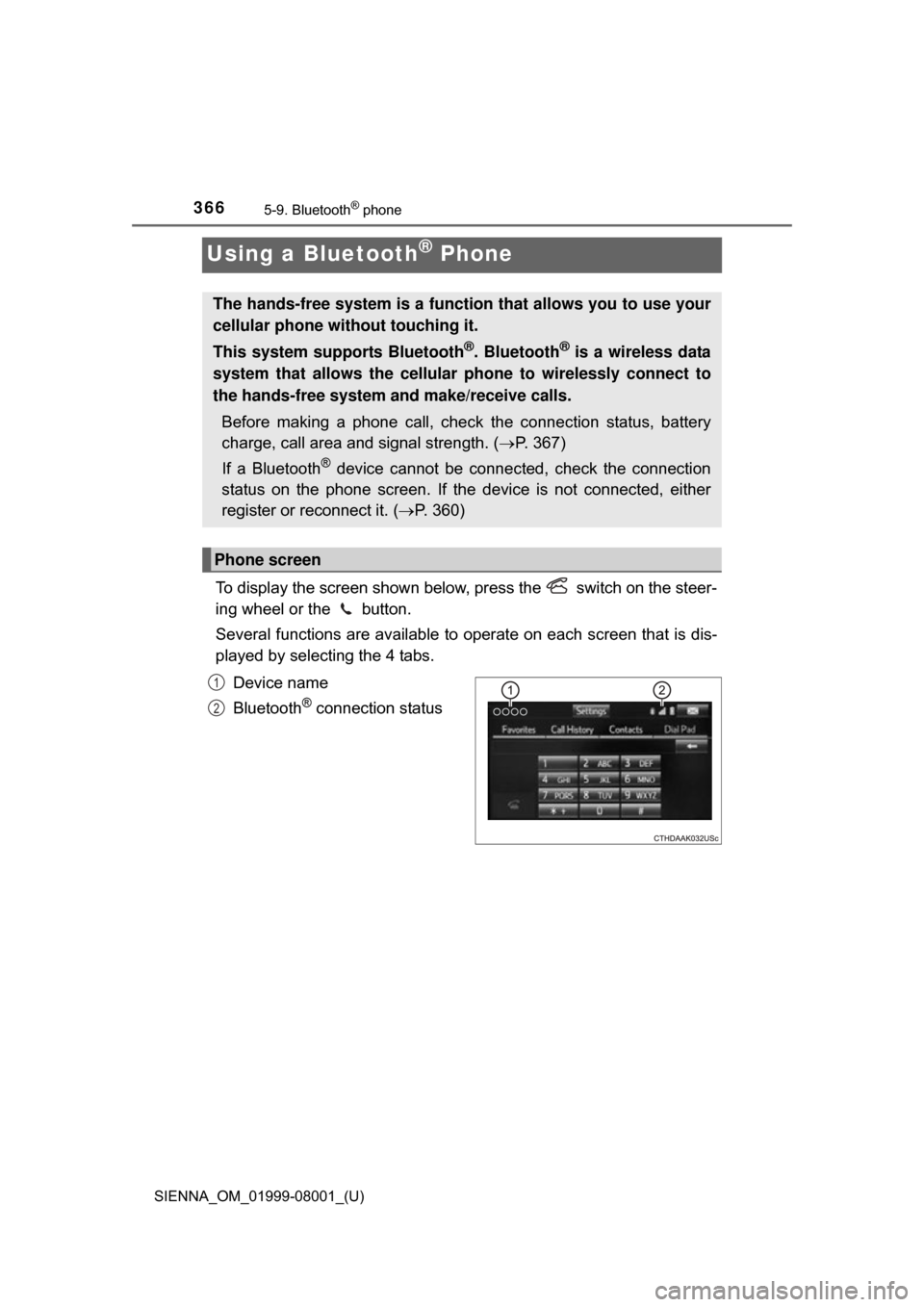
Using a Bluetooth® Phone
To display the screen shown below, press the switch on the steer-
ing wheel or the button.
Several functions are available to operate on each screen that is dis-
played by selecting the 4 tabs.
Device name
Bluetooth
® connection status
The hands-free system is a function that allows you to use your
cellular phone without touching it.
This system supports Bluetooth
®. Bluetooth® is a wireless data
system that allows the cellular phone to wirelessly connect to
the hands-free system and make/receive calls.
Before making a phone call, check the connection status, battery
charge, call area and signal strength. ( P. 367)
If a Bluetooth
® device cannot be connected, check the connection
status on the phone screen. If th e device is not connected, either
register or reconnect it. ( P. 360)
Phone screen
1
2