Page 249 of 664
SIENNA_OM_01999-08001_(U)
2494-3. Operating the lights and wipers
4
Driving
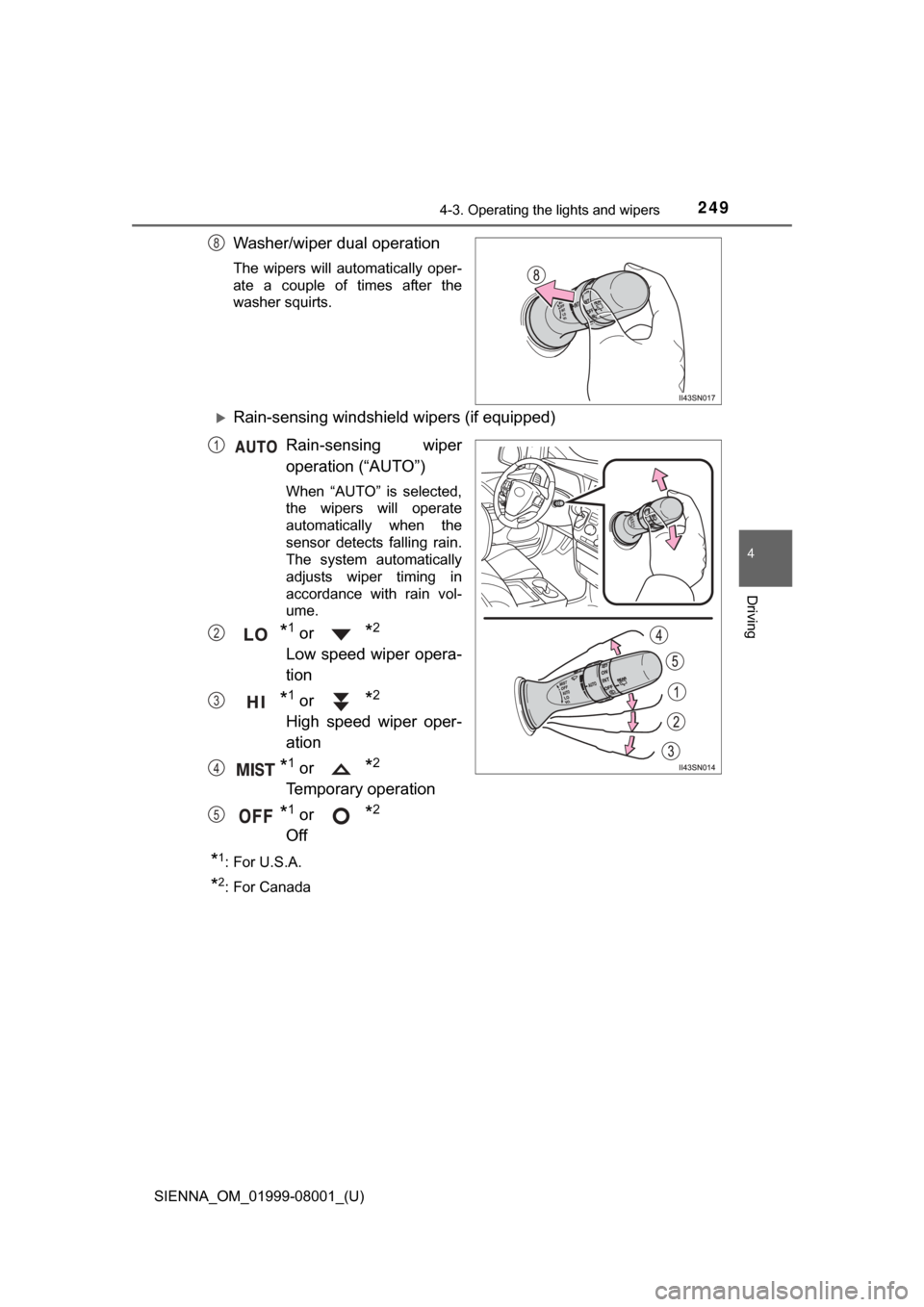
Washer/wiper dual operation
The wipers will automatically oper-
ate a couple of times after the
washer squirts.
Rain-sensing windshield wipers (if equipped)Rain-sensing wiper
operation (“AUTO”)
When “AUTO” is selected,
the wipers will operate
automatically when the
sensor detects falling rain.
The system automatically
adjusts wiper timing in
accordance with rain vol-
ume.
*1 or *2
Low speed wiper opera-
tion
*1 or *2
High speed wiper oper-
ation
*1 or *2
Temporary operation
*1 or *2
Off
*1:For U.S.A.
*2: For Canada
8
1
2
3
4
5
Page 250 of 664
250
SIENNA_OM_01999-08001_(U)
4-3. Operating the lights and wipers
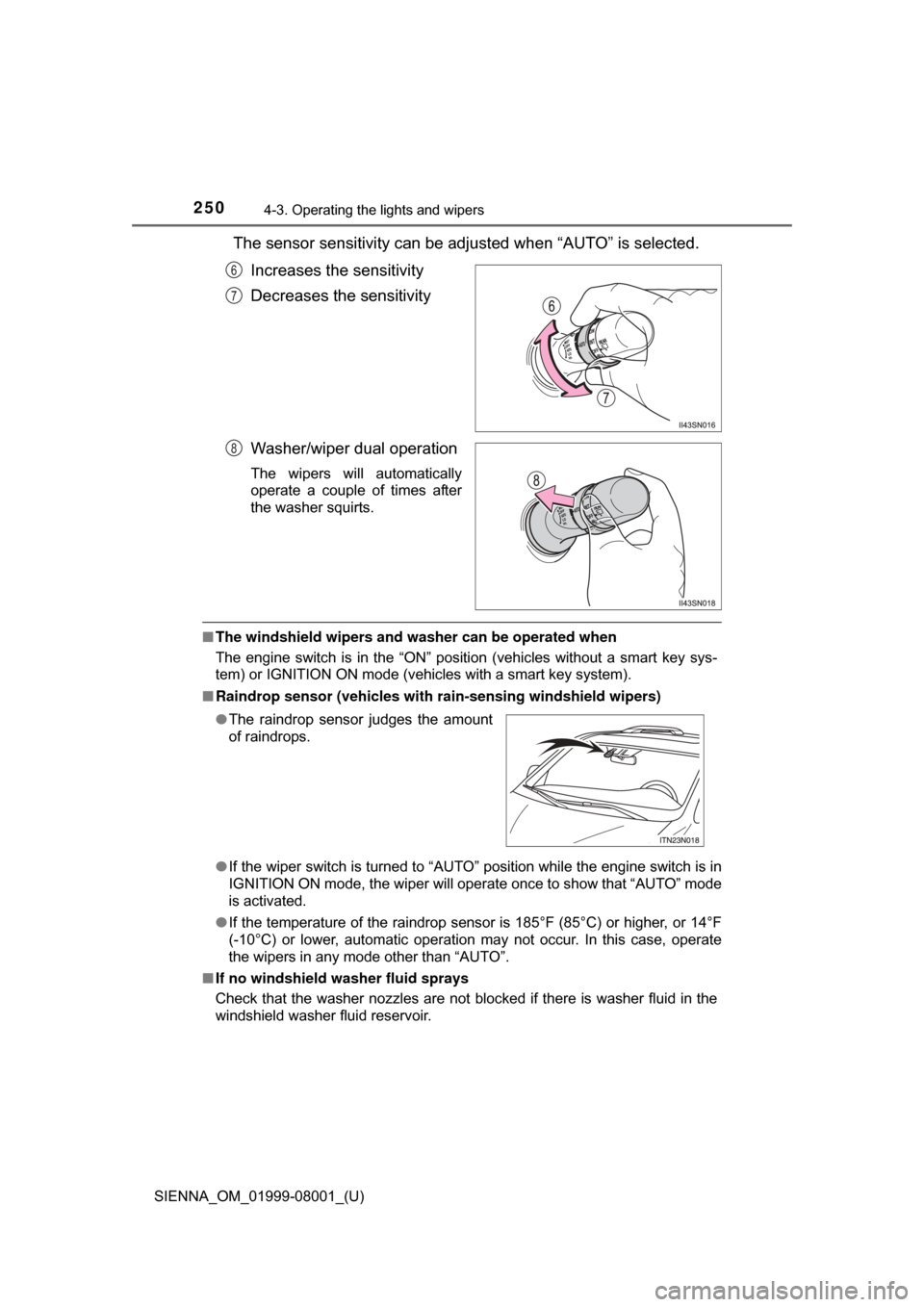
The sensor sensitivity can be adjusted when “AUTO” is selected.Increases the sensitivity
Decreases the sensitivity
Washer/wiper dual operation
The wipers will automatically
operate a couple of times after
the washer squirts.
■The windshield wipers and washer can be operated when
The engine switch is in the “ON” position (vehicles without a smart key sys-
tem) or IGNITION ON mode (vehicles with a smart key system).
■ Raindrop sensor (vehicles with ra in-sensing windshield wipers)
● If the wiper switch is turned to “AUTO” position while the engine switch is in
IGNITION ON mode, the wiper will operate once to show that “AUTO” mode
is activated.
● If the temperature of the raindrop sensor is 185°F (85°C) or higher, or 14°F
(-10°C) or lower, automatic operation may not occur. In this case, operate
the wipers in any mode other than “AUTO”.
■ If no windshield washer fluid sprays
Check that the washer nozzles are not blocked if there is washer fluid in the
windshield washer fluid reservoir.
6
7
8
●The raindrop sensor judges the amount
of raindrops.
Page 251 of 664
SIENNA_OM_01999-08001_(U)
2514-3. Operating the lights and wipers
4
Driving
WARNING
■Caution regarding the use of windshield wipers in “AUTO” mode
The windshield wipers may operate unexpectedly if the sensor is touched or
the windshield is subject to vibration in “AUTO” mode. Take care that your
fingers etc. do not become caught in the windshield wipers.
■ Caution regarding the use of washer fluid
When it is cold, do not use the washer fluid until the windshield becomes
warm. The fluid may freeze on the windshield and cause low visibility. This
may lead to an accident, resulting in death or serious injury.
NOTICE
■When the windshield is dry
Do not use the wipers, as they may damage the windshield.
■ When the washer fluid tank is empty
Do not operate the switch continually as the washer fluid pump may over-
heat.
■ When a nozzle becomes blocked
In this case, contact your Toyota dealer.
Do not try to clear it with a pin or other object. The nozzle will be damaged.
Page 252 of 664
252
SIENNA_OM_01999-08001_(U)
4-3. Operating the lights and wipers
Rear window wiper and washer
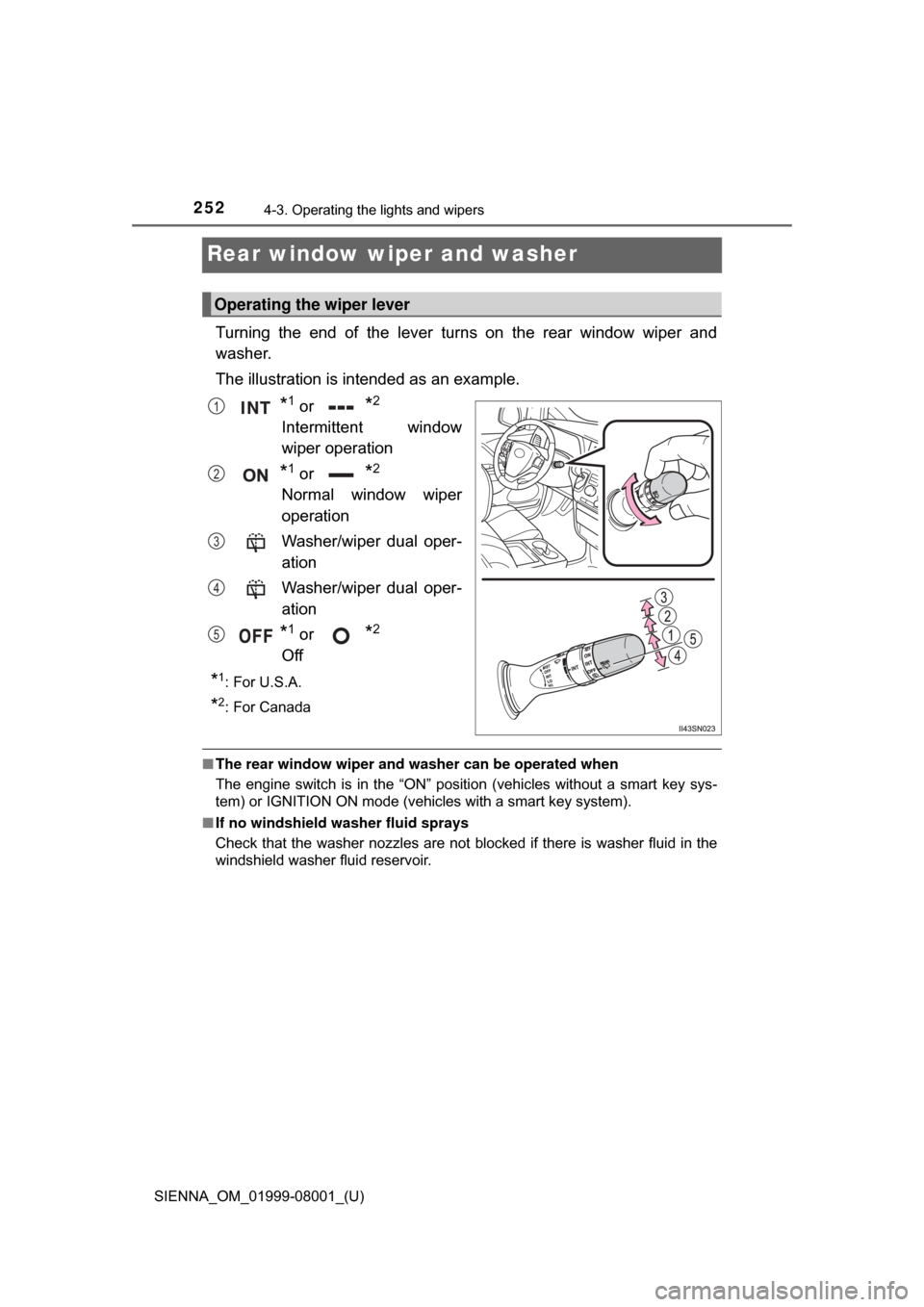
Turning the end of the lever turns on the rear window wiper and
washer.
The illustration is intended as an example.
*1 or *2
Intermittent window
wiper operation
*1 or *2
Normal window wiper
operation
Washer/wiper dual oper-
ation
Washer/wiper dual oper-
ation
*1 or *2
Off
*1:For U.S.A.
*2: For Canada
■ The rear window wiper and w asher can be operated when
The engine switch is in the “ON” position (vehicles without a smart key sys-
tem) or IGNITION ON mode (vehicles with a smart key system).
■ If no windshield washer fluid sprays
Check that the washer nozzles are not blocked if there is washer fluid in the
windshield washer fluid reservoir.
Operating the wiper lever
1
2
3
4
5
Page 253 of 664
SIENNA_OM_01999-08001_(U)
2534-3. Operating the lights and wipers
4
Driving
NOTICE
■When the rear window is dry
Do not use the wiper, as it may damage the rear window.
■ When the washer fluid tank is empty
Do not operate the switch continually as the washer fluid pump may over-
heat.
■ When a nozzle becomes blocked
In this case, contact your Toyota dealer.
Do not try to clear it with a pin or other object. The nozzle will be damaged.
Page 288 of 664
288
SIENNA_OM_01999-08001_(U)
4-5. Using the driving support systems
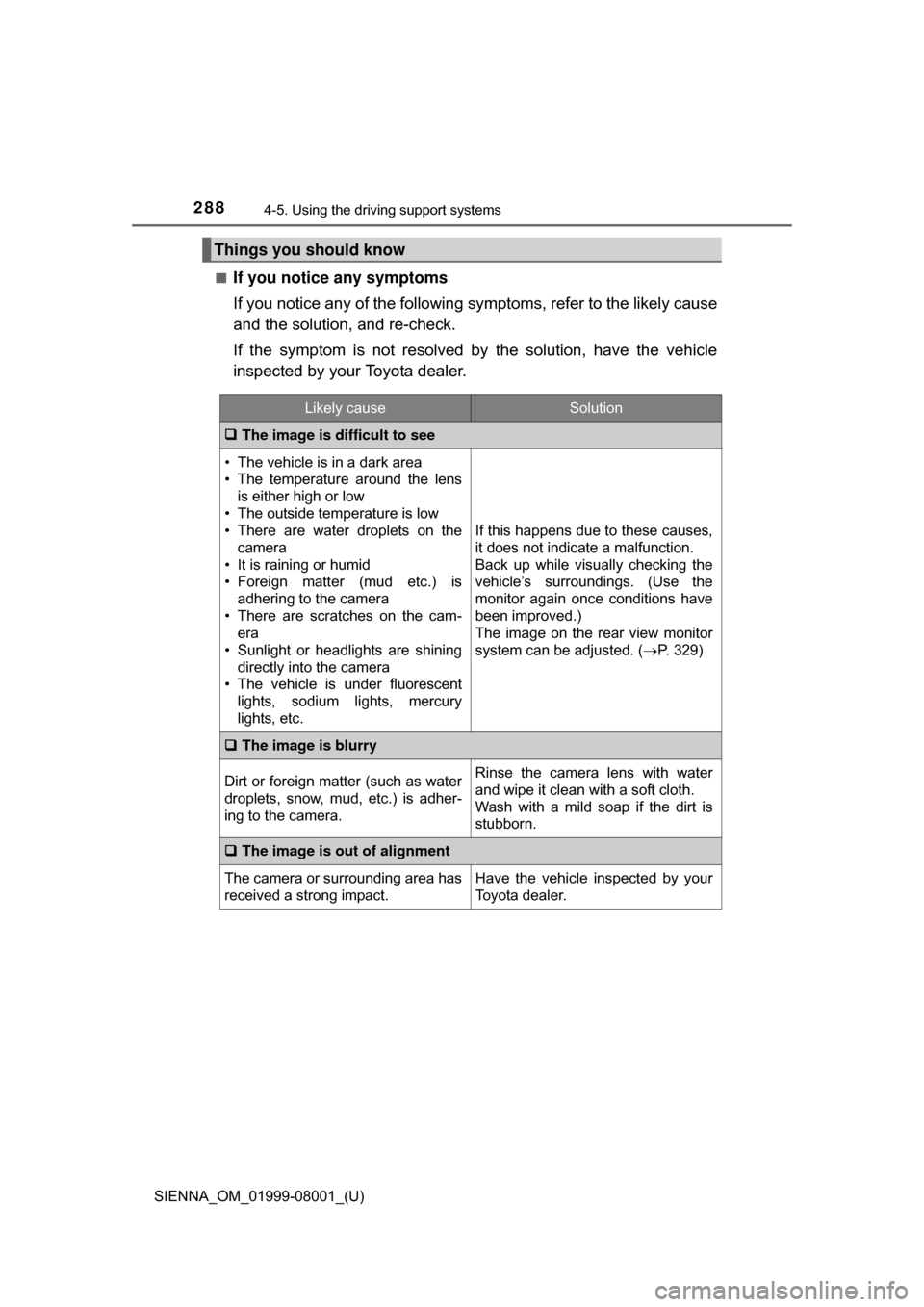
■If you notice any symptoms
If you notice any of the following symptoms, refer to the likely cause
and the solution, and re-check.
If the symptom is not resolved by the solution, have the vehicle
inspected by your Toyota dealer.
Things you should know
Likely causeSolution
The image is difficult to see
• The vehicle is in a dark area
• The temperature around the lens
is either high or low
• The outside temperature is low
• There are water droplets on the camera
• It is raining or humid
• Foreign matter (mud etc.) is adhering to the camera
• There are scratches on the cam- era
• Sunlight or headlights are shining
directly into the camera
• The vehicle is under fluorescent
lights, sodium lights, mercury
lights, etc.
If this happens due to these causes,
it does not indicate a malfunction.
Back up while visually checking the
vehicle’s surroundings. (Use the
monitor again once conditions have
been improved.)
The image on the rear view monitor
system can be adjusted. ( P. 329)
The image is blurry
Dirt or foreign matter (such as water
droplets, snow, mud, etc.) is adher-
ing to the camera.Rinse the camera lens with water
and wipe it clean with a soft cloth.
Wash with a mild soap if the dirt is
stubborn.
The image is out of alignment
The camera or surrounding area has
received a strong impact.Have the vehicle inspected by your
Toyota dealer.
Page 311 of 664
311
SIENNA_OM_01999-08001_(U)
4-6. Driving tips
4
Driving
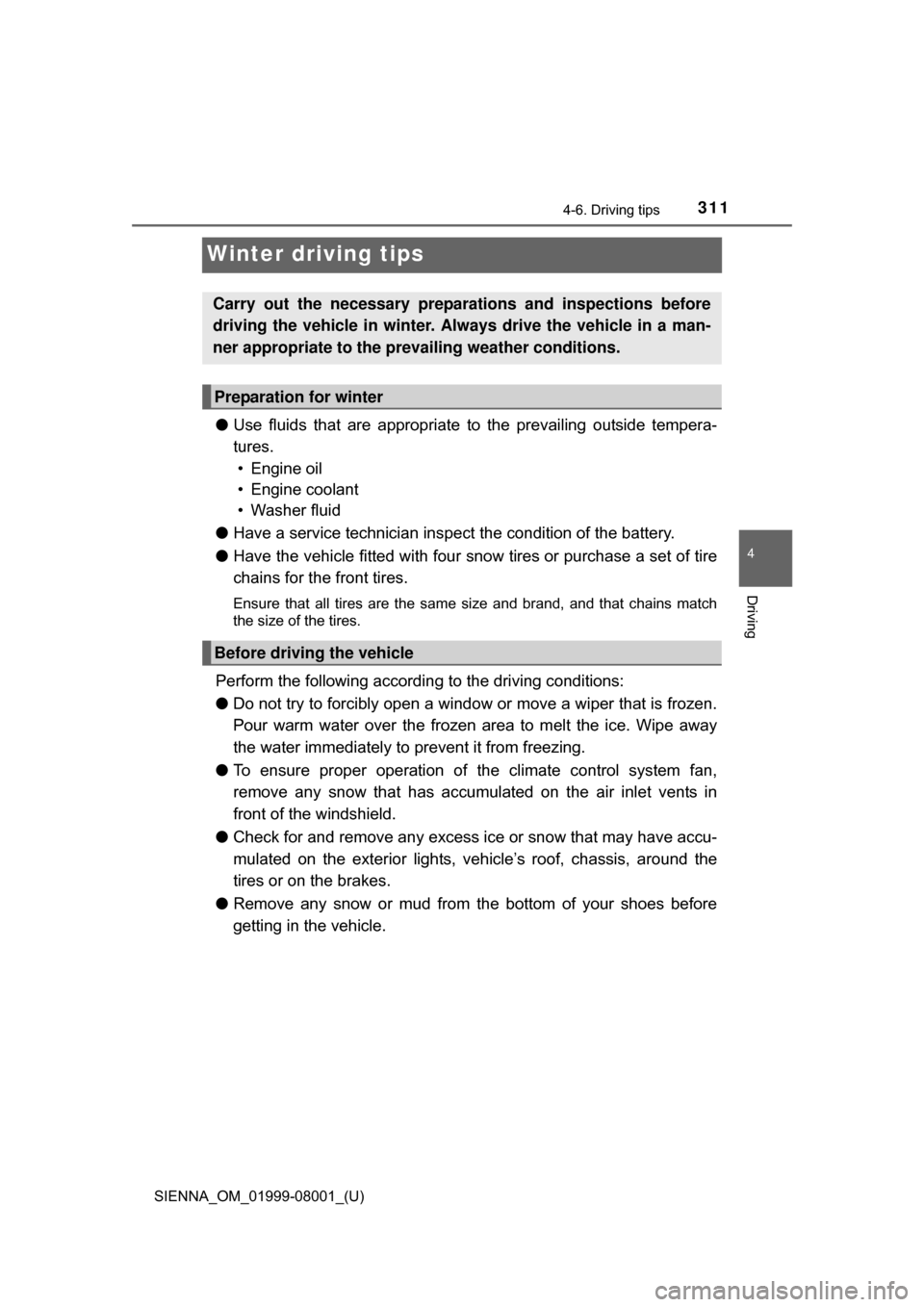
Winter driving tips
●Use fluids that are appropriate to the prevailing outside tempera-
tures.
• Engine oil
• Engine coolant
• Washer fluid
● Have a service technician ins pect the condition of the battery.
● Have the vehicle fitted with four snow tires or purchase a set of tire
chains for the front tires.
Ensure that all tires are the same size and brand, and that chains match
the size of the tires.
Perform the following accordin g to the driving conditions:
● Do not try to forcibly open a window or move a wiper that is frozen.
Pour warm water over the frozen area to melt the ice. Wipe away
the water immediately to prevent it from freezing.
● To ensure proper operation of the climate control system fan,
remove any snow that has accumulated on the air inlet vents in
front of the windshield.
● Check for and remove any excess ice or snow that may have accu-
mulated on the exterior lights, ve hicle’s roof, chassis, around the
tires or on the brakes.
● Remove any snow or mud from the bottom of your shoes before
getting in the vehicle.
Carry out the necessary preparations and inspections before
driving the vehicle in winter. Always drive the vehicle in a man-
ner appropriate to the prevailing weather conditions.
Preparation for winter
Before driving the vehicle
Page 329 of 664
329
SIENNA_OM_01999-08001_(U)
5-2. Setup
5
Audio system
Display settings
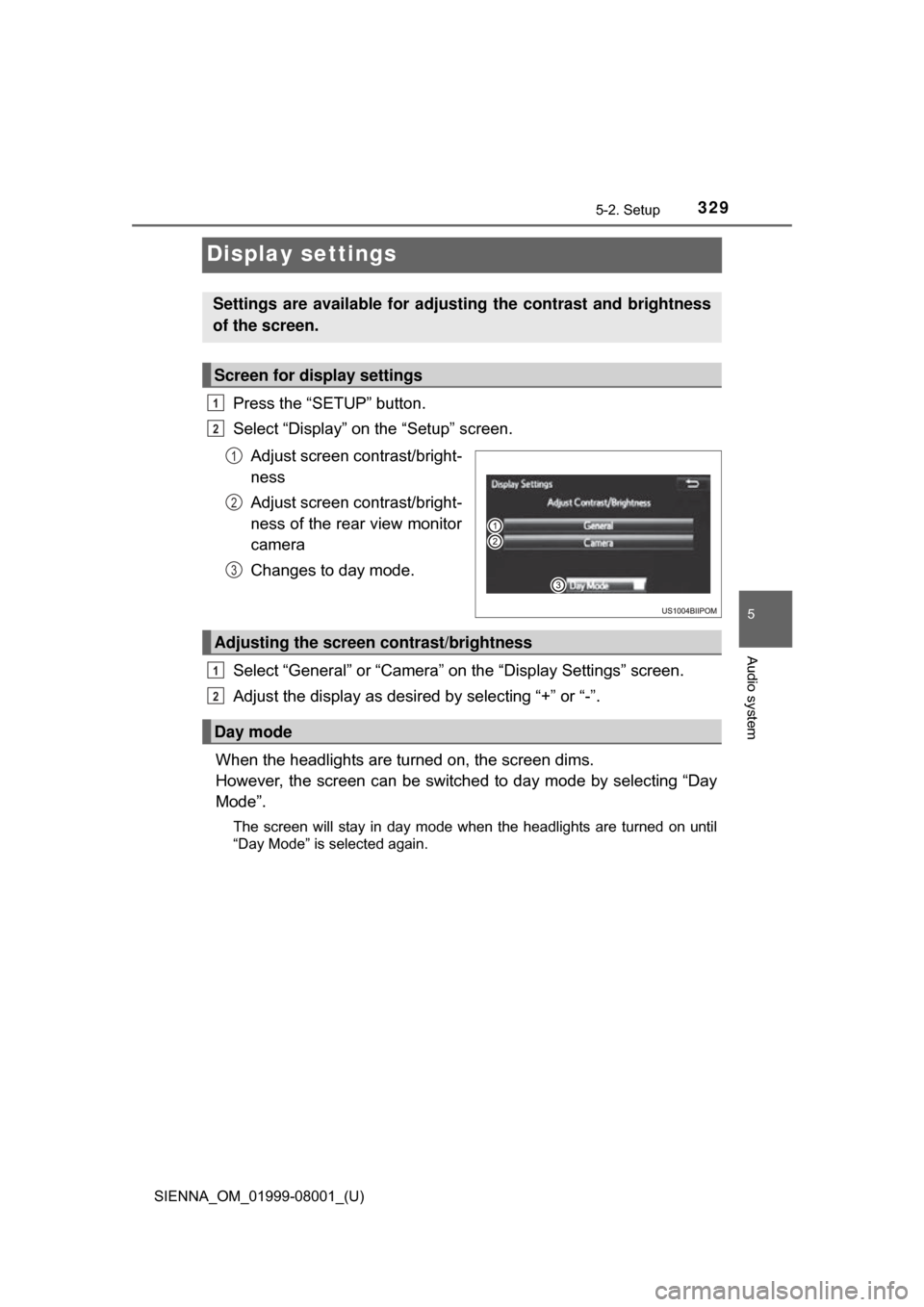
Press the “SETUP” button.
Select “Display” on the “Setup” screen.Adjust screen contrast/bright-
ness
Adjust screen contrast/bright-
ness of the rear view monitor
camera
Changes to day mode.
Select “General” or “Camera” on the “Display Settings” screen.
Adjust the display as desired by selecting “+” or “-”.
When the headlights are turned on, the screen dims.
However, the screen can be switch ed to day mode by selecting “Day
Mode”.
The screen will stay in day mode when the headlights are turned on until
“Day Mode” is selected again.
Settings are available for adjusting the contrast and brightness
of the screen.
Screen for display settings
1
2
1
2
3
Adjusting the screen contrast/brightness
Day mode
1
2