Page 315 of 664

315
SIENNA_OM_01999-08001_(U)
5Audio system
5-5. Playing an audio CD and MP3/WMA/AAC discs
CD player operation .......... 337
5-6. Using an external device Listening to an iPod .......... 343
Listening to a USB memory device ....... 347
Using the AUX port ........... 352
5-7. Connecting Bluetooth
®
Preparations to use wireless
communication ................ 353
Registering a Bluetooth
®
audio player for the
first time .......................... 356
Registering a Bluetooth
®
phone for the
first time .......................... 357
Registering a Bluetooth
®
device.............................. 358
Connecting a Bluetooth
®
device.............................. 360
Displaying a Bluetooth
®
device details .................. 362
Detailed Bluetooth
®
system settings ............... 363 5-8. Bluetooth
® Audio
Listening to Bluetooth®
Audio............................... 364
5-9. Bluetooth
® phone
Using a Bluetooth®
Phone ............................. 366
Making a call ..................... 368
Receiving a call ................. 371
Speaking on the phone ..... 372
Bluetooth
® phone
message function ............ 375
Using the steering wheel switches ................ 379
Bluetooth
® phone
settings ........................... 380
Contact/Call History Settings ........................... 381
What to do if... (Troubleshooting) ............ 390
5-10. Bluetooth
®
Bluetooth®......................... 394
5-11. Using the voice command system
Voice command system .... 400
Page 316 of 664
316
SIENNA_OM_01999-08001_(U)
5-1. Basic Operations
Audio system types
Entune Audio
P. 3 1 7
Entune Audio Plus/Entune Pr emium Audio with Navigation
Owners of models equipped with a navigation system should refer to
the “NAVIGATION AND MULTIMEDIA SYSTEM OWNER’S
MANUAL”.
■ Using cellular phones
Interference may be heard through the audio system’s speakers if a cellular
phone is being used inside or close to the vehicle while the audio system is
operating.
NOTICE
■To prevent battery discharge
Do not leave the audio system on longer than necessary when the engine is
off.
■ To avoid damaging the audio system
Take care not to spill drinks or other fluids on the audio system.
Page 317 of 664
317
SIENNA_OM_01999-08001_(U)
5-1. Basic Operations
5
Audio system
Audio system
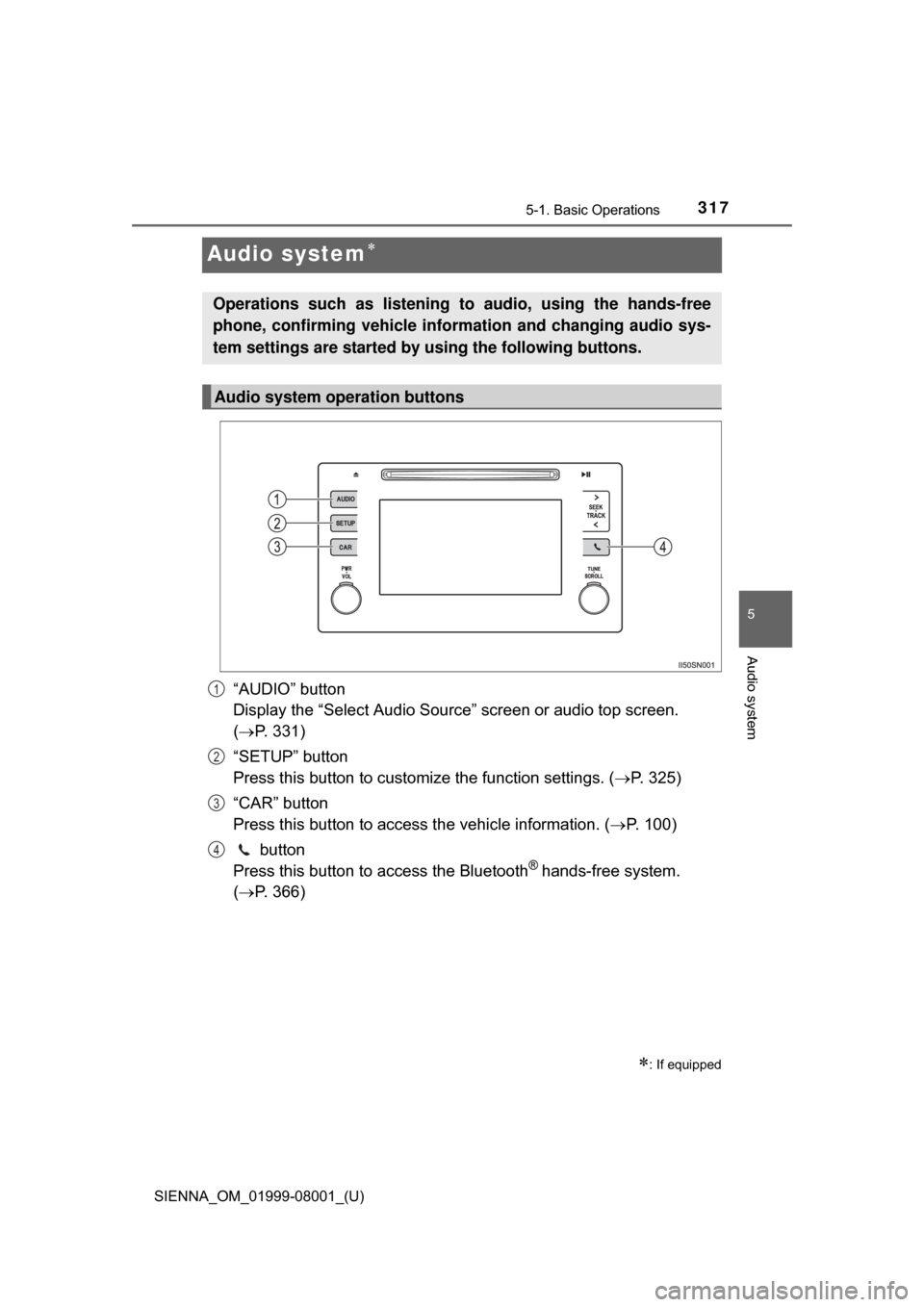
“AUDIO” button
Display the “Select Audio Source” screen or audio top screen.
( P. 331)
“SETUP” button
Press this button to customize the function settings. ( P. 325)
“CAR” button
Press this button to access the vehicle information. ( P. 100)
button
Press this button to access the Bluetooth
® hands-free system.
( P. 366)
: If equipped
Operations such as listening to audio, using the hands-free
phone, confirming vehicle inform ation and changing audio sys-
tem settings are started by using the following buttons.
Audio system operation buttons
1
2
3
4
Page 324 of 664
3245-1. Basic Operations
SIENNA_OM_01999-08001_(U)
Select to change on/off.
Select to change on/off.
■Using cellular phones
Interference may be heard through the audio system’s speakers if a cellular
phone is being used inside or close to the vehicle while the audio system is
operating.
■ Certification (caution)
Laser product
This product is a class 1 laser product.
Do not open the cover of the player or attempt to repair the unit yourself.
Refer servicing to qualified personnel.
●Laser products
This product utilizes a laser.
Use of controls or adjustments or performance of procedures other than
those specified herein may result in hazardous radiation exposure.
THE USE OF OPTICAL INSTRUMENTS WITH THIS PRODUCT WILL
INCREASE EYE HAZARD.
Random playback
Repeat play
NOTICE
■To prevent battery discharge
Do not leave the audio system on longer than necessary when the engine is
off.
■ To avoid damaging the audio system
Take care not to spill drinks or other fluids on the audio system.
Page 327 of 664
SIENNA_OM_01999-08001_(U)
3275-2. Setup
5
Audio system
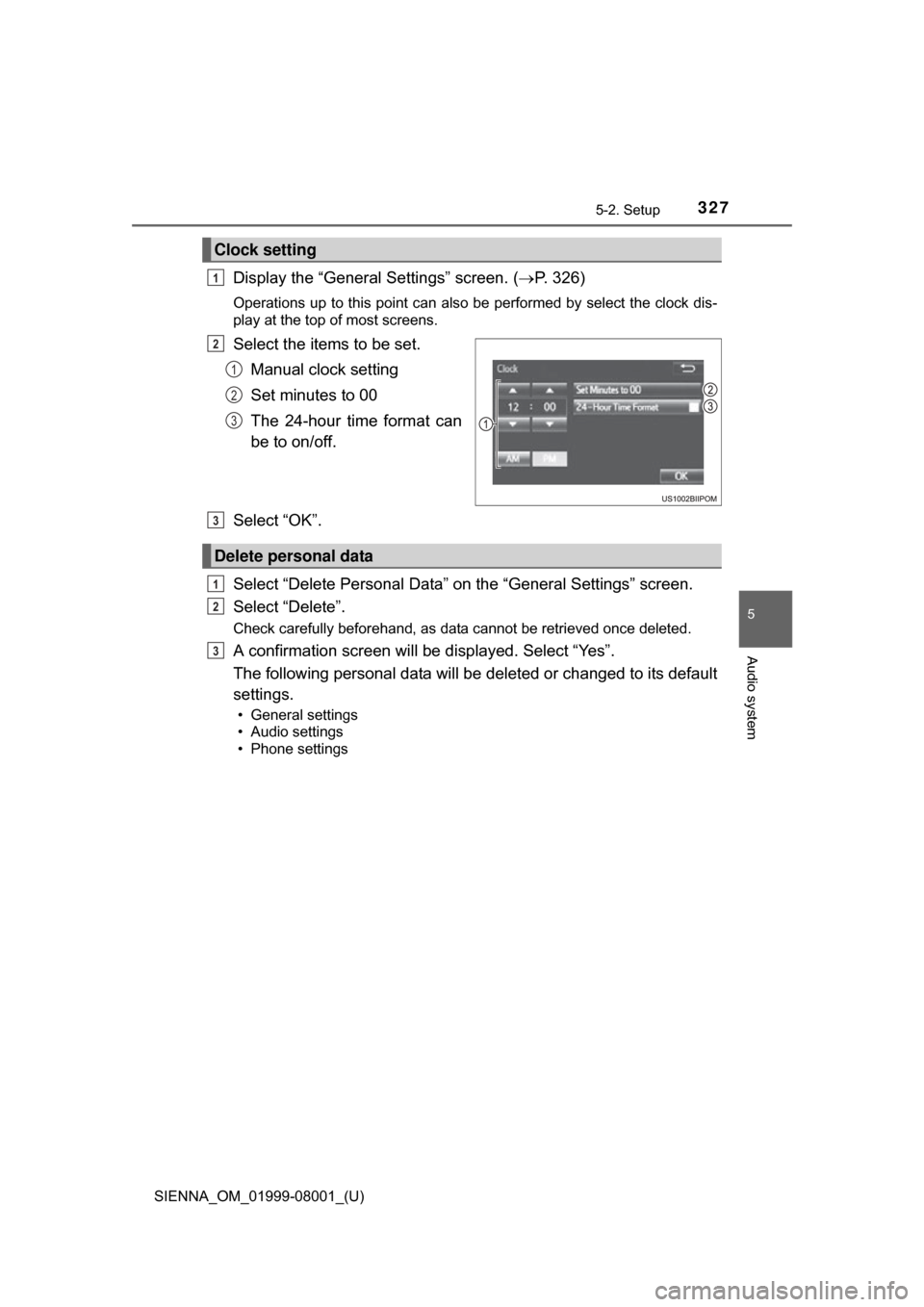
Display the “General Settings” screen. (P. 326)
Operations up to this point can also be performed by select the clock dis-
play at the top of most screens.
Select the items to be set.
Manual clock setting
Set minutes to 00
The 24-hour time format can
be to on/off.
Select “OK”.
Select “Delete Personal Data” on the “General Settings” screen.
Select “Delete”.
Check carefully beforehand, as data cannot be retrieved once deleted.
A confirmation screen will be displayed. Select “Yes”.
The following personal data will be deleted or changed to its default
settings.
• General settings
• Audio settings
• Phone settings
Clock setting
1
2
1
2
3
Delete personal data
3
1
2
3
Page 344 of 664
3445-6. Using an external device
SIENNA_OM_01999-08001_(U)
■About iPod
●“Made for iPod” and “Made for iPhone” mean that an electronic accessory
has been designed to connect specifically to iPod or iPhone, respectively,
and has been certified by the developer to meet Apple performance stan-
dards.
● Apple is not responsible for the operation of this device or its compliance
with safety and regulatory standards. Please note that the use of this acces-
sory with iPod or iPhone may affect wireless performance.
● iPhone, iPod, iPod classic, iPod nano, and iPod touch are trademarks of
Apple Inc., registered in the U.S. and other countries. Lightning is a trade-
mark of Apple Inc.
■ iPod cover art
●Depending on the iPod and songs in the iPod, iPod cover art may be dis-
played.
● This function can be changed to on/off. (P. 328)
● It may take time to display iPod cover art, and the iPod may not be operated
while the cover art display is in process.
● Only iPod cover art that is saved in JPEG format can be displayed.
■ iPod functions
●When an iPod is connected and the audio source is changed to iPod mode,
the iPod will resume play from the same point in which it was last used.
● Depending on the iPod that is connected to the system, certain functions
may not be available. If a function is unavailable due to a malfunction (as
opposed to a system specification), disconnecting the device and recon-
necting it may resolve the problem.
● While connected to the system, the iPod cannot be operated with its own
controls. It is necessary to use the controls of the vehicle’s audio system
instead.
● When the battery level of an iPod is very low, the iPod may not operate. If
so, charge the iPod before use.
● Compatible models ( P. 346)
Page 346 of 664
3465-6. Using an external device
SIENNA_OM_01999-08001_(U)■
Compatible models
The following iPod
®, iPod nano®, iPod classic®, iPod touch® and iPhone®
devices can be used with this system.
●Made for
• iPod touch (5th generation)
• iPod touch (4th generation)
• iPod touch (3rd generation)
• iPod touch (2nd generation)
• iPod touch (1st generation)
• iPod classic
• iPod with video
• iPod nano (7th generation)
• iPod nano (6th generation)
• iPod nano (5th generation)
• iPod nano (4th generation)
• iPod nano (3rd generation)
• iPod nano (2nd generation)
• iPod nano (1st generation)
• iPhone 5
• iPhone 4S
• iPhone 4
• iPhone 3GS
• iPhone 3G
• iPhone
Depending on differences between models or software versions etc., some
models might be incompatible with this system.
WARNING
■ While driving
Do not connect an iPod or operate the controls.
NOTICE
■To prevent damage to the iPod or its terminals
● Do not leave the iPod in the vehicle. The temperature inside the vehicle
may become high.
● Do not push down on or apply unnecessary pressure to the iPod while it is
connected.
● Do not insert foreign objects into the port.
Page 353 of 664
353
SIENNA_OM_01999-08001_(U)
5-7. Connecting Bluetooth®
5
Audio system
Preparations to use wireless communication
The following can be performed using Bluetooth® wireless com-
munication:
■A portable audio player can be operated and listened to via
audio system
■Hands-free phone calls can be made via a cellular phone
In order to use wireless communication, register and connect a
Bluetooth
® device by performing the following procedures.