Page 241 of 664
SIENNA_OM_01999-08001_(U)
2414-3. Operating the lights and wipers
4
Driving
■Automatic light off system
Vehicles without a smart key system
● When the headlights are on: The headlights and tail lights turn off 30 sec-
onds after a door is opened and closed if the engine switch is turned to the
“ACC” or “LOCK” position. (The lights turn off immediately if on the
key is pressed after all the doors are locked.)
● When only the tail lights are on: The tail lights turn off automatically if the
engine switch is turned to the “ACC” or “LOCK” position and the driver’s
door is opened.
To turn the lights on again, turn the engine switch to the “ON” position, or turn
the light switch off once and then back to the
or .
Vehicles with a smart key system
● When the headlights are on: The headlights and tail lights turn off 30 sec-
onds after a door is opened and closed if the engine switch is turned to
ACCESSORY mode or turned off. (The lights turn off immediately if
on the key is pressed after all the doors are locked.)
● When only the tail lights are on: The tail lights turn off automatically if the
engine switch is turned to ACCESSORY mode or turned off and the driver’s
door is opened.
To turn the lights on again, turn the engine switch to IGNITION ON mode, or
turn the light switch off and then back to or .
■ Light reminder buzzer
Vehicles without a smart key system
A buzzer sounds when the engine switch is turned to the “LOCK” position, the
key is removed and the driver’s door is opened while the lights are turned on.
Vehicles with a smart key system
A buzzer sounds when the engine switch is turned off and the driver’s door is
opened while the lights are turned on.
■ Customization
Settings (e.g. light sensor sensitivity) can be changed.
(Customizable features: P. 625)
NOTICE
■To prevent battery discharge
Do not leave the lights on longer than necessary when the engine is not
running.
Page 242 of 664
242
SIENNA_OM_01999-08001_(U)
4-3. Operating the lights and wipers
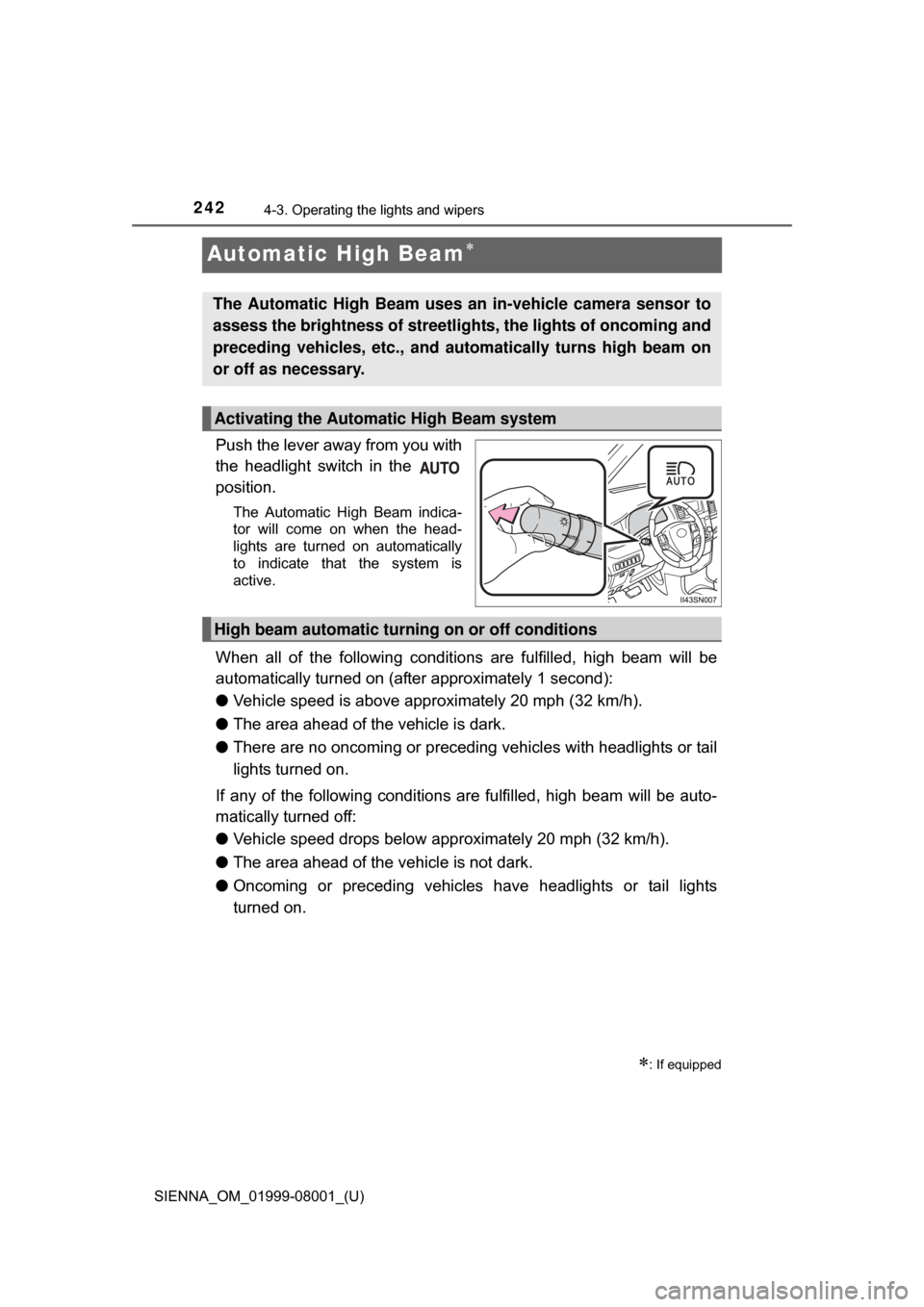
Automatic High Beam
Push the lever away from you with
the headlight switch in the
position.
The Automatic High Beam indica-
tor will come on when the head-
lights are turned on automatically
to indicate that the system is
active.
When all of the following conditions are fulfilled, high beam will be
automatically turned on (after approximately 1 second):
● Vehicle speed is above appr oximately 20 mph (32 km/h).
● The area ahead of the vehicle is dark.
● There are no oncoming or preceding vehicles with headlights or tail
lights turned on.
If any of the following conditions are fulfilled, high beam will be auto-
matically turned off:
● Vehicle speed drops below approximately 20 mph (32 km/h).
● The area ahead of the vehicle is not dark.
● Oncoming or preceding vehicles have headlights or tail lights
turned on.
: If equipped
The Automatic High Beam uses an in-vehicle camera sensor to
assess the brightness of streetli ghts, the lights of oncoming and
preceding vehicles, etc., and au tomatically turns high beam on
or off as necessary.
Activating the Automatic High Beam system
High beam automatic turning on or off conditions
Page 244 of 664

244
SIENNA_OM_01999-08001_(U)
4-3. Operating the lights and wipers
■The Automatic High Beam can be operated when
The engine switch is in the “ON” position (vehicles without a smart key sys-
tem) or IGNITION ON mode (vehicles with a smart key system).
■ Camera sensor detection information
●High beam may not be automatically turned off in the following situations:
• When oncoming vehicles suddenly appear from a curve.
• When the vehicle is cut in front of by another.
● High beam may be turned off if an oncoming vehicle that is using fog lights
without using the headlights is detected.
● Houselights, streetlights, red traffic signals, and illuminated billboards or
signs may cause the high beam to turn off.
● The following factors may affect the amount of time taken to turn high beam
on or off:
• The brightness of headlights, fog lights, and tail lights of oncoming and
preceding vehicles
• Road conditions (wetness, ice, snow etc.)
• The number of passengers and amount of baggage
● High beam may be turned on or off when unexpected by the driver.
Page 245 of 664
SIENNA_OM_01999-08001_(U)
2454-3. Operating the lights and wipers
4
Driving
●In the situations below, the system may not be able to correctly detect the
surrounding brightness levels, and may flash or expose nearby pedestrians
to the high beam. Therefore, you should consider turning the high beam on
or off manually rather than relying on the Automatic High Beam system.
• In bad weather (rain, snow, fog, sandstorms etc.)
• The windshield is obscured by fog, mist, ice, dirt etc.
• The windshield is cracked or damaged.
• The camera sensor is deformed or dirty.
• Surrounding brightness levels are equal to those of headlights, tail lights
or fog lights.
• Vehicles ahead have headlights that are either switched off, dirty, are changing color, or are not aimed properly.
• When driving through an area of in termittently changing brightness and
darkness
• When frequently and repeatedly driving ascending/descending roads, or roads with rough, bumpy or uneven surfaces (such as stone-paved
roads, gravel tracks etc.)
• When frequently and repeatedly taking curves or driving on a winding road
• There is a highly reflective object ahead of the vehicle, such as a sign or a mirror.
• The vehicle’s headlights are damaged or dirty.
• The vehicle is lifting or tilting, due to a flat tire, a trailer being towed etc.
• The high beam and low beam are repeatedly being switched between in an abnormal manner.
• The driver believes that the high beam may be causing problems or dis- tress to other drivers or pedestrians nearby.
■ When the warning message is show n on the multi-information display
P. 554
■ Temporary lowering sensor sensitivity
The sensitivity of the sensor can be temporarily lowered.
To lower the sensitivity, push and hold on the inside rear view mirror for
15 to 20 seconds, and release. The indicator light on the inside rear view mir-
ror will flash to indicate that the sensitivity has been lowered.
When the engine switch is turned to the “LOCK” position (vehicles without a
smart key system) or turned off (vehicles with a smart key system), the sensi-
tivity will be returned to its normal level.
■ Customization
The Automatic High Beam can be turned off.
(Customizable features: P. 625)
Page 246 of 664
246
SIENNA_OM_01999-08001_(U)
4-3. Operating the lights and wipers
WARNING
■Limitations of the Automatic High Beam
Do not rely on the Automatic High Beam. Always drive safely, taking care to
observe your surroundings and turning high beam on or off manually if nec-
essary.
NOTICE
■Camera sensor
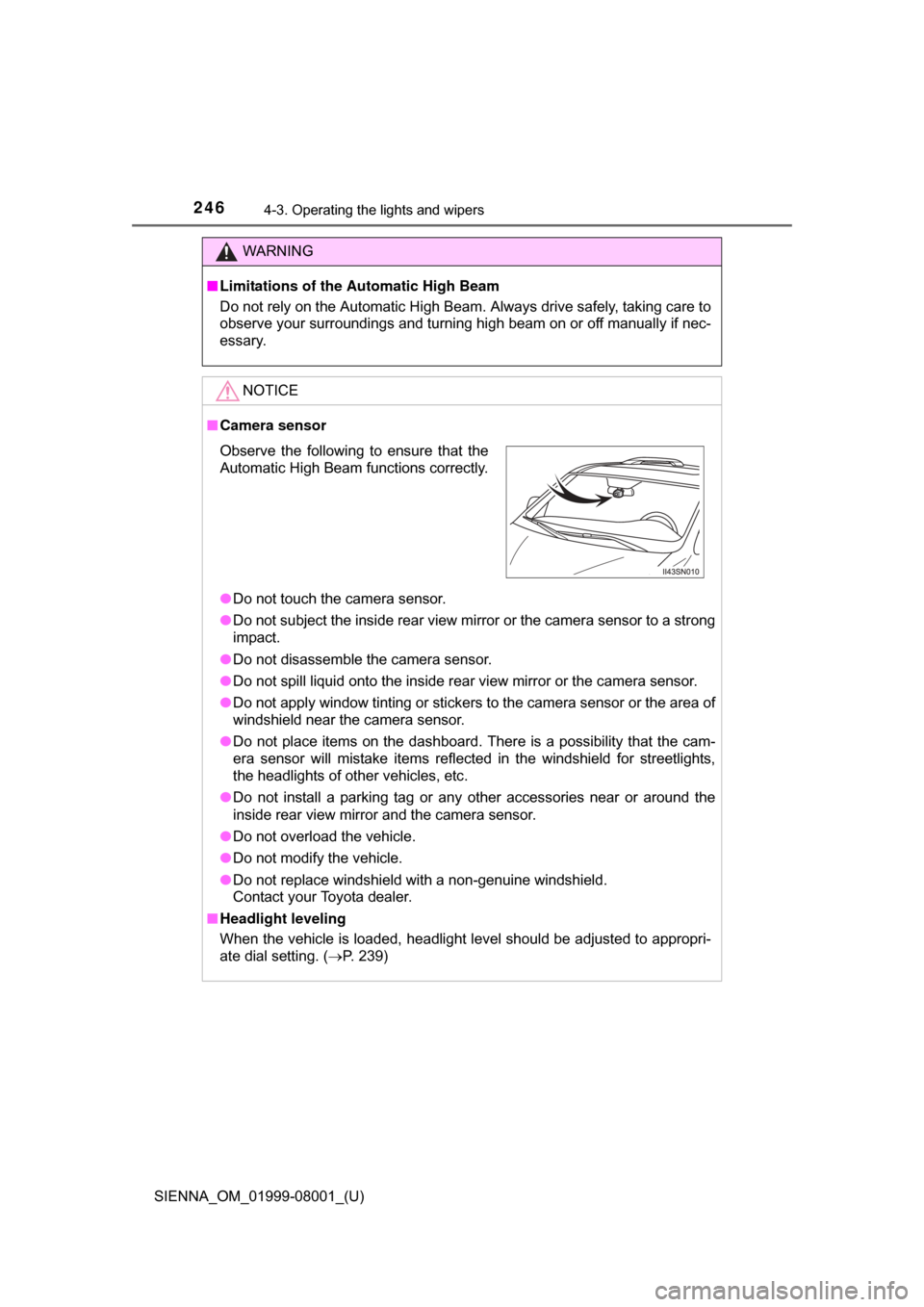
● Do not touch the camera sensor.
● Do not subject the inside rear view mirror or the camera sensor to a strong
impact.
● Do not disassemble the camera sensor.
● Do not spill liquid onto the inside rear view mirror or the camera sensor.
● Do not apply window tinting or stickers to the camera sensor or the area of
windshield near the camera sensor.
● Do not place items on the dashboard. There is a possibility that the cam-
era sensor will mistake items reflected in the windshield for streetlights,
the headlights of other vehicles, etc.
● Do not install a parking tag or any other accessories near or around the
inside rear view mirror and the camera sensor.
● Do not overload the vehicle.
● Do not modify the vehicle.
● Do not replace windshield with a non-genuine windshield.
Contact your Toyota dealer.
■ Headlight leveling
When the vehicle is loaded, headlight level should be adjusted to appropri-
ate dial setting. ( P. 239)
Observe the following to ensure that the
Automatic High Beam functions correctly.
Page 247 of 664
247
SIENNA_OM_01999-08001_(U)
4-3. Operating the lights and wipers
4
Driving
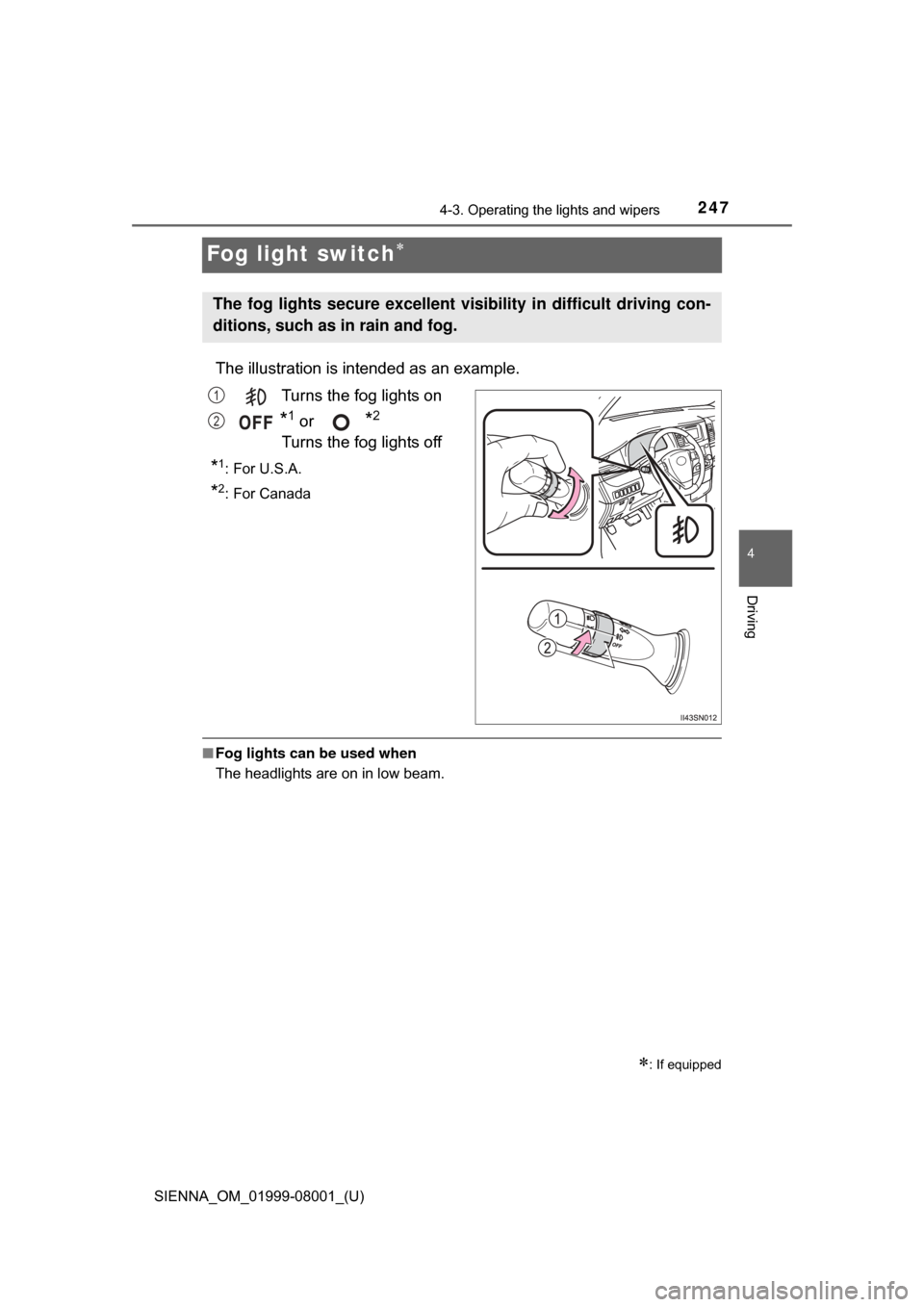
Fog light switch
The illustration is intended as an example.
Turns the fog lights on
*1 or *2
Turns the fog lights off
*1:For U.S.A.
*2: For Canada
■ Fog lights can be used when
The headlights are on in low beam.
: If equipped
The fog lights secure excellent visi bility in difficult driving con-
ditions, such as in rain and fog.
1
2
Page 288 of 664
288
SIENNA_OM_01999-08001_(U)
4-5. Using the driving support systems
■If you notice any symptoms
If you notice any of the following symptoms, refer to the likely cause
and the solution, and re-check.
If the symptom is not resolved by the solution, have the vehicle
inspected by your Toyota dealer.
Things you should know
Likely causeSolution
The image is difficult to see
• The vehicle is in a dark area
• The temperature around the lens
is either high or low
• The outside temperature is low
• There are water droplets on the camera
• It is raining or humid
• Foreign matter (mud etc.) is adhering to the camera
• There are scratches on the cam- era
• Sunlight or headlights are shining
directly into the camera
• The vehicle is under fluorescent
lights, sodium lights, mercury
lights, etc.
If this happens due to these causes,
it does not indicate a malfunction.
Back up while visually checking the
vehicle’s surroundings. (Use the
monitor again once conditions have
been improved.)
The image on the rear view monitor
system can be adjusted. ( P. 329)
The image is blurry
Dirt or foreign matter (such as water
droplets, snow, mud, etc.) is adher-
ing to the camera.Rinse the camera lens with water
and wipe it clean with a soft cloth.
Wash with a mild soap if the dirt is
stubborn.
The image is out of alignment
The camera or surrounding area has
received a strong impact.Have the vehicle inspected by your
Toyota dealer.
Page 329 of 664
329
SIENNA_OM_01999-08001_(U)
5-2. Setup
5
Audio system
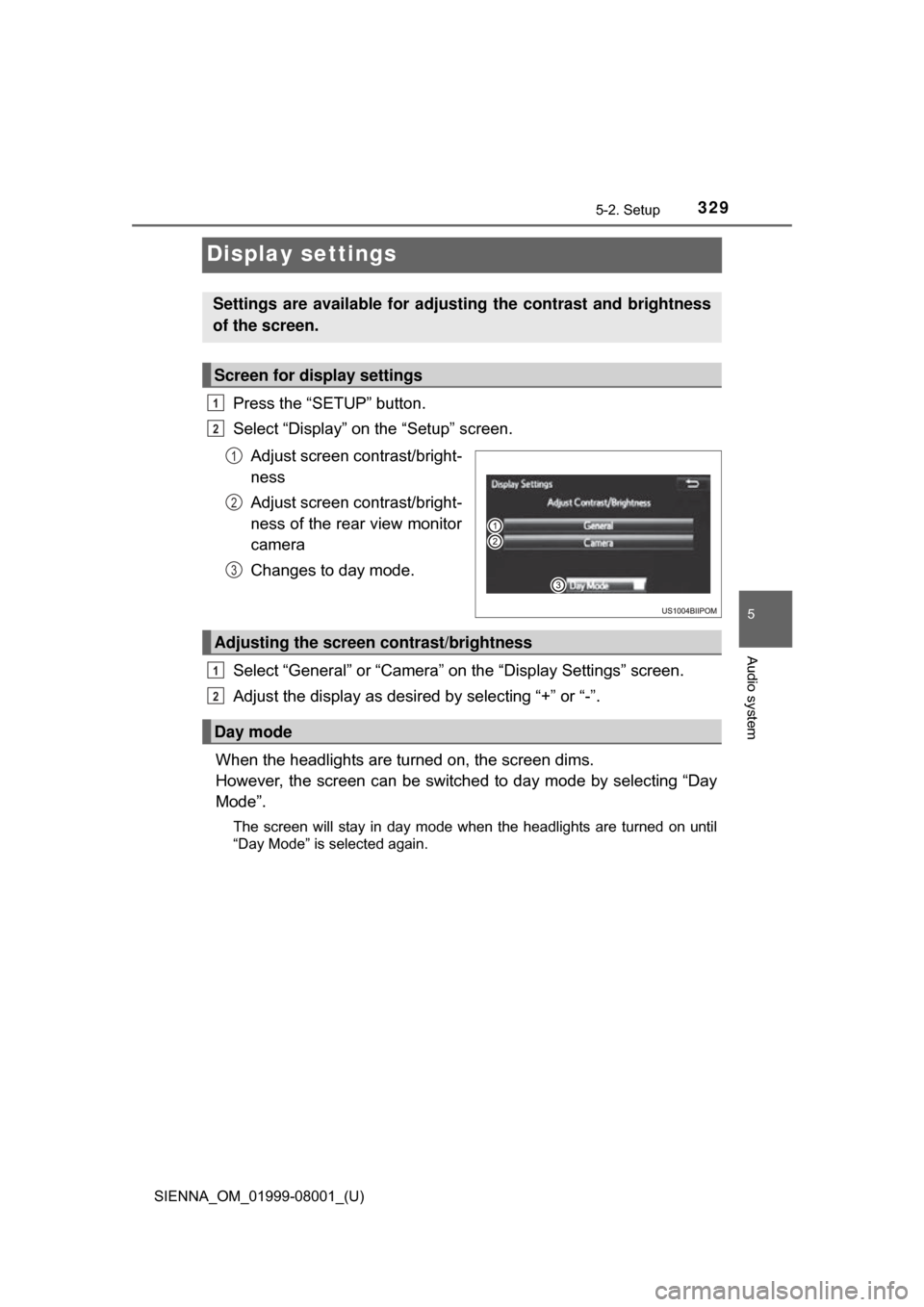
Display settings
Press the “SETUP” button.
Select “Display” on the “Setup” screen.Adjust screen contrast/bright-
ness
Adjust screen contrast/bright-
ness of the rear view monitor
camera
Changes to day mode.
Select “General” or “Camera” on the “Display Settings” screen.
Adjust the display as desired by selecting “+” or “-”.
When the headlights are turned on, the screen dims.
However, the screen can be switch ed to day mode by selecting “Day
Mode”.
The screen will stay in day mode when the headlights are turned on until
“Day Mode” is selected again.
Settings are available for adjusting the contrast and brightness
of the screen.
Screen for display settings
1
2
1
2
3
Adjusting the screen contrast/brightness
Day mode
1
2