Page 251 of 354
251
3. WHAT TO DO IF...
SIENNA_Navi+MM_01999-08003_(U)
14.06.02 18:35
PHONE
7
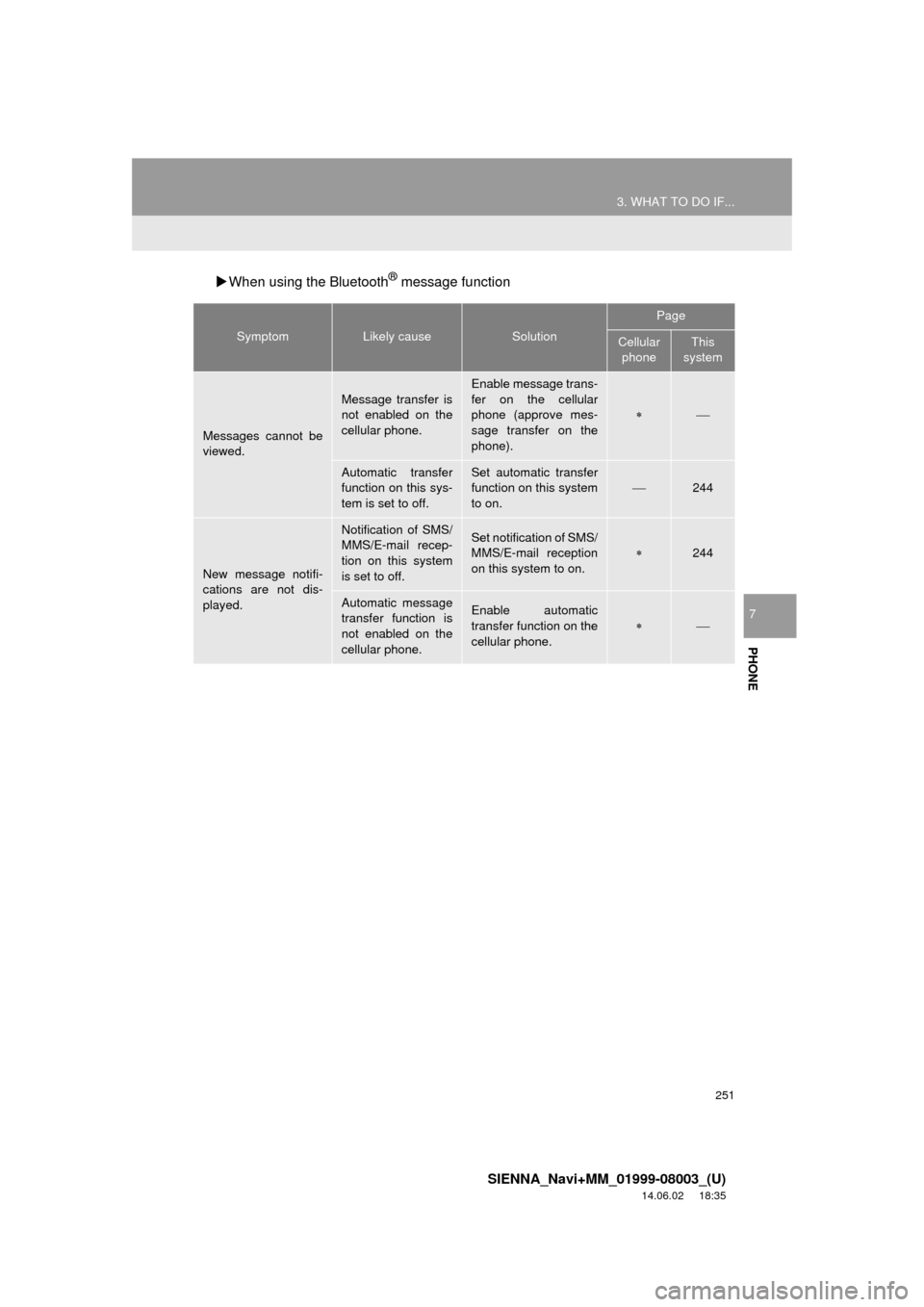
When using the Bluetooth® message function
SymptomLikely causeSolution
Page
Cellular
phoneThis
system
Messages cannot be
viewed.
Message transfer is
not enabled on the
cellular phone.
Enable message trans-
fer on the cellular
phone (approve mes-
sage transfer on the
phone).
Automatic transfer
function on this sys-
tem is set to off.Set automatic transfer
function on this system
to on.
244
New message notifi-
cations are not dis-
played.
Notification of SMS/
MMS/E-mail recep-
tion on this system
is set to off.Set notification of SMS/
MMS/E-mail reception
on this system to on.
244
Automatic message
transfer function is
not enabled on the
cellular phone.Enable automatic
transfer function on the
cellular phone.
Page 252 of 354
252
3. WHAT TO DO IF...
SIENNA_Navi+MM_01999-08003_(U)
14.06.02 18:35
In other situations
SymptomLikely causeSolution
Page
Cellular
phoneThis
system
The Bluetooth® con-
nection status is dis-
played at the top of
the screen each time
the engine switch is in
following.
Vehicles without
a smart key sys-
tem
The engine switch is
turned to the “ACC” or
“ON” position.
Vehicles with a
smart key system
The engine switch is
turned to ACCESSO-
RY or IGNITION ON
mode.
Connection confir-
mation display on
this system is set to
on.To turn off the display,
set connection confir-
mation display on this
system to off.
57
Page 253 of 354
253
3. WHAT TO DO IF...
SIENNA_Navi+MM_01999-08003_(U)
14.06.02 18:35
PHONE
7
: For details, refer to the owner’s manual that came with the cellular phone.
Even though all con-
ceivable measures
have been taken, the
symptom status does
not change.
The cellular phone
is not close enough
to this system.Bring the cellular
phone closer to this
system.
The cellular phone
is the most likely
cause of the symp-
tom.
Turn the cellular phone
off, remove and rein-
stall the battery pack,
and then restart the
cellular phone.
Enable the cellular
phone’s Bluetooth®
connection.
Stop the cellular
phone’s security soft-
ware and close all ap-
plications.
Before using an appli-
cation installed on the
cellular phone, careful-
ly check its source and
how its operation might
affect this system.
SymptomLikely causeSolution
Page
Cellular phoneThis
system
Page 277 of 354
277
2. DESTINATION SEARCH
SIENNA_Navi+MM_01999-08003_(U)
14.06.02 18:35
NAVIGATION SYSTEM
8
1Display the “Destination” screen.
(P.274)
2Select “Point of Interest” .
3Select the desired search method.
1Select “Name” .
2Enter a POI name and select “OK”.
3Select the desired POI.
When entering the name of a specific POI,
and there are 2 or more sites with the
same name, the list screen will be dis-
played. Select the desired POI.
SEARCHING BY POINT OF
INTEREST
There are 3 methods to search for a
destination by Points of Interest.
No.FunctionPage
Select to search by name.277
Select to search by catego-
ry.278
Select to search by phone
number.279
SEARCHING BY NAME
No.FunctionPage
Select to search for POI in
the desired city.278
Select to search for POI
from the category list.278
INFORMATION
● To search for a facility name using multi-
ple search words, put a space between
each word.
Page 279 of 354

279
2. DESTINATION SEARCH
SIENNA_Navi+MM_01999-08003_(U)
14.06.02 18:35
NAVIGATION SYSTEM
8
When “Near a City Center in XX*” is se-
lected
1Select “Near a City Center in XX” .
2Enter a city name and select “OK”.
“Last 5 Cities” : Select the city name from
the list of the last 5 cities.
3Select the desired city name.
4Select “OK” when the city center map
screen is displayed.
5Follow the steps from 3 onward in
“SEARCHING BY CATEGORY”.
(P.278)
*: XX represents the selected search area name.
1Select “Phone #” .
2Enter a phone number and select
“OK”.
If there is more than 1 site with the same
number, the list screen will be displayed.
INFORMATION
● The names of POIs located within
approximately 200 miles (320 km) from
the selected search point can be dis-
played.
INFORMATION
●If the navigation system has never been
used, selecting the city name from “Last
5 Cities” will not be available.
SEARCHING BY PHONE
NUMBER
INFORMATION
●If there is no match for the entered
phone number, a list of identical num-
bers with different area codes will be dis-
played.
Page 300 of 354
300
4. MEMORY POINTS
SIENNA_Navi+MM_01999-08003_(U)
14.06.02 18:35
1Display the “Navigation Settings”
screen. (P.299)
2Select “Home” .
3Select the desired item to be set.
1Select “New”.
2Select the desired item to search for
the location. ( P.272)
3Select “OK” when the editing home
screen appears.
1Select “Edit”.
2Select the desired item to be edited.
3Select “OK”.
1Select “Delete” .
2Select “Yes” when the confirmation
screen appears.
SETTING UP HOME
If home has been registered, that infor-
mation can be recalled by selecting
“Go Home” on the “Destination”
screen. ( P.275)
No.FunctionPage
Select to register home.300
Select to edit home.300
Select to delete home.300
REGISTERING HOME
EDITING HOME
No.FunctionPage
Select to edit the home
name.305
Select to set display of the
home name on/off.
Select to edit location infor-
mation.305
Select to edit the phone
number.305
Select to change the icon
to be displayed on the map
screen.304
DELETING HOME
Page 302 of 354
302
4. MEMORY POINTS
SIENNA_Navi+MM_01999-08003_(U)
14.06.02 18:35
1Select “Edit”.
2Select the desired preset destination.
3Select the item to be edited.
4Select “OK”.
1Select “Delete” .
2Select the preset destination to be de-
leted and select “Delete”.
3Select “Yes” when the confirmation
screen appears.
EDITING PRESET
DESTINATIONS
No.FunctionPage
Select to edit the preset
destination name.305
Select to set display of the
preset destination name
on/off.
Select to edit location infor-
mation.305
Select to edit the phone
number.305
Select to change the icon
to be displayed on the map
screen.
304
DELETING PRESET
DESTINATIONS
Page 303 of 354
303
4. MEMORY POINTS
SIENNA_Navi+MM_01999-08003_(U)
14.06.02 18:35
NAVIGATION SYSTEM
8
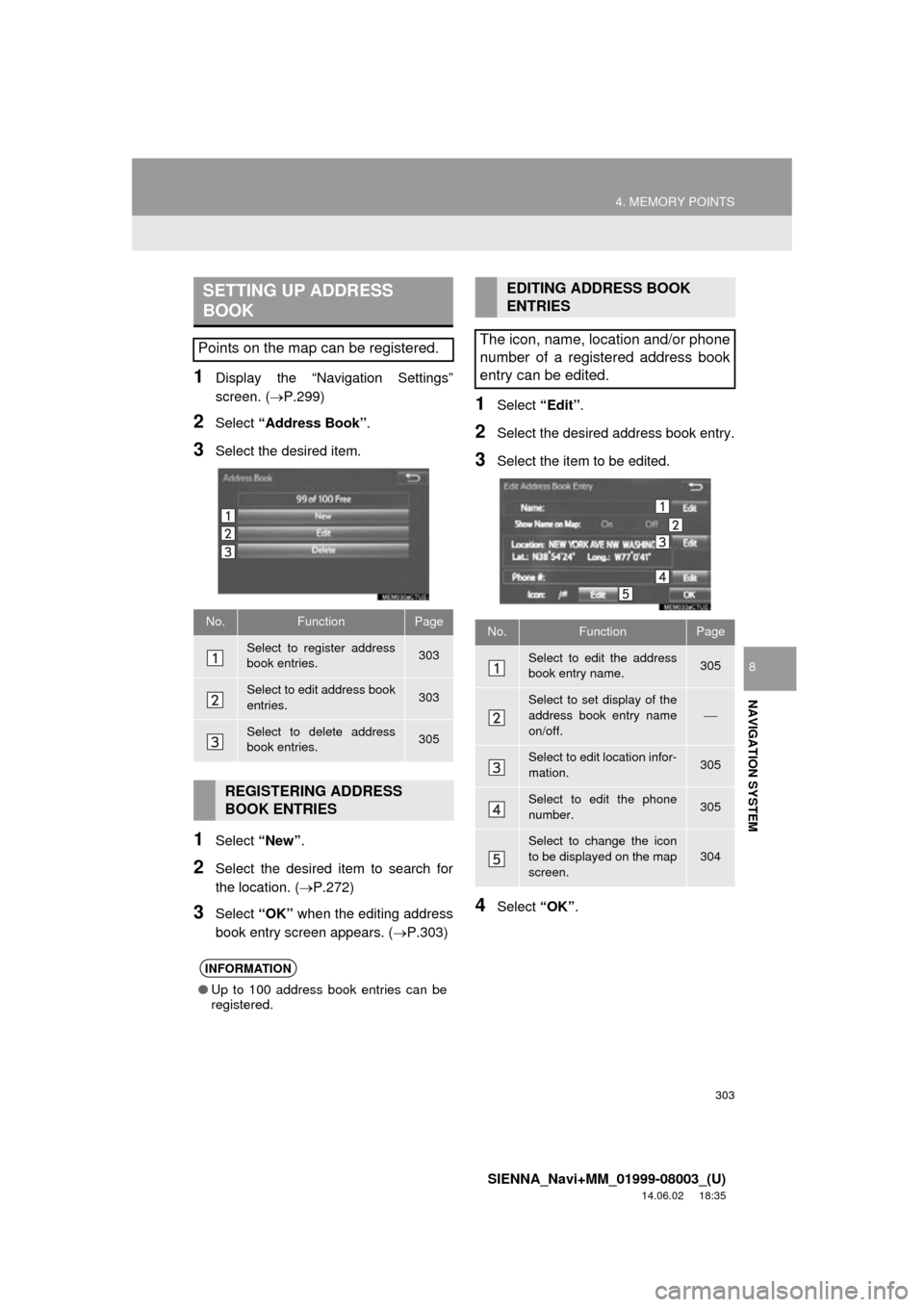
1Display the “Navigation Settings”
screen. (P.299)
2Select “Address Book” .
3Select the desired item.
1Select “New”.
2Select the desired item to search for
the location. ( P.272)
3Select “OK” when the editing address
book entry screen appears. ( P.303)
1Select “Edit”.
2Select the desired address book entry.
3Select the item to be edited.
4Select “OK”.
SETTING UP ADDRESS
BOOK
Points on the map can be registered.
No.FunctionPage
Select to register address
book entries.303
Select to edit address book
entries.303
Select to delete address
book entries.305
REGISTERING ADDRESS
BOOK ENTRIES
INFORMATION
●Up to 100 address book entries can be
registered.
EDITING ADDRESS BOOK
ENTRIES
The icon, name, location and/or phone
number of a registered address book
entry can be edited.
No.FunctionPage
Select to edit the address
book entry name.305
Select to set display of the
address book entry name
on/off.
Select to edit location infor-
mation.305
Select to edit the phone
number.305
Select to change the icon
to be displayed on the map
screen.
304