2015 TOYOTA SEQUOIA audio
[x] Cancel search: audioPage 377 of 664

377
3-2. Using the multimedia system
3
Interior features
Listening to Bluetooth® audio
Audio control screenSome titles and controls may not be displayed depending on the type
of portable audio player used. Connection status
Battery charge
“Select Audio Source” screen
appears
Selecting a Bluetooth
® device
Select to display the play
mode selection screen
Random playback
Repeat play
Pause
Select to resume play
Setting the sound ( P. 333)
The Bluetooth® audio system enables the user to enjoy music
played on a portable player from the vehicle speakers via wireless
communication.
Select “ Audio” on the “Select Audio Source” screen.
When a Bluetooth® device cannot be con nected, check the con-
nection status on the “B luetooth Audio” screen. If the device is not
connected, either register or reconnect the device. ( P. 361)
IndicatorsConditions
Connection statusGood Not connected
Battery chargeFull Empty
Page 476 of 664

476 4-1. Maintenance and care
NOTICE
■Cleaning detergents
●Do not use organic substances such as benzene or gasoline, acidic or
alkaline solutions, dye, bleach or other detergent. Doing so may discolor
the vehicle interior or cause streaks or damage to painted surfaces.
● Do not use polish wax or polish cleaner. The instrument panel’s or other
interior part’s painted surface may be damaged.
■ Preventing damage to leather surfaces
Observe the following precautions to avoid damage to and deterioration o\
f
leather surfaces.
●Remove any dust or dirt on leather surfaces immediately.
● Do not expose the vehicle to direct sunlight for extended periods of time.
Park the vehicle in the shade, especially during summer.
● Do not place items made of vinyl or plastic, or that contain wax on the
upholstery, as they may stick to the leather surface if the vehicle interior
heats up significantly.
■ Water on the floor
Do not wash the vehicle floor with water.
Vehicle systems such as the audio system may be damaged if water comes
into contact with electrical components under the floor of the vehicle, and
may also cause the body to rust.
■ Cleaning the inside of the back window and the rear quarter windows
●Do not use glass cleaner to clean the back window and the rear quarter
windows, as this may cause damage to the rear window defogger heater
wires or antennas. Use a cloth dampened with lukewarm water to gently
wipe the window clean. Wipe the window in strokes running parallel to the
heater wires.
● Be careful not to scratch or damage the heater wires or antennas.
Page 527 of 664
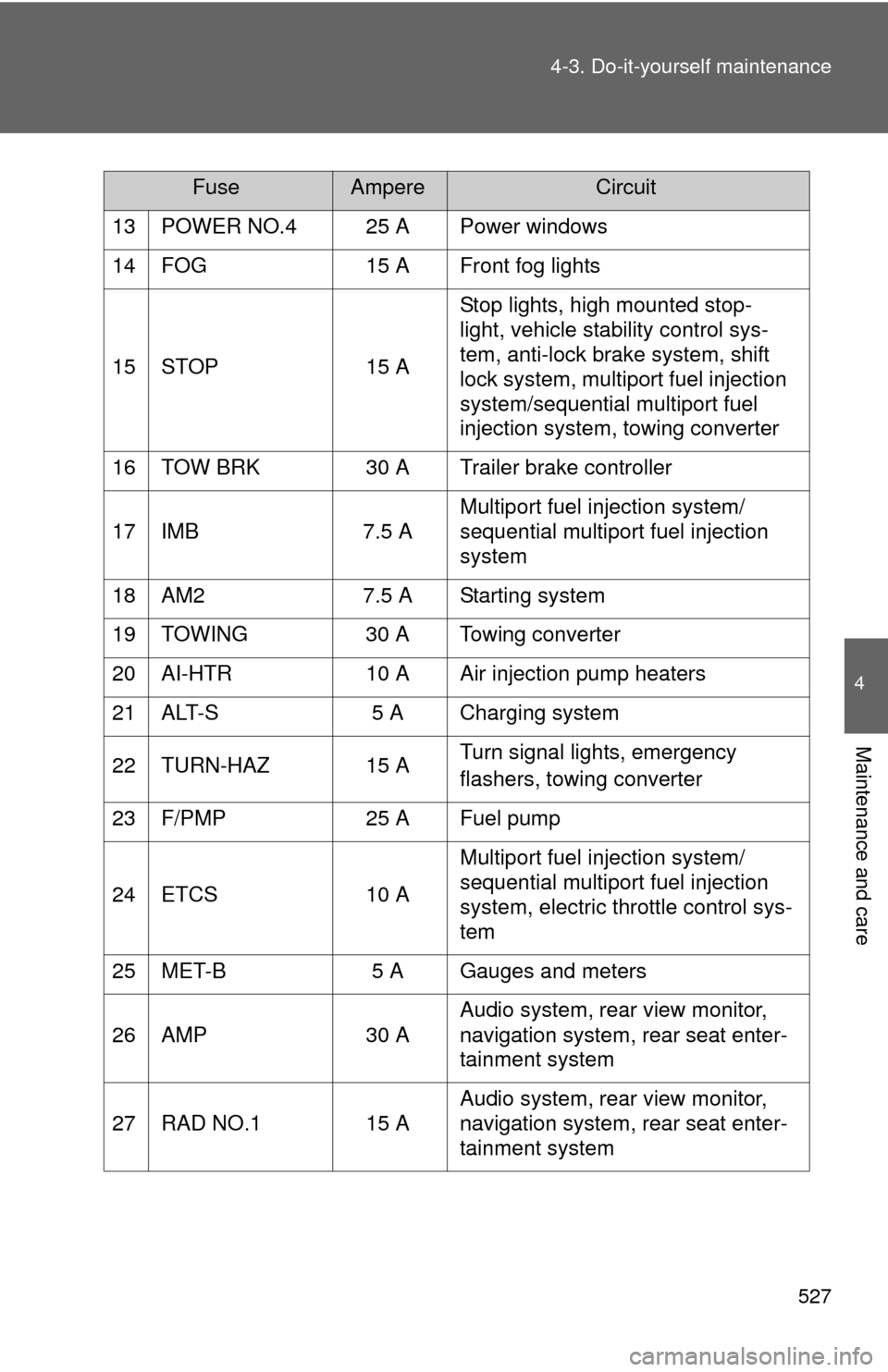
527
4-3. Do-it-yourself maintenance
4
Maintenance and care
13 POWER NO.4 25 A Power windows
14 FOG 15 A Front fog lights
15 STOP 15 A
Stop lights, high mounted stop-
light, vehicle stability control sys-
tem, anti-lock brake system, shift
lock system, multiport fuel injection
system/sequential multiport fuel
injection system, towing converter
16 TOW BRK 30 A Trailer brake controller
17 IMB 7.5 A Multiport fuel injection system/
sequential multiport fuel injection
system
18 AM2 7.5 A Starting system
19 TOWING 30 A Towing converter
20 AI-HTR 10 A Air injection pump heaters
21 ALT-S 5 A Charging system
22 TURN-HAZ 15 A Turn signal lights, emergency
flashers, towing converter
23 F/PMP 25 A Fuel pump
24 ETCS 10 A Multiport fuel injection system/
sequential multiport fuel injection
system, electric throttle control sys-
tem
25 MET-B 5 A Gauges and meters
26 AMP 30 A Audio system, rear view monitor,
navigation system, rear seat enter-
tainment system
27 RAD NO.1 15 A Audio system, rear view monitor,
navigation system, rear seat enter-
tainment system
FuseAmpereCircuit
Page 533 of 664

533
4-3. Do-it-yourself maintenance
4
Maintenance and care
26 PANEL
7.5 AInstrument panel lights, glove box
light, ashtray, accessory meter,
audio system, rear view monitor,
navigation system, rear seat enter-
tainment system, gauges and
meters, air conditioning system,
seat heater or heated and venti-
lated switches, BSM main switch
27 ACC 7.5 AAccessory meter, audio system,
rear seat entertainment system,
rear view monitor, navigation sys-
tem, back-up lights, trailer lights
(back-up lights), multiplex commu-
nication system, power outlet, out-
side rear view mirror
28 BK/UP LP 10 A Back-up light, gauges and meters
29 CIG 15 A Cigarette lighter
30 POWER No.1 30 A Power windows, power back win-
dow
■ After a fuse is replaced
●If the lights do not turn on even after the fuse has been replaced, a bulb
may need replacement. ( P. 535)
● If the replaced fuse blows again, have the vehicle inspected by your
Toyota dealer.
■ If there is an overload in the circuits
The fuses are designed to blow, protecting the wiring harness from damage.
FuseAmpereCircuit
Page 590 of 664

590 5-2. Steps to take in an emergency
■Starting the engine when the battery is discharged
The engine cannot be started by push-starting.
■ Avoiding a discharged battery
●Turn off the headlights and the audio system while the engine is turned
off.
● Turn off any unnecessary electrical components when the vehicle is run-
ning at a low speed for an extended period, such as in heavy traffic, etc.
■ When the battery is removed or discharged
●Flex-fuel vehicles: The information recorded in the computer will be
cleared, which may cause the engine to run roughly and reduce driving
performance for a while when the engine is first started. In this case, wait
until the engine runs normally.
If the vehicle is running on E85, the engine may stall. In this case, restart
the engine, repeatedly if necessary.
● Make sure that the key is not inside the vehicle when recharging or
replacing the battery. The key may be locked in the vehicle if the alarm is
activated. ( P. 107)
■ Charging the battery
The electricity stored in the battery will discharge gradually even when the
vehicle is not in use, due to natural discharge and the draining effects of cer-
tain electrical appliances. If the vehicle is left for a long time, the battery may
discharge, and the engine may be unable to start. (The battery recharges
automatically during driving.)
Once the vehicle’s engine has started, remove the jumper
cables in the exact reverse order in which they were con-
nected.
Once the engine starts, have the vehicle checked at your Toyota
dealer as soon as possible.
Page 647 of 664

Index
647
Abbreviation list ..................... 648
Alphabetical index .................. 650
What to do if... ........................ 661
For vehicles with Entune Audio Plus or Entune Premium
Audio, refer to the “NAVIGATION SYSTEM OWNER’S
MANUAL” for information regarding the multimedia
system.
Multimedia system types: P. 318
Page 650 of 664

650
Alphabetical index
Alphabetical index
A/C ..................................... 302, 311
AAC disc ................................... 336
ABS ........................................... 255
Active traction control ............. 255
Adaptive variable suspension system .................................... 247
Air conditioning filter............... 518
Air conditioning system
Air conditioning filter .............. 518
Front air conditioning system ................................ 302
Rear air conditioning system ................................ 311
Airbags Airbag operating conditions............................ 114
Airbag precautions for your child .................................... 118
Airbag warning light............... 558
Curtain shield airbag
operating conditions............ 114
Curtain shield airbag
precautions ......................... 118
Front passenger occupant classification system ........... 123
General airbag precautions ......................... 118
Locations of airbags .............. 111
Modification and disposal of
airbags ................................ 122
Proper driving
posture ........................ 109, 118
Side airbag operating conditions............................ 114
Side airbag precautions ........ 118
SRS airbags .......................... 111
Alarm ......................................... 106
Antenna..................................... 335
Anti-lock brake system............ 255
Armrest ..................................... 450
Ashtrays.................................... 436 Assist grips .............................. 453
A-TRAC ..................................... 255
Audio input ............................... 324
Audio system
A/V input port
*
Antenna................................. 335
Audio input ............................ 324
Audio visual input
*
AUX port ............................... 354
Blu-ray Disc™
*
CD player .............................. 336
DVD disc
*
DVD player*
iPod ....................................... 343
MP3/WMA/AAC disc ............. 336
Portable music player ........... 354
Radio..................................... 334
Rear seat entertainment system
*
Steering wheel audio switch*
Type ...................................... 318
USB memory......................... 349
Audio visual input
*
AUTO LSD system ................... 253
Automatic light control system .................................... 190
Automatic transmission .......................... 159
AUX port ................................... 324
Auxiliary box ............................ 429
A/V input port
*
AVS ........................................... 247
Back-up lights Replacing light bulbs ............. 535
Wattage................................. 610
Back door
Back door ................................ 40
Back window ........................... 93
Wireless remote control .......... 31
A
B
Page 651 of 664

651
Alphabetical index
Battery
Checking .............................. 499
If the vehicle has discharged
battery ................................ 589
Preparing and checking
before winter ...................... 275
Blind Spot Monitor .................. 236
Bluetooth
® audio..................... 377
Bluetooth® phone ................... 378
Bottle holder ............................ 428
Brake assist ............................. 255
Brakes Fluid...................................... 496
Parking brake ....................... 164
Break-in tips ............................ 147
BSM .......................................... 236
Card holder .............................. 414
Care Exterior ................................. 472
Interior .................................. 474
Seat belts ............................. 475
Cargo capacity ........................ 268
Cargo hooks ............................ 457
CD player ................................. 336
Chains ...................................... 275
Child restraint system Booster seats, definition ....... 128
Booster seats, installation .... 139
Convertible seats, definition............................. 128
Convertible seats, installation .......................... 138
Front passenger occupant
classification system .......... 123
Infant seats, definition .......... 128
Infant seats, installation ........ 137
Installing CRS with LATCH system................................ 134
Installing CRS with seat
belts ................................... 137 Installing CRS with top
tether straps ........................140
Child safety Airbag precautions ................118
Battery precautions .......500, 591
Child restraint system............128
Child-protectors .......................37
How your child should wear the seat belt ..........................75
Installing child restraints ........132
Moon roof precautions ............99
Power window lock switch.......90
Power window precautions .....92
Removed key battery precautions .........................522
Seat belt extender precautions ...........................78
Seat belt precautions ..............75
Seat heater precautions ........447
Child-protectors .........................37
Cigarette lighter .......................437
Cleaning Exterior ..................................472
Interior ...................................474
Seat belts ..............................475
Climate control seat.................448
Clock ........................................ 433
Coin holder ...............................410
Compass ...................................467
Condenser ................................496
Console box .....................411, 419
Conversation mirror ................438
Cooling system
Engine overheating ...............592
CRS ...........................................128
C
*: Refer to “NAVIGATION SYSTEM OWNER’S MANUAL”.