Page 281 of 732

RAV4_OM_OM42A78U_(U)
2814-5. Using the driving support systems
4
Driving
The Blind Spot Monitor function uses radar sensors to detect vehicles
that are traveling in an adjacent lane in the area that is not reflected in
the outside rear view mirror (the b lind spot), and advises the driver of
the vehicles existence via the out side rear view mirror indicator.
The areas that vehicles can be detected in are outlined below.
The range of the detection area
extends to: Approximately 11.5 ft. (3.5 m)
from the side of the vehicle
The first 1.6 ft. (0.5 m) from the
side of the vehicle is not in the
detection area
Approximately 9.8 ft. (3 m) from
the rear bumper
Approximately 3.3 ft. (1 m) for-
ward of the rear bumper
The Blind Spot Monitor function
The Blind Spot Monitor function detection areas
1
2
3
CAUTION
■Cautions regarding the use of the system
The driver is solely responsible for safe driving. Always drive safely, taking
care to observe your surroundings.
The Blind Spot Monitor function is a supplementary function which alerts the
driver that a vehicle is present in the blind spot. Do not overly rely on the
Blind Spot Monitor function. The function cannot judge if it is safe to change
lanes, therefore over reliance could cause an accident resulting in death or
serious injury.
According to conditions, the system may not function correctly. Therefore
the driver’s own visual confirmation of safety is necessary.
Page 284 of 732

284
RAV4_OM_OM42A78U_(U)
4-5. Using the driving support systems
The Rear Cross Traffic Alert functions when your vehicle is in reverse.
It can detect other vehicles approaching from the right or left rear of
the vehicle. It uses radar sensors to alert the driver of the other vehi-
cle’s existence through fl ashing the outside rear view mirror indicators
and sounding a buzzer.
The Rear Cross Traffic Alert function
Approaching vehicles Detection areas12
CAUTION
■Cautions regarding the use of the system
The driver is solely responsible for safe driving. Always drive safely, taking
care to observe your surroundings.
The Rear Cross Traffic Alert function is only an assist and is not a replace-
ment for careful driving. The driver must be careful when backing up, even
when using the Rear Cross Traffic Alert function. The driver’s own visual
confirmation of behind you and your vehicle is necessary and be sure there
are no pedestrians, other vehicles, etc. before backing up. Failure to do so
could cause death or serious injury.
According to conditions, the system may not function correctly. Therefore
the driver’s own visual confirmation of safety is necessary.
Page 285 of 732
RAV4_OM_OM42A78U_(U)
2854-5. Using the driving support systems
4
Driving
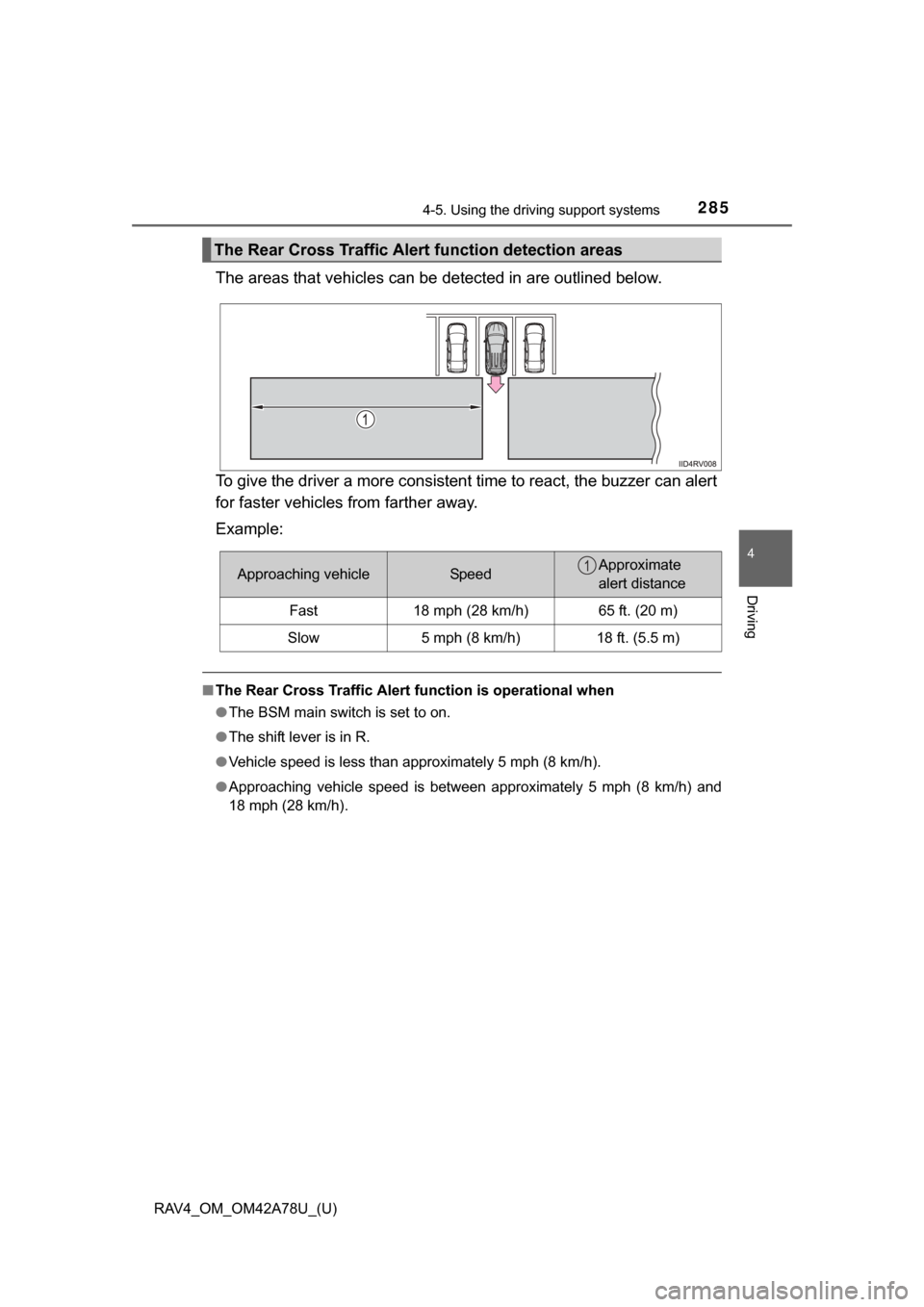
The areas that vehicles can be detected in are outlined below.
To give the driver a more consistent time to react, the buzzer can alert
for faster vehicles from farther away.
Example:
■The Rear Cross Traffic Alert function is operational when
● The BSM main switch is set to on.
● The shift lever is in R.
● Vehicle speed is less than approximately 5 mph (8 km/h).
● Approaching vehicle speed is between approximately 5 mph (8 km/h) and
18 mph (28 km/h).
The Rear Cross Traffic Alert function detection areas
Approaching vehicleSpeedApproximate
alert distance
Fast18 mph (28 km/h)65 ft. (20 m)
Slow5 mph (8 km/h)18 ft. (5.5 m)
1
Page 294 of 732

294
RAV4_OM_OM42A78U_(U)
4-6. Driving tips
When driving your vehicle off-road, please observe the following pre-
cautions to ensure your driving enjoyment and to help prevent the clo-
sure of areas to off-road vehicles:
● Drive your vehicle only in areas where off-road vehicles are permit-
ted to travel.
● Respect private property. Get owner’s permission before entering
private property.
● Do not enter areas that are clos ed. Honor gates, barriers and signs
that restrict travel.
● Stay on established roads. When conditions are wet, driving tech-
niques should be changed or trav el delayed to prevent damage to
roads.
■ Additional information for off-road driving
For owners in U.S. mainland, Hawaii and Puerto Rico:
To obtain additional information pertaini ng to driving your vehicle off-road,
consult the following organizations:
● State and Local Parks and Recreation Departments
● State Motor Vehicle Bureau
● Recreational Vehicle Clubs
● U.S. Forest Service and Bureau of Land Management
Off-road driving
Page 295 of 732
RAV4_OM_OM42A78U_(U)
2954-6. Driving tips
4
Driving
CAUTION
■Off-road driving precautions
Always observe the following precautions to minimize the risk of death, seri-
ous injury or damage to your vehicle:
● Drive carefully when off the road. Do not take unnecessary risks by driving
in dangerous places.
● Do not grip the steering wheel spok es when driving off-road. A bad bump
could jerk the wheel and injure your hands. Keep both hands and espe-
cially your thumbs on the outside of the rim.
● Always check your brakes for effectiveness immediately after driving in
sand, mud, water or snow.
● After driving through tall grass, mud, rock, sand, rivers, etc., check that
there is no grass, bush, paper, rags, stone, sand, etc. adhering or trapped
on the underbody. Clear off any such matter from the underbody. If the
vehicle is used with these materials trapped or adhering to the underbody,
a breakdown or fire could occur.
● When driving off-road or in rugged te rrain, do not drive at excessive
speeds, jump, make sharp turns, strike objects, etc. This may cause loss
of control or vehicle rollover causing death or serious injury. You are also
risking expensive damage to your vehicle’s suspension and chassis.
Page 320 of 732
320
RAV4_OM_OM42A78U_(U)
5-2. Using the audio system
Vehicles without an Entune Premium Audio with Navigation or
Entune Audio Plus or Entune Audio
CD player with AM/FM radio
Press the “SETUP” button.
Turn the “TUNE•SCROLL” knob to select “Language”.
Press the knob.
Turn the knob as corresponds to the desired language.
“English”, “Español”, or “Français” can be selected.
Press the knob or (SAVE) to return to the setup menu.
TitlePage
Using the radioP. 322
Using the CD playerP. 325
Playing back MP3 and WMA discsP. 330
Operating an iPodP. 337
Operating a USB memoryP. 345
Optimal use of the audio systemP. 353
Using the AUX portP. 355
Using the steering wheel audio switchesP. 356
Changing language setting
1
2
3
4
Page 321 of 732
RAV4_OM_OM42A78U_(U)
3215-2. Using the audio system
5
Interior features
■Using cellular phones
Interference may be heard through the audio system’s speakers if a cellular
phone is being used inside or close to the vehicle while the audio system is
operating.
CAUTION
■Certification for the disc player
● Part 15 of the FCC Rules
FCC Warning:
Changes or modifications not expressly approved by the party responsi-
ble for compliance could void the user’s authority to operate the device.
● Laser products
• Do not take this unit apart or attempt to make any changes yourself.
This is an intricate unit that uses a laser pickup to retrieve information
from the surface of compact discs. The laser is carefully shielded so
that its rays remain inside the cabinet. Therefore, never try to disassem-
ble the player or alter any of its parts since you may be exposed to laser
rays and dangerous voltages.
• This product utilizes a laser. Use of controls or adjustments or performance of procedures other than
those specified herein may result in hazardous radiation exposure.
NOTICE
■To prevent battery discharge
Do not leave the audio system on longer than necessary with the engine is
stopped.
■ To avoid damaging the audio system
Take care not to spill drinks or other fluids over the audio system.
Page 341 of 732
RAV4_OM_OM42A78U_(U)
3415-2. Using the audio system
5
Interior features
Press ( ).
Press the “TEXT” button to display or hide the album title.
If there are continuing texts, is displayed.
Press and hold the button to display the remaining texts.
■About iPod
●“Made for iPod” and “Made for iPhone” mean that an electronic accessory
has been designed to connect specifically to iPod, or iPhone, respectively,
and has been certified by the developer to meet Apple performance stan-
dards.
● Apple is not responsible for the operation of this device or its compliance
with safety and regulatory standards. Please note that the use of this acces-
sory with iPod or iPhone may affect wireless performance.
● iPhone, iPod, iPod classic, iPod nano , iPod shuffle, and iPod touch are
trademarks of Apple Inc., registered in the U.S. and other countries.
Playing and pausing tracks
Switching the display