Page 544 of 732
544
RAV4_OM_OM42A78U_(U)
6-3. Do-it-yourself maintenance
Check the radiator and condenser and clear away any foreign objects.
If either of the above parts is ex tremely dirty or you are not sure of
their condition, have yo ur vehicle inspected by your Toyota dealer.
■Checking fluid level
The brake fluid level should be
between the “MAX” and “MIN”
lines on the tank.
■Adding fluid
Make sure to check the fluid type and prepare the necessary item.
Radiator and condenser
CAUTION
■When the engine is hot
Do not touch the radiator or condenser as they may be hot and cause seri-
ous injuries, such as burns.
Brake fluid
Fluid type FMVSS No.116 DOT 3 or SAE J1703 brake fluid
Items Clean funnel
Page 547 of 732

RAV4_OM_OM42A78U_(U)
5476-3. Do-it-yourself maintenance
6
Maintenance and care
■After recharging/reconnecting the ba ttery (vehicles with a smart key sys-
tem)
The engine may not start. Follow the procedure below to initialize the system.
Shift the shift lever to P.
Open and close any of the doors.
Restart the engine.
● Unlocking the doors using the smart key system may not be possible imme-
diately after reconnecting the battery. If this happens, use the wireless
remote control or the mechanical key to lock/unlock the doors.
● Start the engine with the engine switch in ACCESSORY mode. The engine
may not start with the engine switch turned off. However, the engine will
operate normally from the second attempt.
● The engine switch mode is recorded by the vehicle. If the battery is recon-
nected, the vehicle will return the engine switch mode to the status it was in
before the battery was disconnected. Make sure to turn off the engine
before disconnect the battery. Take extra care when connecting the battery
if the engine switch mode prior to discharge is unknown.
If the engine will not start even after multiple attempts, contact your Toyota
dealer.
1
2
3
Page 549 of 732
RAV4_OM_OM42A78U_(U)
5496-3. Do-it-yourself maintenance
6
Maintenance and care
CAUTION
■Emergency measures regarding electrolyte
● If electrolyte gets in your eyes
Flush your eyes with clean water for at least 15 minutes and get immedi-
ate medical attention. If possible, continue to apply water with a sponge or
cloth while traveling to the nearest medical facility.
● If electrolyte gets on your skin
Wash the affected area thoroughly. If you feel pain or burning, get medical
attention immediately.
● If electrolyte gets on your clothes
It can soak through clothing on to your skin. Immediately take off the cloth-
ing and follow the procedure above if necessary.
● If you accidentally swallow electrolyte
Drink a large quantity of water or milk. Get emergency medical attention
immediately.
NOTICE
■When recharging the battery
Never recharge the battery while the engine is running. Also, be sure all
accessories are turned off.
Page 550 of 732
550
RAV4_OM_OM42A78U_(U)
6-3. Do-it-yourself maintenance
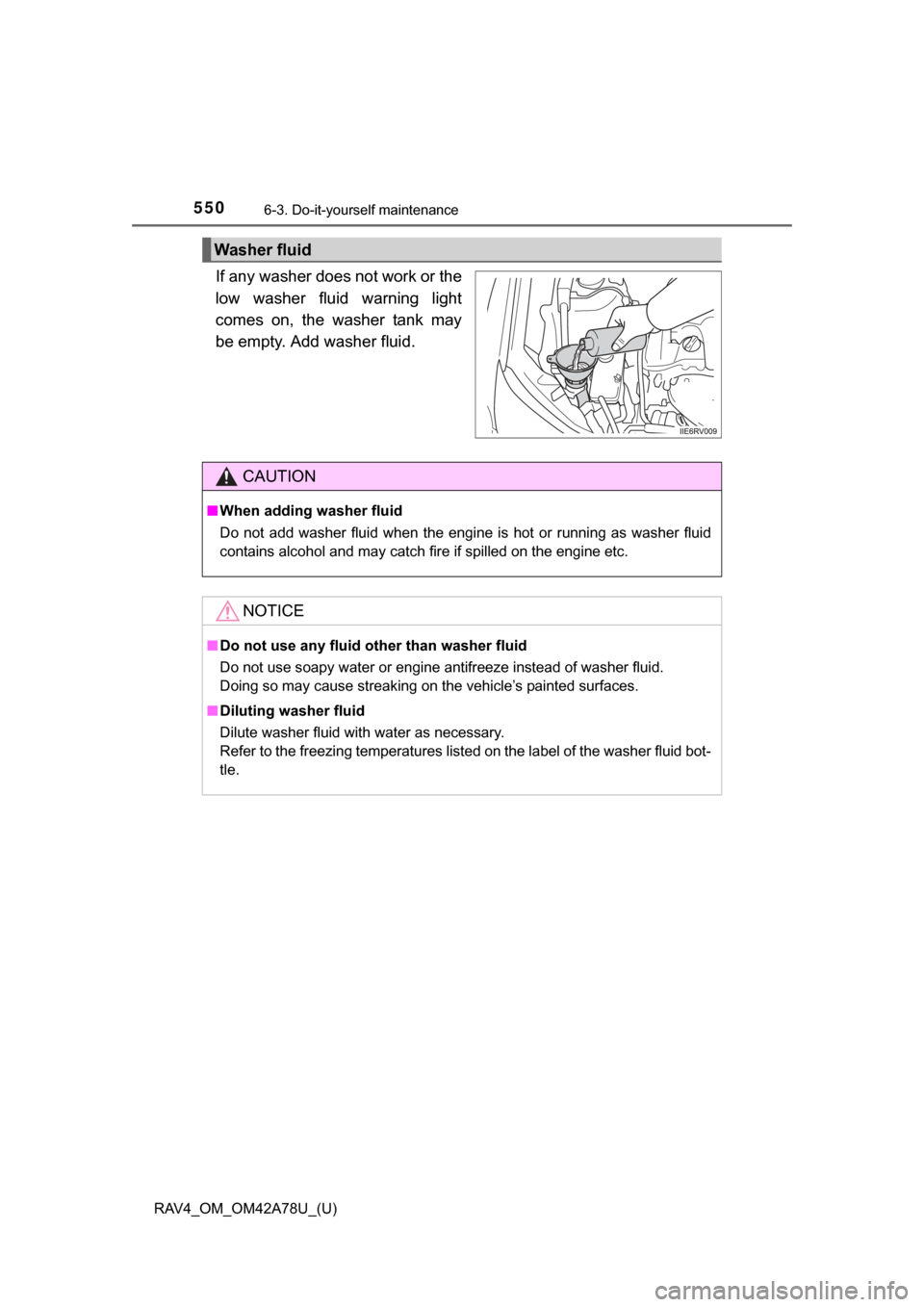
If any washer does not work or the
low washer fluid warning light
comes on, the washer tank may
be empty. Add washer fluid.
Washer fluid
CAUTION
■When adding washer fluid
Do not add washer fluid when the engine is hot or running as washer fluid
contains alcohol and may catch fire if spilled on the engine etc.
NOTICE
■ Do not use any fluid other than washer fluid
Do not use soapy water or engine antifreeze instead of washer fluid.
Doing so may cause streaking on the vehicle’s painted surfaces.
■ Diluting washer fluid
Dilute washer fluid with water as necessary.
Refer to the freezing temperatures listed on the label of the washer fluid bot-
tle.
Page 554 of 732
554
RAV4_OM_OM42A78U_(U)
6-3. Do-it-yourself maintenance
■How to initialize the tire pressure warning systemPark the vehicle in a safe place and turn the engine switch to the
“LOCK” position (vehicles without a smart key system) or off
(vehicles with a smart key system).
Initialization cannot be performed while the vehicle is moving.
Adjust the tire inflation pressure to the specified cold tire inflation
pressure level. ( P. 669)
Make sure to adjust the tire pressu re to the specified cold tire infla-
tion pressure level. The tire pressure warning system will operate
based on this pressure level.
Turn the engine switch to the “ON” position (vehicles without a
smart key system) or IGNITION ON mode (vehicles with a smart
key system).
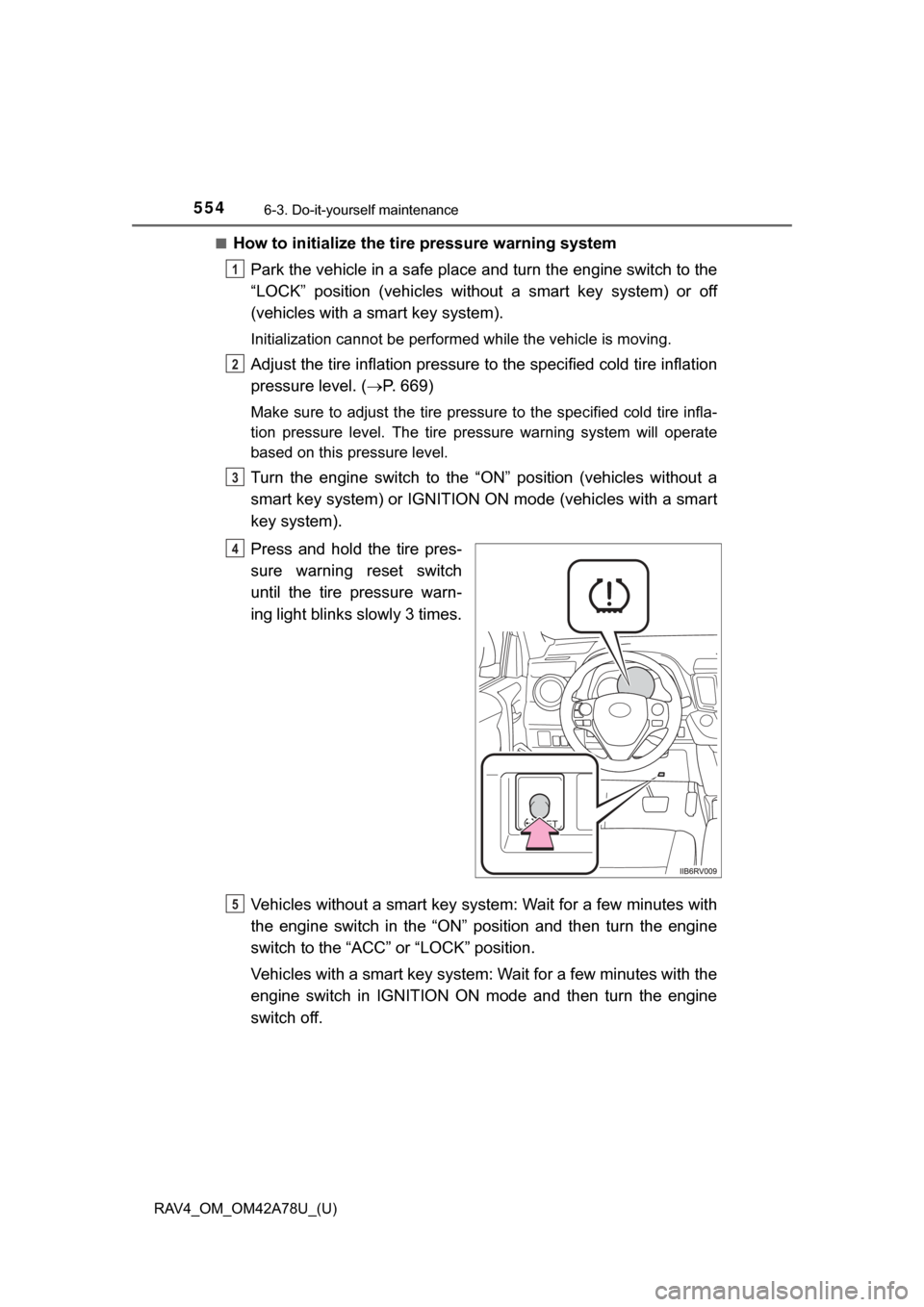
Press and hold the tire pres-
sure warning reset switch
until the tire pressure warn-
ing light blinks slowly 3 times.
Vehicles without a smart key syst em: Wait for a few minutes with
the engine switch in the “ON” position and then turn the engine
switch to the “ACC” or “LOCK” position.
Vehicles with a smart key system: Wait for a few minutes with the
engine switch in IGNITION ON mode and then turn the engine
switch off.
1
2
3
4
5
Page 558 of 732

558
RAV4_OM_OM42A78U_(U)
6-3. Do-it-yourself maintenance
■The initialization operation (vehicles with the tire pressure warning
system)
●Make sure to carry out in itialization after adjusting the tire inflation pres-
sure.
Also, make sure the tires are cold be fore carrying out initialization or tire
inflation pressure adjustment.
●If you have accidentally turned the engine switch to the “LOCK” position
(vehicles without a smart key system) or off (vehicles with a smart key
system) during initialization, it is no t necessary to press the reset switch
again as initialization will restart aut omatically when the engine switch
has been turned to the “ON” position (vehicles without a smart key sys-
tem) or IGNITION ON mode (vehic les with a smart key system) for the
next time.
●If you accidentally press the reset s witch when initialization is not neces-
sary, adjust the tire inflation pressu re to the specified level when the
tires are cold, and conduct initialization again.
■When initialization of the tire pressure warning system has failed (if
equipped)
Initialization can be completed in a few minutes. However, in the following
cases, the settings have not been recorded and the system will not oper-
ate properly. If repeated attempts to record tire inflation pressure settings
are unsuccessful, have the vehicle inspected by your Toyota dealer.
●When operating the tire pressure wa rning reset switch, the tire pressure
warning light does not blink 3 times.
●After driving for a certain period of time since the initialization has been
completed, the warning light comes on after blinking for 1 minute.
■Tire pressure warning system certification
For vehicles sold in the U.S.A.
TRW Automotive
Tire Pressure Monitoring Sensor
FCC ID: GQ4-51T
This device complies with Part 15 of th e FCC Rules. Operation is subject
to the following two conditions: (1) This device may not cause harmful
interference, and (2) This device must accept any interference received,
including interference that may cause undesired operation of this device.
WARNING: Changes or modifications not expressly approved by TRW
Automotive U.S. LLC could void the user’s authority to operate the equip-
ment.
Page 568 of 732
568
RAV4_OM_OM42A78U_(U)
6-3. Do-it-yourself maintenance
Air conditioning filter
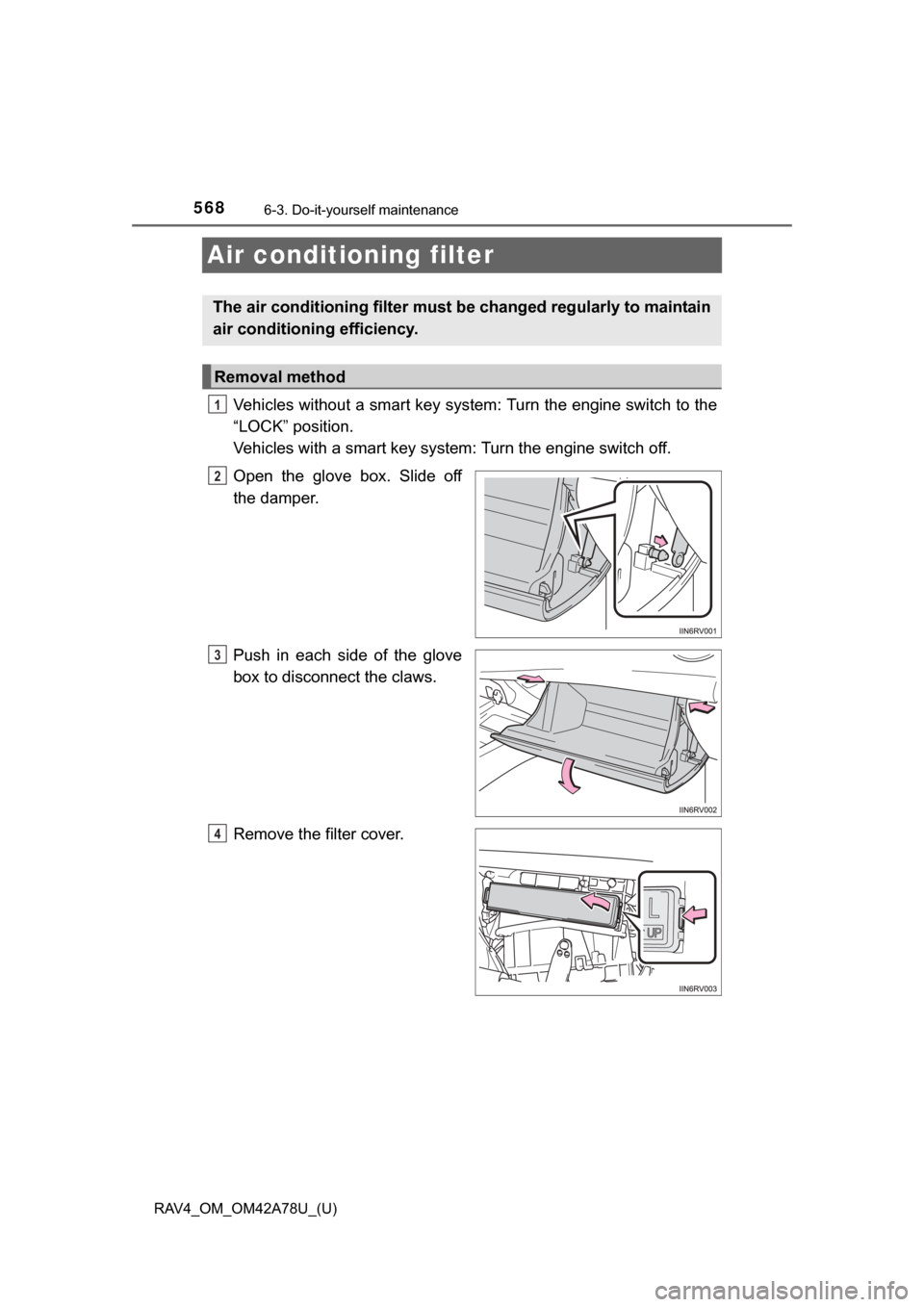
Vehicles without a smart key system: Turn the engine switch to the
“LOCK” position.
Vehicles with a smart key system: Turn the engine switch off.
Open the glove box. Slide off
the damper.
Push in each side of the glove
box to disconnect the claws.
Remove the filter cover.
The air conditioning filter must be changed regularly to maintain
air conditioning efficiency.
Removal method
1
2
3
4
Page 573 of 732
573
RAV4_OM_OM42A78U_(U)
6-3. Do-it-yourself maintenance
6
Maintenance and care
Checking and replacing fuses
Vehicles without a smart key system:
Turn the engine switch to the “LOCK” position.
Vehicles with a smart key system:
Turn the engine switch off.
After a system failure, see “Fuse layout and amperage ratings” for
details about which fuse to check. ( P. 576)
Open the fuse box cover or instrument panel.
Engine compartment
Push the tabs in and lift the
cover off.
Under the instrument panel
Remove the cover.
If any of the electrical components do not operate, a fuse may
have blown. If this happens, check and replace the fuses as nec-
essary.
1
2
3