Page 21 of 621
21Pictorial index
PRIUS v_OM_OM47887U_(U)MPH or km/h button . . . . . . . . . . . . . . . . . . . . . . . . . . . . . . . . . P. 93
Clock adjustment buttons . . . . . . . . . . . . . . . . . . . . . . . . . . . P. 384
Tire pressure warning reset switch . . . . . . . . . . . . . . . . . . . P. 443
*: If equipped
1
2
3
Page 24 of 621

24Pictorial index
PRIUS v_OM_OM47887U_(U)
■Interior
SRS airbags . . . . . . . . . . . . . . . . . . . . . . . . . . . . . . . . . . . . . . . P. 41
Floor mats. . . . . . . . . . . . . . . . . . . . . . . . . . . . . . . . . . . . . . . . . P. 28
Front seats . . . . . . . . . . . . . . . . . . . . . . . . . . . . . . . . . . . . . . . P. 137
Rear seats . . . . . . . . . . . . . . . . . . . . . . . . . . . . . . . . . . . . . . . . P. 141
Head restraints . . . . . . . . . . . . . . . . . . . . . . . . . . . . . . . . . . . . P. 144
Seat belts . . . . . . . . . . . . . . . . . . . . . . . . . . . . . . . . . . . . . . . . . P. 32
Console box . . . . . . . . . . . . . . . . . . . . . . . . . . . . . . . . . . . . . . P. 375
Inside lock buttons . . . . . . . . . . . . . . . . . . . . . . . . . . . . . . . . P. 122
Cup holders/bottle holders/door pockets . . . . . . . . . . . . . . P. 376
Auxiliary boxes . . . . . . . . . . . . . . . . . . . . . . . . . . . . . . . . . . . P. 3781
2
3
4
5
6
7
8
9
10
Page 62 of 621
621-1. For safe use
PRIUS v_OM_OM47887U_(U)
Installing child restraints
Child restraint LATCH anchors
LATCH anchors are provided for
the outboard rear seats. (Buttons
displaying the location of the
anchors are attached to the seats.)
Seat belts equipped with a child
restraint locking mechanism
(ALR/ELR belts except driver’s
seat belt) (P. 32)
Anchor brackets (for top tether
strap)
An anchor bracket is provided for
each rear seat.
Follow the child restraint system manufacturer’s instructions.
Firmly secure child restraints to the seats using the LATCH
anchors or a seat belt. Attach the top tether strap when installing
a child restraint.
The lap/shoulder belt can be used if your child restraint system
is not compatible with the LATCH (Lower Anchors and Tethers
for Children) system.
Page 117 of 621
PRIUS v_OM_OM47887U_(U)
1173-1. Key information
3
Operation of each component
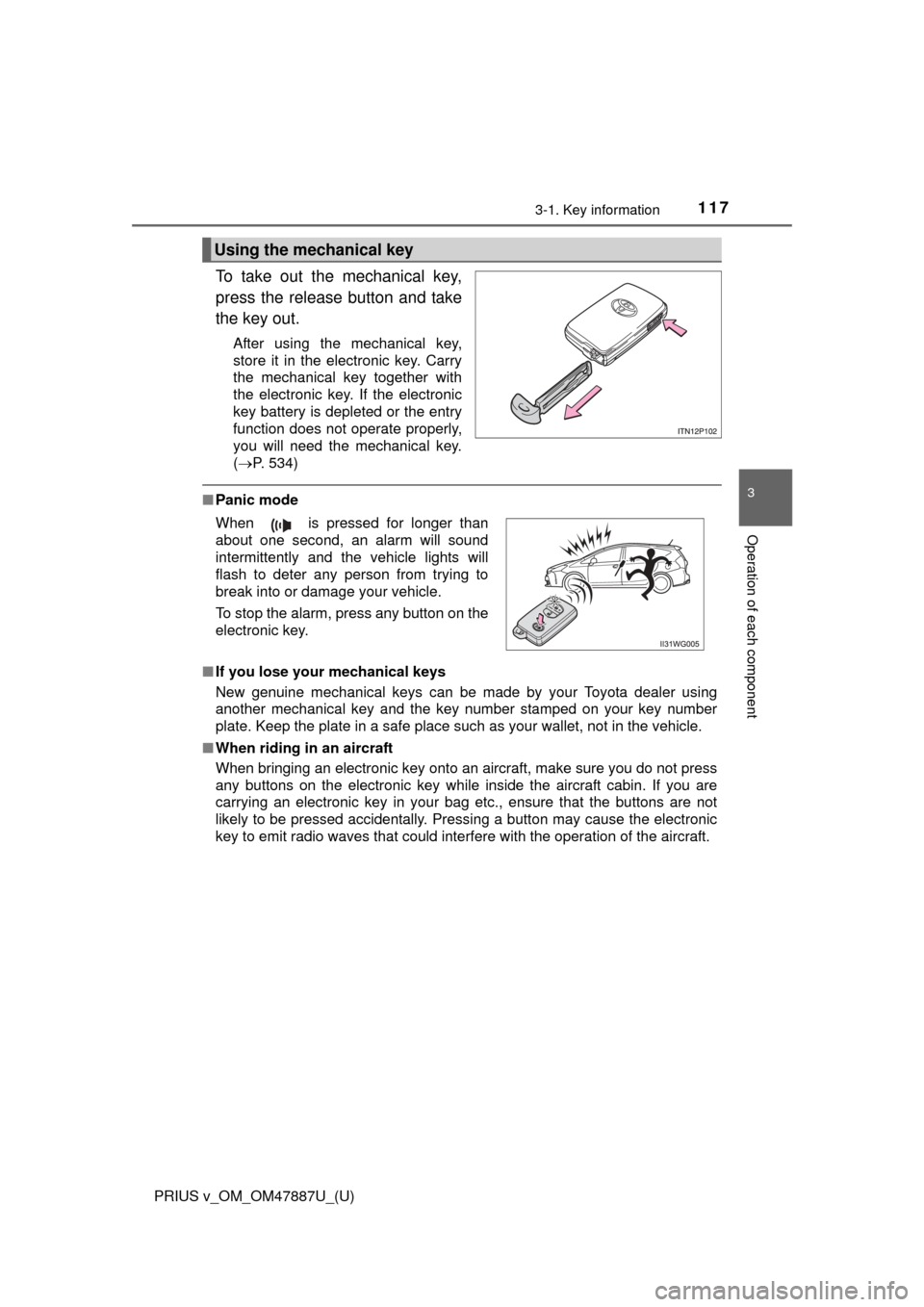
To take out the mechanical key,
press the release button and take
the key out.
After using the mechanical key,
store it in the electronic key. Carry
the mechanical key together with
the electronic key. If the electronic
key battery is depleted or the entry
function does not operate properly,
you will need the mechanical key.
(P. 534)
■ Panic mode
■ If you lose your mechanical keys
New genuine mechanical keys can be made by your Toyota dealer using
another mechanical key and the key number stamped on your key number
plate. Keep the plate in a safe place such as your wallet, not in the vehicle.
■ When riding in an aircraft
When bringing an electronic key onto an aircraft, make sure you do not press
any buttons on the electronic key while inside the aircraft cabin. If you are
carrying an electronic key in your bag etc., ensure that the buttons are not
likely to be pressed accidentally. Pressing a button may cause the electronic
key to emit radio waves that could interfere with the operation of the aircraft.
Using the mechanical key
When is pressed for longer than
about one second, an alarm will sound
intermittently and the vehicle lights will
flash to deter any person from trying to
break into or damage your vehicle.
To stop the alarm, press any button on the
electronic key.
Page 122 of 621
122
PRIUS v_OM_OM47887U_(U)
3-2. Opening, closing and locking the doors
◆Door lock switchLocks all the doors
Unlocks all the doors
◆Inside lock buttonsLocks the door
Unlocks the door
The front doors can be opened
by pulling the inside handle
even if the lock buttons are in
the lock position.
Move the inside lock button to the lock position.
Close the door.
The door cannot be locked if the pow er switch is in ACCESSORY or
ON mode, or the electronic key is left inside the vehicle.
The key may not be detected correctly and the door may be locked.
Locking and unlocking the doors from the inside
1
2
1
2
Locking the front doors from the outside without a key
1
2
Page 124 of 621
124
PRIUS v_OM_OM47887U_(U)
3-2. Opening, closing and locking the doors
WARNING
■To prevent an accident
Observe the following precautions while driving the vehicle.
Failure to do so may result in a door opening and an occupant throwing out
of the vehicle, resulting in death or serious injury.
● Ensure that all doors are properly closed and locked.
● Do not pull the inside handle of the doors while driving.
Be especially careful for the front doors, as the doors may be opened
even if the inside lock buttons are in locked position.
● Set the rear door child-protector locks when children are seated in the rear
seats.
■ When opening or closing a door
Check the surroundings of the vehicle such as whether the vehicle is on an
incline, whether there is enough space for a door to open and whether a
strong wind is blowing. When opening or closing the door, hold the door
handle tightly to prepare for any unpredictable movement.
Page 268 of 621
267
PRIUS v_OM_OM47887U_(U)
5-1. Basic Operations
5
Audio system
Audio system
“AUDIO” button
Display the “Select Audio Source” screen or audio top screen.
( P. 283)
“SETUP” button
Press this button to customize the function settings. ( P. 274)
“CAR” button
Press this button to access the vehicle information. ( P. 108)
button
Press this button to access the Bluetooth
® hands-free system.
( P. 321)
: If equipped
Operations such as listening to audio, using the hands-free
phone, confirming vehicle inform ation and changing audio sys-
tem settings are started by using the following buttons.
Audio system operation buttons
1
2
3
4
Page 270 of 621
PRIUS v_OM_OM47887U_(U)
2695-1. Basic Operations
5
Audio system
■When using the touch screen
●If the screen is cold, the display may be dark, or the system may seem to be
operating slightly slower than normal.
● The screen may seem dark and hard to see when viewed through sun-
glasses. Change your angle of viewing, adjust the display on the “Display
Settings” screen ( P. 279) or remove your sunglasses.
● Flick operations may not be performed smoothly in high altitudes.
NOTICE
■To avoid damaging the touch screen
● To prevent damaging the screen, lightly touch the screen buttons with your
finger.
● Do not use objects other than your finger to touch the screen.
● Wipe off fingerprints using a glass cleaning cloth. Do not use chemical
cleaners to clean the screen, as they may damage the touch screen.


