Page 133 of 496
1332. Instrument cluster
2
Instrument cluster
PRIUS +_OM_OM47B16E_(EE)
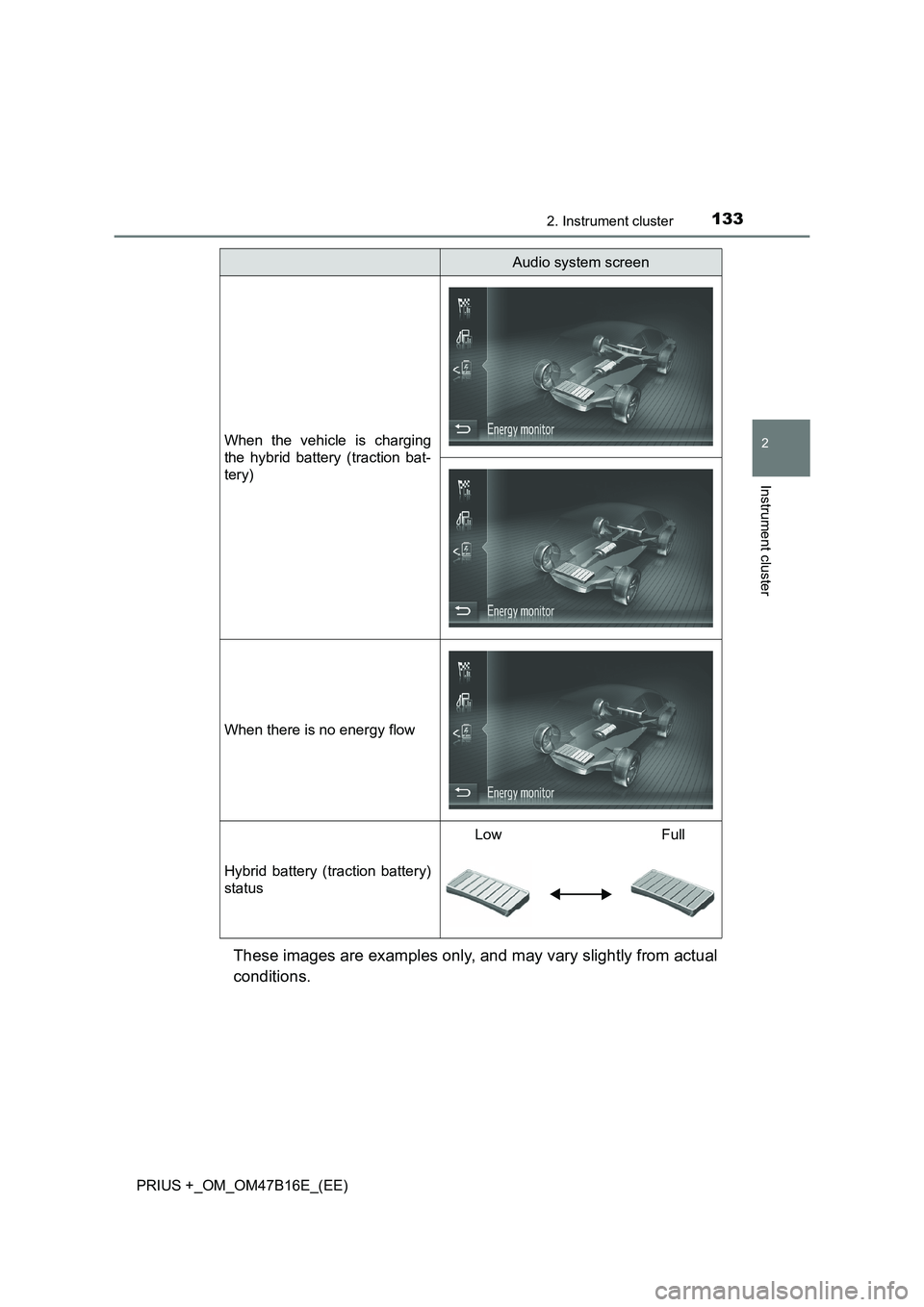
These images are examples only, and may vary slightly from actual
conditions.
When the vehicle is charging
the hybrid battery (traction bat-
tery)
When there is no energy flow
Hybrid battery (traction battery)
status
LowFull
Audio system screen
Page 141 of 496
1413-1. Key information
3
Operation of each component
PRIUS +_OM_OM47B16E_(EE)NOTICE
■
To prevent key damage
●Do not drop the keys, subject them to strong shocks or bend them.
● Do not expose the keys to high temperatures for long periods of time.
● Do not get the keys wet or wash them in an ultrasonic washer etc.
● Do not attach metallic or magnetic materials to the keys or place the keys
close to such materials.
● Do not disassemble the keys.
● Do not attach a sticker or anything else to the surface of the electronic key.
● Do not place the keys near objects that produce magnetic fields, such as
TVs, audio systems and induction cookers, or medical electrical equip-
ment, such as low-frequency therapy equipment.
■ Carrying the electronic key on your person
Carry the electronic key 10 cm (3.9 in.) or more away from electric appli-
ances that are turned on. Radio wave s emitted from electric appliances
within 10 cm (3.9 in.) of the electronic key may interfere with the key, caus-
ing the key to not function properly.
■ In case of a smart entry & start syst em malfunction or other key-related
problems
Take your vehicle with all the electronic keys provided with your vehicle to
any authorized Toyota dealer or repairer, or another duly qualified and
equipped professional.
■ When an electronic key is lost
If the electronic key remains lost, the risk of vehicle theft increases signifi-
cantly. Visit any authorized Toyota dealer or repairer, or another duly quali-
fied and equipped professional immediately with all remaining electronic
keys that were provided with your vehicle.
Page 154 of 496

1543-2. Opening, closing and locking the doors
PRIUS +_OM_OM47B16E_(EE)■
Conditions affecting operation
The smart entry & start system, wireless remote control and immobilizer sys-
tem use weak radio waves. In the following situations, the communication
between the electronic key and the vehicle may be affected, preventing the
smart entry & start system, wireless remote control and immobilizer system
from operating properly.
(Ways of coping: →P. 437)
● When the electronic key battery is depleted
● Near a TV tower, electric power plant, gas station, radio station, large dis-
play, airport or other facility that generates strong radio waves or electrical
noise
● When carrying a portable radio, cellular phone, cordless phone or other
wireless communication devices
● When the electronic key is in contact with, or is covered by the following
metallic objects
• Cards to which aluminum foil is attached
• Cigarette boxes that have aluminum foil inside
• Metallic wallets or bags
• Coins
• Hand warmers made of metal
• Media such as CDs and DVDs
● When other wireless key (that emit radio waves) is being used nearby
● When carrying the electronic key together with the following devices that
emit radio waves
• Another vehicle’s electronic key or a wireless key that emits radio waves
• Personal computers or personal digital assistants (PDAs)
• Digital audio players
• Portable game systems
● If window tint with a metallic content or metallic objects are attached to the
rear window
Page 203 of 496
2034-2. Driving procedures
4
Driving
PRIUS +_OM_OM47B16E_(EE)
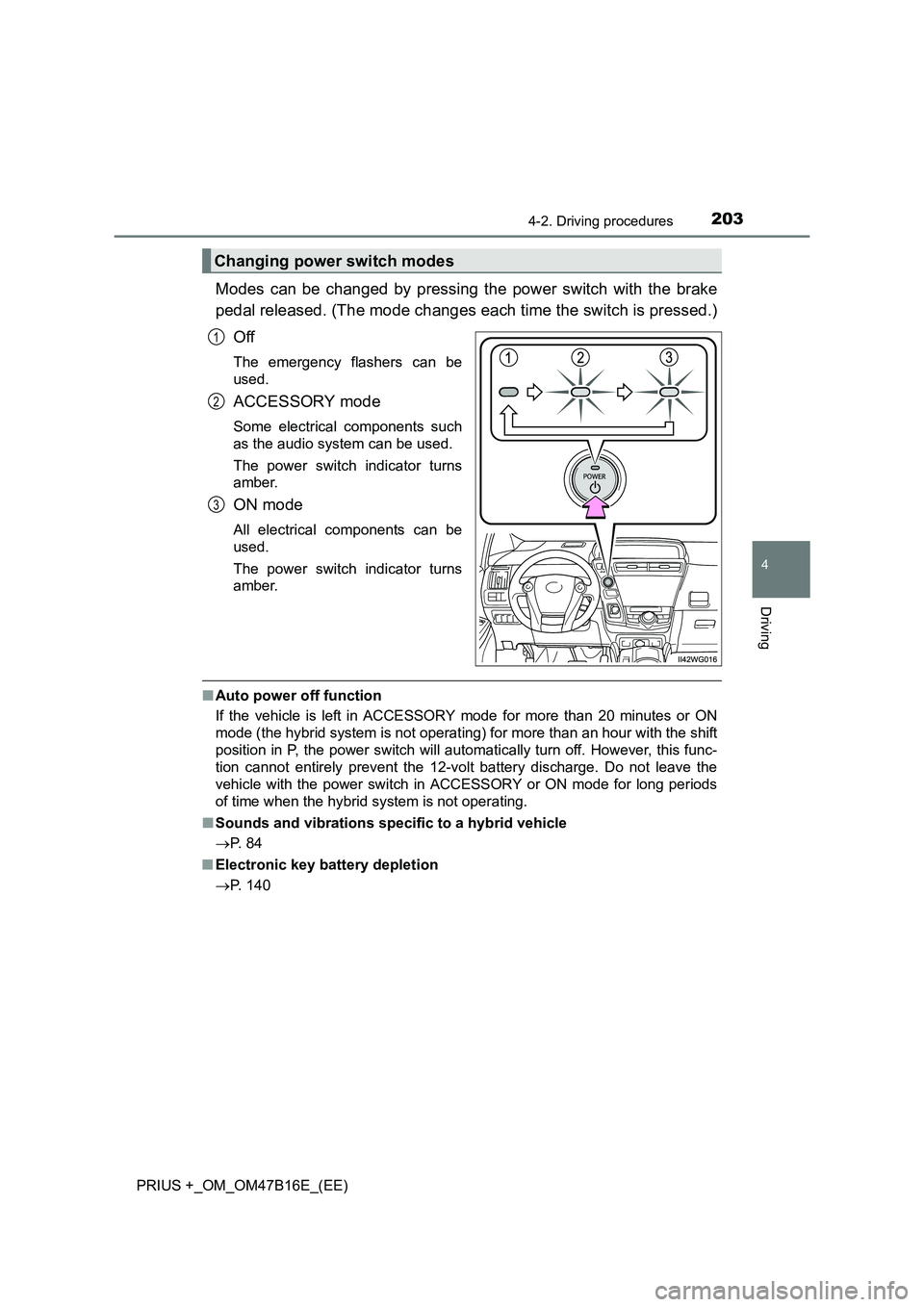
Modes can be changed by pressing the power switch with the brake
pedal released. (The mode changes each time the switch is pressed.)Off
The emergency flashers can be
used.
ACCESSORY mode
Some electrical components such
as the audio system can be used.
The power switch indicator turns
amber.
ON mode
All electrical components can be
used.
The power switch indicator turns
amber.
■Auto power off function
If the vehicle is left in ACCESSORY mode for more than 20 minutes or ON
mode (the hybrid system is not operating) for more than an hour with the shift
position in P, the power switch will automatically turn off. However, this func-
tion cannot entirely prevent the 12-volt battery discharge. Do not leave the
vehicle with the power switch in ACCESSORY or ON mode for long periods
of time when the hybrid system is not operating.
■ Sounds and vibrations specific to a hybrid vehicle
→ P. 8 4
■ Electronic key battery depletion
→ P. 140
Changing power switch modes
1
2
3
Page 307 of 496
3076-1. Maintenance and care
PRIUS +_OM_OM47B16E_(EE)
6
Maintenance and care
NOTICE
■Cleaning detergents
●Do not use the following types of detergent, as they may discolor the vehi-
cle interior or cause streaks or damage to painted surfaces:
• Non-seat portions: Organic substances such as benzene or gasoline,
alkaline or acidic solutions, dye, and bleach
• Seats: Alkaline or acidic solutions, such as thinner, benzene, and alco- hol
● Do not use polish wax or polish cleaner. The instrument panel’s or other
interior part’s painted surface may be damaged.
■ Preventing damage to leather surfaces
Observe the following precautions to avoid damage to and deterioration of
leather surfaces:
●Remove any dust or dirt from leather surfaces immediately.
● Do not expose the vehicle to direct sunlight for extended periods of time.
Park the vehicle in the shade, especially during summer.
● Do not place items made of vinyl, plastic, or containing wax on the uphol-
stery, as they may stick to the leather surface if the vehicle interior heats
up significantly.
■ Water on the floor
Do not wash the vehicle floor with water.
Vehicle systems such as the audio system may be damaged if water comes
into contact with electrical components such as the audio system above or
under the floor of the vehicle. Water may also cause the body to rust.
■ Cleaning the inside of the rear window
●Do not use glass cleaner to clean the rear window, as this may cause
damage to the rear window defogger heater wires. Use a cloth dampened
with lukewarm water to gently wipe the window clean. Wipe the window in
strokes running parallel to the heater wires.
● Be careful not to scratch or damage the heater wires.
Page 384 of 496
3847-2. Steps to take in an emergency
PRIUS +_OM_OM47B16E_(EE)■
Conditions that the tire pressure warning system may not function prop-
erly
→ P. 335
■ If the tire pressure warning light frequently comes on after blinking for
1minute
If the tire pressure warning light frequently comes on after blinking for
1 minute when the power switch is turned to ON mode, have it checked by
any authorized Toyota dealer or re pairer, or another duly qualified and
equipped professional.
■ Warning buzzer
In some cases, the buzzer may not be heard due to being in a noisy location
or audio sound.
Page 441 of 496

4417-2. Steps to take in an emergency
PRIUS +_OM_OM47B16E_(EE)
7
When trouble arises
Start the engine of the second vehicle. Increase the engine speed
slightly and maintain at that level for approximately 5 minutes to
recharge the 12-volt battery of your vehicle.
Maintain the engine speed of the second vehicle and start the
hybrid system of your vehicle by turning the power switch to ON
mode.
Make sure the “READY” indicator comes on. If the indicator light
does not come on, contact any authorized Toyota dealer or repairer,
or another duly qualified and equipped professional.
Once the hybrid system has started, remove the jumper cables in
the exact reverse order from which they were connected.
Close the exclusive jump starting terminal cover, and reinstall the
fuse box cover to its original position.
When installing, first hook the fuse box cover onto the two rear tabs.
Once the hybrid system starts, have the vehicle inspected at any
authorized Toyota dealer or repairer, or another duly qualified and
equipped professional as soon as possible.
■Starting the hybrid system when the 12-volt battery is discharged
The hybrid system cannot be started by push-starting.
■ To prevent 12-volt battery discharge
●Turn off the headlights and the audio system while the hybrid system is off.
● Turn off any unnecessary electrical components when the vehicle is running
at a low speed for an extended period, such as in heavy traffic.
■ When the 12-volt battery is removed or discharged
●The hybrid system may not start. ( →P. 328)
● If the 12-volt battery discharges while the shift position is in P, it may not be
possible to shift the shift position to other positions. In this case, the vehicle
cannot be towed without lifting both front wheels because the front wheels
will be locked. ( →P. 370)
● When the 12-volt battery is reconnected, start the hybrid system and con-
firm that the shift position can be changed to each position using the shift
position indicator.
● Make sure that the key is not inside the vehicle when recharging or replac-
ing the 12-volt battery. The key may be locked in the vehicle if the alarm is
activated. ( →P. 97)
4
5
6
7
8
Page 473 of 496
473
Index
PRIUS +_OM_OM47B16E_(EE)What to do if...
(Troubleshooting) ..................... 474
Alphabetical index ......................478
For vehicles with a navigation system, refer to the
“Navigation and multimedia system Owner’s Manual” for
information regarding the equipment listed below.
• Navigation system
• Toyota parking assist monitor
• Audio/visual system