Page 158 of 728
115
1-4. Opening, closing and locking the doors
1
Before driving
PRIUS PHV_OM_OM47A11U_(U)
Back door (vehicles with entry function of front and back doors)
Press the unlock button to
unlock all the doors.
The doors cannot be unlocked for
3 seconds after the doors are
locked.
Press the lock button to lock all
the doors.
Check that the door is securely
locked.
Check to see that all the side
doors and back door are securely
locked.
Page 164 of 728

121
1-4. Opening, closing and locking the doors
1
Before driving
PRIUS PHV_OM_OM47A11U_(U)
■Security feature
If a door is not opened within approximately 60 seconds after the vehicle is
unlocked, the security feature automatically locks the vehicle again.
■Switching the door unlock function
It is possible to set which doors the entry function unlocks.
Turn the “POWER” switch off.
When the indicator on the key surface is turned off, push and hold
or for approximately 5 seconds while pushing the but-
ton on the key.
The setting changes each time an operation is performed, as shown below.
(When changing the setting continuously, release the buttons, wait for at
least 5 seconds, and repeat .)
STEP 1
STEP 2
STEP 2
Multi-information
displayUnlocking doorsBeep
Hold the driver’s door
handle to unlock only the
driver’s door.Exterior: Beeps three
times
Interior: Pings onceHold the passenger’s door
handle or back door
opener to unlock all the
doors.
Hold the front door handle
or back door opener to
unlock all the doors.
Exterior: Beeps twice
Interior: Pings once
Page 168 of 728

125
1-4. Opening, closing and locking the doors
1
Before driving
PRIUS PHV_OM_OM47A11U_(U)
■Note for locking the doors
●To u c h i n g t h e d o o r l o c k s e n s o r w h i l e w e a r i n g g l o v e s m a y d e l a y o r p r e v e n t
lock operation. Remove the gloves and touch the lock sensor again.
●When the lock operation is performed using the lock sensor, recognition
signals will be shown up to two consecutive times. After this, no recogni-
tion signals will be given.
●If the door handle becomes wet while the electronic key is within the
effective range, the door may lock and unlock repeatedly. Place the key
in a position 6 ft. (2 m) or more separate from the vehicle while the vehi-
cle is being washed. (Take care to ensure that the key is not stolen.)
●If the electronic key is inside the vehicle and a door handle becomes wet
during a car wash, a buzzer will sound outside the vehicle. To turn off the
alarm, lock all the doors.
●The lock sensor may not work properly if it comes into contact with ice,
snow, mud, etc. Clean the lock sensor and attempt to operate it again, or
use the lock sensor on the lower part of the door handle.
●Fingernails may scrape against the door during operation of the door
handle. Be careful not to injure fingernails or damage the surface of the
door.
Page 179 of 728
136
1-4. Opening, closing and locking the doors
PRIUS PHV_OM_OM47A11U_(U)
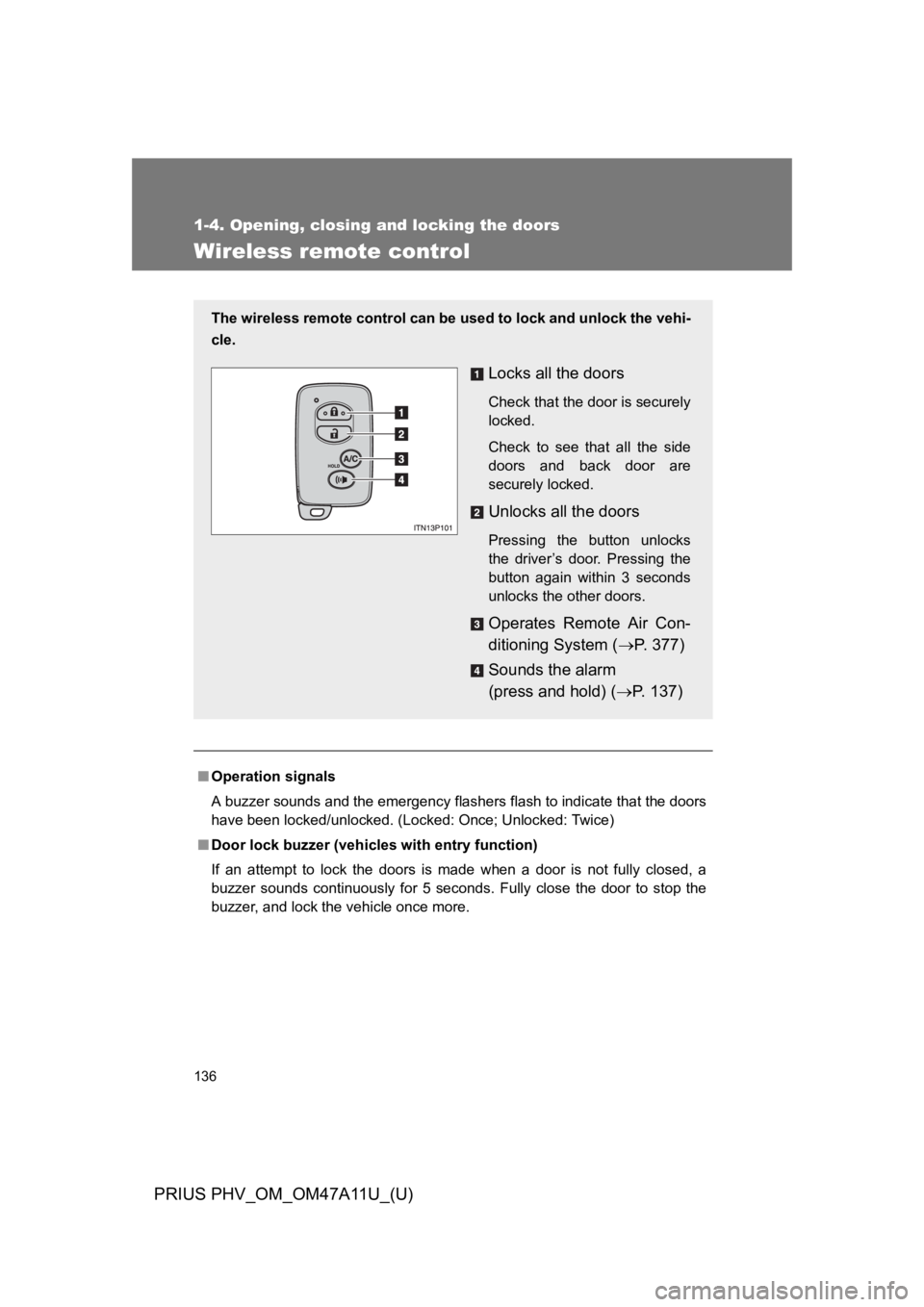
Wireless remote control
■Operation signals
A buzzer sounds and the emergency flashers flash to indicate that the doors
have been locked/unlocked. (Locked: Once; Unlocked: Twice)
■Door lock buzzer (vehicles with entry function)
If an attempt to lock the doors is made when a door is not fully closed, a
buzzer sounds continuously for 5 seconds. Fully close the door to stop the
buzzer, and lock the vehicle once more.
The wireless remote control can be used to lock and unlock the vehi-
cle.
Locks all the doors
Check that the door is securely
locked.
Check to see that all the side
doors and back door are
securely locked.
Unlocks all the doors
Pressing the button unlocks
the driver’s door. Pressing the
button again within 3 seconds
unlocks the other doors.
Operates Remote Air Con-
ditioning System (oP. 3 7 7 )
Sounds the alarm
(press and hold) (oP. 1 3 7 )
Page 180 of 728
137
1-4. Opening, closing and locking the doors
1
Before driving
PRIUS PHV_OM_OM47A11U_(U)
■Panic mode
■Security feature
oP. 1 2 1
■Conditions affecting operation
oP. 1 2 3
■If the wireless remote control does not operate properly
Locking and unlocking the doors: Use the mechanical key. (oP. 5 9 9 )
■Electronic key battery depletion
oP. 1 2 7
■When the electronic key battery is fully depleted
oP. 4 9 7
■Customization
Settings (e.g. door unlocking function) can be changed.
(Customizable features oP. 6 4 7 )
When is pressed for longer than
about one second, an alarm will sound
intermittently and the vehicle lights will
flash to deter any person from trying to
break into or damage your vehicle.
To s t o p t h e a l a r m , p r e s s a n y b u t t o n o n
the electronic key.
Page 190 of 728

147
1-4. Opening, closing and locking the doors
1
Before driving
PRIUS PHV_OM_OM47A11U_(U)
CAUTION
■Operating the back door
Observe the following precautions.
Failure to do so may cause parts of the body to be caught, resulting in death
or serious injury.
●Remove any heavy loads, such as snow and ice, from the back door
before opening it. Failure to do so may cause the back door to suddenly
shut again after it is opened.
●When opening or closing the back door, thoroughly check to make sure
the surrounding area is safe.
●If anyone is in the vicinity, make sure they are safe and let them know that
the back door is about to open or close.
●Use caution when opening or closing the back door in windy weather as it
may move abruptly in strong wind.
●The back door may suddenly shut if it is
not opened fully. It is more difficult to
open or close the back door on an
incline than on a level surface, so
beware of the back door unexpectedly
opening or closing by itself. Make sure
that the back door is fully open and
secure before using the luggage com-
partment.
Page 198 of 728

155
1-5. Adjustable components (seats, mirrors, steering wheel)
1
Before driving
PRIUS PHV_OM_OM47A11U_(U)
CAUTION
■When folding the seatbacks down
Observe the following precautions. Failure to do so may result in death or
serious injury.
●Do not fold the seatbacks down while driving.
●Stop the vehicle on level ground, set the parking brake and shift the shift
position to P.
●Do not allow anyone to sit on a folded seatback or in the luggage compart-
ment while driving.
●Do not allow children to enter the luggage compartment.
■After returning the seatback to the upright position
Observe the following precautions. Failure to do so may result in death or
serious injury.
●Check that the seat belts are not twisted or caught in the seatback.
●Make sure that the seatback is securely
locked in position by lightly pushing it
back and forth.
If the seatbacks is not securely locked,
the red marking will be visible on the
seatback lock release button. Make
sure that the red marking is not visible.
Page 206 of 728
163
1-5. Adjustable components (seats, mirrors, steering wheel)
1
Before driving
PRIUS PHV_OM_OM47A11U_(U)
■Child seat belt usage
The seat belts of your vehicle were principally designed for persons of adult
size.
●Use a child restraint system appropriate for the child, until the child
becomes large enough to properly wear the vehicle’s seat belt. (oP. 2 0 8 )
●When the child becomes large enough to properly wear the vehicle’s
seat belt, follow the instructions on P. 160 regarding seat belt usage.
■Replacing the belt after the pretensioner has been activated
If the vehicle is involved in multiple collisions, the pretensioner will activate
for the first collision, but will not activate for the second or subsequent colli-
sions.
■Seat belt extender
If your seat belts cannot be fastened
securely because they are not long
enough, a personalized seat belt
extender is available from your Toyota
dealer free of charge.