Page 391 of 644
391
3-5. Other interior features
PRIUS_OM_OM47A17U_DVD_(U)
3
Interior features
■
Programming an entry gate (f or U.S.A. owners)/Programming
a devices in the Canadian market
Place the remote control transmitter 1 to 3 in. (25 to 75 mm)
away from the HomeLink
® buttons.
Keep the HomeLink® indicator light in view while programming.
Press and hold the selected HomeLink® button.
Repeatedly press and release (cycle) the remote control
transmitter for 2 seconds each until step 4 is completed.
When the HomeLink
® indicator light starts to flash rapidly,
release the buttons.
Test the HomeLink
® operation by pressing the newly pro-
grammed button. Check to see if the gate/device operates
correctly.
Repeat the steps above to program another device for any of
the remaining HomeLink
® buttons.
■ Programming other devices
To program other devices such as home security systems, home
door locks and lighting, contact your Toyota dealer for assistance.
■ Reprogramming a button
The individual HomeLink
® buttons cannot be erased but can be
reprogrammed. To reprogram a button, follow the “Reprogramming
a HomeLink
® button” instructions.
STEP 1
STEP 2
STEP 3
STEP 4
STEP 5
STEP 6
Page 392 of 644
392 3-5. Other interior features
PRIUS_OM_OM47A17U_DVD_(U)
Operating HomeLink®
Press the appropriate HomeLink® button. The HomeLink® indicator
light should come on.
The HomeLink® compatible transceiver in your vehicle continues to send
a signal for up to 20 seconds as long as the button is pressed.
Reprogramming a HomeLink® button
Press and hold the desired HomeLink
® button. After 20 seconds, the
HomeLink® indicator light will start flashing slowly. Keep pressing the
HomeLink® button and press and hold the transmitter button until the
HomeLink® indicator light changes from a slow to a rapid flash.
Release the buttons.
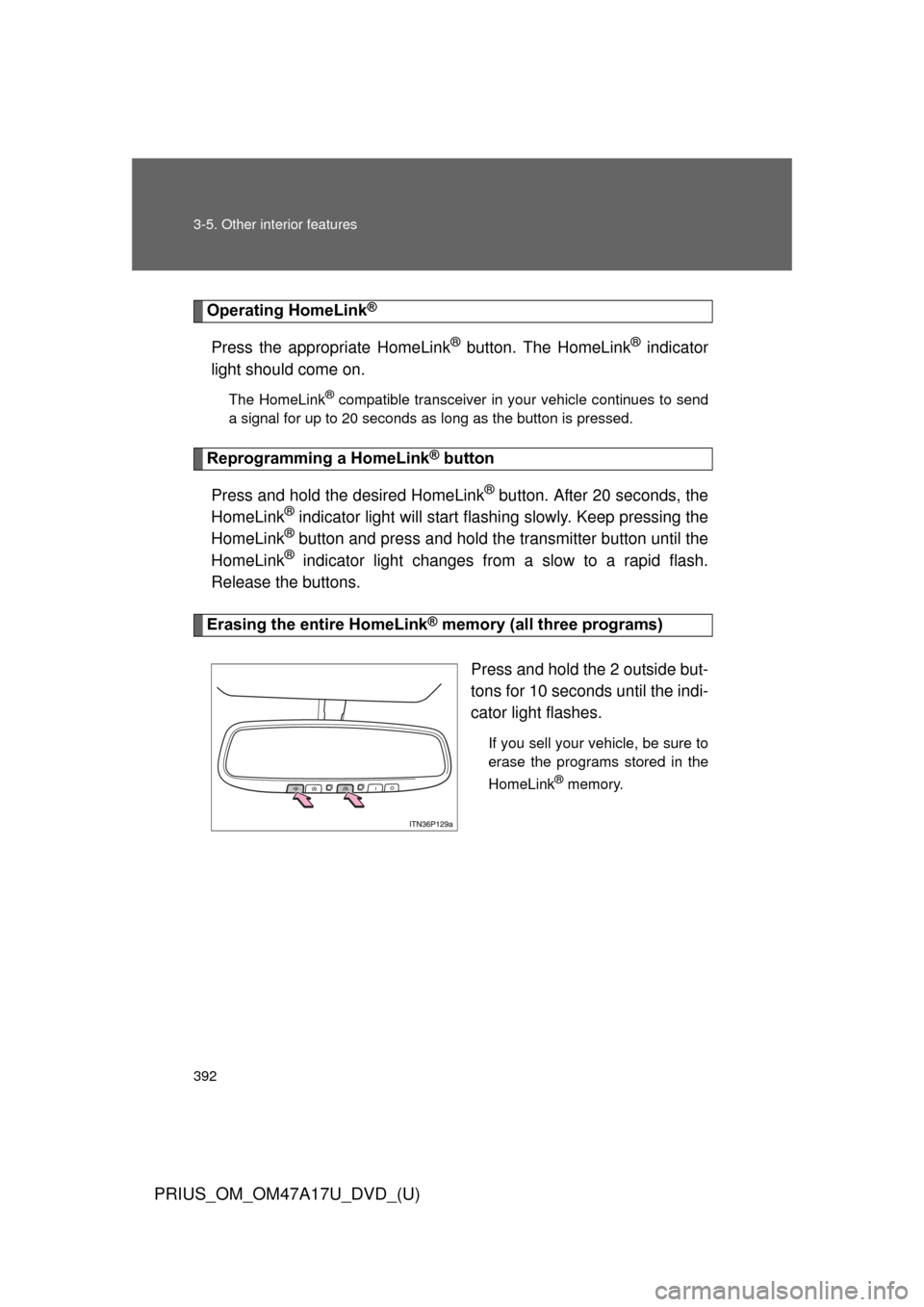
Erasing the entire HomeLink® memory (all three programs)
Press and hold the 2 outside but-
tons for 10 seconds until the indi-
cator light flashes.
If you sell your vehicle, be sure to
erase the programs stored in the
HomeLink
® memory.
Page 393 of 644
393
3-5. Other interior features
PRIUS_OM_OM47A17U_DVD_(U)
3
Interior features
■
Before programming
●Install a new battery in the remote control transmitter.
● The battery side of the remote control transmitter must be pointed away
from the HomeLink
® button.
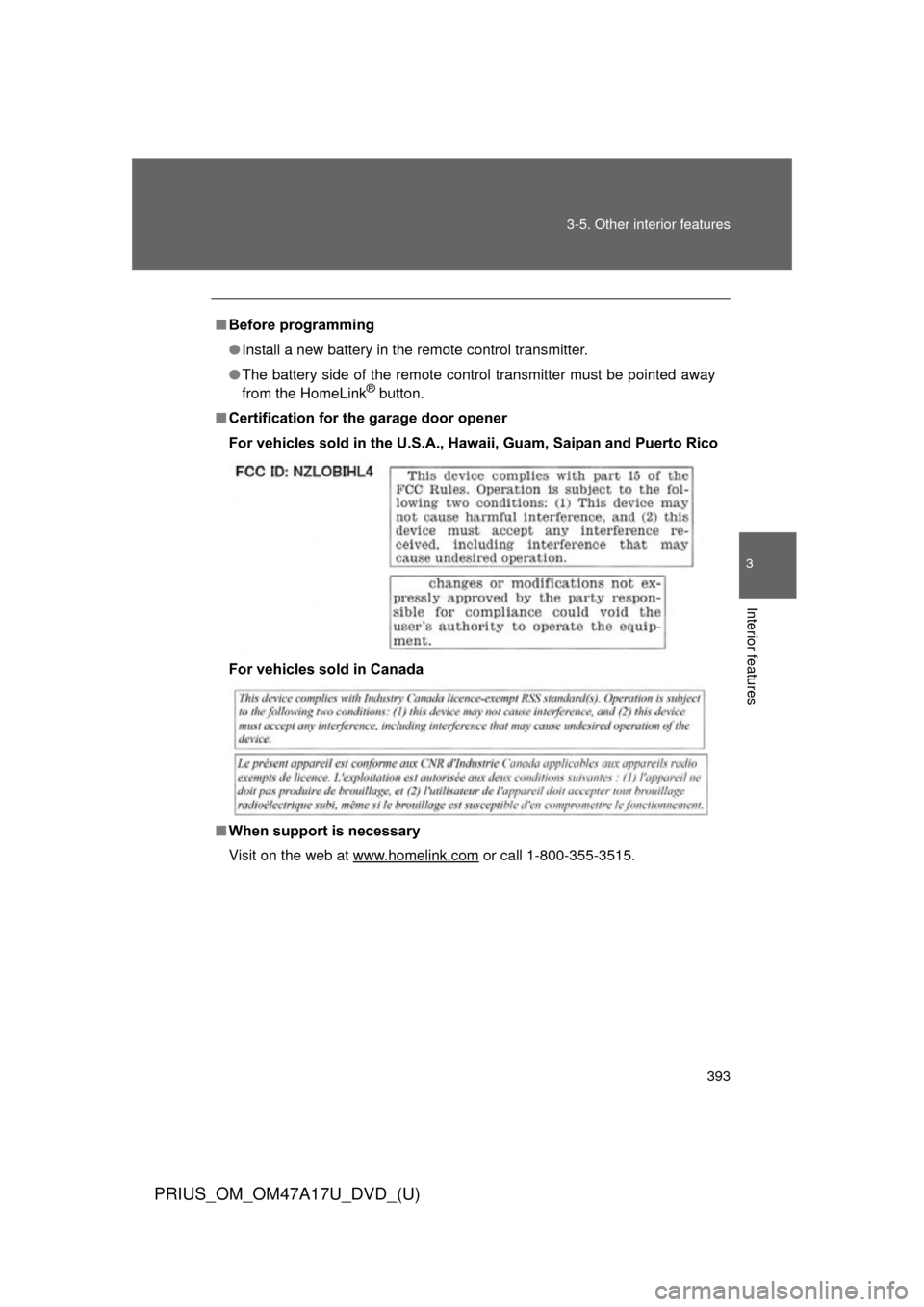
■ Certification for the garage door opener
For vehicles sold in the U.S.A., Ha waii, Guam, Saipan and Puerto Rico
For vehicles sold in Canada
■ When support is necessary
Visit on the web at www.homelink.com
or call 1-800-355-3515.
Page 394 of 644
394 3-5. Other interior features
PRIUS_OM_OM47A17U_DVD_(U)
CAUTION
■When programming a garage door or other remote control device
The garage door or other device may operate, so ensure people and objects
are out of danger to prevent potential harm.
■ Conforming to federal safety standards
Do not use the HomeLink
® compatible transceiver with any garage door
opener or device that lacks safety stop and reverse features as required by
federal safety standards.
This includes any garage door that cannot detect an interfering object. A
door or device without these features increases the risk of death or serious
injury.
Page 400 of 644

400 3-5. Other interior features
PRIUS_OM_OM47A17U_DVD_(U)
Safety information for Safety ConnectImportant! Read this information before using Safety Connect.
■ Exposure to radio frequency signals
The Safety Connect system installed in your vehicle is a low-power
radio transmitter and receiver. It receives and also sends out radio
frequency (RF) signals.
In August 1996, the Federal Communications Commission (FCC)
adopted RF exposure guidelines with safety levels for mobile wire-
less phones. Those guidelines are consistent with the safety stan-
dards previously set by the following U.S. and international
standards bodies.
● ANSI (American National Stand ards Institute) C95.1 [1992]
● NCRP (National Council on Ra diation Protection and Measure-
ment) Report 86 [1986]
● ICNIRP (International Commiss ion on Non-Ionizing Radiation
Protection) [1996]
Those standards were based on comprehensive and periodic eval-
uations of the relevant scientific literature. Over 120 scientists,
engineers, and physicians from universities, and government
health agencies and industries reviewed the available body of
research to develop the ANSI Standard (C95.1).
The design of Safety Connect complies with the FCC guidelines in
addition to those standards.
Page 415 of 644
415
4-2. Maintenance
PRIUS_OM_OM47A17U_DVD_(U)
4
Maintenance and care
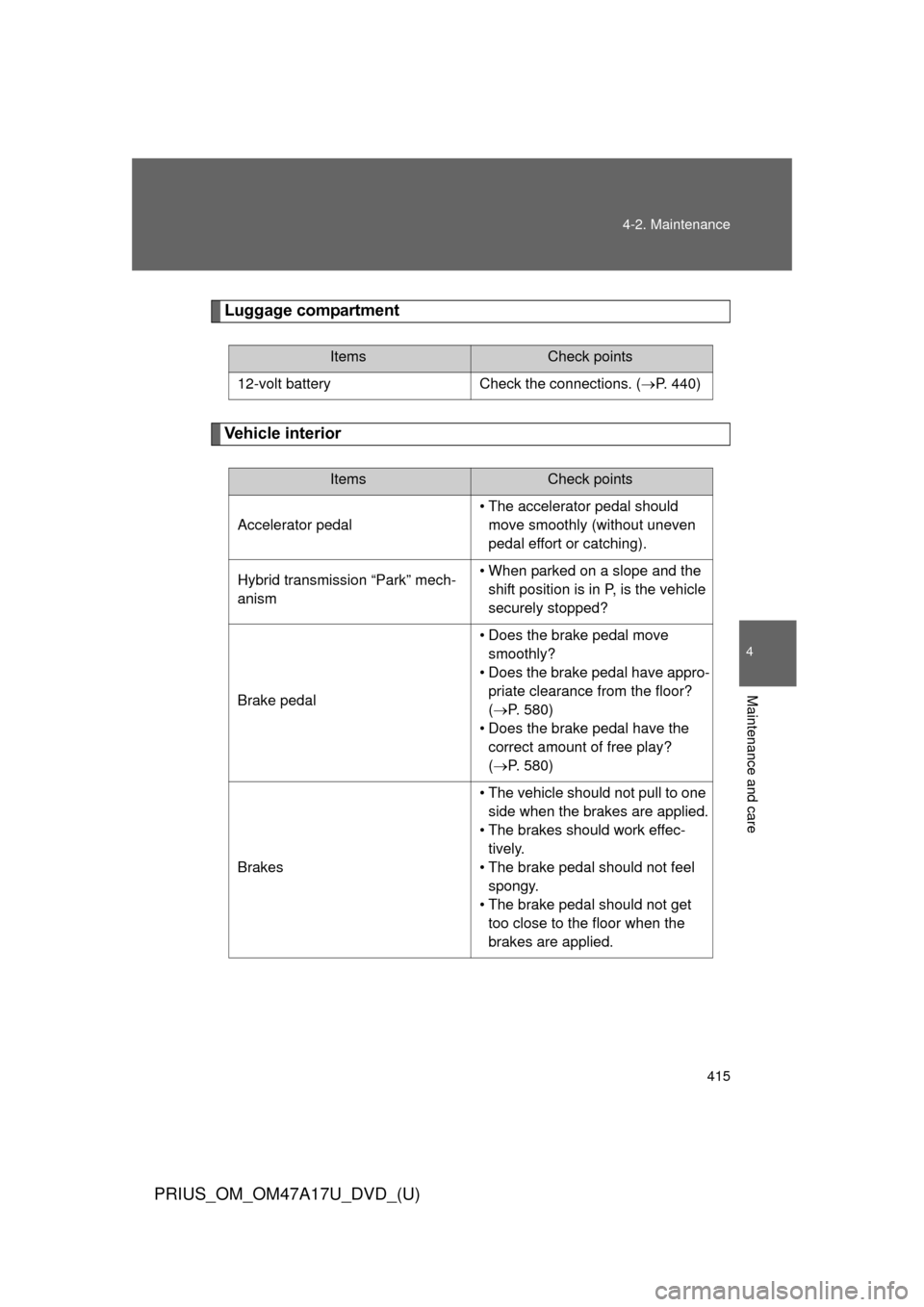
Luggage compartment
Vehicle interior
ItemsCheck points
12-volt battery Check the connections. (P. 440)
ItemsCheck points
Accelerator pedal
• The accelerator pedal should
move smoothly (without uneven
pedal effort or catching).
Hybrid transmission “Park” mech-
anism • When parked on a slope and the
shift position is in P, is the vehicle
securely stopped?
Brake pedal • Does the brake pedal move
smoothly?
• Does the brake pedal have appro- priate clearance from the floor?
(P. 580)
• Does the brake pedal have the correct amount of free play?
(P. 580)
Brakes • The vehicle should not pull to one
side when the brakes are applied.
• The brakes should work effec- tively.
• The brake pedal should not feel spongy.
• The brake pedal should not get too close to the floor when the
brakes are applied.
Page 447 of 644
447
4-3. Do-it-yourself maintenance
PRIUS_OM_OM47A17U_DVD_(U)
4
Maintenance and care
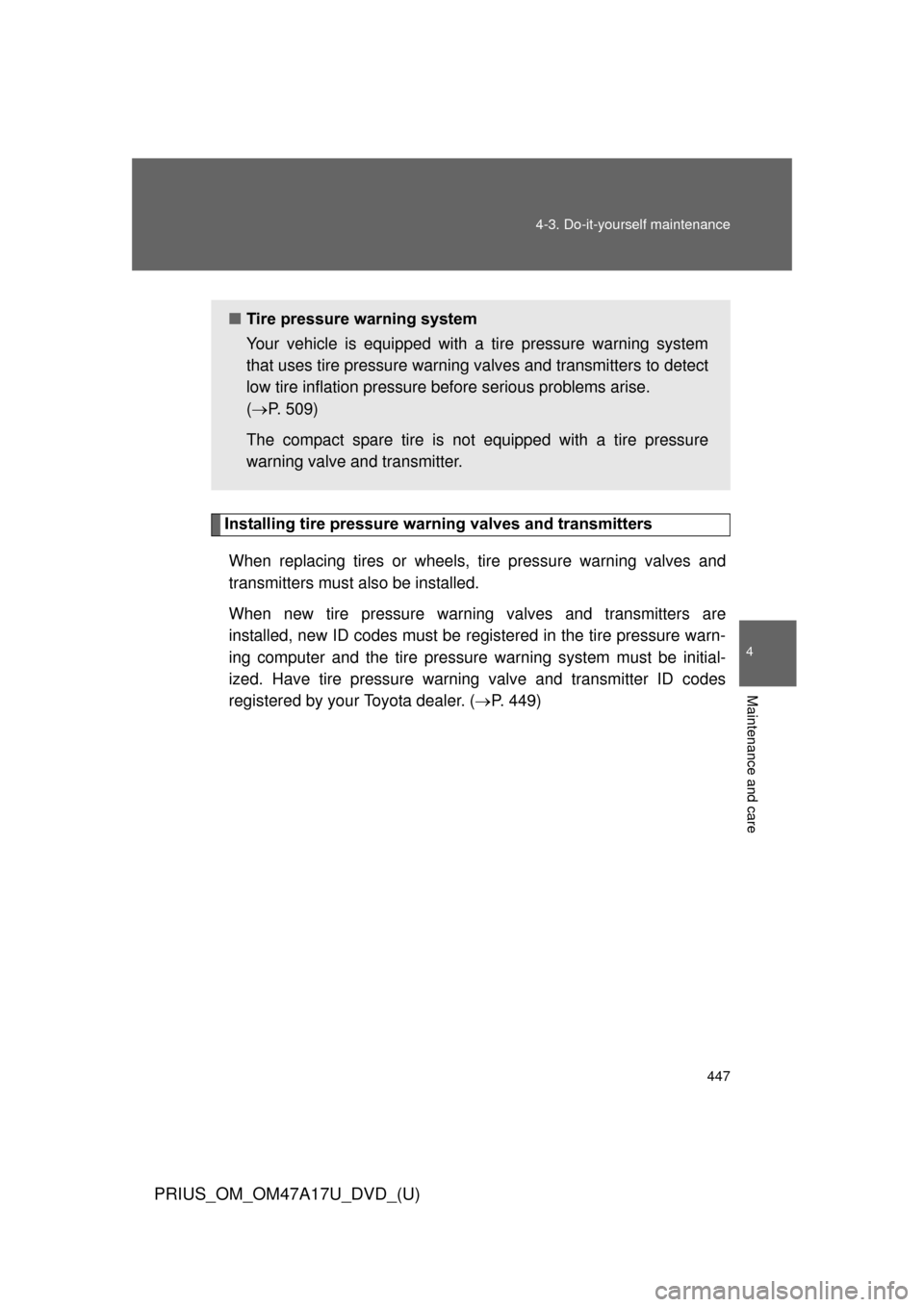
Installing tire pressure warning valves and transmitters
When replacing tires or wheels, tire pressure warning valves and
transmitters must also be installed.
When new tire pressure warning valves and transmitters are
installed, new ID codes must be registered in the tire pressure warn-
ing computer and the tire pressure warning system must be initial-
ized. Have tire pressure warning valve and transmitter ID codes
registered by your Toyota dealer. ( P. 449)
■ Tire pressure warning system
Your vehicle is equipped with a tire pressure warning system
that uses tire pressure warning valves and transmitters to detect
low tire inflation pressure before serious problems arise.
( P. 509)
The compact spare tire is not equipped with a tire pressure
warning valve and transmitter.
Page 449 of 644
449
4-3. Do-it-yourself maintenance
PRIUS_OM_OM47A17U_DVD_(U)
4
Maintenance and care
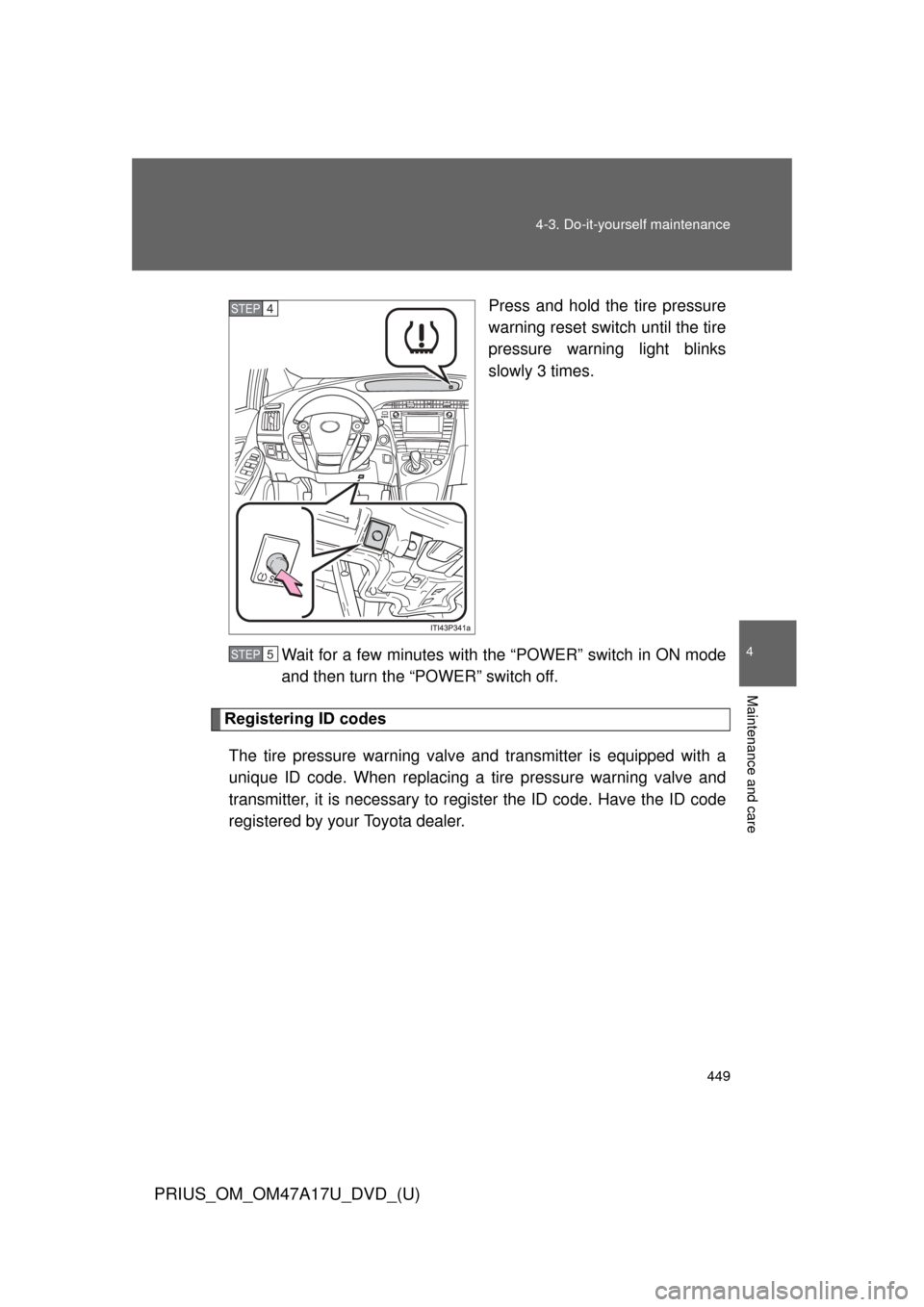
Press and hold the tire pressure
warning reset switch until the tire
pressure warning light blinks
slowly 3 times.
Wait for a few minutes with th e “POWER” switch in ON mode
and then turn the “POWER” switch off.
Registering ID codes
The tire pressure warning valve and transmitter is equipped with a
unique ID code. When replacing a tire pressure warning valve and
transmitter, it is necessary to regi ster the ID code. Have the ID code
registered by your Toyota dealer.
STEP 4
STEP 5