Page 437 of 728
437
3-4. Using the hands-free
system (for cellular phone)
3
Interior features
LC200_OM_OM60L83U_(U)
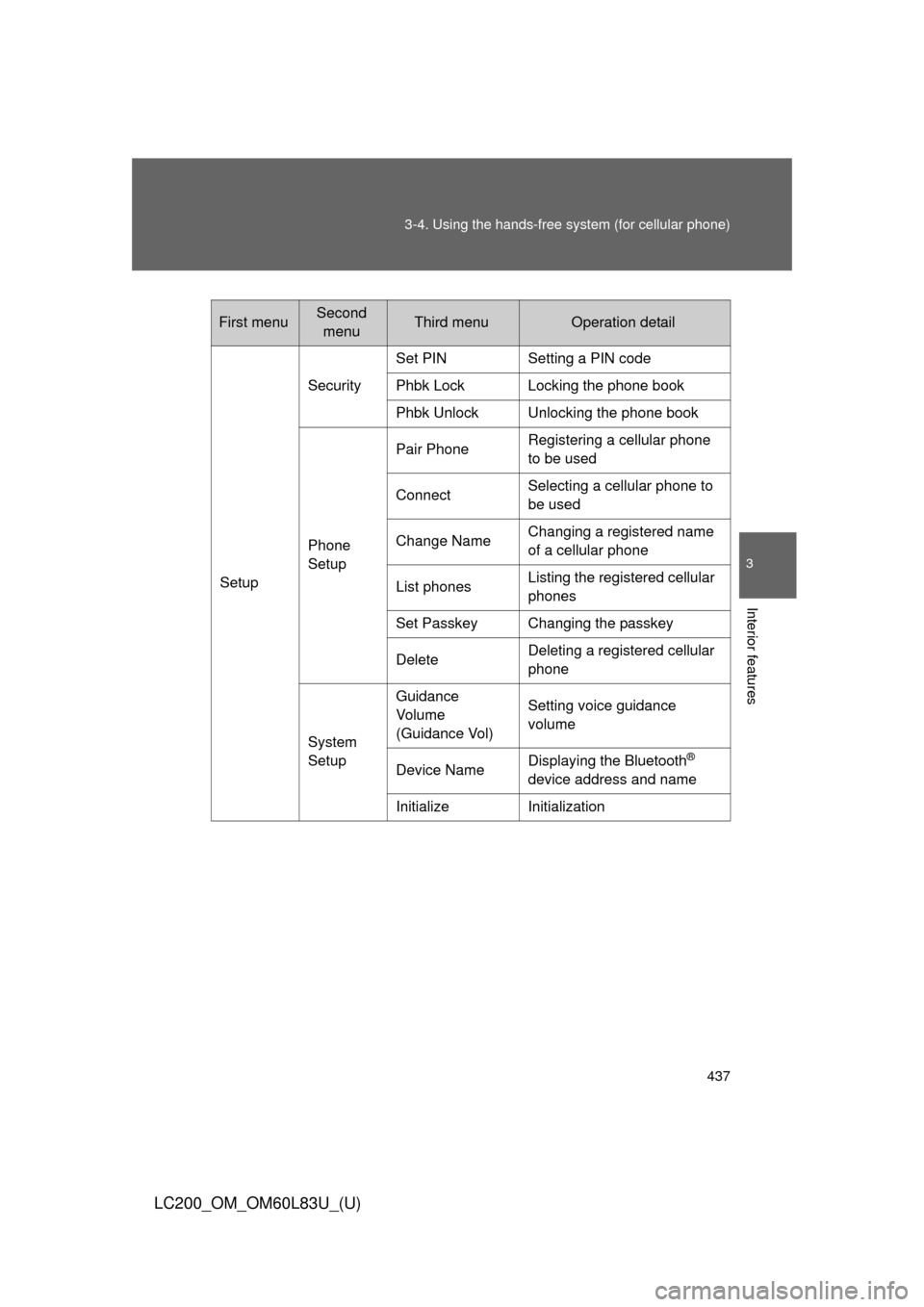
First menuSecond
menuThird menuOperation detail
Setup Security
Set PIN Setting a PIN code
Phbk Lock Locking the phone book
Phbk Unlock Unlocking the phone book
Phone
Setup Pair Phone
Registering a cellular phone
to be used
Connect Selecting a cellular phone to
be used
Change Name Changing a registered name
of a cellular phone
List phones Listing the registered cellular
phones
Set Passkey Changing the passkey
Delete Deleting a registered cellular
phone
System
Setup Guidance
Vo l u m e
(Guidance Vol)
Setting voice guidance
volume
Device Name Displaying the Bluetooth
®
device address and name
Initialize Initialization
Page 450 of 728
450 3-4. Using the hands-free system (for cellular phone)
LC200_OM_OM60L83U_(U)
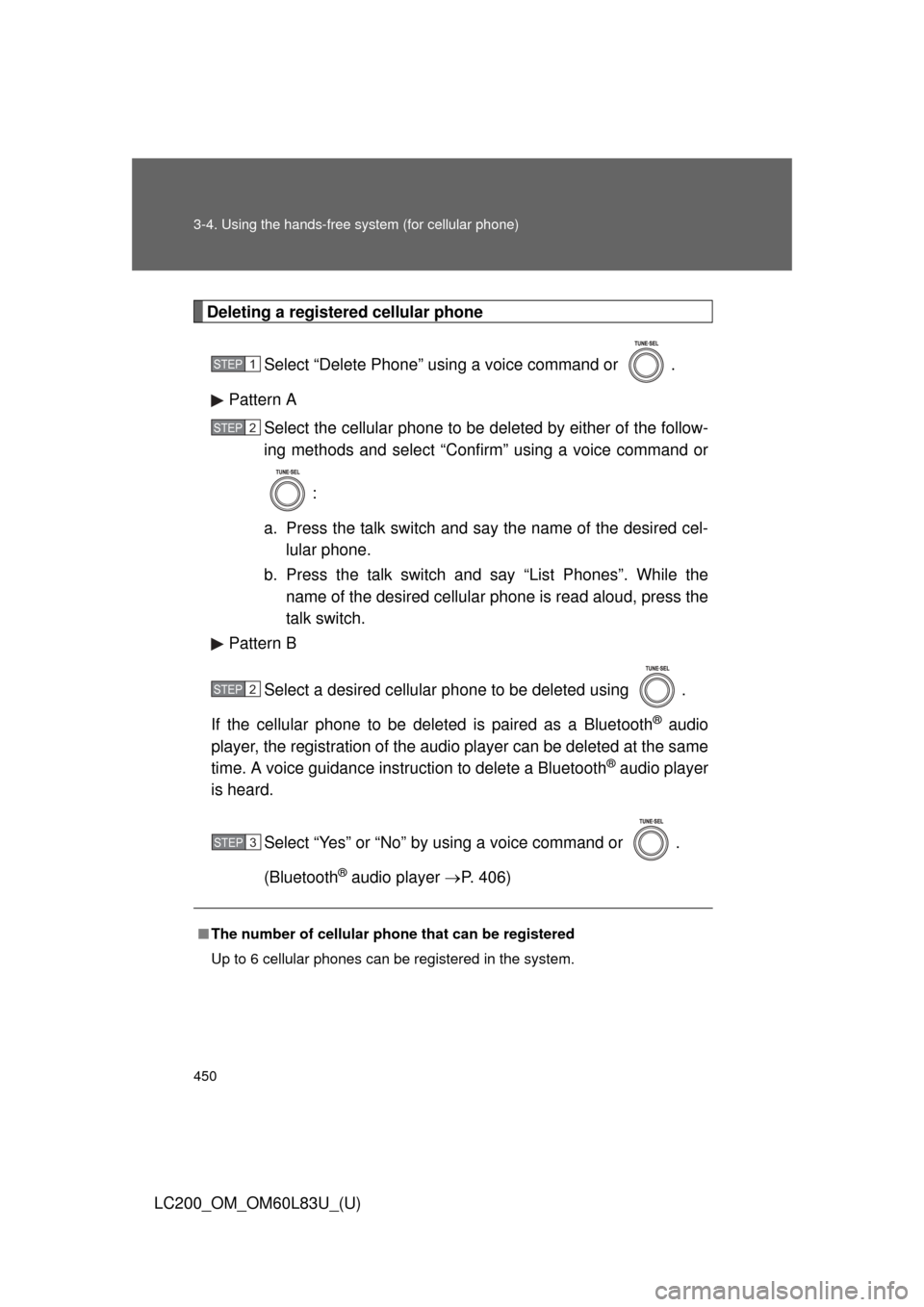
Deleting a registered cellular phoneSelect “Delete Phone” using a voice command or .
Pattern A Select the cellular phone to be deleted by either of the follow-
ing methods and select “Confirm” using a voice command or
:
a. Press the talk switch and say the name of the desired cel- lular phone.
b. Press the talk switch and say “List Phones”. While the name of the desired cellular phone is read aloud, press the
talk switch.
Pattern B
Select a desired cellular phone to be deleted using .
If the cellular phone to be deleted is paired as a Bluetooth
® audio
player, the registration of the audio player can be deleted at the same
time. A voice guidance instruction to delete a Bluetooth
® audio player
is heard.
Select “Yes” or “No” by using a voice command or .
(Bluetooth
® audio player P. 406)
■The number of cellular phone that can be registered
Up to 6 cellular phones can be registered in the system.
STEP1
STEP2
STEP2
STEP3
Page 452 of 728
452 3-4. Using the hands-free system (for cellular phone)
LC200_OM_OM60L83U_(U)
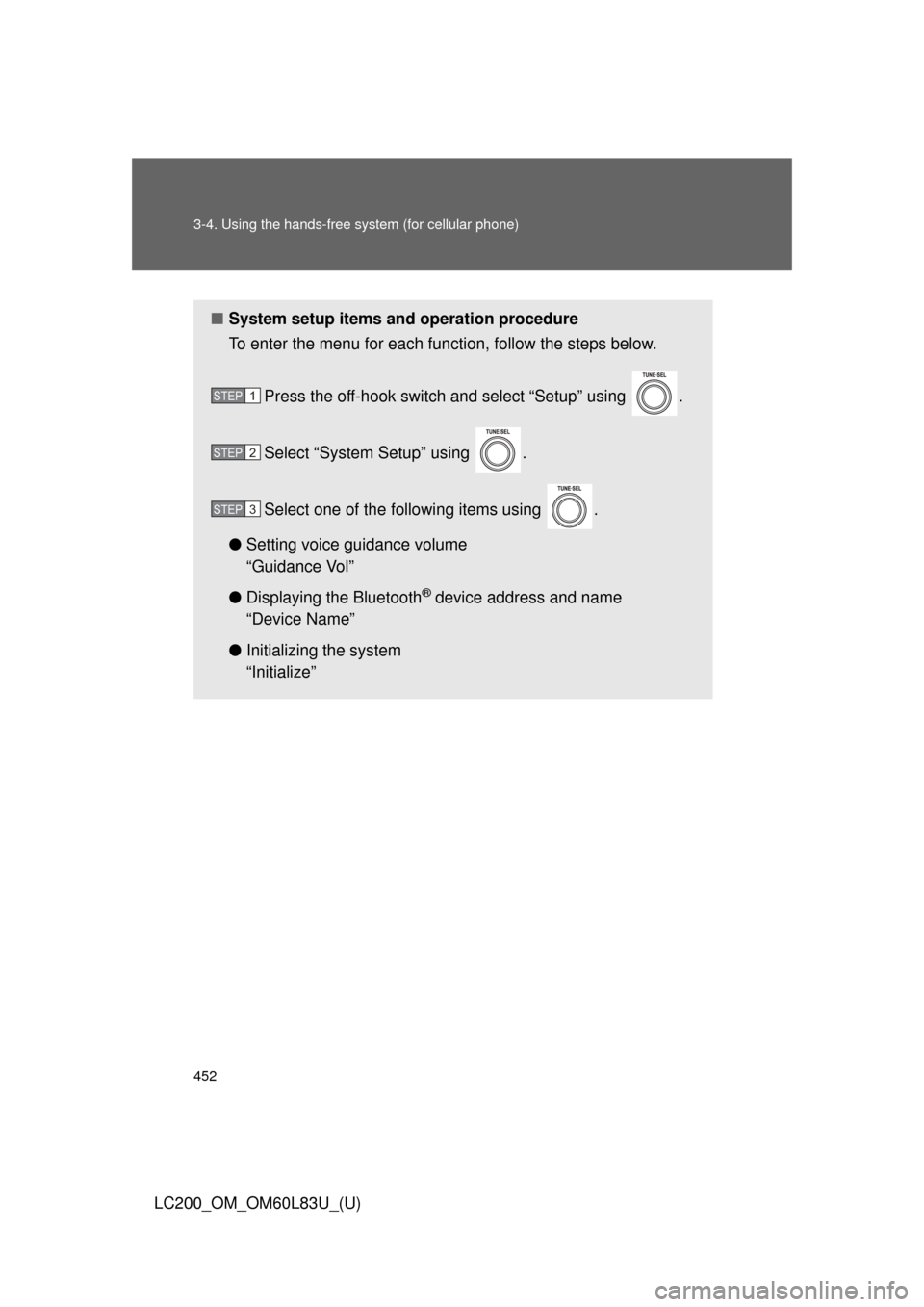
■System setup items and operation procedure
To enter the menu for each function, follow the steps below.
Press the off-hook switch and select “Setup” using .
Select “System Setup” using .
Select one of the following items using .
● Setting voice guidance volume
“Guidance Vol”
● Displaying the Bluetooth
® device address and name
“Device Name”
● Initializing the system
“Initialize”
STEP1
STEP2
STEP3
Page 455 of 728
455
3-4. Using the hands-free
system (for cellular phone)
3
Interior features
LC200_OM_OM60L83U_(U)
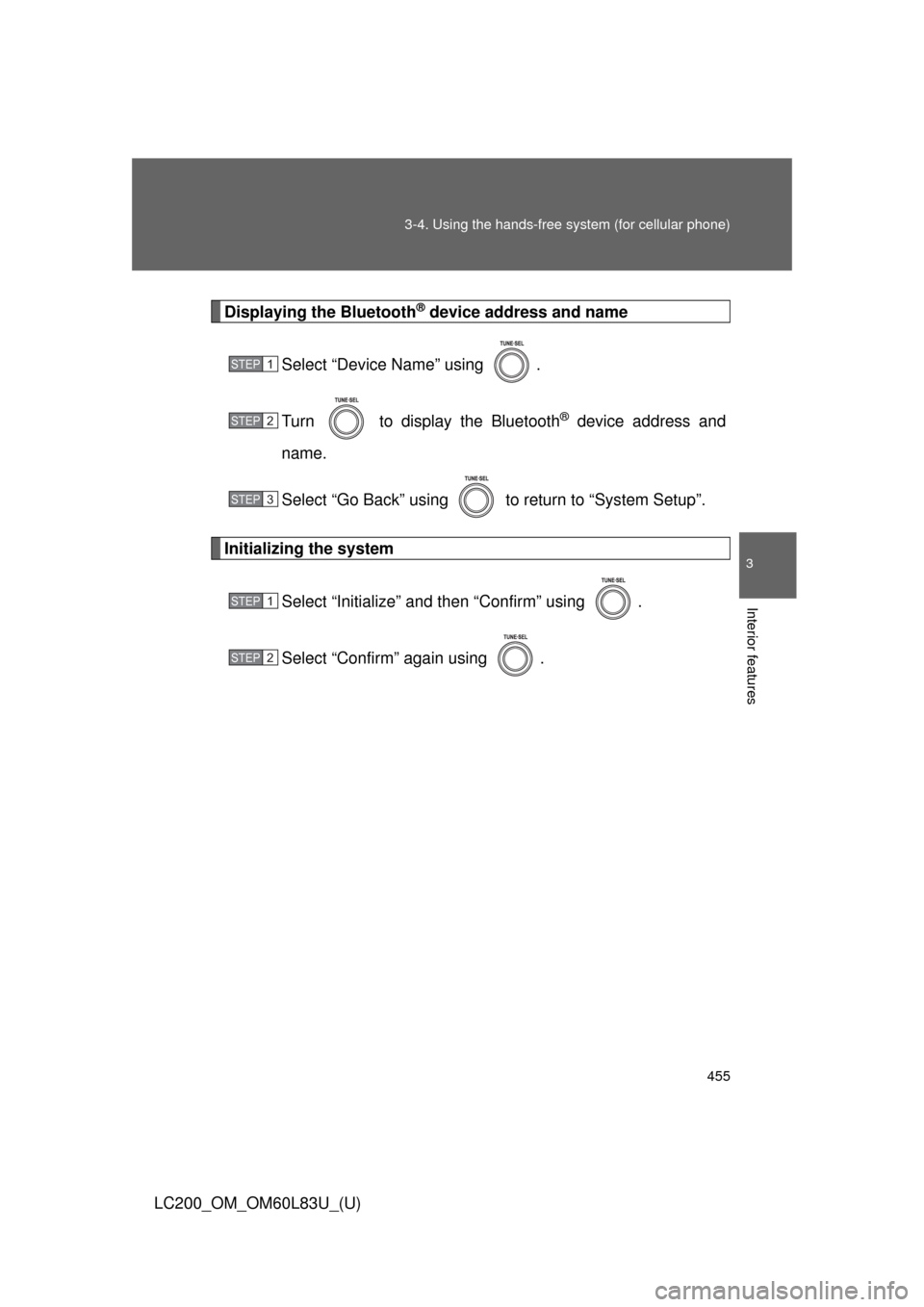
Displaying the Bluetooth® device address and name
Select “Device Name” using .
Turn to display the Bluetooth
® device address and
name.
Select “Go Back” using to return to “System Setup”.
Initializing the system
Select “Initialize” and then “Confirm” using .
Select “Confirm” again using .
STEP1
STEP2
STEP3
STEP1
STEP2
Page 456 of 728
456 3-4. Using the hands-free system (for cellular phone)
LC200_OM_OM60L83U_(U)
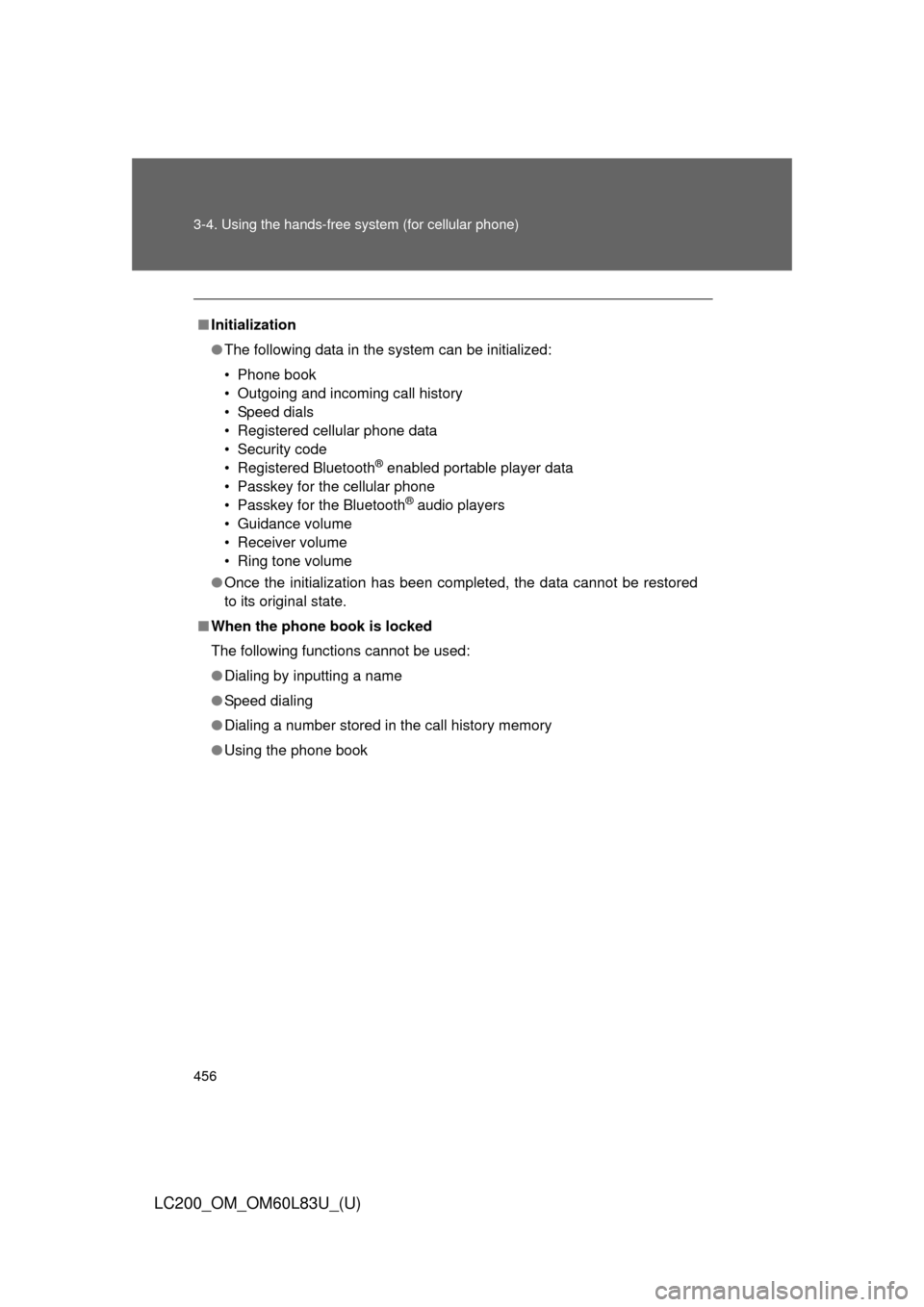
■Initialization
●The following data in the system can be initialized:
• Phone book
• Outgoing and incoming call history
• Speed dials
• Registered cellular phone data
• Security code
• Registered Bluetooth
® enabled portable player data
• Passkey for the cellular phone
• Passkey for the Bluetooth
® audio players
• Guidance volume
• Receiver volume
• Ring tone volume
● Once the initialization has been completed, the data cannot be restored
to its original state.
■ When the phone book is locked
The following functions cannot be used:
●Dialing by inputting a name
● Speed dialing
● Dialing a number stored in the call history memory
● Using the phone book
Page 510 of 728
510 3-7. Other interior features
LC200_OM_OM60L83U_(U)
■Safety Connect Services Information
●Phone calls using the vehicles Bluetooth
® technology will not be possible
during Safety Connect.
● Safety Connect is available beginning Fall 2009 on select Toyota models.
Contact with the Safety Connect response center is dependent upon the
telematics device being in operative condition, cellular connection avai\
l-
ability, and GPS satellite signal reception, which can limit the ability to
reach the response center or receive emergency service support. Enroll-
ment and Telematics Subscription Service Agreement required. A variety
of subscription terms is available; charges vary by subscription term
selected.
● Automatic Collision Notification, Emergency Assistance, Stolen Vehicle
Location, and Enhanced Roadside Assistance will function in the United
States, including Hawaii and Alaska, and in Canada. No Safety Connect
services will function outside of the United States in countries other than
Canada.
● Safety Connect services are not subject to section 255 of the Telecom-
munications Act and the device is not TTY compatible.
■ Languages
The Safety Connect response center will offer support in multiple languages.
The Safety Connect system will offer voice prompts in English and Spanish.
Please indicate your language of choice when enrolling.
■ When contacting the response center
You may be unable to contact the response center if the network is busy.
■ Safety Connect backup battery depletion
An exclusive backup battery is built in to assist the Automatic Collision Noti-
fication, which is activated when impact above a certain level is applied to
the vehicle, or when the airbags operate. This battery is a primary battery,
and cannot be recharged. The red LED indicator will flash to indicate that the
battery should be replaced.
The backup battery will need to be replaced if the Automatic Collision Notifi-
cation operates for 60 seconds or more. For replacement, consult your Toy-
ota dealer.
Page 717 of 728
717
Alphabetical index
LC200_OM_OM60L83U_(U)
Back door
Back door ............................... 52
Wireless remote control key ... 44
Back-up lights Replacing light bulbs ............ 586
Wattage ................................ 683
Battery If the vehicle has discharged battery ............................... 662
Preparing and checking before winter ...................... 313
Bluetooth
® audio
(vehicles without
navigation system) ............... 406
Bluetooth
® audio
(vehicles with
navigation system)
*
Bluetooth® phone (vehicles
without navigation
system ................................... 427
Bluetooth
® phone (vehicles
with navigation system)
*
Bottle holder ............................ 476
Brake Fluid...................................... 541
Parking brake ....................... 181
Brake assist ............................. 285
Break-in tips ............................ 159
Brightness control Instrument light control ......... 186 Care
Exterior ..................................516
Interior ...................................519
Seat belts ..............................520
Card holder ...............................478
Cargo capacity .........................305
Cargo net hooks.......................499
CD player
*/changer*...............369
Center differential
lock/unlock switch.................244
Chains .......................................315
Child-protectors .........................48
Child restraint system Booster seats, definition ........138
Booster seats, installation .....143
Convertible seats, definition .............................138
Convertible seats,
installation ...........................143
Front passenger occupant classification system ........... 132
Infant seats, definition ...........138
Infant seats, installation.........143
Installing child restraint systems with
LATCH system........ ............144
Installing child restraint systems with seat belts .......146
Installing child restraint systems with top
tether strap..........................151
BC
*: For vehicles with a navigation system,
refer to the “Navigation System Owner’s Manual”.