Page 44 of 728
44
1-2. Opening, closing and locking the doors
LC200_OM_OM60L83U_(U)
Wireless remote control
■Operation signals
●Doors: A buzzer sounds and the emergency flashers flash to indicate
that the doors have been locked/unlocked. (Locked: Once; Unlocked:
Tw i c e )
● Windows and moon roof: A buzzer sounds when the windows and moon
roof begin to open.
■ Operating conditions
The wireless remote control will not operate when the “ENGINE START
STOP” switch is in any position other than OFF.
■ Door lock buzzer
If a door is not fully closed, a buzzer sounds continuously for 5 seconds if an
attempt to lock the door is made. Fully close the door to stop the buzzer, and
lock the vehicle once more.
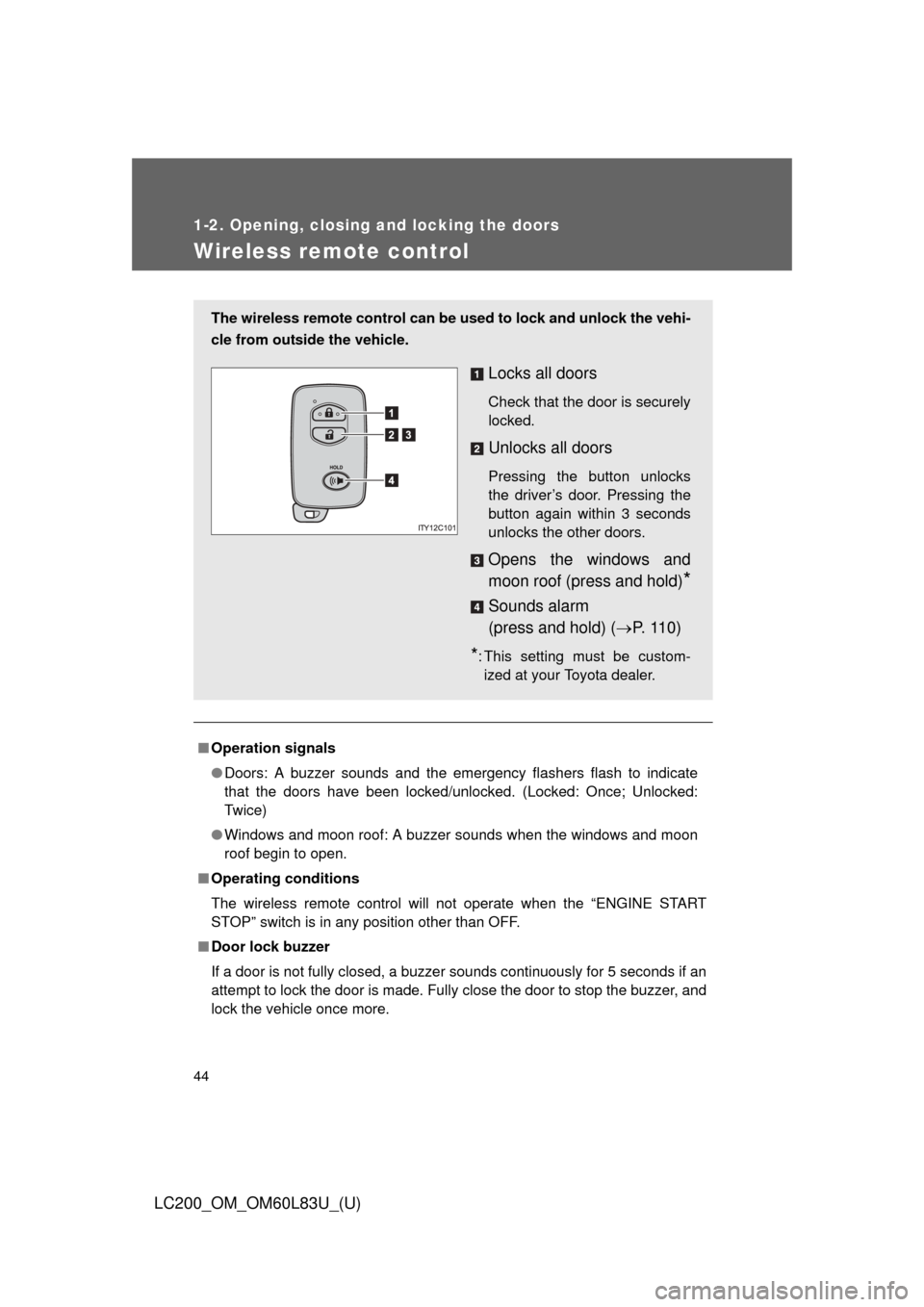
The wireless remote control can be used to lock and unlock the vehi-
cle from outside the vehicle.
Locks all doors
Check that the door is securely
locked.
Unlocks all doors
Pressing the button unlocks
the driver’s door. Pressing the
button again within 3 seconds
unlocks the other doors.
Opens the windows and
moon roof (press and hold)
*
Sounds alarm
(press and hold) ( P. 110)
*: This setting must be custom-
ized at your Toyota dealer.
Page 46 of 728
46 1-2. Opening, closing and locking the doors
LC200_OM_OM60L83U_(U)
■Certification for wireless remote control
FCC ID: HYQ14AEM
FCC ID: HYQ13BZS
FCC ID: HYQ14ABK
*
FCC ID: HYQ13CZA*
*
: For U.S. mainland only
NOTE:
This device complies with part 15 of the FCC Rules. Operation is subject to
the following two conditions: (1) This device may not cause harmful interfer-
ence, and (2) this device must accept any interference received, including
interference that may cause undesired operation.
FCC WARNING:
Changes or modifications not expressly approved by the party responsible
for compliance could void the user’s authority to operate the equipment.
CAUTION
■ When using the wireless remote control and operating the power win-
dows and moon roof
Operate the power window or moon roof after checking to make sure that
there is no possibility of any passenger having any of their body parts caught
in the window or moon roof. Also, do not allow children to operate the wire-
less remote control. It is possible for children and other passengers to get
caught in power window and moon roof.
Page 64 of 728
64 1-3. Adjustable components (seats, mirrors, steering wheel)
LC200_OM_OM60L83U_(U)
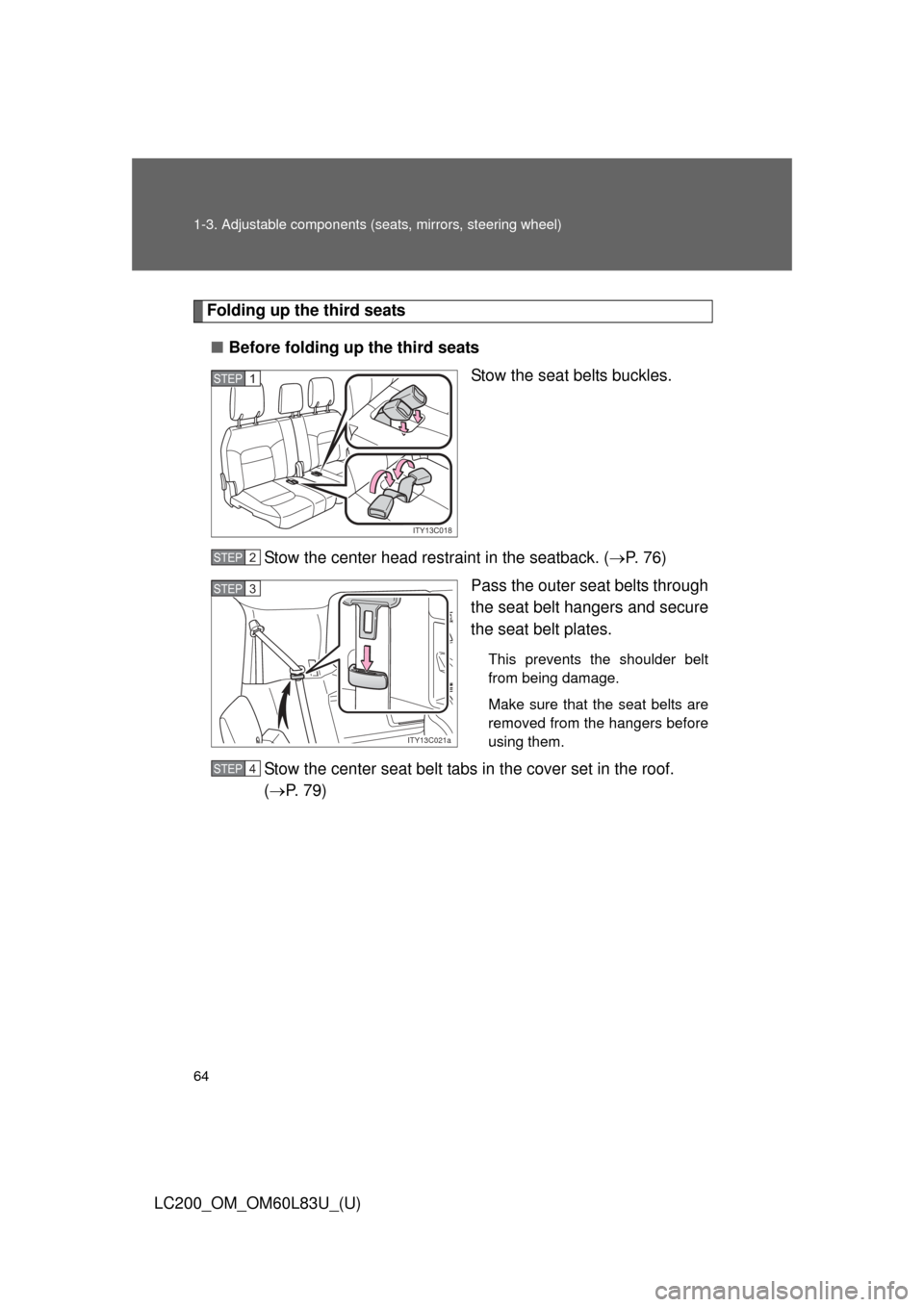
Folding up the third seats
■ Before folding up the third seats
Stow the seat belts buckles.
Stow the center head restraint in the seatback. ( P. 76)
Pass the outer seat belts through
the seat belt hangers and secure
the seat belt plates.
This prevents the shoulder belt
from being damage.
Make sure that the seat belts are
removed from the hangers before
using them.
Stow the center seat belt tabs in the cover set in the roof.
( P. 7 9 )
ITY13C018
STEP1
STEP2
ITY13C021a
STEP3
STEP4
Page 95 of 728
95
1
Before driving
LC200_OM_OM60L83U_(U)
1-4. Opening and closing the windows and moon roof
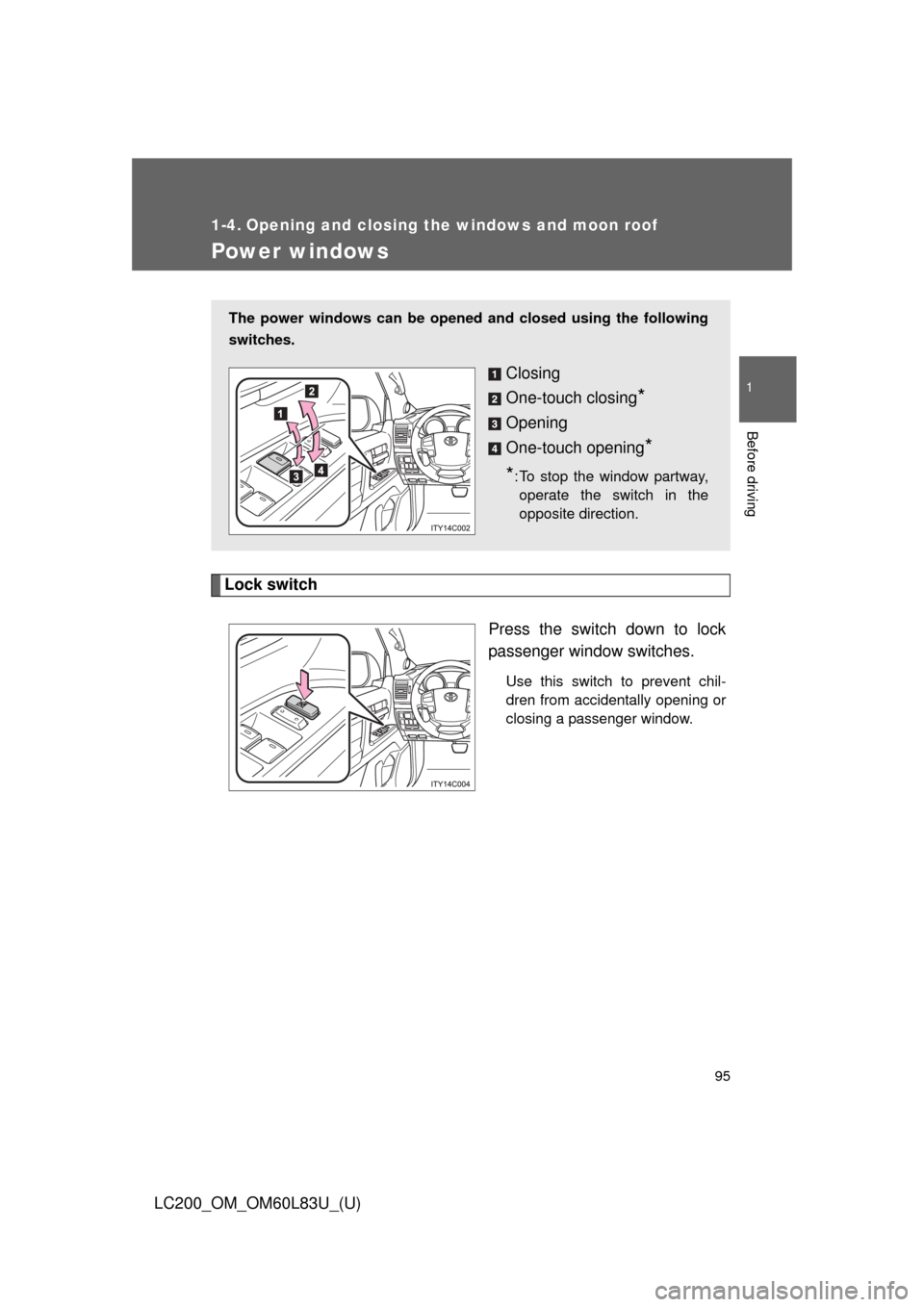
Power windows
Lock switchPress the switch down to lock
passenger window switches.
Use this switch to prevent chil-
dren from accidentally opening or
closing a passenger window.
The power windows can be opened and closed using the following
switches.
Closing
One-touch closing
*
Opening
One-touch opening
*
*
: To stop the window partway, operate the switch in the
opposite direction.
Page 96 of 728
96 1-4. Opening and closing the windows and moon roof
LC200_OM_OM60L83U_(U)
■The power windows can be operated when
The “ENGINE START STOP” switch is in IGNITION ON mode.
■ Door lock linked window operation
The following functions can be used if customized at your Toyota dealer.
●The power windows can be opened and closed using the mechanical
key. ( P. 659)
● The power windows can be opened using the wireless remote control.
( P. 4 4 )
● The power windows can be closed using the smart key system. ( P. 33)
■ Operating the power windows after turning the “ENGINE START STOP”
switch OFF
The power windows can be operated for approximately 45 seconds even
after the “ENGINE START STOP” switch is turned ACCESSORY mode or
turned OFF. They cannot, however, be operated once the driver’s or front
passenger’s door is opened.
■ Jam protection function
If an object becomes caught between the window and the window frame,
window travel is stopped and the window is opened slightly.
Page 97 of 728
97
1-4. Opening and closing the windows and moon roof
1
Before driving
LC200_OM_OM60L83U_(U)
■
When the power window does not close normally
If the jam protection function is operating abnormally and a window cannot
be closed, perform the following operations using the power window switch
on the relevant door.
●After stopping the vehicle, the window can be closed by holding the
power window switch in the one-touch closing position while the
“ENGINE START STOP” switch is turned to IGNITION ON mode.
● If the window still cannot be closed even by carrying out the operation
explained above, initialize the function by performing the following proce-
dure.
Hold the power window switch in the one-touch closing position.
Continue holding the switch for a further 6 seconds after the win-
dow has closed.
Hold the power window switch in the one-touch opening position.
Continue holding the switch for a further 2 seconds after the win-
dow has opened completely.
Hold the power window switch in the one-touch closing position
once again. Continue holding the switch for a further 2 seconds
after the window has closed.
If you release the switch while the window is moving, start again from the
beginning. If the window continues to close but then re-open slightly even
after performing the above procedure correctly, have the vehicle inspected
by your Toyota dealer.
■ Customization
Settings (e.g. linked door lock operation) can be changed.
(Customizable features P. 700)
STEP1
STEP2
STEP3
Page 98 of 728
98 1-4. Opening and closing the windows and moon roof
LC200_OM_OM60L83U_(U)
CAUTION
■Closing the windows
Observe the following precautions.
Failing to do so may result in death or serious injury.
●The driver is responsible for all the power window operations, including the
operation for the passengers. In order to prevent accidental operation,
especially by a child, do not let a child operate the power windows. It is
possible for children and other passengers to have body parts caught in
the power window. Also, when riding with a child, it is recommended to use
the window lock switch. ( P. 95)
● Check to make sure that all passengers do not have any part of their body
in a position where it could be caught when a window is being operated.
● When using the smart key system, wireless remote control or mechanical
key and operating the power windows, operate the power window after
checking to make sure that there is no possibility of any passenger having
any of their body parts caught in the window. Also, do not let a child oper-
ate window by the smart key system, wireless remote control or mechani-
cal key. It is possible for children and other passengers to get caught in the
power window.
● When exiting the vehicle, turn the “ENGINE START STOP” switch off,
carry the key and exit the vehicle along with the child. There may be acci-
dental operation, due to mischief, etc., that may possibly lead to an acci-
dent.
■ Jam protection function
●Never try jamming any part of your body to activate the jam protection
function intentionally.
● The jam protection function may not work if something gets caught just
before the window fully closes.
Page 99 of 728
99
1
1-4. Opening and closing the windows and moon roof
Before driving
LC200_OM_OM60L83U_(U)
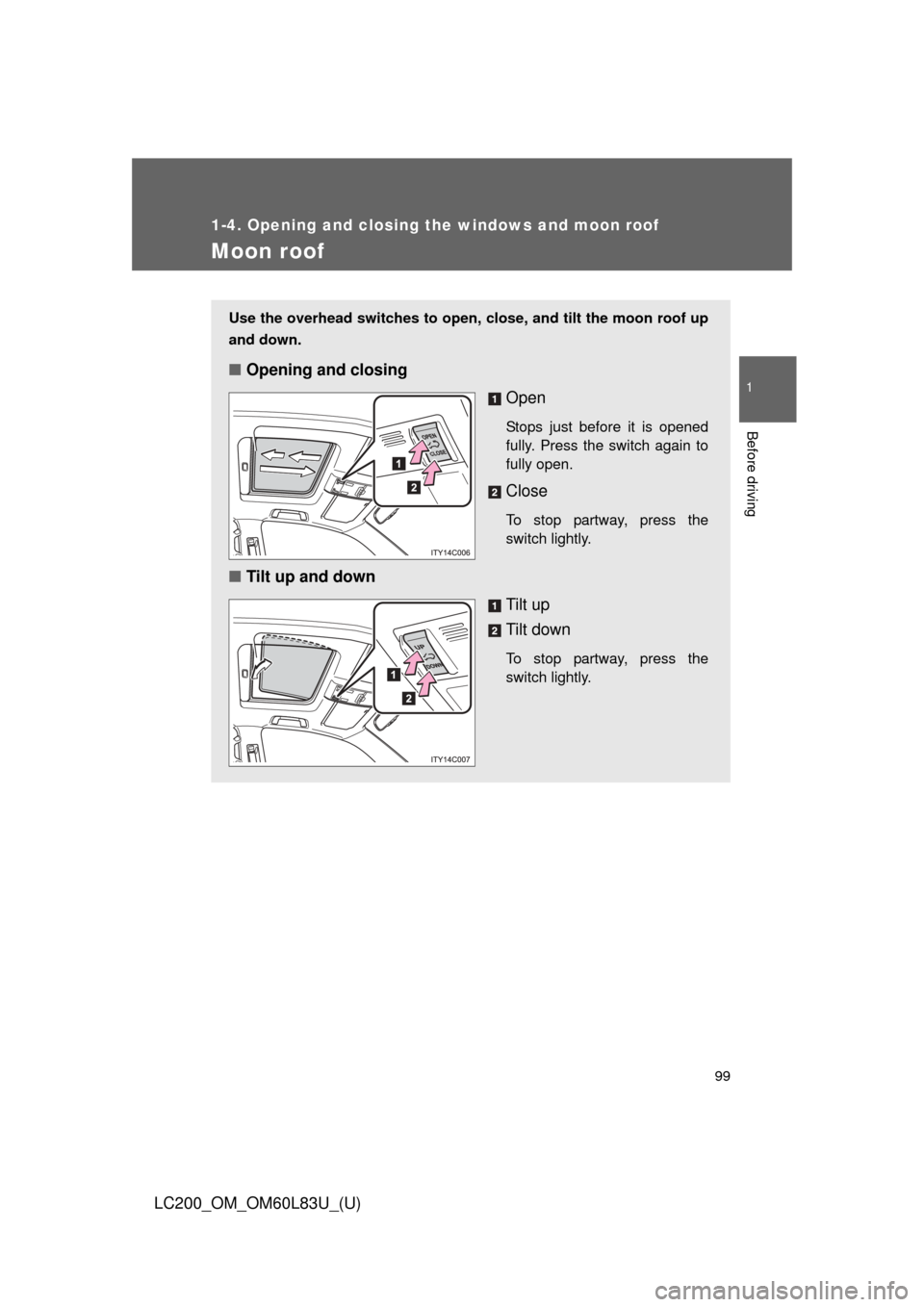
Moon roof
Use the overhead switches to open, close, and tilt the moon roof up
and down.
■Opening and closing
Open
Stops just before it is opened
fully. Press the switch again to
fully open.
Close
To stop partway, press the
switch lightly.
■Tilt up and down
Tilt up
Tilt down
To stop partway, press the
switch lightly.