2015 TOYOTA HILUX USB
[x] Cancel search: USBPage 4 of 540
TABLE OF CONTENTS4
HILUX_OM_OM0K219E_(EE)5-1. Using the air conditioning
system and defogger
Boost ventilator system......250
Manual air conditioning system .............................253
Automatic air conditioning system .............................260
Power heater .....................267
Rear window and outside rear view mirror
defoggers.........................268 5-2. Using the audio system
Audio system type ............. 270
Using the radio .................. 272
Using the CD player .......... 276
Playing back MP3 and WMA discs ...................... 281
Operating an iPod ............. 287
Operating a USB memory................... 295
Optimal use of the audio system ................... 303
Using the AUX port ........... 306
Bluetooth
® audio/phone .... 307
Using the Bluetooth®
audio/phone .................... 312
Operating a Bluetooth
®
enabled portable
player .............................. 316
Making a phone call .......... 319
Using the “SETUP” menu (“Bluetooth
*”
menu) .............................. 324
Using the “SETUP” menu (“TEL” or “PHONE”
menu) .............................. 331
5-3. Using the interior lights Interior lights list ................ 338
• Personal/interior light main switch ................... 339
• Personal/interior lights ............................. 339
• Interior light ................... 340
5Interior features
*: Bluetooth is a registered trademark of Bluetooth SIG, Inc.
HILUX_OM_OM0K219E_(EE).book Page 4 Wednesday, May 14, 2014 3 :06 PM
Page 25 of 540
25Pictorial index
HILUX_OM_OM0K219E_(EE)Meters . . . . . . . . . . . . . . . . . . . . . . . . . . . . . . . . . . . . . . . . . . . P. 100
Reading the meters . . . . . . . . . . . . . . . . . . . . . . . . . . . . . . . . . P. 100
Adjusting the instrument panel light
*1. . . . . . . . . . . . . . . . . . . P. 102
Warning lights/indicator lights . . . . . . . . . . . . . . . . . . . . . . . . . . P. 94
When the warning lights come on . . . . . . . . . . . . . . . . . . . . . . P. 448
Parking brake lever . . . . . . . . . . . . . . . . . . . . . . . . . . . . . . . . P. 195
Applying/releasing . . . . . . . . . . . . . . . . . . . . . . . . . . . . . . . . . . P. 195
Precautions against winter season . . . . . . . . . . . . . . . . . . . . . P. 244
Warning light . . . . . . . . . . . . . . . . . . . . . . . . . . . . . . . . . . . . . . P. 448
Turn signal lever . . . . . . . . . . . . . . . . . . . . . . . . . . . . . . . . . . P. 194
Headlight switch . . . . . . . . . . . . . . . . . . . . . . . . . . . . . . . . . . P. 197
Headlights/front position lights/tail lights . . . . . . . . . . . . . . . . . P. 197
Fog lights
*1 . . . . . . . . . . . . . . . . . . . . . . . . . . . . . . . . . . . . . . . P. 201
Windshield wiper and washer switch . . . . . . . . . . . . . . . . . P. 204
Usage . . . . . . . . . . . . . . . . . . . . . . . . . . . . . . . . . . . . . . . . . . . P. 204
Adding washer fluid . . . . . . . . . . . . . . . . . . . . . . . . . . . . . . . . . P. 394
Hood lock release lever . . . . . . . . . . . . . . . . . . . . . . . . . . . . P. 378
Fuel filler door opener
*1. . . . . . . . . . . . . . . . . . . . . . . . . . . . P. 211
Manual air conditioning system
*1. . . . . . . . . . . . . . . . . . . . P. 253
Automatic air conditioning system
*1 . . . . . . . . . . . . . . . . . P. 260
Audio system
*1. . . . . . . . . . . . . . . . . . . . . . . . . . . . . . . . . . . P. 270
AUX port/USB port . . . . . . . . . . . . . . . . . . . . . . . . . P. 287, 295, 306
Multimedia
*1, 2
Rear view monitor system*1 . . . . . . . . . . . . . . . . . . . . . . . . P. 219
Clock . . . . . . . . . . . . . . . . . . . . . . . . . . . . . . . . . . . . . . . . . . . . P. 349
Multi-information display
*1 . . . . . . . . . . . . . . . . . . . . . . . . . P. 104
*1: If equipped
*2: Refer to “Navigation system Owner’s manual”.
5
6
7
8
9
10
11
12
13
HILUX_OM_OM0K219E_(EE).book Page 25 Wednesday, May 14, 2014 3:06 PM
Page 28 of 540
28Pictorial index
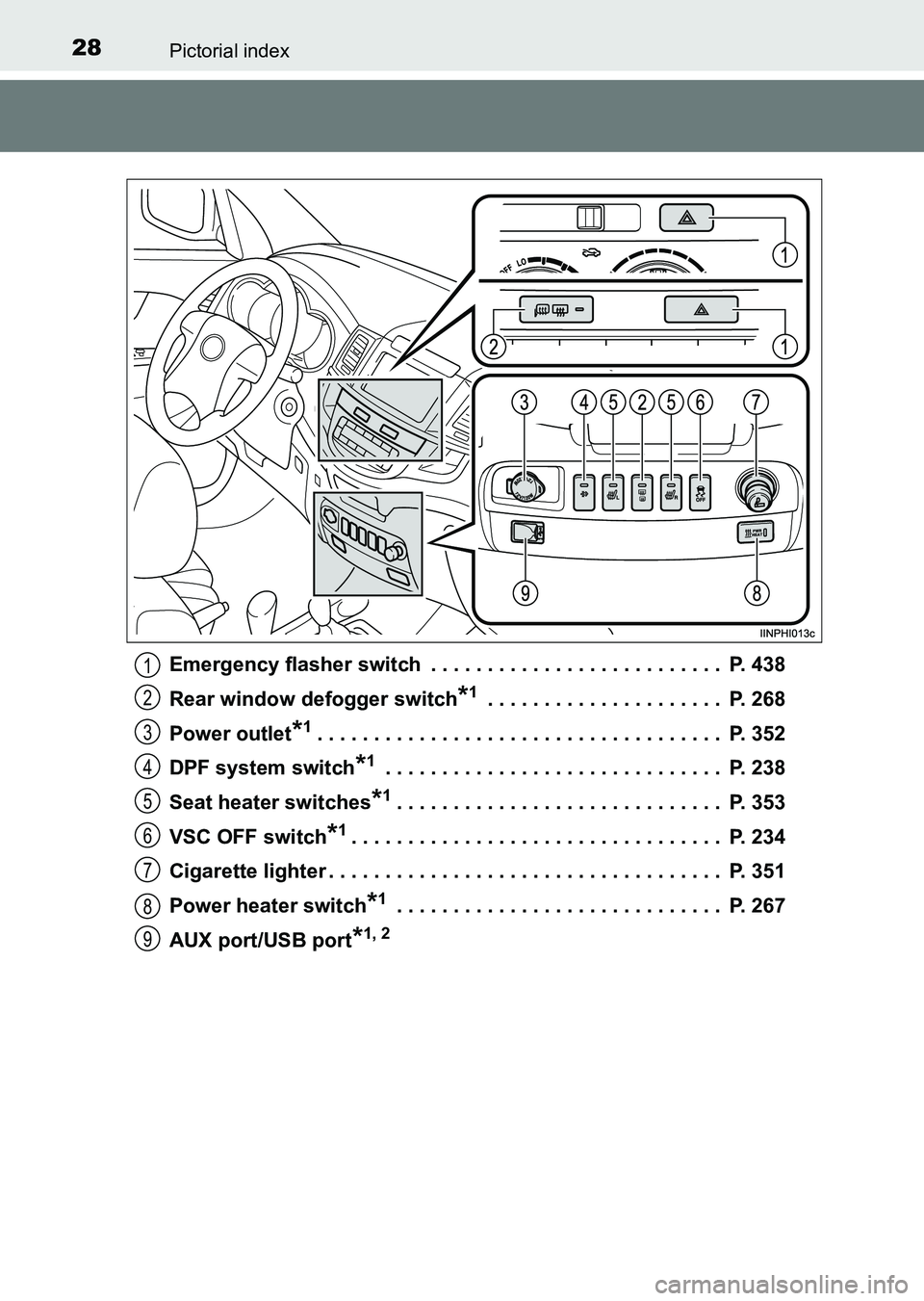
HILUX_OM_OM0K219E_(EE)Emergency flasher switch . . . . . . . . . . . . . . . . . . . . . . . . . . P. 438
Rear window defogger switch
*1 . . . . . . . . . . . . . . . . . . . . . P. 268
Power outlet
*1. . . . . . . . . . . . . . . . . . . . . . . . . . . . . . . . . . . . P. 352
DPF system switch
*1 . . . . . . . . . . . . . . . . . . . . . . . . . . . . . . P. 238
Seat heater switches
*1. . . . . . . . . . . . . . . . . . . . . . . . . . . . . P. 353
VSC OFF switch
*1. . . . . . . . . . . . . . . . . . . . . . . . . . . . . . . . . P. 234
Cigarette lighter . . . . . . . . . . . . . . . . . . . . . . . . . . . . . . . . . . . P. 351
Power heater switch
*1 . . . . . . . . . . . . . . . . . . . . . . . . . . . . . P. 267
AUX port/USB port
*1, 2
1
2
3
4
5
6
7
8
9
HILUX_OM_OM0K219E_(EE).book Page 28 Wednesday, May 14, 2014 3:06 PM
Page 33 of 540

33Pictorial index
HILUX_OM_OM0K219E_(EE)Meters . . . . . . . . . . . . . . . . . . . . . . . . . . . . . . . . . . . . . . . . . . . P. 100
Reading the meters . . . . . . . . . . . . . . . . . . . . . . . . . . . . . . . . . P. 100
Adjusting the instrument panel light
*1. . . . . . . . . . . . . . . . . . . P. 102
Warning lights/indicator lights . . . . . . . . . . . . . . . . . . . . . . . . . . P. 94
When the warning lights come on . . . . . . . . . . . . . . . . . . . . . . P. 448
Parking brake lever . . . . . . . . . . . . . . . . . . . . . . . . . . . . . . . . P. 195
Applying/releasing . . . . . . . . . . . . . . . . . . . . . . . . . . . . . . . . . . P. 195
Precautions against winter season . . . . . . . . . . . . . . . . . . . . . P. 244
Warning light . . . . . . . . . . . . . . . . . . . . . . . . . . . . . . . . . . . . . . P. 448
Turn signal lever . . . . . . . . . . . . . . . . . . . . . . . . . . . . . . . . . . P. 194
Headlight switch . . . . . . . . . . . . . . . . . . . . . . . . . . . . . . . . . . P. 197
Headlights/front position lights/tail lights . . . . . . . . . . . . . . . . . P. 197
Fog lights
*1 . . . . . . . . . . . . . . . . . . . . . . . . . . . . . . . . . . . . . . . P. 201
Windshield wiper and washer switch . . . . . . . . . . . . . . . . . P. 204
Usage . . . . . . . . . . . . . . . . . . . . . . . . . . . . . . . . . . . . . . . . . . . P. 204
Adding washer fluid . . . . . . . . . . . . . . . . . . . . . . . . . . . . . . . . . P. 394
Hood lock release lever . . . . . . . . . . . . . . . . . . . . . . . . . . . . P. 378
Fuel filler door opener
*1. . . . . . . . . . . . . . . . . . . . . . . . . . . . P. 211
Manual air conditioning system
*1. . . . . . . . . . . . . . . . . . . . P. 253
Automatic air conditioning system
*1 . . . . . . . . . . . . . . . . . P. 260
Audio system
*1. . . . . . . . . . . . . . . . . . . . . . . . . . . . . . . . . . . P. 270
AUX port/USB port . . . . . . . . . . . . . . . . . . . . . . . . . P. 287, 295, 306
Multimedia
*1, 2
Rear view monitor system*1 . . . . . . . . . . . . . . . . . . . . . . . . P. 219
Clock . . . . . . . . . . . . . . . . . . . . . . . . . . . . . . . . . . . . . . . . . . . . P. 349
Multi-information display
*1 . . . . . . . . . . . . . . . . . . . . . . . . . P. 104
*1: If equipped
*2: Refer to “Navigation system Owner’s manual”.
5
6
7
8
9
10
11
12
13
HILUX_OM_OM0K219E_(EE).book Page 33 Wednesday, May 14, 2014 3:06 PM
Page 36 of 540
36Pictorial index
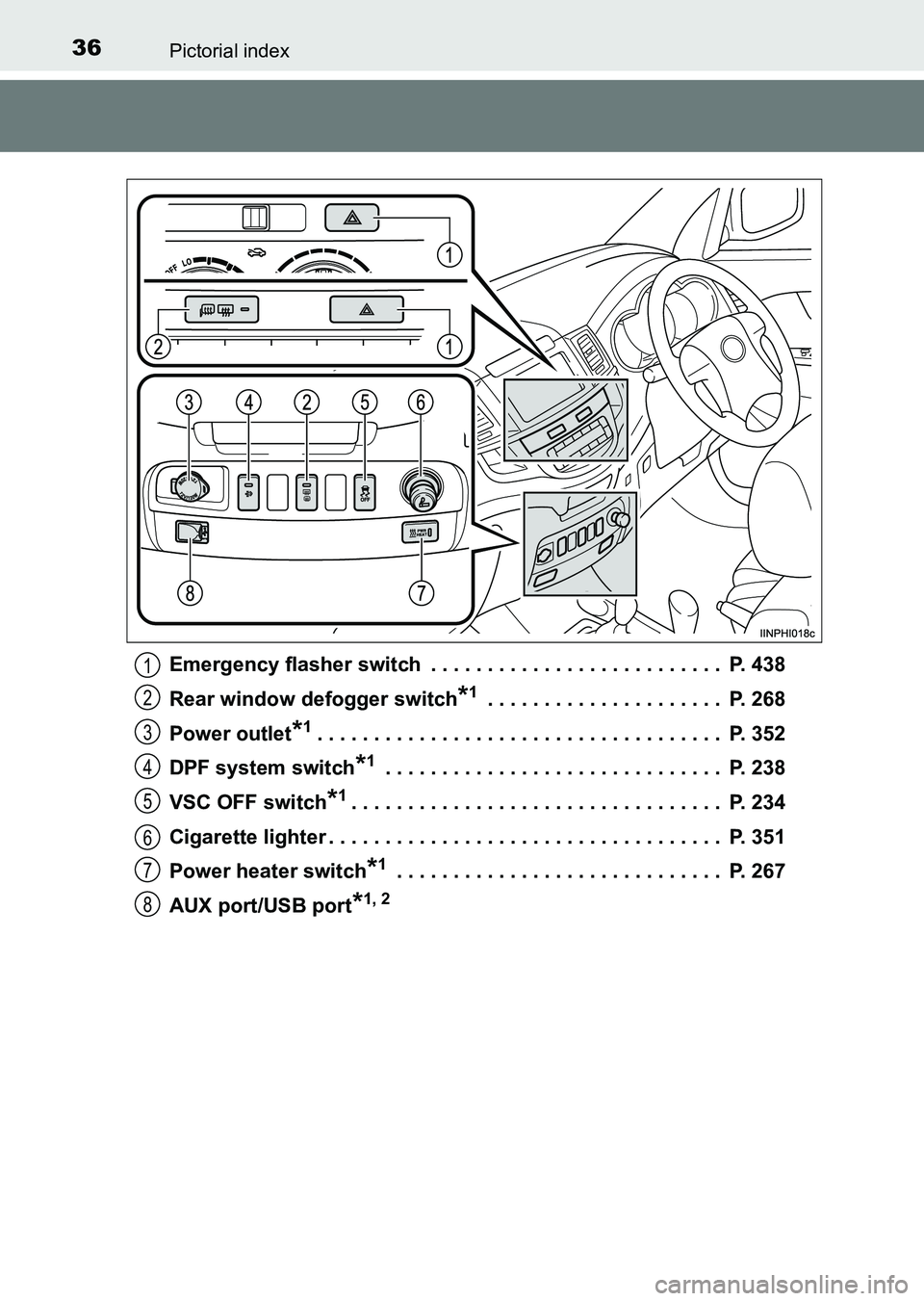
HILUX_OM_OM0K219E_(EE)Emergency flasher switch . . . . . . . . . . . . . . . . . . . . . . . . . . P. 438
Rear window defogger switch
*1 . . . . . . . . . . . . . . . . . . . . . P. 268
Power outlet
*1. . . . . . . . . . . . . . . . . . . . . . . . . . . . . . . . . . . . P. 352
DPF system switch
*1 . . . . . . . . . . . . . . . . . . . . . . . . . . . . . . P. 238
VSC OFF switch
*1. . . . . . . . . . . . . . . . . . . . . . . . . . . . . . . . . P. 234
Cigarette lighter . . . . . . . . . . . . . . . . . . . . . . . . . . . . . . . . . . . P. 351
Power heater switch
*1 . . . . . . . . . . . . . . . . . . . . . . . . . . . . . P. 267
AUX port/USB port
*1, 2
1
2
3
4
5
6
7
8
HILUX_OM_OM0K219E_(EE).book Page 36 Wednesday, May 14, 2014 3:06 PM
Page 249 of 540
249
5Interior features
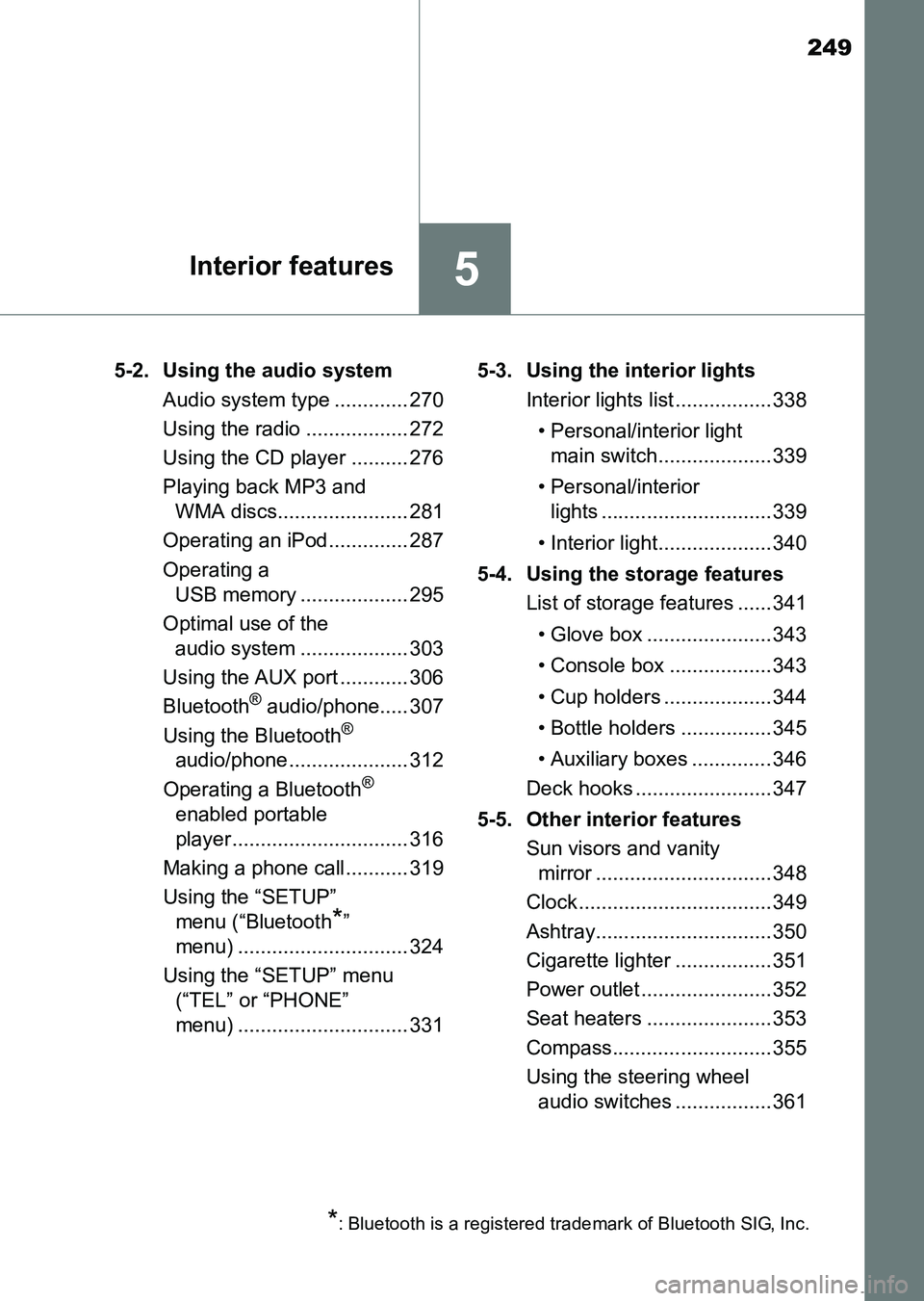
HILUX_OM_OM0K219E_(EE)5-2. Using the audio system
Audio system type ............. 270
Using the radio .................. 272
Using the CD player .......... 276
Playing back MP3 and WMA discs....................... 281
Operating an iPod.............. 287
Operating a USB memory ................... 295
Optimal use of the audio system ................... 303
Using the AUX port ............ 306
Bluetooth
® audio/phone..... 307
Using the Bluetooth®
audio/phone ..................... 312
Operating a Bluetooth
®
enabled portable
player............................... 316
Making a phone call........... 319
Using the “SETUP” menu (“Bluetooth
*”
menu) .............................. 324
Using the “SETUP” menu (“TEL” or “PHONE”
menu) .............................. 331 5-3. Using the interior lights
Interior lights list ................. 338
• Personal/interior light main switch.................... 339
• Personal/interior lights .............................. 339
• Interior light.................... 340
5-4. Using the storage features List of storage features ...... 341
• Glove box ...................... 343
• Console box .................. 343
• Cup holders ................... 344
• Bottle holders ................ 345
• Auxiliary boxes .............. 346
Deck hooks ........................ 347
5-5. Other interior features Sun visors and vanity mirror ............................... 348
Clock .................................. 349
Ashtray............................... 350
Cigarette lighter ................. 351
Power outlet ....................... 352
Seat heaters ......................353
Compass............................ 355
Using the steering wheel audio switches .................361
*: Bluetooth is a registered trademark of Bluetooth SIG, Inc.
HILUX_OM_OM0K219E_(EE).book Page 249 Wednesday, May 14, 2014 3:06 PM
Page 271 of 540
2715-2. Using the audio system
5
Interior features
HILUX_OM_OM0K219E_(EE)
■Using cellular phones
Interference may be heard through the audio system’s speakers if a cellular
phone is being used inside or close to the vehicle while the audio system is
operating.
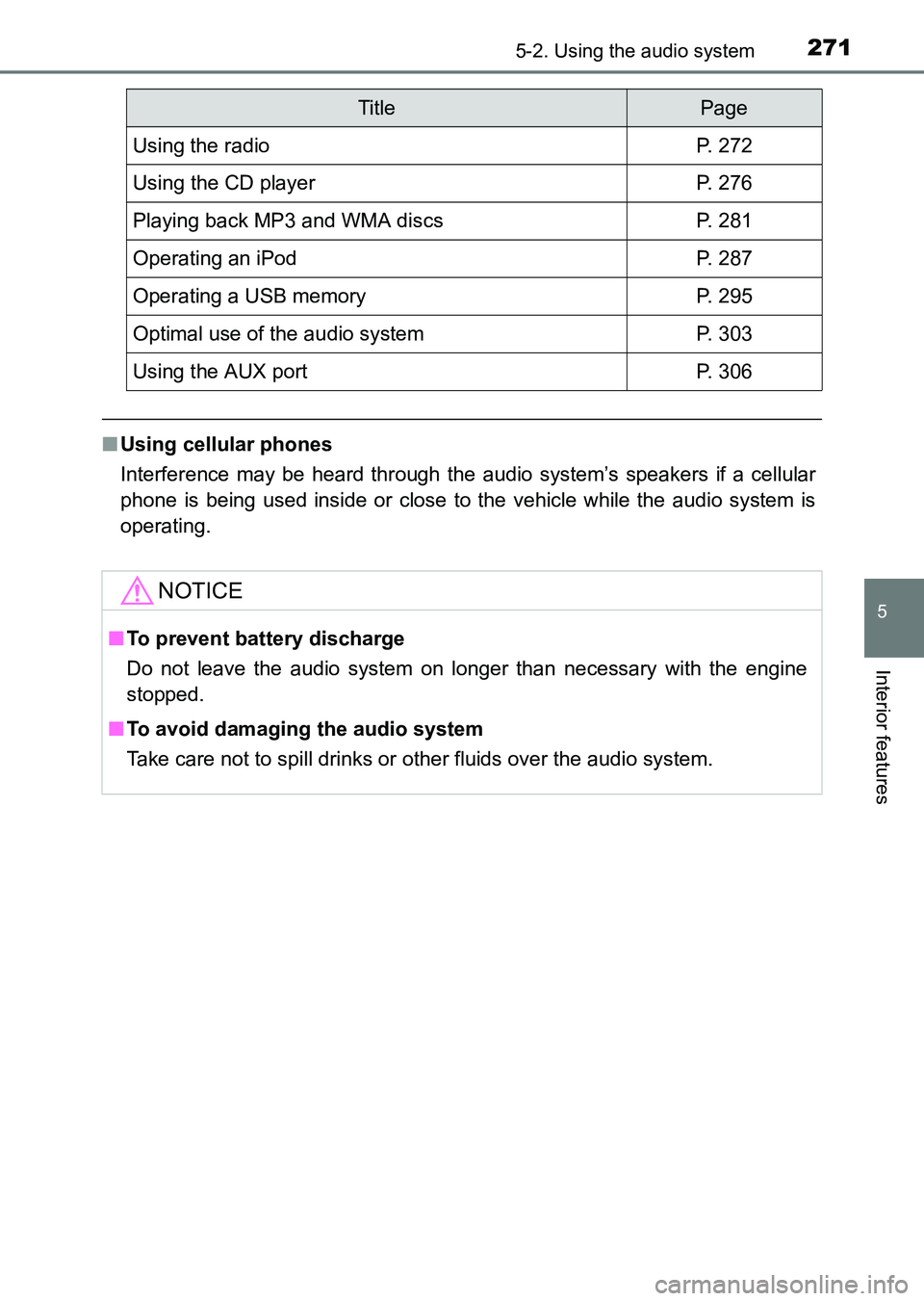
TitlePage
Using the radioP. 272
Using the CD playerP. 276
Playing back MP3 and WMA discsP. 281
Operating an iPodP. 287
Operating a USB memoryP. 295
Optimal use of the audio systemP. 303
Using the AUX portP. 306
NOTICE
■To prevent battery discharge
Do not leave the audio system on longer than necessary with the engine
stopped.
■
To avoid damaging the audio system
Take care not to spill drinks or other fluids over the audio system.
HILUX_OM_OM0K219E_(EE).book Page 271 Wednesday, May 14, 2014 3:06 PM
Page 295 of 540
295
5
5-2. Using the audio system
Interior features
HILUX_OM_OM0K219E_(EE)
Operating a USB memor y
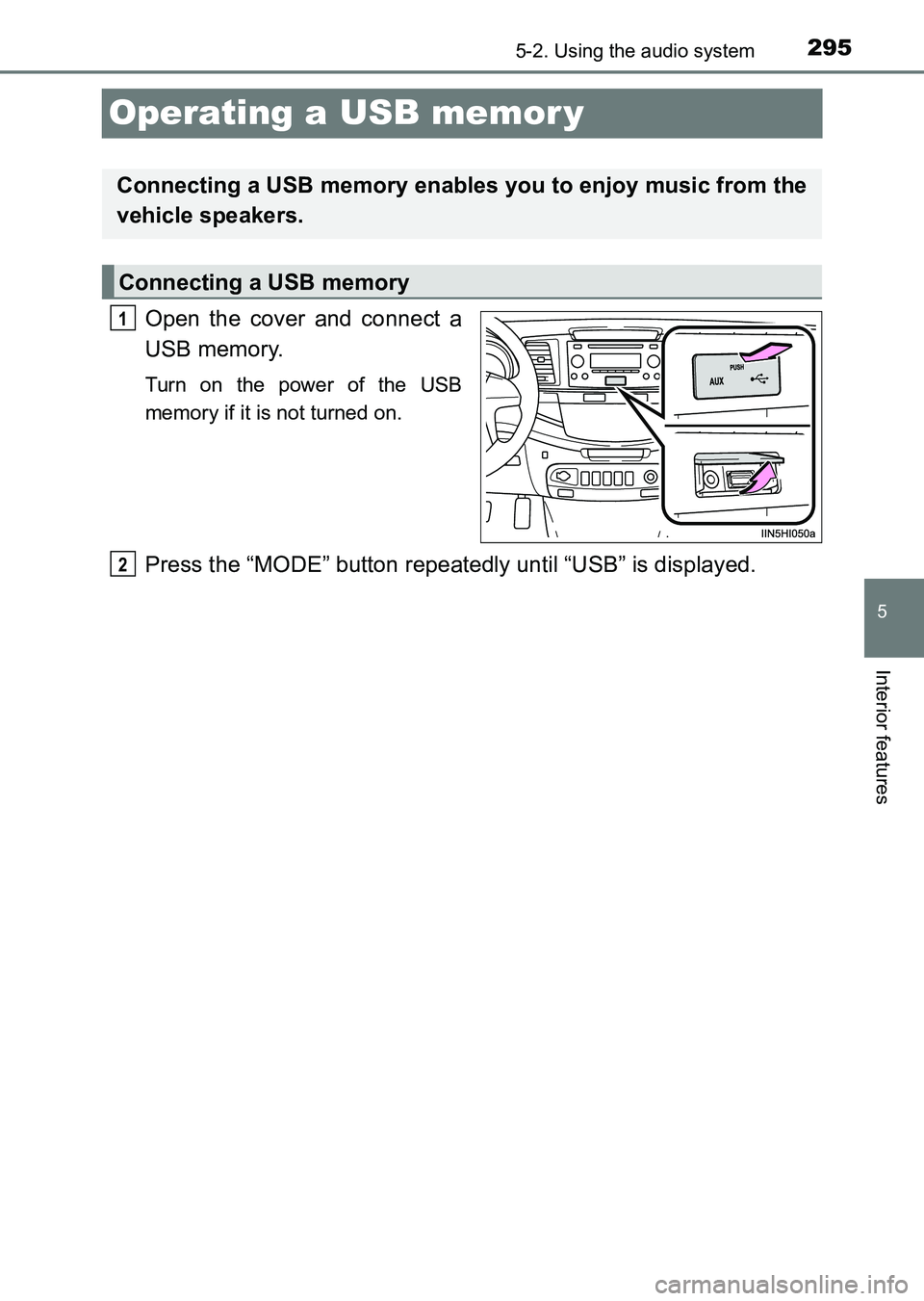
Open the cover and connect a
USB memory.
Turn on the power of the USB
memory if it is not turned on.
Press the “MODE” button repeatedly until “USB” is displayed.
Connecting a USB memory enables you to enjoy music from the
vehicle speakers.
Connecting a USB memory
1
2
HILUX_OM_OM0K219E_(EE).book Page 295 Wednesday, May 14, 2014 3:06 PM