Page 179 of 568

1794-3. Operating the lights and wipers
4
Driving
CAMRY_U (OM33A86U)
Washer/wiper dual operation
Wipers will automatically operate a
couple of times after the washer
squirts.
■The windshield wiper and washer can be operated when
Vehicles without a smart key system:
The engine switch is in the “ON” position.
Vehicles with a smart key system:
The engine switch is in IGNITION ON mode.
■ If no windshield washer fluid sprays
Check that the washer nozzles are not blocked if there is washer fluid in the
windshield washer fluid reservoir.
7
WARNING
■Caution regarding the use of washer fluid
When it is cold, do not use the washer fluid until the windshield becomes
warm. The fluid may freeze on the windshield and cause low visibility. This
may lead to an accident, resulting in death or serious injury.
NOTICE
■When the windshield is dry
Do not use the wipers, as they may damage the windshield.
■ When the washer fluid tank is empty
Damage to the washer fluid pump may be caused if the lever is pulled
toward you and held continually.
■ When a nozzle becomes blocked
In this case, contact your Toyota dealer.
Do not try to clear it with a pin or other object. The nozzle will be damaged\
.
Page 185 of 568

1854-5. Using the driving support systems
4
Driving
CAMRY_U (OM33A86U)
To change the set speed, operate the lever until the desired set speed
is obtained.Increases the speed
Decreases the speed
Fine adjustment: Momentarily
move the lever in the desired direc-
tion.
Large adjustment: Hold the lever in
the desired direction.
The set speed will be increased or decreased as follows:• When the set speed is shown in “MPH”
Fine adjustment: By approximately 1 mph (1.6 km/h) each time the lever
is operated.
Large adjustment: The set speed can be increased or decreased contin-
ually until the lever is released.
• When the set speed is shown in “km/h”
Fine adjustment: By approximately 0.6 mph (1 km/h) each time the lever
is operated
Large adjustment: The set speed can be increased or decreased contin-
ually until the lever is released.
Pulling the lever toward you
cancels the constant speed
control.
The speed setting is also canceled
when the brakes are applied.
Pushing the lever up resumes
the constant speed control.
Resuming is available when the
vehicle speed is more than approx-
imately 25 mph (40 km/h).
Adjusting the set speed
1
2
Canceling and resuming the constant speed control
1
2
Page 187 of 568
1874-5. Using the driving support systems
4
Driving
CAMRY_U (OM33A86U)
WARNING
■To avoid operating the cruise control by mistake
Switch the cruise control off using the “ON-OFF” button when not in use.
■ Situations unsuitable for cruise control
Do not use cruise control in any of the following situations.
Doing so may result in loss of control and could cause an accident resulting
in death or serious injury.
● In heavy traffic
● On roads with sharp bends
● On winding roads
● On slippery roads, such as those covered with rain, ice or snow
● On steep hills
Vehicle speed may exceed the set speed when driving down a steep hill.
● During emergency towing
Page 191 of 568

1914-5. Using the driving support systems
4
Driving
CAMRY_U (OM33A86U)
Pressing the button changes the
vehicle-to-vehicle distance as fol-
lows:Long
Medium
Short
The vehicle-to-vehicle distance is
set automatically to long mode
when the engine switch is turned to
IGNITION ON mode.
If a vehicle is running ahead of
you, the preceding vehicle mark
will also be displayed.
Select a distance from the table below. Note that the distances shown
correspond to a vehicle speed of 50 mph (80 km/h). Vehicle-to-vehicle
distance increases/decreases in accordance with vehicle speed.
Pulling the lever toward you
cancels the cruise control.
The speed setting is also canceled
when the brakes are applied.
Pushing the lever up resumes
the cruise control and returns
vehicle speed to the set speed.
Resuming is available when the
vehicle speed is more than approx-
imately 25 mph (40 km/h).
Changing the vehicle-to-vehicle distance
Preceding
vehicle mark
Preceding vehicle mark
1
2
3
Vehicle-to-vehicle distance settings
Distance optionsVehicle-to-vehicle distance
LongApproximately 160 ft. (50 m)
MediumApproximately 130 ft. (40 m)
ShortApproximately 100 ft. (30 m)
Canceling and resuming the speed control
1
2
Page 198 of 568

1984-5. Using the driving support systems
CAMRY_U (OM33A86U)
WARNING
■Situations unsuitable for dynamic radar cruise control
Do not use dynamic radar cruise control in any of the following situations.
Doing so may result in inappropriate speed control and could cause an acci-
dent resulting in death or serious injury.
● Roads where there are pedestrians, cyclers, etc.
● In heavy traffic
● On roads with sharp bends
● On winding roads
● On slippery roads, such as those covered with rain, ice or snow
● On steep downhills, or where there are sudden changes between sharp up
and down gradients
Vehicle speed may exceed the set speed when driving down a steep hill.
● At entrances to expressways and highways
● When weather conditions are bad enough that they may prevent the sen-
sors from detecting correctly (fog, snow, sandstorm, heavy rain, etc.)
● When an approach warning buzzer is heard often
● During emergency towing
■ When the sensor may not be correct ly detecting the vehicle ahead
In the case of the following and depending on the conditions, operate the
brake pedal when deceleration of the system is insufficient or operate the
accelerator pedal when acceleration is required.
As the sensor may not be able to correctly detect these types of vehicles,
the approach warning ( P. 193) will not be activated, which may lead to an
accident resulting in death or serious injury.
● Vehicles that cut in suddenly
● Vehicles traveling at low speeds
● Vehicles that are not moving in the same lane
● Vehicles with small rear ends (trailers with no load on board etc.)
Page 322 of 568

3225-11. Using the voice command system
CAMRY_U (OM33A86U)
■Microphone
P. 291
■ When using the microphone
●It is unnecessary to speak directly into the microphone when giving a com-
mand.
● When “Voice Prompt Interrupt” set to on, it is not necessary to wait for the
confirmation beep before speaking a command. ( P. 256)
● Voice commands may not be recognized if:
• Spoken too quickly.
• Spoken at a low or high volume.
• The roof or windows are open.
• Passengers are talking while voice commands are spoken.
• The air conditioning speed is set high.
• The air conditioning vents are turned towards the microphone.
● In the following conditions, the system may not recognize the command
properly and using voice commands may not be possible:
• The command is incorrect or unclear. Note that certain words, accents or
speech patterns may be difficult for the system to recognize.
• There is excessive background noise, such as wind noise.
Due to natural language speech recognition technology, this system
enables recognition of a command when spoken naturally. However,
the system cannot recognize ev ery variation of each command.
In some situations, it is possibl e to omit the command for the proce-
dure and directly state the desired operation.
Not all voice commands are displayed in the short cut menu.
This function is available in English, Spanish and French.
■Expression examples for each function
Casual speech recognization
CommandExpression examples
“Call
”Get me .
I need to call at right away.
“Dial ”Please dial the number <3334445555>.
Ring <3334445555>.
Page 345 of 568
3456-3. Using the storage features
6
Interior features
CAMRY_U (OM33A86U)
NOTICE
Put the cap on before stowing a bottle. Do not place open bottles in the bot-
tle holders, or glass or paper cups containing liquid. The contents may spill
and glass cups may break.
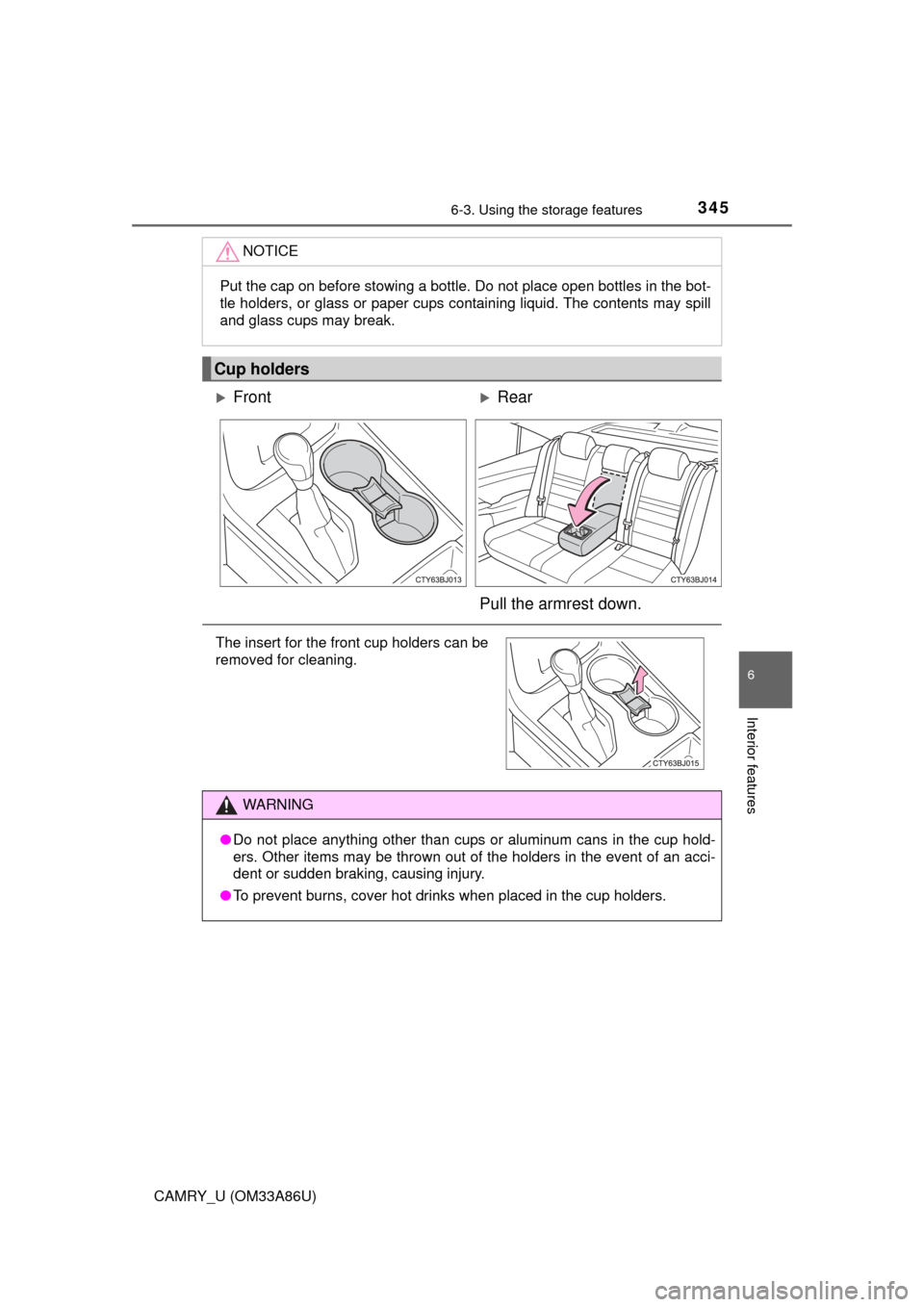
Cup holders
FrontRear
Pull the armrest down.
The insert for the front cup holders can be
removed for cleaning.
WARNING
● Do not place anything other than cups or aluminum cans in the cup hold-
ers. Other items may be thrown out of the holders in the event of an acci-
dent or sudden braking, causing injury.
● To prevent burns, cover hot drinks when placed in the cup holders.
Page 349 of 568

3496-3. Using the storage features
6
Interior features
CAMRY_U (OM33A86U)
WARNING
●Do not attempt to charge portable devices which are not compatible with
the Qi wireless charging standard.
● Do not bring magnetized objects close to the wireless charger.
● Do not perform charging if the charging area is dusty.
● Keep foreign objects away from the wireless charger, and do not spill liquid
on the wireless charger.
● Do not cover the wireless charger with a cloth or other object while charg-
ing.
● Do not attach metallic objects, such as aluminum stickers, to the charging
area.
NOTICE
■Conditions in which the wireless ch arger may not operate correctly
(vehicles with a wireless charger)
In the following situations, the wireless charger may not operate correctly:
● When a portable device is fully charged
● When there is a foreign object between the charging area and portable
device
● When a portable device becomes hot while charging
● When a portable device is placed on the wireless area with its charging
surface facing up
● When a portable device is not centered on the charging area
● When the vehicle is near a TV tower, electric power plant, gas station,
radio station, large display, airport or other facility that generates strong
radio waves or electrical noise
● When the portable device is in contact with, or is covered by any of the fol-
lowing metallic objects
• Cards to which aluminum foil is attached
• Cigarette boxes that have aluminum foil inside
• Metallic wallets or bags
• Coins
• Metal hand warmers
• Media such as CDs and DVDs
● When wireless keys (that emit radio waves) other than those of your vehi-
cle are being used nearby.
If in situations other than above the wireless charger does not operate prop-
erly or the operation indicator light is blinking, the wireless charger may be
malfunctioning. Contact your Toyota dealer.