Page 161 of 568
1614-2. Driving procedures
4
Driving
CAMRY_U (OM33A86U)
NOTICE
■To prevent battery discharge
● Do not leave the engine switch in ACCESSORY or IGNITION ON mode
for long periods of time without the engine running.
● Do not stop the engine when the shift lever is in a position other than P. If
the engine is stopped in another shift lever position, the engine switch will
not be turned off but instead be turned to ACCESSORY mode. If the vehi-
cle is left in ACCESSORY mode, battery discharge may occur.
■ When starting the engine
● Do not race a cold engine.
● If the engine becomes difficult to star t or stalls frequently, have your vehi-
cle checked by your Toyota dealer immediately.
■ Symptoms indicating a malfunction with the engine switch
If the engine switch seems to be operating somewhat differently than usual,
such as the switch sticking slightly, there may be a malfunction. Contact
your Toyota dealer immediately.
Page 175 of 568

1754-3. Operating the lights and wipers
4
Driving
CAMRY_U (OM33A86U)●
In the situations below, the system may not be able to correctly detect the
surrounding brightness levels, and may flash or expose nearby pedestrians
to the high beam. Therefore, you should consider turning the high beams on
or off manually rather than relying on the Automatic High Beam system.
• In bad weather (rain, snow, fog, sandstorms etc.)
• The windshield is obscured by fog, mist, ice, dirt etc.
• The windshield is cracked or damaged.
• The camera sensor is deformed or dirty.
• The camera sensor temperature is extremely high.
• Surrounding brightness levels are equal to those of headlights, tail lights
or fog lights.
• Vehicles ahead have headlights that are either switched off, dirty, are changing color, or are not aimed properly.
• The inside rear view mirror or ca mera sensor is deformed or dirty.
• When driving through an area of in termittently changing brightness and
darkness.
• When frequently and repeatedly driving ascending/descending roads, or roads with rough, bumpy or uneven surfaces (such as stone-paved
roads, gravel tracks etc.).
• When frequently and repeatedly taking curves or driving on a winding road.
• There is a highly reflective object ahead of the vehicle, such as a sign or
a mirror.
• The back of a vehicle ahead is highly reflective, such as a container on a truck.
• The vehicle’s headlights are damaged or dirty.
• The vehicle is listing or tilting, due to a flat tire, a trailer being towed etc.
• The high beam and low beam are repeatedly being switched between in an abnormal manner.
• The driver believes that the high beam may be causing problems or dis-
tress to other drivers or pedestrians nearby.
■ Temporarily lowering sensor sensitivity
The sensitivity of the sensor can be temporarily lowered.
Turn the engine switch off while the following conditions are met.
• The headlight switch is in .
• The headlight switch lever is in high beam position. Turn the engine switch to IGNITION ON mode.
Within 5 seconds after , repeat pulling the headlight switch lever to the
original position then pushing it to the high beam position quickly 9 times,
then leave the lever in high beam position.
Automatic High Beam (headlights) may turn on even the vehicle is stopped.
1
2
32
Page 179 of 568

1794-3. Operating the lights and wipers
4
Driving
CAMRY_U (OM33A86U)
Washer/wiper dual operation
Wipers will automatically operate a
couple of times after the washer
squirts.
■The windshield wiper and washer can be operated when
Vehicles without a smart key system:
The engine switch is in the “ON” position.
Vehicles with a smart key system:
The engine switch is in IGNITION ON mode.
■ If no windshield washer fluid sprays
Check that the washer nozzles are not blocked if there is washer fluid in the
windshield washer fluid reservoir.
7
WARNING
■Caution regarding the use of washer fluid
When it is cold, do not use the washer fluid until the windshield becomes
warm. The fluid may freeze on the windshield and cause low visibility. This
may lead to an accident, resulting in death or serious injury.
NOTICE
■When the windshield is dry
Do not use the wipers, as they may damage the windshield.
■ When the washer fluid tank is empty
Damage to the washer fluid pump may be caused if the lever is pulled
toward you and held continually.
■ When a nozzle becomes blocked
In this case, contact your Toyota dealer.
Do not try to clear it with a pin or other object. The nozzle will be damaged\
.
Page 189 of 568
1894-5. Using the driving support systems
4
Driving
CAMRY_U (OM33A86U)
Press the “ON-OFF” button to
activate the cruise control.
Radar cruise control indicator will
be displayed.
Press the button again to deacti-
vate the cruise control.
Accelerate or decelerate the
vehicle to the desired speed,
and push the lever down to set
the speed.
“SET” indicator and set speed will
be displayed.
The vehicle speed at the moment
the lever is released becomes the
set speed.
Setting the vehicle speed (vehicle-to-vehicle distance control
mode)
1
2
Page 190 of 568

1904-5. Using the driving support systems
CAMRY_U (OM33A86U)
To change the set speed, operate the lever until the desired set speed
is displayed.
Increases the speed
Decreases the speed
Fine adjustment: Momentarily
move the lever in the desired direc-
tion.
Large adjustment: Hold the lever in
the desired direction.
In the vehicle-to-vehicle distance control mode, the set speed will be
increased or decreased as follows:• When the set speed is shown in “MPH”
Fine adjustment: By approximately 1 mph (1.6 km/h) each time the lever
is operated
Large adjustment: By approximately 5 mph (8 km/h) for each 0.75 sec-
onds the lever is held
• When the set speed is shown in “km/h”
Fine adjustment: By approximately 0.6 mph (1 km/h) each time the lever
is operated
Large adjustment: By approximately 3.1 mph (5 km/h) for each 0.75
seconds the lever is held
In the constant speed control mode ( P. 194), the set speed will be
increased or decreased as follows: • When the set speed is shown in “MPH”
Fine adjustment: By approximately 1 mph (1.6 km/h) each time the lever
is operated.
Large adjustment: The set speed can be increased or decreased contin-
ually until the lever is released.
• When the set speed is shown in “km/h”
Fine adjustment: By approximately 0.6 mph (1 km/h) each time the lever
is operated
Large adjustment: The set speed can be increased or decreased contin-
ually until the lever is released.
Adjusting the set speed
1
2
Page 194 of 568

1944-5. Using the driving support systems
CAMRY_U (OM33A86U)
When constant speed cont rol mode is selected, your vehicle will main-
tain a set speed without controlling the vehicle-to-vehicle distance.
Select this mode only when vehicl e-to-vehicle distance control mode
does not function corr ectly due to dirt etc.
Press the “ON-OFF” button to
activate the cruise control.
Press the button again to deacti-
vate the cruise control.
Switch to constant speed con-
trol mode.
(Push the lever forward and
hold for approximately 1 sec-
ond.)
Constant speed control mode indicator will be displayed.
When in constant speed control mode, to return to vehicle-to-vehicle dis-
tance control mode, push the leve r forward again and hold for approxi-
mately 1 second.
After the desired speed has been set, it is not possible to return to vehicle-
to-vehicle distance control mode.
If the engine switch is turned off and then turned to IGNITION ON mode
again, the vehicle will automatically return to vehicle-to-vehicle distance
control mode.
Adjusting the speed setting: P. 190
Canceling and resuming the speed setting: P. 191
Selecting conventional constant speed control mode
1
2
Page 201 of 568
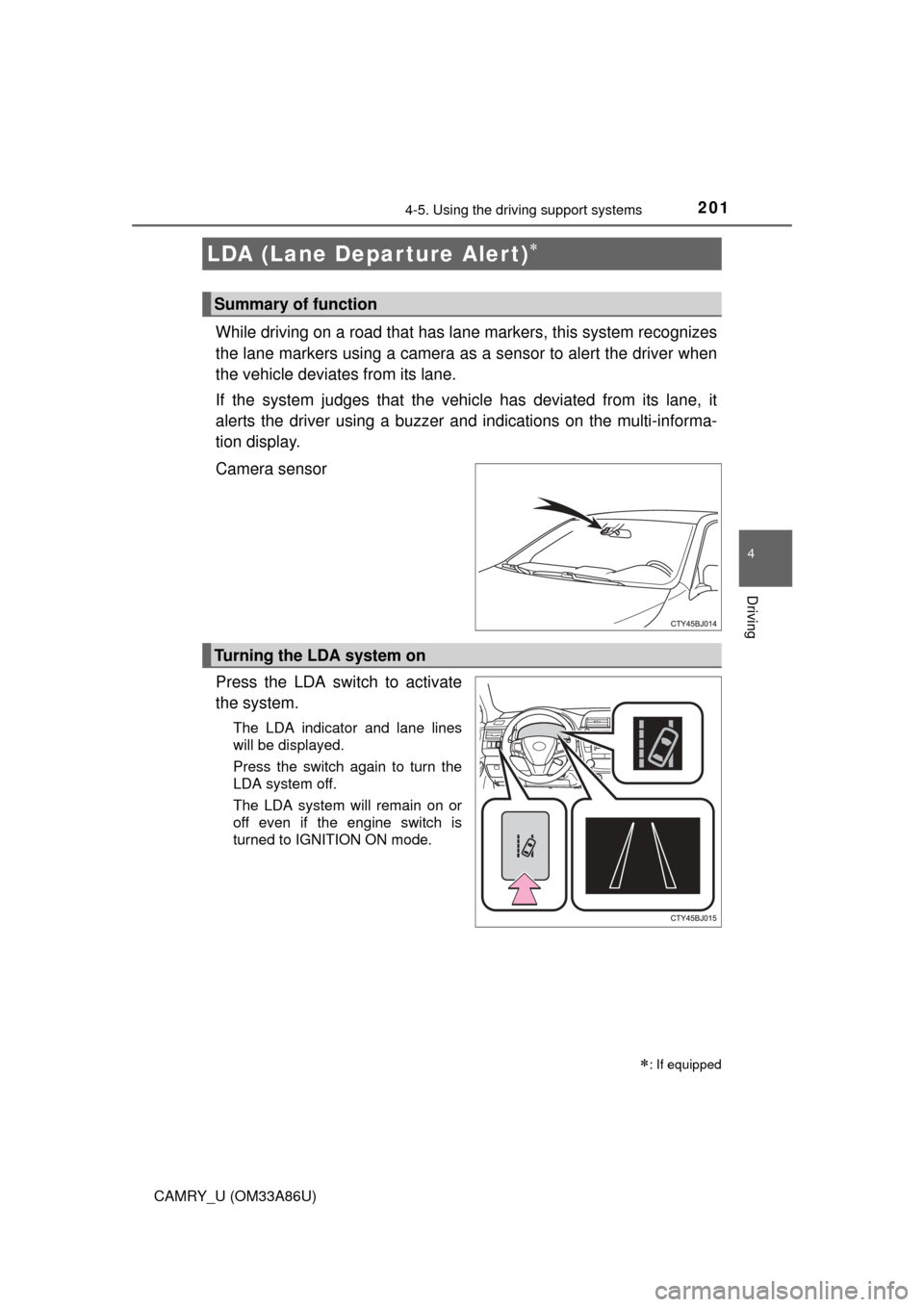
2014-5. Using the driving support systems
4
Driving
CAMRY_U (OM33A86U)
While driving on a road that has lane markers, this system recognizes
the lane markers using a camera as a sensor to alert the driver when
the vehicle deviates from its lane.
If the system judges that the vehicle has deviated from its lane, it
alerts the driver using a buzzer and indications on the multi-informa-
tion display.
Camera sensor
Press the LDA switch to activate
the system.
The LDA indicator and lane lines
will be displayed.
Press the switch again to turn the
LDA system off.
The LDA system will remain on or
off even if the engine switch is
turned to IGNITION ON mode.
LDA (Lane Depar ture Alert)
: If equipped
Summary of function
Turning the LDA system on
Page 222 of 568
2224-5. Using the driving support systems
CAMRY_U (OM33A86U)■
Changing the alert timing of the pre-collision system
Each time the PCS switch is
pressed, the response to the
distance changes as follows.
Far
Middle
*
Near
*: Default setting
■
Turning off the pre-collision system
Press the PCS switch for 3 or
more seconds.
The PCS warning light turns on
and a message is shown on the
multi-information display.
To turn on the system, press the
PCS switch again. The system
is set to on each time the engine
switch is turned to IGNITION
ON mode.
The radar sensor detects vehi-
cles or other obstacles on or near
the road ahead and determines
whether a collision is imminent
based on the position, speed, and
heading of the obstacles.
Changing the pre-collision system
1
2
3
Radar sensor