Page 263 of 564
263
5
Audio system
CAMRY_HV_U (OM33A87U)
5-3.Using the Multimedia system
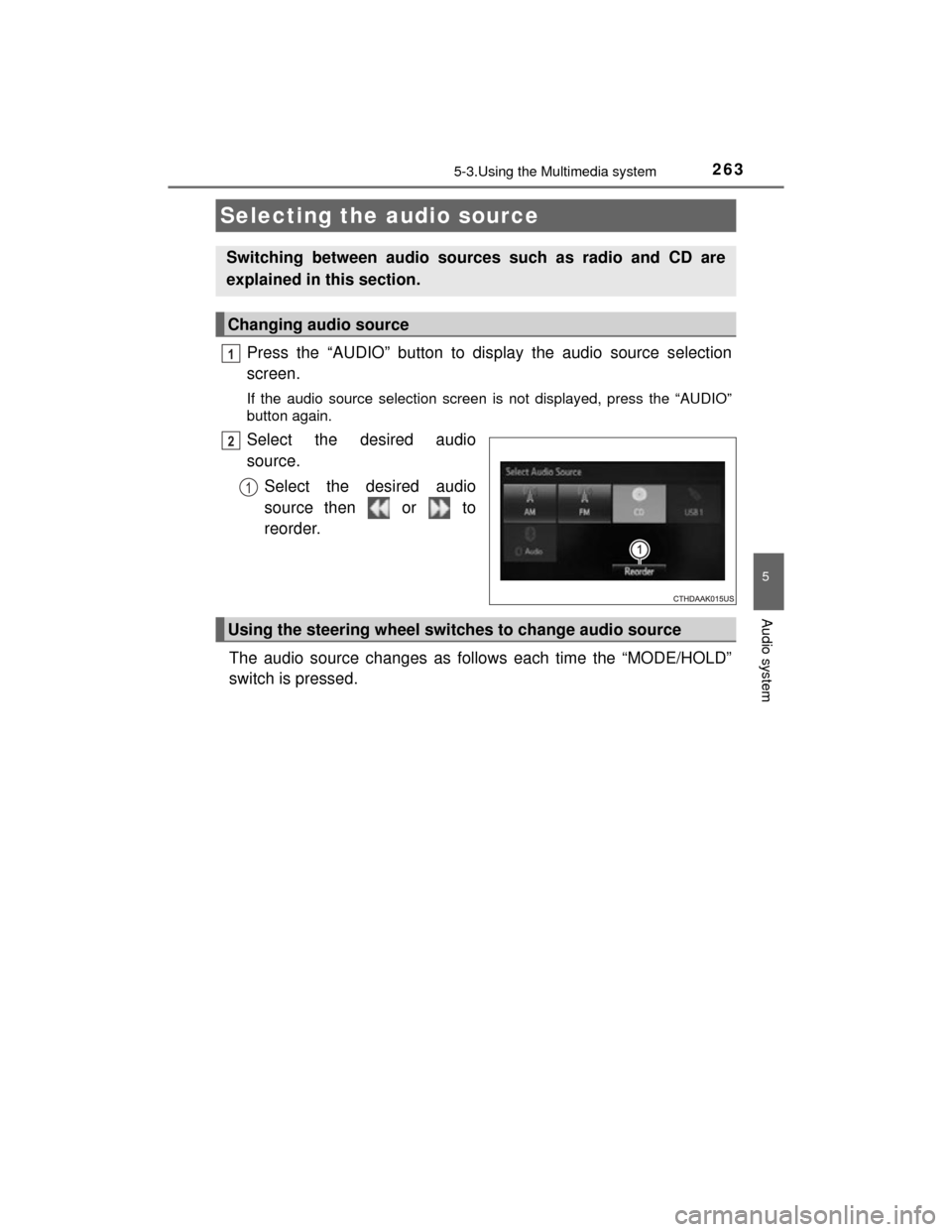
Press the “AUDIO” button to display the audio source selection
screen.
If the audio source selection screen is not displayed, press the “AUDIO”
button again.
Select the desired audio
source.Select the desired audio
source then or to
reorder.
The audio source changes as follows each time the “MODE/HOLD”
switch is pressed.
Selecting the audio source
Switching between audio sources such as radio and CD are
explained in this section.
Changing audio source
1
2
1
Using the steering wheel switches to change audio source
Page 298 of 564
2985-9. Bluetooth® phone
CAMRY_HV_U (OM33A87U)
Display the phone screen. (P. 296)
Select the “Dial Pad” tab and enter a phone number.
To delete the input phone number, select .
For the first digit, you can enter “+” by selecting “ ” for a while.
Press the switch on the steering wheel or select .
You can dial a number from the contact data imported from your cellu-
lar phone. The system has one contact for each registered phone. Up
to 2500 contacts may be stored in each contact. ( P. 298)
Display the phone screen. ( P. 296)
Select “Contacts” tab.
Choose the desired contact to call from the list.
Choose the number and then press the switch on the steering
wheel or select .
You can transfer the phone numbers in a Bluetooth
® phone to the sys-
tem.
Operation methods differ between PBAP (Phone Book Access Profile)
compatible and PBAP incompatible Bluetooth
® phones. If the cellular
phone does not support either PBAP or OPP (Object Push Profile)
service, you cannot transfer contacts.
Making a call
Once a Bluetooth® phone is registered, you can make a call
using the following procedure:
Dialing
Dialing from the contacts list
When the contact is empty
1
2
3
1
2
3
4
Page 299 of 564
2995-9. Bluetooth® phone
5
Audio system
CAMRY_HV_U (OM33A87U)
Press the switch on the steering wheel.
If the phonebook is empty, a message will be displayed.
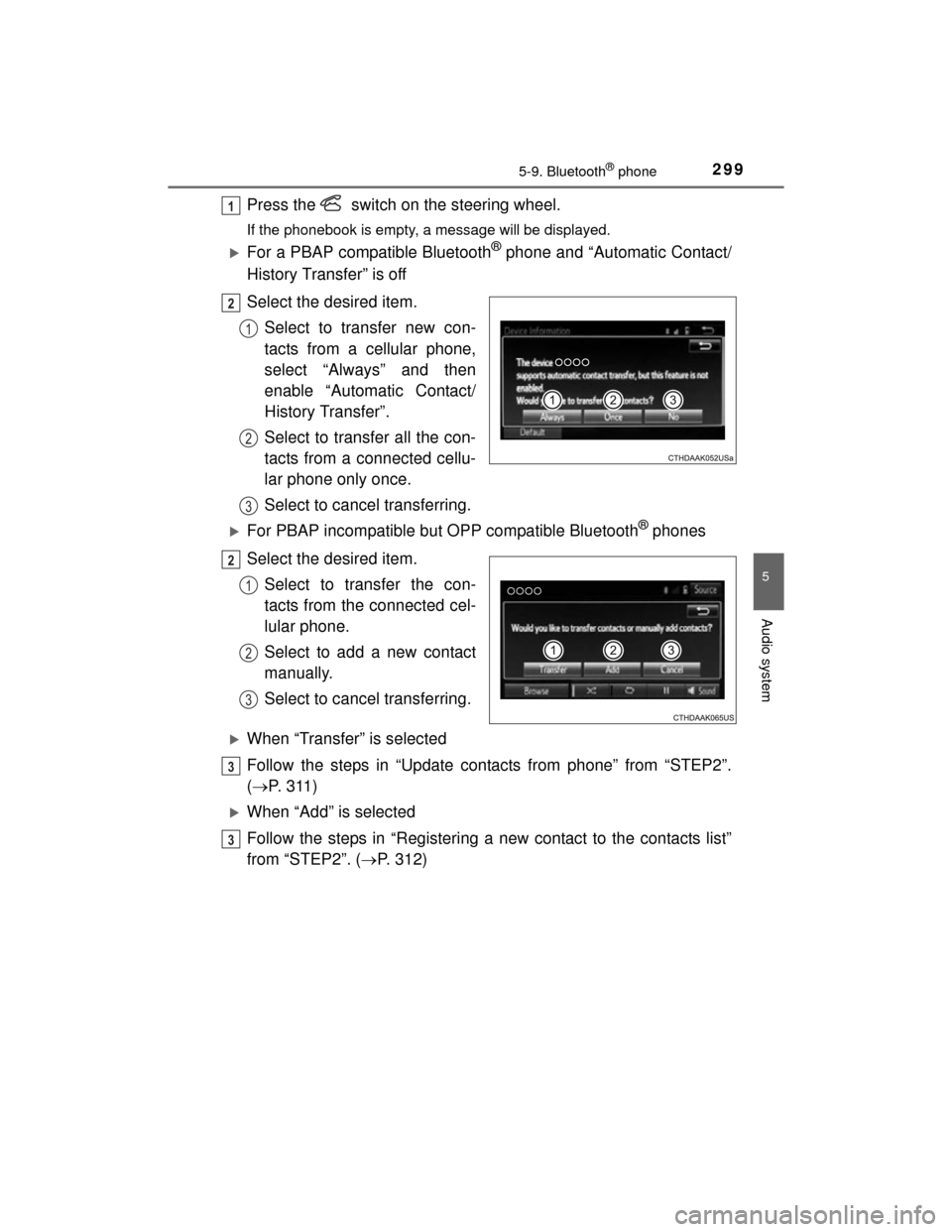
For a PBAP compatible Bluetooth® phone and “Automatic Contact/
History Transfer” is off
Select the desired item.
Select to transfer new con-
tacts from a cellular phone,
select “Always” and then
enable “Automatic Contact/
History Transfer”.
Select to transfer all the con-
tacts from a connected cellu-
lar phone only once.
Select to cancel transferring.
For PBAP incompatible but OPP compatible Bluetooth® phones
Select the desired item. Select to transfer the con-
tacts from the connected cel-
lular phone.
Select to add a new contact
manually.
Select to cancel transferring.
When “Transfer” is selected
Follow the steps in “Update contacts from phone” from “STEP2”.
( P. 311)
When “Add” is selected
Follow the steps in “Registering a new contact to the contacts list”
from “STEP2”. ( P. 312)
1
2
1
2
3
2
1
2
3
3
3
Page 301 of 564
3015-9. Bluetooth® phone
5
Audio system
CAMRY_HV_U (OM33A87U)
Press the switch on the steer-
ing wheel or select .
Press the switch on the steering wheel or select .
Turn the “PWR/VOL” knob. You can also adjust the volume using the
steering switches.
■International calls
Received international calls may not be displayed correctly depending on the
cellular phone in use.
Receiving a call
When a call is received, the following screen is displayed
together with a sound.
To answer the phone
To refuse a call
To adjust the incoming call volume
Page 303 of 564
3035-9. Bluetooth® phone
5
Audio system
CAMRY_HV_U (OM33A87U)
■Release Tones
●A continuous tone signal is a character string that consists of numbers and
the characters p or w. (e.g.056133w0123p#1 )
● When the “p” pause tone is used, the tone data up until the next pause tone
will be automatically sent after 2 seconds have elapsed. When the “w”
pause tone is used, the tone data up until the next pause tone will be auto-
matically sent after a user operation is performed.
● Release tones can be used when automated operation of a phone based
service such as an answering machine or bank phone service is desired. A
phone number with continuous tone signals can be registered in the contact
list.
● Tone data after a “w” pause tone can be operated on voice command during
a call.
Select “Handset Mode” to on from a hands-free call to a cellular
phone call.
Select “Handset Mode” to off from a cellular phone call to a hands-free
call.
Select “Transmit Volume”.
Select the desired level for the transmit volume.
Select “OK”.
Press the switch on the steering wheel or select .
To transfer a call
Transmit volume setting
To h a n g u p
1
2
3
Page 304 of 564
3045-9. Bluetooth® phone
CAMRY_HV_U (OM33A87U)
When a call is interrupted by a third party while talking, an incoming
call message will be displayed.
To talk with the other party:• Press the switch on the
steering wheel.
• Select .
To refuse the call: • Press the switch on the
steering wheel.
• Select .
Every time you press the switch on the steering wheel or select during call waiting, you will be switched to the other party.
■Transferring calls
●If you transfer from the cellular phone to hands-free, the hands-free screen
will be displayed, and you can operate the system using the screen.
● Transfer method and operation may vary according to the cellular phone
used.
● For operation of the cellular phone in use, see the phone's manual.
■ Call waiting operation
Call waiting operation may differ depending on your phone company and cel-
lular phone.
Call waiting
Page 306 of 564
3065-9. Bluetooth® phone
CAMRY_HV_U (OM33A87U)
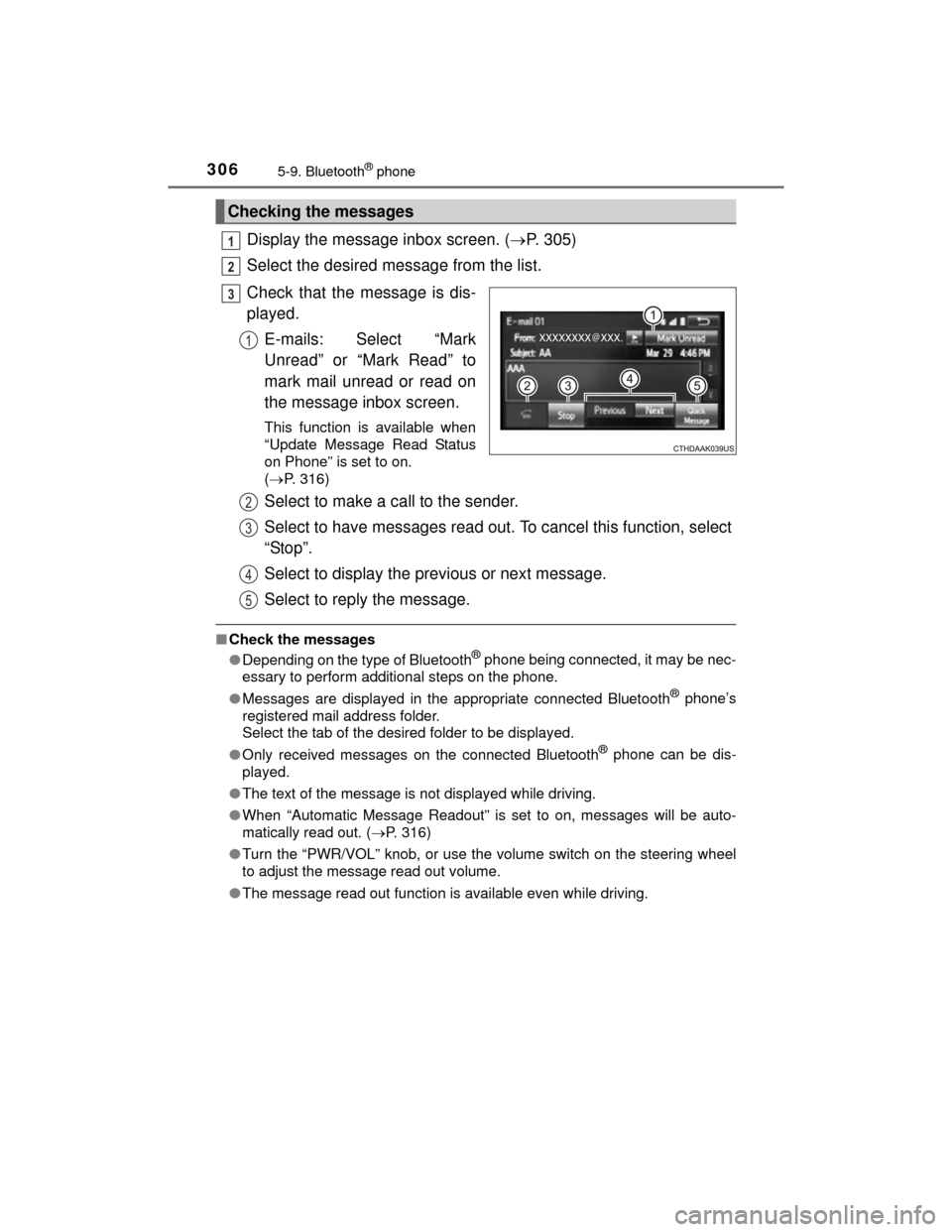
Display the message inbox screen. (P. 305)
Select the desired message from the list.
Check that the message is dis-
played. E-mails: Select “Mark
Unread” or “Mark Read” to
mark mail unread or read on
the message inbox screen.
This function is available when
“Update Message Read Status
on Phone” is set to on.
( P. 316)
Select to make a call to the sender.
Select to have messages read out. To cancel this function, select
“Stop”.
Select to display the previous or next message.
Select to reply the message.
■Check the messages
●Depending on the type of Bluetooth® phone being connected, it may be nec-
essary to perform additional steps on the phone.
● Messages are displayed in the appropriate connected Bluetooth
® phone’s
registered mail address folder.
Select the tab of the desired folder to be displayed.
● Only received messages on the connected Bluetooth
® phone can be dis-
played.
● The text of the message is not displayed while driving.
● When “Automatic Message Readout” is set to on, messages will be auto-
matically read out. ( P. 316)
● Turn the “PWR/VOL” knob, or use the volume switch on the steering wheel
to adjust the message read out volume.
● The message read out function is available even while driving.
Checking the messages
1
2
3
1
2
3
4
5
Page 308 of 564
3085-9. Bluetooth® phone
CAMRY_HV_U (OM33A87U)■
Steering wheel switches on the right hand side
Off hook switch• Make a call
• Receive a call
• Display “Phone” screen
On hook switch • End a call
• Refuse a call
■Steering wheel switches on the left hand side
Vo lu m e swi tc h• Increase/Decrease the volume
• Press and hold: Continuously increase/
decrease the volume
Back switch • Return to the previous screen
Cursor switch • Select a list/tab
Enter switch • Select an item
Using the steering wheel switches
The steering wheel switches can be used to operate a connected
cellular phone.
Operating a telephone using the steering wheel switches
1
2
1
2
3
4