Page 302 of 564
3025-9. Bluetooth® phone
CAMRY_HV_U (OM33A87U)
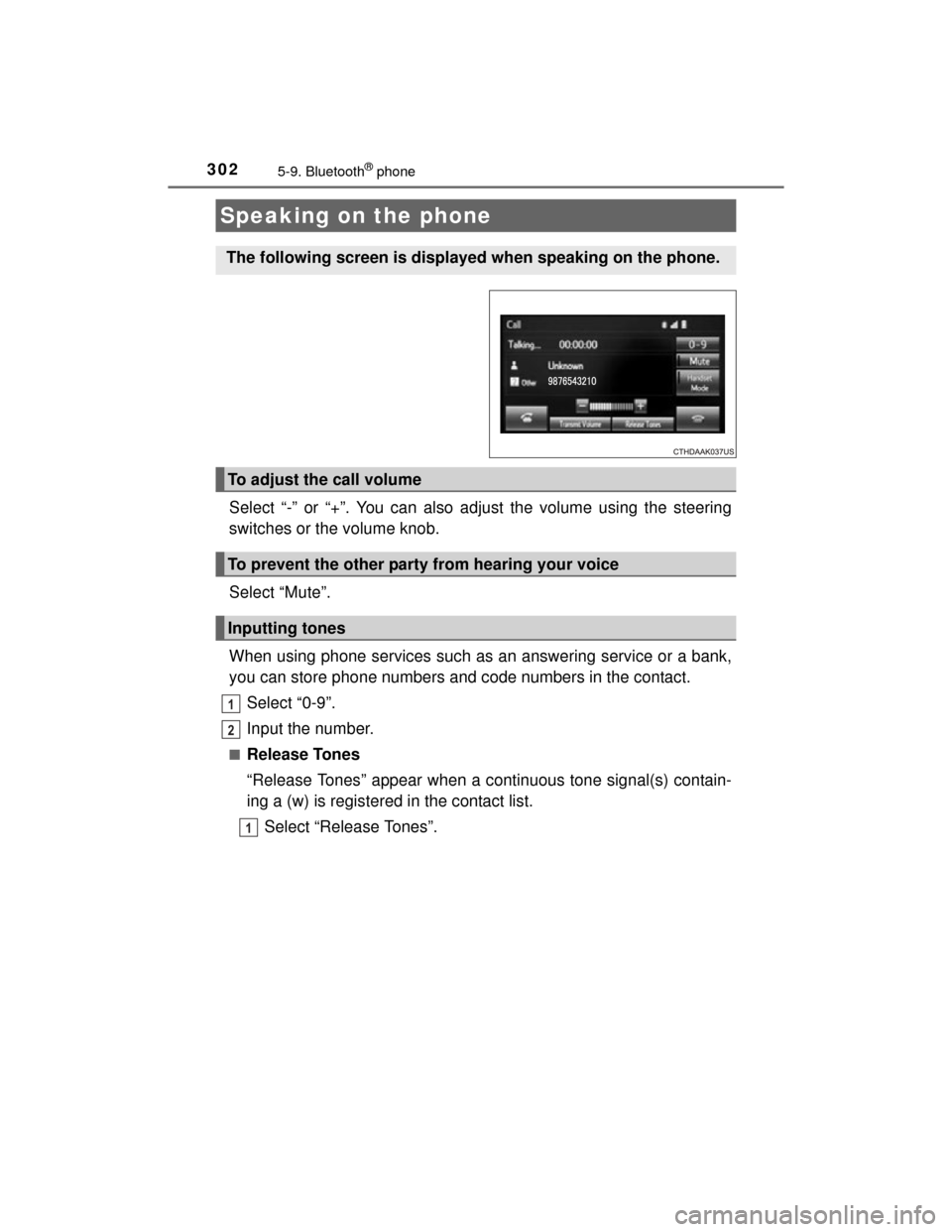
Select “-” or “+”. You can also adjust the volume using the steering
switches or the volume knob.
Select “Mute”.
When using phone services such as an answering service or a bank,
you can store phone numbers and code numbers in the contact.Select “0-9”.
Input the number.
■Release Tones
“Release Tones” appear when a continuous tone signal(s) contain-
ing a (w) is registered in the contact list.Select “Release Tones”.
Speaking on the phone
The following screen is displayed when speaking on the phone.
To adjust the call volume
To prevent the other party from hearing your voice
Inputting tones
1
2
1
Page 303 of 564
3035-9. Bluetooth® phone
5
Audio system
CAMRY_HV_U (OM33A87U)
■Release Tones
●A continuous tone signal is a character string that consists of numbers and
the characters p or w. (e.g.056133w0123p#1 )
● When the “p” pause tone is used, the tone data up until the next pause tone
will be automatically sent after 2 seconds have elapsed. When the “w”
pause tone is used, the tone data up until the next pause tone will be auto-
matically sent after a user operation is performed.
● Release tones can be used when automated operation of a phone based
service such as an answering machine or bank phone service is desired. A
phone number with continuous tone signals can be registered in the contact
list.
● Tone data after a “w” pause tone can be operated on voice command during
a call.
Select “Handset Mode” to on from a hands-free call to a cellular
phone call.
Select “Handset Mode” to off from a cellular phone call to a hands-free
call.
Select “Transmit Volume”.
Select the desired level for the transmit volume.
Select “OK”.
Press the switch on the steering wheel or select .
To transfer a call
Transmit volume setting
To h a n g u p
1
2
3
Page 304 of 564
3045-9. Bluetooth® phone
CAMRY_HV_U (OM33A87U)
When a call is interrupted by a third party while talking, an incoming
call message will be displayed.
To talk with the other party:• Press the switch on the
steering wheel.
• Select .
To refuse the call: • Press the switch on the
steering wheel.
• Select .
Every time you press the switch on the steering wheel or select during call waiting, you will be switched to the other party.
■Transferring calls
●If you transfer from the cellular phone to hands-free, the hands-free screen
will be displayed, and you can operate the system using the screen.
● Transfer method and operation may vary according to the cellular phone
used.
● For operation of the cellular phone in use, see the phone's manual.
■ Call waiting operation
Call waiting operation may differ depending on your phone company and cel-
lular phone.
Call waiting
Page 305 of 564

3055-9. Bluetooth® phone
5
Audio system
CAMRY_HV_U (OM33A87U)
Press the “ ” button.
Select .
When an e-mail/SMS/MMS is received, the incoming message screen
pops up with sound and is ready to be operated on the screen. Select to check the message.
Select to refuse the message.
Select to call the message
sender.
■Receiving a message
●Depending on the cellular phone used for receiving messages, or its regis-
tration status with the navigation system, some information may not be dis-
played.
● The pop up screen is separately available for incoming e-mail and SMS/
MMS messages under the following conditions:
E-mail:
• “Incoming E-mail Display” is set to “Full Screen”. ( P. 316)
• “E-mail Notification Popup” is set to on. (P. 316)
SMS/MMS:
• “Incoming SMS/MMS Display” is set to “Full screen”. ( P. 316)
• “SMS/MMS Notification Popup” is set to on. ( P. 316)
Bluetooth® phone message function
Received messages can be forwarded from the connected
Bluetooth® phone, enabling checking and replying using the
multimedia system.
Depending on the type of Bluetooth
® phone connected, received
messages may not be transferred to the message inbox.
If the phone does not support the message function, this func-
tion cannot be used.
Displaying message inbox screen
Receiving a message
1
2
1
2
3
Page 306 of 564
3065-9. Bluetooth® phone
CAMRY_HV_U (OM33A87U)
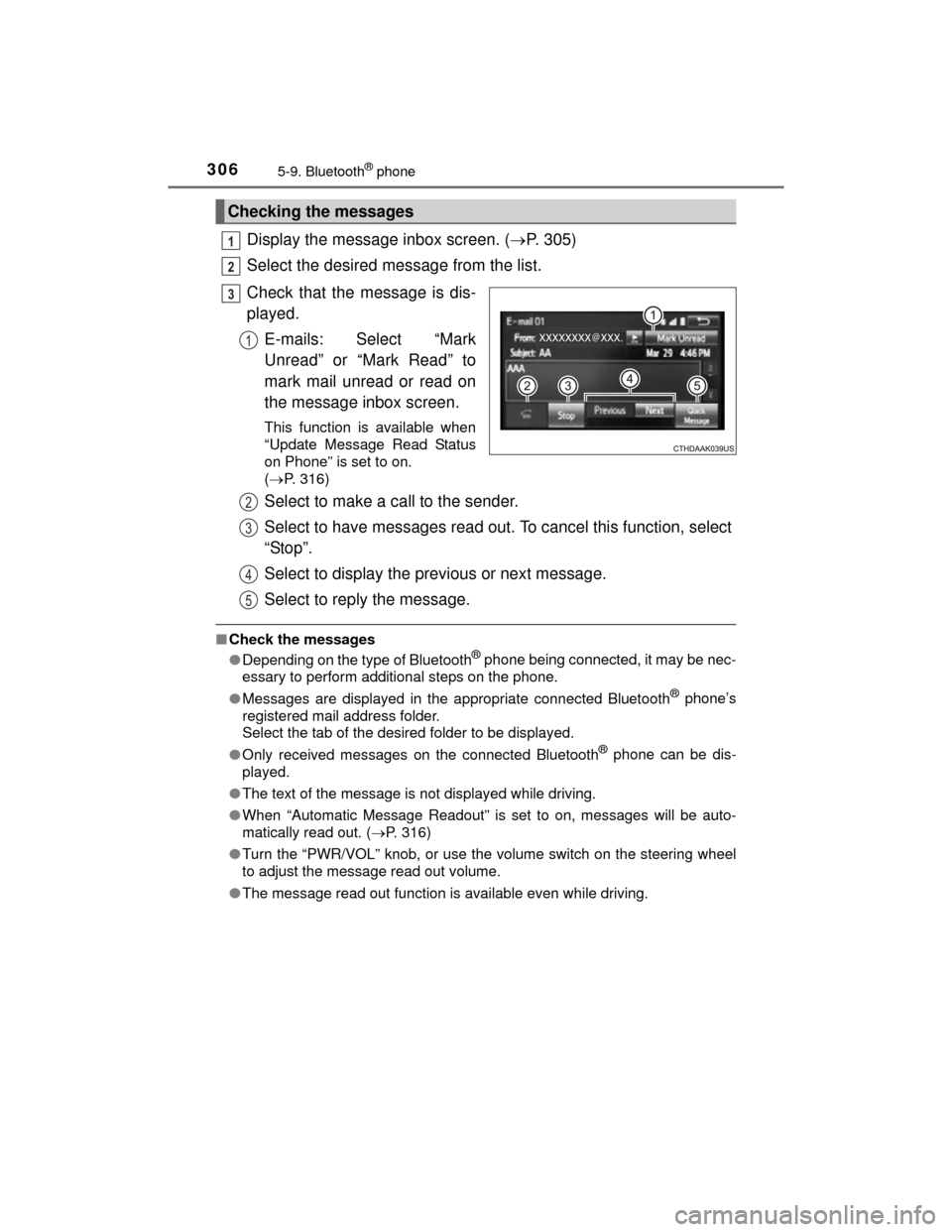
Display the message inbox screen. (P. 305)
Select the desired message from the list.
Check that the message is dis-
played. E-mails: Select “Mark
Unread” or “Mark Read” to
mark mail unread or read on
the message inbox screen.
This function is available when
“Update Message Read Status
on Phone” is set to on.
( P. 316)
Select to make a call to the sender.
Select to have messages read out. To cancel this function, select
“Stop”.
Select to display the previous or next message.
Select to reply the message.
■Check the messages
●Depending on the type of Bluetooth® phone being connected, it may be nec-
essary to perform additional steps on the phone.
● Messages are displayed in the appropriate connected Bluetooth
® phone’s
registered mail address folder.
Select the tab of the desired folder to be displayed.
● Only received messages on the connected Bluetooth
® phone can be dis-
played.
● The text of the message is not displayed while driving.
● When “Automatic Message Readout” is set to on, messages will be auto-
matically read out. ( P. 316)
● Turn the “PWR/VOL” knob, or use the volume switch on the steering wheel
to adjust the message read out volume.
● The message read out function is available even while driving.
Checking the messages
1
2
3
1
2
3
4
5
Page 307 of 564
3075-9. Bluetooth® phone
5
Audio system
CAMRY_HV_U (OM33A87U)
Display the message inbox screen. (P. 305)
Select the desired message from the list.
Select “Quick Message”.
Select the desired message.
Select “Send”.
■Editing quick reply message Select “Quick Message”.
Select corresponding to the desired message to edit.
Select “OK” when editing is completed.
Calls can be made to an e-mail/SMS/MMS message sender's phone
number. Display the message inbox screen. ( P. 305)
Select the desired message.
Select .
Check that the “Call” screen is displayed.
■Calling from a number within a message
Calls can be made to a number identified in a message's text area. Display the message inbox screen. ( P. 305)
Select the desired message.
Select the text area.
Select corresponding to the desired number.
Check that the “Call” screen is displayed.
■Calling from the incoming message screen P. 3 0 4
Replying to a message
Calling the message sender
1
2
3
4
5
1
2
3
1
2
3
4
1
2
3
4
5
Page 308 of 564
3085-9. Bluetooth® phone
CAMRY_HV_U (OM33A87U)■
Steering wheel switches on the right hand side
Off hook switch• Make a call
• Receive a call
• Display “Phone” screen
On hook switch • End a call
• Refuse a call
■Steering wheel switches on the left hand side
Vo lu m e swi tc h• Increase/Decrease the volume
• Press and hold: Continuously increase/
decrease the volume
Back switch • Return to the previous screen
Cursor switch • Select a list/tab
Enter switch • Select an item
Using the steering wheel switches
The steering wheel switches can be used to operate a connected
cellular phone.
Operating a telephone using the steering wheel switches
1
2
1
2
3
4
Page 309 of 564
3095-9. Bluetooth® phone
5
Audio system
CAMRY_HV_U (OM33A87U)
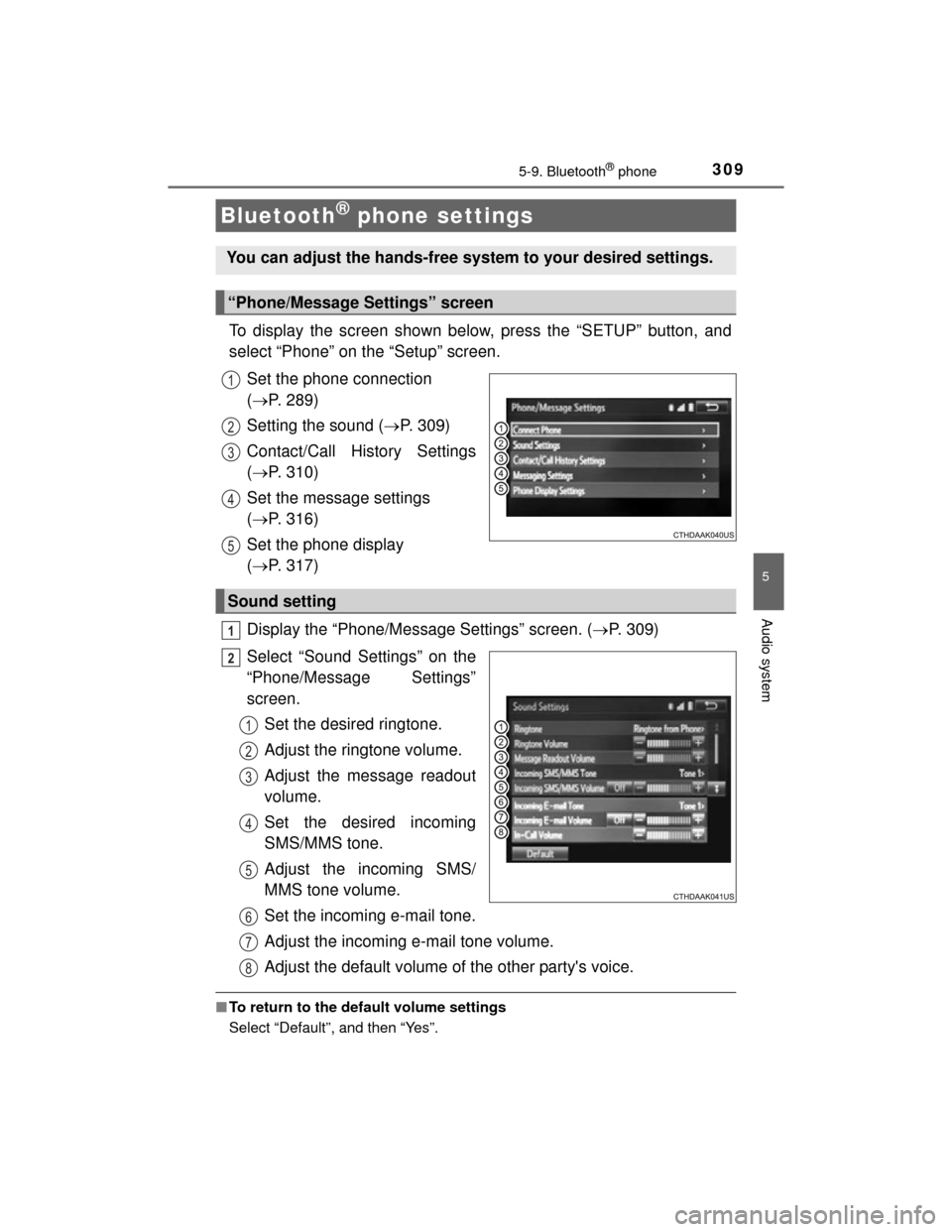
To display the screen shown below, press the “SETUP” button, and
select “Phone” on the “Setup” screen.Set the phone connection
( P. 289)
Setting the sound ( P. 309)
Contact/Call History Settings
( P. 310)
Set the message settings
( P. 316)
Set the phone display
( P. 317)
Display the “Phone/Message Settings” screen. ( P. 309)
Select “Sound Settings” on the
“Phone/Message Settings”
screen. Set the desired ringtone.
Adjust the ringtone volume.
Adjust the message readout
volume.
Set the desired incoming
SMS/MMS tone.
Adjust the incoming SMS/
MMS tone volume.
Set the incoming e-mail tone.
Adjust the incoming e-mail tone volume.
Adjust the default volume of the other party's voice.
■To return to the default volume settings
Select “Default”, and then “Yes”.
Bluetooth® phone settings
You can adjust the hands-free system to your desired settings.
“Phone/Message Settings” screen
1
2
13
14
5
Sound setting
1
2
1
2
13
4
5
6
7
8