Page 224 of 648
2244-2. Driving procedures
AVENSIS_OM_OM20C20E_(EE)■
GAI-SHIFT
The G AI-SHIFT is automatically changed to a suitable gear step while run-
ning in sport mode according to the driving operations and running condi-
tions.
The G AI-SHIFT automatically operates when the driving mode is set to sport
mode with the shift lever in the D position. (The function will be canceled, if
the driving mode is set to normal mode or shift lever is put in the M position.)
WARNING
■ When driving on slippery road surfaces
Do not accelerate or shift gears suddenly.
Sudden changes in engine braking may cause the vehicle to spin or skid,
resulting in an accident.
AVENSIS_OM_OM20C20E_(EE).book Page 224 Thursday, January 29, 2015 1:47 PM
Page 225 of 648
225
4
4-2. Driving procedures
Driving
AVENSIS_OM_OM20C20E_(EE)
Manual transmission∗
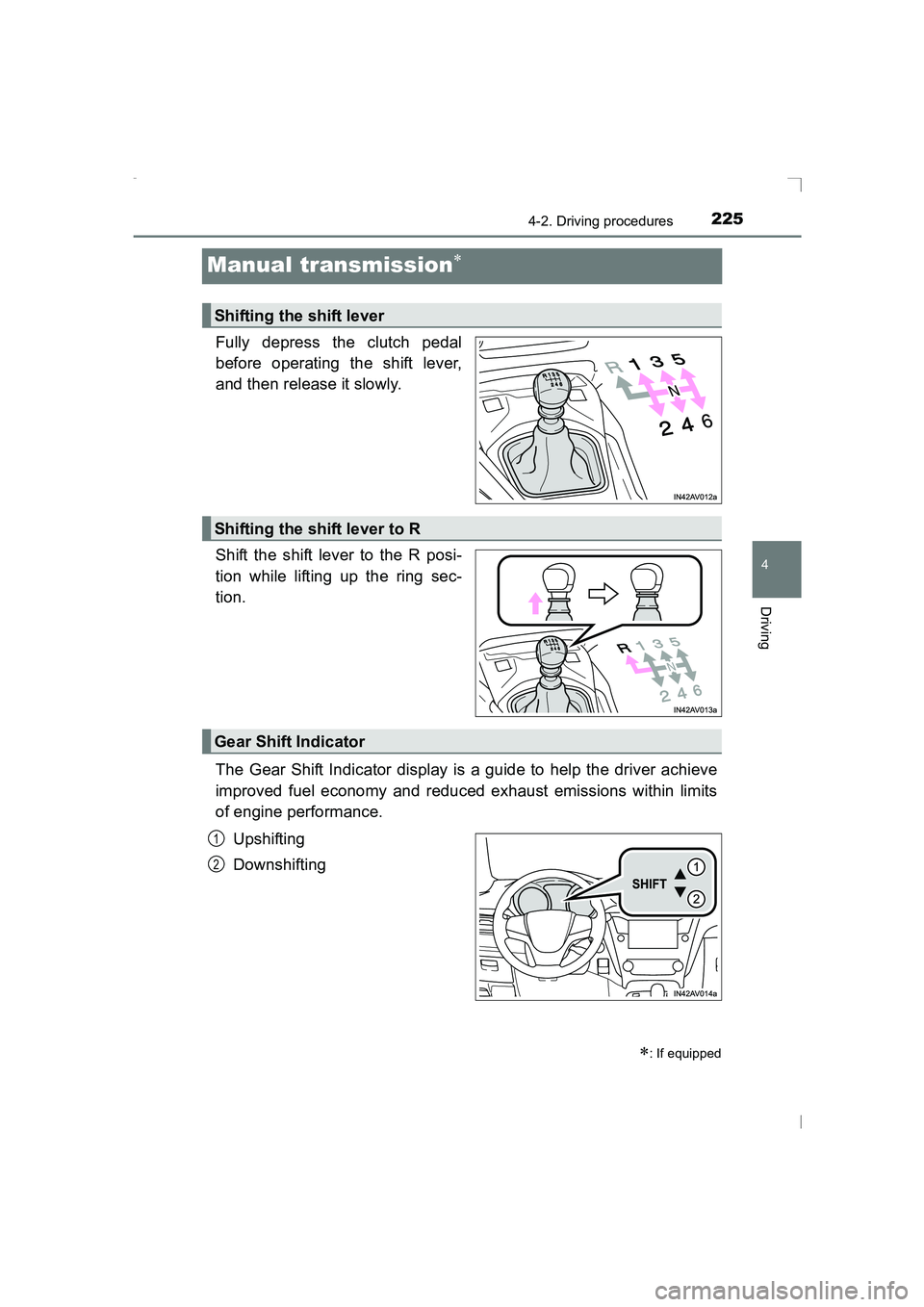
Fully depress the clutch pedal
before operating the shift lever,
and then release it slowly.
Shift the shift lever to the R posi-
tion while lifting up the ring sec-
tion.
The Gear Shift Indicator display is a guide to help the driver achieve
improved fuel economy and reduced exhaust emissions within limits
of engine performance.Upshifting
Downshifting
∗: If equipped
Shifting the shift lever
Shifting the shift lever to R
Gear Shift Indicator
1
2
AVENSIS_OM_OM20C20E_(EE).book Page 225 Thursday, January 29, 2015 1:47 PM
Page 226 of 648
2264-2. Driving procedures
AVENSIS_OM_OM20C20E_(EE)
■Gear Shift Indicator display
The Gear Shift Indicator may not be displayed when your foot is placed on
the clutch pedal.
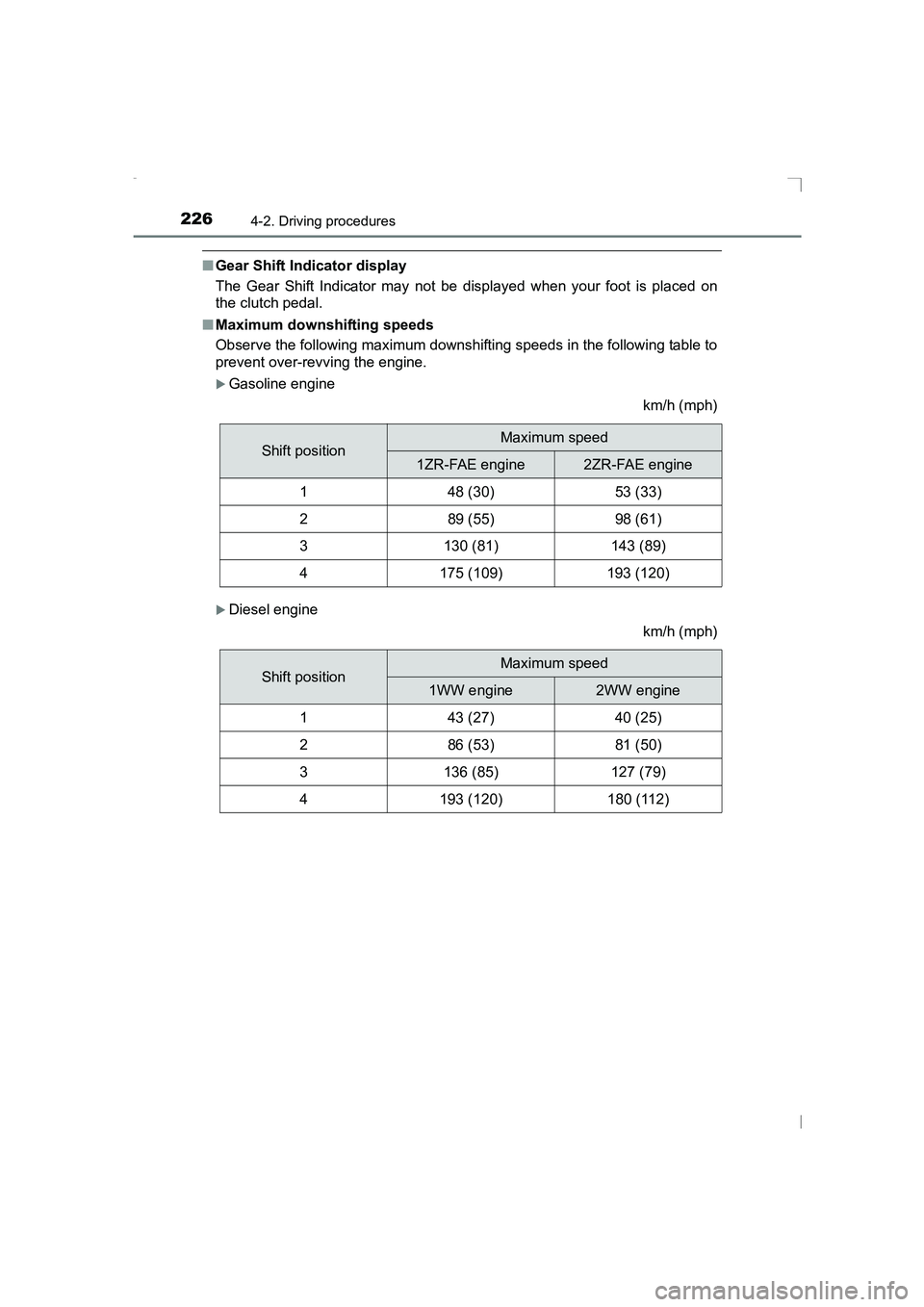
■ Maximum downshifting speeds
Observe the following maximum downshifting speeds in the following table to
prevent over-revving the engine.
XGasoline engine
km/h (mph)
XDiesel engine
km/h (mph)
Shift positionMaximum speed
1ZR-FAE engine2ZR-FAE engine
148 (30)53 (33)
289 (55)98 (61)
3130 (81)143 (89)
4175 (109)193 (120)
Shift positionMaximum speed
1WW engine2WW engine
143 (27)40 (25)
286 (53)81 (50)
3136 (85)127 (79)
4193 (120)180 (112)
AVENSIS_OM_OM20C20E_(EE).book Page 226 Thursday, January 29, 2015 1:47 PM
Page 228 of 648
2284-2. Driving procedures
AVENSIS_OM_OM20C20E_(EE)
Turn signal lever
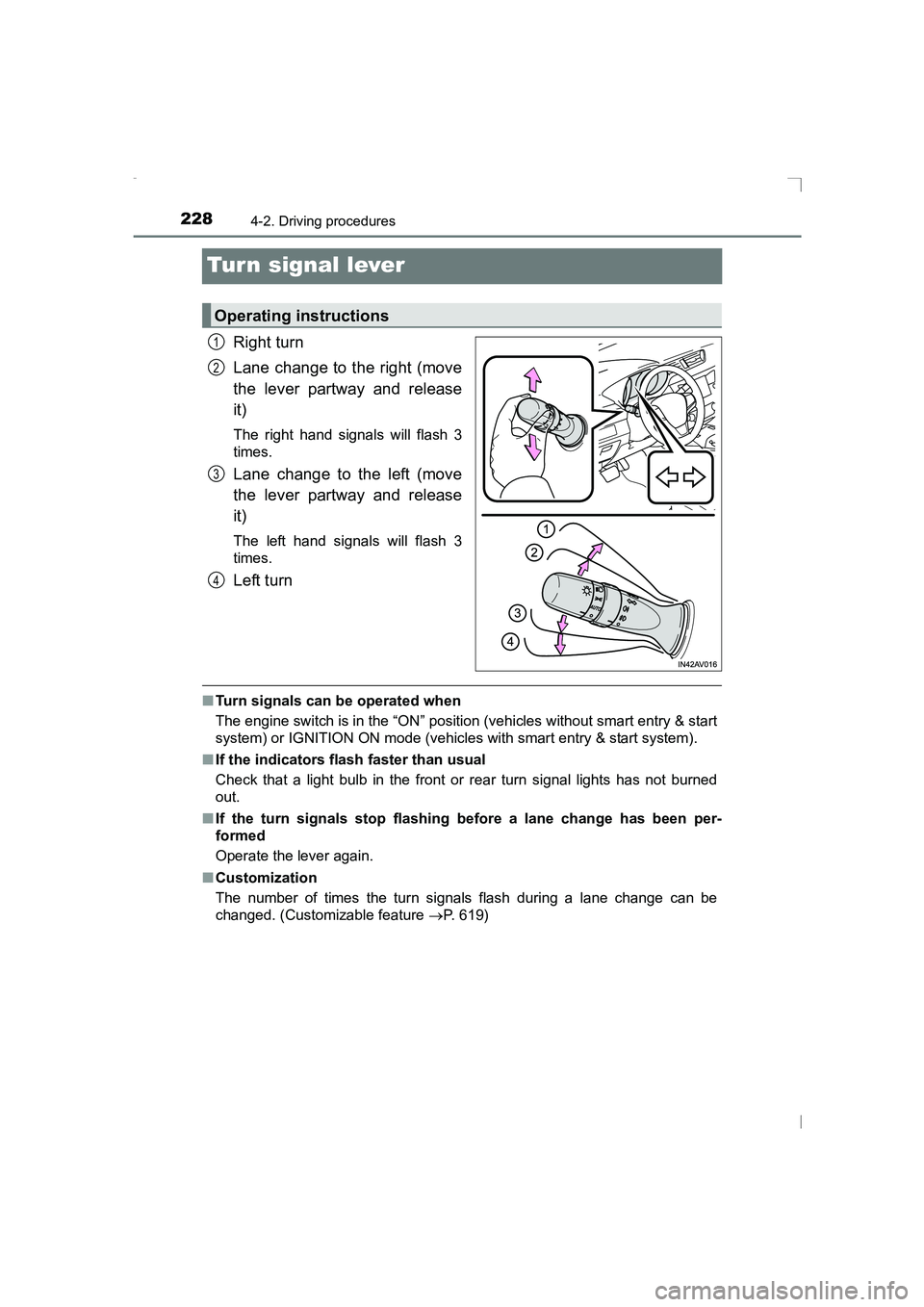
Right turn
Lane change to the right (move
the lever partway and release
it)
The right hand signals will flash 3
times.
Lane change to the left (move
the lever partway and release
it)
The left hand signals will flash 3
times.
Left turn
■Turn signals can be operated when
The engine switch is in the “ON” position (vehicles without smart entry & start
system) or IGNITION ON mode (vehicles with smart entry & start system).
■ If the indicators flash faster than usual
Check that a light bulb in the front or rear turn signal lights has not burned
out.
■ If the turn signals stop flashing before a lane change has been per-
formed
Operate the lever again.
■ Customization
The number of times the turn signals flash during a lane change can be
changed. (Customizable feature →P. 619)
Operating instructions
1
2
3
4
AVENSIS_OM_OM20C20E_(EE).book Page 228 Thursday, January 29, 2015 1:47 PM
Page 229 of 648
229
4
4-2. Driving procedures
Driving
AVENSIS_OM_OM20C20E_(EE)
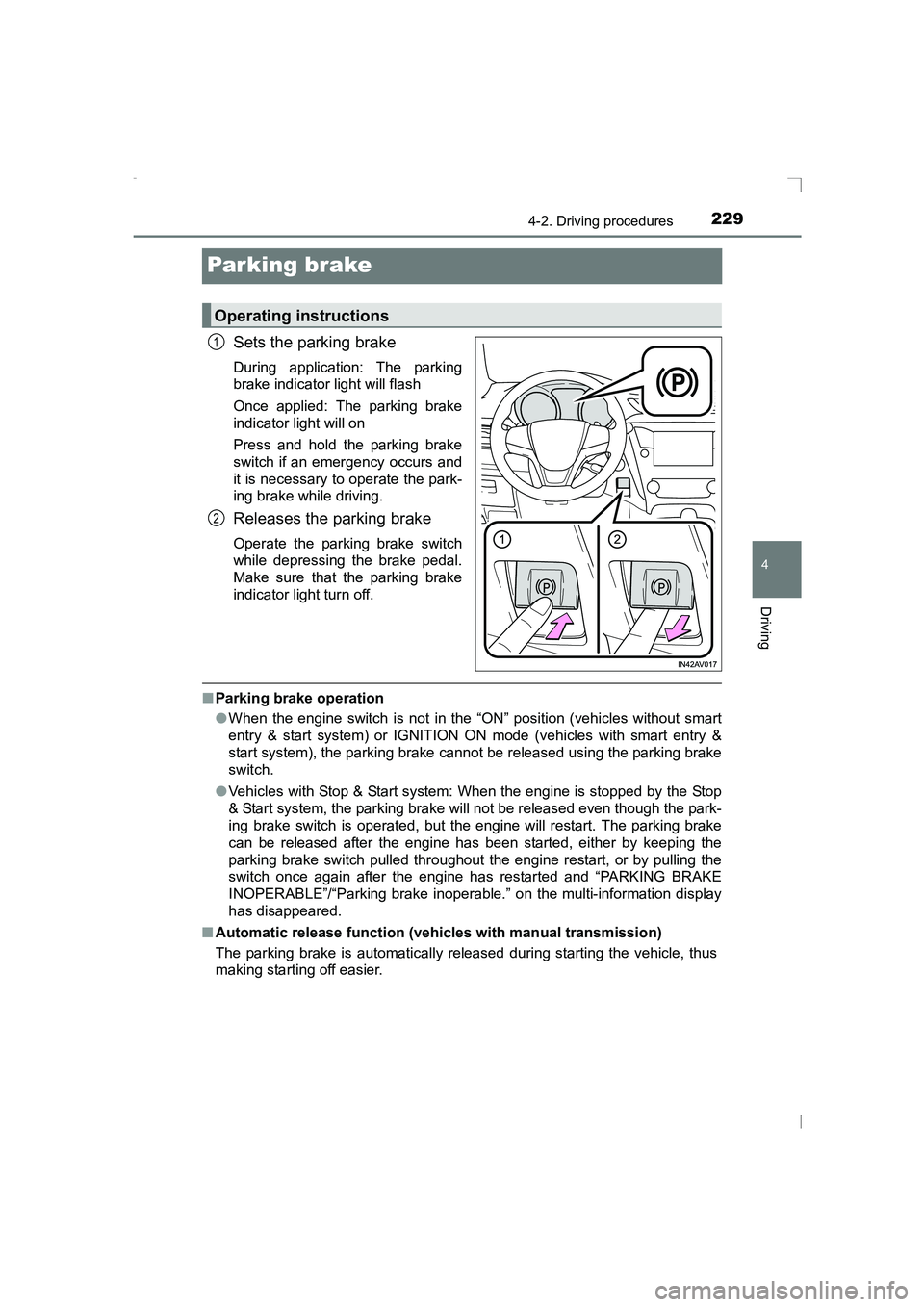
Parking brake
Sets the parking brake
During application: The parking
brake indicator light will flash
Once applied: The parking brake
indicator light will on
Press and hold the parking brake
switch if an emergency occurs and
it is necessary to operate the park-
ing brake while driving.
Releases the parking brake
Operate the parking brake switch
while depressing the brake pedal.
Make sure that the parking brake
indicator light turn off.
■Parking brake operation
●When the engine switch is not in the “ON” position (vehicles without smart
entry & start system) or IGNITION ON mode (vehicles with smart entry &
start system), the parking brake cannot be released using the parking brake
switch.
● Vehicles with Stop & Start system: When the engine is stopped by the Stop
& Start system, the parking brake will not be released even though the park-
ing brake switch is operated, but the engine will restart. The parking brake
can be released after the engine has been started, either by keeping the
parking brake switch pulled throughout the engine restart, or by pulling the
switch once again after the engine has restarted and “PARKING BRAKE
INOPERABLE”/“Parking brake inoperable. ” on the multi-information display
has disappeared.
■ Automatic release function (vehicles with manual transmission)
The parking brake is automatically rel eased during starting the vehicle, thus
making starting off easier.
Operating instructions
1
2
AVENSIS_OM_OM20C20E_(EE).book Page 229 Thursday, January 29, 2015 1:47 PM
Page 230 of 648
2304-2. Driving procedures
AVENSIS_OM_OM20C20E_(EE)■
Automatic apply function (vehicles with manual transmission)
To prevent the parking brake from being left accidentally unapplied, the park-
ing brake will be applied automatically under the following conditions:
●The vehicle is stopped.
● The engine switch is turned to the “LOCK” position (vehicles without smart
entry & start system) or off (vehicles with smart entry & start system).
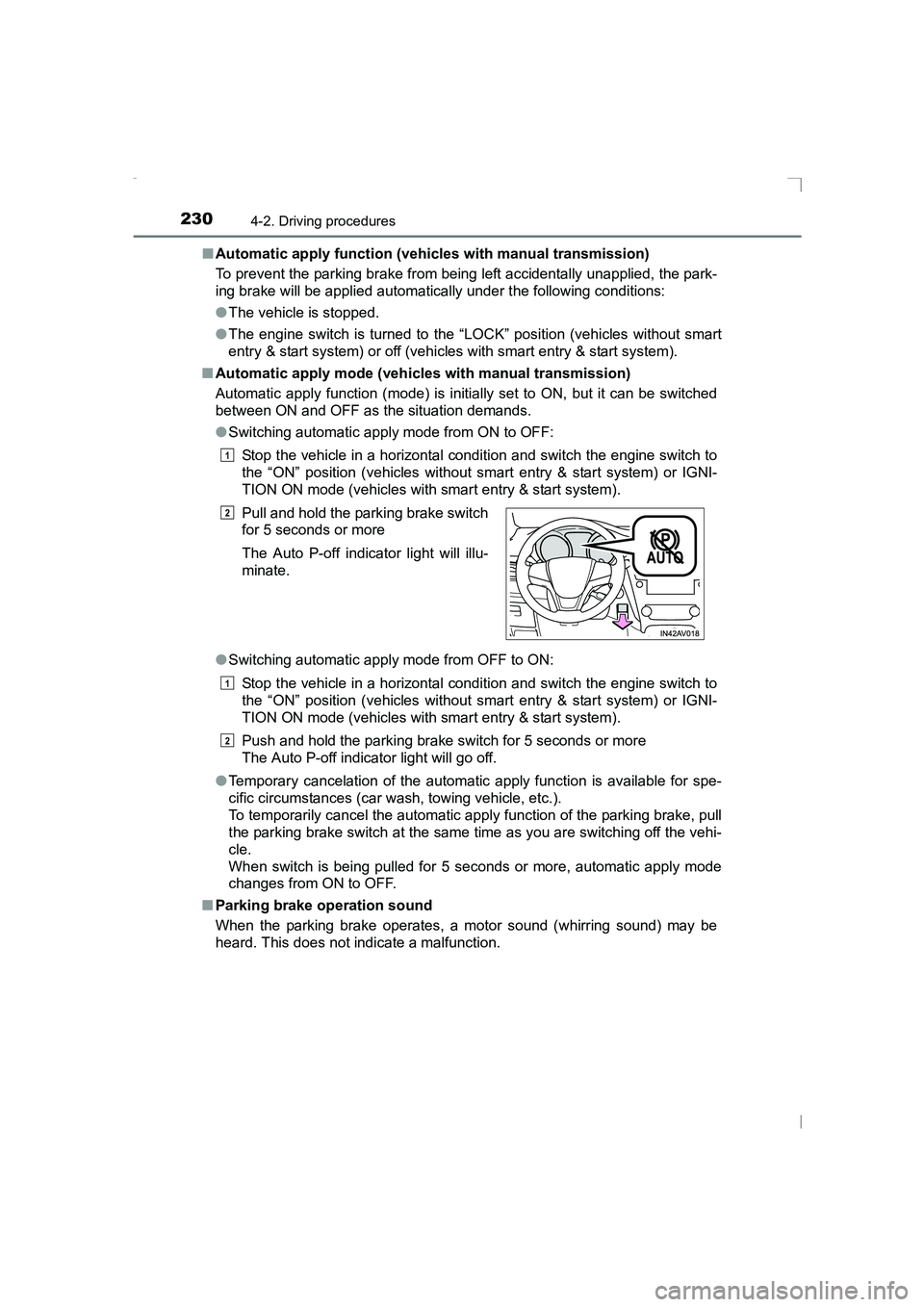
■ Automatic apply mode (vehicles with manual transmission)
Automatic apply function (mode) is initially set to ON, but it can be switched
between ON and OFF as the situation demands.
●Switching automatic apply mode from ON to OFF:
Stop the vehicle in a horizontal condition and switch the engine switch to
the “ON” position (vehicles without smart entry & start system) or IGNI-
TION ON mode (vehicles with smart entry & start system).
● Switching automatic apply mode from OFF to ON:
Stop the vehicle in a horizontal condition and switch the engine switch to
the “ON” position (vehicles without smart entry & start system) or IGNI-
TION ON mode (vehicles with smart entry & start system).
Push and hold the parking brake switch for 5 seconds or more
The Auto P-off indicator light will go off.
● Temporary cancelation of the automatic apply function is available for spe-
cific circumstances (car wash, towing vehicle, etc.).
To temporarily cancel the automatic apply function of the parking brake, pull
the parking brake switch at the same time as you are switching off the vehi-
cle.
When switch is being pulled for 5 seconds or more, automatic apply mode
changes from ON to OFF.
■ Parking brake operation sound
When the parking brake operates, a motor sound (whirring sound) may be
heard. This does not indicate a malfunction. Pull and hold the parking brake switch
for 5 seconds or more
The Auto P-off indicator light will illu-
minate.
1
2
1
2
AVENSIS_OM_OM20C20E_(EE).book Page 230 Thursday, January 29,
2015 1:47 PM
Page 232 of 648
2324-3. Operating the lights and wipers
AVENSIS_OM_OM20C20E_(EE)
Headlight switch
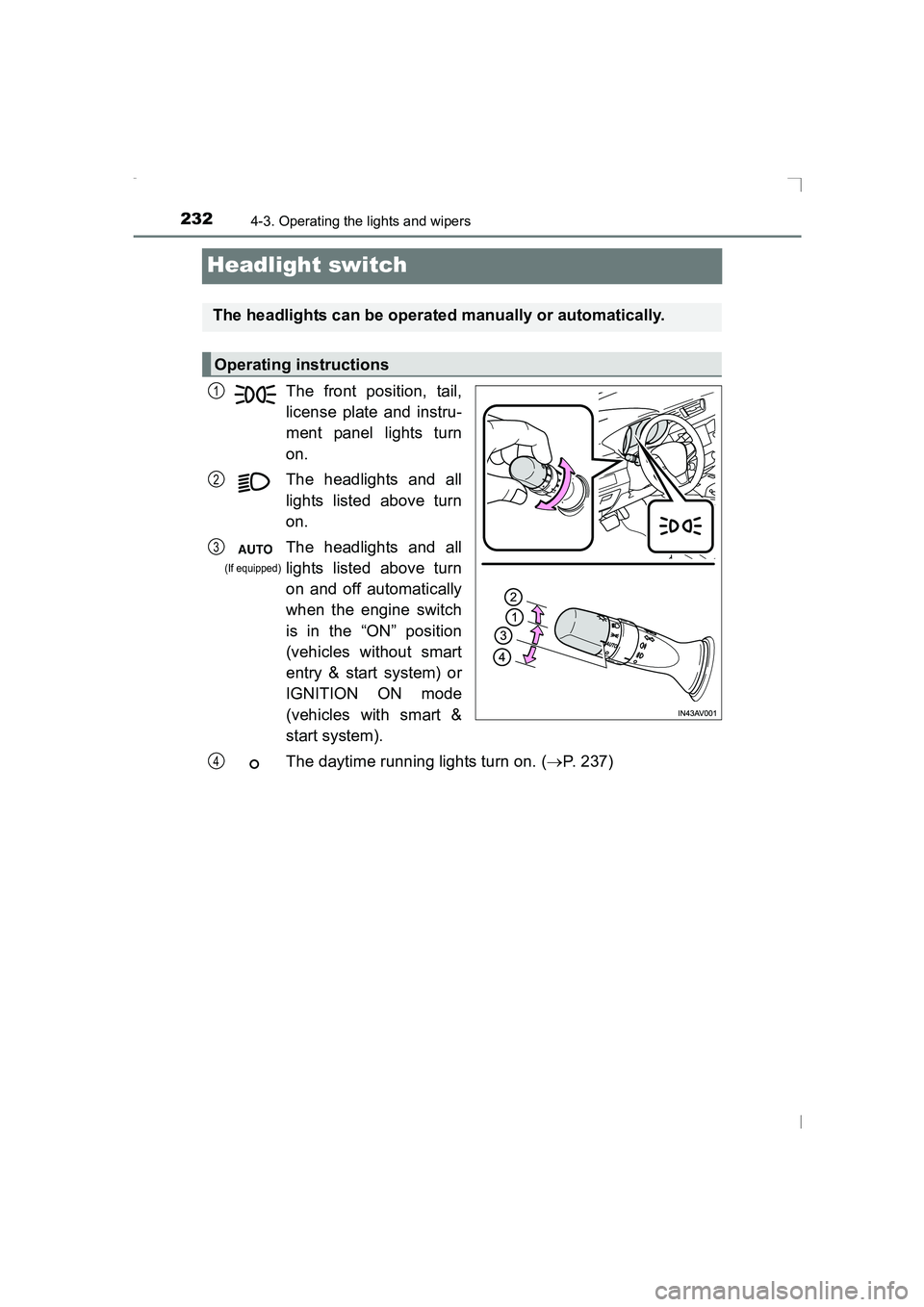
The front position, tail,
license plate and instru-
ment panel lights turn
on.
The headlights and all
lights listed above turn
on.
The headlights and all
lights listed above turn
on and off automatically
when the engine switch
is in the “ON” position
(vehicles without smart
entry & start system) or
IGNITION ON mode
(vehicles with smart &
start system).
The daytime running lights turn on. (→P. 237)
The headlights can be operated manually or automatically.
Operating instructions
1
2
3
(If equipped)
4
AVENSIS_OM_OM20C20E_(EE).book Page 232 Thursday, January 29, 2015 1:47 PM
Page 236 of 648
2364-3. Operating the lights and wipers
AVENSIS_OM_OM20C20E_(EE)
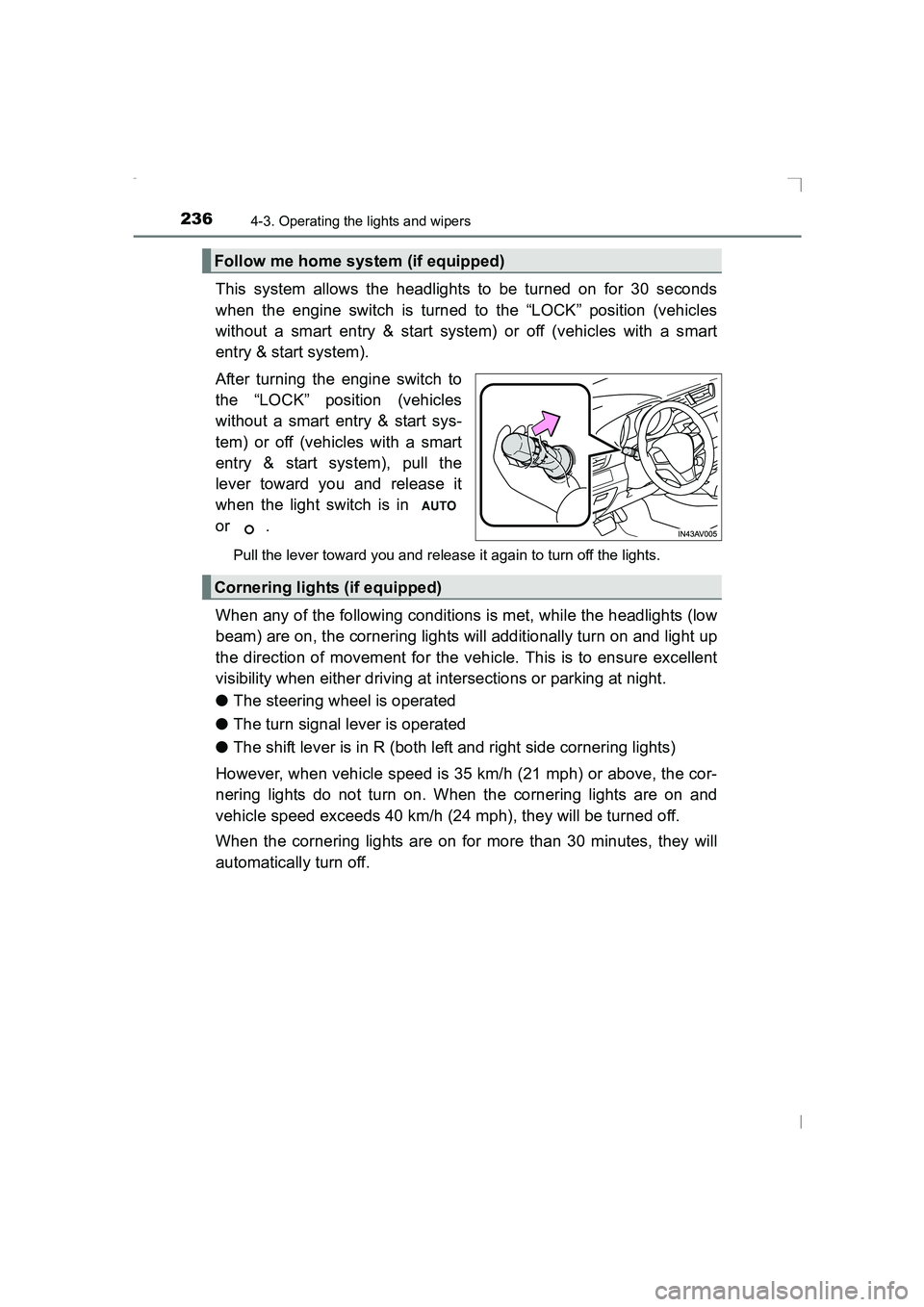
This system allows the headlights to be turned on for 30 seconds
when the engine switch is turned to the “LOCK” position (vehicles
without a smart entry & start system) or off (vehicles with a smart
entry & start system).
After turning the engine switch to
the “LOCK” position (vehicles
without a smart entry & start sys-
tem) or off (vehicles with a smart
entry & start system), pull the
lever toward you and release it
when the light switch is in
or .
Pull the lever toward you and release it again to turn off the lights.
When any of the following conditions is met, while the headlights (low
beam) are on, the cornering lights will additionally turn on and light up
the direction of movement for the vehicle. This is to ensure excellent
visibility when either driving at intersections or parking at night.
●The steering wheel is operated
● The turn signal lever is operated
● The shift lever is in R (both left and right side cornering lights)
However, when vehicle speed is 35 km/h (21 mph) or above, the cor-
nering lights do not turn on. When the cornering lights are on and
vehicle speed exceeds 40 km/h (24 mph), they will be turned off.
When the cornering lights are on for more than 30 minutes, they will
automatically turn off.
Follow me home system (if equipped)
Cornering lights (if equipped)
AVENSIS_OM_OM20C20E_(EE).book Page 236 Thursday, January 29, 2015 1:47 PM