2015 TOYOTA AVALON light
[x] Cancel search: lightPage 87 of 500
872. Instrument cluster
2
Instrument cluster
AVALON (U)_(OM41456U)
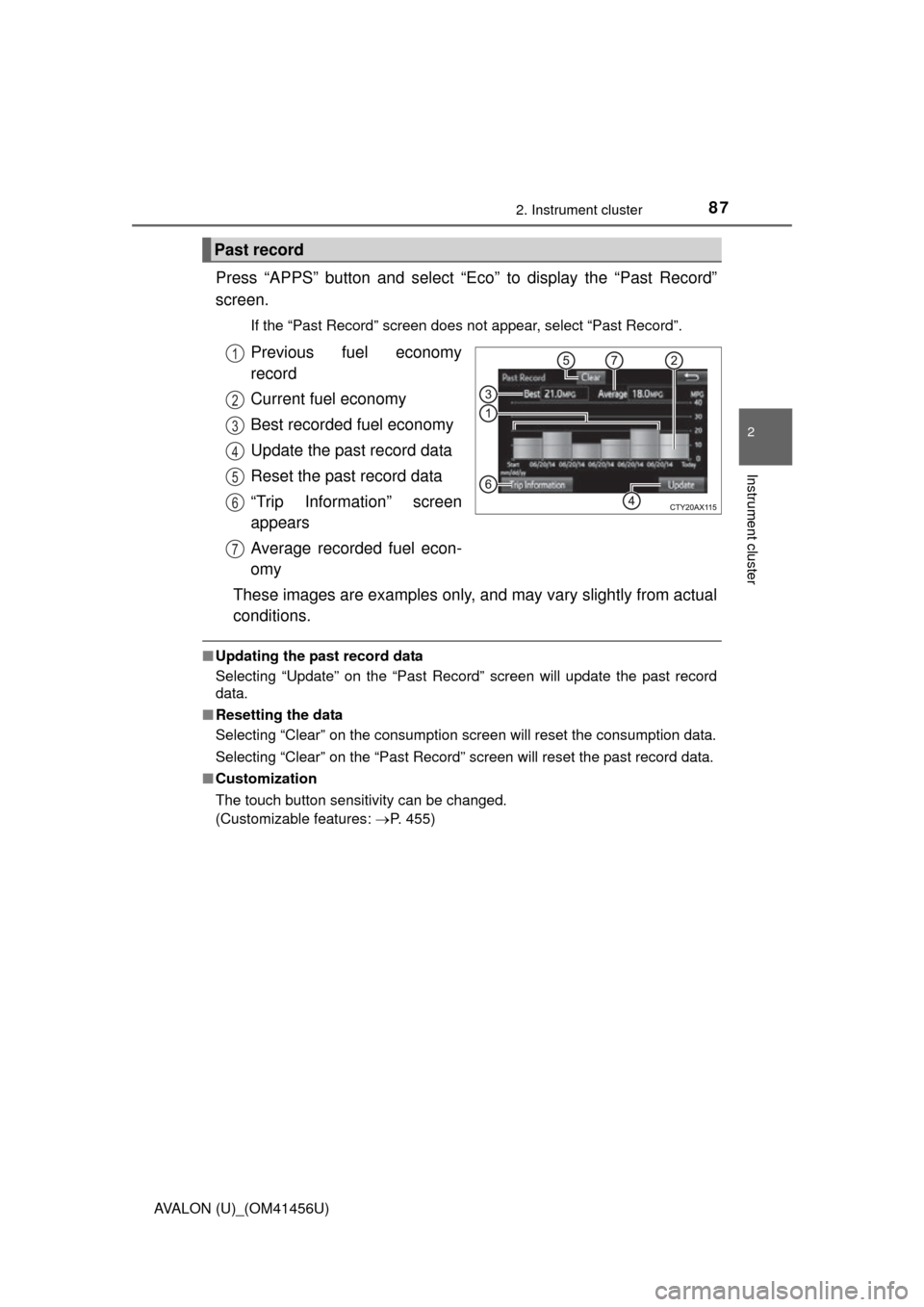
Press “APPS” button and select “Eco” to display the “Past Record”
screen.
If the “Past Record” screen does not appear, select “Past Record”.
Previous fuel economy
record
Current fuel economy
Best recorded fuel economy
Update the past record data
Reset the past record data
“Trip Information” screen
appears
Average recorded fuel econ-
omy
These images are examples only, and may vary slightly from actual
conditions.
■ Updating the past record data
Selecting “Update” on the “Past Record” screen will update t\
he past record
data.
■ Resetting the data
Selecting “Clear” on the consumption screen will reset the consumption data.
Selecting “Clear” on the “Past Record” screen will reset the past record data.
■ Customization
The touch button sensitivity can be changed.
(Customizable features: P. 455)
Past record
1
2
3
4
5
6
7
Page 100 of 500
1003-2. Opening, closing and locking the doors
AVALON (U)_(OM41456U)■
Switching the door unlock function (some models)
It is possible to set which doors the entry function unlocks using the wireless
remote control.
Turn the engine switch off.
When the indicator light on the key surface is not on, press and hold ,
or for approximately 5 seconds while pressing and holding
.
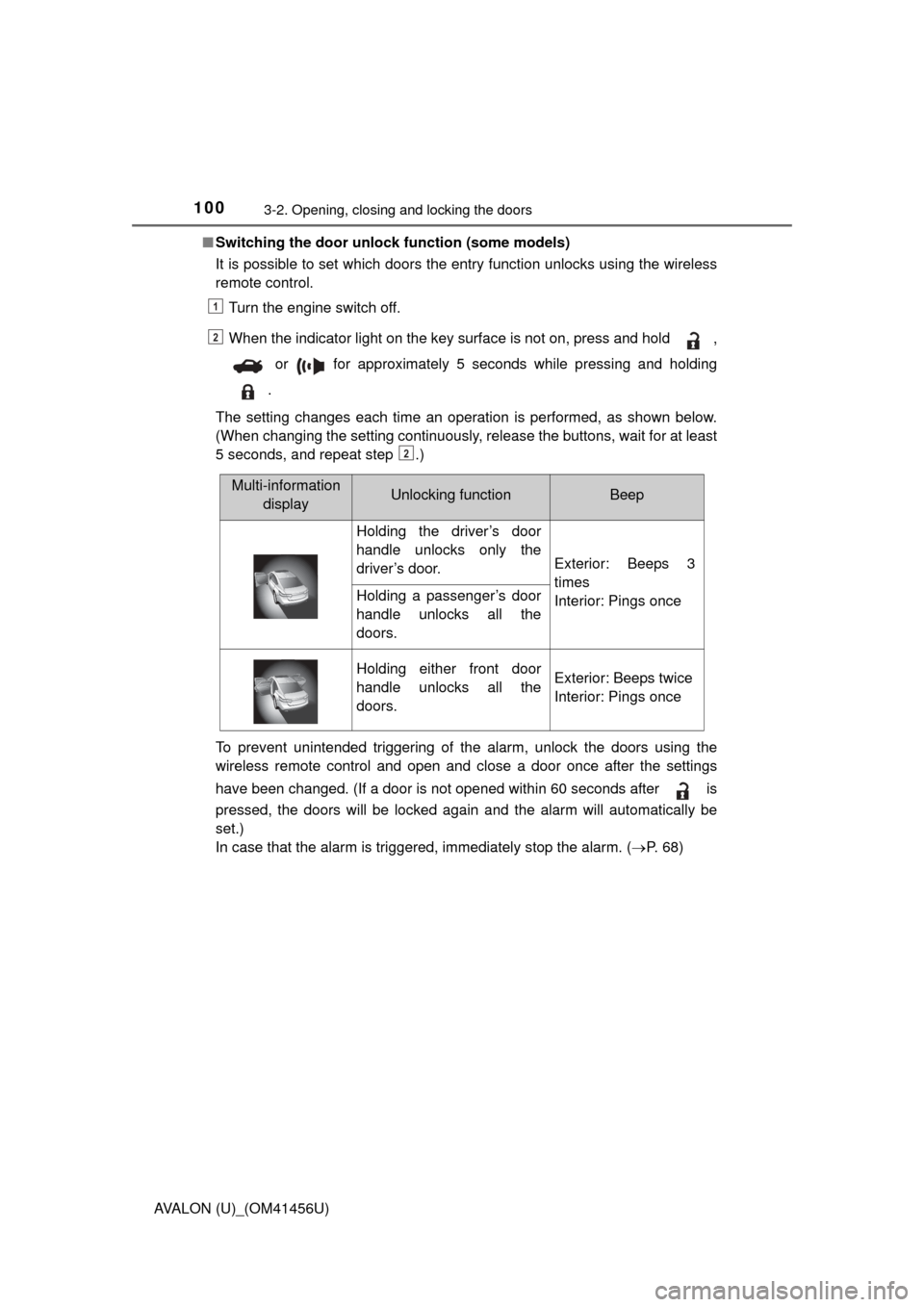
The setting changes each time an operation is performed, as shown below.
(When changing the setting continuously, release the buttons, wait for at least
5 seconds, and repeat step .)
To prevent unintended triggering of the alarm, unlock the doors using the
wireless remote control and open and close a door once after the settings
have been changed. (If a door is not opened within 60 seconds after is
pressed, the doors will be locked again and the alarm will automatically be
set.)
In case that the alarm is triggered, immediately stop the alarm. ( P. 6 8 )
1
2
2
Multi-information
displayUnlocking functionBeep
Holding the driver’s door
handle unlocks only the
driver’s door.
Exterior: Beeps 3
times
Interior: Pings once
Holding a passenger’s door
handle unlocks all the
doors.
Holding either front door
handle unlocks all the
doors.Exterior: Beeps twice
Interior: Pings once
Page 104 of 500

1043-2. Opening, closing and locking the doors
AVALON (U)_(OM41456U)■
Note for locking the doors
●Touching the door lock sensor while wearing gloves may delay or prevent
lock operation. Remove the gloves and touch the lock sensor again.
● If the door handle becomes wet while the electronic key is within the effec-
tive range, the door may lock and unlock repeatedly. In that case, follow the
following correction procedures to wash the vehicle:
• Place the electronic key in a location 6 ft. (2 m) or more away from the
vehicle. (Take care to ensure that the key is not stolen.)
• Set the electronic key to battery-saving mode to disable the smart key system. ( P. 101)
● If the electronic key is inside the vehicle and a door handle becomes wet
during a car wash, a message may be shown on the multi-information dis-
play and a buzzer will sound outside the vehicle. To turn off the alarm, lock
all the doors.
● The lock sensor may not work properly if it comes into contact with ice,
snow, mud, etc. Clean the lock sensor and attempt to operate it again, or
use the lock sensor on the lower part of the door handle.
● Fingernails may scrape against the door during operation of the door han-
dle. Be careful not to injure fingernails or damage the surface of the door.
■ Note for the unlocking function
●A sudden approach to the effective range or door handle may prevent the
doors from being unlocked. In this case, return the door handle to the origi-
nal position and check that the doors unlock before pulling the door handle
again.
● Gripping the door handle when wearing a glove may not unlock the door.
● If the door handle becomes wet while the electronic key is within the effec-
tive range, the door may lock and unlock repeatedly. In that case, follow the
following correction procedures to wash the vehicle:
• Place the electronic key in a location 6 ft. (2 m) or more away from the
vehicle. (Take care to ensure that the key is not stolen.)
• Set the electronic key to battery-saving mode to disable the smart key system. ( P. 101)
● If there is another electronic key in the detection area, it may take slightly
longer to unlock the doors after the door handle is gripped.
● Fingernails may scrape against the door during operation of the door han-
dle. Be careful not to injure fingernails or damage the surface of the door.
Page 109 of 500
1093-2. Opening, closing and locking the doors
3
Operation of each component
AVALON (U)_(OM41456U)
■Operation signals
Doors:
A buzzer sounds and the emergency flashers flash to indicate that the doors
have been locked/unlocked. (Locked: once; Unlocked: twice)
Trunk:
A buzzer sounds to indicate that the trunk has been opened.
■ Door lock buzzer
If an attempt to lock the doors is made when a door is not fully closed, a
buzzer sounds continuously for 5 seconds. Fully close the door to stop the
buzzer, and lock the vehicle once more.
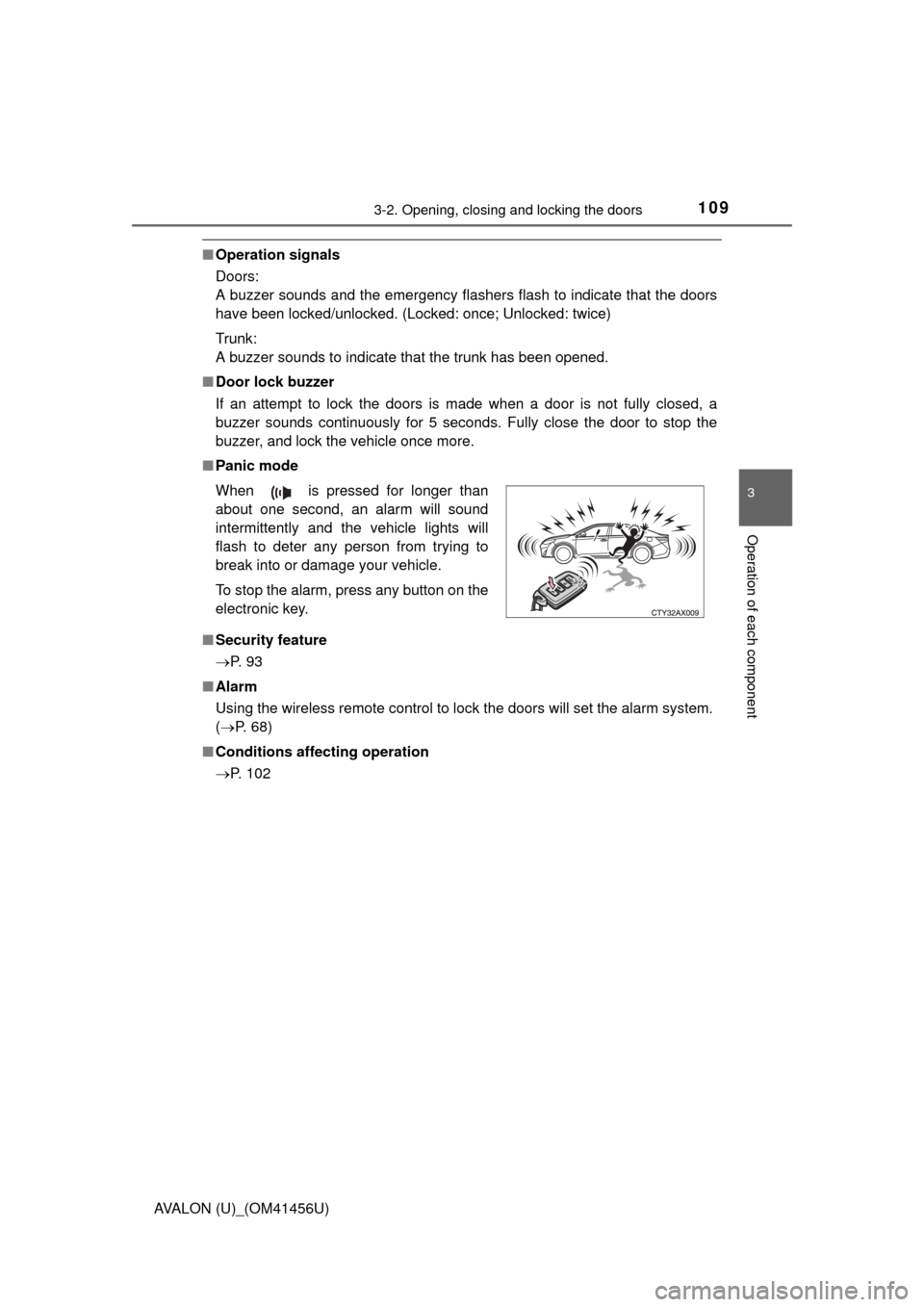
■ Panic mode
■ Security feature
P. 9 3
■ Alarm
Using the wireless remote control to lock the doors will set the alarm system.
(P. 68)
■ Conditions affecting operation
P. 102 When is pressed for longer than
about one second, an alarm will sound
intermittently and the vehicle lights will
flash to deter any person from trying to
break into or damage your vehicle.
To stop the alarm, press any button on the
electronic key.
Page 115 of 500
1153-2. Opening, closing and locking the doors
3
Operation of each component
AVALON (U)_(OM41456U)
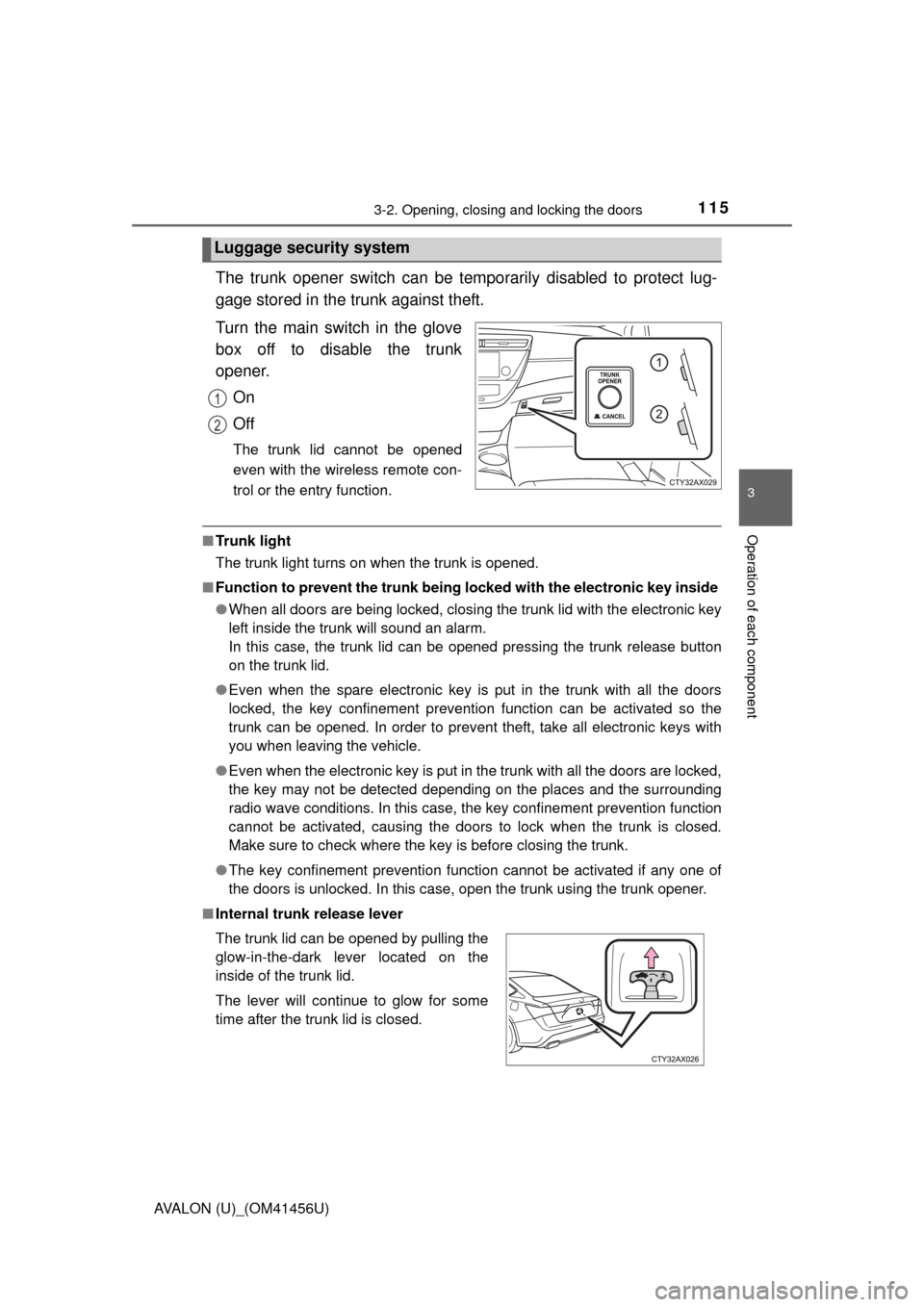
The trunk opener switch can be temporarily disabled to protect lug-
gage stored in the trunk against theft.
Turn the main switch in the glove
box off to disable the trunk
opener.On
Off
The trunk lid cannot be opened
even with the wireless remote con-
trol or the entry function.
■Tr u n k l i g h t
The trunk light turns on when the trunk is opened.
■ Function to prevent the tr unk being locked with the electronic key inside
● When all doors are being locked, closing the trunk lid with the electronic key
left inside the trunk will sound an alarm.
In this case, the trunk lid can be opened pressing the trunk release button
on the trunk lid.
● Even when the spare electronic key is put in the trunk with all the doors
locked, the key confinement prevention function can be activated so the
trunk can be opened. In order to prevent theft, take all electronic keys with
you when leaving the vehicle.
● Even when the electronic key is put in the trunk with all the doors are locked,
the key may not be detected depending on the places and the surrounding
radio wave conditions. In this case, the key confinement prevention function
cannot be activated, causing the doors to lock when the trunk is closed.
Make sure to check where the key is before closing the trunk.
● The key confinement prevention function cannot be activated if any one of
the doors is unlocked. In this case, open the trunk using the trunk opener.
■ Internal trunk release lever
Luggage security system
1
2
The trunk lid can be opened by pulling the
glow-in-the-dark lever located on the
inside of the trunk lid.
The lever will continue to glow for some
time after the trunk lid is closed.
Page 117 of 500
1173-2. Opening, closing and locking the doors
3
Operation of each component
AVALON (U)_(OM41456U)
CAUTION
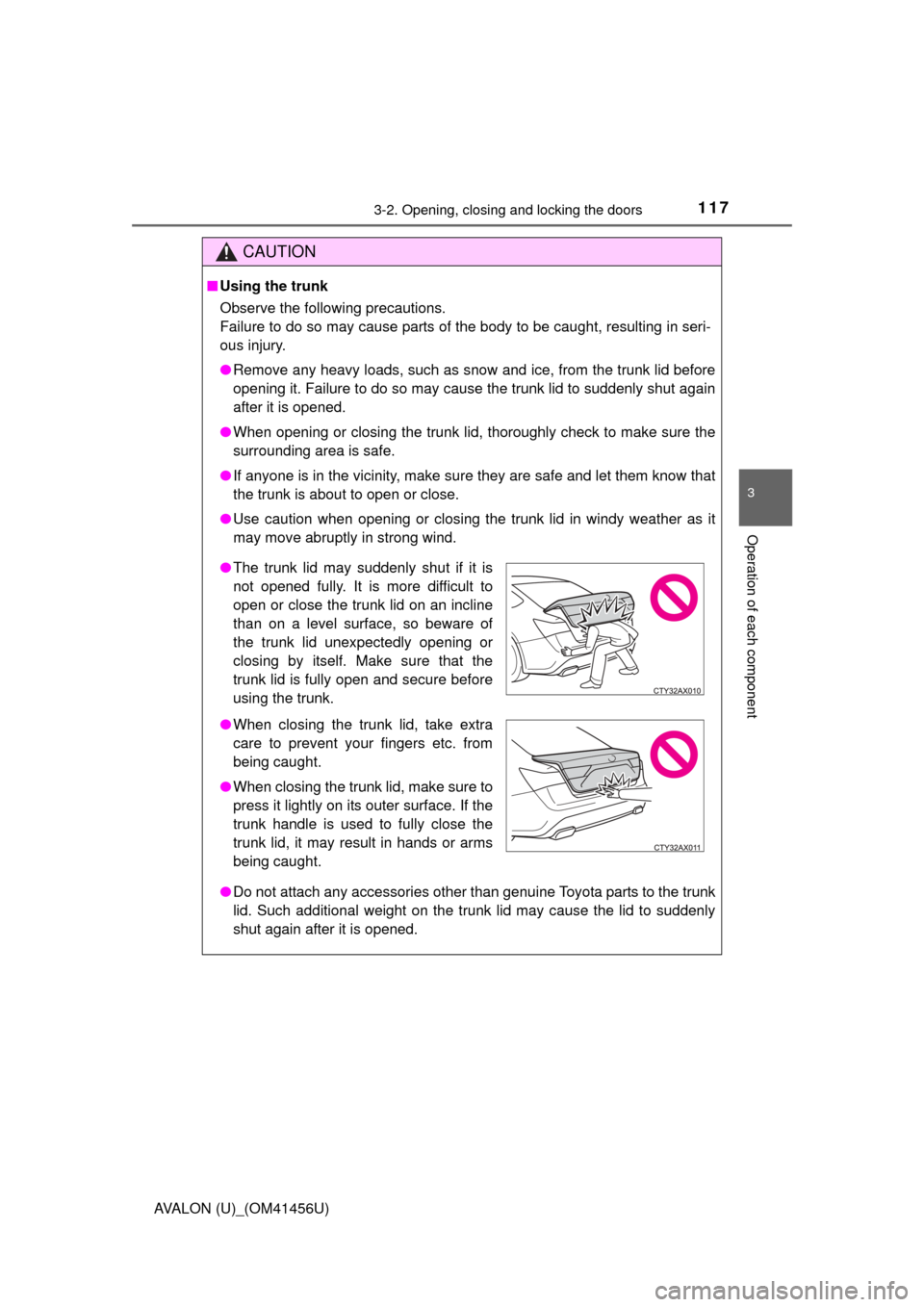
■Using the trunk
Observe the following precautions.
Failure to do so may cause parts of the body to be caught, resulting in seri-
ous injury.
● Remove any heavy loads, such as snow and ice, from the trunk lid before
opening it. Failure to do so may cause the trunk lid to suddenly shut again
after it is opened.
● When opening or closing the trunk lid, thoroughly check to make sure the
surrounding area is safe.
● If anyone is in the vicinity, make sure they are safe and let them know that
the trunk is about to open or close.
● Use caution when opening or closing the trunk lid in windy weather as it
may move abruptly in strong wind.
● Do not attach any accessories other than genuine Toyota parts to the trunk
lid. Such additional weight on the trunk lid may cause the lid to suddenly
shut again after it is opened.
●The trunk lid may suddenly shut if it is
not opened fully. It is more difficult to
open or close the trunk lid on an incline
than on a level surface, so beware of
the trunk lid unexpectedly opening or
closing by itself. Make sure that the
trunk lid is fully open and secure before
using the trunk.
● When closing the trunk lid, take extra
care to prevent your fingers etc. from
being caught.
● When closing the trunk lid, make sure to
press it lightly on its outer surface. If the
trunk handle is used to fully close the
trunk lid, it may result in hands or arms
being caught.
Page 122 of 500

1223-3. Adjusting the seats
AVALON (U)_(OM41456U)■
Recall procedure
Check that the shift lever is in P.
Turn the engine switch to IGNITION ON mode.
Press button “1” or “2” to
recall the desired position.
■To stop the position recall operation part-way through
Perform any of the following:
●Press the “SET” button.
● Press button “1” or “2”.
● Adjust the seat using the switches (only cancels seat position recall).
■ Seat positions that can be memorized ( P. 118)
The seat position, with the exception of the portions adjusted by the seat
cushion length switch and lumbar support switch, can be recorded.
■ Operating the driving position memory after turning the engine switch
off
Recorded seat positions can be activated up to 180 seconds after the driver’s
door is opened and another 60 seconds after it is closed again.
■ In order to correctly use the dr iving position memory function
If a seat position is already in the furthest possible position and the seat is
operated in the same direction, the recorded position may be slightly different
when it is recalled.
1
2
3
Page 123 of 500
1233-3. Adjusting the seats
3
Operation of each component
AVALON (U)_(OM41456U)
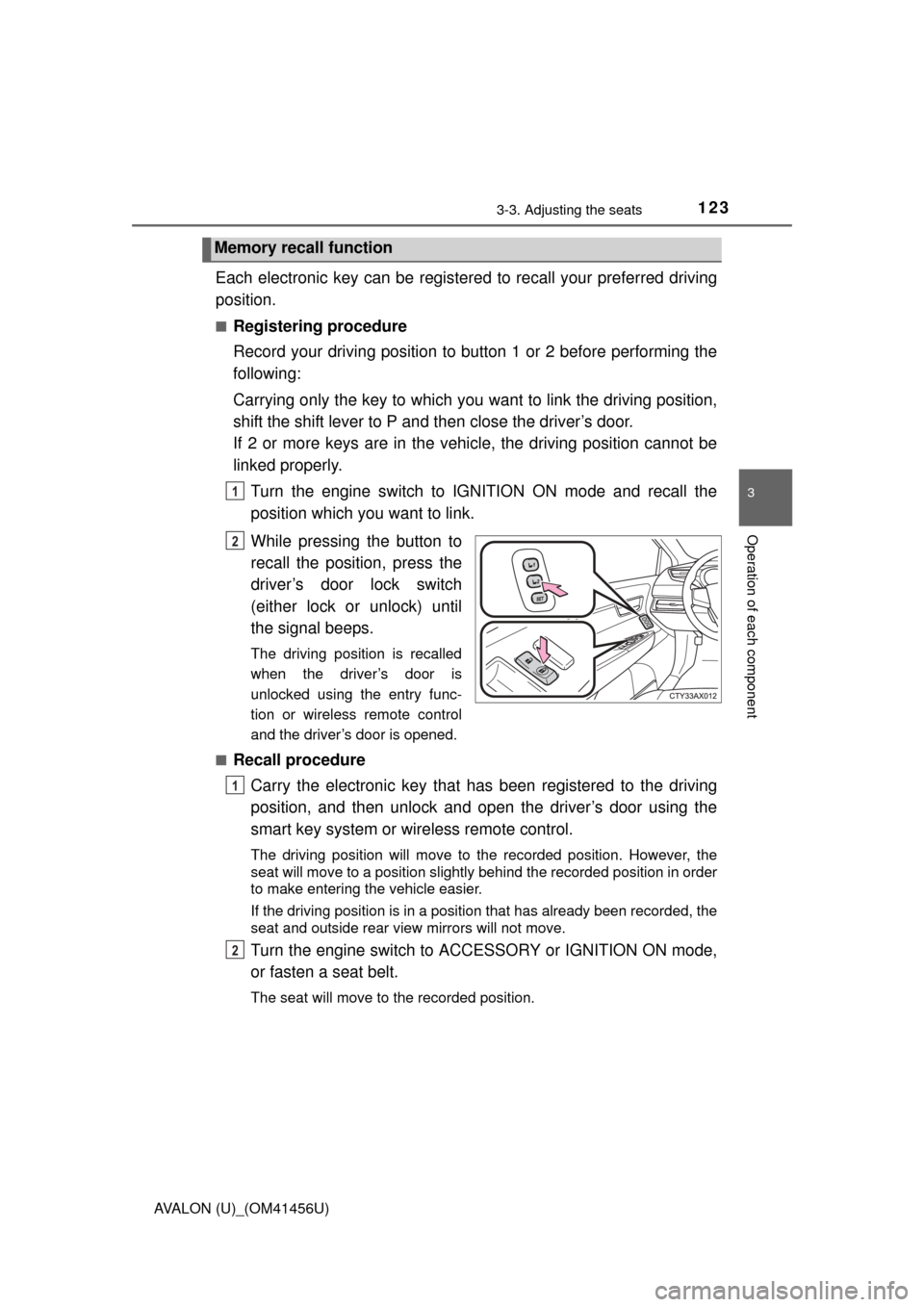
Each electronic key can be registered to recall your preferred driving
position.
■Registering procedure
Record your driving position to button 1 or 2 before performing the
following:
Carrying only the key to which you want to link the driving position,
shift the shift lever to P and then close the driver’s door.
If 2 or more keys are in the vehicle, the driving position cannot be
linked properly.
Turn the engine switch to IGNITION ON mode and recall the
position which you want to link.
While pressing the button to
recall the position, press the
driver’s door lock switch
(either lock or unlock) until
the signal beeps.
The driving position is recalled
when the driver’s door is
unlocked using the entry func-
tion or wireless remote control
and the driver’s door is opened.
■
Recall procedure Carry the electronic key that has been registered to the driving
position, and then unlock and open the driver’s door using the
smart key system or wi reless remote control.
The driving position will move to the recorded position. However, the
seat will move to a position slightly behind the recorded position in order
to make entering the vehicle easier.
If the driving position is in a position that has already been recorded, the
seat and outside rear view mirrors will not move.
Turn the engine switch to ACCESSORY or IGNITION ON mode,
or fasten a seat belt.
The seat will move to the recorded position.
Memory recall function
1
2
1
2