Page 77 of 500
772. Instrument cluster
2
Instrument cluster
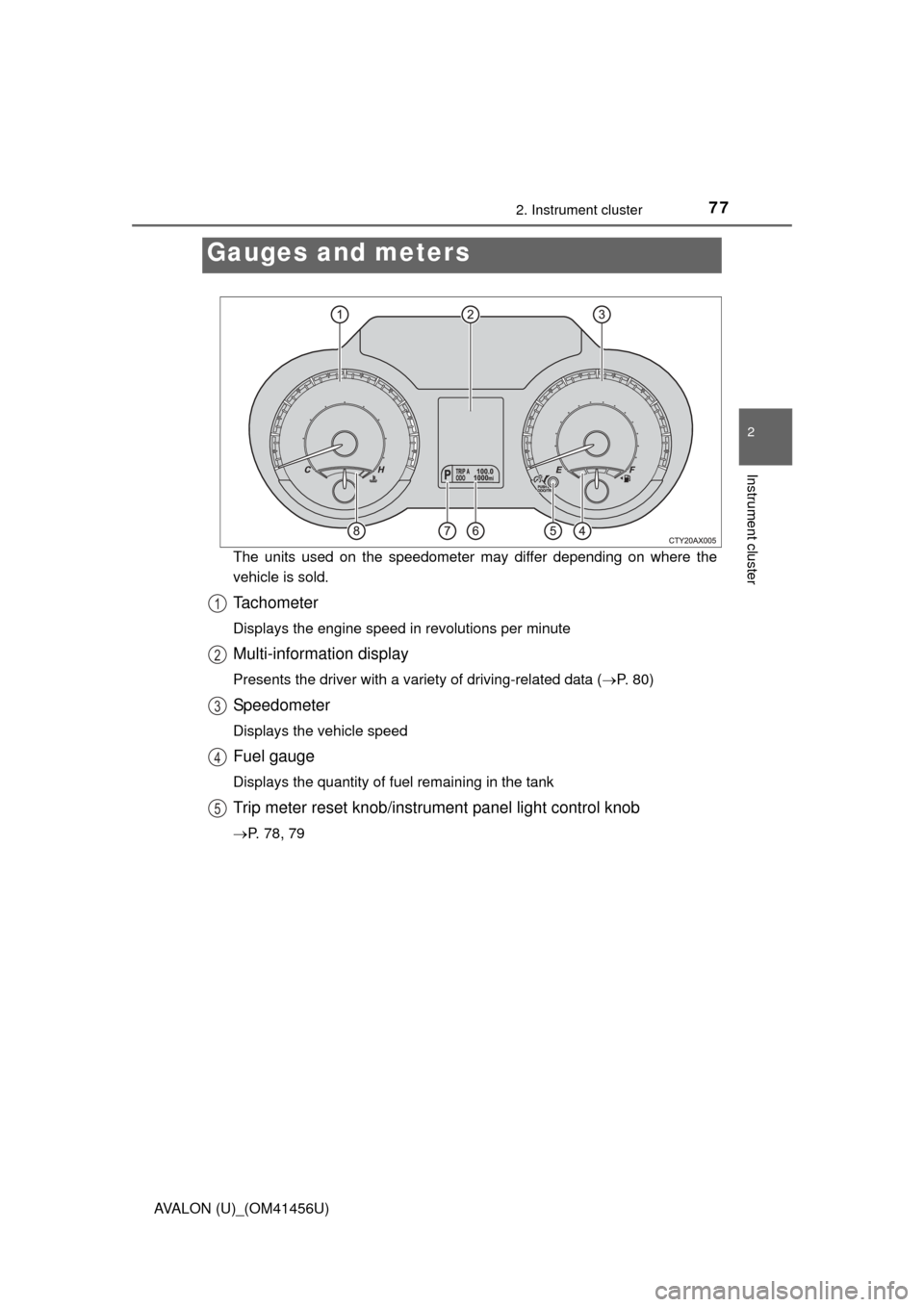
AVALON (U)_(OM41456U)The units used on the speedometer may differ depending on where the
vehicle is sold.
Tachometer
Displays the engine speed in revolutions per minute
Multi-information display
Presents the driver with a variety of driving-related data (
P. 80)
Speedometer
Displays the vehicle speed
Fuel gauge
Displays the quantity of fuel remaining in the tank
Trip meter reset knob/instrument panel light control knob
P. 78, 79
Gauges and meters
1
2
3
4
5
Page 82 of 500
822. Instrument cluster
AVALON (U)_(OM41456U)■
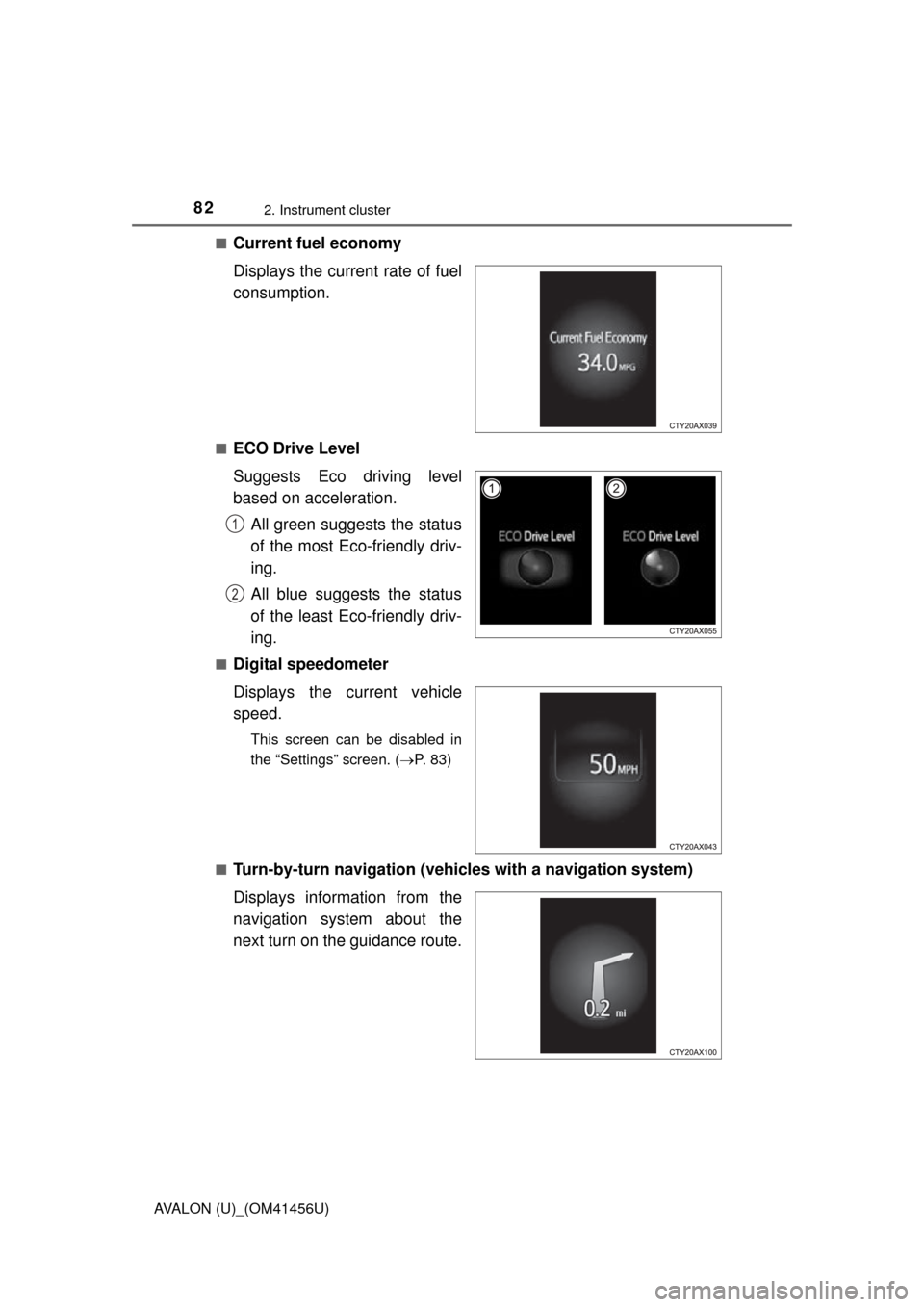
Current fuel economy
Displays the current rate of fuel
consumption.
■ECO Drive Level
Suggests Eco driving level
based on acceleration.
All green suggests the status
of the most Eco-friendly driv-
ing.
All blue suggests the status
of the least Eco-friendly driv-
ing.
■Digital speedometer
Displays the current vehicle
speed.
This screen can be disabled in
the “Settings” screen. ( P. 83)
■
Turn-by-turn navigation (vehicl es with a navigation system)
Displays information from the
navigation system about the
next turn on the guidance route.
1
2
Page 83 of 500
832. Instrument cluster
2
Instrument cluster
AVALON (U)_(OM41456U)■
Customizable items
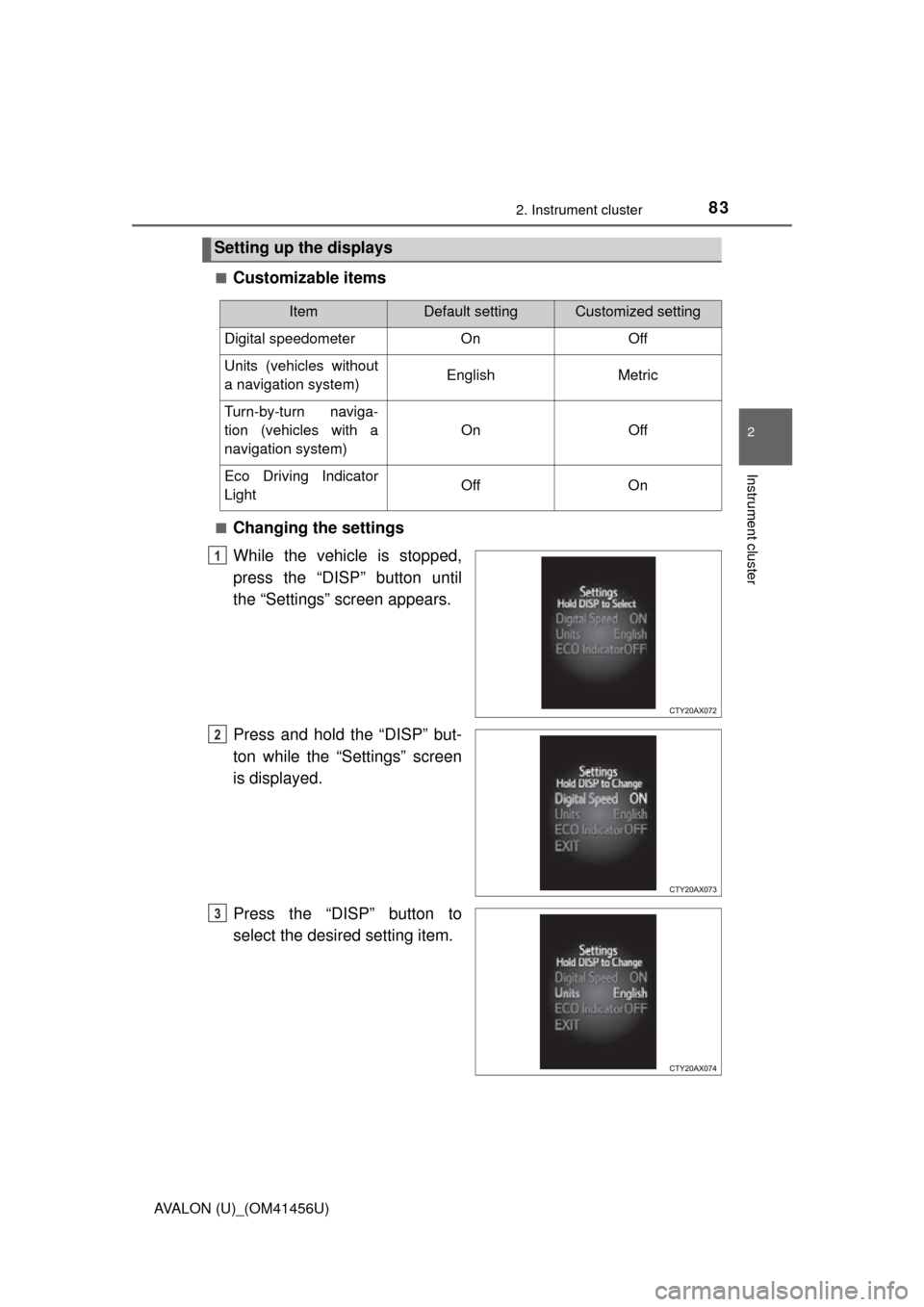
■Changing the settings
While the vehicle is stopped,
press the “DISP” button until
the “Settings” screen appears.
Press and hold the “DISP” but-
ton while the “Settings” screen
is displayed.
Press the “DISP” button to
select the desired setting item.
Setting up the displays
ItemDefault settingCustomized setting
Digital speedometer On Off
Units (vehicles without
a navigation system) English Metric
Turn-by-turn naviga-
tion (vehicles with a
navigation system) On Off
Eco Driving Indicator
Light Off On
1
2
3
Page 89 of 500
89
Operation of
each component
3
AVALON (U)_(OM41456U) 3-1. Key information
Keys .................................... 90
3-2. Opening, closing and locking the doors
Smart key system ............... 93
Wireless remote control ............................. 108
Doors ................................ 111
Trunk ................................. 114
3-3. Adjusting the seats Front seats ........................ 118
Driving position memory ........................... 120
Head restraints.................. 125
3-4. Adjusting the steering wheel and mirrors
Steering wheel .................. 128
Inside rear view mirror ...... 129
Outside rear view mirrors ............................. 131
3-5. Opening, closing the windows and moon roof
Power windows ................. 134
Moon roof .......................... 137
Page 101 of 500
1013-2. Opening, closing and locking the doors
3
Operation of each component
AVALON (U)_(OM41456U)■
Battery-saving function
The battery-saving function will be activated in order to prevent the electronic
key battery and the vehicle battery from being discharged while the vehicle is
not in operation for a long time.
●In the following situations, the smart key system may take some time to
unlock the doors.
• The electronic key has been left in an area of approximately 6 ft. (2 m) of
the outside of the vehicle for 10 minutes or longer.
• The smart key system has not been used for 5 days or longer.
● If the smart key system has not been used for 14 days or longer, the doors
cannot be unlocked at any doors except the driver’s door. In this case, take
hold of the driver’s door handle, or use the wireless remote control or the
mechanical key, to unlock the doors.
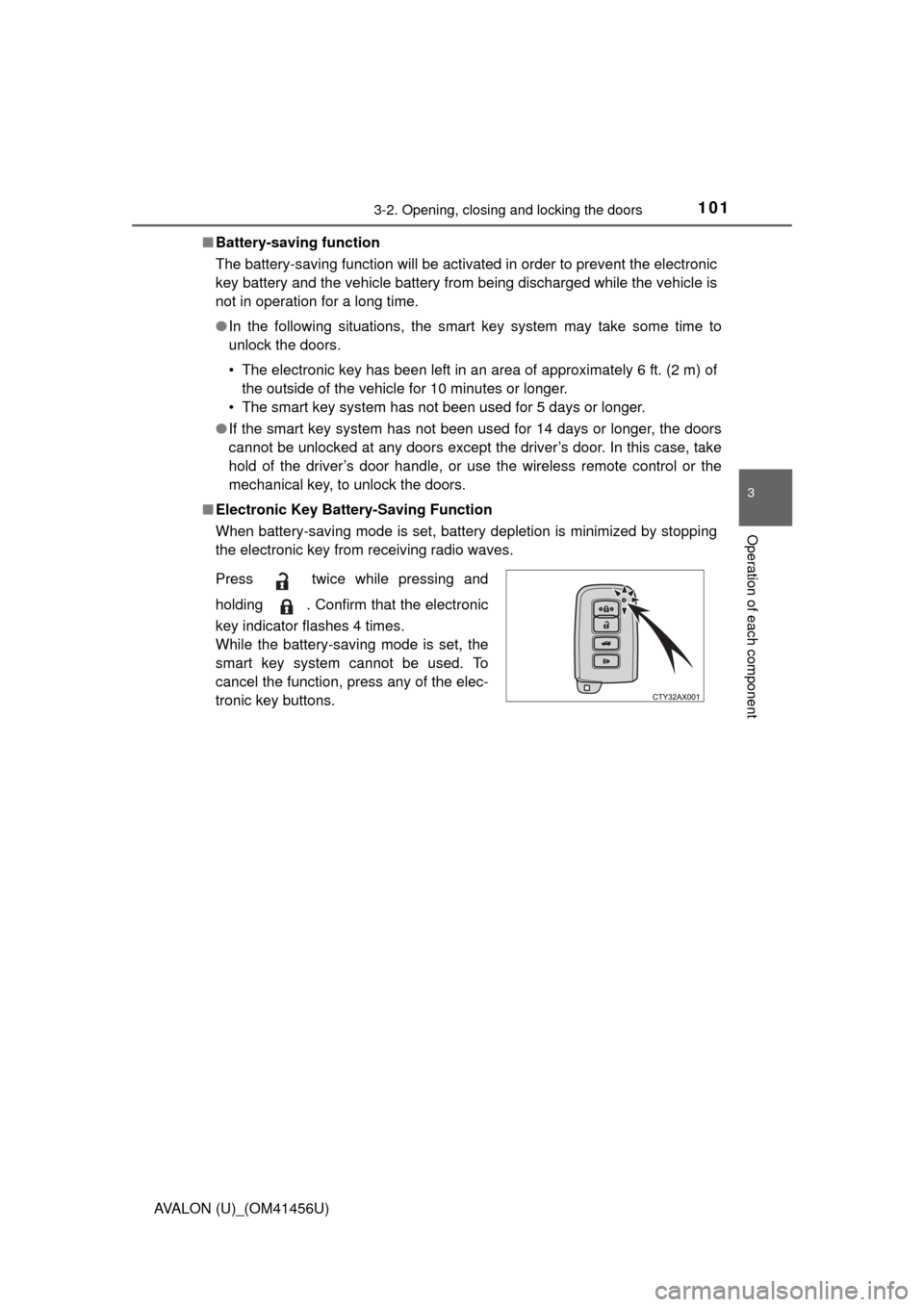
■ Electronic Key Battery-Saving Function
When battery-saving mode is set, battery depletion is minimized by stopping
the electronic key from receiving radio waves.
Press twice while pressing and
holding . Confirm that the electronic
key indicator flashes 4 times.
While the battery-saving mode is set, the
smart key system cannot be used. To
cancel the function, press any of the elec-
tronic key buttons.
Page 104 of 500

1043-2. Opening, closing and locking the doors
AVALON (U)_(OM41456U)■
Note for locking the doors
●Touching the door lock sensor while wearing gloves may delay or prevent
lock operation. Remove the gloves and touch the lock sensor again.
● If the door handle becomes wet while the electronic key is within the effec-
tive range, the door may lock and unlock repeatedly. In that case, follow the
following correction procedures to wash the vehicle:
• Place the electronic key in a location 6 ft. (2 m) or more away from the
vehicle. (Take care to ensure that the key is not stolen.)
• Set the electronic key to battery-saving mode to disable the smart key system. ( P. 101)
● If the electronic key is inside the vehicle and a door handle becomes wet
during a car wash, a message may be shown on the multi-information dis-
play and a buzzer will sound outside the vehicle. To turn off the alarm, lock
all the doors.
● The lock sensor may not work properly if it comes into contact with ice,
snow, mud, etc. Clean the lock sensor and attempt to operate it again, or
use the lock sensor on the lower part of the door handle.
● Fingernails may scrape against the door during operation of the door han-
dle. Be careful not to injure fingernails or damage the surface of the door.
■ Note for the unlocking function
●A sudden approach to the effective range or door handle may prevent the
doors from being unlocked. In this case, return the door handle to the origi-
nal position and check that the doors unlock before pulling the door handle
again.
● Gripping the door handle when wearing a glove may not unlock the door.
● If the door handle becomes wet while the electronic key is within the effec-
tive range, the door may lock and unlock repeatedly. In that case, follow the
following correction procedures to wash the vehicle:
• Place the electronic key in a location 6 ft. (2 m) or more away from the
vehicle. (Take care to ensure that the key is not stolen.)
• Set the electronic key to battery-saving mode to disable the smart key system. ( P. 101)
● If there is another electronic key in the detection area, it may take slightly
longer to unlock the doors after the door handle is gripped.
● Fingernails may scrape against the door during operation of the door han-
dle. Be careful not to injure fingernails or damage the surface of the door.
Page 113 of 500
1133-2. Opening, closing and locking the doors
3
Operation of each component
AVALON (U)_(OM41456U)
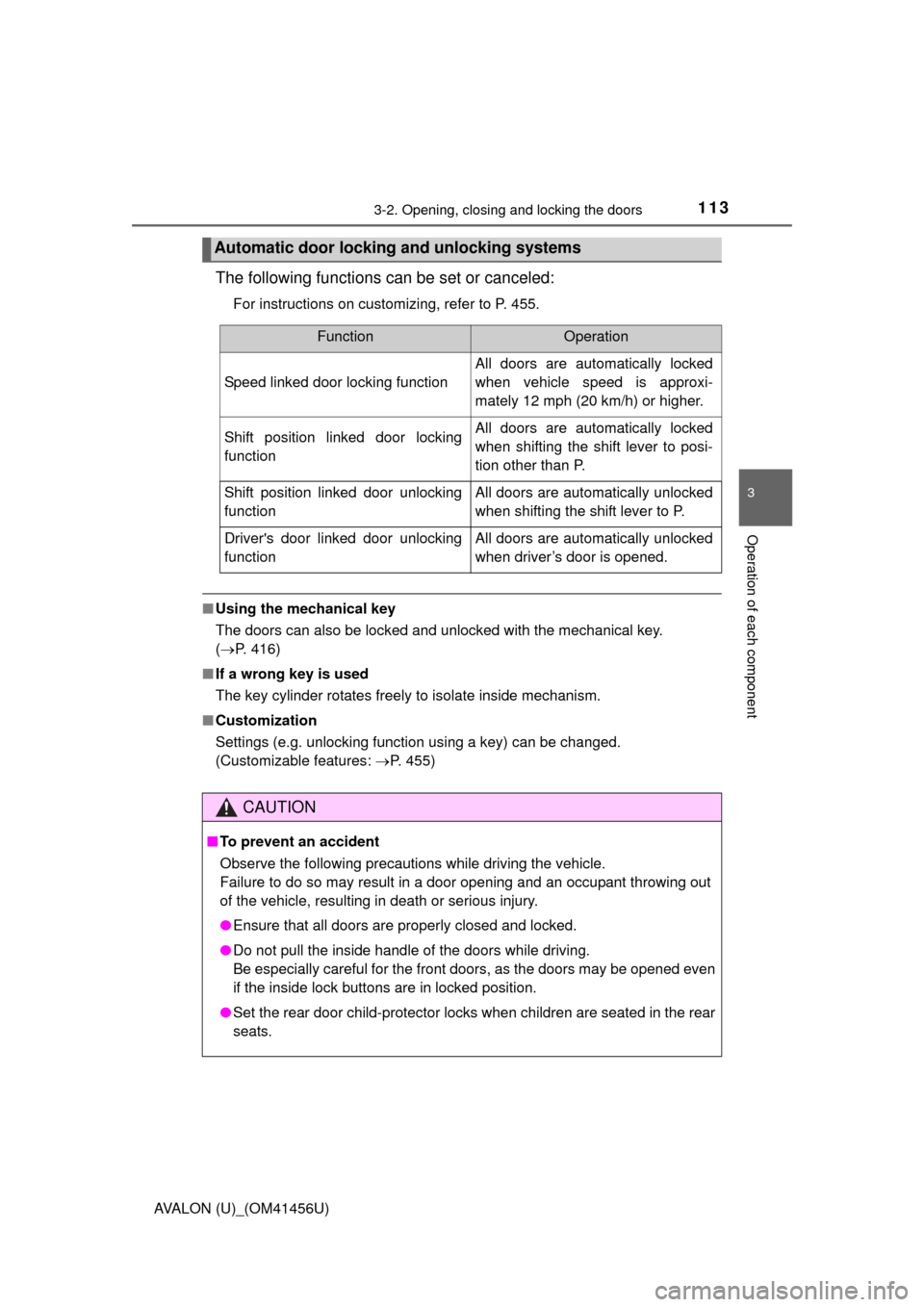
The following functions can be set or canceled:
For instructions on customizing, refer to P. 455.
■Using the mechanical key
The doors can also be locked and unlocked with the mechanical key.
(P. 416)
■ If a wrong key is used
The key cylinder rotates freely to isolate inside mechanism.
■ Customization
Settings (e.g. unlocking function using a key) can be changed.
(Customizable features: P. 455)
Automatic door locking and unlocking systems
FunctionOperation
Speed linked door locking function
All doors are automatically locked
when vehicle speed is approxi-
mately 12 mph (20 km/h) or higher.
Shift position linked door locking
functionAll doors are automatically locked
when shifting the shift lever to posi-
tion other than P.
Shift position linked door unlocking
functionAll doors are automatically unlocked
when shifting the shift lever to P.
Driver's door linked door unlocking
functionAll doors are automatically unlocked
when driver’s door is opened.
CAUTION
■To prevent an accident
Observe the following precautions while driving the vehicle.
Failure to do so may result in a door opening and an occupant throwing out
of the vehicle, resulting in death or serious injury.
● Ensure that all doors are properly closed and locked.
● Do not pull the inside handle of the doors while driving.
Be especially careful for the front doors, as the doors may be opened even
if the inside lock buttons are in locked position.
● Set the rear door child-protector locks when children are seated in the rear
seats.
Page 115 of 500
1153-2. Opening, closing and locking the doors
3
Operation of each component
AVALON (U)_(OM41456U)
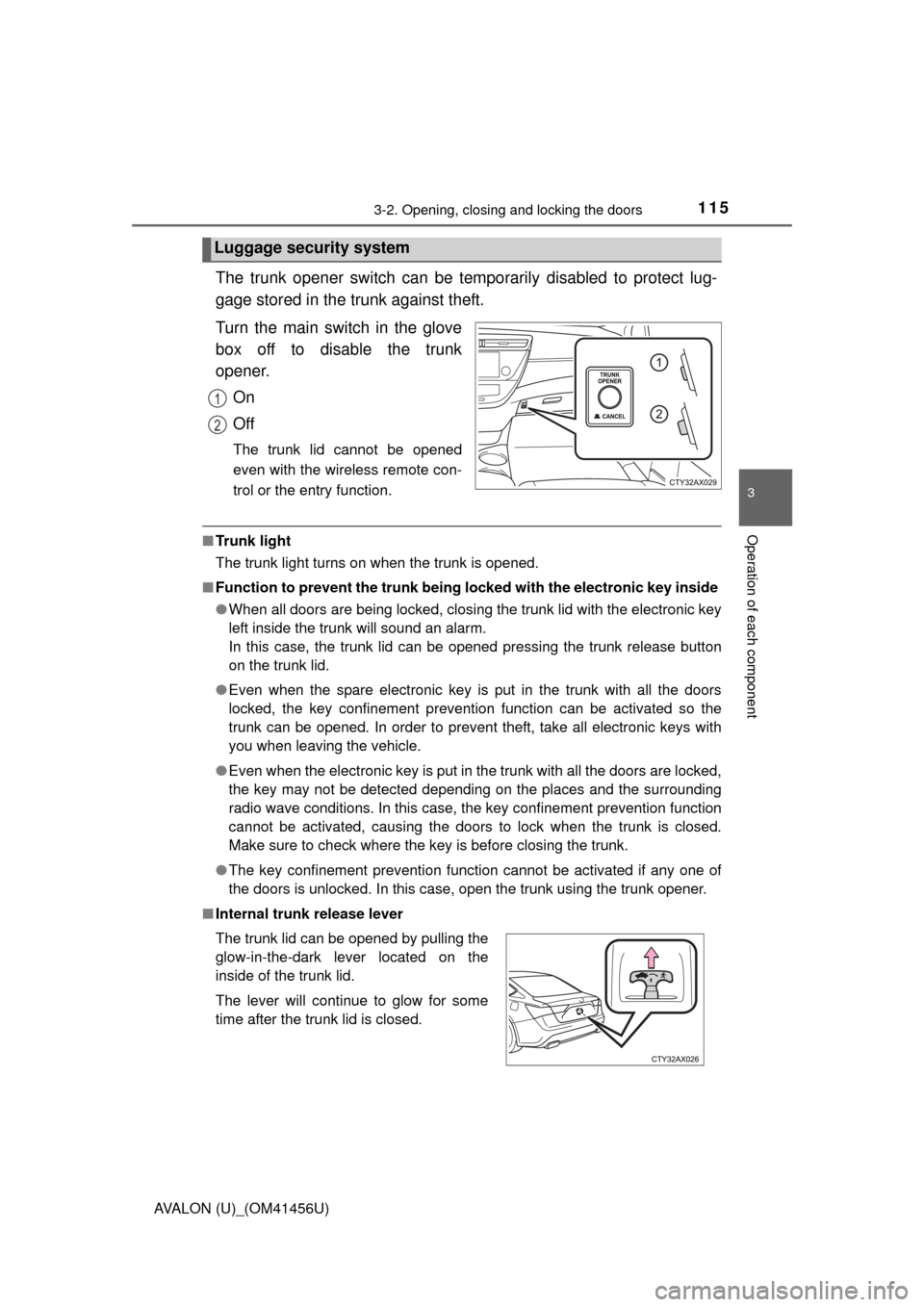
The trunk opener switch can be temporarily disabled to protect lug-
gage stored in the trunk against theft.
Turn the main switch in the glove
box off to disable the trunk
opener.On
Off
The trunk lid cannot be opened
even with the wireless remote con-
trol or the entry function.
■Tr u n k l i g h t
The trunk light turns on when the trunk is opened.
■ Function to prevent the tr unk being locked with the electronic key inside
● When all doors are being locked, closing the trunk lid with the electronic key
left inside the trunk will sound an alarm.
In this case, the trunk lid can be opened pressing the trunk release button
on the trunk lid.
● Even when the spare electronic key is put in the trunk with all the doors
locked, the key confinement prevention function can be activated so the
trunk can be opened. In order to prevent theft, take all electronic keys with
you when leaving the vehicle.
● Even when the electronic key is put in the trunk with all the doors are locked,
the key may not be detected depending on the places and the surrounding
radio wave conditions. In this case, the key confinement prevention function
cannot be activated, causing the doors to lock when the trunk is closed.
Make sure to check where the key is before closing the trunk.
● The key confinement prevention function cannot be activated if any one of
the doors is unlocked. In this case, open the trunk using the trunk opener.
■ Internal trunk release lever
Luggage security system
1
2
The trunk lid can be opened by pulling the
glow-in-the-dark lever located on the
inside of the trunk lid.
The lever will continue to glow for some
time after the trunk lid is closed.