Page 4 of 504

TABLE OF CONTENTS4
AVALON_HV_U (OM41457U)5-1. Using the air
conditioning system
and defogger
Automatic air conditioning system ........ 262
Rear window and outside rear view mirror
defoggers ........................ 273
5-2. Using the interior lights Interior lights list ................ 274
• Personal/interior light main switch ................... 275
• Personal/ interior lights ................. 275
• Ambient lights ............... 276
5-3. Using the storage features
List of storage features...... 277
• Glove box...................... 278
• Console box .................. 279
• Cup holders .................. 280
• Auxiliary boxes .............. 281
Trunk features ................... 286 5-4. Other interior features
Sun visors and vanity mirrors ............................. 288
Clock.................................. 289
Outside temperature display ............................. 291
Power outlets ..................... 292
Seat heaters/ seat ventilators ................ 295
Armrest .............................. 298
Rear sunshade .................. 299
Coat hooks ........................ 301
Assist grips ........................ 302
Garage door opener .......... 303
Safety Connect .................. 310
Compass ........................... 316
5Interior features
Page 19 of 504
19Pictorial index
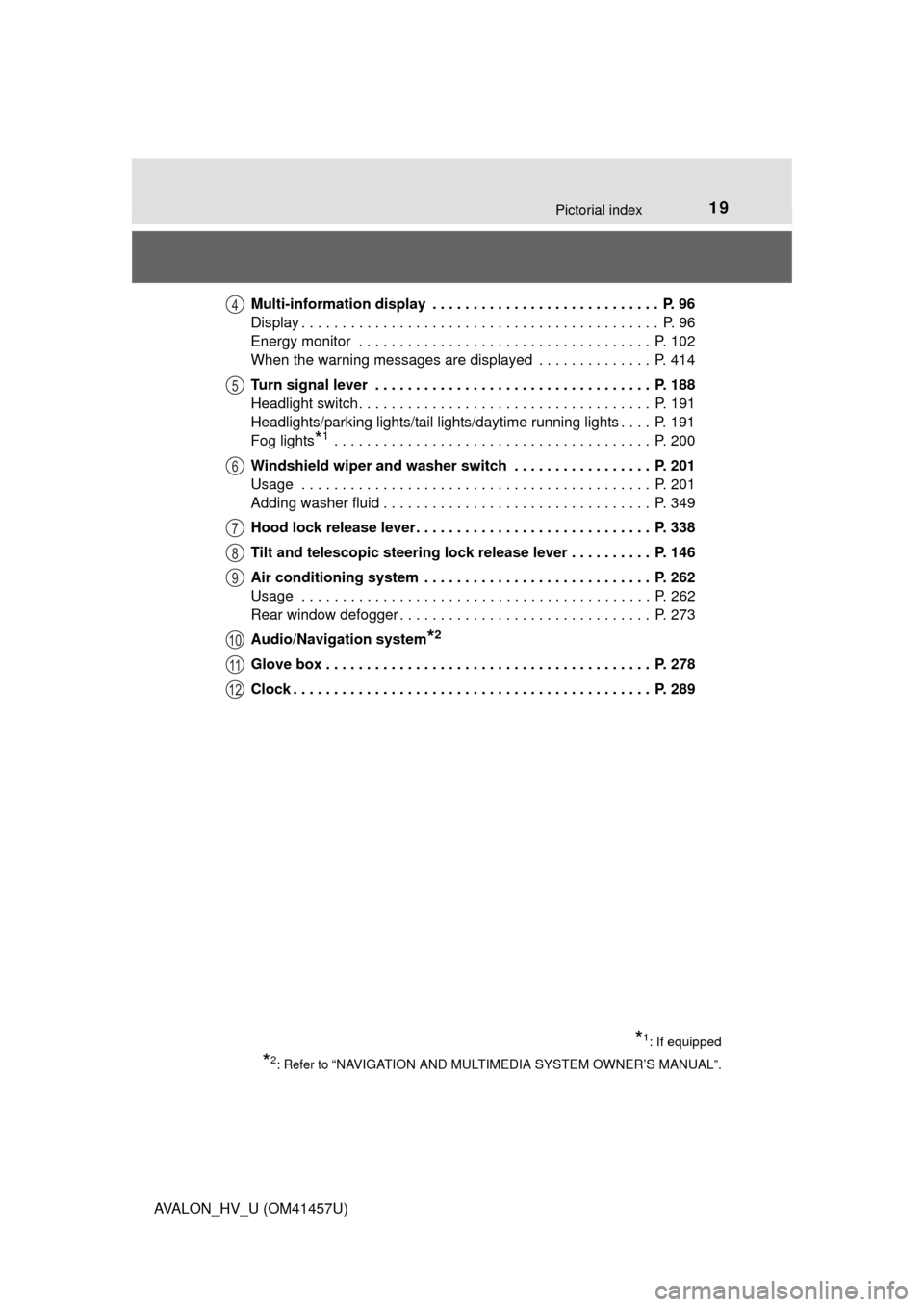
AVALON_HV_U (OM41457U)Multi-information display . . . . . . . . . . . . . . . . . . . . . . . . . . . . P. 96
Display . . . . . . . . . . . . . . . . . . . . . . . . . . . . . . . . . . . . . . . . . . . . P. 96
Energy monitor . . . . . . . . . . . . . . . . . . . . . . . . . . . . . . . . . . . . P. 102
When the warning messages are displayed . . . . . . . . . . . . . . P. 414
Turn signal lever . . . . . . . . . . . . . . . . . . . . . . . . . . . . . . . . . . P. 188
Headlight switch . . . . . . . . . . . . . . . . . . . . . . . . . . . . . . . . . . . . P. 191
Headlights/parking lights/tail lights/daytime running lights . . . . P. 191
Fog lights
*1 . . . . . . . . . . . . . . . . . . . . . . . . . . . . . . . . . . . . . . . P. 200
Windshield wiper and washer switch . . . . . . . . . . . . . . . . . P. 201
Usage . . . . . . . . . . . . . . . . . . . . . . . . . . . . . . . . . . . . . . . . . . . P. 201
Adding washer fluid . . . . . . . . . . . . . . . . . . . . . . . . . . . . . . . . . P. 349
Hood lock release lever. . . . . . . . . . . . . . . . . . . . . . . . . . . . . P. 338
Tilt and telescopic steering lock release lever . . . . . . . . . . P. 146
Air conditioning system . . . . . . . . . . . . . . . . . . . . . . . . . . . . P. 262
Usage . . . . . . . . . . . . . . . . . . . . . . . . . . . . . . . . . . . . . . . . . . . P. 262
Rear window defogger . . . . . . . . . . . . . . . . . . . . . . . . . . . . . . . P. 273
Audio/Navigation system
*2
Glove box . . . . . . . . . . . . . . . . . . . . . . . . . . . . . . . . . . . . . . . . P. 278
Clock . . . . . . . . . . . . . . . . . . . . . . . . . . . . . . . . . . . . . . . . . . . . P. 289
*1: If equipped
*2: Refer to “NAVIGATION AND MULTIMEDIA SYSTEM OWNER’S MANUAL”.
4
5
6
7
8
9
10
11
12
Page 94 of 504
942. Instrument cluster
AVALON_HV_U (OM41457U)
■The meters and display illuminate when
The power switch is in ON mode.
■ The brightness of the in strument panel lights
● When the headlight switch is turned to on, the brightness will be reduced
slightly unless the control knob is turned fully clockwise.
● When the knob is turned fully clockwise, the display audio/navigation sys-
tem screen will always be in day mode regardless of the headlight switch
position.
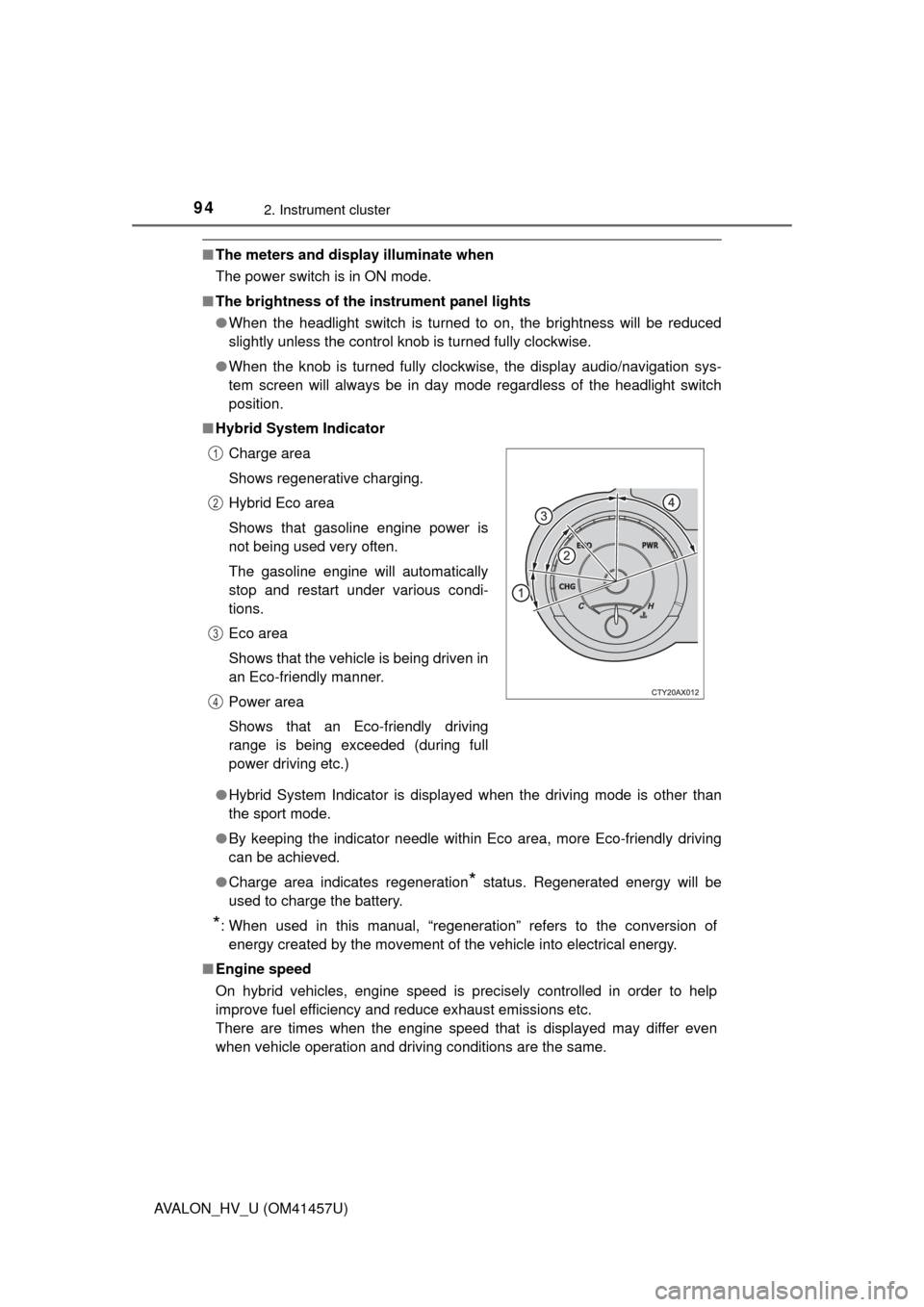
■ Hybrid System Indicator
●Hybrid System Indicator is displayed when the driving mode is other than
the sport mode.
● By keeping the indicator needle within Eco area, more Eco-friendly driving
can be achieved.
● Charge area indicates regeneration
* status. Regenerated energy will be
used to charge the battery.
*: When used in this manual, “regeneration” refers to the conversion of energy created by the movement of the vehicle into electrical energy.
■ Engine speed
On hybrid vehicles, engine speed is precisely controlled in order to help
improve fuel efficiency and reduce exhaust emissions etc.
There are times when the engine speed that is displayed may differ even
when vehicle operation and driving conditions are the same.Charge area
Shows regenerative charging.
Hybrid Eco area
Shows that gasoline engine power is
not being used very often.
The gasoline engine will automatically
stop and restart under various condi-
tions.
Eco area
Shows that the vehicle is being driven in
an Eco-friendly manner.
Power area
Shows that an Eco-friendly driving
range is being exceeded (during full
power driving etc.)
1
2
3
4
Page 261 of 504

261
Interior features5
AVALON_HV_U (OM41457U)5-1. Using the air
conditioning system
and defogger
Automatic air conditioning system ........ 262
Rear window and outside rear view mirror
defoggers ........................ 273
5-2. Using the interior lights Interior lights list ................ 274
• Personal/interior light main switch ................... 275
• Personal/ interior lights ................. 275
• Ambient lights ............... 276 5-3. Using the storage
features
List of storage features ..... 277
• Glove box...................... 278
• Console box .................. 279
• Cup holders .................. 280
• Auxiliary boxes.............. 281
Trunk features ................... 286
5-4. Other interior features Sun visors and vanity mirrors ............................. 288
Clock ................................. 289
Outside temperature display............................. 291
Power outlets .................... 292
Seat heaters/seat ventilators ....................... 295
Armrest ............................. 298
Rear sunshade.................. 299
Coat hooks ........................ 301
Assist grips........................ 302
Garage door opener.......... 303
Safety Connect ................. 310
Compass ........................... 316
Page 265 of 504
2655-1. Using the air conditioning system and defogger
5
Interior features
AVALON_HV_U (OM41457U)■
Changing the rear seat temperature settings (vehicles with a
rear control switch)
Turn clockwise to increase the temperature and turn
counterclockwise to decrease the temperature.
■Confirming automatic operation status
During automatic operation, the operation status of fan speed, air
outlet mode, outside/recirculated air mode and whether the A/C is
on or off can be confirmed on the display by touching .
The display will return to its previous state after a few seconds.
■
Automatic mode indicator
If the fan speed setting or air fl ow modes are operated, the auto-
matic mode indicator goes off. However, automatic mode for func-
tions other than that operated are maintained.
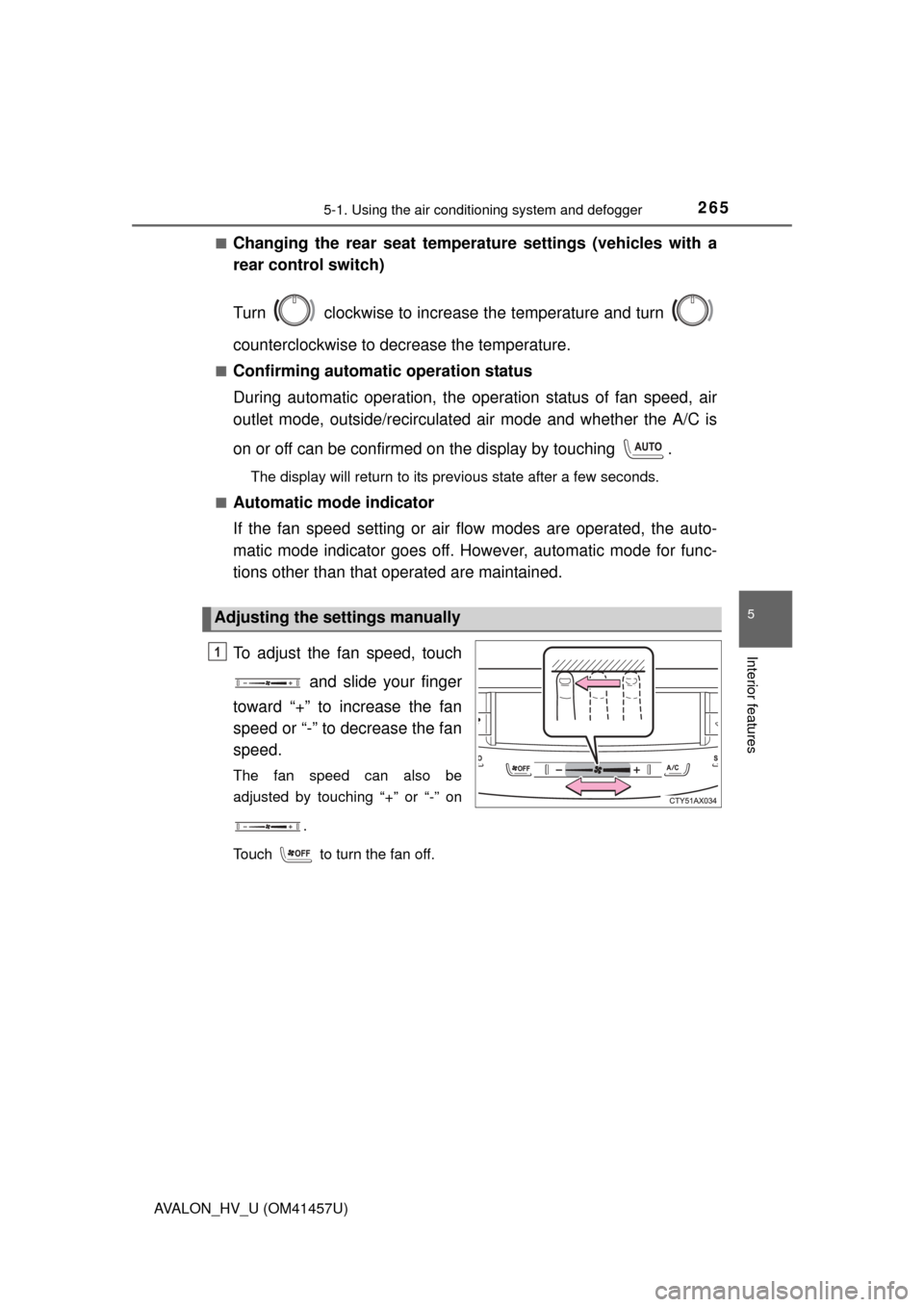
To adjust the fan speed, touch
and slide your finger
toward “+” to increase the fan
speed or “-” to decrease the fan
speed.
The fan speed can also be
adjusted by touching “+” or “-” on
.
Touch to turn the fan off.
Adjusting the settings manually
1
Page 289 of 504
2895-4. Other interior features
5
Interior features
AVALON_HV_U (OM41457U)
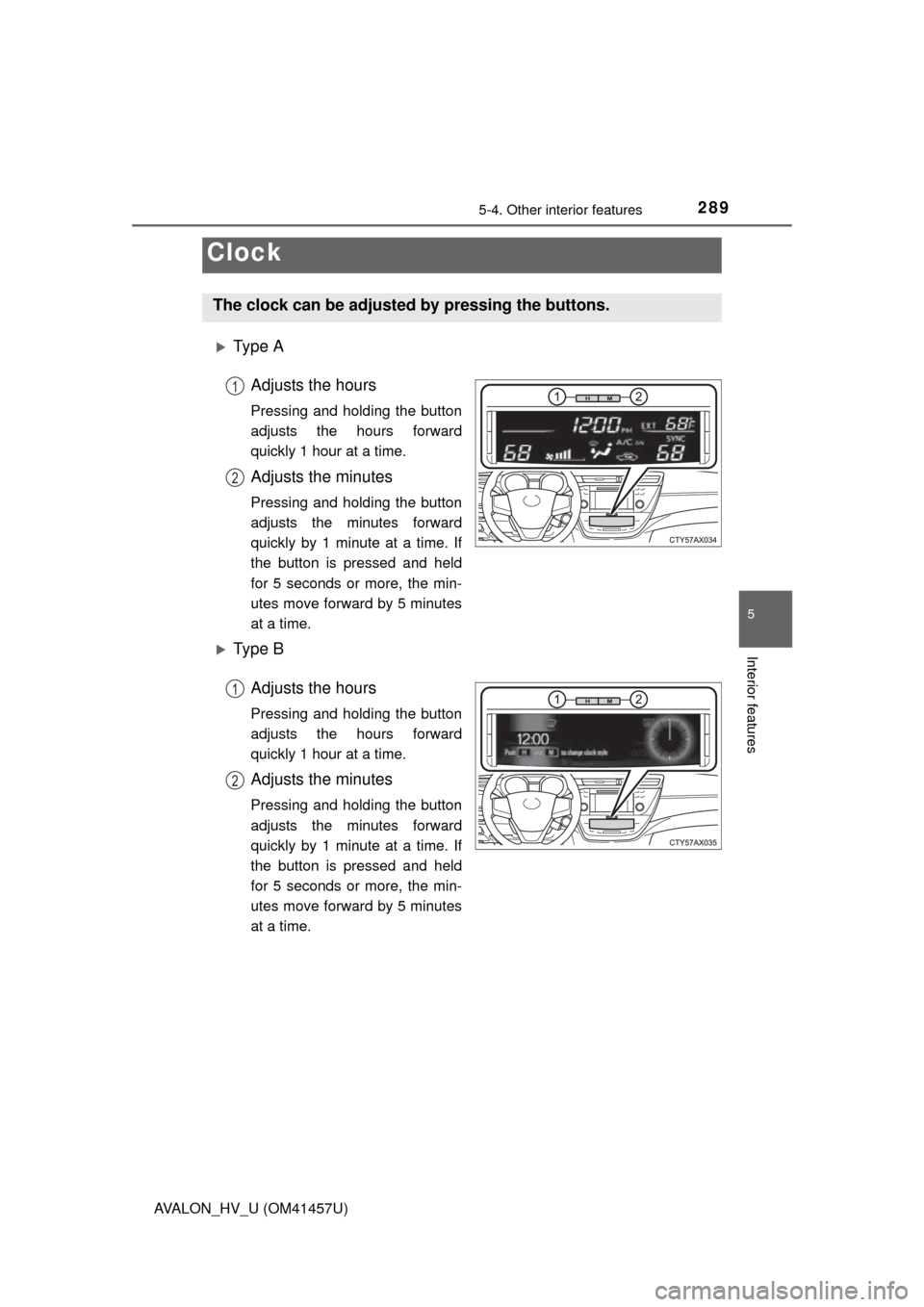
Ty p e AAdjusts the hours
Pressing and holding the button
adjusts the hours forward
quickly 1 hour at a time.
Adjusts the minutes
Pressing and holding the button
adjusts the minutes forward
quickly by 1 minute at a time. If
the button is pressed and held
for 5 seconds or more, the min-
utes move forward by 5 minutes
at a time.
Ty p e B
Adjusts the hours
Pressing and holding the button
adjusts the hours forward
quickly 1 hour at a time.
Adjusts the minutes
Pressing and holding the button
adjusts the minutes forward
quickly by 1 minute at a time. If
the button is pressed and held
for 5 seconds or more, the min-
utes move forward by 5 minutes
at a time.
Clock
The clock can be adjusted by pressing the buttons.
1
2
1
2
Page 290 of 504
2905-4. Other interior features
AVALON_HV_U (OM41457U)
■The clock is displayed when
The power switch is in ACCESSORY or ON mode.
■ When disconnecting and reconnect ing 12-volt battery terminals
Type A
The time display will automatically be set to 12:00 AM.
Type B
The time display will automatically be set to 12:00.
■ Time display (Type B)
After pressing “H” or “M” to show the setting screen, press “H” and “M” at the
same time to change between the analog and digital displays.
Page 295 of 504
2955-4. Other interior features
5
Interior features
AVALON_HV_U (OM41457U)■
Front seats
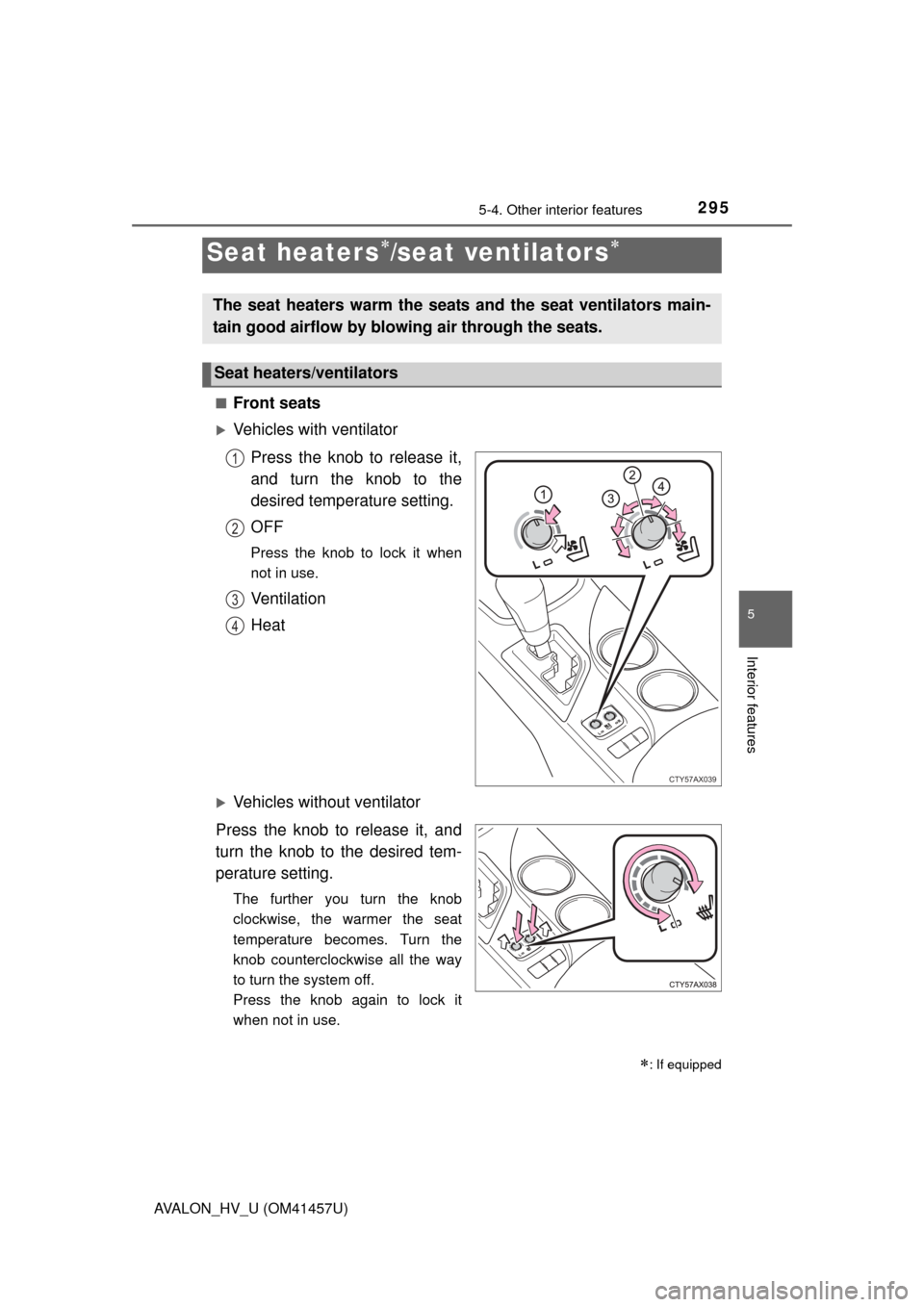
Vehicles with ventilator
Press the knob to release it,
and turn the knob to the
desired temperature setting.
OFF
Press the knob to lock it when
not in use.
Ventilation
Heat
Vehicles without ventilator
Press the knob to release it, and
turn the knob to the desired tem-
perature setting.
The further you turn the knob
clockwise, the warmer the seat
temperature becomes. Turn the
knob counterclockwise all the way
to turn the system off.
Press the knob again to lock it
when not in use.
Seat heaters/seat ventilators
: If equipped
The seat heaters warm the seats and the seat ventilators main-
tain good airflow by blowing air through the seats.
Seat heaters/ventilators
CTY57AX039
1
2
3
4