Page 445 of 524
4457-2. Steps to take in an emergency
7
When trouble arises
4RUNNER (U)_(OM35B18U)
Use the mechanical key
( P. 92) in order to perform the
following operations:
Locks all the doors
Closes the windows and moon
roof (turn and hold)
*
( P. 147, 154)
Unlocks all the doors
Turning the key rearward unlocks the driver’s door. Turning the key once
again unlocks the other doors.
Opens the windows and moon roof (turn and hold)*
( P. 147, 154)
*: This setting must be customized at your Toyota dealer.
If the electronic ke y does not operate
properly (vehicles with a smar t key system)
If communication between the electronic key and vehicle is
interrupted ( P. 106) or the electronic key cannot be used
because the battery is depleted, the smart key system and wire-
less remote control cannot be used. In such cases, the doors
can be opened and the engine ca n be started by following the
procedure below.
Locking and unlocking the doors
1
2
3
4
Page 448 of 524

4487-2. Steps to take in an emergency
4RUNNER (U)_(OM35B18U)
Vehicles with a smart key system only: Open and close any of the
doors of your vehicle with the engine switch off.
Maintain the engine speed of the second vehicle and start the
engine of your vehicle by turni ng the engine switch to the “ON”
position (vehicles without a smart key system) or turning the engine
switch to IGNITION ON mode (v ehicles with a smart key system).
Once the vehicle’s engine has started, remove the jumper cables in
the exact reverse order from which they were connected.
Once the engine starts, have the vehicle inspected at your Toyota
dealer as soon as possible.
■ Starting the engine when the battery is discharged
The engine cannot be started by push-starting.
■ To prevent battery discharge
●Turn off the headlights and the audio system while the engine is off.
● Turn off any unnecessary electrical components when the vehicle is running
at a low speed for an extended period, such as in heavy traffic.
■ Charging the battery
The electricity stored in the battery will discharge gradually even when the
vehicle is not in use, due to natural discharge and the draining effects of cer-
tain electrical appliances. If the vehicle is left for a long time, the battery may
discharge, and the engine may be unable to start. (The battery recharges
automatically during driving.)
■ When recharging or replacing the battery
●Vehicles with a smart key system: In some cases, it may not be possible to
unlock the doors using the smart key system when the battery is dis-
charged. Use the wireless remote control or the mechanical key to lock or
unlock the doors.
● The engine may not start on the first attempt after the battery has recharged
but will start normally after the second attempt. This is not a malfunction.
● Vehicles with a smart key system: The engine switch mode is memorized by
the vehicle. When the battery is reconnected, the system will return to the
mode it was in before the battery was discharged. Before disconnecting the
battery, turn the engine switch off.
If you are unsure what mode the engine switch was in before the battery dis-
charged, be especially careful when reconnecting the battery.
● Make sure that the key is not inside the vehicle when recharging or replac-
ing the battery. The key may be locked in the vehicle if the alarm is acti-
vated. ( P. 73)
4
5
6
Page 456 of 524
456
4RUNNER (U)_(OM35B18U)
8-1. Specifications
*1: Unladen vehicle
*2: Without rear differential lock system
*3: With rear differential lock system (TRAIL)
*4: With 5 occupants
*5: With 7 occupants
Maintenance data (fuel, oil level, etc.)
Dimensions and weights
Overall length189.8 in. (4820 mm)
Overall width75.8 in. (1925 mm)
Overall height *170.1 in. (1780 mm)
Wheelbase109.8 in. (2790 mm)
TreadFront63.2 in. (1605 mm)
Rear63.2 in. (1605 mm)
Vehicle capacity weight
(Occupants + luggage)1165 lb. (525 kg) *2
835 lb. (375 kg) *3
Trailer weight rating
(trailer weight + cargo weight)5000 lb. (2270 kg)
Luggage compartment load
capacity970 lb. (445 kg) *4
670 lb. (309 kg) *5
Page 457 of 524
4578-1. Specifications
8
Vehicle specifications
4RUNNER (U)_(OM35B18U)■
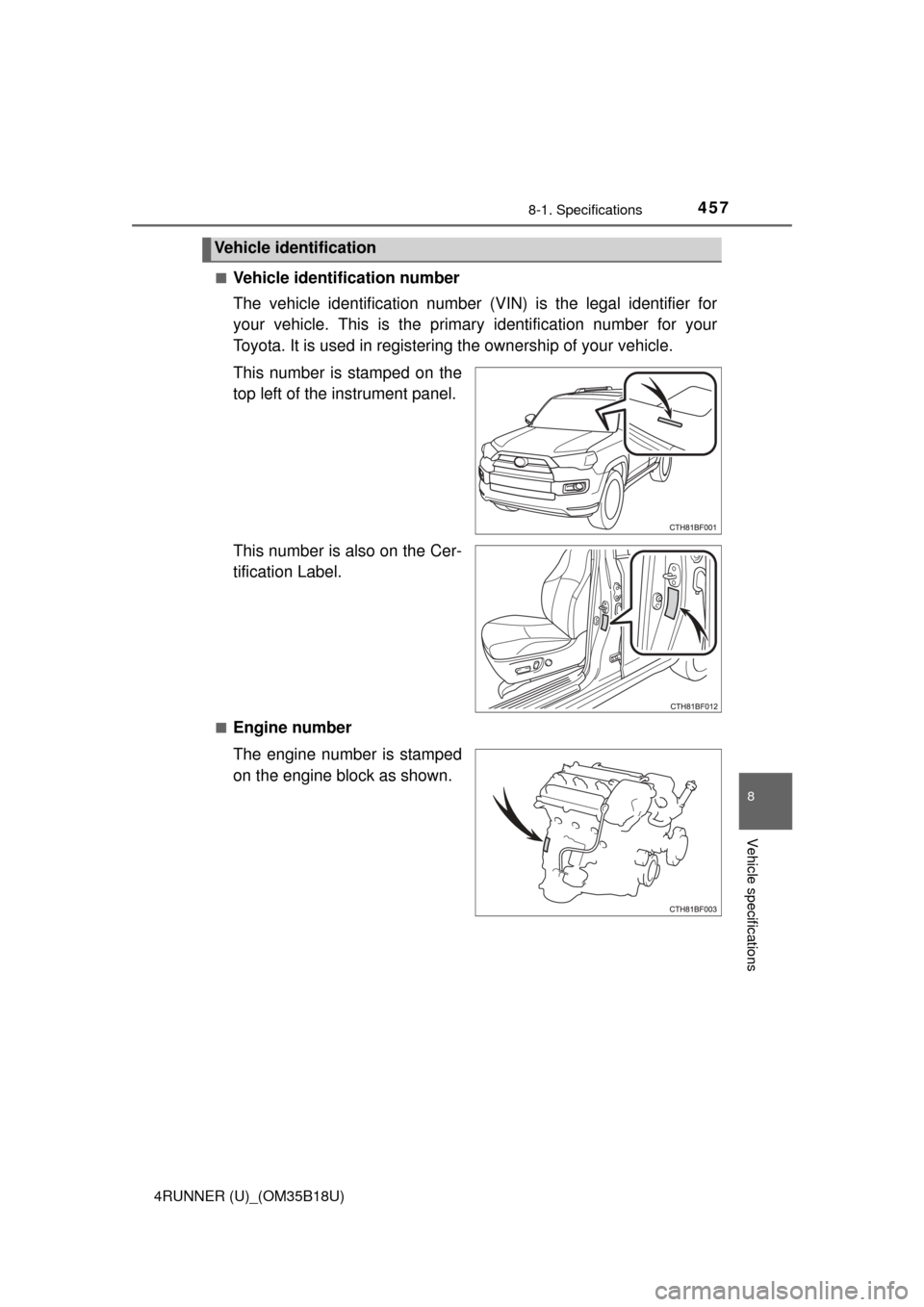
Vehicle identification number
The vehicle identification number (VIN) is the legal identifier for
your vehicle. This is the primar
y identification number for your
Toyota. It is used in registering the ownership of your vehicle.
This number is stamped on the
top left of the instrument panel.
This number is also on the Cer-
tification Label.
■Engine number
The engine number is stamped
on the engine block as shown.
Vehicle identification
Page 462 of 524
4628-1. Specifications
4RUNNER (U)_(OM35B18U)
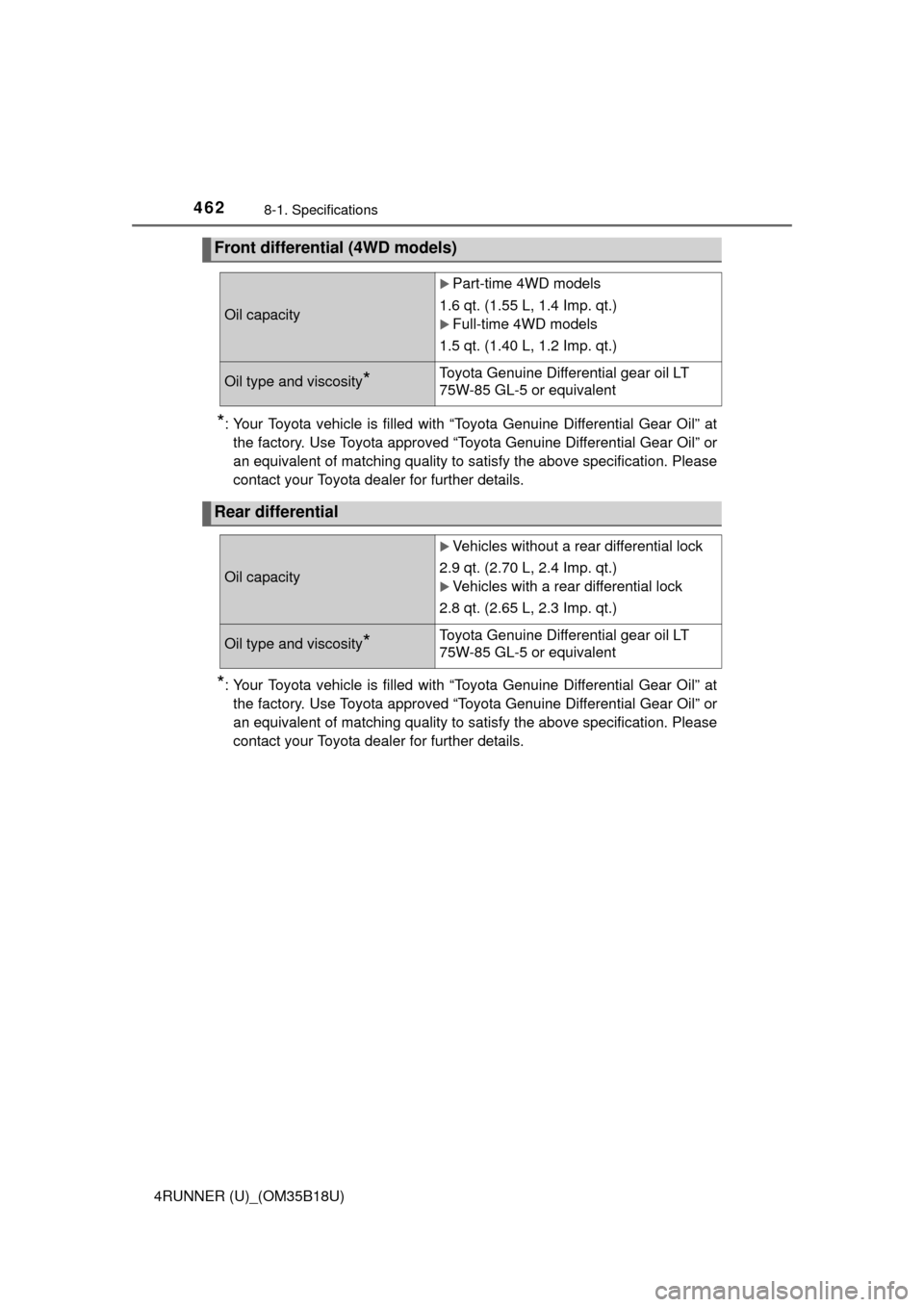
*: Your Toyota vehicle is filled with “Toyota Genuine Differential Gear Oil” atthe factory. Use Toyota approved “Toyota Genuine Differential Gear Oil” or
an equivalent of matching quality to satisfy the above specification. Pl\
ease
contact your Toyota dealer for further details.
*: Your Toyota vehicle is filled with “Toyota Genuine Differential Gear Oil” atthe factory. Use Toyota approved “Toyota Genuine Differential Gear Oil” or
an equivalent of matching quality to satisfy the above specification. Pl\
ease
contact your Toyota dealer for further details.
Front differential (4WD models)
Oil capacity
Part-time 4WD models
1.6 qt. (1.55 L, 1.4 Imp. qt.)
Full-time 4WD models
1.5 qt. (1.40 L, 1.2 Imp. qt.)
Oil type and viscosity*Toyota Genuine Differential gear oil LT
75W-85 GL-5 or equivalent
Rear differential
Oil capacity
Vehicles without a rear differential lock
2.9 qt. (2.70 L, 2.4 Imp. qt.)
Vehicles with a rear differential lock
2.8 qt. (2.65 L, 2.3 Imp. qt.)
Oil type and viscosity*Toyota Genuine Differential gear oil LT
75W-85 GL-5 or equivalent
Page 463 of 524

4638-1. Specifications
8
Vehicle specifications
4RUNNER (U)_(OM35B18U)
*: The fluid capacity is a reference quantity. If replacement is necessary, con-tact your Toyota dealer.
*1: Minimum pedal clearance when depressed with a force of 110 lbf (490 N,50 kgf) while the engine is running.
*2: Parking brake pedal travel when depre ssed with a force of 67 lbf (300 N,
30 kgf).
Automatic transmission
Fluid capacity*11.3 qt. (10.7 L, 9.4 Imp. qt.)
Fluid typeToyota Genuine ATF WS
NOTICE
■ Transmission fluid type
Using transmission fluid other than “Toyota Genuine ATF WS” may cause
deterioration in shift quality, locking up of the transmission accompanied by
vibration and, ultimately, damage to the vehicle’s transmission.
Brakes
Pedal clearance*13.62 in. (92 mm) Min.
Pedal free playLess than 0.04 0.24 in. (1 6 mm)
Brake pad wear limit0.04 in. (1.0 mm)
Parking brake lining wear limit0.04 in. (1.0 mm)
Parking brake pedal travel*25 7 clicks
Fluid typeSAE J1703 or FMVSS No.116 DOT 3
Page 481 of 524
481
8
Vehicle specifications
4RUNNER (U)_(OM35B18U)
8-2. Customization
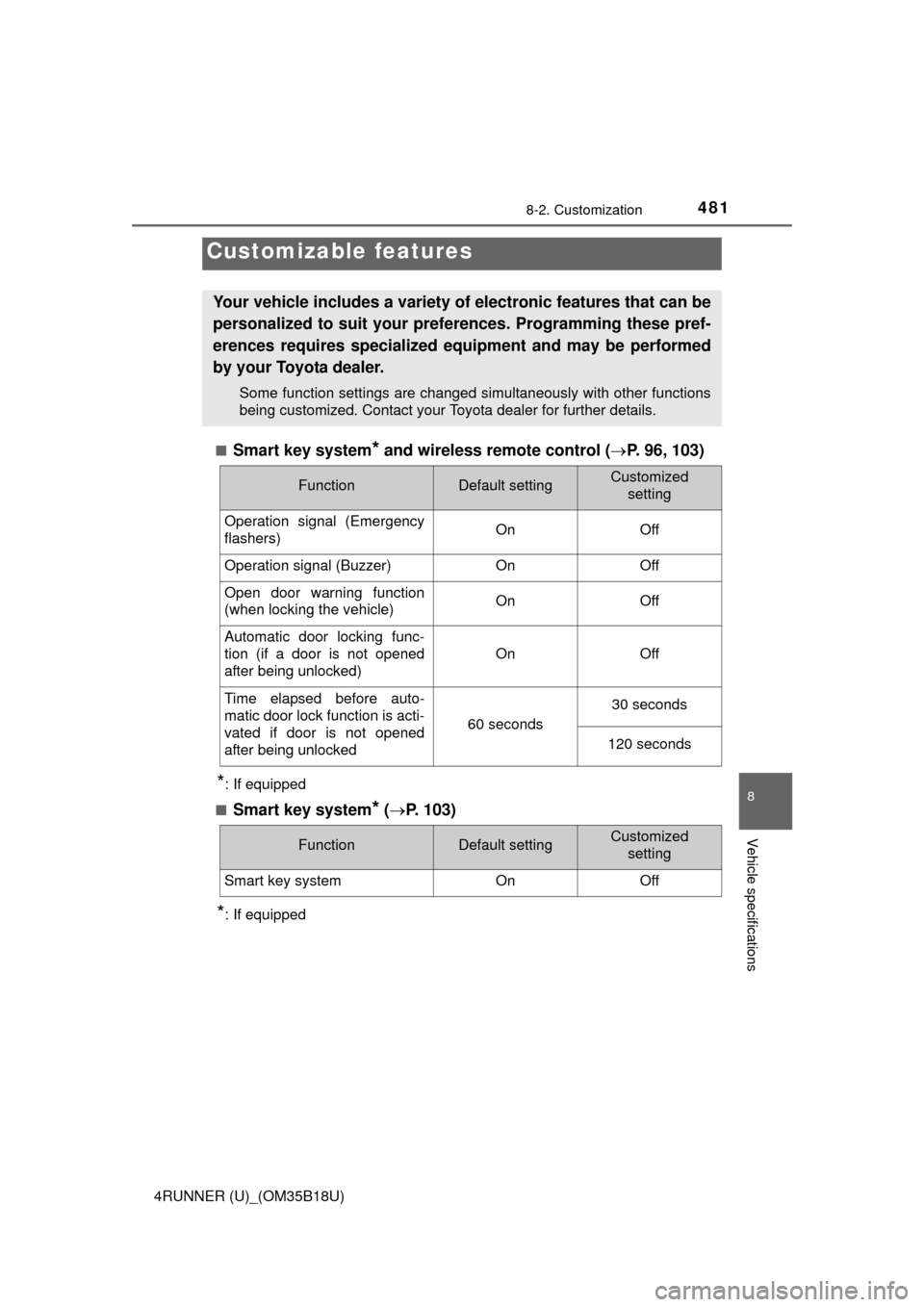
■Smart key system* and wireless remote control (P. 96, 103)
*: If equipped
■
Smart key system* ( P. 103)
*: If equipped
Customizable features
Your vehicle includes a variety of electronic features that can be
personalized to suit your preferences. Programming these pref-
erences requires specialized e quipment and may be performed
by your Toyota dealer.
Some function settings are changed simultaneously with other functions
being customized. Contact your Toyota dealer for further details.
FunctionDefault settingCustomized setting
Operation signal (Emergency
flashers) On Off
Operation signal (Buzzer)OnOff
Open door warning function
(when locking the vehicle)OnOff
Automatic door locking func-
tion (if a door is not opened
after being unlocked)
OnOff
Time elapsed before auto-
matic door lock function is acti-
vated if door is not opened
after being unlocked
60 seconds
30 seconds
120 seconds
FunctionDefault settingCustomized
setting
Smart key systemOnOff
Page 482 of 524
4828-2. Customization
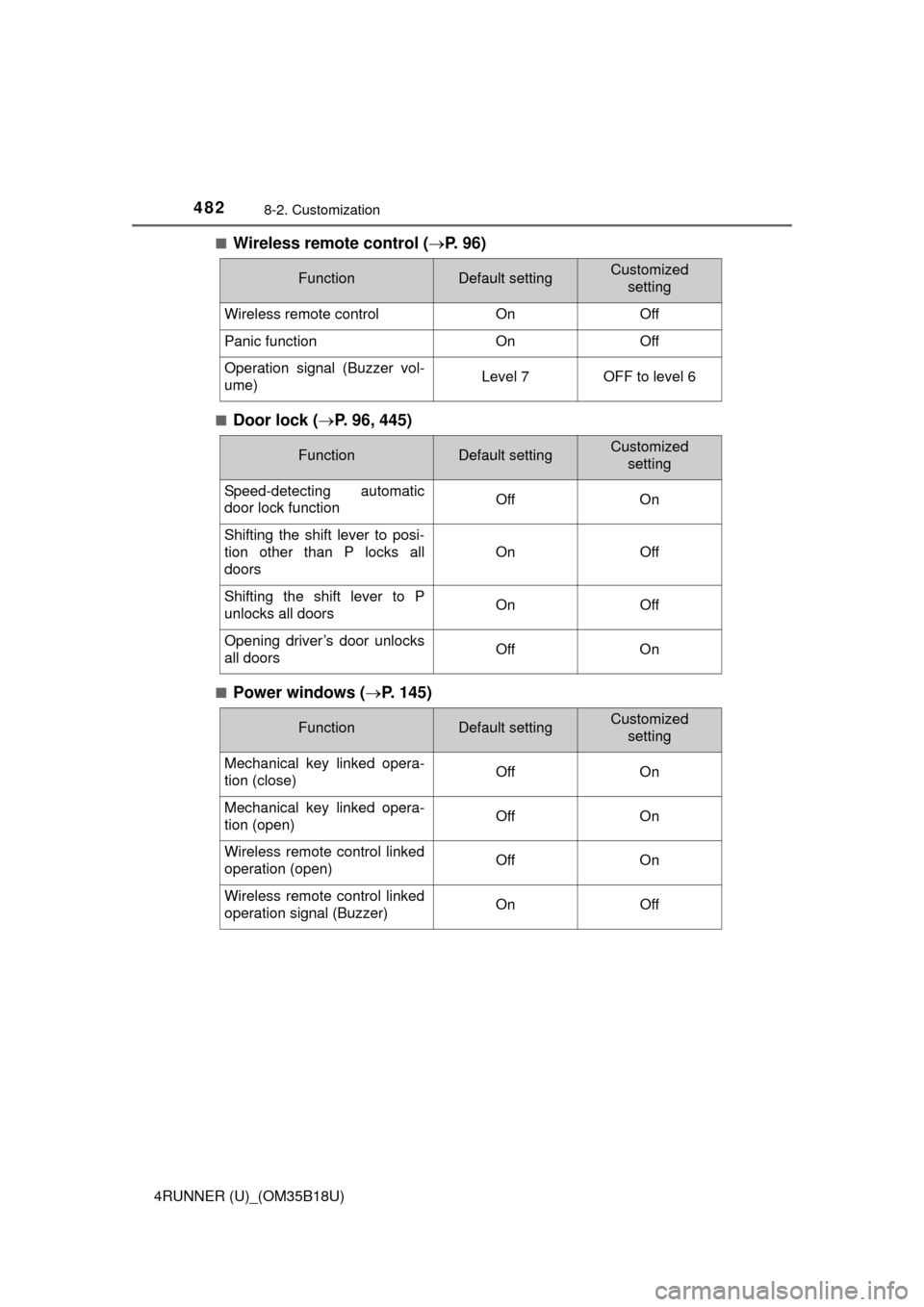
4RUNNER (U)_(OM35B18U)■
Wireless remote control (
P. 9 6 )
■Door lock ( P. 96, 445)
■Power windows ( P. 145)
FunctionDefault settingCustomized
setting
Wireless remote controlOnOff
Panic functionOnOff
Operation signal (Buzzer vol-
ume)Level 7OFF to level 6
FunctionDefault settingCustomizedsetting
Speed-detecting automatic
door lock functionOffOn
Shifting the shift lever to posi-
tion other than P locks all
doors
OnOff
Shifting the shift lever to P
unlocks all doorsOnOff
Opening driver’s door unlocks
all doorsOffOn
FunctionDefault settingCustomized
setting
Mechanical key linked opera-
tion (close)OffOn
Mechanical key linked opera-
tion (open)OffOn
Wireless remote control linked
operation (open)OffOn
Wireless remote control linked
operation signal (Buzzer)OnOff