Page 324 of 524
3245-4. Other interior features
4RUNNER (U)_(OM35B18U)
Press the appropriate HomeLink® button. The HomeLink® indicator
light should turn on.
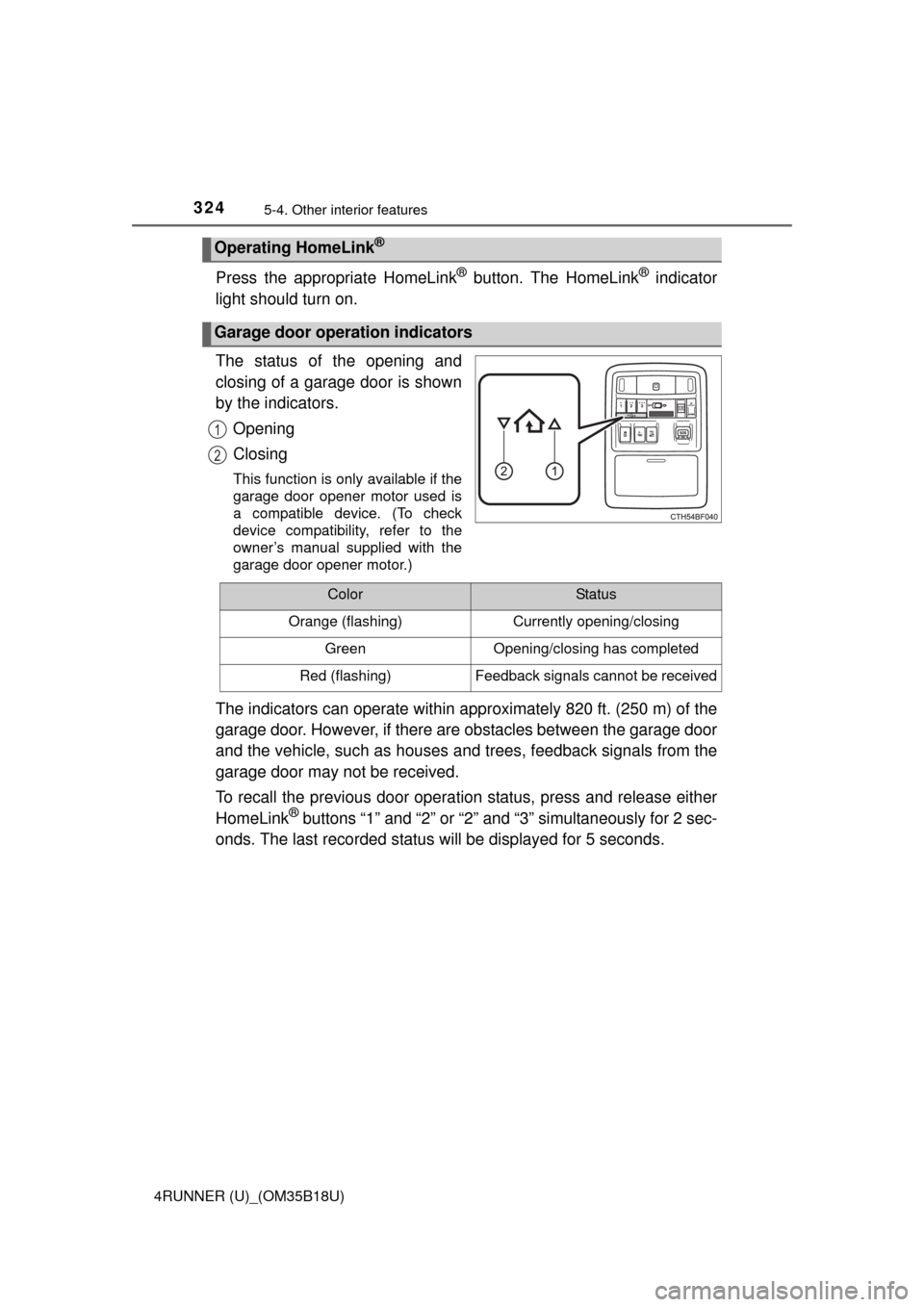
The status of the opening and
closing of a garage door is shown
by the indicators.
Opening
Closing
This function is only available if the
garage door opener motor used is
a compatible device. (To check
device compatibility, refer to the
owner’s manual supplied with the
garage door opener motor.)
The indicators can operate within approximately 820 ft. (250 m) of the
garage door. However, if there are obstacles between the garage door
and the vehicle, such as houses a nd trees, feedback signals from the
garage door may not be received.
To recall the previous door operat ion status, press and release either
HomeLink
® buttons “1” and “2” or “2” and “3” simultaneously for 2 sec-
onds. The last recorded status will be displayed for 5 seconds.
Operating HomeLink®
Garage door operation indicators
1
2
ColorStatus
Orange (flashing)Currently opening/closing
GreenOpening/closing has completed
Red (flashing)Feedback signals cannot be received
Page 325 of 524
3255-4. Other interior features
5
Interior features
4RUNNER (U)_(OM35B18U)
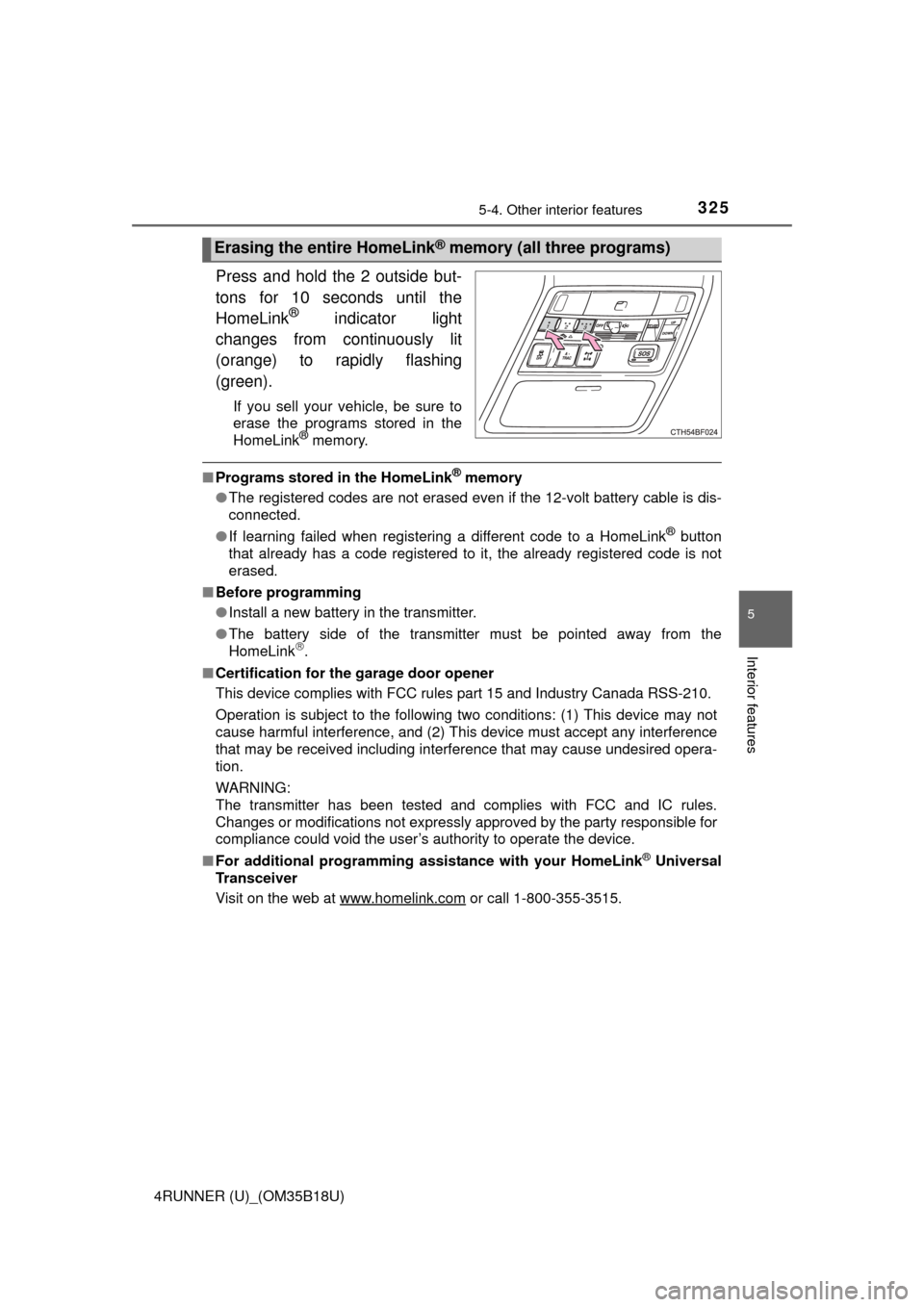
Press and hold the 2 outside but-
tons for 10 seconds until the
HomeLink
® indicator light
changes from continuously lit
(orange) to rapidly flashing
(green).
If you sell your vehicle, be sure to
erase the programs stored in the
HomeLink
® memory.
■ Programs stored in the HomeLink® memory
● The registered codes are not erased even if the 12-volt battery cable is dis-
connected.
● If learning failed when registering a different code to a HomeLink
® button
that already has a code registered to it, the already registered code is not
erased.
■ Before programming
●Install a new battery in the transmitter.
● The battery side of the transmitter must be pointed away from the
HomeLink
.
■ Certification for the garage door opener
This device complies with FCC rules part 15 and Industry Canada RSS-210.
Operation is subject to the following two conditions: (1) This device may not
cause harmful interference, and (2) This device must accept any interference
that may be received including interference that may cause undesired opera-
tion.
WARNING:
The transmitter has been tested and complies with FCC and IC rules.
Changes or modifications not expressly approved by the party responsible for
compliance could void the user’s authority to operate the device.
■ For additional programming assi stance with your HomeLink
® Universal
Transceiver
Visit on the web at www.homelink.com
or call 1-800-355-3515.
Erasing the entire HomeLink® memory (all three programs)
Page 327 of 524
3275-4. Other interior features
5
Interior features
4RUNNER (U)_(OM35B18U)■
System components
Microphone
“SOS” button
LED light indicators
Safety Connect
: If equipped
Safety Connect is a subscripti on-based telematics service that
uses Global Positioning System (GPS) data and embedded cel-
lular technology to provide safety and security features to sub-
scribers. Safety Connect is supported by Toyota’s designated
response center, which operates 24 hours per day, 7 days per
week.
Safety Connect service is avai lable by subscription on select,
telematics hardware-equipped vehicles.
By using the Safety Connect service, you are agreeing to be
bound by the Telematics Subscription Service Agreement and
its Terms and Conditions, as in ef fect and amended from time to
time, a current copy of which is available at Toyota.com. All use
of the Safety Connect service is subject to such then-applicable
Terms and Conditions.
1
2
3
Page 329 of 524

3295-4. Other interior features
5
Interior features
4RUNNER (U)_(OM35B18U)
When the engine switch is turned to the “ON” position (vehicles with-
out a smart key system) or the engine switch is turned to IGNITION
ON mode (vehicles with a smart key system), the red indicator light
comes on for 2 seconds then turns off. Afterward, the green indicator
light comes on, indicating that the service is active.
The following indicator light patterns indicate specific system usage
conditions:
● Green indicator light on = Active service
● Green indicator light flashing = Sa fety Connect call in process
● Red indicator light (except at vehi cle start-up) = System malfunction
(contact your Toyota dealer)
● No indicator light (off) = Safety Connect service not active
■Automatic Collision Notification
In case of either airbag deployment or severe rear-end collision, the
system is designed to automatical ly call the response center. The
responding agent receives the vehicle’s location and attempts to
speak with the vehicle occupants to assess the level of emergency.
If the occupants are unable to communicate, the agent automati-
cally treats the call as an emergency, contacts the nearest emer-
gency services provider to descri be the situation, and requests that
assistance be sent to the location.
Safety Connect LE D light Indicators
Safety Connect services
Page 333 of 524
333
Maintenance and care6
4RUNNER (U)_(OM35B18U)6-1. Maintenance and care
Cleaning and protecting the vehicle exterior .......... 334
Cleaning and protecting the vehicle interior ........... 336
6-2. Maintenance Maintenance requirements ................... 339
General maintenance........ 341
Emission inspection and maintenance (I/M)
programs......................... 344
6-3. Do-it-yourself maintenance
Do-it-yourself service precautions ..................... 345
Hood ................................. 348
Engine compartment ......... 349
Tires .................................. 364
Tire inflation pressure ....... 369
Wheels .............................. 372
Air conditioning filter.......... 375
Wireless remote control/ electronic key battery ...... 377
Checking and replacing fuses ............................... 380
Light bulbs......................... 383
Page 335 of 524

3356-1. Maintenance and care
6
Maintenance and care
4RUNNER (U)_(OM35B18U)■
Bumpers and side moldings
Do not scrub with abrasive cleaners.
CAUTION
■When washing the vehicle
Do not apply water to the inside of the engine compartment. Doing so may
cause the electrical components etc. to catch fire.
■ Precautions regarding the exhaust pipe
Exhaust gases cause the exhaust pipe to become quite hot.
When washing the vehicle, be careful not to touch the pipe until it has
cooled sufficiently, as touching hot exhaust pipe can cause burns.
NOTICE
■To prevent paint deterioration and corrosion on the body and compo-
nents (aluminum wheels etc.)
● Wash the vehicle immediately in the following cases:
• After driving near the sea coast
• After driving on salted roads
• If coal tar or tree sap is present on the paint surface
• If dead insects, insect droppings or bird droppings are present on the
paint surface
• After driving in an area contaminated with soot, oily smoke, mine dust,
iron powder or chemical substances
• If the vehicle becomes heavily soiled with dust or mud
• If liquids such as benzene and gasoline are spilled on the paint surface
● If the paint is chipped or scratched, have it repaired immediately.
● To prevent the wheels from corroding, remove any dirt and store in a place
with low humidity when storing the wheels.
■ Cleaning the exterior lights
● Wash carefully. Do not use organic substances or scrub with a hard brush.
This may damage the surfaces of the lights.
● Do not apply wax to the surfaces of the lights.
Wax may cause damage to the lenses.
■ High pressure car washes (vehicles with rear view monitor system)
When washing the vehicle, do not apply intensive bursts of water to the
camera or camera area. Doing so may result in the camera malfunctioning.
Page 338 of 524

3386-1. Maintenance and care
4RUNNER (U)_(OM35B18U)
NOTICE
■Cleaning detergents
● Do not use the following types of detergent, as they may discolor the vehi-
cle interior or cause streaks or damage to painted surfaces:
• Non-seat portions: Organic substances such as benzene or gasoline,
alkaline or acidic solutions, dye, and bleach
• Seats: Alkaline or acidic solutions, such as thinner, benzene, and alco- hol
● Do not use polish wax or polish cleaner. The instrument panel’s or other
interior part’s painted surface may be damaged.
■ Preventing damage to leather surfaces
Observe the following precautions to avoid damage to and deterioration of
leather surfaces:
● Remove any dust or dirt from leather surfaces immediately.
● Do not expose the vehicle to direct sunlight for extended periods of time.
Park the vehicle in the shade, especially during summer.
● Do not place items made of vinyl, plastic, or containing wax on the uphol-
stery, as they may stick to the leather surface if the vehicle interior heats
up significantly.
■ Water on the floor
Do not wash the vehicle floor with water.
Vehicle systems such as the audio system may be damaged if water comes
into contact with electrical components such as the audio system above or
under the floor of the vehicle. Water may also cause the body to rust.
■ Cleaning the inside of the rear quarter windows and back window
● Do not use glass cleaner to clean the rear quarter windows and back win-
dow, as this may cause damage to the rear window defogger heater wires
or antenna. Use a cloth dampened with lukewarm water to gently wipe the
window clean. Wipe the window in strokes running parallel to the heater
wires or antenna.
● Be careful not to scratch or damage the heater wires or antenna.
Page 342 of 524
3426-2. Maintenance
4RUNNER (U)_(OM35B18U)
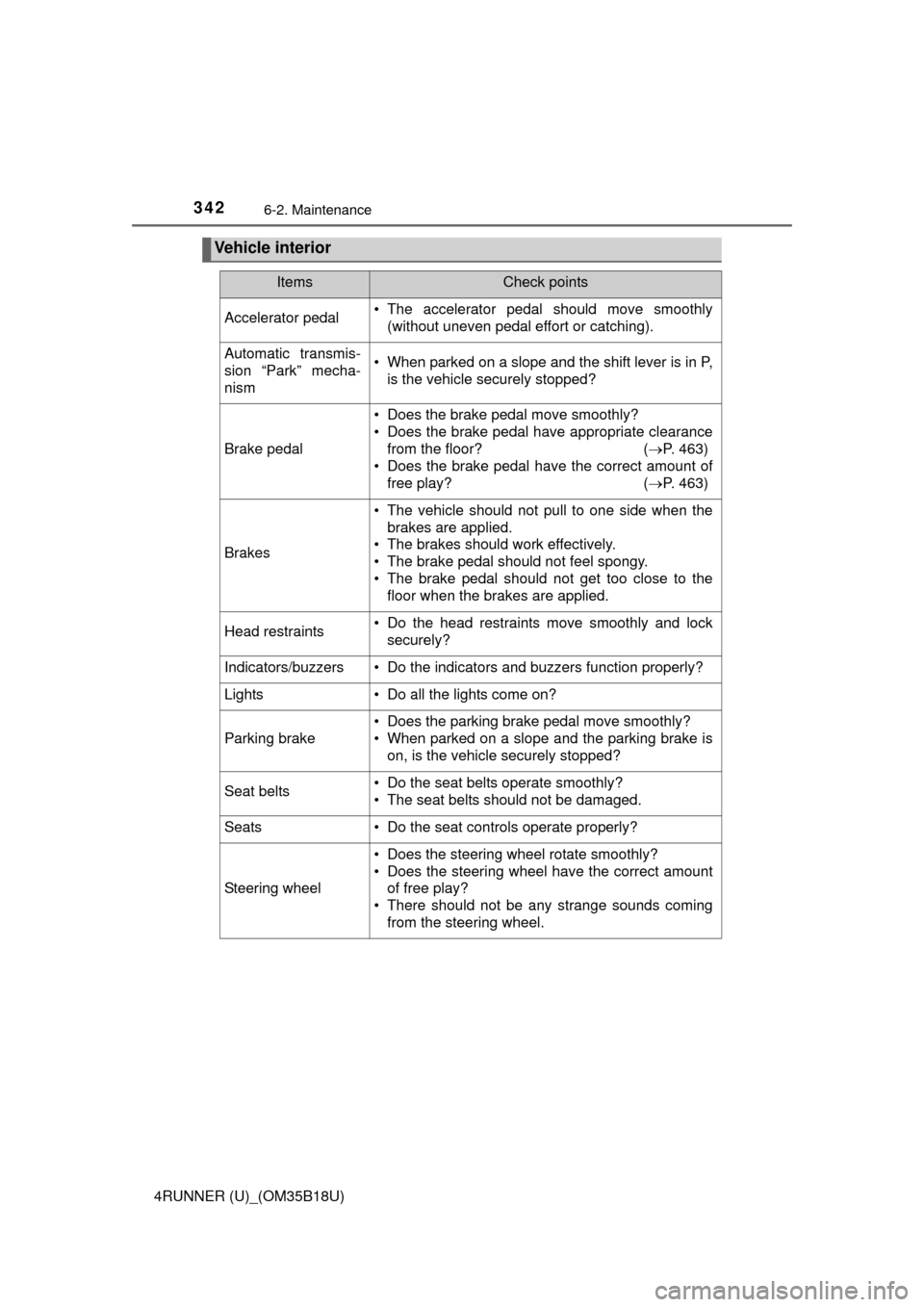
Vehicle interior
ItemsCheck points
Accelerator pedal• The accelerator pedal should move smoothly(without uneven pedal effort or catching).
Automatic transmis-
sion “Park” mecha-
nism• When parked on a slope and the shift lever is in P,is the vehicle securely stopped?
Brake pedal
• Does the brake pedal move smoothly?
• Does the brake pedal have appropriate clearancefrom the floor? ( P. 463)
• Does the brake pedal have the correct amount of
free play? ( P. 463)
Brakes
• The vehicle should not pull to one side when the
brakes are applied.
• The brakes should work effectively.
• The brake pedal should not feel spongy.
• The brake pedal should not get too close to the floor when the brakes are applied.
Head restraints• Do the head restraints move smoothly and locksecurely?
Indicators/buzzers• Do the indicators and buzzers function properly?
Lights • Do all the lights come on?
Parking brake
• Does the parking brake pedal move smoothly?
• When parked on a slope and the parking brake is on, is the vehicle securely stopped?
Seat belts• Do the seat belts operate smoothly?
• The seat belts should not be damaged.
Seats• Do the seat controls operate properly?
Steering wheel
• Does the steering wheel rotate smoothly?
• Does the steering wheel have the correct amountof free play?
• There should not be any strange sounds coming
from the steering wheel.

